Leaderboard




Popular Content
Showing content with the highest reputation on 08/05/20 in all areas
-
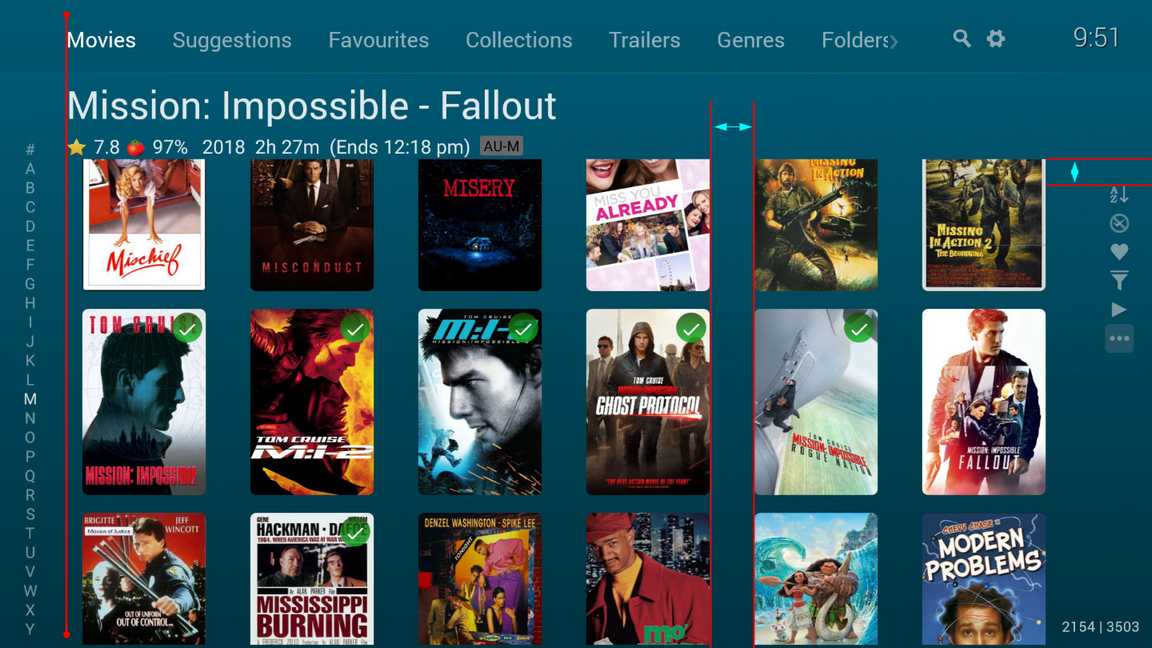
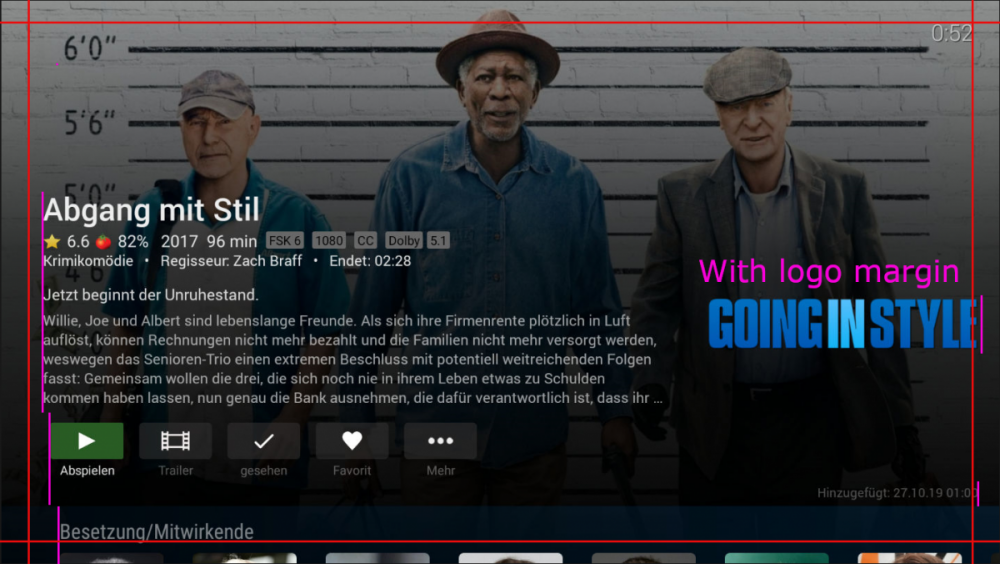
I can translate, as I've commented about this type of thing in the past as well. Placement of objects on the screen is almost arbitrary without alignment to other objects on the screen. In looking at the above there is one item that I see that could "wonder" a bit and that's the movie image on the right "With logo margin Going in style". Since it's an image with a transparent background you could never really flush right it consistently. The page doesn't have balance from left to right. Far more left space then right space, hence the red cross hatches to show a constant margin that could be used. The button row should either be aligned left with the paragraph of text above it or centered under the text block. The length (run time) and clock aren't flush right. The size of the movie posters is of course calculated and depend on screen resolution but need to take into account the left and right border to make them flush and adjust the amount of spacing between posters to push them wider so they would be flush with the red border. The whole set of text could start much higher on the page instead of roughly the middle to fit more on the screen including the first set of posters. In the above picture as far as the red margin is concerned only the clock is in the correct position on the page and everything else is out of balance to one another.2 points
-
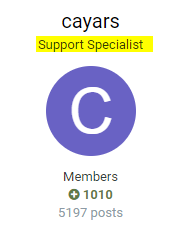
It raises a very good security point tbh - anybody 'could' pretend to be Emby support and request a team session. Is there a way to have a category for 'Support Specialist' rather than 'Members' on the forum profile ? ie along the lines of 'Admin' and 'Mod's' for example? Anybody can edit their profile to add 'Support Specialist' under their name - so while useful, this could be abused.
 2 points
 -
It is really a shame to see how the AndroidTv app is treated without love. I look at it every day and annoy myself not having any other hardware every day to no longer have this terrific design. It is sad that I am not spared on my FireTv Sticks. If this is possible, it might be advisable to get help. I don't know exactly who is working on the AndroidTV app, but this has nothing to do with design. I also don't understand why new functions are being resisted. Everything can be made switchable so that the user can decide. Seriously, you really like that, it looks like a beginner designed it. I can still make 10 screenshots where it looks really crappy This is just an example, I showed you so many things and everything is somehow justified that it must look so bad or not or whatever. This is fresh modern design in 2020. You shouldn't do everything 1:1 either, I never said that. But the old graphics and decent arrangements aren't too much to ask. Switchable that you have backdrops or not and with or without overlay. finished My screenshots alone are reason enough to act. I understand that you defend your work but with the AndroidTV app you do not spatter yourself with glory, sorry. Please, please don't get me wrong, but AndroidTV / FireTV make up 70-80% of the device surface that is used. Unfortunately, this is the worst looking app at Emby. It is all a matter of taste but you should not defend yourself against programming and design errors!!! You don't even get the same themes available as on the web and Windows app. What is the difference between Dark Theme and Classic. Leave the Emby Classic for users who like the ancient design and modernize the dark theme. Dark theme with red accents is missing on AndroidTV for example.
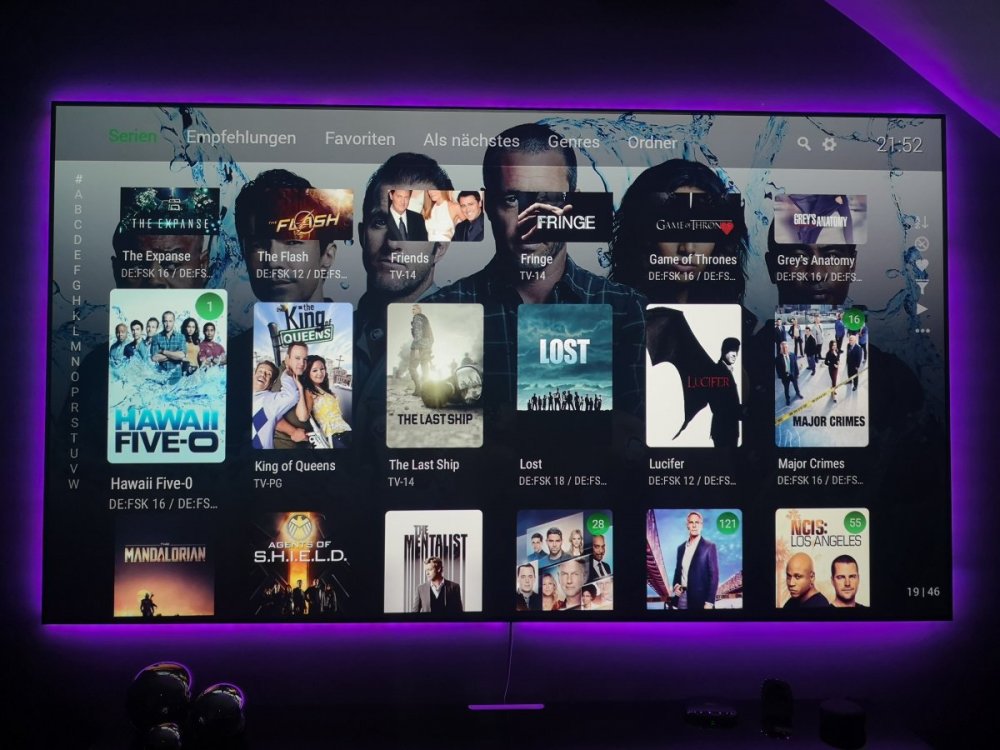
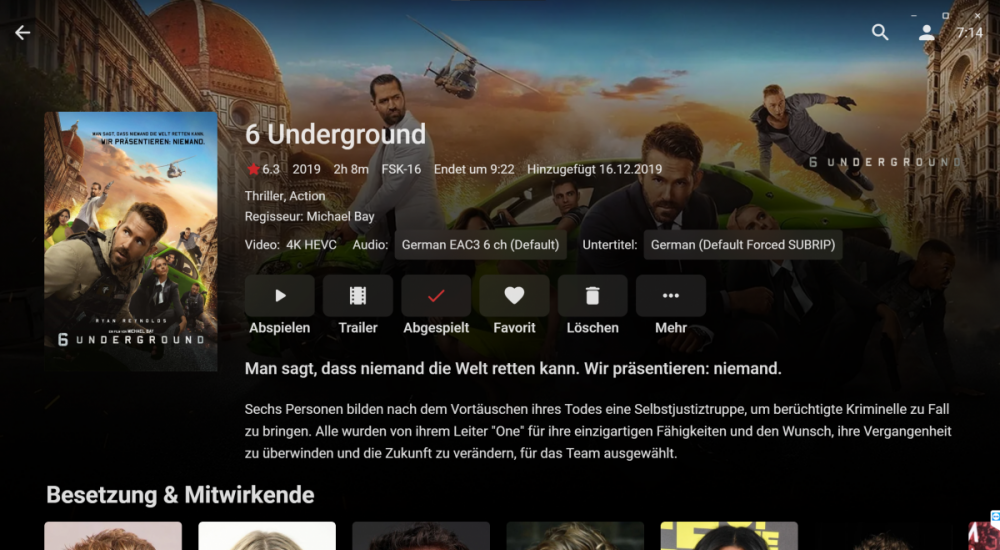
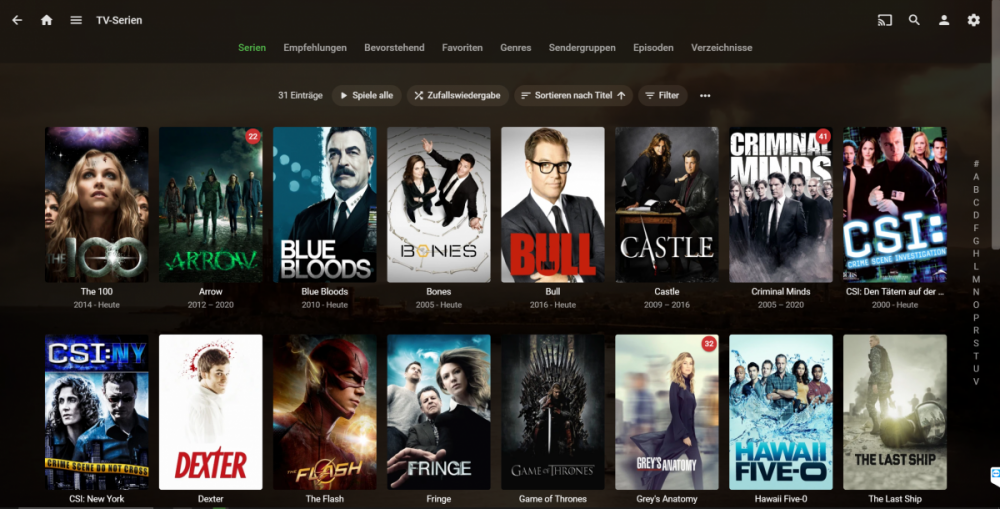 2 points
 -
Is "staff" as in infection? Sorry, again my poor impulse control strikes. Actually @cayars is one of the three most helpful people on the board and one of the ones that has been most patient with me and my stumbles through the world of Emby. I sometimes try to help as well but my fumblings are more often guesses while @cayarsalmost always knows what he is talking about. If he can help this old cranky geezer he has a good chance of helping anybody. Now we don't want @cayars getting a swelled head so I am reserving two good insults for use in the future to balance this overdose of sweetness.2 points
-
Be able to create playlist based on a certain criteria, like genre and or year, in order to create a dynamic playlist that it refreshes automatically when new content is added. This way you can for example, create a tv comedy playlist from the 90's, or a new sci-fi Movies playlist. Some other criteria for rules could be the rating, watched/unwantched, score, tags, language, audio codec, etc The possibilities could be endless1 point
-
Similar to this old post, I'm suggesting a tab that would be titled Watchlist and could be placed in between Suggestions and Favorites. The functionality would pretty much be a copy of Favorites, just with a + symbol added next to the heart and other symbols that let you favorite a movie etc. The previous post had mentioned extra functionality such as automatically removing a movie from Watchlist after it has been watched. This would be nice, but is unnecessary because after watching a movie you can simply click the + symbol a second time to remove it from Watchlist. I would imagine this would be very easy to implement as a rebranded copy of Favorites. Adding other features could come later. Edit: added link to old post1 point
-
Pretty simple suggestion. I have multiple users for my Emby server. If I want to do continuous maintenance on the media, I have to tell everyone. some of them are harder to reach than others ( i.e. no Facebook or Skype chat etc. ) It would be great if say... on the admin panel, I could hit a check box that enables 'maintenance mode', where the server still runs does everything as normal, but instead of the login screen it displays a maintenance page saying the server is unavailable. Even better if I were able to directly put a reason in a text box that would then display on the login screen as well. Not really sure what others would think of this, but for me it would be quite helpful. mostly if I want to make sure no one is trying to access content I know won't work until I've done a full library scan again. Thanks for reading. -Kyle1 point
-
Now for the embarrassing part - I'm always falling asleep watching something - then have a complete mind blank what i was watching the next day until the next episode is out and i realise im missing something. Would it be possible to add a 'recently watched' section where you can see all items you've recently viewed in order? Probably more applicable to TV I guess,1 point
-
Hello, Perhaps I am not the first one to ask this question but it will be very cool if this feature could be implemented. I have 2 servers one at home and the other at work. ( and soon a third one...) So I have a movies library called movies on each server. I would like to see all the movies from a single 'virtual server location' when I use the app (ios or android ) where I will see only one movies library containing movies informations from the movie library at work and the movie library at home. It's an aggregation of movies informations from the movie library at work and the movie library at home. In fact when a user have multiple servers it will be perfect if another choice in the server list called "all servers" for example appears automatically with a merge of media informations from librairies with the same name on different servers.1 point
-
While Emby already has recommendations built in based on previously watched items I find they are not all that helpful. They seem to be based on genre only, for example, because you watched a comedy here are other comedies in your library. I do like how the also directed by/appear in recommendations work though. What would be great is if Emby could incorporate Trakt's recommendations as they are much more sophisticated. Trakt's recommendations are not only based off of what you have previously watched but also what your Trakt friends and other Trakt users have watched. It takes user ratings and trending/popular media into account. Ideally Emby would include full Trakt integration allowing users to rate media after watching, view lists and recommendations, and view upcoming media all from within Emby but for now I think recommendations would be a nice addition. Trakt has the potential to give Emby that community feel and allow users to discover new media, find something to watch, and recommend media to other users. http://docs.trakt.apiary.io/#reference/recommendations1 point
-
I would like the ability to disable the camera upload feature, both per-user and globally. It seems odd to me that that isn't already there as far as I can find... Sure I could just not use it, but that depends on trust that your other users wont decide to enable it, as the only on/off is in each users personal preferences.1 point
-
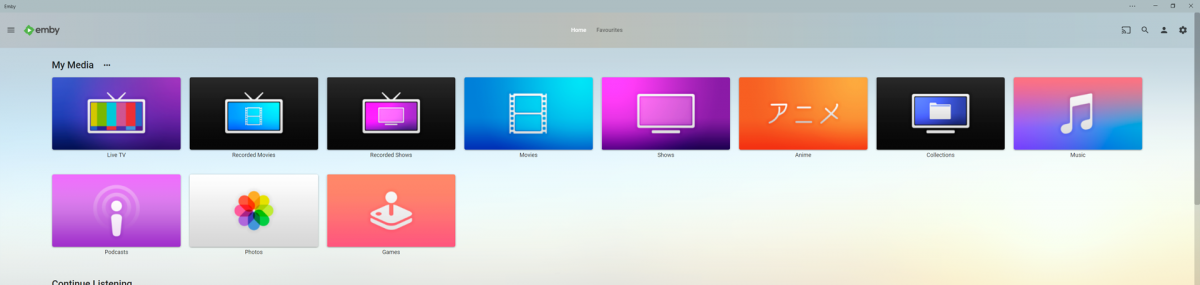
Got bored and wanted to get back into making things in photoshop so i decided to make a few apple tv themed library icons to add a bit of colour to my server, it has been awhile since i worked in photoshop but luckily apples designs for their icons are pretty simple and easy to replicate. I have taken some liberties of course for personal preference but overall i think they turned out okay and i had quite a lot of fun making these and have already decided to maybe make more aha hope you guys like them. --------------------------------------------- Here is an Imgur Album if you only want specific Icons otherwise the zip file includes all the files. https://imgur.com/a/bnVq43H --------------------------------------------- library icons.zip - File Contents Anime.png // 1280px x 720px Collections.png // 1280px x 720px Files.png // 1280px x 720px Games.png // 1280px x 720px Live TV.png // 1280px x 720px Movies.png // 1280px x 720px Music.png // 1280px x 720px Photos.png // 1280px x 720px Podcast.png // 1280px x 720px Recorded Movies.png // 1280px x 720px Recorded TV Shows.png // 1280px x 720px TV Shows.png // 1280px x 720px ---------------------------------------------
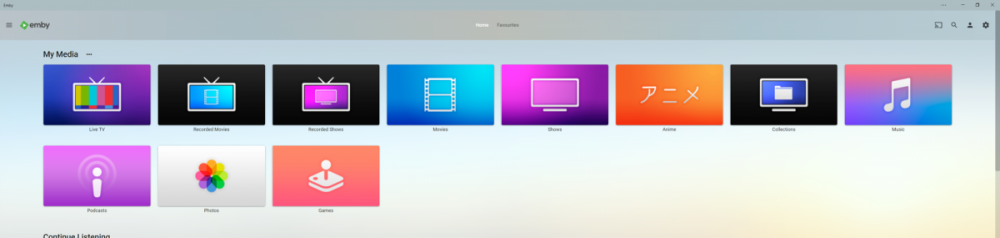 1 point
 -
Can you add favorite channels to the favorite tab on ALL platforms? Right now I see favorite channels on Android TV, but not on any other platforms. I mainly use Android Mobile, so that would personally be my highest priority platform to add them to.1 point
-
Yea, I bet the word "Trailer" in the titles mucks things up somehow. Anyway try this. It works for me Movies The Long, Long Trailer (1954) The Long, Long Trailer (1954) [WEBDL-720p].mp4 trailers The Long, Long Trailer (1954)-trailer.mkv1 point
-
Yes I get the same results as OP. Giving the media no names worked. So it would appear to be something specific to the name. The Long, Long Trailer (1954) movie.mp4 movie-trailer.mkv Also using a trailers folder worked properly also. The Long, Long Trailer (1954) The Long, Long Trailer (1954).mp4 trailers The Long, Long Trailer (1954)-trailer.mkv1 point
-
humor me and try this: Movies The Long, Long Trailer (1954) The Long, Long Trailer (1954).mp4 The Long, Long Trailer (1954) - trailer.mkv Remove the NFO and rename the movie removing the type info in brackets. make sure it's " - " and not "-" before trailer (space in front and back of dash). Refresh library. Did that fix your issue?1 point
-
Which competitors? The Plex ATV app is horrid and nowhere near as nice as the Emby ATV app and don't even get me started on the JellyFin one I wouldn't class Kodi as a competitor, as the Kodi/Emby users are relying on the Emby backend, so they can do what they like with their skins. The actual Kodi setup is far too complex and there's too much tinkering that's possible. Yes some skins looks good, but overall, the Emby ATV app is a happy medium. Can it be improved, of course, but it has evolved a helluva lot over the last 7 years.1 point
-
I've tested the series and had no issues on emby with local files but i haven't had this replay issue on my gdrive library since saturday either, also on the files it did have a problem with before. I didn't make any changes did nothing big but the problem seems to have stopped occurring.1 point
-
Sammy, any chance I can TV in and take a look? Send me credentials if possible via PM.1 point
-
There have been several topics on this but it is the matter of Movies have a visual indicator of Watched, where TV has no indicator for watched, but only shows a indicator of unwatched. So from TV no indicator means you have watched all episodes. So the question comes back to would a watched indicator create confusion of thinking there are still unwatched episodes if a visual indicator was always on TV Shows? But photo 1 above is a glitch/bug/refresh issue as there should be no indicators for all watched TV as you can reproduce the indicator remaining by toggling the Watched indicator at folder level until page refresh. You can see the same at Series level, the seasons show a watch indicator until page refresh (not new as I know I have reported this before). @Luke1 point
-
Yea, it's a matter of personal choice which you like better. You could also consider if you're in the detail screen you're looking for actual details about the movie like the cast which doesn't fit on the screen until you press more buttons. If you're intention is to play the movie the backdrop is kind of meaningless as well. I did say "could" not "should" above. Personally things like that don't matter much to me but equal spacing, symmetry, and things being flushed left and right do. You shouldn't have a left margin of say 2" but the right side 1/4" for example but the same margin on both sides. That's from a graphic artist background. But I'm more about features and usability than looks personally so I'd take a dog ugly UI that works vs a pretty UI that doesn't work.1 point
-
No thanks. As @ebr said 'tries to emphasize the backdrop because this is displayed on your 65" TV. That layout was designed fairly recently with the feedback of many Emby users at the time.' The new layout is better. You've probably just come from a display full of posters so why show it again when you can have a logo and see more of the backdrop. As I've bored everyone with previously, I've moved a lot of stuff out of the way on the browser to see more of the background as well. @Dlarge still don't agree with the 'background with the fanart is too visible' if you mean on the movie details page, such as the image above with the margins shown. It is too much with the movie posters (eg first image post#68) but then you just disable that background. You also mentioned 'restless' ? At least for the movie details image, I think thats because a lot of people want a lot of info on the details page at first glance without having to scroll down. Sorry, not trying to be contrary, but just saying I like what I see, but it could probably do with some tinkering round the edges as has been mentioned.1 point
-
A chkdsk might fix the file problem - worth a try, anyway. Can you see the file you say you can't delete? If so, try taking ownership of it or of the containing folder - that might enable more access to changing the permissions. When files get screwed like that it can be a right pain to deal with! Paul1 point
-
Nah, you were just "testing" a new feature of the server to see if you like it or not. LOL1 point
-
I did that and it disconnected LiveTV. Now to monitor the status.1 point
-
I apologize if i am not being clear, but as i stated in my original post the single file in the broken folder can't be deleted, i get a permissions error. The file does not exist at the indicated file path so there is nothing to delete, which i think is the problem. if I can't figure it out i'll take you up on your teamviewer offer.1 point
-
Thank you for pointing me to the wright direction. I actually have try that on my remote but didn't work. I ended up going into the box Android setting and changed the Display settings 720UI to 1080ui (rebooted) Now i can see 5 channels EPG at the same time when i press my epg button on my remote. I'm glad you took the time to answer cause It could of be hard to find since it's not even SW related. Thanks again (but I guess That's why I love Emby so far !)1 point
-
My logs are in the beginning of this thread already and you already responded to it. So i think everything is here1 point
-
I agree, from the beginning I figured that there most be something else at play here (e.g. a non-compete with Plex which would be a smart move for Plex to make, pushes people to their platform. If they have the money for some sort of licensing fee it could be seen as worth it if they are desperate enough/believe that the smart TV apps are a major source of users for them). As you (Emby) would be the developers there is little cost to Vizio to add you to their list of available apps. It increases the marketability of their devices and it’s on you to maintain the app - and changes to their SDK/etc that requires them to ‘do work’ so that developers can update their apps is already being done for the other apps on their platform. Unless their platform is so convoluted that they experience a very large number of tickets from developers with issues/questions (with the current, very limited, number of apps available), the TVs themselves don’t have the hardware specs/memory/etc necessary to be able to run certain apps and/or they are trying to keep that info quiet, or the employees involved are amazingly astoundingly lazy or have some sort of prejudice against Emby I see literally no other reason for why they would keep ignoring your requests... (also making the existence of a non-compete like this one public knowledge would not benefit any of the involved parties in any way. It could alienate customers, provide precedent for various business practices, and would be a signal from Plex to Emby about how serious they are taking the competition - which could make things more difficult for Plex)1 point
-
Hi. We will see if we can reproduce this and figure out what is going wrong. Thanks for reporting it.1 point
-
Okay, so that is an off-brand Android box. It isn't reporting its pixel density correctly. If you have any control over this in the settings, please try changing them (zoom, etc.). You can also turn on the "Compact Guide" option.1 point
-
Haven't really done any */trailers/anything.ext testing but would have to see what is in the database. I know the primary issue is null OfficialRating and InheritedParentalRating values for local trailers. But none of my test */trailers/anything.ext work until I add at a minimum a OfficialRating value.1 point
-
Just look at the pink lines, they should be in line on not like a stairway. (The red lines is the common margin that is defined through the top bar on the homescreen or the clock in this picture)1 point
-
Once again thanks for the answer Man I gotta appreciate how fast y'all respond unlike Plex forums I did a complain about no ASS support for Android in their forums and they straight up ip banned me One of the reasons why I switched from Plex to emby Also saw the amazing features you added to the server and immediately bought the monthly subscription1 point
-
You have yet to even tell us which version of Emby Server you are running. I can assure you @cayars is Official Support, and not some random guy on the internet.1 point
-
Can you elaborate?1 point
-
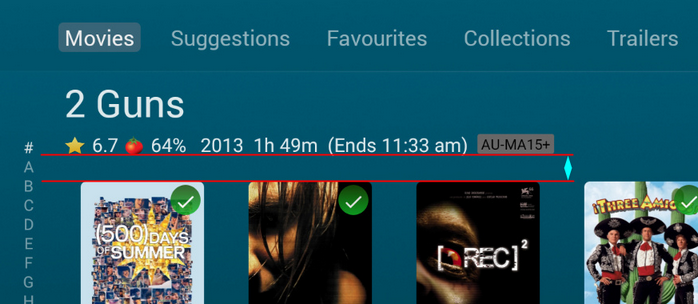
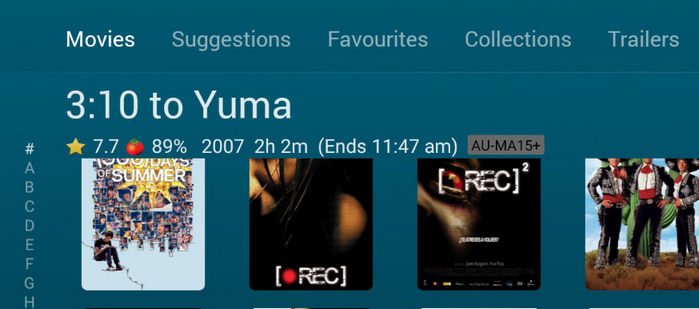
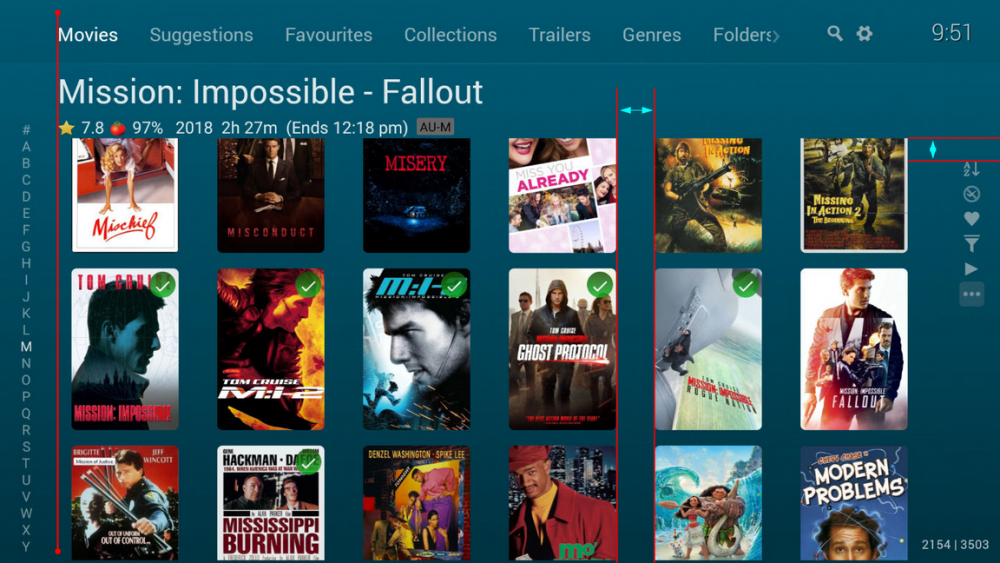
I would have to agree with margin alignment, there are numerous times where things just don't line up properly. First row has a nice comfortable spacing between text and cover As soon as you scroll down to the next row, that spacing becomes almost nothing. Left side alpha picker and right side bar don't line up with anything (i'm guessing this is because of that top row boundary moving) "Grid view" horizontal margin doesn't match the vertical margin (presumably because titles are disabled) these should ideally dynamically adjust to compensate.
 1 point
 -
The issue looks like the Emby user doesn't have access to the share. It doesn't have permission to execute which is required to "play" them. You might have forgot to set +X on the directory? SharpCifs.Util.Sharpen.UnknownHostException: WDMYCLOUD<20>1 point
-
Are you talking to me? Here's one example:
 1 point
 -
Honestly, I agree on this. Emby should give more love to the design of ATV. I think by just looking to the setting page it does say a lot reg design as it looks like Windows 95.. the design team should acknowledge this at least and perhaps say in about 3 yrs we will look at this rather than saying the design looks modern and clean.. this way people know they are taken seriously1 point
-
Ahh, I wasn't aware of the plug in - this is great to know, so thanks and I will give it a try1 point
-
It was posted as username leitenky at 1030am today when I posted the server log file.1 point
-
As an example below - I have a 32 Mbps file, force the Android client to use 30 Mbps (forcing a transcode) - both the dashboard and stats for nerds locally on the client are reporting it as a 2.5 Mbps bitrate ! The transcode log - the 30 Mbps is being acknowledged as the Max bitrate in the ffmpeg command line. C:\Emby-Server\system\ffmpeg.exe -ss 00:07:51.000 -f matroska -i file:"\\media\Films 7\2 Guns (2013)\2 Guns (2013) - BluRay 1080p.mkv" -threads 0 -map 0:0 -map 0:1 -sn -c:v:0 libx264 -pix_fmt yuv420p -maxrate 29808000 -bufsize 59616000 -preset veryfast -profile:v:0 high -level:v:0 4.1 -crf 23 -x264opts:0 subme=0:me_range=4:rc_lookahead=10:me=dia:no_chroma_me:8x8dct=0:partitions=none -g:v:0 72 -keyint_min:v:0 72 -sc_threshold:v:0 0 -copyts -vsync -1 -codec:a:0 copy -metadata:s:a:0 language=eng -disposition:a:0 default -f segment -max_delay 5000000 -avoid_negative_ts disabled -map_metadata -1 -map_chapters -1 -start_at_zero -segment_time 3 -individual_header_trailer 0 -segment_format mpegts -segment_write_temp 1 -segment_list_type m3u8 -segment_start_number 157 -segment_list "C:\Emby-Server\programdata\transcoding-temp\31ADBA.m3u8" -y "C:\Emby-Server\programdata\transcoding-temp\31ADBA_%d.ts" Streaming details are showing it as ~ 2.5 Mbps - 17:11:32.468 frame=12181 fps= 29 q=28.0 size= 147868kB time=00:17:55.17 bitrate=2388.5kbits/s throttle=100 speed=1.21x If I look at the actual data being sent to my device via network tools - 2.5 Mbit .... If I force the bitrate to direct play - then my network tools report it as 32 Mbit/sec. So I agree with the OP - something is wrong with the transcoding bitrate algorithms - as even with 'headroom' it no way reflects what you would expect it to be. -- edit So looking into this further and copying the emby ffmpeg command line and changing the crf/preset manually it is using much higher bitrates as I expect it to - so it could simply be the selected/default crf/preset is dictating the bitrate used - thus 2.5 mbit/sec is all it can use with those presets ... selecting 30 Mbps is largely irrelevant .. I'll report back with my findings and update this thread .. -- edit 2 ok - so this is exactly what the issue is. If I set my transcoding preset to 'superfast' and CRF to 18 - then it will use UP TO 30 Mbit to do what it needs to do. 18:13:56.875 frame= 324 fps= 39 q=19.0 size= 44980kB time=01:05:19.61 bitrate=29625.3kbits/s dup=1 drop=0 throttle=off speed= 1.5x So OP - to get your clients to use UP TO the max bandwidth that you/they set - ensure you are setting a suitable CRF and Preset in the transcoding settings to force your server to ignore trying to save bits ! -- edit 3 I believe the note is technically incorrect in this instance. The x264 preset when using CRF (which we are for transcoding) has little to do with Quality but it has everything to do with bitrate. The more bitrate you have, then less you need to compress - which would result in a bigger file size obviously, but as we are streaming, that is not relevant. It could say something like - 'Choose a faster value to reduce CPU load but at the expense of a higher streaming bitrate, or a slower value to decrease the streaming bitrate but at the expense of a higher CPU load.'
 1 point
 -
This is what shouldn't exist. You're deciding for us what you think it should do. It has never worked. As I showed, it always uses 2.5 Mb/s, in my case. If you don't want to remove it, then we need an option to completely disable it. If I set 6 Mb/s, I want 6 Mb/s.1 point
-
Hi guys, Again I delete the files: users.db-wal and users.db-shm in the data folder. After deleting, I restarted the server and it worked! Finally! Thanks for the huge support @cayars, you were amazing friend!1 point
-
It's a "risk reward" type thing that only you can decide if it's worth it or not. My thoughts are if you run Emby Server on a PC under Windows you might want to consider running the beta even on your main system. Windows is by far the best tested of all versions simply because of the amount of people running Windows, plus it's the main development environment as well. I can't remember the last time there was a show stopper in Beta. If something does get broken it's quickly fixed with a new beta release. You can always run the beta but turn off auto updates and just stay behind a bit like a couple of days to make sure no one else has discovered any major problems with a new release but they are usually just incremental things at the beta level compared to release versions anyway. The latest beta 4.5.0.16 has been very stable to me. Something to consider.1 point
-
Actually, +1 from me on this - I've been running into this issue lately with my oldest son - I coudl do with finer incrementsto tailer the access around his specified times1 point
-
We're trying to get to the bottom of this and looks like Luke is getting close. Here is a thread on this.1 point
-
my ocd requires me to fix the episodes that shows up in the wrong order in kodi and during this i have noticed, that even shows that i have locked, both tvshow and seasons are locked, but the episodes are still in the wrong order, so my question is. if i lock a show, its only the tvshow info thats locked and the same with seasons ? do i have to manually lock each episode ? this does not seem right !!!!1 point
-
This might be a longshot but maybe if enough interest is generated someone would be willing to take this on. Pretty much a request for a PVR backend to connect to Stalker Middleware. Much like the Kodi backend. https://github.com/kodi-pvr/pvr.stalker1 point