Leaderboard




Popular Content
Showing content with the highest reputation on 08/04/20 in all areas
-
This would be a good filter to add to the standard filters so that you can do this without the reports plugin. Thanks for the feedback.2 points
-
I have not. I use a lot of mixed content folders though. None of it is for adult entertainment. There must be something in how you have the files labeled that is triggering emby to recognize the folders as tv series. Without setting up your file structure correctly your results will most certainly be substandard and lackluster. Setting the library to home videos is much more forgiving.2 points
-
Guys, The ebook side of Emby/MediaBrowser has been long stalled or rather stagnated. I would like to offer up a couple of suggestions. Many people use calibre as an ebook/comic book tool for scraping data and general management of their collection already. This program is absolutely astonishing in its ability to pull metadata from post calibre scans, as well as draw in metadata from the file source and/or directory structure. http://vaemendis.net/ubooquity/ Its a self contained .jar server/reader combination. And honestly I am very impressed by it's small footprint and wide range of abilities. The other option is COPS , which was written specifically with calibre in mind. It is open source, so making it work with emby I would think would be fairly easy. https://blog.slucas.fr/projects/calibre-opds-php-server/ Ever since the original release of MediaBrowser's bookshelf I have always wanted something that would allow me to 'read' my collection, rather than being basically nothing more than a place-set for images of books I own. I am sure that those who mainly have audiobooks are thrilled with bookshelf , but it's nothing more than an extension of the music library IMHO, not new features. We can have both right? Here I give you two suggestions free of charge.. Just because I love you, and Emby Personally I plan on running the Ubooquity Server along side of Emby from now on, just because of it's massive functionality and tiny footprint. But I sure hope that someone decides -- "yeah, ebook support should be in here too" and do something about it - rather than allow this now very very ancient issue to continue to remain an issue. And so I don't have to have 20 different ports open, some with SSL support - some not, because Emby isn't delivering the 'complete package'. (Please take some of this with humor, I know you have your hands full with improvements/bugs/suggestions/requests)1 point
-
Pretty simple suggestion. I have multiple users for my Emby server. If I want to do continuous maintenance on the media, I have to tell everyone. some of them are harder to reach than others ( i.e. no Facebook or Skype chat etc. ) It would be great if say... on the admin panel, I could hit a check box that enables 'maintenance mode', where the server still runs does everything as normal, but instead of the login screen it displays a maintenance page saying the server is unavailable. Even better if I were able to directly put a reason in a text box that would then display on the login screen as well. Not really sure what others would think of this, but for me it would be quite helpful. mostly if I want to make sure no one is trying to access content I know won't work until I've done a full library scan again. Thanks for reading. -Kyle1 point
-
Feature Request: Have User Groups and all settings applied at the Group Level That way you can just assign users to the appropriate Group and all settings will be inheritated.1 point
-
I would like the ability to adjust the playback speed of my videos and recordings. YouTube.com does this and i think it is a very convenient feature to have.1 point
-
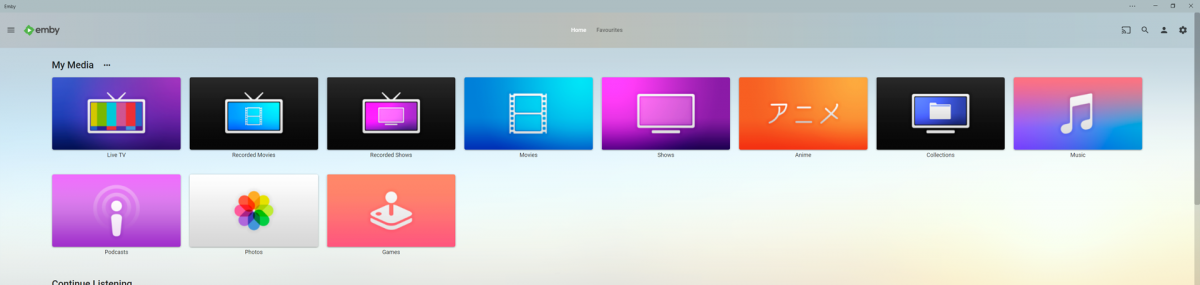
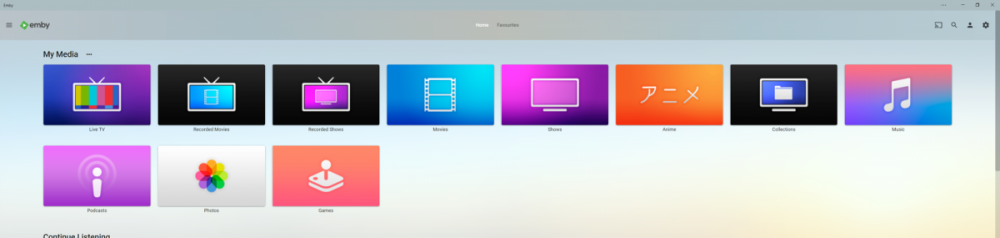
Got bored and wanted to get back into making things in photoshop so i decided to make a few apple tv themed library icons to add a bit of colour to my server, it has been awhile since i worked in photoshop but luckily apples designs for their icons are pretty simple and easy to replicate. I have taken some liberties of course for personal preference but overall i think they turned out okay and i had quite a lot of fun making these and have already decided to maybe make more aha hope you guys like them. --------------------------------------------- Here is an Imgur Album if you only want specific Icons otherwise the zip file includes all the files. https://imgur.com/a/bnVq43H --------------------------------------------- library icons.zip - File Contents Anime.png // 1280px x 720px Collections.png // 1280px x 720px Files.png // 1280px x 720px Games.png // 1280px x 720px Live TV.png // 1280px x 720px Movies.png // 1280px x 720px Music.png // 1280px x 720px Photos.png // 1280px x 720px Podcast.png // 1280px x 720px Recorded Movies.png // 1280px x 720px Recorded TV Shows.png // 1280px x 720px TV Shows.png // 1280px x 720px ---------------------------------------------
 1 point
 -
Surely there's a way to get this forum to localise date formats? But I just can't find it, and I'm getting fed up with getting misled by illogical US-style dates! Paul1 point
-
I don't know how much demand there might be for this, but thought I'd throw it out there. In my old, custom-built system I had a way that I could indicate that an "extra" (or subitem) could also appear in the main listing as it's own stand-alone item (with all of it's own metadata) (though I would indicate when viewing the details of that item in a stand-alone context that it was connected to it's parent item). The simplicity of how Extras work in Emby has definitely grown on me (it's very handy to just be able to drop stuff in an "extras" folder and have them handled automatically). However, I periodically have Extras that I both would like to appear as Extras for a given Movie, but which also are substantial enough to be present in the main listing of movies (for example, certain documentaries paired with a given movie DVD). It would be great if there were a checkbox to designate a given Extra could also appear independently (such that it would show up with it's own item listing, in addition to appearing as an Extra for it's parent). This is actually partly possible currently by adding an Extra to a Collection -- the Extra will show up in the Collection as a stand-alone item, including being able to browse to it's detail page (though, until we get metadata downloading, etc. for Extras there's not much to see: https://emby.media/community/index.php?/topic/43845-emby-server-emby-theater-support-nfo-files-and-automatic-metadata-lookup-for-extras/ ). This method kinda gets at what I'm aiming for, but I think I'd ultimately prefer the full version of what I'm asking for (including the Extra's detail page have an indicator of, and link back to the parent). One question though: Is what I've described as currently being possible with adding an Extra to a Collection a fluke (ie, an accidental feature), or can I count on it continuing to function that way? If I decide to make use of that functionality (eg, there are some items where it might be sufficient for me just to be able to add them to a Collection) I don't want that to then later go away because it was not something that was intended to work that way. Thanks! PS - If this is something you might like to see implemented, be sure to "Like" this top/first post (as well as any subsequent posts in this thread that highlight particular aspects of what you are interested in) -- "Liking" the top/first post helps the Devs to know how much interest there is in a given Feature Request.1 point
-
Direct paths use network shares like nfs or smb, you do not want to make network shares public. You could try setting up a VPN so your users effectively end up on your network but that is involved and over complicated. You are better off sticking with http streaming.1 point
-
I'm not a designer, but am pretty happy with the Android TV version. However, if you really don't like it, it might be worth using Emby as a back-end to Kodi.1 point
-
As an example below - I have a 32 Mbps file, force the Android client to use 30 Mbps (forcing a transcode) - both the dashboard and stats for nerds locally on the client are reporting it as a 2.5 Mbps bitrate ! The transcode log - the 30 Mbps is being acknowledged as the Max bitrate in the ffmpeg command line. C:\Emby-Server\system\ffmpeg.exe -ss 00:07:51.000 -f matroska -i file:"\\media\Films 7\2 Guns (2013)\2 Guns (2013) - BluRay 1080p.mkv" -threads 0 -map 0:0 -map 0:1 -sn -c:v:0 libx264 -pix_fmt yuv420p -maxrate 29808000 -bufsize 59616000 -preset veryfast -profile:v:0 high -level:v:0 4.1 -crf 23 -x264opts:0 subme=0:me_range=4:rc_lookahead=10:me=dia:no_chroma_me:8x8dct=0:partitions=none -g:v:0 72 -keyint_min:v:0 72 -sc_threshold:v:0 0 -copyts -vsync -1 -codec:a:0 copy -metadata:s:a:0 language=eng -disposition:a:0 default -f segment -max_delay 5000000 -avoid_negative_ts disabled -map_metadata -1 -map_chapters -1 -start_at_zero -segment_time 3 -individual_header_trailer 0 -segment_format mpegts -segment_write_temp 1 -segment_list_type m3u8 -segment_start_number 157 -segment_list "C:\Emby-Server\programdata\transcoding-temp\31ADBA.m3u8" -y "C:\Emby-Server\programdata\transcoding-temp\31ADBA_%d.ts" Streaming details are showing it as ~ 2.5 Mbps - 17:11:32.468 frame=12181 fps= 29 q=28.0 size= 147868kB time=00:17:55.17 bitrate=2388.5kbits/s throttle=100 speed=1.21x If I look at the actual data being sent to my device via network tools - 2.5 Mbit .... If I force the bitrate to direct play - then my network tools report it as 32 Mbit/sec. So I agree with the OP - something is wrong with the transcoding bitrate algorithms - as even with 'headroom' it no way reflects what you would expect it to be. -- edit So looking into this further and copying the emby ffmpeg command line and changing the crf/preset manually it is using much higher bitrates as I expect it to - so it could simply be the selected/default crf/preset is dictating the bitrate used - thus 2.5 mbit/sec is all it can use with those presets ... selecting 30 Mbps is largely irrelevant .. I'll report back with my findings and update this thread .. -- edit 2 ok - so this is exactly what the issue is. If I set my transcoding preset to 'superfast' and CRF to 18 - then it will use UP TO 30 Mbit to do what it needs to do. 18:13:56.875 frame= 324 fps= 39 q=19.0 size= 44980kB time=01:05:19.61 bitrate=29625.3kbits/s dup=1 drop=0 throttle=off speed= 1.5x So OP - to get your clients to use UP TO the max bandwidth that you/they set - ensure you are setting a suitable CRF and Preset in the transcoding settings to force your server to ignore trying to save bits ! -- edit 3 I believe the note is technically incorrect in this instance. The x264 preset when using CRF (which we are for transcoding) has little to do with Quality but it has everything to do with bitrate. The more bitrate you have, then less you need to compress - which would result in a bigger file size obviously, but as we are streaming, that is not relevant. It could say something like - 'Choose a faster value to reduce CPU load but at the expense of a higher streaming bitrate, or a slower value to decrease the streaming bitrate but at the expense of a higher CPU load.'
 1 point
 -
I haven't lost sight of this and I'm still working to try and repeat.1 point
-
We're hoping to be able to get to this soon. Thanks for the feedback.1 point
-
Many thanks Abo1 point
-
No, the app isn't aware of the fact you disabled server conversion. There is a warning under that option telling you it can cause playback problems.1 point
-
The visibility issue you pointed out in the grid is why backdrops are off by default while browsing. Some people like this but how good it looks depends a lot on the particular backdrop and, when we darken it or blur it, people that like it complain that there is no point in having the backdrop. For most users, this is never an issue because they never turn this option on. The other items you pointed out are common and recommended design techniques to make it obvious that there is content to scroll to. Interfaces no longer use arrows and such for this purpose. Instead they use partial content. This is actually one of the design guidelines for publishing an Android TV app. Thanks.1 point
-
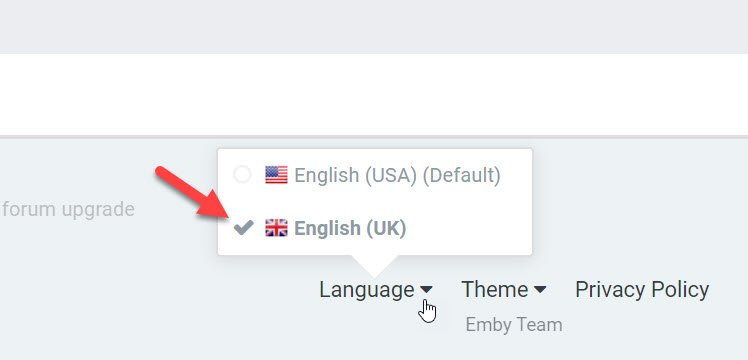
We add UK English language for whom wanted date format, if you want that select the language:
 1 point
 -
@Abobader When quoting other's posts from a day ago or older, the posted date for that quote is always in US date format (MM/DD/YYYY). Is there any way that this could be displayed in the localised date format (UK=DD/MM/YYYY) please? Or is there a forum setting I'm over looking? Thanks.1 point
-
It's a "risk reward" type thing that only you can decide if it's worth it or not. My thoughts are if you run Emby Server on a PC under Windows you might want to consider running the beta even on your main system. Windows is by far the best tested of all versions simply because of the amount of people running Windows, plus it's the main development environment as well. I can't remember the last time there was a show stopper in Beta. If something does get broken it's quickly fixed with a new beta release. You can always run the beta but turn off auto updates and just stay behind a bit like a couple of days to make sure no one else has discovered any major problems with a new release but they are usually just incremental things at the beta level compared to release versions anyway. The latest beta 4.5.0.16 has been very stable to me. Something to consider.1 point
-
I would take a look at your Network settings in the server. It could be configured in such a way that the server is unable to determine that a connection is a remote connection.1 point
-
It isn't possible right now but we'd like to try and make it so. However, are you not getting audio because you turned off the option to allow audio conversion on the server?1 point
-
You are one of many thousands of users, so the devs can't pander to just your requests. They take a balanced view of requests and if they see something that can be tweaked easily, without affecting other users, then they will. Be patient, Rome wasn't built in a day.1 point
-
1 point
-
It'll be released when it's been thoroughly tested in the beta environment. You could always set up a separate beta server yourself and help test, then you wouldn't need to keep asking the same question1 point
-
Hi. This is not a question we can answer accurately because the answer is "when it is ready" . I can say we are closing in on it and chasing down the last few issues that need to be addressed as opposed to still working on new items. Thanks.1 point
-
Emby for Samsung Tizen SmartTV's (2015 J-series to Present) Download: https://emby.media/emby-for-samsung-smart-tv.html 2.3.7 (05/24/2026) Increase size of spotlight 2.3.5 (04/23/2026) Updates related to new home screen features with 4.10 server 2.3.4 (03/24/2026) Fix startup crash regression on older devices 2.3.3 (03/13/2026) Support new home screen features with 4.10 server 2.3.2 (02/11/2026) Fix regression with older devices 2.3.1 (1/29/2026) Improve error handling on audio track changes 2.3.0 (1/1/2026) Fix some dialogs being cut off on older models Fix volume control for youtube player 2.2.9 (12/11/2025) Merge Movies and Shows tab in mixed content libraries 2.2.8 (11/20/2025) Fixes for live tv guide rendering on older devices 2.2.7 (10/31/2025) Fixes for YouTube playback 2.2.6 (10/19/2025) Show person age Improve now playing music background 2.2.4 (09/17/2025) Fixes for horizontal home screen 2.2.1 (09/07/2025) Add new option to hide episode spoiler information Fix video being improperly stretched in some situations 2.2.0 (09/02/2025) Fixes for horizontal home screen 2.1.9 (08/24/2025) Fix detail screen regressions with collections and actors 2.1.8 (08/22/2025) Improve horizontal home screen 2.1.7 (08/21/2025) Support new 4.9 server features Various scroll fixes 2.1.5 (08/01/2025) Background fixes 2.1.4 (07/25/2025) Fix regression in metadata editor 2.1.3 (07/23/2025) General performance improvements 2.1.1 (05/26/2025) Add display option to automatically jump through folders containing single items 2.1.0 (05/01/2025) Fix various display quirks on older models 2.0.6 (04/26/2025) Fix regression causing app to not load on older models 2.0.5 (04/24/2025) Fix regression causing app to not load on older models 2.0.4 (04/21/2025) Add option to control video player long press behavior Improve support for fonts embedded within .ass subtitles (with 4.9 server) 2.0.3 (04/12/2025) Improve performance 2.0.2 (03/25/2025) Fix loss of focus in the video player when seek bar is disabled 2.0.1 (03/20/2025) Support sleep timer in the audio player 1.9.8 (03/03/2025) Add options to force transcoding for certain formats 1.9.7 (02/07/2025) Ensure 16:9 aspect ratio is shown fullscreen 1.9.6 (01/07/2025) Support Remove from Continue Watching under TV -> Suggestions 1.9.5 (12/19/2024) Fix playback settings screen not loading 1.9.4 (12/17/2024) Quality detection fixes 1.9.3 (12/12/2024) Increase default remote quality 1.9.2 (12/05/2024) Support sorting playlists and collections by date added 1.9.1 (11/06/2024) Bug fixes for music video screens 1.9.0 (10/07/2024) Resolve top portion of some screens being cut on specific devices 1.8.8 (08/26/2024) Improve general navigation performance Fix played indicators showing during backdrop screensaver Avoid stream copying interlaced video 1.8.7 (07/27/2024) Live TV Guide fixes for older devices Now playing screen layout fixes 1.8.6 (07/02/2024) Fix header background being lost on older devices 1.8.5 (06/25/2024) Add theme song volume setting 1.8.4 (06/18/2024) Live TV Guide scroll fixes 1.8.3 (06/12/2024) Fix regression in audio play queue screen 1.8.2 (05/30/2024) Support shuffle state in the audio player Support incremental seek speed Improve performance 1.8.1 (05/23/2024) Auto-scroll guide to last played channel Show more rows in video OSD guide Improve performance 1.8.0 (05/13/2024) Make subtitle offset dialog easier by converting to a slider 1.7.9 (04/26/2024) Fix unnecessary transcoding of flac audio files 1.7.8 (04/09/2024) Group collection items by media type 1.7.7 (03/15/2024) Fix add to play queue missing from context menus 1.7.6 (03/06/2024) New screen for music genres 1.7.5 (02/08/2024) Live TV Guide layout fixes 1.7.4 (01/22/2024) Fix seek bar regression 1.7.3 (01/20/2024) Fix seek bar regression 1.7.2 (01/19/2024) Fix regression causing some settings screens to not be reachable 1.7.1 (01/15/2024) Various user interface bug fixes 1.7.0 (12/27/2023) Various user interface bug fixes 1.6.9 (12/21/2023) Various user interface bug fixes Support channel up/down buttons to change channels during live tv playback 1.6.8 (12/11/2023) Improve dialog menus throughout the app 1.6.7 (11/12/2023) Fix startup error on older models 1.6.6 (11/10/2023) Improve Korean subtitle font Add release date to playlist and collection sort orders 1.6.5 (10/11/2023) General performance improvements throughout the application Support the new profile pin feature in conjunction with Emby Server 4.8 1.6.4 (09/14/2023) Make more fields available in lists 1.6.1 (08/14/2023) Fix regression with Emby Connect pin code sign in Fix regression causing home screen settings to display incorrectly 1.5.9 (08/12/2023) Fix regression on older devices causing lists to render with blank text 1.5.8 (08/10/2023) Add option to hide media info from detail screens 1.5.7 (07/12/2023) Various fixes and improvements with back button behavior and left nav menu Various performance improvements 1.5.6 (06/14/2023) Rework app exit menu Support left sidebar by pressing left on the left edge of most screens 1.5.5 (05/16/2023) Add flatten series display option 1.5.3 (04/06/2023) Add View Lyrics context menu option 1.5.2 (03/06/2023) Rework add to collections/playlists user interface 1.5.1 (02/10/2023) Various user interface bug fixes 1.5.0 (01/11/2023) Various user interface bug fixes 1.4.9 (12/13/2022) Support sorting playlists Fixed HLS subtitles not rendering correctly on certain models 1.4.8 (11/17/2022) Add Played filter for audio books 1.4.6 (10/20/2022) Subtitle selection fixes 1.4.5 (10/18/2022) Fix regression when playing H265 1.4.4 (10/17/2022) Various user interface bug fixes 1.4.3 (10/13/2022) Various user interface bug fixes 1.4.2 (10/05/2022) Various user interface bug fixes 1.4.1 (9/28/2022) Fix regression with 2015/2016 devices Various video OSD fixes 1.4.0 (9/28/2022) Various video OSD fixes 1.3.9 (9/20/2022) Fix nested dialog focus regression Various video OSD fixes 1.3.8 Various video OSD fixes 1.3.7 Various video OSD fixes Various subtitle fixes Add option to control rating information display at the start of playback Updated now playing design for music in the background 1.3.6 Various video OSD fixes Various subtitle fixes 1.3.5 Various video OSD fixes 1.3.4 Add home screen focus preview option Make play from beginning always visible Update runtime on detail screen when changing video versions Add ends at directly to video player Update video OSD layout to reduce button clicks Move subtitle offset feature into subtitle menu Update Live TV guide design Various right to left (rtl) fixes 1.3.3 Fix loss of header on certain devices 1.3.2 Updated design for Movie Suggestions and TV Suggestions tabs Various performance improvements Fix blue radiance theme not working on some models 1.3.1 Improved right to left (RTL) support Fix playback progress bar on older models 1.3.0 Initial right to left (RTL) support Various video playback fixes 1.2.9 Add new fields that can be selected for display in lists Improve video detail screens Add new theme options Various improvements to video OSD and audio now playing screens 1.2.8 Improve video detail screens Support new accent color display option (2018 models and newer) Support lyrics Support new manual recordings feature Various improvements to video OSD and audio now playing screens 1.2.7 Improve video OSD menus Improve visual seeking support in video OSD 1.2.6 (29/04/2022) Samsung store version 1.2.6 Improve visual seeking support in video OSD 1.2.5 Improve visual seeking support in video OSD 1.2.4 Improve visual seeking support in video OSD 1.2.3 Fix remote control regressions in certain models 1.1.1 Fix support for play button press on Live TV Guide slots Support keyboard input on search screen 1.1.09 Support A-Z picker with descending sort order 1.1.08 Fix regression with 2015 & 2016 devices 1.1.07 Live TV Guide layout fixes Video OSD layout fixes 1.1.06 Fix regression with playpause remote button Fix regression causing progress bar to not show on audio OSD 1.1.05 Add new option to display logos as titles on detail screens Improve audio book detail screens 1.1.04 Various subtitle fixes 1.1.03 Close chapter menu when selecting a chapter during playback Add workaround for 2022 models that don't support embedded subrip subtitles Add subtitle background color and opacity options Various subtitle rendering improvements 1.1.02 Various fixes with new video OSD features 1.1.01 Various fixes with new video OSD features 1.1.0 Add Info, Chapters, On Now and Guide sections to video OSD Minor adjustment of detail screen buttons Improve performance of playlist detail screen Add sort by track number option to folder views 1.0.99 Update top tabs design to support more than seven tabs 1.0.98 Improve WMC theme 1.0.97 Fix blue radiance theme background color Live tv guide layout fixes 1.0.96 Various subtitle fixes Fix navigational input occasionally skipping over certain form fields 1.0.95 Various fixes with horizontal home screen 1.0.94 Add more field options for display in lists Improve single channel program list display Improve list navigation performance 1.0.93 Various ass/ssa subtitle fixes for 2016 models Fix wrong subtitles being selected in certain situations 1.0.92 Various ass/ssa subtitle fixes for 2015 models Various fixes for new multi-select filters Support for new features in upcoming 4.6 server release such as Live TV channel grouping 1.0.91 Fix regression saving certain settings 1.0.90 Various ass/ssa subtitle fixes Support multi-select filtering 1.0.89 (01/15/2021) Restore preview feature for 2016 models and up Various ass/ssa subtitle fixes 1.0.88 (12/21/2020) Resolve click through problem on certain 2015 devices 1.0.87 (11/18/2020) New: modified Home Screen like web client New: modified Now Playing like web client Fixed: an issue where some TV models couldn't select certain folders 1.0.86 (10/20/2020) New: added new transitions found in other clients Fixed: navigational problem with photo albums 1.0.85 (09/29/2020) New: added feature to change subtitle offset New: added feature to download subtitles during playback' Fixed: navigational problem within settings 1.0.84 (09/10/2020) Various navigation fixes 1.0.83 (08/29/2020) Fixes an error preventing the app from loading on some model TVs 1.0.82 (08/27/2020) Navigation fixes and internal changes 1.0.81 Improve ass/ssa subtitle rendering Improve performance of text-based subtitles (srt, vtt, etc). 1.0.80 (07/01/2020) 1.0.79 (06/01/2020) Improve Live TV Guide 1.0.78 Improve Live TV Guide performance 1.0.77 Various performance and scrolling improvements 1.0.76 Various fixes for rendering ass/ssa format subtitles 1.0.74 Improved performance of navigating large lists 1.0.73 Redesign add to collections & playlists Fixed problem where subtitles weren't selectable when more than one audio track was present 1.0.72 (01/31/2020) Samsung store version 1.0.71 (01/01/2020) Added ability to change font size and color of SRT format subtitles in settings Added remotes with combined Start/Pause button can now start items from Home page Added selecting Info using remote on Home page brings up playback menu for highlighted item Added clicking Back/Return from Home page brings up the Settings/Exit page instead of exiting the app 1.0.70 (12/01/2019) Added support for internal ssa/ass subtitles 1.0.69 (11/01/2019) Updated music OSD Return/Back button on remote will remove OSD while playing movies 1.0.68 (10/3/2019) Fixed an issue on some models where the active poster wasn't being highlighted 1.0.67 (10/01/2019) Restored counts on list screens Added "Are you still watching?" in settings Fixed an issue which caused some models to start with just a black screen 1.0.64 (09/01/2019) 1.0.63 (08/01/2019) Update detail screen buttons to newer design Improve app performance 1.0.62 (06/30/2019) Fix spinning circle when pressing FF/REW on some TV models Fix check boxes not changeable on some TV models Fix a problem where the second video in a series would play shadowed if transcoding occurs Updated playback icons Added support for WMA music 1.0.61 (07/01/2019) Samsung store version 1.0.61 (2019/05/21) Improve app performance Expanded sorting and filtering options Improved subtitle support Support multi-version movies with version selection prior to playback Improved uniform design with other Emby apps 1.0.53 Fixes details pages not fully loading causing endless spinning circle 1.0.43 Fix double subtitles issue 1.0.42 (2018/07/06) Improve navigation performance Various subtitle fixes Update filters and sorting options on all list screens Improve Live TV recording layouts 1.0.34 Add filters and view settings Improve live tv guide layout 1.0.32 Add new theme feature 1.0.25 Improve automatic bitrate detection within local networks Improve navigation performance Announcement 1.0.24 Various subtitle fixes New DVR features - manage series recordings 1.0.23 Improve direct play of high bitrate & 4K content 1.0.22 Improve direct play of high bitrate & 4K content New vertical layouts Full support for Live TV Guide New Live TV features - view series recordings, better suggestions, improved recording layouts, and more 1.0.21 Improve direct play support for high bitrate content, including 4K video Update to latest Emby Theater interface 1.0.20 Resolve issues related to subtitles Improve direct play of high bitrate & 4K content 1.0.18 Fix next episode auto-play crashing the player Use native tizen fast-forward and rewind functions Update to latest Emby Theater interface 1.0.17 Add delete button to video detail screens Improve Live TV program detail screen Always show scenes at bottom of detail screen 1.0.16 Resolve video OSD staying visible permanently on certain models Improve external subtitle support Emby for Samsung Orsay SmartTV's (2014 H-series / 2015 J-series Entry) official app notes 0.122 (2018/10/29) Final release, Samsung is no longer taking inputs for their legacy OS as of Oct 2018 0.120 (2018/09/07) Fixed focus issue on subtitle selection screen 0.116 (2018/07/06) Improve navigation performance Various subtitle fixes Update filters and sorting options on all list screens Improve Live TV recording layouts 0.113 (2018/03/20) Added support for additional subtitle formats 0.112 (2018/02/19) Add new sort feature Fix a couple of issues on the add new server page 0.111 (2018/01/02) Improve navigation performance Add option to switch to vertical home screen 0.110 Add new themes feature 0.105 Initial release Announcement --------------------------------------------------------------------------------------------------------------------------------------------------------------------------------------------------------------------------- Emby for Samsung Orsay SmartTV's (2012 E / 2013 F / 2014 H / 2015 J-series Entry) community app notes 2.2.9 (2021/06/17) Fixed a problem affecting TVs that don't support 60fps Final release, no longer being developed. 2.2.8 (2020/09/18) Fixed a problem with selecting LiveTV channels 2.2.7 (2020/01/23) Fixed a couple navigational errors - thanks ogry 2.2.6a (2020/01/21) Fixed a problem where episodes were not being shown under season folder 2.2.6 (2019/07/05) Remove sha1 password Update authentication to use pw field Removes Genres itemcount from queries and overlays Fix bug preventing IME from showing Server by name will use default port 8096 if not entered 2.2.4 Modified max bitrate for transcodes 2.2.3 Fixed: Unsupported audio codec selected when transcoding. Added Live TV back in (beta) Prefer backdrop images to screenshots for episodes on the home screen. 2.2.2 Minor audio playback change to maintain server compatibility. See here. 2.2.1 Fixed: Menu Screen goes up and down when scrolling after a movie is finished (thanks @shorty1483 ). Corrected codec support for J4300, J5200, J5300, J5500, J6200, J6300, J6400 and K8500 (thanks @Jay204 ) 2.2.0 See here. Emby for Samsung Orsay SmartTV's (2011 D-series) third party app notes 1.0.10 (2019/07/05) Remove sha1 password Update authentication to use pw field Removes Genres itemcount from queries and overlays Fix bug preventing IME from showing Server by name will use default port 8096 if not entered Final release, no longer being developed. 1.0.8 Fixed DTS playback1 point