Leaderboard




Popular Content
Showing content with the highest reputation on 07/31/20 in all areas
-
Actually, yes, the null value is the reason. Great find, thanks.2 points
-
4.5.0.16 beta Don't download subtitles for disc placeholders2 points
-
Here is the latest list of versions for Emby software across the server and clients. Emby Server Stable: v4.9.5.0 (2026/05/18) Release Notes Beta: v4.10.0.14 (2026/06/04) Release Notes For other platforms, please refer to the download page. Emby for Android TV Google Devices Stable: v2.1.23 (2025/12/27) Beta: v2.1.46 (2026/04/15) Amazon Devices Stable: v2.1.23 (2025/12/27) Beta: v2.1.46 (2026/04/15) Stable Release Notes Beta Release Notes Universal Android app Stable: v3.5.16 (2026/01/26) Beta: v3.5.36 (2026/05/10) Release Notes Download the latest Beta here. Emby for Kodi See here for the latest information. Emby for Roku Stable: v4.1.63 (2026/05/04) Release Notes Beta: v4.1.64 (2026/05/13) Release Notes Emby for Windows (Windows Store for PC & Xbox One) Stable Release Notes Beta release notes Emby for Linux Beta Release Notes Emby for Samsung Smart TV (Orsay) E-series to H-series TVs only Release Notes Emby Theatre for Samsung Smart TV (Tizen) Release Notes Emby Theatre for LG Smart TV Stable: 1.0.50 (2026/01/19) Emby for iOS Stable: v2.2.53 (2026/05/16) Stable Release Notes Beta: v2.2.52 (2025/04/11) Beta Release Notes Emby for Apple TV Stable: v2.0.3 (2025/12/26) Announcement Beta: v2.0.6 (2026/04/11) Release Notes Emby for tvOS (Apple TV) Stable: 2.1.6 (2022/12/23) Release Notes - TBA Beta: 1.5.1 (10) (2021/03/02) Beta Release Notes Emby For MacOS Stable: 2.1.6 (2022/05/09) Details here. I will keep this post up-to-date as much as possible, but please send me a PM about anything I haven't updated, or is missing. Special thanks to @Borskfor supplying a lot of the updated information. Thanks.1 point
-
Can we get admin settings to have universal settings for every device. So if I want my movies to show as thumbnails on every device I set that in my admin panel. Same with how the home page display looks and the theme is. So all settings are all universal and not having to change them every single time.1 point
-
Hi, In the TV Shows library there's is an option to merge from diferrents folders, thats works good. ¿It's possible to put the same option for the movies? I actually use different hard drives for different qualitys, so when I put a library I have a lot of movies that i have to group manually. I know there is a plugin doing something similar, but that plugin merge all libraries, and i want some library separated than others because I have for example a uniqe library with GDrive Movies, 3D movies separated... etc I think it would be nice have that option just like tv shows. Thanks1 point
-
Please click "Like this" and share it if you want to support this feature. Thank you ! Hello, There is a Kodi addon call "gdrive" from ddurdle who can read videos (original and transcoding version) directly from Google Drive. Why not build on this idea to integrate Google Drive as source directly in Emby Server ? In addition, Emby could generate automatically the STRM files from one or many Drive folders. And transcodings are already available with Drive so no need to transcode with Emby server. What do you think ? ------------- Three reasons why this feature will be useful and awesome: 1. Cloud is the future and today the cost is affordable. I have a Google Drive Unlimited for $50/month (ie $600/year) and I have unlimited space that is secured against crashes. Knowing the cost of hard drive and the cost of power consumption, its a very good deal. 2. Google Drive transcode video file. This provides different stream quality like Youtube (1080p, 720p, 480p and 360p) and the "image quality/compression ratio" is very satisfying. I can play 720p video on my poor 4 Mbits DSL. 3. You don't need to have a big server. Personally, I opted for a little dedicated server (Kimsufi 2G) for the cost and I can leave it run 24/7! Furthermore, me and my friends can watch movies from anywhere! Basics features that should be included: GOOGLE APPS OAUTH2 for activation and permission playing transcoded version (MP4 360p, 480p, 720p & 1080p) directly into Emby's app playing original file (avi, mkv, mp4) directly into Emby's app import embedded subtitles porwerful script module for multiple folder scanning and STRM generating1 point
-
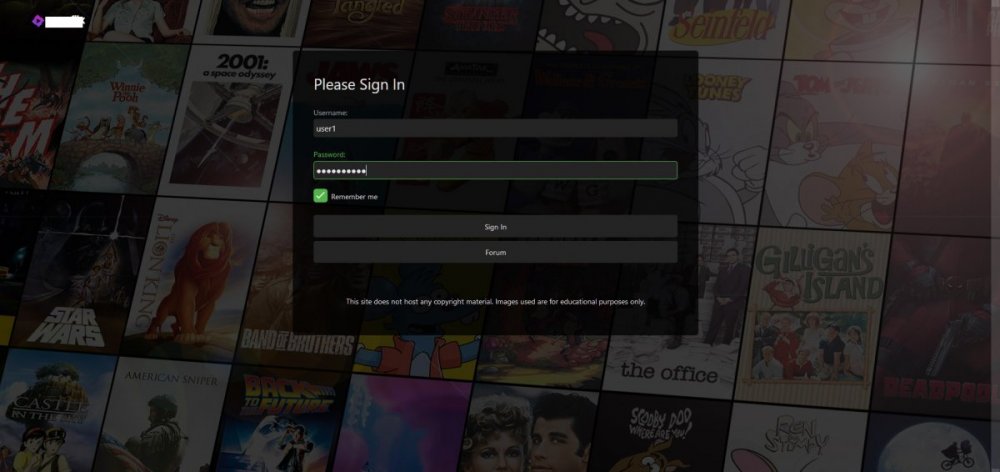
Edit (12/19/2020 - Cleaned up code, Re-wrote guide for step-by-step method) Hi everyone, I recently decided to ditch my server's landing page and just use emby itself. I've been making changes to the login page to give it a "Netflix" style and have come up with this: Now, if anyone is interested in accomplishing this, you should know it isn't just CSS. Steps First, there are some edits in manuallogin.html: 1. Find the line <div is="emby-scroller" class="view flex flex-direction-column scrollFrameY flex-grow" data-mousewheel="true" data-horizontal="false" data-centerfocus="card"> and add "custombg" as a class, like so <div is="emby-scroller" class="view flex flex-direction-column scrollFrameY flex-grow custombg" data-mousewheel="true" data-horizontal="false" data-centerfocus="card"> 2. Find the line <div class="scrollSlider flex-grow flex-direction-column padded-left padded-right padded-top-page padded-bottom-page"> and add "custombody" as a class, like so <div class="scrollSlider flex-grow flex-direction-column padded-left padded-right padded-top-page padded-bottom-page custombody"> 3. Find the line with the <form> tag and replace it with <form class="customoverlay"> Optional: If you'd like to add custom buttons, simply place and alter the following code after a </button> tag <a is="emby-button" class="raised block emby-button" href="https://myforum.com">Forum</a> Then, in your Emby settings, add this Custom CSS: .customoverlay { background-color:rgba(0,0,0,.75); -webkit-border-radius:6px; -moz-border-radius:6px; border-radius:6px; -webkit-box-sizing:border-box; -moz-box-sizing:border-box; box-sizing:border-box; display:-webkit-box; display:-webkit-flex; display:-moz-box; display:-ms-flexbox; display:flex; -webkit-box-orient:vertical; -webkit-box-direction:normal; -webkit-flex-direction:column; -moz-box-orient:vertical; -moz-box-direction:normal; -ms-flex-direction:column; flex-direction:column; margin:0 auto; min-height:515px; padding:40px 40px 40px; width:100% } .custombg { background:url('https://i.imgur.com/ynv9BKl.jpg'); background-size:cover; -webkit-background-size:cover; -moz-background-size:cover; -o-background-size:cover; height:100vh; position:fixed; background-position:center center; background-repeat:no-repeat } .custombody { height:100vh; overflow-y:auto; overflow-x:hidden; -webkit-overflow-scrolling:touch } Optional: Add the following css as well in order to hide the "Forgot Password" and "Cancel" buttons. .btnForgotPassword { display:none!important } .buttonCancel { display:none!important } You can now replace the background url with any image you want to use. I've kept in a temporary one. Note: In order to see the changes to manuallogin.html, you likely have to clear your browser cache. Hopefully someone might find this post useful. Special thanks to @Happy2Play for always answering my CSS questions.
 1 point
 -
Hi! I come from Plex, and I miss one option in the library... "Empty trash automatically after every scan". If in one moment I have a hard drive "offline" when I scan, in Emby, I lost all the library metadata, and when I connect again the disk I have to scan all the content again. In plex, if there's something offline, whit that option the library doesn't remove nothing, and when I connect de hdd, no need to reescan and download all metadata.1 point
-
Glad we have pretty much isolated it to missing OfficialRating on Local Trailers. But I have no idea of any other fields that may need to be populated though.1 point
-
Did it again, i now have cinema intros! Changed 10 of them for testing and they are being used with cinema intros... Still not working with any movies i did not change to add officalrating to something other than NULL. Same settings! Same Result...1 point
-
Website is updated.1 point
-
Thanks CBers1 point
-
At the moment that is correct. I'm sure it'll return at some point once any issues are resolved.1 point
-
Tapatalk was disabled temporarily. so it likely won't work even reading the forums. A solution is in the works but for now you would be best served to read the forums with a web broswer. We're sorry for this inconvenience and we're working to resolve the issue best we can with.1 point
-
It's because you're using optical. It only has enough bandwidth for core 5.1 compressed (AC3 or DTS) or stereo uncompressed (PCM). mpv is decoding it because it can't be passed through, and it's downmixed to stereo because that's all that can fit in the optical cable. So no EAC3, DTS-HD or TrueHD. mpv can re-encode those to 5.1 AC3, which will work. Use the audio config I posted above, and unzip the attached zip file to: C:\users\USERNAME\AppData\Roaming mpv.zip1 point
-
Thanks for all your hard work on this and everything else you do Abobader!1 point
-
Please do this. I am a recent Plex refugee (I love this so much more) -- this feature would make user management so much easier.1 point
-
Thanks! This link helped me out!1 point
-
I am very interested in this write up, as I already have a domain and Cloudflare manages the DNS for it currently. Would love to see how you've setup CF for remote caching, etc.1 point
-
Hi everyone, apologies for never replying back, that was not cool of me. Real Life got in the way... Long story short, yes, the scan finally finished. I kept looking at the logs, there where some files that where causing issues, so I deleted them, rescanned and it eventually completed. Again, much thx to @Luke and @mastrmind11 for the feedback Thx!1 point
-
Just use Tags for this.1 point
-
Yes it's just a bug in the app. It is resolved for the next app update. Thanks for helping us chase it down.1 point
-
Yea i"m hoping to get the website switched over today to the new package.1 point
-
At the moment, only themes responsiveness that work good on mobile devices, later when we update we will have stand alone mobile devices support for Android & iOS that can be downloaded from Apple & Google for this forum software from IPS.1 point
-
i loaded beta version of app and the photos seem to work now! thanks!1 point
-
Tiens je ne connaissais pas pour [l'] @Wettony Par défaut, les article français ne sont pas pris en compte à l'exception de [la] Il suffit d'éditer le fichier system.xml, avec notepad++ par exemple, et de supprimer la ligne <string>la</string>1 point
-
It will be adding new filters to the current set.1 point
-
It adds to the experience of watching your curated "live" tv. I personally have an archive of thousands of toy/food/game ads from the 90s. But, even beyond commercials, I also think it would be useful for channel bumpers. Emby has a "cinematic intros" function that can queue videos from a folder to play prior to content from your library. That might be a place to look for functionality. Also, side note. How many TVShows per channel? I feel like i tagged about 20 shows, but am only seeing episodes from about 8 of them.1 point
-
Ahhh... I skipped 4.4.0.5... :-) By the way, I know you need a rest for a bit, but is there any chance that after your rest an option for music videos could be looked at? I really wouldn't mind my own MTV like it was in the 90s... (or ViVa, since you seem to be German... LoL)1 point
-
It's a very good idea.1 point
-
Lots of enhancements are coming soon to live tv, so please stay tuned.0 points