Leaderboard




Popular Content
Showing content with the highest reputation on 07/29/20 in all areas
-
Try Top Gun, Days of Thunder & Unstoppable if you have them. Probably movies you might not have thought about. Star Wars collection, Avatar, Titanic should probably be watched again as well. I love when the sound is awesome and really well balanced on movies you would expect it from. Now when are you going to expand to 7 or 9?2 points
-
Often times what people write in the forums and what the actual issue is can be quite different which is understandable especially if they really don't understand what to do or not a technical type of person. A side benefits of reaching out and helping people via TeamViewer is seeing the misunderstanding of articles or misconfiguration people do. Showing them how to do it and getting comments back like "why didn't it just say do this"! So using the knowledge of what I'm seeing as pain points for people I've been slowly improving many of our articles to clarify things, add detail when needed, rewrite overly complex articles or rewrite some things where more hand holding is needed.2 points
-
Also, It would be cool if we have various m3u lists and have the option to choose/assign each m3u list for each user.. Example. In user settings we can choose which library to give them for VOD so this shouldnt be hard enough to do it for live tv too no? USER 1 - Playlist 1 - Playlist 2 - Playlist 3 USER 2 - Playlist 3 USER 3 - Playlist 1 - Playlist 3 Etc etc.... *** Delete this message from another topic I opened because I posted it by accident there1 point
-
... as I was tired of manually grouping all my movie versions into groups after each recreation of the db, I created a plugin to help with that. The use case is having movies, that belong together spread around and not being able to easily match the emby naming conventions, but still having the desire to present them as one item with multiple versions. The plugin works similar to the auto boxsets, but does the "movie versions grouping" - it will group all movies based on their TMDB id into one item, regardless of where they're placed and how they're named. I made that for myself - however, if anybody is interested, attached is a plugin that solves this issue. Attached version is for current 3.6.0.49 beta Server, do NOT use it with stable release! Plugin is alpha state, you should only use it, if you are willing to backup your db (there is no way to revert the changes otherwise!) and manually put the dll in the server plugin directory. Do not use it in your production environment before having tested in a test environment that you're fine with what it does - seriously! ;-). Note: There is a known bug in the web GUI presentation which is described here, which needs to be fixed on emby side. Edit: the mentioned display bug in BoxSets is fixed in Emby now, thanks Luke. AutoCollections-for3-6-0-49-betaServer.zip AutoCollections-for3-6-0-75-betaServer.zip AutoCollections-for-4.1.0.15-betaServer.zip AutoCollections-for-4.2.0.17-betaServer.zip (4.6.0.10 and before) 4.6.4.0 and above (does not require beta server as version number has been surpassed) AutoCollections-for-4.6.0.22-betaServer.zip Note: Original version will cause issue with other new plugins like Top Picks. Updates by community members: v.1.0.0.4 New update thanks to @Cheesegeezer Looks like we've managed to update the plugin, to be current Emby Server 4.7.7 (minimum). Some Changes to be aware of Automatic Library scan and updates are disabled, too many things are triggering library scans at the moment and entering into an endless loop which will crash the server. Moved to a Scheduled task now. Fully Locked item Metadata can be ignored in the Plugin Settings for grouping. (Partial field may have worked before but you need to Lock the item itself now) ".strm" files are ignored from any processing New plugin Graphics with a big nod to MikePlanet This is always Mikes plugin and the work he has done is fantastic. - We only did essential maintenance to keep this alive for you peeps. AutoCollections_1.0.0.4.zip v1.0.0.5 Removed Top Pick Items from the available item list re introduced the auto scanning... this will take place 1 min after an item event is detected re introduced auto run after a library scan tested against top pick plugin and there is no endless looping... but please test fixed the locked items bug. Good luck and let me know how the testing goes. AutoCollections.v1.0.0.5.zip v.1.0.0.9 New update thanks to @Hoptional Added option whether to Merge items across different libraries Compatible with nested folder structures, the "Top Picks", and the "New Releases" plugin Improved logging AutoCollections_1.0.0.9-libraryoption.dll1 point
-
Could we get the option to (or the system automatically detect and set) the number of thumbnail extraction processes that can be run? Rebuilding my library is taking a long long time due to the fact that the thumbnail extract only runs on one media item at a time - server is currently sat with ~30% cpu usage.1 point
-
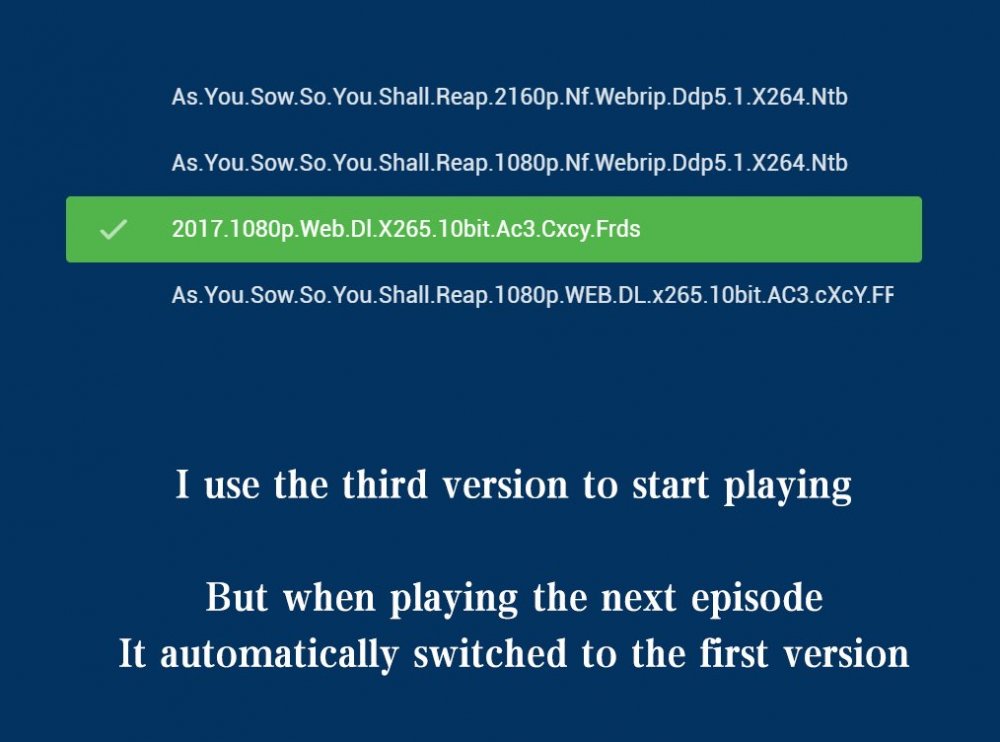
Please click "Like this" and share it if you want to support this feature. Thank you ! There are multiple versions of each tvshow in my library Some are 4K, some are 1080P, some are HDR, and some have subtitles every time when I paly a next episode, the first version of the default sort will be played automatically For this reason I was forced to quit playing, Then manually select the last version, Resume playing This is not what I want. I hope that when I play 2160P, the next episode will still be the 2160P version, not automatically switch to another(1080P) version,I need to exit playback, So I hope to switch the version during playback.
 1 point
 -
Is it possible to add a bitrate for users that are direct(whatever) something? It's good info, and readily available. Thanks1 point
-
Often times when I see "Reason for transcodng: Media bitrate exceeds limit." in the info I wonder, what kind of internet connection do they have? I know this can cover multiple scenarios like bandwidth limit set for user, server, client side quality setting, as well as AUTO bandwidth detection... Can you PLEASE add to the dashboard the returned client bandwidth capabilities? The value you are getting from the client that tells emby its bandwidth abilities. While you are at it tighten up the spaces between lines on the transcode items, and align the results to the right instead of center.. MAYBE SOMETHING LIKE THIS :1 point
-
For some reason, it's decoding the audio instead of passing it through. And you probably have Windows audio configured to stereo, when it should be configured to your speaker count. So too should the audio in Theater, be. But the correct question is why it's decoding. You're using the test build. Does it happen in the release (3.0.11)?1 point
-
Thanks for the help guys. This forum is always so helpful and quick. Always the best!1 point
-
It's working again now, I basically got an email, "Michael, is it working again now" took about 5 minutes after that email and recordings started showing up and the guide came back to life and I was able to watch live TV. The HomeTheatrePC does not get touched, believe me, it's the central piece of hardware in the house that my wife would kill me if I do anything to it. I haven't been given any explanation at all but I probably wasted about 3 hours last night, debugging and searching for nothing, I literally did nothing to get this working again other than report a billing issue, I would just like a message telling me what happened.1 point
-
Unless you are having issues with TheMovieDb I do not see this behavior testing the scenario above. What you are describing is TheMovieDb failed and you only got info from OMDB. TMDB shows 24 Actors, OMDB shows 4 Actors. We will probably need to see the server log for this action. Note if I disable TMDB I get what OP gets.1 point
-
Emby has no control over File System limitation. So all you have is alternative naming.1 point
-
@softworkz, thanks for adding the developers view. It would be a nice to have but I also think there are other requests with more importance than this one.1 point
-
Hi there, what metadata providers are enabled for your movie library, and in what order?1 point
-
Ah, now I understand - the alternative (fixed schedule at night) is just not very attractive and I'd agree to that. My primary point it that it should be decoupled from library scan - so instead of doing; Add Item >> 10 min extraction >> Add Item >> 10 min extraction >> Add Item >> 10 min extraction Rather do: >> Add Item >> Add Item >> Add Item || Check system usage || when idle, do: 10 min extraction >> 10 min extraction >> 10 min extraction ...when checking whether the system is in use or not (idle detection), there's no need for a late night task schedule But let's get back on topic: Image extraction is something that needs to happen in the background in the most efficient way that is possible and should not affect the users' system operations. This is not mean to be a benchmark or load-test for your many-core CPUs. There's not much CPU involved anyway (in case of quick extraction): We're mostly reading out the key frames and only when there are no suitable matches at a point in time, we're going into decoding a few frames in sequence. You should be much more concerned about your network usage when the media isn't local. ffmpeg threads parameter: You can completely forget about that. This is not some kind of global setting. When you specify that parameter, it will be matched to the closest component that supports multi-threading. And only applied to that one. So it might affect the audio deccoder at one time, and when you have a different audio-decoder next time, that doesn't support multi-threadiing, it might be applied to the video encoder instead. That setting shouldn't even exist in Emby and the parameter should not be used as long as you aren't hand-tuning a specific command line. But for us - supporting thousands of command line variations, it's impossible to manage the threads parameter. Eventually it will do more harm than anything else. You must scratch that idea once and for all. Parallel extractions would be a realistic option, but as mentioned above, there are other resources than CPU cores and Emby would surely not do something that could lead to a negative user experience. So I say "realistic" but probably "not reasonable". Maybe @Luke will share his thoughts about that..1 point
-
We have a quick extraction that extracts thumbnails 10-20 times faster than normally. It cannot operate in parallel, though, and wouldn't run faster but "wronger" instead.1 point
-
@curtis03 - The scale_vaapi filter on your device does not support color conversion from 10bit to 8bit. Unfortunately, this is hardly possible to detect automatically, so I think we should probably add an option for disabling the use of scale_vaapi in combination with 10 bit video. It might be possible to fix this by updating to the latest Intel drivers, but that's just a general statement, without considering your hw and sw setup.1 point
-
^_~1 point
-
I'm wondering, is that the right rc file to use if Emby is running as a server (I don't know the Synology options, I'm afraid). Paul1 point
-
It is the server which has to check the premiere licence, using the URL: https://mb3admin.com/admin/service/registration/ Paul1 point
-
Yep. Having examples for all the codecs would be most excellent.1 point
-
There's a thing at the bottom that asks if you found this helpful, yes or no but that's it. I'm working on this week replacing how to setup remote access as mentioned above. If you see anything, anywhere in the knowledge base that looks, wrong, could be worded better, needs additions let me know as I'd love to improve it as I'm constantly making adjustments. If you ever want to write something yourself to have added to the knowledge base I'm all for that as well, just shoot me a PM with any info like that. Your expertise on all things Emby would be very welcome!1 point
-
For Dolby Digital you would use "AC3". For Dolby Digital Plus you would use "EAC3" or possibly "E-AC3" not sure which there.1 point
-
Good day, The problem with dark theme, that will not fit everyone liking, that normal, can I see the image of the gray background color in firefox you talking about? Thanks One of the issue that is change some permission issue that not allowed here. Beside the security consideration that are effected general to all, maybe other forums do not notice it or it do not effected them based on the configurations they allowed in their forums. I received a reply from Tapatalk for the ticket I submit to them, that they do not find the issue I report, for that, I am removing this plugin from our forum. My best1 point
-
Perfect - many thanks - gonna give this a spin edit - all good, multi-versions for those with permissions - exactly what it should do out the box. Thanks @MikePlanet1 point
-
This was an issue initially but got fixed (thanks @Luke!). So if under folder permissions you don't give users access to a certain folder they only see the versions they're allowed to see1 point
-
It is enabled for all regions that they support. Thanks.1 point
-
1 point
-
It would appear Plugin Version 1.0.39 has resolved the Activity Report TimeDate issue in my test.1 point
-
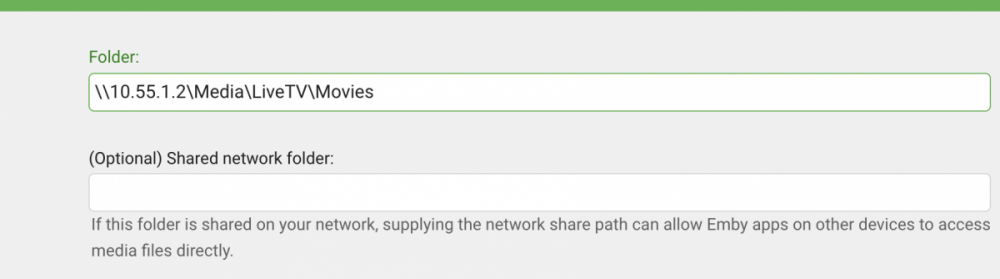
I've not spent any time with Docker so I won't be much use to you, but it is interesting that other clients continue to work. Are they DirectPlaying? Can you recall what might have changed in your setup around the time that this started being an issue? In your library folder paths, do you have 'Shared network folders' set?
 1 point
 -
1 point
-
@OtherlandDK i guess you are already on build 20150 or above, i d say thats the minimum reference build to go for next step would be to see how the gpu access is, /dev/dri prolly wont work as simple as on a linux based docker. and idk if the current state is already so far to use it with a linux guest docker, afaik its yet only working on windows based dockers, 1st step is for linux based vm's. so prolly u need (when u are on wddm 2.9) use a linux vm and run the docker inside this vm for hw acc and not docker for windows.1 point
-
Yup, sounds like a good idea1 point
-
Much the same Fairy Tail S0XEXX Title of episode - absolute number Rebuilding the library did fix it. However as @cayars suggested I will be adding the year for each thing by default now to try improve matching moving forward.1 point
-
Cool! It's been a while , and I looked at the code today and realized I should probably update it and make sure it all actually works with the latest emby clients. Probably do that this week, at some point... Hopefully.1 point
-
That was good information seanbuff. I think I'm going to rewrite the knowledge base article soon with a section specific to setting up remote access to make the steps clearer for those not used to networking. Explain the port forwarding a bit more in detail and the need to ALWAYS forward to the server's 8096 & 8920 ports (this gets some people), use a pic like you did above for checking what Emby thinks is the setup is and of course a bit of a walk through on setting up SSL if using CloudFlare.1 point
-
Can you see both your LAN and WAN addresses and ports shown on your Dashboard? Are the IPs and Ports correct there? Also, try attaching the actual complete log file itself, rather than a copy/paste EDIT: Woops, @cayars has got this
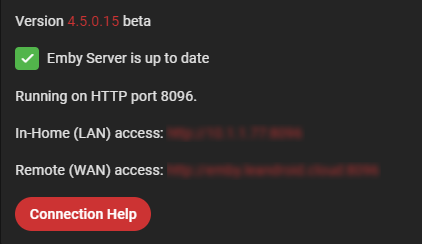 1 point
 -
Good day, I disable Tapatalk, the latest build we install from 2 days ago bring some issue to our forum, I submit a ticket about the issue, and will not enable it back till they fix it. My best1 point
-
Sure your perfect Morse code abilities help you with punching the data in. Another sense of SMR if you like ...1 point
-
Are you referring to disabling "Enable smart parental control" in Cinema Intros settings? Enable smart parental control Trailers will only be selected with a parental rating equal to or less than the content being watched. I have it currently disabled and get the same Random results.1 point
-
What do you mean? If you have 10,000 movies with trailers you're going to remove the age rating of each movie? Then parental ratings won't work. That a cure worse then the disease. If the user doing the test doesn't have any parental restraints, this shouldn't even matter.1 point
-
I cranked up my Tivo 4k and NO firmware update to correct the HDR to SDR issue, so not usable for me at this time. Anyway, it is a mediocre media player, there is NO automatic frame rate adjustment and NO HD audio passthrough.... And like all of the Amlogic boxes, it will NOT natively play any BlueRay rips that are encoded with the Microsoft VC-1 codec.1 point
-
I was also interested in delaying the start of emby in my Linux system. My reason was that emby-service started before network connection was ready. This caused the built in search for updates (aplication and plugin) to fail at startup + DLNA does not load. (Both can of course be fixed after starting emby - but I wanted it done at boot) My way of doing it was: Copy files: emby-server.service and emby-server@.service (Now correct name) From: /usr/lib/systemd/system/ To: /etc/systemd/system/ In both files edit section [Service] so it looks like this: [Service] EnvironmentFile=/etc/emby-server.conf WorkingDirectory=/opt/emby-server ExecStartPre=-/bin/sleep 30 ExecStart=/opt/emby-server/bin/emby-server RestartForceExitStatus=3 User=emby (Thanks to EODCrafter above for the red line. I just changed delay 20 to 30) The reason I prefer to copy the files before editing is that /etc/systemd/system/ has priority over /usr/lib/systemd/system/. Changes will be more permanent. This works just fine for me running Linux Mint Mate version 19.3 I have noted no problems at all. And I can enjoy that search for updates and DLNA works as they should already from boot. Edit: Fix a small error on filename. The second file to copy is emby-server@.service (not embyserver@.service as it said before)1 point
-
yeah bridge gets a bit funky when you have multiple devices with different protocol implementations. host mode just exposes your emby server as having the server's IP, which is much simpler for streamers to resolve. glad you got it working (assuming that's what you meant)1 point
-
DId you start the container in host mode?1 point
-
cant you just add S00Exx - where xx is beyond the number of extras on tvdb i do this for extras which are not specials - usually i start xx at 100 and place them in season 01 point
-
Excited for an update here.1 point
-
Not yet but hopefully soon.1 point
-
Yes we'll expand on the information displayed. Thanks for the feedback.1 point