Leaderboard




Popular Content
Showing content with the highest reputation on 07/08/20 in all areas
-
You can also lower the in-app quality setting to a value that will be able to play smoothly.2 points
-
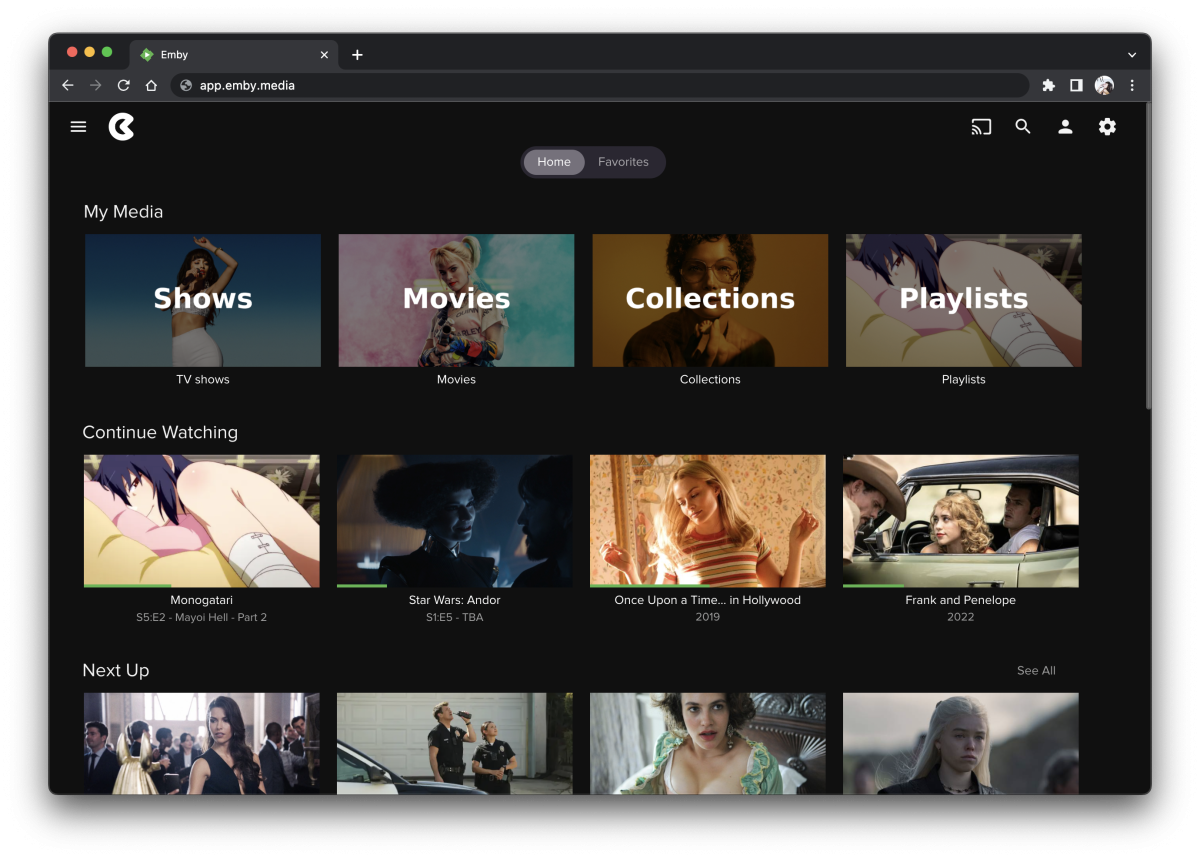
[09-22-2022] update https://pastebin.com/dR1wDdUy icons.zip
 1 point
 -
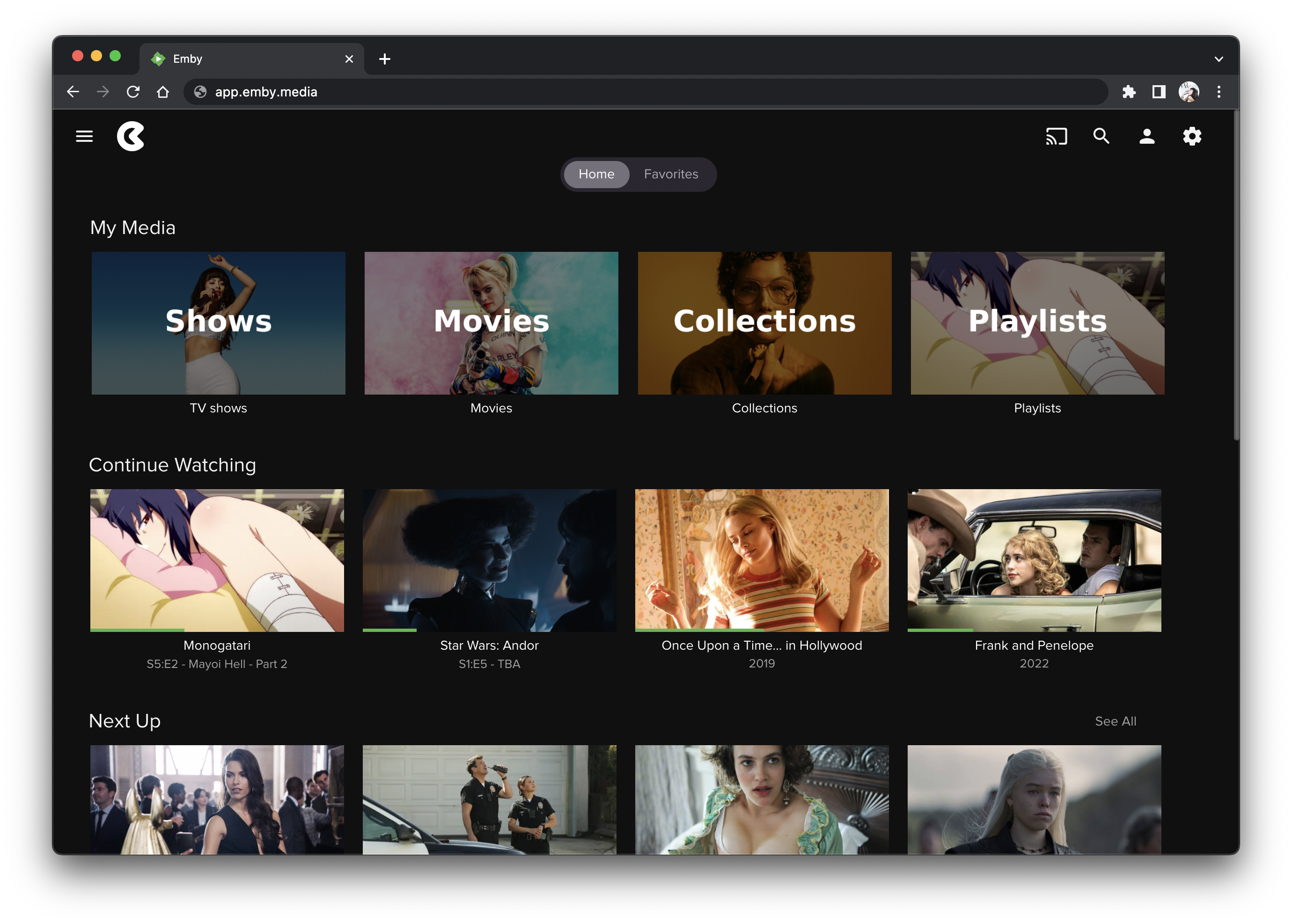
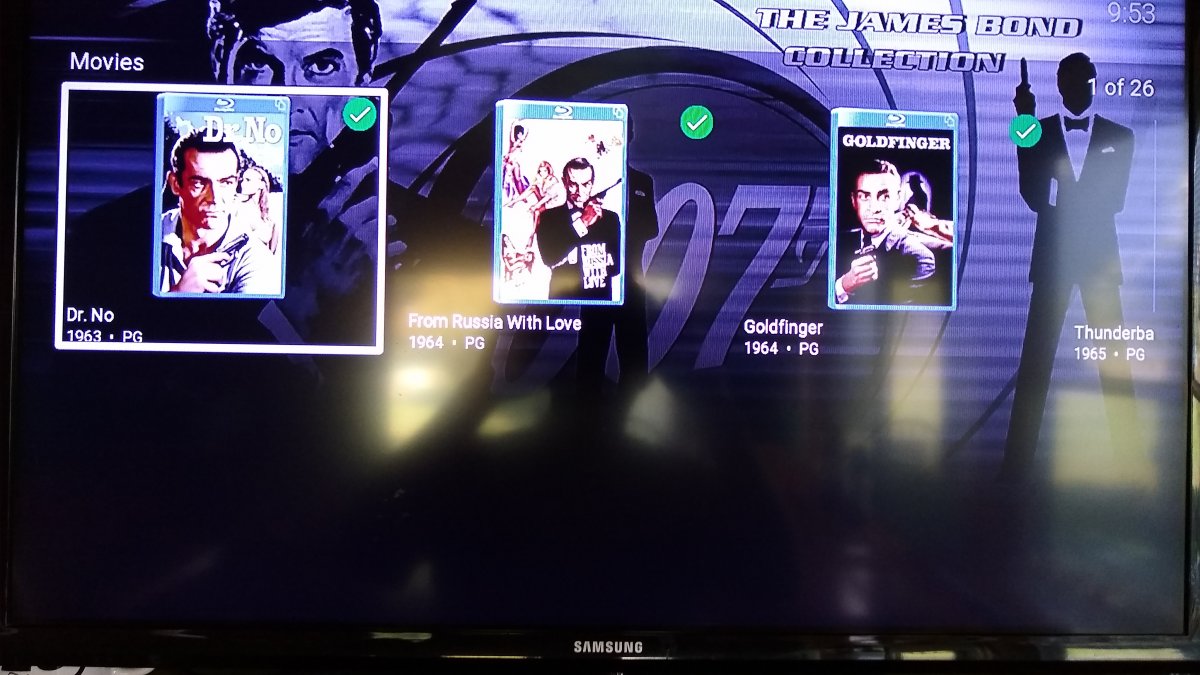
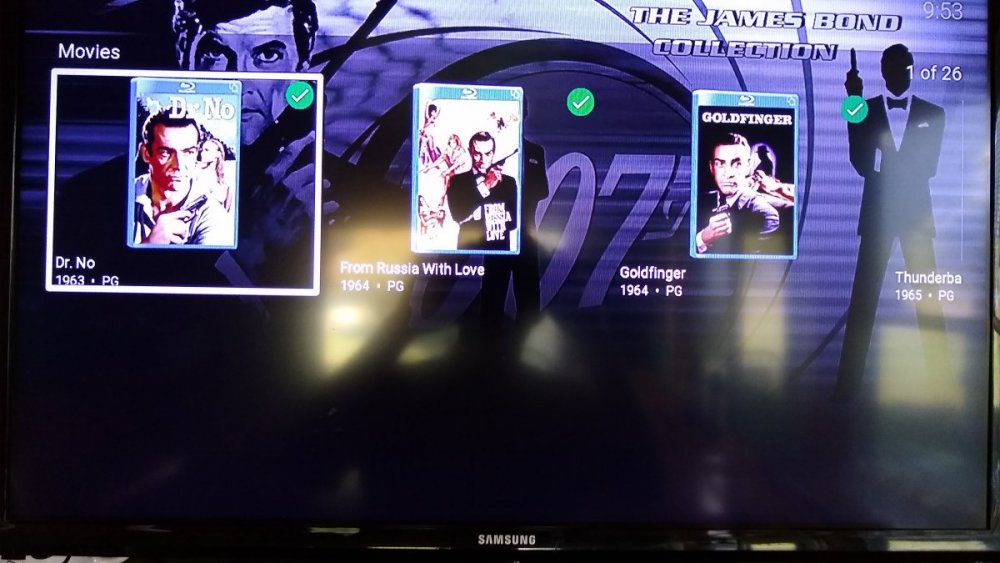
This afternoon I was watching a movie when the movie frozen, then Roku rebooted. When it came back to life the Emby Roku app had updated. I picked up where it left off and played the rest of the movie perfectly. The problem is the display of movies in a collection. Since the update now displays the movies horizontally with only 3 movies on showing without scrolling. The box surrounding the movie poster is laid out is landscape with the poster a portrait inside. What a waste of space. Can't this layout issue be fixed1 point
-
We are looking into improving it. Thanks for reporting.1 point
-
Okay, that is your problem. Premiere requires at least periodic internet connectivity. Can you allow that at least temporarily?1 point
-
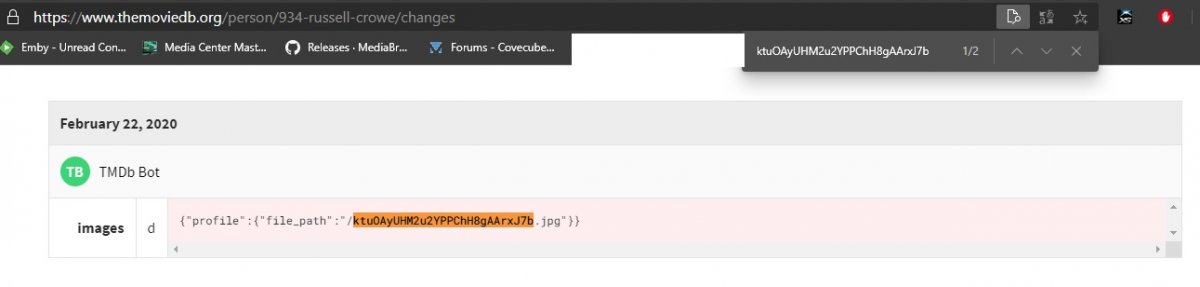
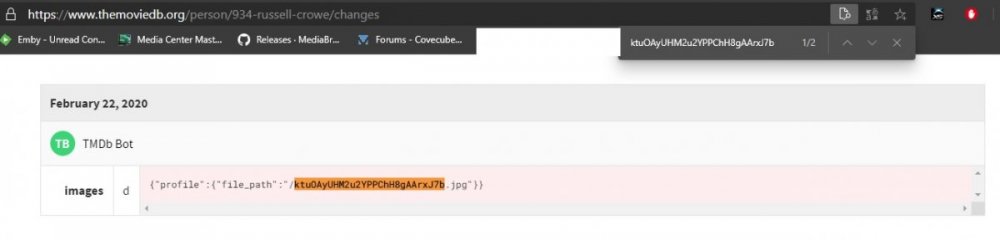
This is the same as all the other broken/corupt/missing people image topics. It is do to the initial media import pulled a tmdb url for the image and TMDB has deleted that image and now you have a broken database image. Emby requires you to enter the person for Emby to actually get the image locally (per request of providers). As shown here deleted from TMDB Dependent of your OS have you tried the plugin fix? https://emby.media/community/index.php?/topic/86323-tmdb-corrupt-image-fix-plugin-for-windows-10
 1 point
 -
I'm sorry you feel my response is ridiculous when I tell you we will look at this. But as I've stated it's a non issue when the software is used as designed so we would need to look at it and evaluate if this type of change is warranted or if we could do something else. Personally I'm not sure this would be a good change (only show nag screen to admins) to make as it would defeat the purpose of the "nag screen". All anyone would need to do is setup an admin account and another user account (normal user) for the admin to use so they would essentially never get the nag screen during normal use. That would defeat the purpose of having it. What we can do however is look at ways to maybe extend the check so that the clients know it's licensed and not show the nag screen to anyone on systems with the license key installed. I'm not sure what else to say other than we understand your issue and unique situation and we'll look at it as I've said a few times already.1 point
-
The issue is the way you present the media to Emby. As you know V4 changed the way this works. What you want to do is add ONE parent folder to the library and that's it. If you add multiple folders you will get a parent folder for each share. I don't know what type of storage you are using or how many actual servers you have the media on but if it's just one server you should be able to combine all discs to appear as one large drive/parent folder regardless of where the info is stored. If running Windows DrivePool is great for this type of thing. Otherwise you may need to try and resort to "Mount a drive as a folder" which is another way to do this in windows. Maybe take a look at this article: https://docs.microsoft.com/en-us/windows-server/storage/disk-management/assign-a-mount-point-folder-path-to-a-drive But basically you want to present the data to Emby in a different manner so you get the outcome you are looking for.1 point
-
Nah, things are good. I got it figured out. I appreciate it!1 point
-
I'm looking at it, thanks Carlo.1 point
-
Emby nor xTeVe will take two separate Logins of a Identical Provider and combine them into usable "Multiple Tuners/Streams". Most IPTV Providers offer Subs with up to 5 Connections/Lines on 1 Login...Then you can have 5 people watching 5 Different Channels...You cannot combine Two 5 Line-Subs and make it 10. We have been asking for this feature for years.... Sry1 point
-
Ports below 1024 are privileged and restricted to root or specific configurations to allow non-root user processes to bind to those ports.1 point
-
I think this is a dvbt problem and actually was@maegibbons rather than me1 point
-
As for your question on the user data - as long as those items were properly identified with a global ID (like from tmdb) at the time the user data was created, and they are properly identified again after the move, the user data will carry with them (if backed up and restored via the plug-in).1 point
-
I was the one who made that suggestion. I won't comment whether I'm a torrent person or not (and indeed, people can forget there can be legal uses of torrents - though they're admittedly rare), because that's not necessary to the point. Paul1 point
-
I always forget that, thanks! Seems so, at least the transcode reason in his screenshot is referring to that.1 point
-
It seems to be running like it should now. Yes, it was long time getting there, but it's ok....we got there. I had tried for months and months with the other brand media server, and got no where. Thank you for all of the help. I appreciate you keeping at it until the issues were resolved. Pete1 point
-
Well I CAN read even if I clearly don't always choose to.1 point
-
It is probably possible but I am not sure it is going to be added. EmbyCon is all about being simple and working, adding more background services to the base addon is not something I take lightly and for now not something I will be adding.1 point
-
One other thing would be comparing the old and new library options.xml. \Emby-Server\programdata\root\default\"each library"1 point
-
How can it be that everyone here suddenly has this same problem after the last emby version update??? There are A LOT of users with this exact problem all of a sudden! Where is the guidance and or/fix that you mention??1 point
-
Avi is a container; there could still be differences in the codecs of the files concerned. Paul1 point
-
That's not how I understand things, I have 2 subs in ONE instance of xteve, you do not need two instances. Set each sub (Playlist) in xteve and how many tuners each sub has, so in your case 2 each, xteve will then be detected as a 4 tuner HDHR
 1 point
 -
There is, use less bitrate heavy media. You can move 100 tons of dirt with a dump truck or your pickup truck but one is going to be a lot more successful then the other. You choose your equipment and infrastructure based on requirements and needs not wants. If you want to move very high bitrate movies you need to have the proper infrastructure as well to pull it off 100% of the time. The problem I think you have compared to most that use WIFI is that it appears you are using it for everything (correct me if wrong). By this I mean your Emby Server is using WIFI and so is the client. That means at a minimum 2 devices are sharing the bandwidth. BTW, it doesn't matter if you are using 2.4 or 5GHz on the same router (for the most part), they are devices sharing your bandwidth. By this I mean if you have 8 devices on 2.4 and 4 devices on 5GHz, that's 12 WIFI devices sharing that bandwidth. At a minimum, make sure the Emby Server is not connected via WIFI and has a cable to the router even if this means you move the router or the Emby Server. If after this you can do tests like turn off every WIFI device except the TV/Device you want to watch high bitrate files on and see with only that ONE DEVICE connected if it plays. If it does play back well then you know it's possible and if you intend to stay WIFI wiill need to add more hotspots that are hard wired together running on different channels to spread the load. These hotspots can not use WIFI to connect as that defeats the purpose so some hard line wiring will be needed or just put the routers near each other. Bits are bits so if you have a bitrate problem there is only two ways to solve it. Use less bits for the content or increase the bits available to use to stream the video. This really is a case of WANT vs NEED being different.1 point
-
Thankyou Luke. I know there is a lot of discussion about slow load times of channels etc. i dont have too much of an issue with this as i have switched off the function to pause live tv & just direct stream it. I get channel changes of approx 5 - 6 seconds like this. It works ok. When i do switch on the option so that i can pause live TV, channel switching is very very slow, hence why i played about with VLC & MX player. Its not a major issue whatsover - TBH id rather have slower channel changes, and the development of Emby to be focussed on things like the ability to create channel groups. Really looking forward having the ability to filter channel lists into movies, kids tv, radio channels etc. This would be extremely useful for me. Thanks for your reply.1 point
-
The relevant part was that all other libraries were configured differently then what was uploaded. The way it was set in the pics posted are the way every library is now configured. It's the option to create the thumbnails/bif files DURING scanning that was the issue. Having thumbnails turned on or allowing thumbnail task running wasn't the problem.1 point
-
Thanks a lot!1 point
-
I upgraded to 3.0.11 and this problem went away. I then applied the main.js mod and the problem returned. Anything else I can do to resolve it? Or do I need to choose between a working overlay and being able to drag to another window?1 point
-
I had to get rid of imvdb. It's 30-40% hit rate is awful, but when it doesn't hit, it screws up the metadata big time. adds weird artists and wrong song titles. Better to just dump it altogether. A good example is with the group 'The Monkees' imvdb changed the artist names to weird groups and, as an example, changed 'Last train to Clarksville' to 'Last train to London'. Out of 6 songs, the only one correct is 'Daydream Believer'. So I manually checked imvdb and these well known songs are not even in their database. Emby could fix this by using filenames when the hit is less than 99% instead of relying on a weak database to substitute wrong info.1 point
-
I guess it's designed for box sets of movies or TV series, which would be expected to have posters or box covers in a portrait format, and the behaviour with other formats simply hasn't been thought about yet. I'm happy with my solutions, but if you'd like Emby to add a possibility of (say) two or three landscape images, you could add a feature request (or vote for it if an appropriate one already exists). Paul1 point
-
Very pleased to see that changes will be made to collections, as the single row is brutal and different from how Emby works on other platforms (eg: Android App).1 point
-
Yes, we plan to improve the way collections are displayed. Thanks.1 point
-
I've sadly had to turn collections off due to this change. It's an annoyance, but not as much as losing the grid layout. I somewhat understand the reasoning due to mixed media, but I'd venture a guess that's a smaller number of users than those of us who just group a category like "Movies" into collections so we don't have to see 9 Star Wars or 3 John Wicks or 300 Fast and Furious titles in the initial category.1 point
-
I too was surprised by the update... my collections used to be a nice, navigable grid, and are now a single horizontal line showing three items at once. This is virtually unusable! My collections are all of the same type of media, and I desperately want my grid view back. We always open a collection (for example, current TV shows), and browse the grid to see what we want to watch next. This was a beautiful, intuitive, and functional interface that has now become unusable. One more thing that changed for the worse (dropped back, actually): the number of episodes shown on the folder in the collection view used to diminish by one each time you watched an episode. Now you need to exit the collection and re-enter to update this number (this is how it used to be a long time ago – we've regressed!). Please fix these issues! Thank you.1 point
-
If I understand you correctly, I will get the display I want if no single collection contains more than 30 items. I have 2 collections that have more than 30 items so I deleted them and rescanned the database thinking that the display will change. The results are the same, can only see three items before I have to scroll right.
 1 point
 -
Hi Luke, Yes this helped perfectly. Turning off throttling solved the issue.1 point
-
Here's the thing: Premiere doesn't really pay for the software itself. Premiere pays so we can have endless updates. At no point has the Emby pricing model been "Purchase Emby for $49.95; Upgrade from Emby Server v3.x to v4.x for $34.95." That's not a thing they do. You pay $120 once, as the server owner, and your whole dang family have unlimited updates and support forever. I don't know about you, but I'd pick the Emby support team over the Plex support team any day of the week and twice on Sundays. I might be frustrated that the Emby devs can't fricken work on audiobooks to save their lives (and for which I would legit pay extra to have), but otherwise it's amazing. With Emby, I recall submitting a bug report for something, and in less than 10 minutes I got a reply from Luke. Luke actually fricken works on development of the actual software, and I got a reply from him in minutes. Just 2 or 3 days later, there was a bugfix. Whereas, when I submitted a recent bug report with Plex, there has been no response whatsoever---not even from a Ninja (who doesn't work on the software), not to mention there's no fix and it has literally been months. So yeah, Emby's support is head and shoulders better. And I didn't even get into the topic of Plex implementing Plex News while completely ignoring the whole Feature RequestsSuggestions section. If you told me you want Emby to implement a curated streaming web news clip library, and initially not allow people to disable it---just like Plex has done---I think I would facepalm so hard I would have a concussion.1 point
-
Just to add my endorsement to this. By all means mark it as failed (in some manner) but recording retry (whatever interval is static or sliding scale backoff) SHOULD ALWAYS happen within the recoding slot. Yes, having breaks in the recording may not ideal BUT it is better than nothing. Losing a minute or two out of a 3 hour "Tour De France" stage or Football game is not a killer!! Krs Mark Sent from my SM-N976B using Tapatalk1 point
-
Strictly looking at your screenshot I'm disappointed to see that navigation hasn't improved. We are desperately in need of at least a Home button but ideally there should be buttons to quickly move between Home, Movies, TV, Live TV, and Recordings. Edit: I just read a post you made in another thread stating that you are going to unify the interface with the web app. Please disregard my disgruntlements.1 point
-
Thanks for the feedback.1 point
-
I lack the words to describe how much I loathe this &@^$-ing feature. Certainly I lack polite words to describe it.1 point
-
First off, there should be no need to set the sticky bit on the folders. I personally have never, ever used that and I have been using all kinds of distros for three years or so. Second, you actually still do not quite have the permissions set correctly. For any user or group to be able to actually open a folder, the folder needs to have the execute permission set for that user or group. IF you look at your permissions, the Baaria folder only has read, write and execute set for your user (700). You need to have that folder set to 750 at least for it to work. All of my files are set to be 755 and it works quite well. Doing a "chmod 770 -R /exports/zeusmedia/Movies" and "chown -R antonio:emby /exports/zeusmedia/Movies" should fix your problems. Second, when you move a file to a new location, it preserves the permissions of that file when you move it. In other words, a file with the owner:group antonio:antonio with the octal format 700 will have those same permissions in the new folder regardless of whether the parent directory is set to the permissions antonio:emby octal format 777. Emby will have access to the directory and be able to see the file and write to that folder but it won't be able to read the file to play it. My point being, remember to change the permissions on any files you add to your media directories.1 point