Leaderboard




Popular Content
Showing content with the highest reputation on 06/24/20 in all areas
-
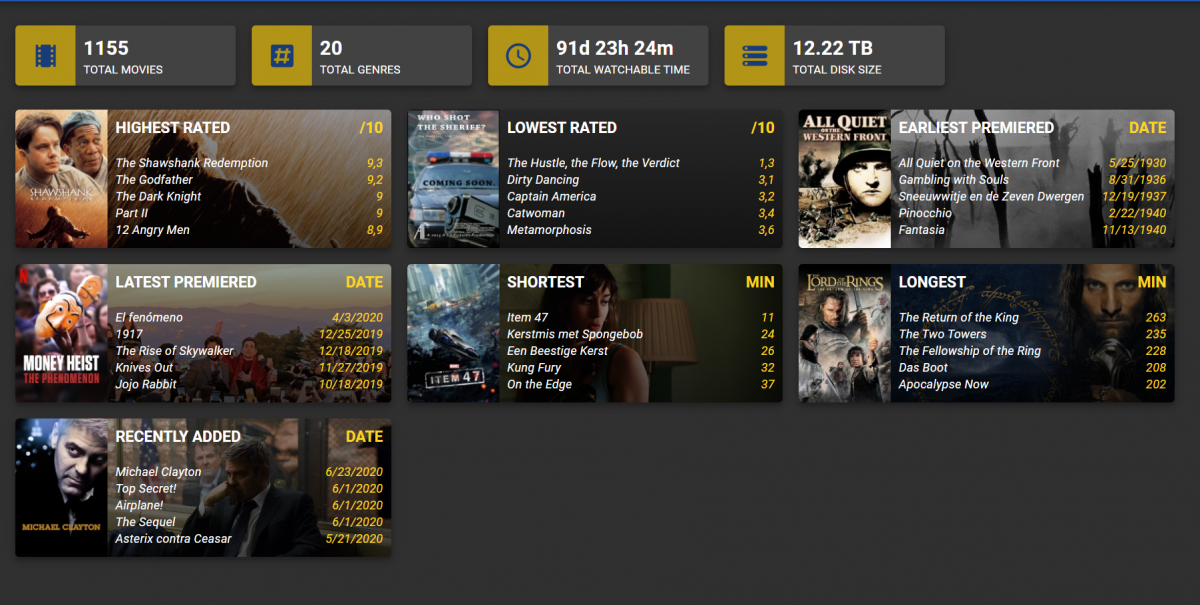
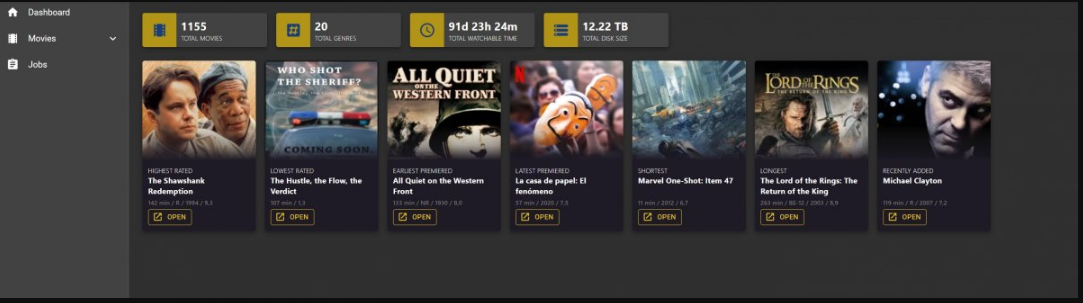
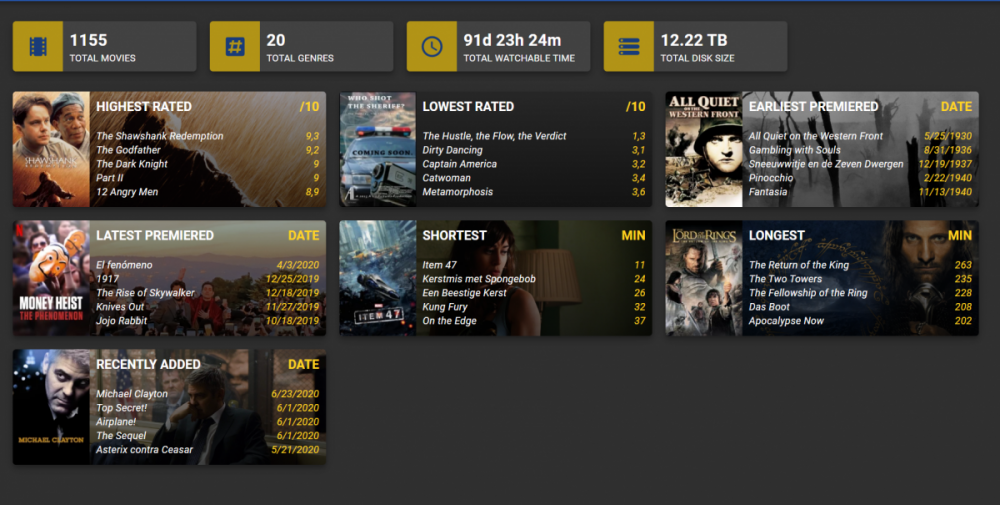
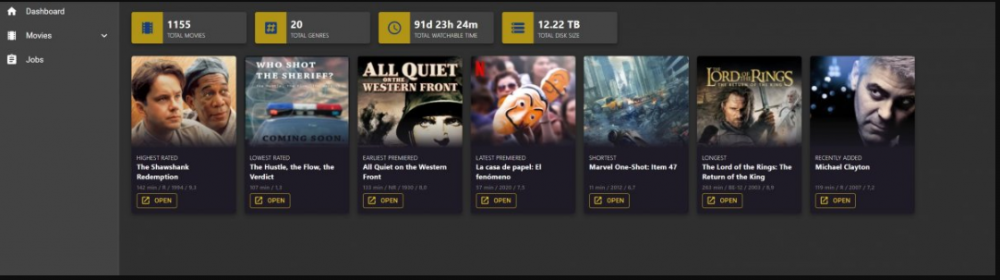
So I did some refactoring after the idea from @kesm. The titles are clickable and on hover they become yellow like the other text. I was just thinking that the yellow looks a lot like tautulli so maybe I need to find some other color scheme then blue-yellow as default theme colors. Maybe going back to the Emby green would be better.
 4 points
 -
Tapatalk confirm the issue: As our part is done, when new update come up, we will update the plugin. Thanks.2 points
-
Yes, day of death isn't shown anywhere, at least in the web app. But you should see day of birth and location. Biography and image isn't available at TheMovieDB.2 points
-
Hey Everyone, My journey from Plex to Emby has been pretty smooth with the exception of setting up SSL encryption. There are lots of great posts on this forum and elsewhere on how to do this, and I consider myself pretty computer literate. But I'll be honest, this was a bit overwhelming for me as I have no experience at all in hosting web servers, DNS, or encryption certificates. After many hours, I've got it all working, so I thought I'd share what I've learned. I'm going to try to write this for the newbie, so don't be offended if it seems like I'm explaining lots of simple stuff. That's really what I needed a week ago, so maybe it'll help someone else in my shoes. Also, this is for Windows, although most of it applies to any OS. There's lots of text, but it's really very easy. Let me also say, I understand that a reverse proxy gives you lots of benefits and flexibility for securing your server. But that was a step too far for me. If you want a reverse proxy this post is not for you, but there are many posts in this forum to help you. If you want to access your Emby server from outside your home network you will want to require secure connection mode for all remote connections (see "Network" tab in Emby server configuration). To do this you need an SSL certificate. To get an SSL certificate you must have your own registered domain name. Here's a step-by-step. Domain Name Registration A domain name is the readable text part of a web address. So emby.media, or google.com, or media.yourdomain.net. Most home users don't have one, but you need one to get an encryption certificate. While (Edit:)There are many options for purchasing a domain (godaddy.com being very popular), I chose to buy my domain from domains.google. It cost me $12/year, and this is the only cost to getting your Emby server working with encryption. Go to https://domains.google, pick a domain, pay your money, and you're ready to go. For the rest of this discussion let's say you registered the domain name yourdomain.net. Now you need to associate your new domain with your home IP address. Most home users get their IP address assigned to them by their internet provider and it is "dynamic," meaning it can change. So you need to be able to tell your domain provider what your address is and update it when it changes. This can be done automatically, and is called dynamic DNS (DDNS). (Edit:) Before obtaining a domain, ensure the provider supports Dynamic DNS. Google domains supports this easily, here is the help page explaining how to set it up. Fortunately, my ASUS router has this capability built in so it was easy, but it's easy even if your router doesn't (follow google's directions). (Edit:) In case you have a static IP (obtained from your ISP), DDNS support is not mandatory. That's it for domain name registration. Now yourdomain.net points to your home network IP address. SSL Certificate Now you need to get an SSL certificate. This has the encryption keys you need, and must be issued by a recognized certificate authority or it gets blocked by your browser. Lets Encrypt will give you a free SSL certificate but it has to be renewed every 90 days. This was the part I was most confused by, but it's actually really easy. The part to understand is that Lets Encrypt must have some way of proving you own your domain name before they can issue you a certificate. There are two options, 1) they give you a little text file to place on your web server in a certain location. I don't have a web server so this is a no-go. 2) They give you a text string to add to your DNS registration in what is called a "TXT Record." You do this with google domains, it's very easy. To get a certificate you need an ACME client program that knows how to talk to the lets encrypt server. They recommend certbot, but it doesn't work in windows. Dig enough and you'll find ZeroSSL, they have a nice downloadable program that does it all and is really easy. Download here. Make a directory on your computer (I used c:\ZeroSSL). Put the le64 (or 32) exe in this directory. A single command will create your certificate. I think the easiest way to do this is create a text file in the same folder as the program, call it "get_cert.bat" and put the following three lines of text in the file. Edit the second line to have your actual domain name (instead of "yourdomain.net"), and to have your actual password for your PFX file (whatever you want it to be, just replace "yourpasswordhere" in the code below. @[member="Echo"] off le64 --key account.key --csr domain.csr --csr-key domain.key --crt certificate.csr --domains "yourdomain.net" --generate-missing --handle-as dns --export-pfx “yourpasswordhere” --live pause Save the text file as get_cert.BAT and then double click it to run. This runs the le64 program, creates the public/private key pair, asks lets encrypt to generate a certificate, saves that certificate, and converts it to a PFX file format that Emby requires. All in one command! When you run this, a command window will appear and you can see what it's doing. After a few seconds it'll pause and ask you to place the TXT record in your domain. It gives you a name and value, the name will be something like _acme-challenge.yourdomain.net, and the value will be a bunch of random letters and numbers. The program pauses here for you to put this into your domain. So now you just log in to your google domain again, go to "DNS" on the left menu, scroll all the way down and enter a "Custom Resource Record." The type is TXT, the name and value are what le64 gave you. Put them in, wait a few minutes for the change to take effect (took just a couple of minutes for me). Then go back to the command window where le64 is running and press enter to continue. It'll then verify your TXT record is there and issue your certificate. You'll find a file certificate.pfx in the le64 directory, that's it! Emby Setup Now log in to your Emby server setup. Go to "Network," in the field "External Domain" you put your domain name, so yourdomain.net or whatever you chose. For "Custom SSL certificate path," browse to the .pfx file that was created by the le64 program. In the "Certificate Password" field put whatever password you used in the .BAT file above when you created your certificate. Then for "Secure Connection Mode" I recommend you choose "Required for all remote connections." You also have to log in to your home router and forward port 8920 to the computer running your Emby server. I'm not going to give directions on how to do this, it depends on your router, but it's super easy. That's it. You need to restart your Emby Server, and then you're done! You can now access your server remotely and securely at https://yourdomain.net:8920. Certificate Renewal Now, I mentioned before that the Lets Encrypt certificates are only good for 90 days. So every 90 days you have to renew the certificate. Take that "get_cert.bat" file you made earlier and make a copy of it called renew_cert.bat. At the end of the second line, just add the text "--renew 20" (without the double quotes). When you are within 20 days of your expiration date run this file, it'll renew your certificate. I believe it'll ask you to place a new TXT record in your domain, so certificate renewal cannot be made fully automatic. You'll have to run it manually and add this TXT record into your google domain just like when you created the certificate in the first place. But it takes just a few minutes and then your certificate is renewed. You'll have to restart your Emby server for it to take. The file locations all stay the same, so you don't have to update anything in the Emby setup, just restart Emby. That's it! Well, I hope this helps someone. Sorry for the long post. I would have benefited from this level of detail a week ago, so maybe it'll be good for someone. If anyone sees something wrong here, feel free to correct me.1 point
-
I am switching over from a Win7 box running MBC to Chromecast dongles. With the Win7 box I had a HDMI to Cat6 setup that allowed me to stream to up to 4 displays/TVs simultaneously. It was great while it lasted, but involved stapling cables to the ceiling to run it from room to room - plus it has borked Can there be an option to multi-cast to several receivers at once? i.e. simultaneously play to Chromecast dongles in my office and living room and kitchen simultaneously so i can walk from room to room without stopping and restarting the movie or show all the time? I realize that bandwidth could POTENTIALLY be an issue, but i have a fill gigabit network and a multi-port NAS so that really is the least of my worries... Thank you!1 point
-
To help with the tracking of feature requests and allow users to easily find and vote on features they would like to see I have started a master list. Please keep all feature specific discussions to their respective threads. Don't forget to cast your vote by liking the first post in the thread. If any of the features are complete, information is out of date, or is missing completely please post in this thread and I will update the list. Server Features 100+ Likes Centralized Authentication Functionality (LDAP/SSO/HTML Header/RADIUS) 40-100 Likes Integrate Trakt Recommendations Option to ignore media in scans Forget a series in Next Up User Groups Smart Playlists Copy user / user templates (Duplicate: User Groups) POOL Multiple m3u Tuners - No Double or Duplicate Channels Additional Extras/Special Folder Types for TV Series (similar to Movies) Hide Empty Folders Google Drive as source Include Collection information on movie's title screen Import playlists Set simultaneous connect limit for users Web client to remember "Tab" 20-40 Likes Multi-Cast Support Merge libraries from multiple servers Anonymised Logs Bitrate on admin page Down for maintenance Paginated full search results instead of arbitary 30 result limit MySQL Support Configurable collections folder Auto Delete Watched after "N" Days Watchlist PseudoTV Emby style! 2-Factor Authentication (2FA) Channel groups for live tv Chapter images in media folder Server dashboard max bit rate exceeds limit clarification. Recommend movies or shows to other users Auto Organize Movies as well as TV Live TV Deinterlace Method Option 10-20 Likes Live TV Commercials file support "Galleries" Movie Extras Folder Show Intro Skip Option Watching Together (Duplicate: Multi-Cast Support) Client Bandwidth Feedback Bulk Meta Data Editor Implement Metacritic ratings and allow Enable/Disable ratings option in settings Download Subtitles during playback SHow only "Unwatched" in "Because you like...." Collections and Genres in Search results Transcode in H265 Add a specific content type for classical music Book server/reader incorporation Audiobook support Recently Watched Allow user comments on media "Resume" for playback of active recordings Lyrics for Music Recordings That Fail - Listing and/or notification Include tags in search results Preemptively cache images Metadata - original film name "Select All" / "Deselect All" Options with Multiselect on Server Webapp Offset transcoding - Separate Transcoding Server Ability to view by Actor or Studio Nested Collections Change information when version is changed Server Dashboard: Link to Media which is currently beeing played Recording indicator Animated gif support Kill current transcode/streaming sessions from the server [iPTV] Ability to watch PiP (picture in picture) two channels More Filter/Sort Options Multiple Resolutions for TV shows Ability to group movie versions together and choose which to play Send Message To Logged In Users Max streaming rate per user Are you still watching? Thumbnails during scrubbing Profile visibility different within LAN than from WAN Client Features 100+ Likes 40-100 Likes Adjust subtitle delay 20- 40 Likes Gapless Playback Reposition Extras above Cast and Crew, so you can see they are there without having to scroll down Show splash screen whilst Emby Theater is updating Go back to the minimalist OSD while watching.. 10-20 Likes ability to adjust playback speed Random Movie view on homescreen (Roku, Android TV, others?) View channel guide while watching live tv Subtitle size and color Music virtualization on screen Android Mobile - Android Auto Programmable Remote Keymapping Plugin Features 100+ Likes 40-100 Likes 20-40 Likes 10-20 Likes1 point
-
I'd like to see a feature where on a piece of content there was a button to report a playback error or such. I have a lot of content that I haven't watched that friends have requested - if there was a simple button they could click that pings me a message letting me know there's an issue with the file that'd be great.1 point
-
As I mention in a related post, I love the additional subfolders for Movie Extras (eg, Shorts, Scenes, Interviews, etc.)! It would be awesome to extend this functionality to TV Series as well. Specifically to add support for many/all of the same folders supported for Movie Extras, eg, extras specials shorts scenes featurettes behind the scenes deleted scenes interviews trailers As well as any additional folders that get added in the future (eg, hopefully Galleries). Support Placement of "Extras" Folders Within Each Season Folder, Plus A Naming Scheme to Link A Particular Extras Folder with a Specific Episode (eg, "\Season 1\E1 - Deleted Scenes\" for episode 1 deleted scenes): I want to clarify that it would be great if these various "extras" folder types could reside within each Season folder. So for example, within a Season 1 folder we could then have an "Extras" folder, a "Deleted Scenes" folder, a "Featurettes" folder, etc. And furthermore, that we could designate a particular folder to refer to a specific episode (eg, "\Season 1\E1 - Deleted Scenes\" for episode 1 deleted scenes). See more below, particularly why I think this would be so useful: https://emby.media/community/index.php?/topic/55915-emby-server-theater-additional-extrasspecial-folder-types-for-tv-series-similar-to-movies/&do=findComment&comment=587195 Thanks for your consideration! PS - If this is something you might like to see implemented, be sure to "Like" this top/first post (as well as any subsequent posts in this thread that highlight particular aspects of what you are interested in) -- "Liking" the top/first post helps the Devs to know how much interest there is in a given Feature Request.1 point
-
Please click "Like this" and share it if you want to support this feature. Thank you ! Hello, There is a Kodi addon call "gdrive" from ddurdle who can read videos (original and transcoding version) directly from Google Drive. Why not build on this idea to integrate Google Drive as source directly in Emby Server ? In addition, Emby could generate automatically the STRM files from one or many Drive folders. And transcodings are already available with Drive so no need to transcode with Emby server. What do you think ? ------------- Three reasons why this feature will be useful and awesome: 1. Cloud is the future and today the cost is affordable. I have a Google Drive Unlimited for $50/month (ie $600/year) and I have unlimited space that is secured against crashes. Knowing the cost of hard drive and the cost of power consumption, its a very good deal. 2. Google Drive transcode video file. This provides different stream quality like Youtube (1080p, 720p, 480p and 360p) and the "image quality/compression ratio" is very satisfying. I can play 720p video on my poor 4 Mbits DSL. 3. You don't need to have a big server. Personally, I opted for a little dedicated server (Kimsufi 2G) for the cost and I can leave it run 24/7! Furthermore, me and my friends can watch movies from anywhere! Basics features that should be included: GOOGLE APPS OAUTH2 for activation and permission playing transcoded version (MP4 360p, 480p, 720p & 1080p) directly into Emby's app playing original file (avi, mkv, mp4) directly into Emby's app import embedded subtitles porwerful script module for multiple folder scanning and STRM generating1 point
-
While setting up a new device or just searching for the next hiccup it would sometimes be useful to be able to jump to the currently playing media which is shown in the server dashboard. Maybe just by clicking on the image of the active device. ATM now, I have to search for the item in the search field (which sometimes work and sometimes not) or need to manually browse through the library to see the media details.1 point
-
I would like to be able to mark individual media items or even perhaps entire libraries to be excluded from media scans. If I have retrieved all the metadata and images I want for a particular TV series or Music collection and I know that the files will never change and the metadata should never change, I would like to be able to exclude it from scans to a ) reduce scan time b ) decrease the likelihood of unwanted changes being made c ) reduce network utilization I've noticed that even with series that have not had any new episodes in years (and no changes have been made in my filesystem) there is still information being downloaded from metadata providers. I suppose that is to check to make sure it is current/complete, but it is a waste of my network resources which are not plentiful. Perhaps this could be implemented by adding the option to not rescan media that has been marked as locked.1 point
-
It would be nice if the selected movie "version" will be respected when clicking the download or sync button. I have two versions for every movie, one for the (big) tv's and one for mobile devices. Now my Android device downloads the biggest file no matter which one I've selected.1 point
-
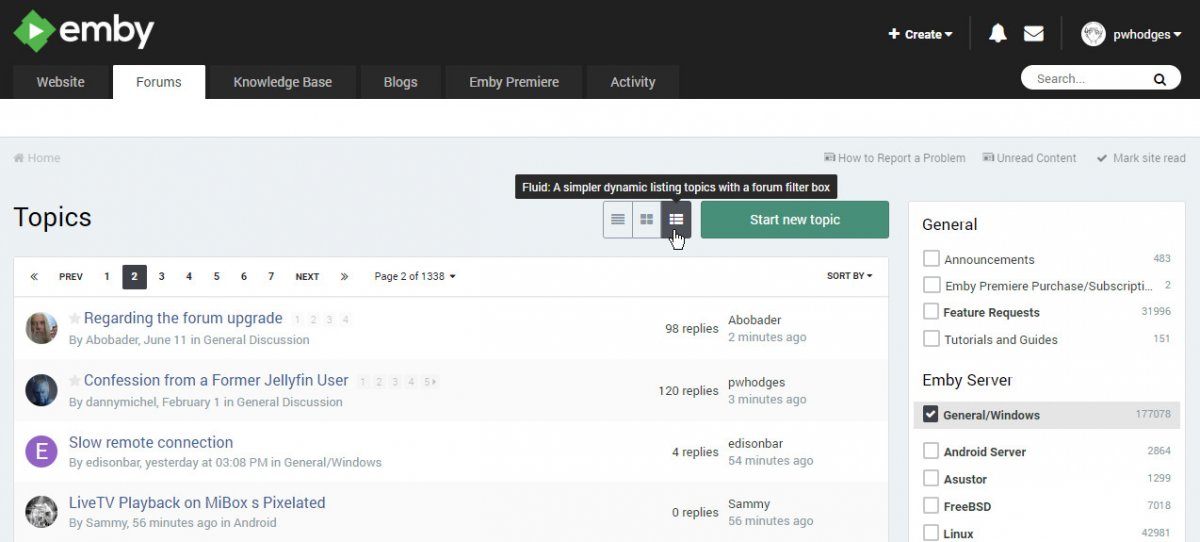
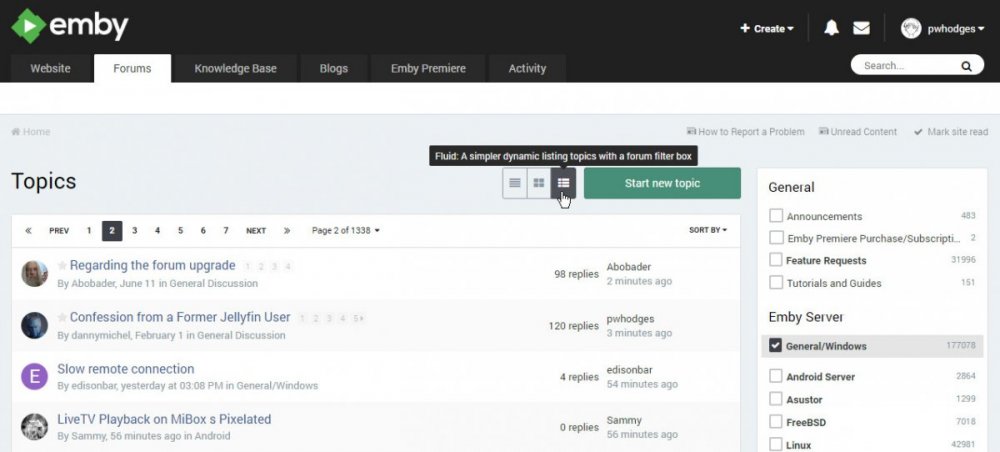
For those who haven't found the "fluid" option, here's a picture. When it's selected, you see all the unread posts in the forums selected on the right, all mixed up in time order from the most recent. The selection of forums I've made, by happy coincidence, has the first page made up entirely of pinned posts, so I've made a bookmark for the second page: Paul
 1 point
 -
@ankurmay1988 @MainMonkey I've taken a look in my crystal ball, but it's not very clear. Enable the debug logging in the plugin, reproduce the problem and attach or send me the embyserver, virtualtv and ffmpeg log if there is any. Also no support for older versions.1 point
-
@softworkz You told me to remind you in a while. Well i just tried the new driver 451.48-desktop-win10-64bit-international-dch-whql-g. Still wont do any GPU encoding with hevc wish they'd fix this bug just letting you know1 point
-
The UDM is catching that particular activity because of its position in the network. The destination is a specific computer which is running software that is the cause of the traffic. So it's inside out. I imagine that Snort would catch it if the UDM wasn't there. And yes, I followed that video, but as you'll see, he suggests experimenting with some of the settings to see what works best for you and doesn't block too much traffic.1 point
-
If MrMc and VLC on the Shield are using ffmpeg and ffmpeg is truly better then, maybe, Emby should also use ffmpeg on the Shield. I believe that using the best engine possible to process the video just might be a good idea.1 point
-
There is an option to save your metadata and images with the media files, that way you can disconnect and reconnect drives easily, without losing data. Hope that helps. Sent from my SM-G920W8 using Tapatalk1 point
-
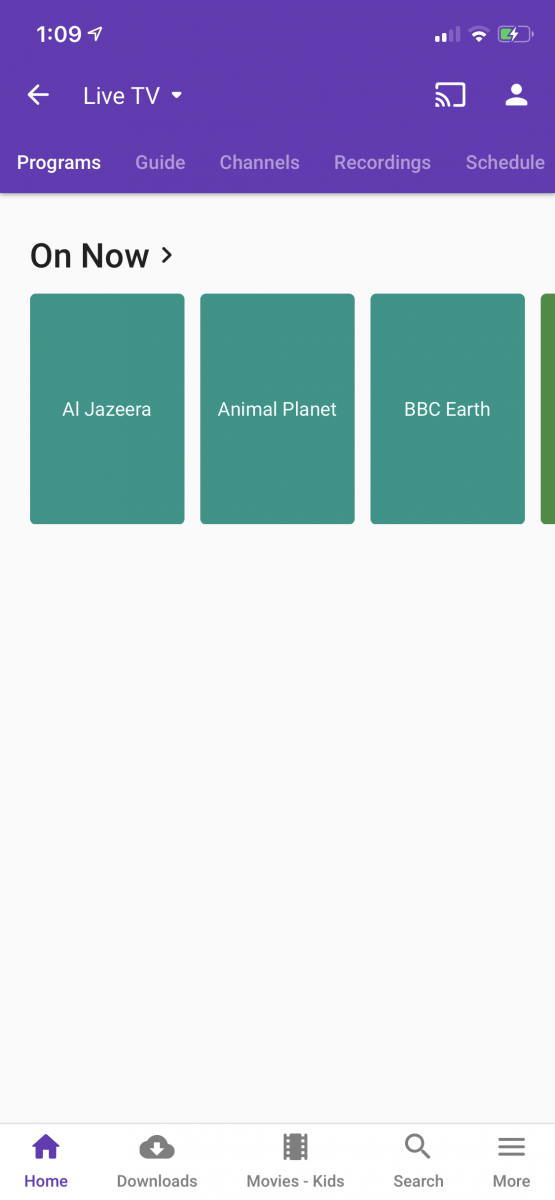
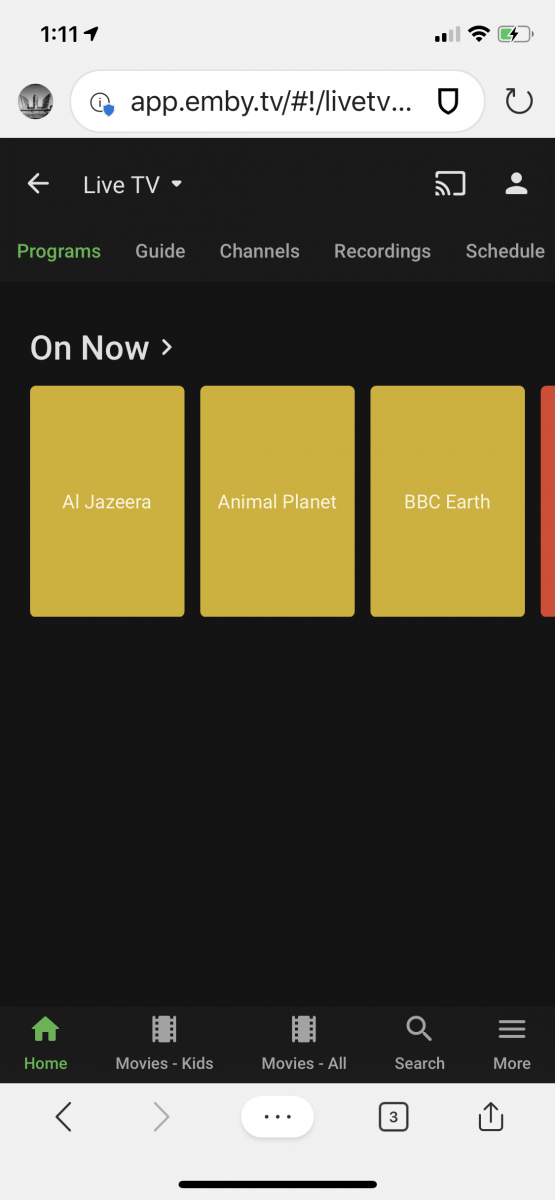
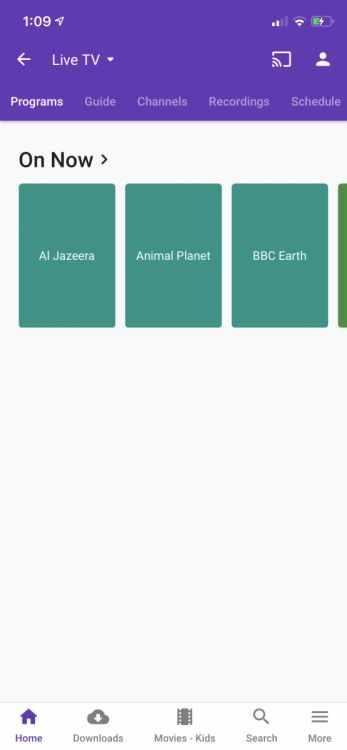
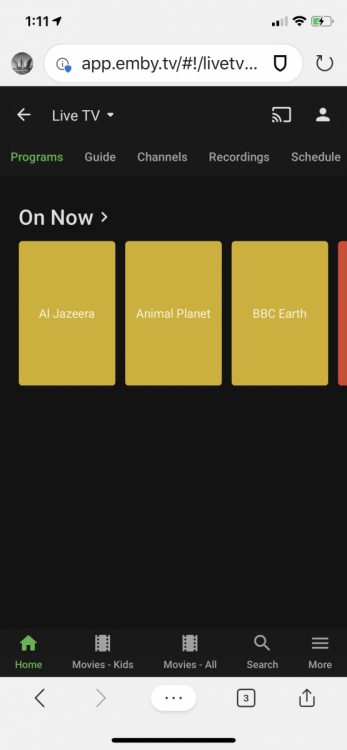
Hmmm - so I just had a thought after my last message. I added the Vbox M3U tuner back in without an EPG provider. It then did a ‘proper’ refresh - about 8 steps along the refresh progress bar (guessing) and sat for ages on the last step - I suspect cleaning up the over 5000 orphan channels. It is now all clear - see pics below one on iOS app and the other within iOS Edge browser - just not near a PC. This was a much longer refresh. It seems to me something broke/breaks the refresh process from time to time - I’m not sure of the order of events but it has definitely happened before and I’m betting will happen again. The refresh before was much to fast - seemingly like a single step. Thoughts? Much appreciate your prompt responses through this - unlike the reputation of a competitors board !
 1 point
 -
I added a bitrate selector when you select Force Transcode to the latest beta 1.9.921 point
-
yeah I am leaning towards this one as well. You select Force Transcode and a dialog pops up to get you to select the bitrate, it remembers the last one you selected so you can just hit ok again if you did not want to change it.1 point
-
yes that is correct, with the new settings you would need to adjust the bitrate in the settings to trigger the lower transcode bitrate. So lets think of a better way. Two options that I can think of. 1.have a force transcode bitrate in the settings, so you have the normal bitrate and then a force bitrate and when you select Force Transcode it uses the force bitrate 2.when you select Force Transocde you can select the bitrate you want1 point
-
set the bitrate to 500001 point
-
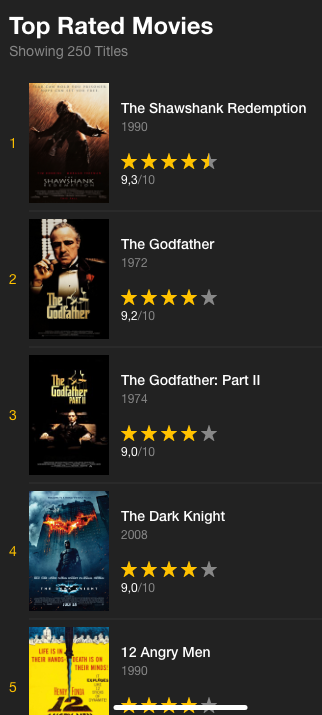
@reggi thanks for the update. A suggestion : In this screen, instead of displaying only a movie for each category, it could be great to have a widget that list the top 5 highest rated movies for example and a link to view more with a list of all movies ordered by ranking desc Something like that with a view more at the bottom or more like tautulli : EDIT : You can also do the same thing for actors, it will prevent to have only Stan Lee displayed in a lot of genre EDIT 2 : Here is some inspiration for filters : https://dribbble.com/shots/6592115-Movies-Dashboard/attachments In the left part you can add all your available filters, once one is selected it's going to the top with the possiblity to delete it or this way to add advanced filters : https://dribbble.com/shots/4068867-Advanced-Filter-States-Flow
 1 point
 -
I return it back, yes it look better, but I still hoping our members when they have time for it, to upload avatar, either way, it back now.1 point
-
Thanks for all your help! Figured it out. Pioneer AVRs have a kind of hidden setting for 4K HDMI. They can be set to Enhanced or STD mode. Enhanced mode is what is needed to get everything working properly! This is also on some Onkyo AVRs. Also need to be the newest firmware. This will also fix 4K HDR for Netflix, Amazon and Disney+.1 point
-
And don't forget in Kodi 19 you will also have MediaImport1 point
-
It's something we can look at adding in future updates. thanks.1 point
-
Good to see more people are requesting this feature, now a matter of time for @Luke & @ebr to make it happen1 point
-
We have a team of developers, and we keep most of them isolated from the forum to ensure as much of their time is spent on development as possible.1 point
-
But there is date on which he died. But this not shown in my emby1 point
-
Because Emby doesn't use IMDB at all. Only TMDB or TVDB. And for example "Gustl Bayrhammer" has no image on TMDB: https://www.themoviedb.org/person/26507-gustl-bayrhammer?language=en-US1 point
-
Tried many times, no change1 point
-
Very pleased to see that changes will be made to collections, as the single row is brutal and different from how Emby works on other platforms (eg: Android App).1 point
-
Hi, try refreshing the metadata of the movie or series containing the actor. Please see if that helps. Thanks.1 point
-
If using Windows then WinSCP might be an easier tool1 point
-
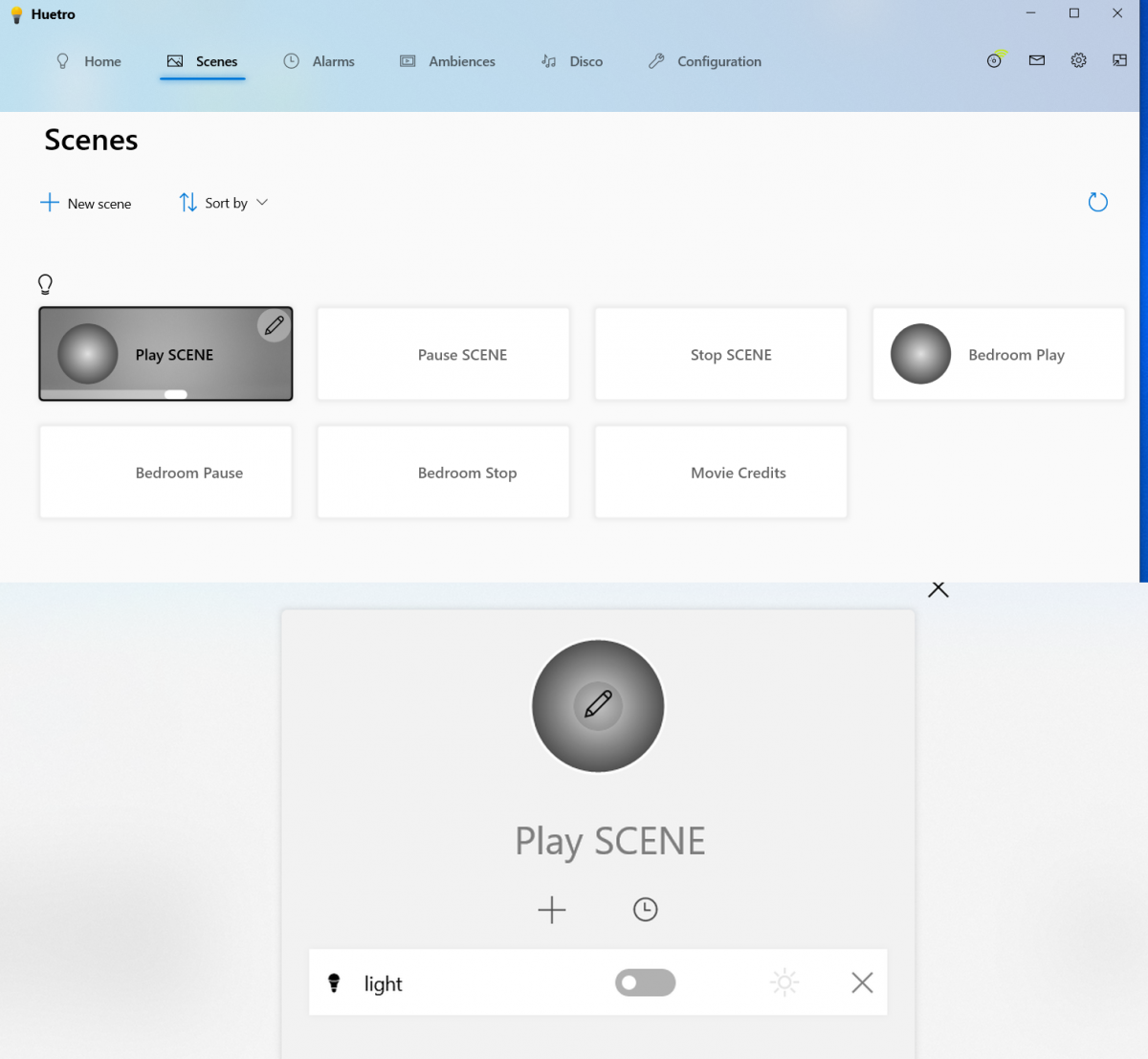
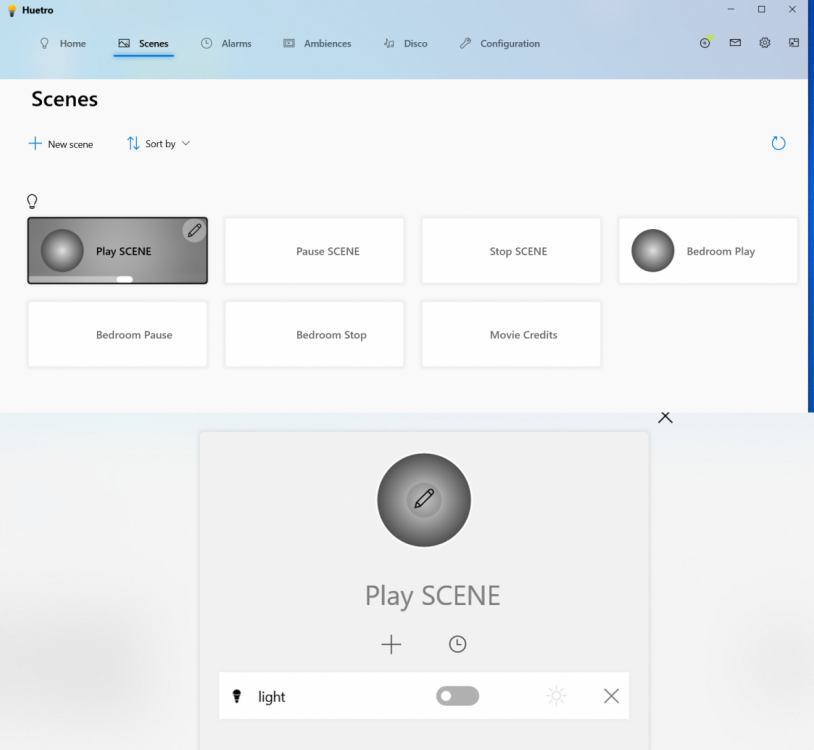
Yeah it's as I remembered. Scenes are their own entity, not tied to a room. At least in the Huetro Windows app. You define a stand alone scene, and assign lights etc to the scene. I highly recommend this app for creating scenes and other Hue related configuration. Huetro for Windows
 1 point
 -
Werden bei Euich dann alle Daten angezeigt? Beispiel Gustl Bayerhammer. In der IMdb sind viel mehr Daten als nur Geburtsdatum und Ort verzeichnet. Bei mir werden aber nur die zwei angezeigt. Wie kann ich ich alle Daten anzeigen lassen?1 point
-
Hi, Mir ist das auch schon aufgefallen und bei nur fehlende Metadaten aktualisieren wird hier auch nichts nachgeladen bei den Schauspielern, wenn du aber sagst aktualisiere alle Metadaten dann klappt es, du musst dafür auch nicht die Cover ersetzen lassen. Hoffe das Hilft dir erstmal, wobei es eigentlich ein Bug ist meiner Meinung nach und dies nur ein workaround ist.1 point
-
when looking at a persons content, as well as their series showing, multiple episodes will also appear for that series diluting the value of the view. maybe the server could prevent fetchers from adding a person as a guest performer if already on the main line up. or maybe fetchers could have this option. maybe a plugin could trawl the series/episode database on a schedule removing such guest performer entries from episodes. or if the database is fast / capable enough maybe such episodes could be filtered out of view in real time. Sent from my SM-G955F using Tapatalk1 point
-
Hi I would like the option in users to prompt the user to set a local password for the server they are on. For example, if a user logs into a server with emby connect, but don't have a local password set, emby notifies the user or even forces them to set one. The reason why I feel this is needed is I have read of users being hacked due to not having passwords on emby connect accounts. Well most people using emby don't know that they don't have a password set when they sign in with emby connect. Most assume their password is set locally with their emby connect password. Another option which may be more complicated would be when users are linked with emby connect, the local password is automatically matched to their connect password. PS. if you are reading this you should make sure all your accounts with remote access have passwords set EVEN IF they are emby connect users.1 point
-
I agree and have requested this in the past as well. A setting to auto stretch or auto zoom 4.3 content would be nice. And for everyone who would like to watch there show as intended, it is a setting you don't have to use.1 point
-
One other comment. I didn't do this in my original post because I prefer to just keep track of my renewal schedule on my own. But if you want, you can add this to your le64 command line when getting or renewing the SSL certificate (don't remove anything else that was there, just add this to the rest of the command): --email "my@email.com" It will register your email address with Lets Encrypt (substitute your real email address in place of my@email.com of course). Then I understand that they will email you a reminder when your certificate is about to expire. It's a nice way to be sure you don't let time slip away from you and suddenly find your certificate expired.1 point
-
I think it's a great idea for the future. thanks.1 point
-
It is working for me, I can force transcode h264 content fine. pm me the full log or the full snippet0 points