Leaderboard




Popular Content
Showing content with the highest reputation on 06/12/20 in all areas
-
We will add dark skin within few days.3 points
-
It would be great to be able to configure channel groups in LiveTV, which can be selected in the guide view (maybe as tabs) so that we can more quickly navigate to preferred channels using the d-pad. Perhaps start with Favorites by default, but be able to add custom groups (similar to collections) which we can add channels to (Network, Premium, Basic Cable, Kids, News etc.).2 points
-
While setting up a new device or just searching for the next hiccup it would sometimes be useful to be able to jump to the currently playing media which is shown in the server dashboard. Maybe just by clicking on the image of the active device. ATM now, I have to search for the item in the search field (which sometimes work and sometimes not) or need to manually browse through the library to see the media details.2 points
-
Good day all, Yes, we know about the issue, but let me give a head up: The complete forum upgrade is not done yet, due to some issue we faced with our servers, we did not complete things we like to apply, we will as soon we solve some issue as I said. We will apply some plugin like Tapatalk and others by tomorrow, we will solve some issue as well. We simply put the forum online so you guys try it and as well testing and give back feedback while we working on our community. Deep thanks to Ebr, Luke and John for their outstanding works/time on this update. Thanks to you all for your patience. My best2 points
-
These "modern protocols", most notably, are HTTP and HLS (http live streaming) that are used by Emby to stream content Unless you're direct streaming or transcoding, the protocol will most likely be HTTP, otherwise it'll be HLS2 points
-
The simple solution is get a safety deposit box and buy a few multi-terabyte drives and rotate them in and out of the box keeping a full backup in the box. You can use any of the many backup programs to accomplish that and you will be about as safe as you can get. If some disaster happens that destroys both your in home setup and the backup in the bank then there is probably much greater problems you need to deal with. I do not trust any "online" backup system and I trust even less other people to maintain my backup. If you want reasonable safety and do not want to involve a bank a good fireproof safe can be acquired and your backups can be kept in there. I have a safe that is designed to withstand any house fire short of something like a white phosphorous and magnesium fire. It did not cost too much and my system and my backups are always accessible at all times. I just periodically hook the backup drives to my computer and run a backup program to get everything copied and I then rotate incremental backups to keep everything up to date. About once every couple of years I reset my entire backup and then I just keep to a schedule until the next time. I do not really trust automation for backups and it takes very little time to do it the way I do.2 points
-
Topic Reputation added, this starter of the thread will get total vote within the posts in his thread, later on, will add forum sort by reputations.2 points
-
Sorry if this is on another thread. Was wondering if there could be an option for watched media to not have a green check. Just an eye candy issue but I'd like the media cover art not to be covered with it. I'd just prefer to use the filter to see what is watched and unwatched. Thanks for all you do! I switched from Plex to Emby and found it to be a more beautiful and stable client!1 point
-
Hello Emby Team, Related to an earlier feature request: https://emby.media/community/index.php?/topic/74731-additional-header-option-in-m3u-tuner-tv-source-setup-page/?hl=%2Buser+%2Bagent I'm currently using .strm files to organize remote video content. My source requires me to send a specific HTTP_USER_AGENT in order to access the content. With IPTV sources it is possible to set a custom User Agent in order to use when playing IPTV content, however such an option does not exist for remote video content using .strm files. My suggestion would be to make it possible to add a custom User Agent either within the .strm file (as an optional parameter/line within the file), or possibly set this at the Library level. Adding it in the .strm file seems most logical IMHO since multiple .strm files from different sources could be in the same library. Alternatively, for me it would be enough to be able to set/override the User Agent for all remote content going through Emby HttpClient / ffmpeg //ffprobe etc. As a temporary solution I already tried to create wrapper scripts around the ffmpeg binaries to supply/override the User Agent using the user-agent parameter, however unfortunately Emby itself also seems to access the stream URL directly (in case or Direct Play?), so no way for me to hook into that. Here is an extract of the logs when trying to access remote content using the Emby Android App: Checking tcpdump to see the request that went out, there was no User-Agent sent at all: Thanks for your consideration. Bob1 point
-
Is it possible to add a bitrate for users that are direct(whatever) something? It's good info, and readily available. Thanks1 point
-
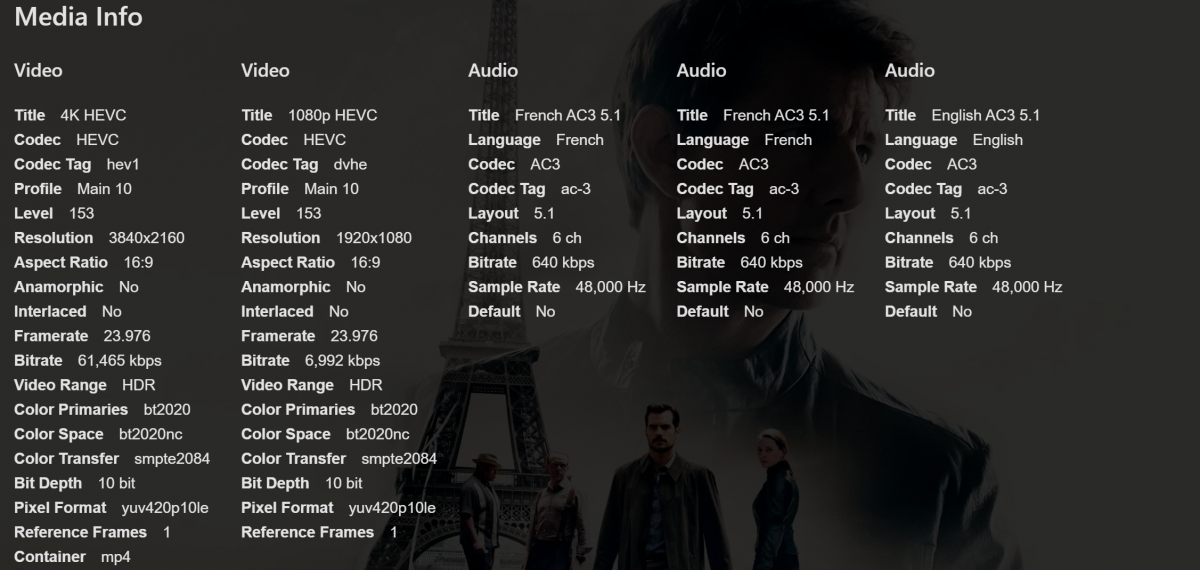
Hi everyone i have a issue with my Emby App well I tested 3 (Movies) two with Dolby Vision and 1 without Dolby Vision but with HDR10 So I tested the movies but the image are not good (Brightness/Darks colors) in HDR10 or Dolby Vision (Dolby Vision doesn't works) I tested without DV but with HDR10 and the result in bad quality of the movie is running, so the quality is very bad (Bright/dark) it's only shows me than the HDR10 is not working. Or at least compared with plex (ExoPlayer) the quality is less better in (Brightness/Dark) on Emby (LibMpv) So LibMpv < exoplayer in terms of brightness and darks color but when I open the stream with a VLC all colors as ok so it only proof than the LibMpv is not able to reproduce well the HDR10 because of their issues on the colors [Dolby Vision With LibMpv] i tried Dolby Vision but the screen still black and with plex works well, so i belive than the issue is from the (LibMpv) I really suggest to upgrade to Exoplayer. if possible. I guess than LibMpv Doesn't support MP4 Dolby Vision content so this is why i suggest moving to Exoplayer (Natively) cuz the Exoplayer run MP4 Dolby Vision withtout any issue in the quality. so i also noticed than the issue is really from the LibMpv cuz when i used "an external player" like VLC it worked well (Nice Brightness/Dark collors and etc...) [HDR10 2160p] the image still to be desirable because brightness and darks collor doesn't look at a real HDR10. i belive than it was a issue also with LibMpv. Tested With the follow movies HDR10 Dolby Vision (MP4) So Conclusion. I guess than LibMpv is not doing HDR10 / Dolby Vision as well on the plaformes where it was implemented. causing HDR10 dimming is bad on emby app My Suggestion. Emby Switch from LibMpv or talk with the LibMpv about this issue because mp4 already support Dolby Vision (Avalaible Only on MP4 and TS at this moment) and HDR10 is avalaible in all container (I guess) Issue: Bland colors instead of good colors as HDR10 Give us at normally Bad Dimming (Birghtness/Dark) colors. It just tell me than it not allow me to reproduce HDR10 but with exoplayer and vlc everything is ok on my Android and iOS. ScreenShot Plus many people enjoy more Exoplayer than others. @Luke Dolby Vision Demo files (MP4 Format) Glass Blowing @59.94fps: Dolby Vision Profile 5 UHD for iOS – Dolby Atmos Glass Blowing @59.94fps: Dolby Vision Profile 8.1 UHD – Dolby Atmos
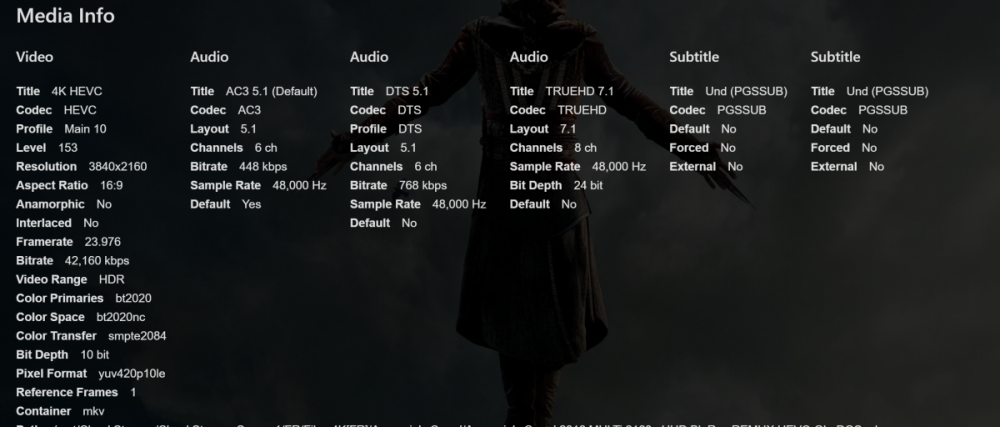
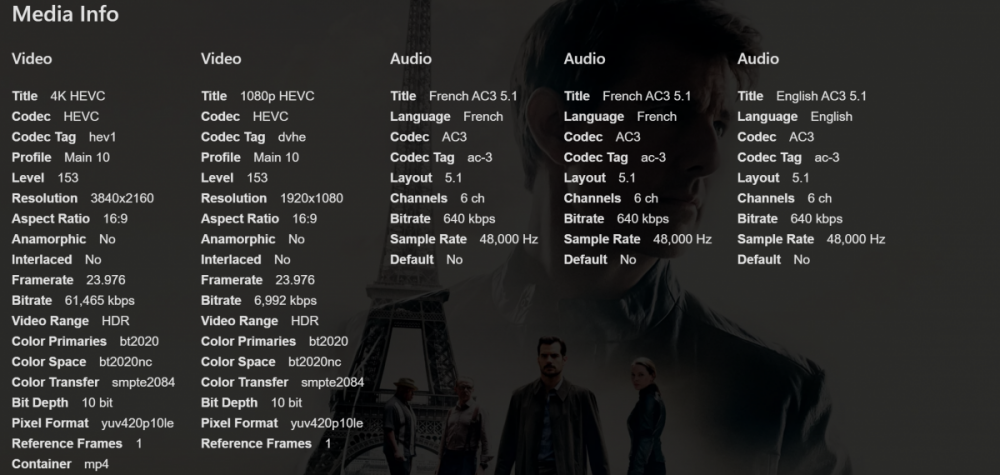
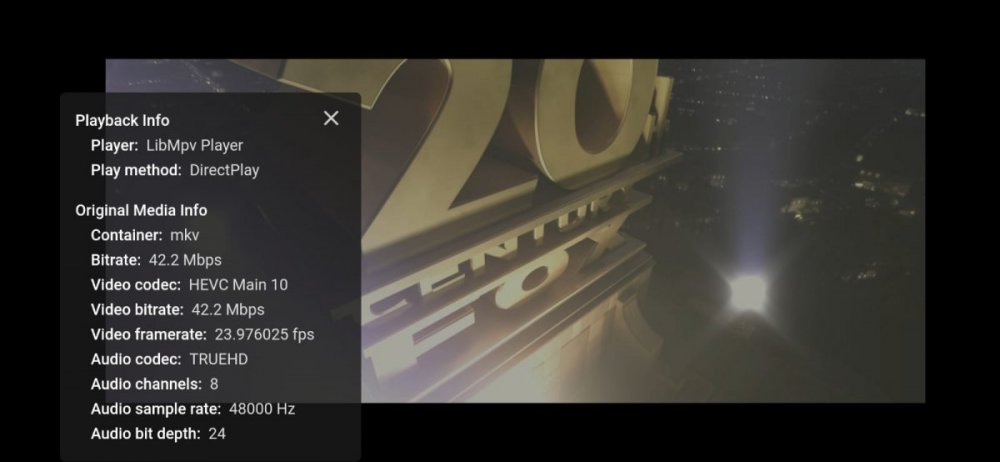 1 point
 -
use makemkv to remux everything don't convert them. Emby hasn't supported this feature for years. Those of us with large raw content, have had to do this. It's not that difficult, just time consuming. Just be glad you don't have anime that has one pgc and the subs are all timed from the beginning so no subs show up after episode 1 due to timings haha:)1 point
-
Yep. And it is okay. I have no problem with my family users either because they are new users (a week or so) and everyone has his own account. It is working how it have to work for me, just the username, but like i said, that is no problem for me. Thanks1 point
-
Hi. In the old version of the software, there was the concept of a different "Display Name" from your user ID. I think the new version eliminated that and now there is just one (probably due to lots of confusion on the part of users).1 point
-
Another tool you might want to check out is Xmedia Recode. It can do remuxing or conversions and is point and click. It's easy to use as well to remove audio tracks not needed, etc.. It's my "Swiss knife" conversion program I recommend to people on Windows.1 point
-
It's not really ideal to use any online backup. First the drives are constantly running for them to be available to you. Well they may spin down but you are putting a lot of life on them. Use external USB drives and just connect them to your system once a week or month to backup anything new without the archive bit set and put the drive back away and NOT connected to the computer. If you want it offsite, a fire safe that you can lock is the way to go. Just give the locked box to a friend or relative to hold for you or use a bank as already suggested. Invite your friend over once a month for beers or coffee and do the incremental backup while they're with you and send them packing with your drives again when they leave. The problem with trying to run your own "online backup" is connectivity issues, using both your bandwidth and you're friend's bandwidth. Having to manage it, wear and tear on the equipment and the very good chance the backup can wear/out before you main drives or similar time frame. With an incremental backup you can use the command line or run a batch file that's super simple. It only needs to copy things since the last backup and uses no proprietary software and will just be a clone in some way of your current directories making them super simple to restore as well if needed. You don't need to go crazy after your first full backup and might only need to backup once a month or every three months depending on how much new content you add and how much you care about loosing a few. As an example with well over 15K movies and 60K TV shows I don't sweat loosing a couple months of content as I can easily add it back if needed (if I even want to) as I've already got so much other content it almost doesn't matter. So now I backup content every couple of months and call it a day knowing I can restore 99+% of my system if needed. Now besides the content you could use an online system or two and backup specific directories (ie Emby backup). Heck you could zip them with a password and just email them to yourself so they would be available that way if you ever need them. Keep in mind the nature of the beast. This is just a personal entertainment system, not your household finances, work info or important information so you don't need to go crazy with solutions to keep up to date nightly or anything. Carlo1 point
-
That depends what the original quality is! But the defaults are a sensible starting point. If you judge it's equivalent, increase the CRF (lower quality) and try again, until you find where the visible change occurs - then balance that against the resulting size. In general lower resolution files justify a lower CRF (higher quality) to make the best of their limitations. Paul1 point
-
Also related with my post here https://emby.media/community/index.php?/topic/87224-hdr10dolby-vision-not-working-on-my-huawei-p30-pro-android/ Sent from my VOG-L29 with Tapatalk1 point
-
Just a reminder, we do not support Gravatar any more, if you want to add avatar, you need to upload it to your profile.1 point
-
MPEG-4 is a complete system of codecs and associated paraphernalia. MPEG-4 part 3 is AAC for audio; MPEG-4 part 10 is AVC for video, which is identical with the ITU standard H.264; MPEG-4 part 12 is the little-used picture format known as JPEG-2000; MPEG-4 part 14 defines the container format we commonly call MP4. You say you are starting with MPEG4 in AVI. This is unusual, because it requires a hack to the specification, is is not universally supported. But if you genuinely have that, then MKVToolnix will repackage it in an MKV container without transcoding, thus not changing the size apart from the different container overhead. The size of a transcoded file can be larger or smaller than the original depending on the parameter settings provided to the encoder. Paul1 point
-
I tried everything, admin acc and connect, eventually I gave up, I just rebuilt the server from scratch, was surprising faster than I remember. Anyway no harm done, this topic can be closedd1 point
-
Can't figure out what I did to keep it in desktop mode on mobile if there is...1 point
-
They looked fine yesterday but today I seem to be getting the desktop version and it's terrible.1 point
-
How about now1 point
-
There definitely was, and now it's missing for me too...1 point
-
Yeah I think so, and switch to 'Condensed' view, I find that is the closest to the previous 'New Posts'1 point
-
Thanks for the feedback. Yes we are looking into it.1 point
-
I confirm that the transfer has been completed. Above all, do not forget to check that the users of the 2 servers have exactly the same name!1 point
-
The power failures have been within the past few days, and none of them have caused unexpected restarts as my PC is on a UPS - I was always able to shutdown safely. With what happened last night, however, I think I might finally be free of them(severe storm caused a nearby power transformer to go boom - power company replaced it pretty quickly and I've suspected that transformer was the cause of the previous issues). I did several forms of disk checking(including chkdsk) way back when the problem first began - before I even suspected that ANY single program might be at fault. Everything came back clean. (did memtest as well - also clean)1 point
-
I am always amazed to see people asking for a "dark" theme or background when the mode we evolved to see best is black letters on a white background. But everyone needs choice and adding a dark theme does nothing harmful so I think it is a good thing when it gets done, I also would suggest that just a slight graying of the background would be helpful for those of us that actually prefer the black on white format. Since there is now so much white space even I find the pure white a bit too much. I know I can adjust Windows to accomplish that but I do not need it on that more sane sites I deal with but the amount of white space we now have is insane.1 point
-
Yes, it was a very strange problem and solved now.1 point
-
None of my test systems are having any issues on version 2004 build 10.0.19645.1. 4.4.3.0 4.5.0.121 point
-
Tapatalk installed.1 point
-
i think this points to not having the latest powershell installed https://github.com/PowerShell/PowerShell/releases (go to assets section) are you on Windows? edit and you need to launch with latest version of powershell..on windows this may mean launching pwsh.exe first and calling fron there (as opposed to double clickkng) or perhaps associating .ps1 with pwsh.exe edit https://docs.microsoft.com/en-us/powershell/scripting/install/installing-powershell-core-on-windows?view=powershell-7 suggests you should get a new open with pwsh when right clicking.1 point
-
Yes there is discussion here along with a work around on page three. https://emby.media/community/index.php?/topic/80502-backup-plugin-not-restoring-library-properly1 point
-
Of the various forum systems I use in my Internet travels, this is the one I like least. However, I am used to it from elsewhere, and so will put up with it <shrug>. This version has rather more white space than the other I go to regularly. But what is particularly noticeable is that newlines are treated differently from previously, as they now give a paragraph spacing. This means that all the past posts which typically have two newlines to separate paragraphs are all now spaced out extra widely... I even had to edit my signature to restore it to a sensible layout. Paul1 point
-
What you were likely seeing were the journal entries for the failed service that was using the default user and why PID was needed for the non - default one. Going forward and with the unit override in place things go back to normal. You should be able to start, stop and get status without having to specify user or PID.1 point
-
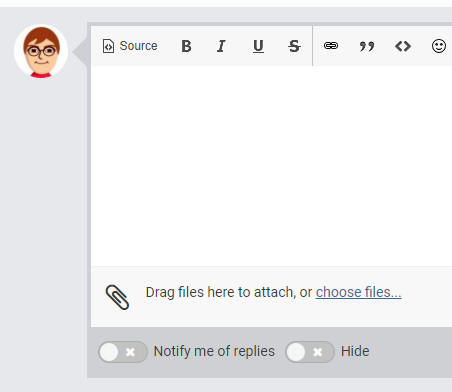
Darker Mode/ Night Mode / other colors ... there are no settings for anything and it is hurting my poor eyes. I loved the darkness I could have on the old forum. Kind of how Blacklist here on my Emby Season 1 looks. (Drag/Drop works wondfully here!)
.thumb.png.8887a4c5b9274f9ed8f095363b3b1583.png) 1 point
1 point -
So just click "choose files..." and you can use the old way... BTW - putting that image in this post was SO much easier than before. before: grab image, save as file, bring up attach image dialog, be sure to change the tab at the top, now go select the file you saved (dang,...gotta navigate to that directory, where was that?) select it, be sure and press the "Send to Server" button and NOT the OK button (yeah that's intuitive). image appears. now: grab image, paste No-brainer as far as I'm concerned :).
 1 point
 -
I do and I'm an idiot for mixing that up! Thanks ebr. Kevin1 point
-
It never will be according to the thread below - it is a hardware limitation even on the CX .. "WebOS apps support for lossless audio - there will be no WebOS app support for lossless HD audio soundtracks such as TrueHD, TrueHD+Atmos, DTS-HD HR, DTS-HD MA or DTS:X - this is the same situation as for the 2019 models; The Alpha9 SoC has only an ARC capable audio output, so it cannot send lossless audio back to the receiver/soundbar, even if they are eARC capable, firmware updates cannot modify hardware limitations;" https://www.avsforum.com/forum/40-oled-technology-flat-panels-general/3119288-2020-lg-oled-cx-gx-owner-s-thread-faq-posts-1-6-no-price-talk.html My Nvidia Shield Pro is hopefully turning up tomorrow - but I'm going to miss the LG App as it was pretty perfect apart from the above and that is obviously no fault of Emby ..1 point
-
No eta but hopefully soon.1 point
-
Hi, yes we're looking into improving this. Thanks for reporting.1 point
-
I am also seeing poor video playback of HEVC on Android Mobile 3.1.23 on a Huawei MediaPad M5. This is with a data rate of under 1.5Mbps. Playback using MX player as an external player is perfectly smooth. Paul1 point
-
Thanks for the feedback.1 point
-
Update. It's more stable. Decent improvement from before and less crashing. However I still have had the app stop playing music and close. If you leave it paused for too long it closes the app. Honestly, I won't care that the app closes or gets closed, if it would remember where and what song I was playing in the app. That's one of the most frustrating things is when it does close or get closed it doesn't recall anything and you have to start all over and go back to the artist(s). Appreciate the update to getting the app more stable.1 point
-
Currently one of the transcoding reasons is Max bitrate exceeds limit. What I want to know as a server admin. Is it because the auto limit detection selected that limit or was it manually selected by the user. Maybe have something like: Max bitrate exceeds limit (Auto) Max bitrate exceeds limit (Manual) or Max bitrate exceeds limit (User) Or something to that effect.1 point
-
I have noticed that it has been a while since anyone has asked again for this feature. I am currently using iptv-epg and the option for groups is great. I understand the use of favorites but having another option for groups would be an absolutely fantastic feature to add.1 point
-
My fun meter has gone way up since they were added1 point
-
This community is here to help you. Here are some guidelines on what information you should supply when reporting issues. Make sure to check out our Knowledge Base for more useful information. Reporting Emby Issues Please create a topic in the community. Describe the problem in your own words, including what you're trying to accomplish, and where you're getting stuck. Please mention some specific examples. In your description, be very specific about the steps you took and what happened with the system. Describe it like you are talking to a blind person - because you are. We cannot see what you did or what happened so be as specific as possible. If you saw error messages, please tell us what they were. If the problem is difficult to explain, please include screenshots that demonstrate the issue. Please attach the server log from the time frame the activity occurred. See the section below titled Emby Server Logs. Please supply the full and complete log file in txt format. Please don't zip or compress, and avoid attempting to extract relevant sections. Everything is relevant to us. If a server transcoding log (ffmpeg log) was also generated during playback (in the server logs folder), please attach that as well. If you are using the Roku or Android TV specific app, please also follow the instructions below to send a log from the app. Emby Server Logs Logs can be accessed directly within the server's web interface by navigating to Logs under Emby Server sidebar section. If you're having difficulty using the web interface, log files can be found in the logs subfolder of the Emby Server Data Folder . Note: Be aware that these log files would not be sanitized if obtained directly from the logs folder and should not be uploaded in the forums. If there is an error downloading the logs through the Emby Web interface for Settings / Logs, please enable debug logging, repeat the attempt to download the logs and report the problem in the forum indicating the logs download issue. The raw logs can then be forwarded to a member of the Emby Team when requested. Emby for Android TV/Fire TV and Emby for Roku Logs These apps have the option to send an app log to us electronically. You enter the settings page and turn on the "Debug Options". Now there will be a new tile on your home page settings row (or menu option on the user menu at the top) labelled "Send Log". Reproduce your problem and then use this button to send the log. Then add the following information to your report in the forum: Exactly what you were doing and what happened. Include the name of whatever you played if it is a playback problem The time you sent the log (in Eastern Time please - UTC -5) The name of the Emby user on the local server that was logged in at the time How to Post Log Files You can simply drag a file onto your post to attach it. Alternatively, you can upload your log file to Paste2 or a DropBox account and then post the link in your topic. Please avoid linking us to log files that require us to sign into a website. If the problem is occurring in the Emby Web app, please remove any custom CSS you may have created and see if the issue remains after that.1 point
























.png.679c0ae3ebd11c2025d6a6c7c7cf8f05.png)