All Activity
- Past hour
-
 lcm0437 joined the community
 -
 Asoomii joined the community
 -
 Leyennda joined the community
 -
 JeffForgue joined the community
 -
 vasandras joined the community
 -

embyforkodi (next-gen) 12.X.X support
quickmic replied to quickmic's topic in Emby For Kodi Next Gen
Max resolution indeed needs a complete wipe of the cached artwork. Kodi caches the artwork directly (on demand) and is not related to the plugin (beside the compression options). I hope you didn't trigger the artwork cache manually. This forces the download immediately (not on demand). If you are familiar with Linux, you can install a sdcard/usb stick and link Kodis artwork folder to that drive. Don't use Kodi's pathsustition via advancedsettings.xml. Use linux softlinks (ln -s ...) -
 faatimaimraan joined the community
 -
 Jose270392 joined the community
 -
 juancasa joined the community
 -
 HannaBalke joined the community
 -
 sjsjhh joined the community
 -
embyforkodi (next-gen) 12.X.X support
quickmic replied to quickmic's topic in Emby For Kodi Next Gen
I use also Emby server beta version and there is no issue on my side. I need a kodi.log for review including the freeze. -
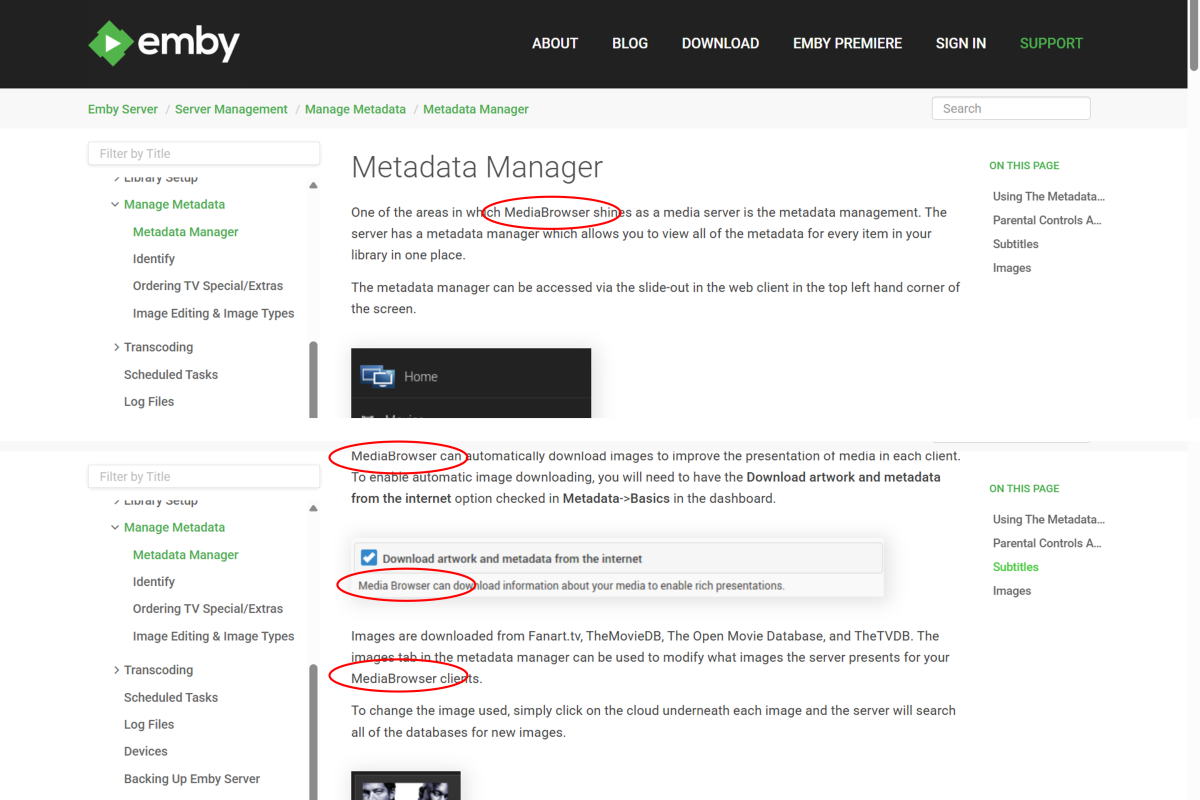
Hi, I just came across some old MediaBrowser references here: https://emby.media/support/articles/Metadata-manager.html Perhaps the page needs updating or maybe the navigation is just incorrectly linking to an old page? I think the images are all from a much older GUI as well.
- Today
-

Problemas al configurar emby en My cloud ex2 pro
sa2000 replied to Oscar Daniel Tafur Vidarte 's topic in Western Digital
@Oscar Daniel Tafur Vidarte Hi I am having difficulty understanding the issue I understand that the Emby Server is installed on the WD MyCloud Ex2 Ultra NAS which has an IP Address of 192.168.1.52 But you mentioned you installed it on windows ? I am confused here. Are we referring to an issue with the server running on the NAS or on Windows ? or on both ? Suggest we stick for now to just the Emby Server running on the NAS All the libraries screenshots you attached are for the Server Settings / Library screen. What do the libraries look like when you click on the Home button (showing as "Inicio" on your screenshots) - do all the libraries show up under "My Media" ? Is there an issue? You also included a screenshot of an error message indication that "\\192.168.1.52 could not be found" Where did you enter the `\\192,168.1.52" as a path in the libraries folder settings ? Could I have a screenshot showing where you entered this before you get the error I see you are using folder paths for movies libraries like "/shares/Directores" - why did you not do the same for the "Accion" library? I see you have a folder path as "\\192.168.1.52\Acción" - why? why are you not specifying WD MyCloud share path? If you download an embyserver log -and attach it and answer my questions above, that will help me understand the issue better For the server log, see How to report a problem -

embyforkodi (next-gen) 12.X.X support
supermood replied to quickmic's topic in Emby For Kodi Next Gen
hi @quickmic, I'm having 28gig of data in kodi, userdata, icons - which exceeds the space of my ugoos am6b+. Am I doing something wrong or does it have to be so much? (lib is about 1800 movies and 200 shows) I already checked the box for max resolution quality in your addon but that had no effect. maybe I have to delete all cache before, so it saves it again with less quality? is there something you would recommend? many thanks! -
I just got the app working on my TitanOS TV. The way to get there was too complicated and honestly just weird. I have my emby server exposed via nginx proxy manager. So I have a domain and an ssl certificate. Still the emby app on titanOS would not connect. The reason: I have setup a local DNS record so that requests in my local network don't go out through the internet but get routed directly to nginx. So the public DNS record is emby.mydomain.com -> MY_PUBLIC_IP in my local network the DNS resolves emby.mydomain.com -> 192.168... (local address of nginx proxy manager) With that setup the titanos app just wouldn't connect. Once I removed the local DNS record, it worked. So it seems that TitanOS is resolving the domain locally and then sending that resolved IP to a server which then connects to it?!? Hopefully this helps someone else.
-
I am experimenting with this box because it would simplify my life. I have been using a Windows 7 and now 10 PC for years with no emby problems on the same Unraid server. I want to convert to something with less maintenance issues as once or twice a year I wind up resetting the WIndows Kodi PC. For my needs, to best accomplish this I have been trying to get ZDMC v21 working with that fork's internal player which is the Zidooplayer. The Zidoo forums has half of the people saying it works and half saying it doesn't. What I can gather is that the Zidoo player doesn't like streaming files only local by design (don't ask me why.) Copilot tells me that this is very workable but I can't quite follow Copilots directions to completion. Here's where I am step by step: 1) I have websocket active and http: inactive. Path substitution on, direct paths. 2) Copilot advises to add a new path substitution. ls command gives me root@Unraid:/mnt/user/Movies which I think should translate to smb://Unraid/Movies/ I know on a PC I see UNRAID on my network and double click on it and see Movies Where I get lost is where Copilot tells me to add this path on the Advanced part of Emby. There's no place to do this. The only place I could find is under library, clicking on Movies, edit, I have added smb://Unraid/Movies/ to the Optional Share Folder field. I have restarted the server. 3) Copilot tells me to test by going to Kodi Videos files, and when I browse under either emby-for-kodi-next-gen-addon-video OR emby-for-kodi-next-gen-addon-video-path-substitution I get Remote Share / Path not found or invalid. Copilot says this error means I don't have it set correctly. (Gee, thanks.) So the internal (to ZDMC) Zidooplayer does not work. To me, the attached log is showing the correct SMB file and pathing. I may have a different issue, but Copilot is insiting I don't have pathing right. Any thoughts? kodi.log
-
And that didn't take long, found 1 bug right as I posted that Updates: Fixed the admin dashboard. Small variable updates Emby Navy and Gold v4.50.css
-
Hi Luke: The live TV refresh was just running, but making no progress. I checked the log and there were no entries in the log other than Tune In Plugin entries around 12:02. It's strange because I have Live TV scheduled for an every twelve hour refresh, and whatever was running, seemed to be running as a tv channel refresh, green progress bar. Ive uninstalled the "Tune In Plugin", I dont really use it anyway, and I did an Emby restart, and Im doing a manual channel refresh now. Ill give it another day or perhaps later 12 hours from now, lets see what happens Attached is log, perhaps you can see something im missing. Thanks again. GG embyserver-63910901099.txt
-

Emby Theater v3.0.20 (Server v4.9.3.0) Homescreen Horiz. navigation broken
Ralph's Emby replied to d00zah's topic in Windows & Xbox
@scottproRegarding issue/bug was a ET (legacy) problem, it was inaccurate because Emby Server Beta also was affected by the same issue, the one is reflected on Emby Theater but at least that part is resolved, last night I used Theater and the side scrolling is working but as stated before the option to apply the preferences "Hide Played Media" on Theater isn't working and yes I did check on my Preferences and are selected as before. @Luke Maybe check on this... isn't hiding the played media only on Theater, the new Windows App works as it should (I have both). Hope this helps -

Hide Playlists from Included In & Group Albums by Release Type + Decade
GrimReaper replied to user24's topic in General/Windows
GUI was getting overwhelmed with all the stuff crammed in, needed some breathing room. v0.9 - GUI reworked emby_album_tag_importer.py -
Emby Theme: Retro Navy & Gold (W/ Seasonal Themes)
GrimReaper replied to Aleas's topic in Web App CSS
Done. Done. Done. -
That would be awesome! I do know the ACdb has an option to add tags to collections? I'm not sure if it actually does that in Emby as well, but it seems like tags for collections still exist in some type of way? Either way, for the customization I'm going for, a feature like this would massively simplify my collections!
-
The way I understand it is that I can have up to 5 devices in the free version in to which I can access my emby server library. When try to access on another device I get a pop-up that says this feature is only available with a premiere subscription. What am I missing here?
-
Here you go version 4.46! I would post a changelog, but this is pretty much a complete rewrite, I don't think anything was spared from updates. If you find any issues, please let me know. A Lot of work and banging my head into the keyboard went into this. @GrimReaperCould you please change the title of this post to "Emby Theme: Retro Navy & Gold (W/ Seasonal Themes), and also post this version on page 1? maybe also add some text to check the thread for updates? Thanks! Emby Navy and Gold v4.46.css
-
It showed the new tags, I think I figured it out.. it's not showing the meta data from the theme.mp3 files. maybe also backdrops/theme.mkv files too?
-

Filters preferences on user profile instead of stored locally
Luke replied to madblam's topic in Feature Requests
Yea this is a good way of doing it. A little verbose, especially if it wraps to multiple lines on a small screen. But it’s effective. -
I completely understand, and want to be able to achieve exactly the same. This worked in the early Emby beta to assign a tag to that collection, but they removed that option in an update. I believe this might still be available under the hood, for example to add a subtitle is still possible to achieve even though Emby removed that option from the native menus. I have focused on other things for the plugin, but now might be a good time to start investigate this a bit more!
-

Stream audio cuts out randomly on Samsung TV
horstepipe replied to griam01's topic in Samsung Smart TV
Hello @SamES i just found this thread while looking for reporting about this problem which a user with a Samsung tv reported to me. Is it still true that you can’t troubleshoot that? Audio transcoding is enabled for that user, so if Samsung tv has problems with aac >160kb bit rate it should be converted by the server? this does not seem to happen. BR -

Filters preferences on user profile instead of stored locally
crusher11 replied to madblam's topic in Feature Requests
-
-
Hi. There is already an option for this in Display Settings.
-
The Roku will always show the forced ones. Their player takes that tag literally and forces the display of those subs.
-

Filters preferences on user profile instead of stored locally
ebr replied to madblam's topic in Feature Requests
Even if it was a week later? -
@Luke I am running Emby 4.9.3 on a WD My Cloud EX 2 Ultra, OS 5. I see there is a new/updated version 4.10.?? Is this newer version ok to run on my NAS? How do I get the newer version? It may help me with these pesky playlist issue(s) I am experience, do you think so? I also attached the server log, hoping this will let you see my problem embyserver (4).txt