All Activity
- Past hour
-
 Darkz joined the community
 -
 Cyan_666 joined the community
 -
This might seem obvious to others, and I swore it was an issue 'inside Emby' to a degree, due to my own naivety, but just in case someone stumbles upon this thread like I did, this is what worked for me: 1) Check user permissions on the Emby Server for your libraries - this wasn't my issue as I have given myself access to all libraries, but still a good first check 2) Make sure your user on your machine hosting Emby has the correct permissions. In my case, I set up a new app, unrelated to Emby, to pull my content into a new media folder I had just created and even though I had added the new path into my Docker Compose file for Emby and restart the server, I was unable to play the content. After SSH'ing into my device and providing my user with the correct read/write permissions, I was able to play the content without any issues. That may not be what's happening here at all, I'm not the most savvy person, but figured those are 2 points worth ruling out, with an emphasis on making sure new volumes/folders have the correct permissions for your user on your machine.
-
 Franco2 joined the community
 -
 Gsharkey joined the community
 -
 shops3368 joined the community
 -
 wolfbyte joined the community
 -
 Jimmy Fang joined the community
 -
 Spud04 joined the community
 -
 Gustavos joined the community
 - Today
-

embyforkodi (next-gen) 12.X.X support
Diedrich replied to quickmic's topic in Emby For Kodi Next Gen
All I installed was the 12.4.15 zip on the first post. Is there an additional repository to add? Edit: Thanks for the clue. I added the Emby repository http://kodi.emby.media Then I installed the Emby repository repository.beta.emby.kodi-1.0.11.zip and then installed the Kodi Emby Beta Addons>Video Addons>Emby for Kodi Next Gen (Video) and then the add-on showed up in the video add-ons list. Thank you, sir. -

Remote access to Emby Server as admin via VPN issues
Luke replied to jerkrl's topic in General/Windows
@jerkrl has this helped? -

Emby Theater v3.0.20 (Server v4.9.3.0) Homescreen Horiz. navigation broken
scottpro replied to d00zah's topic in Windows & Xbox
Because it's a website issue. ET Legacy uses files hosted on "tv.emby.media" which is where the bug resides. The Emby Team needs to update files on the site to fix this issue. I run a custom local proxy which allows me to revert back to old versions and even run offline. -

embyforkodi (next-gen) 12.X.X support
quickmic replied to quickmic's topic in Emby For Kodi Next Gen
Did you install the helpers? -

Emby Theater v3.0.20 (Server v4.9.3.0) Homescreen Horiz. navigation broken
Mahinepua replied to d00zah's topic in Windows & Xbox
Why don’t you post the fix? -
embyforkodi (next-gen) 12.X.X support
Diedrich replied to quickmic's topic in Emby For Kodi Next Gen
EmbyForKodi 12.4.15 Kodi 21.3 On both this test Windows setup and my main Ugoos AMB6B+, I do not see the add-on as a video source when editing menu items. -

Emby Version 4.9.3 - Get User Watched items for movies and episodes
Quincarter replied to Quincarter's topic in Developer API
even when i simplify the query with no recursion, it seems like my server isn't returning any Dates for watched or playcount numbers - Movies (CollectionFolder) | Last Played: N/A | Plays: 0 - TV shows (CollectionFolder) | Last Played: N/A | Plays: 0 - Collections (CollectionFolder) | Last Played: N/A | Plays: 0 - Top Picks (CollectionFolder) | Last Played: N/A | Plays: 0 - Playlists (CollectionFolder) | Last Played: N/A | Plays: 0 Endpoint: /Users/{userId}/Items Params: {'IsPlayed': 'true', 'SortBy': 'DatePlayed', 'SortOrder': 'Descending', 'Limit': 10, 'Fields': 'Name,Type,UserData,DatePlayed,LastPlayedDate,PlayCount', 'IncludeItemTypes': 'Movie,Episode'} -
Emby Theater v3.0.20 (Server v4.9.3.0) Homescreen Horiz. navigation broken
scottpro replied to d00zah's topic in Windows & Xbox
This bug should have been fixed days ago. There's enough information about the issue in this topic to easily reproduce and fix the problem. I was able to fix this issue locally in about 15 minutes and only requires 3 line changes in one file. I DM'd Luke details about the fix and got a "Thanks" in response. It seems like the dev team is on vacation because the responses are "auto-chatbot" in nature; "What arrows are you talking about", "Try reinstalling the app", "Works in my testing", ... In the past I've seen multiple version updates (up to 5) in one day to fix bugs so it's not a "Wait until the next update" issue. I also question the QA/testing prior to version updates. Users shouldn't be testers to new code changes/releases, especially on a stable branch. I hope this isn't a sign of the future support for the ET Legacy version. Hope all is well with the Emby Team. -
Recording a series identified as something else
Luke replied to atreyu4055's topic in General/Windows
@atreyu4055it depends on whether i'm right that internet metadata is the cause. It's also possible that renaming the series in your library to match the guide data would also resolve it. That might be a less disruptive change than having to disable all of internet metadata. -
hi @Blatherscribeare you still having an issue with this?
-
hi, we'll take a look at it. Thanks.
-
Hi, how does it compare in Chrome?
-
Hi, we are still looking at it. Thanks.
-
Hi, you can use an animated gif as the main poster of a movie or series.
-
Emby Version 4.9.3 - Get User Watched items for movies and episodes
Quincarter posted a topic in Developer API
Hey all - i am having a lot of issues with this API response and i think i just need help building the proper fields here. i am calling: `/Users/{userId}/Items?Recursive=true&Filters=IsPlayed&SortBy=DatePlayed%2CSortName&SortOrder=Descending&IncludeItemTypes=Movie%2CEpisode&Limit=500&Fields=RunTimeTicks%2CSeriesId%2CSeriesProviderIds%2CProviderIds%2CGenres%2CImageTags%2CUserData%2CDateCreated%2CPremiereDate%2CDatePlayed%2CPrimaryImageAspectRatio%2CProductionYear%2CBasicSyncInfo&ExcludeLocationTypes=Virtual&EnableImageTypes=Primary%2CBackdrop%2CThumb&ImageTypeLimit=1&EnableUserData=true` potentially easier to read params: const params = { Recursive: "true", Filters: "IsPlayed", SortBy: "DatePlayed,SortName", SortOrder: "Descending", IncludeItemTypes: "Movie,Episode", Limit: "500", Fields: "RunTimeTicks,SeriesId,SeriesProviderIds,ProviderIds,Genres,ImageTags,UserData,DateCreated,PremiereDate,DatePlayed,PrimaryImageAspectRatio,ProductionYear,BasicSyncInfo", ExcludeLocationTypes: "Virtual", EnableImageTypes: "Primary,Backdrop,Thumb", ImageTypeLimit: "1", EnableUserData: "true", }; The data i get back looks right, but I am missing some of the fields i am requesting - like DatePlayed doesn't show up in any of my responses, which is how i am trying to filter my dashboard. The user data shows the PlayCount: 0 and Played: true for items i know i watched in full and didn't just mark `watched`. I watch via the web app and my Roku depending on the day. What am i doing wrong here? sample json: {"Items": [{"BackdropImageTags": [Array], "DateCreated": "2020-04-09T14:11:54.0000000Z", "GenreItems": [Array], "Genres": [Array], "Id": "342160", "ImageTags": [Object], "IndexNumber": 5, "IsFolder": false, "MediaType": "Video", "Name": "Captive Hearts", "ParentBackdropImageTags": [Array], "ParentBackdropItemId": "323025", "ParentIndexNumber": 1, "ParentThumbImageTag": "6b89e64ca9ba1ace70514bd9b431e25c", "ParentThumbItemId": "323025", "PremiereDate": "1993-01-30T05:00:00.0000000Z", "PrimaryImageAspectRatio": 1.3333333333333333, "ProductionYear": 1993, "ProviderIds": [Object], "RunTimeTicks": 12769280000, "SeasonId": "342151", "SeasonName": "Season 1", "SeriesId": "323025", "SeriesName": "X-Men: The Animated Series", "SeriesPrimaryImageTag": "1f5f7547cc98884e3988ab2b87fc8389", "ServerId": "f545b8635e4c4d83abb073dff0f72546", "SupportsSync": true, "Type": "Episode", "UserData": [Object]}, {"BackdropImageTags": [Array], "DateCreated": "2020-04-09T14:12:15.0000000Z", "GenreItems": [Array], "Genres": [Array], "Id": "342164", "ImageTags": [Object], "IndexNumber": 9, "IsFolder": false, "MediaType": "Video", "Name": "Come the Apocalypse", "ParentBackdropImageTags": [Array], "ParentBackdropItemId": "323025", "ParentIndexNumber": 1, "ParentThumbImageTag": "6b89e64ca9ba1ace70514bd9b431e25c", "ParentThumbItemId": "323025", "PremiereDate": "1993-02-27T05:00:00.0000000Z", "PrimaryImageAspectRatio": 1.3333333333333333, "ProductionYear": 1993, "ProviderIds": [Object], "RunTimeTicks": 12786780000, "SeasonId": "342151", "SeasonName": "Season 1", "SeriesId": "323025", "SeriesName": "X-Men: The Animated Series", "SeriesPrimaryImageTag": "1f5f7547cc98884e3988ab2b87fc8389", "ServerId": "f545b8635e4c4d83abb073dff0f72546", "SupportsSync": true, "Type": "Episode", "UserData": [Object]}, {"BackdropImageTags": [Array], "DateCreated": "2020-04-09T14:16:28.0000000Z", "GenreItems": [Array], "Genres": [Array], "Id": "342163", "ImageTags": [Object], "IndexNumber": 8, "IsFolder": false, "MediaType": "Video", "Name": "The Cure", "ParentBackdropImageTags": [Array], "ParentBackdropItemId": "323025", "ParentIndexNumber": 1, "ParentThumbImageTag": "6b89e64ca9ba1ace70514bd9b431e25c", "ParentThumbItemId": "323025", "PremiereDate": "1993-02-20T05:00:00.0000000Z", "PrimaryImageAspectRatio": 1.3333333333333333, "ProductionYear": 1993, "ProviderIds": [Object], "RunTimeTicks": 12795520000, "SeasonId": "342151", "SeasonName": "Season 1", "SeriesId": "323025", "SeriesName": "X-Men: The Animated Series", "SeriesPrimaryImageTag": "1f5f7547cc98884e3988ab2b87fc8389", "ServerId": "f545b8635e4c4d83abb073dff0f72546", "SupportsSync": true, "Type": "Episode", "UserData": [Object]}, {"BackdropImageTags": [Array], "DateCreated": "2013-10-18T00:00:00.0000000Z", "GenreItems": [Array], "Genres": [Array], "Id": "386224", "ImageTags": [Object], "IndexNumber": 5, "IsFolder": false, "MediaType": "Video", "Name": "The Workplace Proximity", "ParentBackdropImageTags": [Array], "ParentBackdropItemId": "322801", "ParentIndexNumber": 7, "ParentThumbImageTag": "90349ac2ad262b5323f0b2ab3e0fb847", "ParentThumbItemId": "322801", "PremiereDate": "2013-10-17T04:00:00.0000000Z", "PrimaryImageAspectRatio": 1.7777777777777777, "ProductionYear": 2013, "ProviderIds": [Object], "RunTimeTicks": 11471680000, "SeasonId": "330174", "SeasonName": "Season 7", "SeriesId": "322801", "SeriesName": "The Big Bang Theory", "SeriesPrimaryImageTag": "0215e5c24861c303afa270ddfcf7e135", "ServerId": "f545b8635e4c4d83abb073dff0f72546", "SupportsSync": true, "Type": "Episode", "UserData": [Object]}, {"BackdropImageTags": [Array], "DateCreated": "2021-09-22T00:00:00.0000000Z", "GenreItems": [Array], "Genres": [Array], "Id": "379311", "ImageTags": [Object], "IndexNumber": 1, "IsFolder": false, "MediaType": "Video", "Name": "All That Glitters (1)", "ParentBackdropImageTags": [Array], "ParentBackdropItemId": "322949", "ParentIndexNumber": 4, "ParentThumbImageTag": "a40c55644dc9189e4f78c1ff4b2177b8", "ParentThumbItemId": "322949", "PremiereDate": "2021-09-21T04:00:00.0000000Z", "PrimaryImageAspectRatio": 1.7777777777777777, "ProductionYear": 2021, "ProviderIds": [Object], "RunTimeTicks": 25943852500, "SeasonId": "379251", "SeasonName": "Season 4", "SeriesId": "322949", "SeriesName": "FBI", "SeriesPrimaryImageTag": "8ba137f8f15ccca10354d1491ae23be8", "ServerId": "f545b8635e4c4d83abb073dff0f72546", "SupportsSync": true, "Type": "Episode", "UserData": [Object]}, {"BackdropImageTags": [Array], "DateCreated": "2021-05-26T00:00:00.0000000Z", "GenreItems": [Array], "Genres": [Array], "Id": "379413", "ImageTags": [Object], "IndexNumber": 15, "IsFolder": false, "MediaType": "Video", "Name": "Straight Flush", "ParentBackdropImageTags": [Array], "ParentBackdropItemId": "322949", "ParentIndexNumber": 3, "ParentThumbImageTag": "a40c55644dc9189e4f78c1ff4b2177b8", "ParentThumbItemId": "322949", "PremiereDate": "2021-05-25T04:00:00.0000000Z", "PrimaryImageAspectRatio": 1.7777777777777777, "ProductionYear": 2021, "ProviderIds": [Object], "RunTimeTicks": 25830572500, "SeasonId": "379398", "SeasonName": "Season 3", "SeriesId": "322949", "SeriesName": "FBI", "SeriesPrimaryImageTag": "8ba137f8f15ccca10354d1491ae23be8", "ServerId": "f545b8635e4c4d83abb073dff0f72546", "SupportsSync": true, "Type": "Episode", "UserData": [Object]}, {"BackdropImageTags": [Array], "DateCreated": "2021-05-19T00:00:00.0000000Z", "GenreItems": [Array], "Genres": [Array], "Id": "379412", "ImageTags": [Object], "IndexNumber": 14, "IsFolder": false, "MediaType": "Video", "Name": "Trigger Effect", "ParentBackdropImageTags": [Array], "ParentBackdropItemId": "322949", "ParentIndexNumber": 3, "ParentThumbImageTag": "a40c55644dc9189e4f78c1ff4b2177b8", "ParentThumbItemId": "322949", "PremiereDate": "2021-05-18T04:00:00.0000000Z", "PrimaryImageAspectRatio": 1.7777777777777777, "ProductionYear": 2021, "ProviderIds": [Object], "RunTimeTicks": 25742680000, "SeasonId": "379398", "SeasonName": "Season 3", "SeriesId": "322949", "SeriesName": "FBI", "SeriesPrimaryImageTag": "8ba137f8f15ccca10354d1491ae23be8", "ServerId": "f545b8635e4c4d83abb073dff0f72546", "SupportsSync": true, "Type": "Episode", "UserData": [Object]}, {"BackdropImageTags": [Array], "DateCreated": "2026-03-12T00:00:00.0000000Z", "GenreItems": [Array], "Genres": [Array], "Id": "450176", "ImageTags": [Object], "IndexNumber": 4, "IsFolder": false, "MediaType": "Video", "Name": "My Poker Face", "ParentBackdropImageTags": [Array], "ParentBackdropItemId": "425833", "ParentIndexNumber": 1, "PremiereDate": "2026-03-11T04:00:00.0000000Z", "PrimaryImageAspectRatio": 1.7777777777777777, "ProductionYear": 2026, "ProviderIds": [Object], "RunTimeTicks": 12246400000, "SeasonId": "425834", "SeasonName": "Season 1", "SeriesId": "425833", "SeriesName": "Scrubs (2026)", "SeriesPrimaryImageTag": "ad4b6bbab9f20034088a651f0426c62a", "ServerId": "f545b8635e4c4d83abb073dff0f72546", "SupportsSync": true, "Type": "Episode", "UserData": [Object]}, {"BackdropImageTags": [Array], "DateCreated": "2026-03-10T02:00:00.0000000Z", "GenreItems": [Array], "Genres": [Array], "Id": "450187", "ImageTags": [Object], "IndexNumber": 10, "IsFolder": false, "MediaType": "Video", "Name": "His Name Was Martin", "ParentBackdropImageTags": [Array], "ParentBackdropItemId": "322955", "ParentIndexNumber": 8, "ParentThumbImageTag": "7d9215371cd472daa3b54a8f4e971a9a", "ParentThumbItemId": "322955", "PremiereDate": "2026-03-09T04:00:00.0000000Z", "PrimaryImageAspectRatio": 1.7777777777777777, "ProductionYear": 2026, "ProviderIds": [Object], "RunTimeTicks": 25820160000, "SeasonId": "419219", "SeasonName": "Season 8", "SeriesId": "322955", "SeriesName": "The Rookie", "SeriesPrimaryImageTag": "5ad9d72646339535070fbdc89ff2382e", "ServerId": "f545b8635e4c4d83abb073dff0f72546", "SupportsSync": true, "Type": "Episode", "UserData": [Object]}, {"BackdropImageTags": [Array], "DateCreated": "2015-06-28T23:10:48.0000000Z", "GenreItems": [Array], "Genres": [Array], "Id": "384170", "ImageTags": [Object], "IsFolder": false, "MediaType": "Video", "Name": "DodgeBall: A True Underdog Story", "PremiereDate": "2004-06-18T04:00:00.0000000Z", "PrimaryImageAspectRatio": 0.68, "ProductionYear": 2004, "ProviderIds": [Object], "RunTimeTicks": 55545800000, "ServerId": "f545b8635e4c4d83abb073dff0f72546", "SupportsSync": true, "Type": "Movie", "UserData": [Object]}], "TotalRecordCount": 3129} User Data object and date logs here: LOG item.UserData {"IsFavorite": false, "PlayCount": 0, "PlaybackPositionTicks": 0, "Played": true} LOG item.LastPlayedDate undefined LOG item.DatePlayed undefined LOG item.PremiereDate 1993-01-30T05:00:00.0000000Z LOG item.DateCreated 2020-04-09T14:11:54.0000000Z LOG item.UserData {"IsFavorite": false, "PlayCount": 0, "PlaybackPositionTicks": 0, "Played": true} LOG item.LastPlayedDate undefined LOG item.DatePlayed undefined LOG item.PremiereDate 1993-02-27T05:00:00.0000000Z LOG item.DateCreated 2020-04-09T14:12:15.0000000Z LOG item.UserData {"IsFavorite": false, "PlayCount": 0, "PlaybackPositionTicks": 0, "Played": true} LOG item.LastPlayedDate undefined LOG item.DatePlayed undefined LOG item.PremiereDate 1993-02-20T05:00:00.0000000Z LOG item.DateCreated 2020-04-09T14:16:28.0000000Z LOG item.UserData {"IsFavorite": false, "PlayCount": 0, "PlaybackPositionTicks": 0, "Played": true} LOG item.LastPlayedDate undefined LOG item.DatePlayed undefined LOG item.PremiereDate 2013-10-17T04:00:00.0000000Z LOG item.DateCreated 2013-10-18T00:00:00.0000000Z LOG item.UserData {"IsFavorite": false, "PlayCount": 0, "PlaybackPositionTicks": 0, "Played": true} LOG item.LastPlayedDate undefined LOG item.DatePlayed undefined LOG item.PremiereDate 2021-09-21T04:00:00.0000000Z LOG item.DateCreated 2021-09-22T00:00:00.0000000Z LOG item.UserData {"IsFavorite": false, "PlayCount": 0, "PlaybackPositionTicks": 0, "Played": true} LOG item.LastPlayedDate undefined LOG item.DatePlayed undefined LOG item.PremiereDate 2021-05-25T04:00:00.0000000Z LOG item.DateCreated 2021-05-26T00:00:00.0000000Z LOG item.UserData {"IsFavorite": false, "PlayCount": 0, "PlaybackPositionTicks": 0, "Played": true} LOG item.LastPlayedDate undefined LOG item.DatePlayed undefined LOG item.PremiereDate 2021-05-18T04:00:00.0000000Z LOG item.DateCreated 2021-05-19T00:00:00.0000000Z LOG item.UserData {"IsFavorite": false, "PlayCount": 0, "PlaybackPositionTicks": 0, "Played": true} LOG item.LastPlayedDate undefined LOG item.DatePlayed undefined LOG item.PremiereDate 2026-03-11T04:00:00.0000000Z LOG item.DateCreated 2026-03-12T00:00:00.0000000Z LOG item.UserData {"IsFavorite": false, "PlayCount": 0, "PlaybackPositionTicks": 0, "Played": true} LOG item.LastPlayedDate undefined LOG item.DatePlayed undefined LOG item.PremiereDate 2026-03-09T04:00:00.0000000Z LOG item.DateCreated 2026-03-10T02:00:00.0000000Z LOG item.UserData {"IsFavorite": false, "PlayCount": 0, "PlaybackPositionTicks": 0, "Played": true} LOG item.LastPlayedDate undefined LOG item.DatePlayed undefined LOG item.PremiereDate 2004-06-18T04:00:00.0000000Z LOG item.DateCreated 2015-06-28T23:10:48.0000000Z -
Hi, yes how are the tracks tagged with embedded metadata?
-
Thanks for following up.
-
Two albums, by different artists "entangled" in Emby
Luke replied to brothom's topic in General/Windows
Even though it is embedded in your own files? -
HI, yes more control over this is certainly possible. Thanks. They are also used on detail screens for the chapters display.
-
Would we not rather have "outstanding" bugs instead of just regular normal bugs?
-
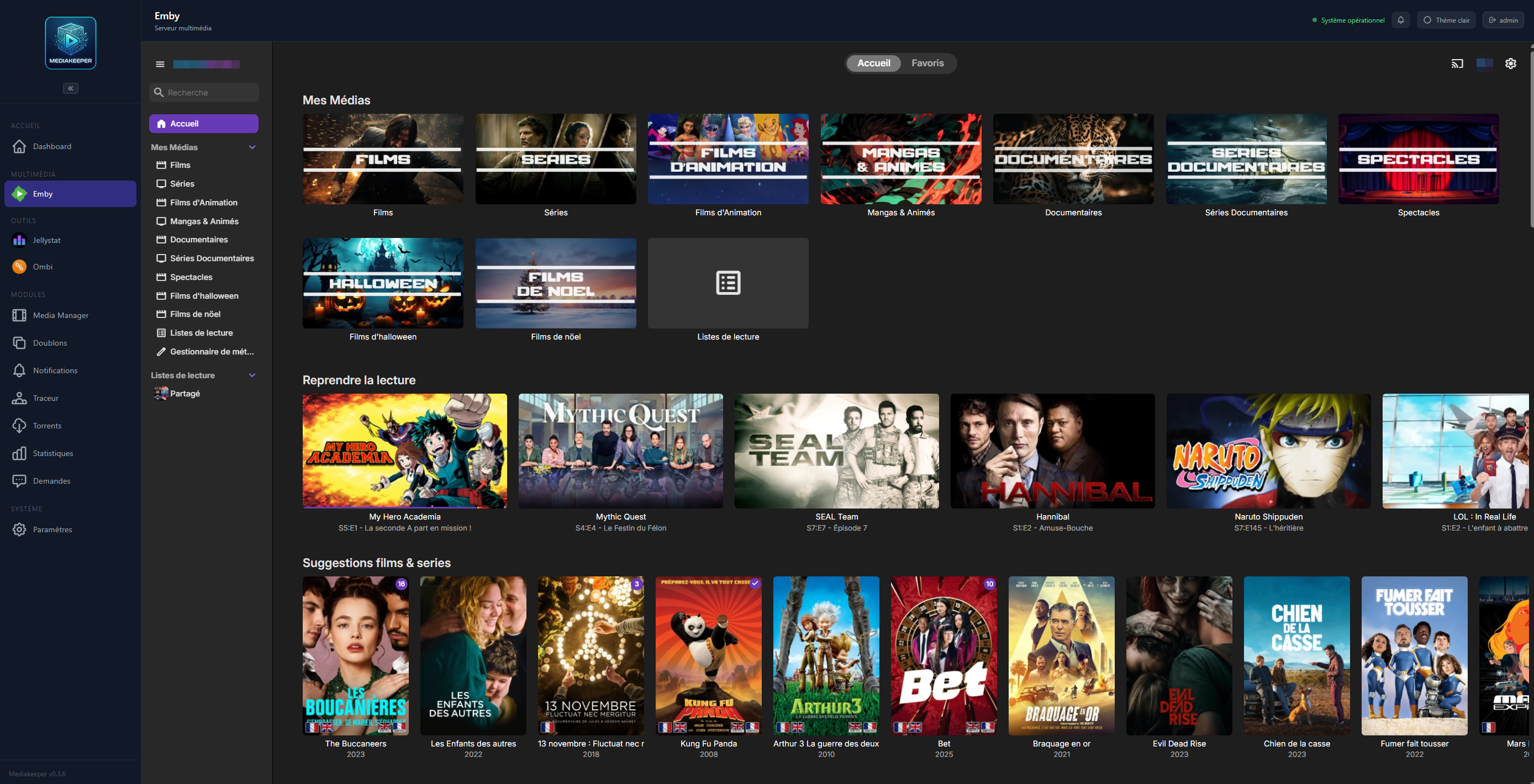
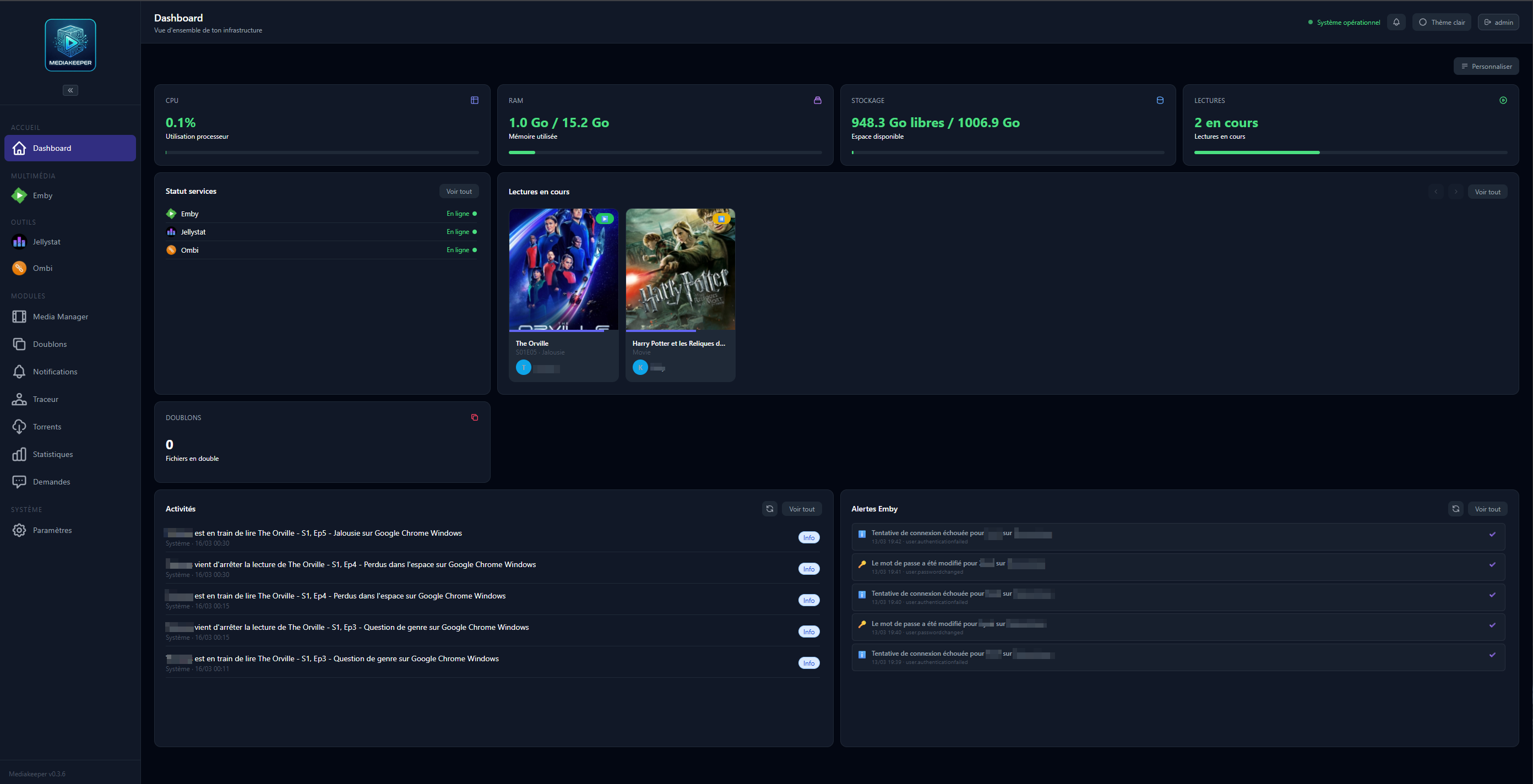
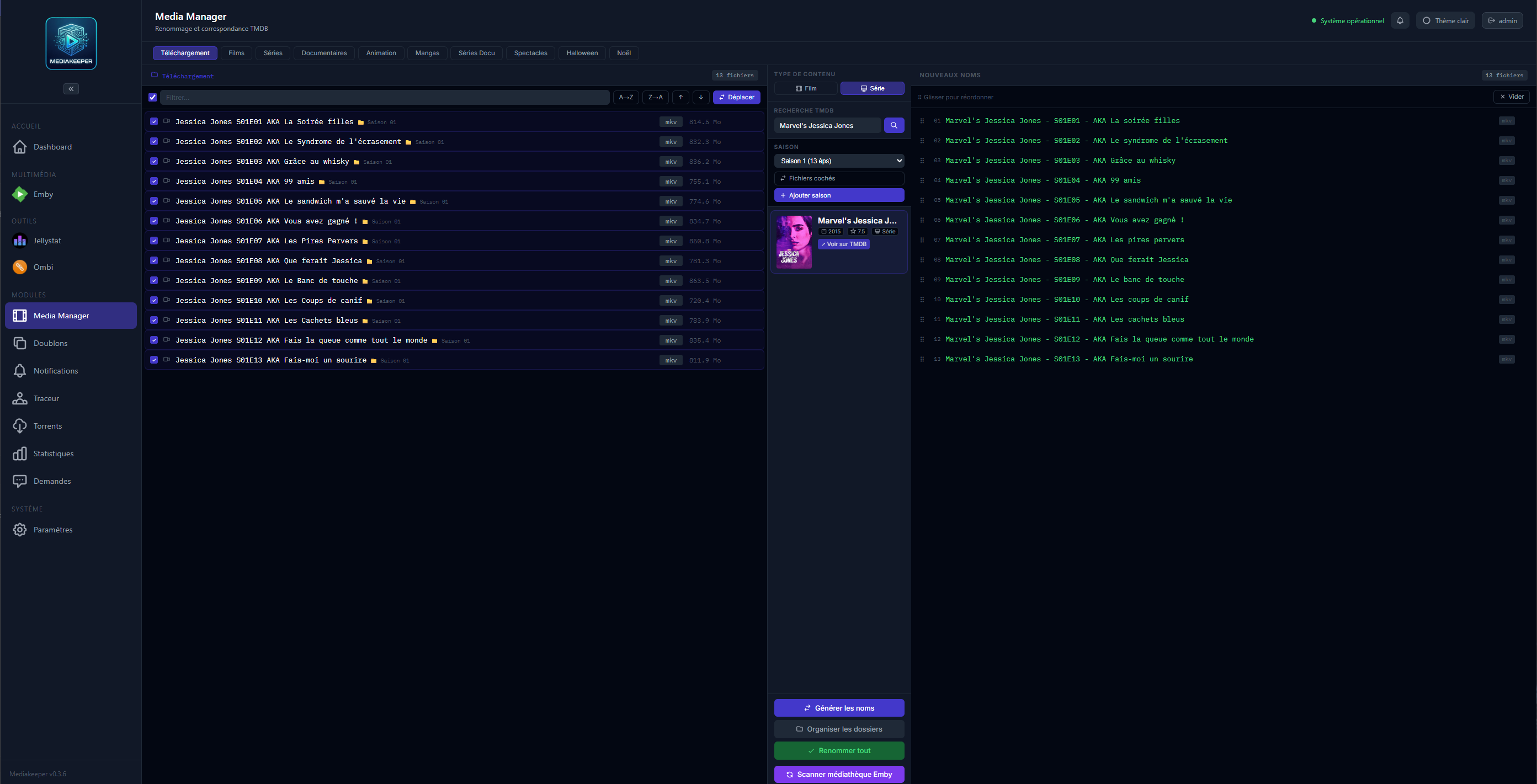
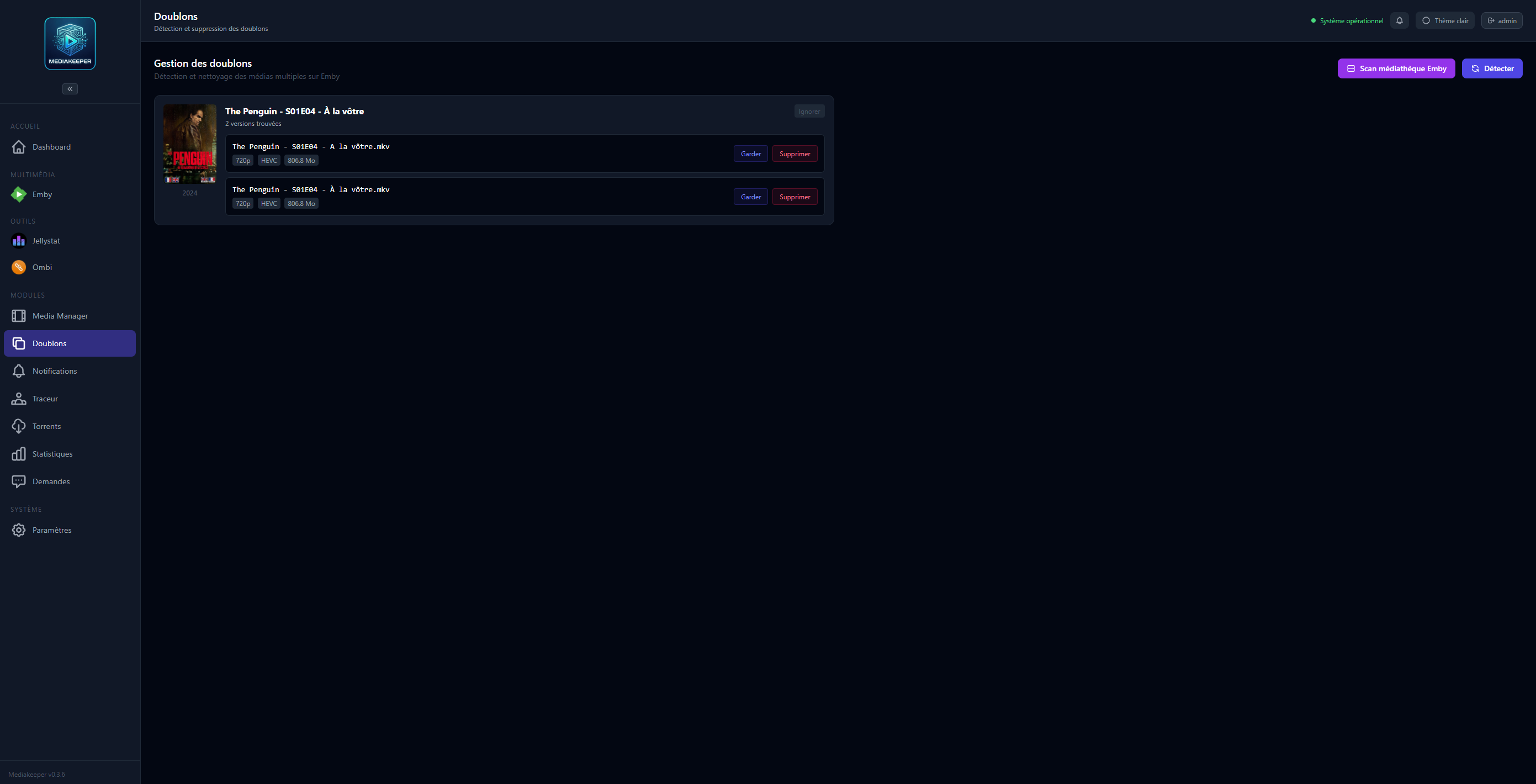
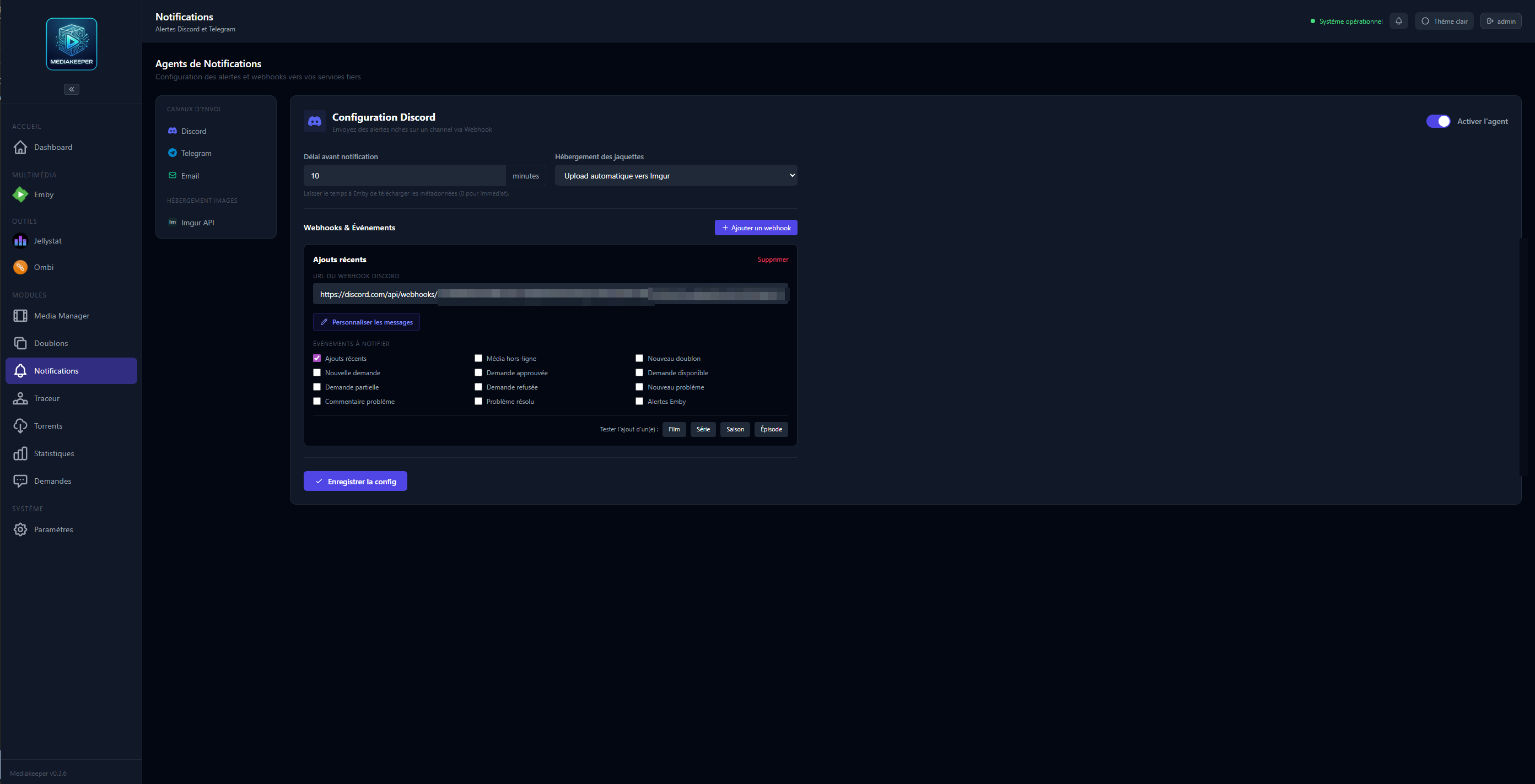
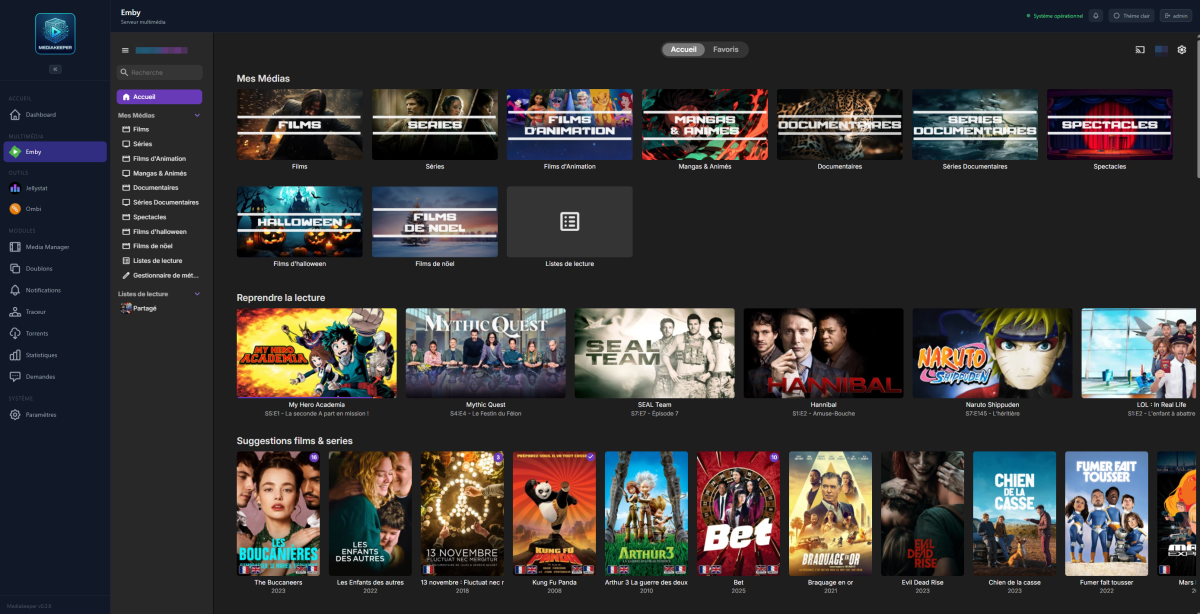
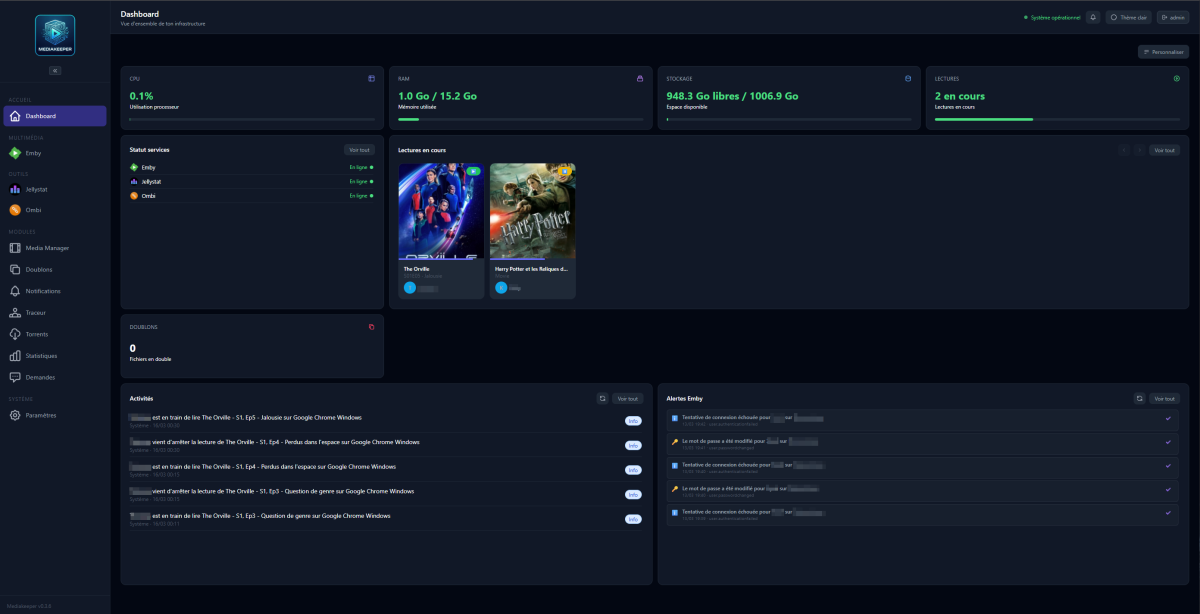
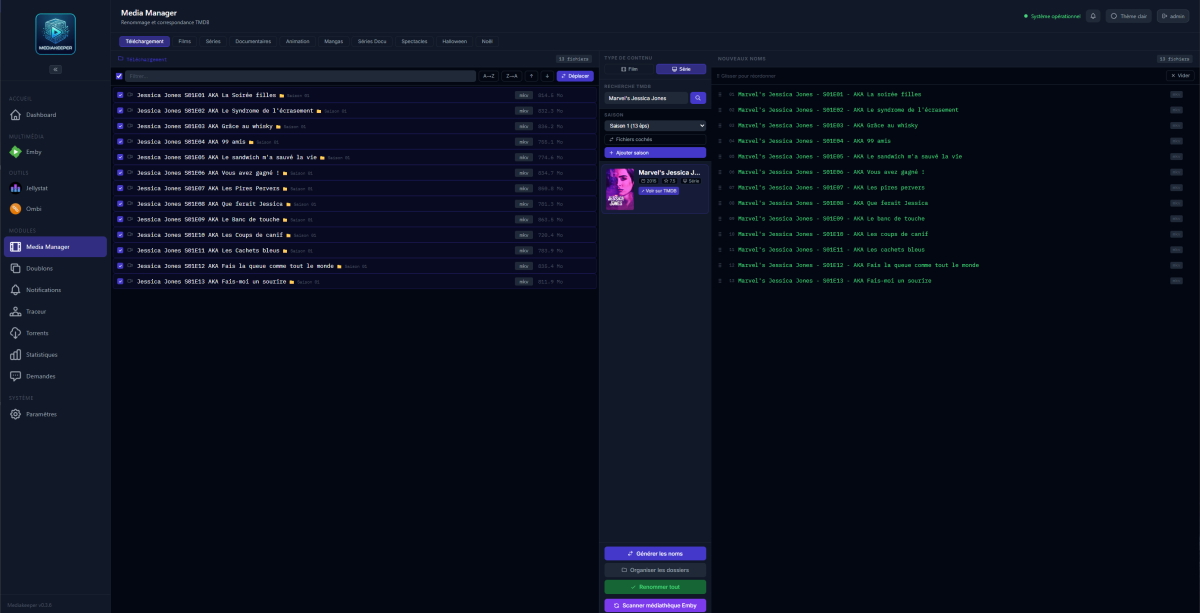
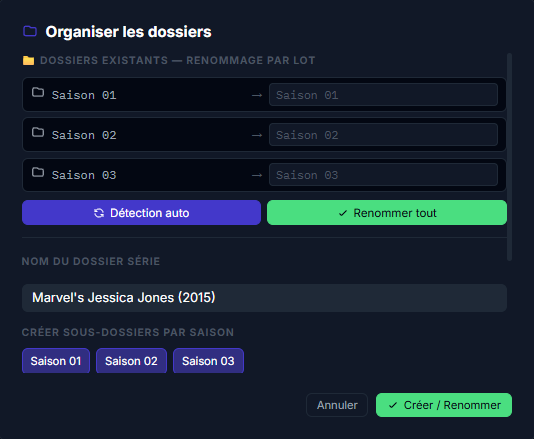
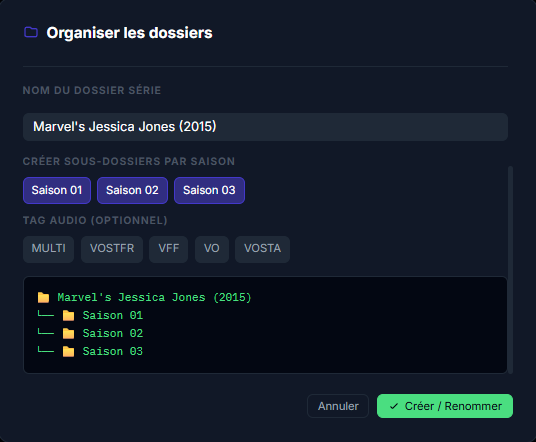
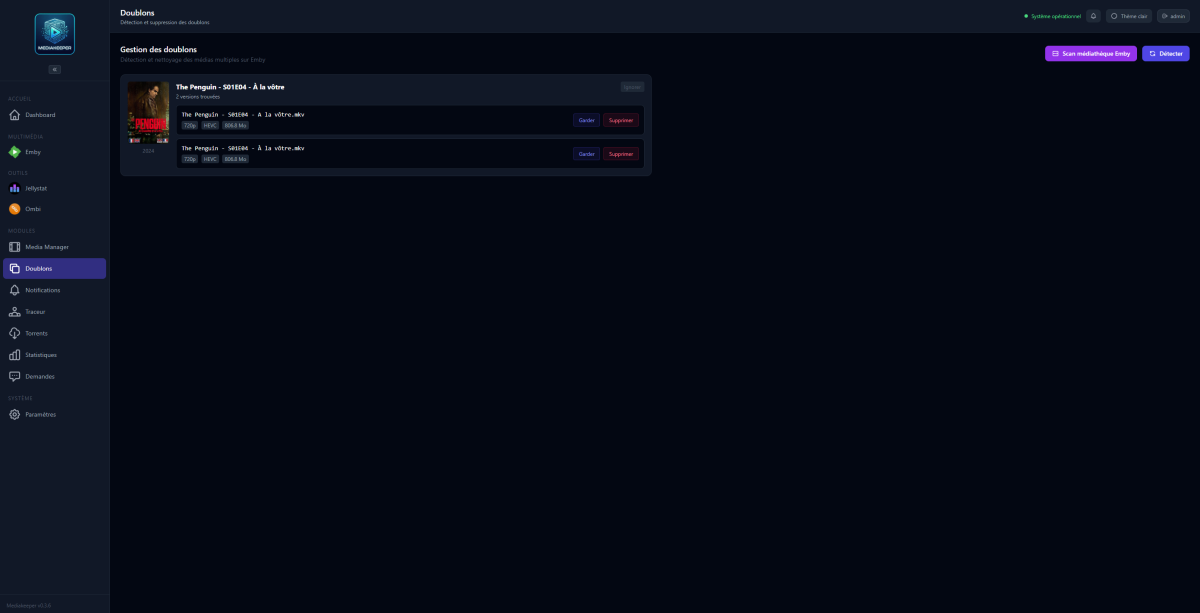
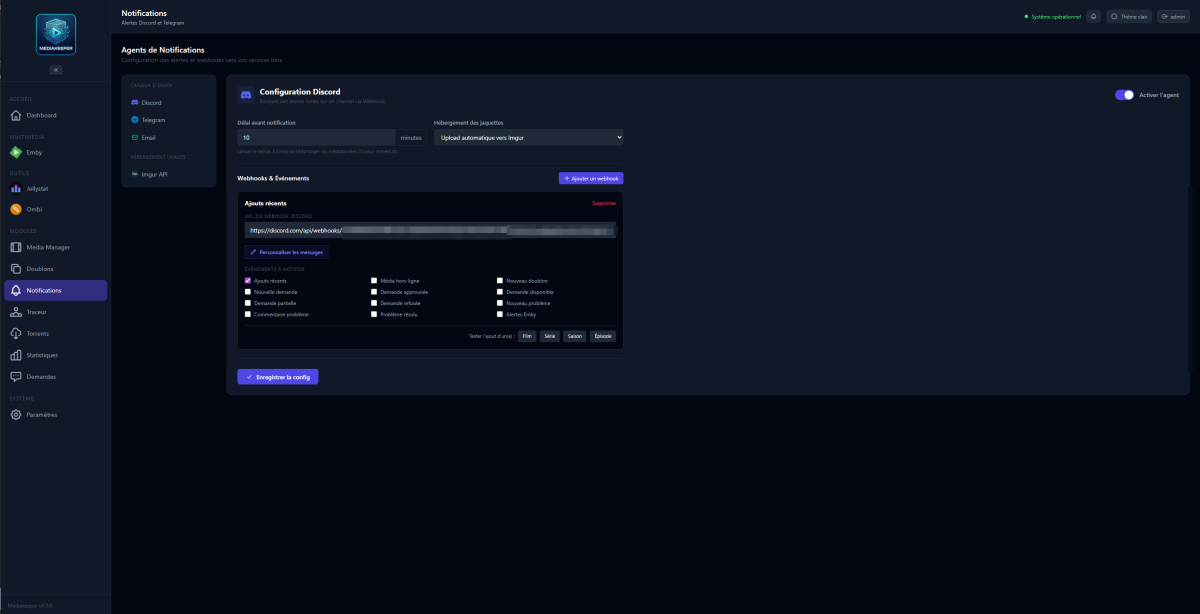
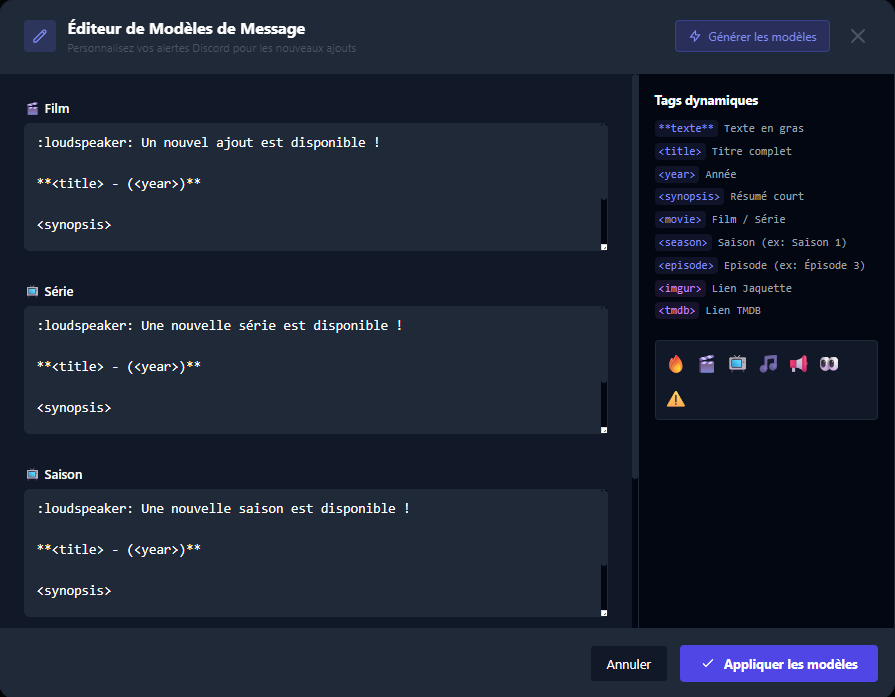
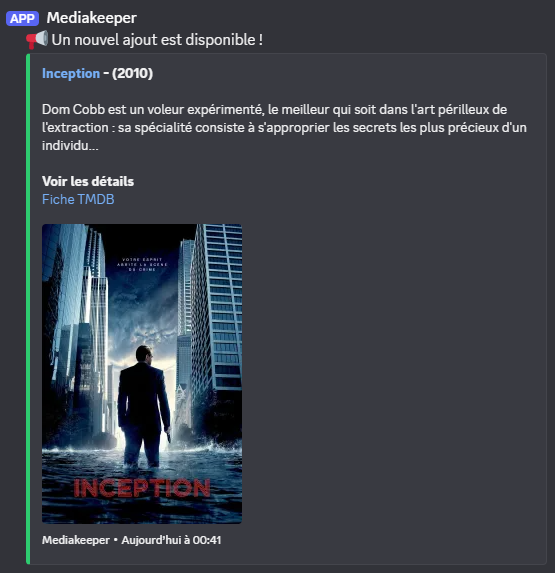
Bonjour à tous, Issu du monde système et réseau avec quelques bases en dev, j'ai profité de l'appui de l'IA pour coder un outil répondant à un besoin perso : Mediakeeper. Initialement prévu pour mon propre usage, le projet commence à prendre de l'ampleur et je me demande s'il ne pourrait pas être utile à d'autres membres. J'ai conscience que l'usage de l'IA pour le développement suscite actuellement des débats. Je tiens à préciser que Mediakeeper est initialement un projet personnel, strictement limité à un usage en réseau local et non exposé sur l'extérieur. Par ailleurs, j'utilise ce projet comme un levier d'apprentissage : j'approfondis quotidiennement mes connaissances en développement et en cybersécurité pour affiner le code produit et réduire progressivement ma dépendance aux IA. C'est quoi l'idée ? L'objectif est de regrouper dans une interface unique tout le nécessaire pour administrer une médiathèque. Pour l'instant, c'est focus sur Emby et conçu pour tourner exclusivement en réseau local. Ce qui est déjà fonctionnel : Dashboard central : Une vue d'ensemble personnalisable (et encore en évolution) pour garder un œil sur l'état de l'infra. Intégration iFrame : Possibilité d'intégrer directement l'interface d'Emby, mais aussi d'autres outils comme Jellystats ou Ombi, pour tout piloter depuis un seul onglet. Ce qui est en cours de développement (Modules dédiés) : Media Manager : Un outil pour automatiser les tâches chronophages. Il s'appuie sur l'API TMDB pour renommer proprement les fichiers, créer les dossiers de saisons en y ajoutant des tags (Multi, VOSTFR...), déplacer les médias au bon endroit (drag and drop) et déclencher le scan Emby. J'y ai aussi intégré un système de tags automatiques (par exemple pour identifier les films d'animation). Doublons : Un module pour scanner la bibliothèque et débusquer les fichiers redondants en comparant la taille et la résolution, avec option de suppression directe, ou ignorer. Notifications : Un système d'alertes paramétrable pour envoyer des notifications via Discord, Telegram ou par mail (pour l'instant). Je ne parlerais pas des autres modules encore à l'étape de réflexion. Vos retours m'intéressent Avant d'aller plus loin dans le développement des autres modules, je suis curieux d'avoir votre avis : Est-ce que c'est un outil qui pourrait vous intéresser ? Y a-t-il des fonctionnalités de gestion (fichiers, métadonnées, monitoring) qui vous manquent aujourd'hui sur les solutions existantes ? Au plaisir d'échanger avec vous sur le sujet ! Belle soirée !
-
It seems quite absurd to me that .bif files are cached when using this library option: .bif files are accessed only when the video is playing, not during browsing. This doesn’t enhance browsing speed! I see no reason to cash these .bif’s; it’s a huge waste of space on the fast SSD (MVNE?). Slow or sleeping HDDs must be spinning while the video is playing, so even a slow HDD can serve the video and .bif files just fine. Please add an option to exclude caching for .bif files, as this causes the metadata folder to become very large. Thanks

- Yesterday
-
I understand the frustration. We can add a setting in the meantime. This would allow you to disable the support for HE-AAC entirely leaving it up to the server to transcode the audio.
-
For me, the majority of my channels *DO NOT WORK*, so I would be happy to transcode everything. This is just a Roku thing, as the web browser, Android and IPhone app play all of them just fine, but the Roku app just cycles the loading screen. I am to the point where I might just hook up a Chromecast to the TV since the app really does not work for 90% of my channels.