All Activity
- Past hour
-
 mirian-robledo. joined the community
 -

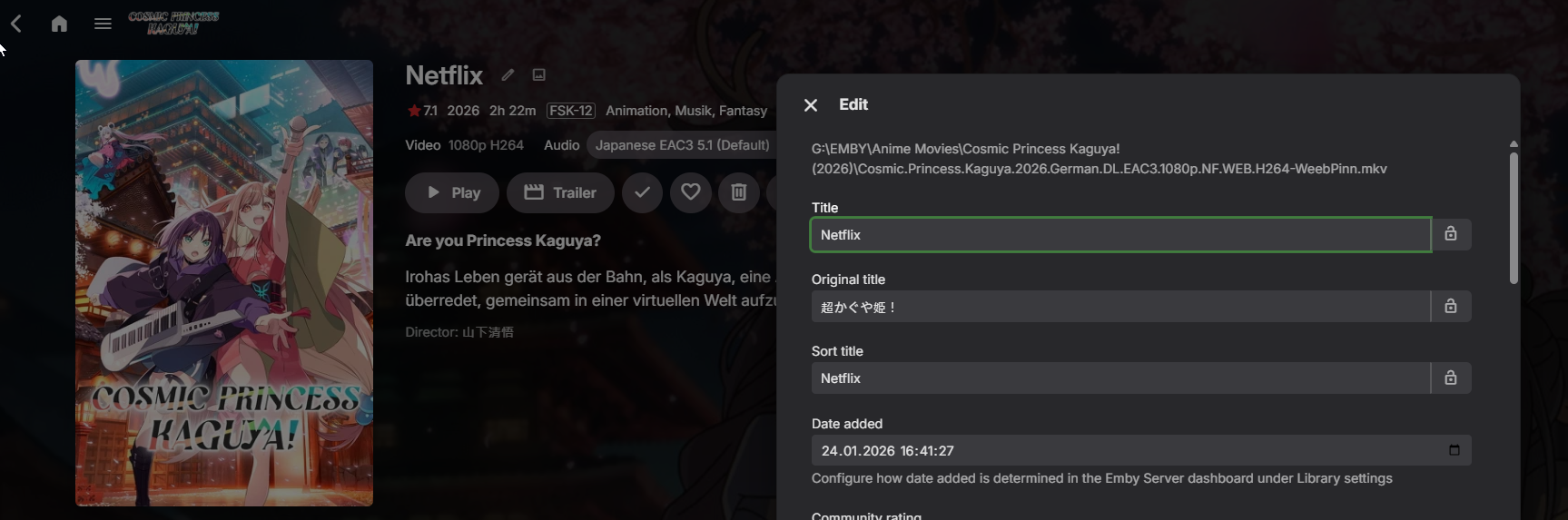
Resfreshing metdata replaced the title with the embedded title form the video.
Kyouma posted a topic in General/Windows
Hello, I installed the AniList Plugin to get the AniList ID (nothing else). Then refreshed the metadata and chose the option "search for missing metadata". And somehow this triggered it to replace the Title for example "Cosmic Princess Kaguya! (2026)" with the Title embedded into the Video which would be "Netflix" in this example. I have attatched the log. What may have caused this and how can i prevent it? I only want to get the AniList ID. Also, is there a way to revert this, without editing everything manually? embyserver.txt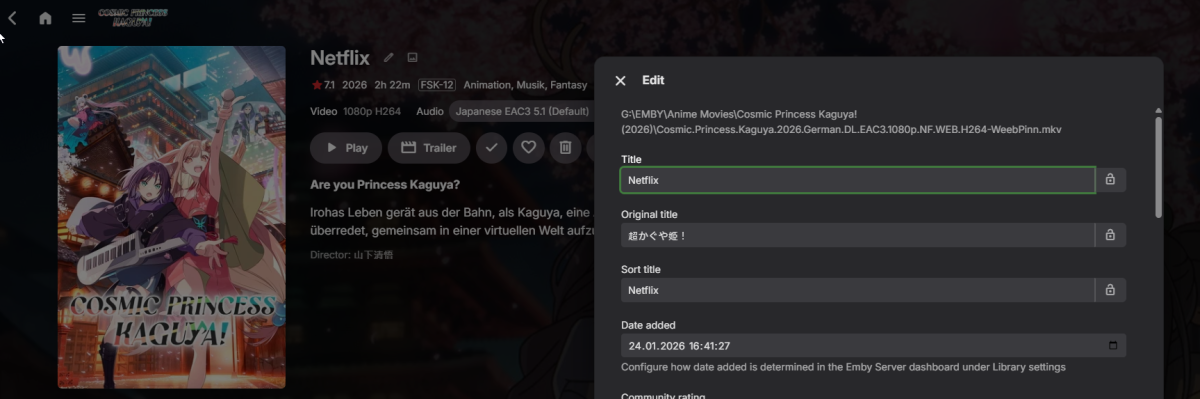
.png.dbb227fe902f5506ec2a81a26ca8d71a.png)
-
 usisidododod joined the community
 -
 jkskdodlfmfk joined the community
 -
 Crismartimez joined the community
 -
 9999887666 joined the community
 -
 Kmax39834 joined the community
 -
 673839494 joined the community
 -
 cat486 joined the community
 -
 EmbZhou001 joined the community
 -
 K2shiner joined the community
 -
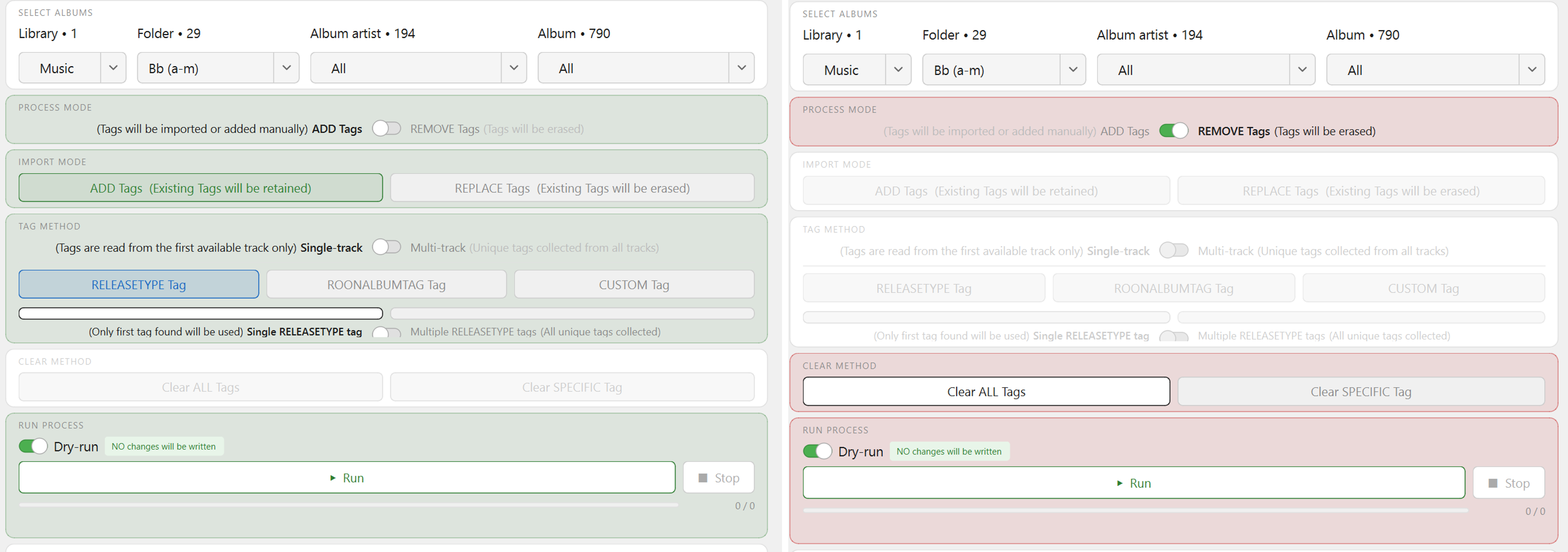
Just wanted you to say that; after 30 mins testing on colored version, opening plain one was literal WFT moment - you'll se after some usage. Anyway, that'll be the branch for further development. You are right, there's actually no reason for METHOD buttons to be accented at all, let alone in three colors - likely a legacy mental map from some of the previous iterations - not even a single blue (tested), plain white/black is in line with general theme and works just fine. I'm fine either way, maybe I'm slightly more inclined towards having word Tag there, but I won't be using it anyway so I'm not bothered. v1.2 - GUI refined (color accents dropped, button tags) emby_album_tag_importer.py
-
Is there a way to apply playstates to each user automatically? For example if I create a new source and add the filter "unplayed" I can choose the user or all users. This requires that a unique playlist for each user to incorporate their watched status. If I create a home screen selection through the Emby UI I can add the playstate filter and it applies to that user. If I copy the setting to any other user it will apply their own watched status. Does that make any sense?
-

why emby keeping transcode av1 not direct play anymore??
TariqK replied to kira yamato's topic in Apple iOS / macOS
I thought this was an AppleTV thing, sounds like its on other platforms too? -

why emby keeping transcode av1 not direct play anymore??
majorsl replied to kira yamato's topic in Apple iOS / macOS
Noticed this too. My 55" Fire TV used to direct play AV1, now it seems to want to transcode it. - Today
-
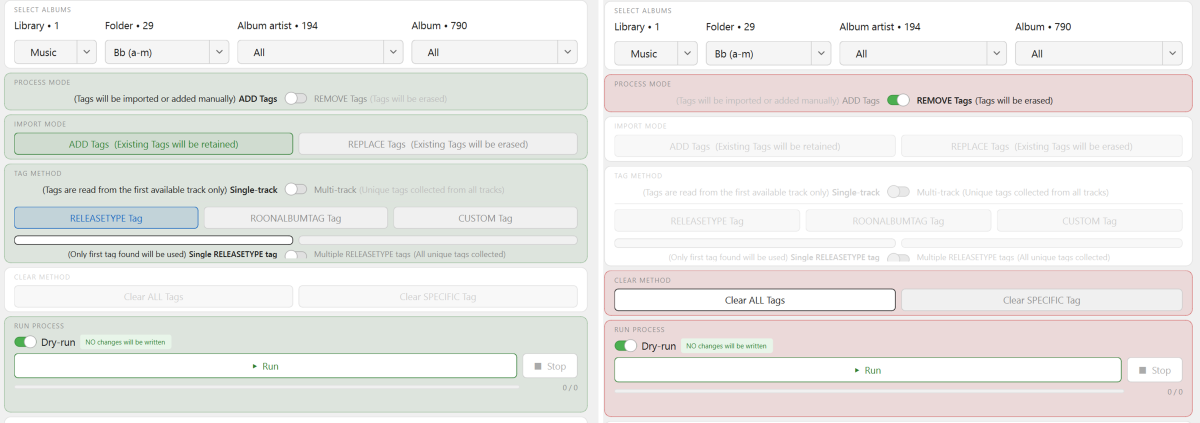
Well, this was a big change!!! If I was only ever updating a few Albums, or even all (e.g.) "The Beatles" albums in bulk, then the standard white background would be fine, because any silly mistakes could quickly be corrected. BUT real-life use-case (as per images above) is more likely to be updating at top folder-level (e.g) "Bb (a-m)". Therefore green/red is the way to go. It's a good idea! But see below re: color... Two possible improvement changes: 1. CUSTOM tag in orange is too close to red in the color spectrum, now clashes with green, and seems like a "warning" signal. Now that green is the background, all three tag selections would possibly be better if they were 'above' green - ROYGBIV - from left to right? Please can you pick the best tones that you think will work. Second thought - perhaps Blue for all three or even just the Gray/White palette(???), as the position and name delineates which tag has been selected, and they are all are tags, as such. Maybe simple is better - or we end up with a rainbow!!! 2. Just a thought - but I'm not too fussed either way - RELEASETYPE, ROONALBUMTAG. CUSTOM possibly dont't need the "Tag" after them inside the buttons. There is plenty of room, but it may look better without? You be the judge. Thanks!
-
Aperture v0.7.5 Release Notes This release expands Discovery with JustWatch streaming charts, configurable TMDb genre strips (including exclude genres and flexible year ranges), a clearer Movies / TV browse layout, and multilingual UI improvements. At a glance Theme What shipped Discovery browse layout On Movies and TV Series, sub-tabs separate TMDb popular overall (AI pool, filters, refresh) from Popular by genre (admin-configured TMDb Discover strips). Choice is remembered in the browser. Streaming discovery Discover → Streaming tab (when enabled): JustWatch-backed charts; admin can enable the feature and choose provider strips. Genre strips (admin) Per-strip genres (AND), exclude genres, from / to year (including Today for a rolling end at the current calendar year), heading, origin country, max titles, drag reorder. Multilingual UI Fourteen locales; RTL for Arabic and Hebrew. Deployment-wide language defaults under System settings. Summary for users Where to find things What Where AI discovery pool + filters + Refresh Discover → Movies or TV Series → sub-tab TMDb popular overall Horizontal genre strips Discover → Movies or TV Series → sub-tab Popular by genre Streaming charts Discover → Streaming (only if your admin has enabled streaming discovery for the server) Your UI language User settings (language / locale preferences in the app) Grid/list view and Refresh apply to TMDb popular overall, not to the genre-strip sub-tab. Redundant info alerts about clicking titles were removed from Discovery tab content. Summary for admins Genre strips (TMDb Discover) Path: Admin → Settings → Setup → Genre discovery (third sub-tab under Setup). TMDb must be configured; the tab is disabled until then. Deep link (same page): /admin/settings?tab=setup&setupSub=genre-discovery Configure Movies and TV sections separately. For each strip you can set: Genres — multiple genres are combined with AND (TMDb with_genres). Exclude genres — TMDb without_genres (e.g. Science Fiction but not Animation). From year / To year — optional bounds on release date (movies) or first air date (TV). To year can be No end, Today (current year) (rolling end-of-year bound at fetch time), or a specific year. Optional heading, origin country, and max titles per strip. Drag strips to reorder; use the save control on a strip (or your workflow) to persist. Streaming discovery (JustWatch) Path: Admin → Settings → Setup → Integrations — Streaming discovery block (enable flag, provider strip codes). Deep link: /admin/settings?tab=setup&setupSub=integrations The Discover → Streaming tab appears for users when streaming discovery is enabled for the deployment and their account has Discovery enabled. Language defaults (deployment) Path: Admin → Settings → System — Language defaults (default UI language and default AI language for new users / server-side defaults where applicable). Discovery – TMDb popular overall vs Popular by genre TMDb popular overall — The personalized discovery pool: language/genre/year filters, Refresh, grid or list view, job progress when a discovery job runs. Popular by genre — Read-only horizontal strips driven by admin Genre discovery configuration. Strips load as you scroll (lazy loading). Discovery – Streaming (JustWatch) Charts are backed by JustWatch GraphQL data with server-side caching. TMDb poster paths may be resolved and cached to reduce API load. Exact provider codes depend on region; the admin UI references the bundled provider list. Multilingual UI and RTL Aperture’s web UI is multilingual. Users can work in a supported language (including via browser language detection and stored preference). We do not guarantee completeness or accuracy of translations; no promises are made as to language quality. Supported UI locales (14): English (en), Spanish (es), German (de), French (fr), Italian (it), Portuguese (pt), Dutch (nl), Russian (ru), Japanese (ja), Chinese (zh), Korean (ko), Hindi (hi), Arabic (ar), Hebrew (he). Right-to-left (RTL): The layout uses RTL for Arabic and Hebrew so navigation and mirroring behave correctly for those locales. Update instructions For Docker users docker compose pull docker compose up -d Apply database migrations per your process (pnpm db:migrate or automatic on startup, depending on deployment). Operator checklist Run migrations — 0110–0112 must apply before relying on streaming discovery or poster cache. Should happen automatically. TMDb — Required for genre strips and for sensible Discover behavior. Streaming discovery — Enable and configure provider strips under Setup → Integrations if you want the Streaming tab. Genre strips — Configure under Setup → Genre discovery; use Discover → Popular by genre to verify. Thank you for running Aperture and feeding back on Discovery and translations in real environments.
-
Hi Luke, any update on this please?
-
FIX FOUND - devs please look: Emby unnecessarily transcoding HEVC streams with the native AVKit player
TariqK replied to Geordie's topic in Apple TV
If this is why I all of a sudden cannot play av1 on my AppleTV since around 2 months ... when is this going to be fixed? -
why emby keeping transcode av1 not direct play anymore??
TariqK replied to kira yamato's topic in Apple iOS / macOS
Been having a terrible experience too, in fact the av1 codec videos dont even play. HAs there been any update on this? -
This is small quick follow-up test on V1.0 (will catch up soon) Found the JSON file. I suppose I was initially expecting a pop-up window like "Save As" rather than "Save". It seems to Save ok (e.g.) (Hmmm - this has actually given me a vague idea for a completely different project I'm working on, where I need to map Album Artists to their IDs). Yep. Found this out the hard way. I need to read the instructions!!! Just me getting used to how it works. Moving on to the newer versions now...
-
Update: Updated Accent comment to include the term experimental. Control the IMDB ratings star color in the master pallet for both options. Dimmed down the active sidebar pill so you can see the active state icon when accent colors were enabled. Default gold colors made the active state pill a gold color instead of accent color. Emby Navy and Gold v4.62.css
-
Irgendwie juckt es mir in den Fingern emby auf meinen pc zu packen. Einfach nur um sehen dass es keinen Unterschied macht
-

Subtitle translation using local LLM or API calls - Very accurate language - cheap.
Neminem replied to dexus's topic in Tools and Utilities
Curious if its will always embed the subs into MKV files? I have not played with this yet Ohh its a script / barebone install, any chance for a docker version -
Has Anyone Integrated AI With Emby? Looking for Real-World Tools, Setups & Dev Plans
Neminem replied to Airbender's topic in Tools and Utilities
@dexus Nice more options are always nice I have used this for 1 or 2 years now. lingarr-translate/lingarr: Lingarr is an application that supports both local and SaaS translation services to translate subtitle files into a specified target language. With automated translation options, Lingarr simplifies translating subtitles. With a combination of Bazarr and Whisper for those pesky not found subs in any language. It runs in docker, so that might not be for all. But using that with libretranslate. This is mostly because I strip out all embedded subs from my media. And only use .srt subs. -
v1.1b2 - GUI reworked (Mapping modals behavior adjusted) emby_album_tag_importer.py
-

Has Anyone Integrated AI With Emby? Looking for Real-World Tools, Setups & Dev Plans
dexus replied to Airbender's topic in Tools and Utilities
LOL! I am actually working on one that does that as well, but also uses api calls to an LLM to fine-tune the subs, and keeping them in the "netflix rules" for subs, correcting grammar, punctuation and shortening sentences that are longer than the standard etc. Refinement stage. In the translation project there is alot more to it than meets the eye.. it uses quite advanced processes to ensure that we have bulletproof timing and that the llm doesn't f*ck it up. -

Has Anyone Integrated AI With Emby? Looking for Real-World Tools, Setups & Dev Plans
BillOatman replied to Airbender's topic in Tools and Utilities
Nice! I wrote this one that creates subs from the audio that uses Whisper SubtitleCreator -
also bei mir läuft es auch perfekt , habe auch lifetime , denke noch immer das es an der Hardware liegt die Synology ist ja nicht sehr potent
-
Has Anyone Integrated AI With Emby? Looking for Real-World Tools, Setups & Dev Plans
dexus replied to Airbender's topic in Tools and Utilities
Hey, my Danish neighbor! check out my translation project using AI here: https://github.com/dexusno/Translate_Subs It works like a charm, and DeepSeek API is so cheap it's ridicolous. -
3090 hardcoded english strings
-
thanks for this, I'm using this option now, works a treat. quick question... when I updated the server to 4.9.3.0 I noticed content I have in a mixed folder will not sort by release date anymore and the tags will not show. i have nfo files for this. worked fine before I updated. is there a reason why the updated server would stop this? thanks
-
Hi Luke: It looks like "Tune In" was the culprit. Somehow it was affecting the guide refresh. A successful guide refresh ran about 1.5 hours ago. Tune in is still uninstalled. Ill leave it uninstalled since I dont use it. any thoughts your side on this? You stated that Tune In is in no way related to Live TV. Perhaps the plugin has a bug of some type. Anyway, thanks for the assist. I guess we can mark this as solved.
-
I am almost done, wrote some google translate scripts and i18n have made this a bit less painful... without Cursor and composer 2 fast for help I would not have ever done this.
-
Which server version? Local or hosted Web App?