
All Activity
- Past hour
-
 Nada177 joined the community
 -
 HMLB joined the community
 -
 Sad2412 joined the community
 -
That is my question, how do I split them in Emby? I don't see any option to do that, there is only the drop down under the version. They are already split on the file system I tried selecting the edit metadata, but no matter which of the versions is selected, the metadata editor always shows the same 2018 file in the file path?
-

Plugin: EmbyCredits, detect end credits and add auto skip.
popy replied to yocker's topic in Plugins
Hey guys. Discovered this nice plugin and tested it with the OCR docker to get credit markers for a few episodes. It works in the web GUI and Emby for Android app on my smartphone (emby showing the pop-up at the detected time). Sadly, on my Nvidia Shields with Emby for AndroidTV the markers are not shown (~1 min before end on my example episode). Instead it shows the default pop-up at 30 secs before the end. Searched this thread for Android tv and also the ATV app options but found no solution. Maybe I missed a setting...? Any hints? Thx a lot for your efforts on this plugin!!!!! -
 kofmy6-kecdyM-hyntoj joined the community
 -
 Feyber joined the community
 -
 avivohana@gmail.com joined the community
 -
 Wildwood72 joined the community
 -
 aviv.ohana1@icloud.com joined the community
 -
 camilo0102 joined the community
 -
Hi, they probably have the same external ids somehow. What I would do is split them manually, and then use the identify feature on both versions once they are separated.
-
 Levent joined the community
 -
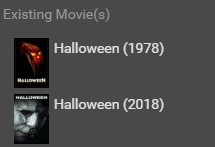
Radarr shows them both correctly separate as well:
-

embyforkodi (next-gen) 12.X.X support
e123enitan replied to quickmic's topic in Emby For Kodi Next Gen
As I am curious to know why log have several warnings and errors I used Ai analyzed log, please, note even with the Ai analysis I dont know what they mean let alone how to fixed them I’ll break this into real issues vs noise, then give you targeted fixes. What your log is really telling us 1) Emby addon is the main source of warnings From your snippet: EMBY.hooks.websocket That’s important. It means: Kodi core is fine The Emby for Kodi integration layer is doing most of the work And it’s also generating most warnings Root cause Your Emby addon is still using old Kodi APIs (ListItem) instead of: InfoTagVideo That’s why you see: ListItem.setInfo() is deprecated ListItem.setCast() is deprecated ListItem.addStreamInfo() is deprecated What this means technically Every time Emby builds a media item → it uses outdated calls Kodi logs a warning for each one That’s why you see duplicate warnings spam Impact Not a playback issue Not a lag cause (by itself) But adds overhead + log noise 2) Websocket spam (hidden performance clue) You have: UserDataChanged ItemSkipUpdate Root cause Emby server is pushing real-time updates via websocket Kodi receives them and decides whether to process or skip Why this matters If your full log shows a lot of: UserDataChanged Library updates Then you likely have: Frequent metadata sync Possibly triggered during playback or channel switching Impact Can cause UI lag / delays Especially on weaker systems or busy networks 3) Texture loading failure (real issue) Direct texture file loading failed for: resource.images.studios.coloured/Stanley Kubrick Productions / Metro-Goldwyn-Mayer.png Root cause (very likely) Bad metadata string from Emby: "Stanley Kubrick Productions / Metro-Goldwyn-Mayer" Kodi tries to match it to a single PNG → fails Why this happens Emby merges multiple studios into one string Kodi expects one studio = one image file Impact Missing artwork Minor UI slowdown when repeatedly failing to load textures 4) Hidden pattern in logs like yours (important) In setups like yours (Kodi + Emby + Live TV / streaming), these logs usually also include: A) HTTP / streaming delays Look for in your full log: CCurlFile::FillBuffer - timeout Open - failed with code 404/500 If present → network or backend issue PVR / Live TV lag clues Since you previously mentioned lag: Look for: PVRManager - Channel switch took X ms AddOnLog: pvr.* slow response That’s where real lag usually lives (not in your warnings) What is NOT your problem Let’s be clear: These are NOT causing lag: Deprecated API warnings Duplicate messages InfoTagVideo migration warnings They look scary, but they’re developer-level warnings only What you should fix (priority order) 1) Update Emby ecosystem (highest priority) Do this first: Update: Emby Server Emby for Kodi addon If possible, switch to: Emby Next Gen plugin (better Kodi 21/22 support) This alone will reduce: warnings websocket noise metadata issues 2) Fix artwork errors Do this: Reinstall: resource.images.studios.coloured Then clear cache: userdata/Database/Textures13.db userdata/Thumbnails/ 3) Reduce Emby websocket load (big hidden win) Inside Emby addon settings: Disable or reduce: Real-time updates Playback reporting frequency Library sync triggers This can noticeably improve: menu responsiveness channel switching 4) Clean metadata (important for your specific error) On Emby server: Check studios for affected items Fix entries like: Studio A / Studio B ➡ split them properly 5) If you’re chasing lag (important) Your current warnings are NOT the root cause. You should instead look for: buffering delays PVR backend latency HTTP/2 or streaming issues (you mentioned earlier) Bottom line Your log shows a modern Kodi + outdated addon API mismatch The real system looks like: Kodi = OK Emby = slightly outdated behavior Metadata = slightly messy Only artwork + websocket behavior are worth fixing right now If you want a real deep diagnosis Paste: 30–60 seconds of log during: channel switch OR playback start That’s where the real bottleneck shows up. -
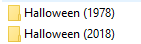
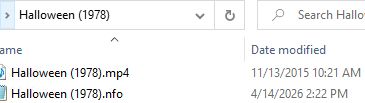
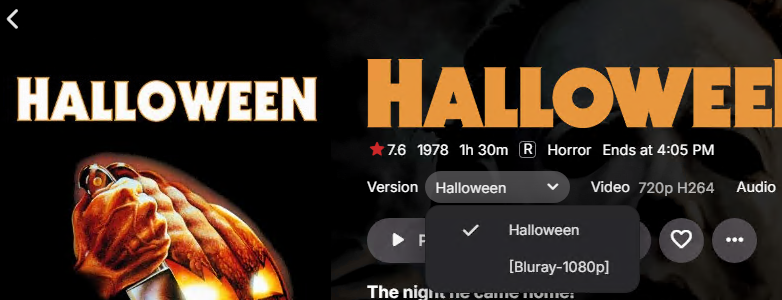
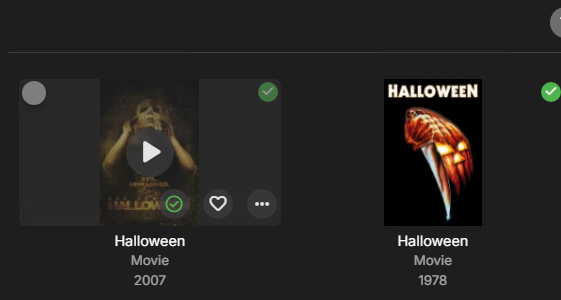
I have 2 Halloween movies: They are different movies: However Emby has them combined into 1 entry: the Halloween is the 1978 movie, the [Bluray-1080p] is actually the 2018 movie Not sure why or how this is happening? Since there is only 1 entry listing in Emby, I am unsure how to specify specific imdb ids for each movie? Strange thing is Halloween (2007) show correctly as a separate movie:



-
In case it helps, the Emby apps waits 5 minutes.
-

Subtitle Encoding Issue After Emby Premiere Activation
Luke replied to Andoo's topic in General/Windows
@Andoothe issue is resolved on the server beta channel and will be in the upcoming 4.9.5 server release. In case it helps in the future, Emby Server has a log anonymization feature to protect your data, and you can always send log files privately as well. Thanks. -
Download movie from server to Emby for Android - "ready to transfer" nothing happens.
Luke replied to Hazandhan's topic in Android
@Hazandhanhas it downloaded? -
No art or posters for anything including backdrops on roku app.
Luke replied to Error3972's topic in Roku
Hi there, please attach the Emby server log from when the problem occurred: How to Report a Problem Thanks! -
Can you give it another try?
-
Philips Titan OS 8 channel audio playback issues
Luke replied to geomusicmaker's topic in Other Smart TVs
This is the only way that Titan is providing right now. -
Home Videos library ignores Date Added from local NFO
Luke replied to TDriver's topic in General/Windows
HI there, can you please provide a specific example? How to Report a Problem Thanks ! -
It looks like on the initial refresh metadata it did not have a moviedb id. Then it got one as part of Identify.
-

No hardware transcoding on intel core ultra 255H
fricelander replied to cantchooseaname's topic in Linux
Nope, I got i5 10500T instead -
It needs to be added.
-
embyforkodi (next-gen) 12.X.X support
e123enitan replied to quickmic's topic in Emby For Kodi Next Gen
I am aware that v22 has advance settings, however, there seems to be additional settings in file as I disabled PVR as suggested, leaving only e4k addon, the lasted log revealed a lot of warnings and errors https://paste.kodi.tv/nozalamagi let me know what is next thanks <?xml version="1.0" encoding="UTF-8" standalone="yes" ?> <advancedsettings> <network> <disablehttp2>true</disablehttp2> <curlclienttimeout>15</curlclienttimeout> </network> <pathsubstitution> <substitute> <from>/emby_addon_mode/</from> <to>http://127.0.0.1:57342/|redirect-limit=1000</to> </substitute> </pathsubstitution> <video> <excludefromlisting> <regexp>^\/emby_addon_mode(?!.*(dynamic|musicvideo|tvshows|video|movies))</regexp> <regexp>^http:\/\/127.0.0.1:57342(?!.*(dynamic|musicvideo|tvshows|video|movies))</regexp> <regexp>^dav:\/\/127.0.0.1:57342(?!.*(dynamic|musicvideo|tvshows|video|movies))</regexp> </excludefromlisting> <excludefromscan> <regexp>/emby_addon_mode/</regexp> <regexp>http://127.0.0.1:57342/</regexp> <regexp>dav://127.0.0.1:57342/</regexp> </excludefromscan> <excludetvshowsfromscan> <regexp>/emby_addon_mode/</regexp> <regexp>http://127.0.0.1:57342/</regexp> <regexp>dav://127.0.0.1:57342/</regexp> </excludetvshowsfromscan> </video> <audio> <excludefromlisting> <regexp>^\/emby_addon_mode(?!.*(dynamic|audio))</regexp> <regexp>^http:\/\/127.0.0.1:57342(?!.*(dynamic|audio))</regexp> <regexp>^dav:\/\/127.0.0.1:57342(?!.*(dynamic|audio))</regexp> </excludefromlisting> <excludefromscan> <regexp>/emby_addon_mode/</regexp> <regexp>http://127.0.0.1:57342/</regexp> <regexp>dav://127.0.0.1:57342/</regexp> </excludefromscan> </audio> </advancedsettings> - Today
-
@Luke
-
@Molikva Hi there, let's look at an example. Please attach the information requested in how to report a media playback issue. Thanks!
-
@danielknightcan you please attach the ffmpeg log as well? Thanks !
-
@fricelanderdid you end up getting one?
-
Hi, can you try this again? Thanks.
-
HI, this should be resolved in the server beta channel, and the fix will be included in the next stable release. Thanks.
-
OK we're looking into it. Thanks.
-
I guess the issue is that if we add this it will be limited to the bottom of the detail screen only. And filters. We can't really fit any new tabs in the main music header.


