All Activity
- Past hour
-
I adjusted it to this...
-
 Spikkel joined the community
 -
Hi Luke, no joy as of right now! I am not a bit techie so I am not entirely hopeful. But thank you so much for bearing with me!
-
 jonaschoy joined the community
 -

The latest version 2.3.3 doesn't work
MediaEmby1968 replied to MediaEmby1968's topic in Samsung Smart TV
Thanks. I'll continue using version 2.2.8 of the TV for now. -
 Delaha joined the community
 -
 85804 joined the community
 -
 miguelta1987 joined the community
 -

Add "Remove from Collection" to the three-dot menu on a collection in the "Included In" section
crusher11 replied to crusher11's topic in Feature Requests
What do you mean? -

Emby Version 4.9.3 - Get User Watched items for movies and episodes
Quincarter replied to Quincarter's topic in Developer API
Ayyyye what a legend. Thank you! That was it! I am not 100% sure i need all of these fields. But i got them in there now and i can trim it down for what i need. That was the key though. for those coming back later - here is my query and my params: /Users/{userid}/Items?Recursive=true&Filters=IsPlayed&SortBy=DatePlayed%2CSortName&SortOrder=Descending&IncludeItemTypes=Movie%2CEpisode&Limit=500&Fields=RunTimeTicks%2CSeriesId%2CSeriesProviderIds%2CProviderIds%2CGenres%2CImageTags%2CUserData%2CDateCreated%2CPremiereDate%2CDatePlayed%2CPrimaryImageAspectRatio%2CProductionYear%2CBasicSyncInfo%2CUserDataLastPlayedDate&ExcludeLocationTypes=Virtual&EnableImageTypes=Primary%2CBackdrop%2CThumb&ImageTypeLimit=1&EnableUserData=true const params = { Recursive: "true", Filters: "IsPlayed", SortBy: "DatePlayed,SortName", SortOrder: "Descending", IncludeItemTypes: "Movie,Episode", Limit: "500", Fields: "RunTimeTicks,SeriesId,SeriesProviderIds,ProviderIds,Genres,ImageTags,UserData,DateCreated,PremiereDate,DatePlayed,PrimaryImageAspectRatio,ProductionYear,BasicSyncInfo,UserDataLastPlayedDate", ExcludeLocationTypes: "Virtual", EnableImageTypes: "Primary,Backdrop,Thumb", ImageTypeLimit: "1", EnableUserData: "true", }; -
 Mohammed Ali- joined the community
 -

OpenSubtitles not working, shows "There was an error processing the request" error yet "Success" in Emby log
Luke replied to SolidSnake289's topic in General/Windows
HI, yes we are looking into this. Thanks. -
 c4mila_diaz joined the community
 -
 ZaidaCanet joined the community
 -
Emby Theater Beta (Electron) on Raspberry Pi 5: Stuck at logo with infinite loading bar
Luke replied to hukt_own_fonikz's topic in Linux & Raspberry Pi
Hi, how did you install the app? -
Add "Remove from Collection" to the three-dot menu on a collection in the "Included In" section
Luke replied to crusher11's topic in Feature Requests
Have you checked again to see if it's there? -
Hi, ,we'll take a look at it. Thanks.
-
Hi, what guide data are you using?
-
Stuck at Ready to Transfer (Windows Emby App)
Luke replied to mrtechnologist's topic in Windows & Xbox
HI there, can you please provide a specific example? How to Report a Problem Thanks ! -
 Puffer joined the community
 -
What makes you think it's not finding zootopia 2?
-
Please let us know how things go. Thanks.
-
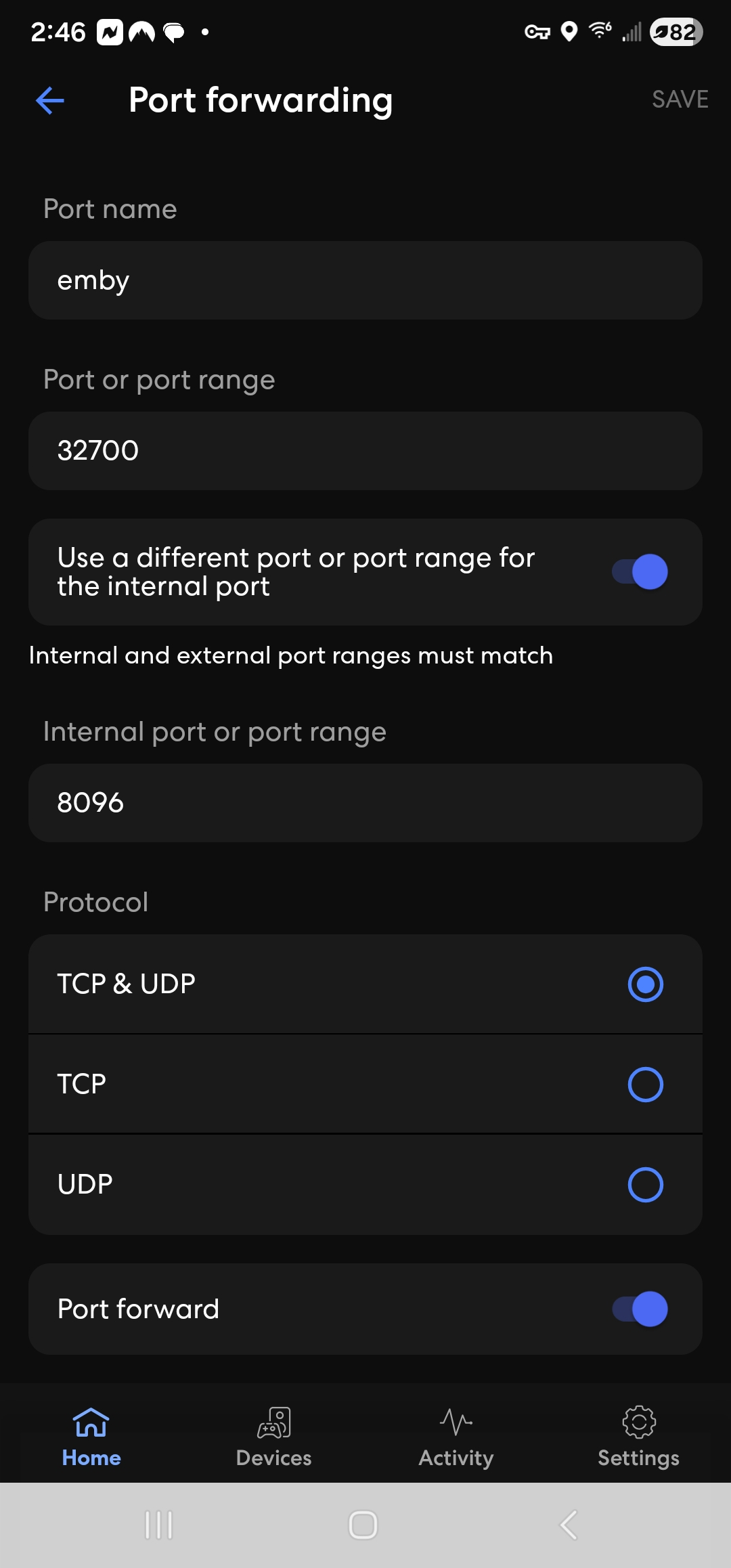
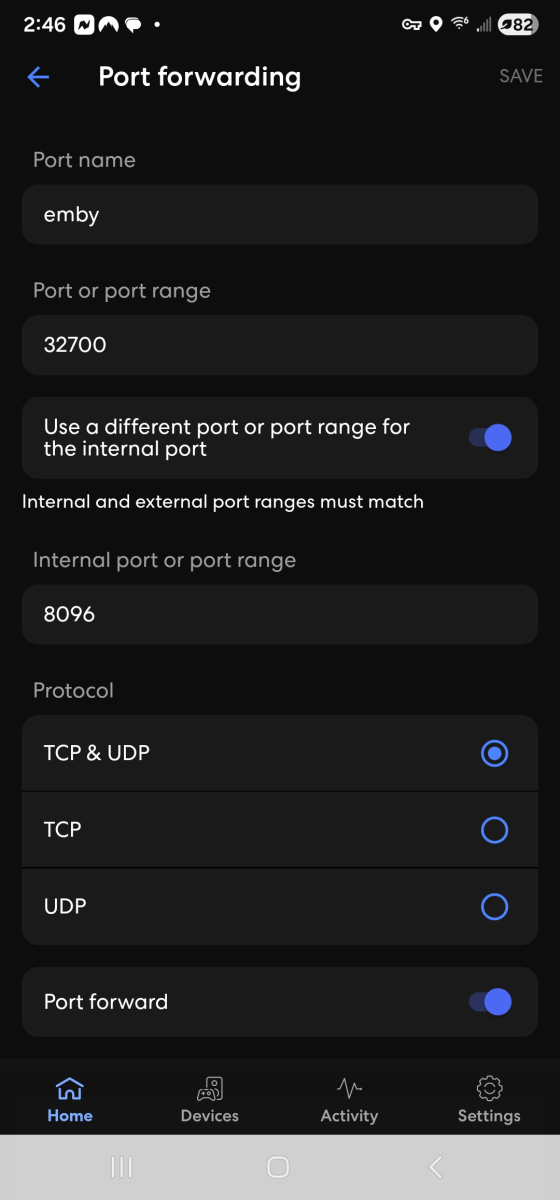
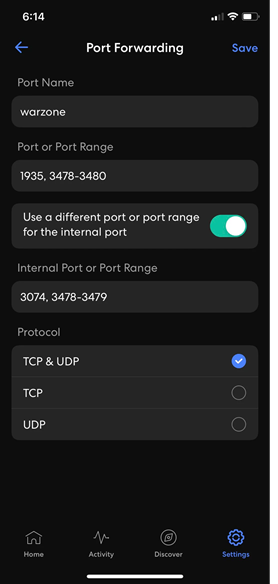
I am concerned this might be a port range 8096 to 32700 Do you have a screen in the eero app like the one below?s If you do, then it needs to be: Name: Emby Port or Port Range: 32700 Use a different port or port range for the internal port: enabled Internal Port or Port Range: 8096 Protocol: TCP ticked and saved Then in Emby Server Network Settings you keep Local http port as 8096 and you set Public Http port as 32700 and you have "Enable automatic port mapping" unticked and Save I am assuming you have "Secure Connections Mode" as "Disabled" If your eero app screen is different, let me have a screenshot
-
Reserved. In the eero app, under IP Reservation, Port Forwarding 8096-32700 (Enabled). In Emby Server Network settings, no, the public http port number by default is showing 8096 in the first row and on the second row it is showing the Public https port number 8920. Do I change both of these to 32700? For the local inside of emby Network settings, the first row Local http port number, 8096. The second row Local https port number, 8920
-
So the Emby Server has a local IP address provided by the eero. It is DHCP Reserved or static You have a manual port forward in the eero for Public/WAN/External Port 32700 to forward to Private/LAN/Local tcp port 8096 In Emby Server Settings - Network, you have Public http port number set to 32700 The default Local Http port number is kept as default as 8096 Update: and you have disabled "Enable automatic port mapping" ? correct?
- Today
-
I released v1.0.3.8 of the RatingPosterDB Emby plugin, it should resolve all reported issues, along with adding a LOT of new features: - Themes! - Theme position - Font size / weight - Image preview area in the settings - Many many new stylings settings and much more A full list of all plugin settings can be seen here: https://github.com/RatingPosterDB/RPDB-Emby-Plugin/blob/main/README.md#settings-screenshot If you find any issues with this new version, please make sure to notify me.
-
Hi Paul, I’ll contact the initial guy who I got it from .. he moved on and now someone else is running it.. I’m a total non techie person so I’m very appreciative of the help I’m given. Thank you so much. regardd deirdre
-
.thumb.png.f4cb0545e98b51fd9b00e427622ab761.png)
Remove Watched Items from Recently Released Movies and Collections
Amything replied to Dizzy49's topic in General/Windows
In regards to the homescreen, you’ll be able to do that in the next version (currently in beta). -
Okay, I adjusted the port forwarding through the eero, 8096-32700.
-

Remove Watched Items from Recently Released Movies and Collections
Dizzy49 posted a topic in General/Windows
I like a "Clean and Focused" interface. I only want to see things that I need/want to watch. If it's watched, it has no reason to be on my home page. Right now I'm looking at "Recently Released Movies" and I have seen every single movie displayed. Why are they still there? They should go away and make room for the next movies down the list so that I have more options to choose from. Similar with Collections. If I've marked every movie in the collection as Watched, then the Collection should be marked as watched (which it doesn't look like that can be done), and the collection should no longer be displayed in that section on the Home Screen. I will say that I DO like that both those areas display far more items than the "Latest XXXXXX" sections. Is removing these possible? Did I miss a setting or something? -
Star Wars - A New Hope (1977)
-
I did the scan, and here's the log. If you need anything else for the diagnosis, just let me know. embyserver.txt

-
A long time ago (like YEARS) I made some modification SOMEWHERE that increased the number of items displayed in Continue Watching to 50. I have NO idea where I made that change, but I'd like to make similar changes for the "Latest XXXX" sections as well. I have an Ultrawide screen and they don't even fill up the screen which just annoys me, and I like to have lots of options. Sometimes, particularly at the start of a new season all my stuff I was watching gets shoved off screen and I have to go track them down to finish watching the last episode or two. Anyone know where such a change can be made? I am pretty sure it was server side, but I could be wrong. I primarily use Emby on my Windows11 PC. I switch between the web version and Emby Theater. It depends what I'm watching and if it's HDR or not.
-
.thumb.jpg.d1639af2d080f59454a5d8102bcb977e.jpg)
External player integration – can Emby send a direct file URL to an external player on Android?
Cotignac replied to Cotignac's topic in Android
Follow-up: Bridge approach for Dune player integration — any API guidance available? Hi, I posted the question below a few weeks ago but haven't received any response yet. I completely understand that the development team is busy, and I don't want to be a nuisance — but I wanted to check whether this topic is on anyone's radar, or whether there is perhaps a better place to direct this kind of API question. In short, we are exploring a bridge approach that would intercept a playback event via the Emby API and launch the Dune player on an R_volution device with the direct file path and subtitle URL passed as parameters. The two specific questions we are hoping to get guidance on are: Does Emby support webhooks or API callbacks that fire when playback is initiated on a specific device? Is there an API endpoint that returns the direct file path or network URL for a given media item? Any pointer — even just to the relevant section of the API documentation — would be very helpful. Thank you for a great product, and for your time.