All Activity
- Past hour
-
 juancontreras joined the community
 -
 Galuka joined the community
 -
 Jumanu53 joined the community
 -
 mohamedsafy joined the community
 -
 asaf4545 joined the community
 -
 YUVALbt joined the community
 -
 71023 joined the community
 -
 AlbinRexhepi joined the community
 -
 1782011t joined the community
 -
 WeedMyCheat joined the community
 -

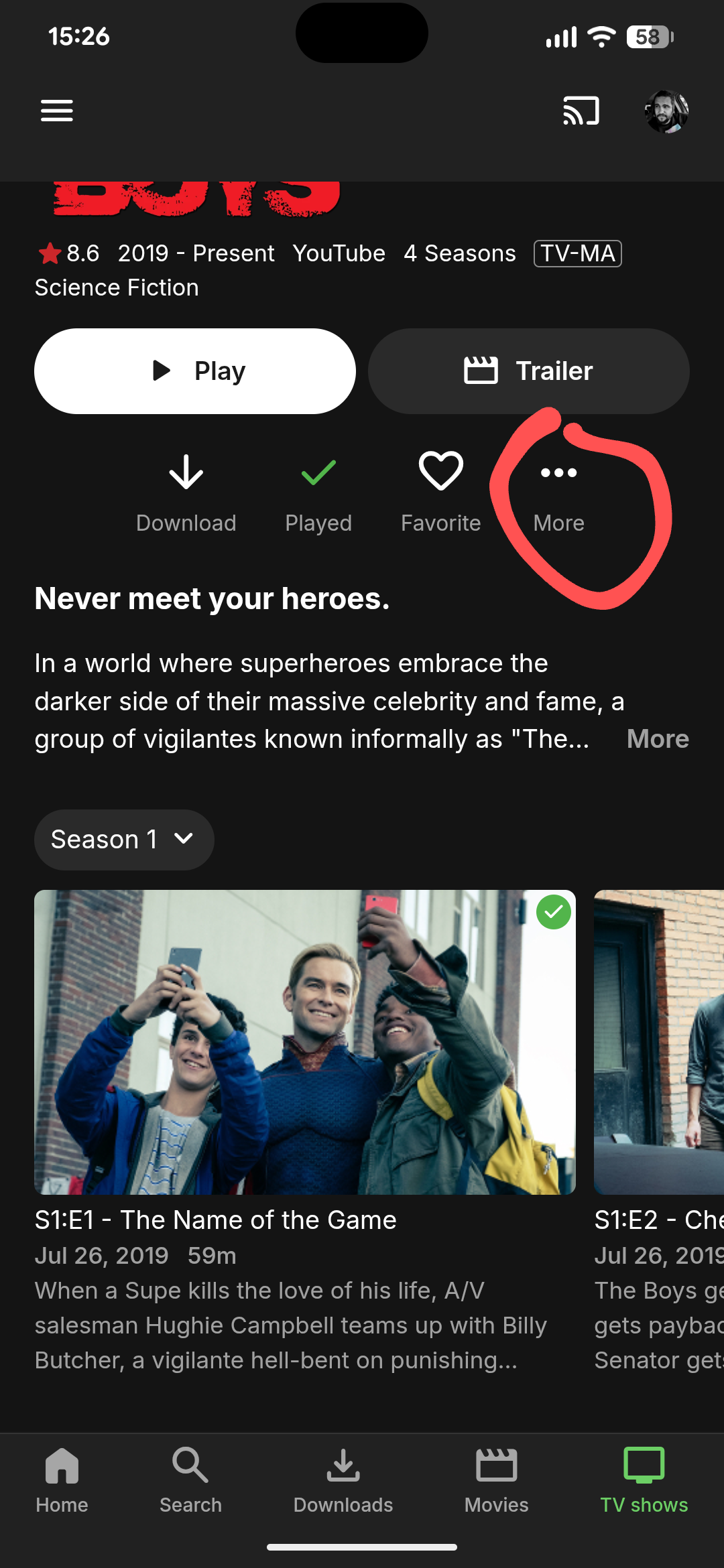
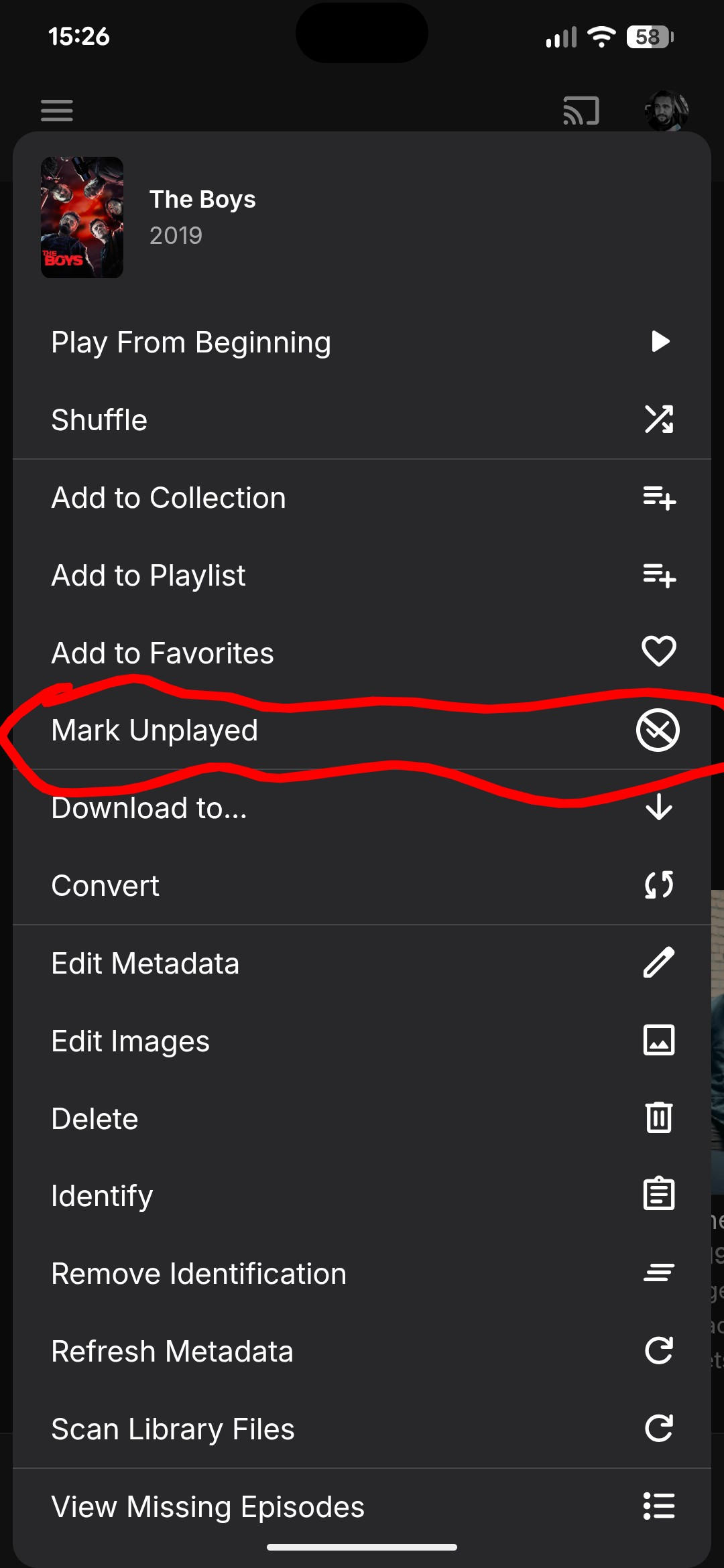
How to toggle individual season as watched or unwatchable?
Robybw replied to Robybw's topic in Android
Thank you! This is what I was looking for. -
@DMazerWhat platform are you using to host your Emby server? Those of us on Synology NAS found that 4.9.3 worked for other platforms (like it worked for my MacOS dev environment) but was still not all the way there for Synology NAS. It wasn't until we installed 4.10.0.1 beta that the rollout for Synology worked as intended.
-

Particular movie file - audio coming from rear speakers
oceanclub posted a topic in Samsung Smart TV
I have the following setup: * Samsung S85F 55 4K OLED QE55S85FAUXXU (with Emby app) * Samsung Q990F Soundbar * XBox One X (with Emby app) Normally when I play movie files using the Samsung Smart TV native Emby app, the sound from the soundbar and rear speakers is fine. It might sometimes need to transcode it, but it sounds "right". However, when I play an audio file with the following audio codec, the audio, especially speech, is weighted towards the rear speakers. I note that the Samsung Emby app does not try to transcode it. Audio ID : 2 Format : AAC LC Format/Info : Advanced Audio Codec Low Complexity Format settings : PNS / PNS Codec ID : A_AAC-2 Duration : 2 h 2 min Channel(s) : 7 channels Channel layout : L R C Cb Lb Rb Cb Sampling rate : 48.0 kHz Frame rate : 46.875 FPS (1024 SPF) Compression mode : Lossy Delay relative to video : -21 ms Title : DTS-HD MA 6.1 Language : English Default : Yes Forced : No The file sounds fine to my ears using the XBox Emby app. This is probably a real edge case as the channel layout seems to be unusual but wonder if there's any workaround or fix. -

How to toggle individual season as watched or unwatchable?
GrimReaper replied to Robybw's topic in Android
No, you can't mark one particular season Played there, you're on series level - that'll mark whole TV show/all seasons watched, as you've already observed. In that TV show Display view, it ain't one-click operation to mark single season as Played; you can either: 1) Enter any episode details>select "Go to Season" in the three-dot menu dropdown>mark season Played or 2) Change "Preferred TV show display" to " Always show season folders" under your user Display preferences and mark season Played there, after you have individual seasons listed -
LOL. I was looking for this, and looking for this, and I couldn't find it. Thank you so much for pointing it out!
-
How to toggle individual season as watched or unwatchable?
Robybw replied to Robybw's topic in Android
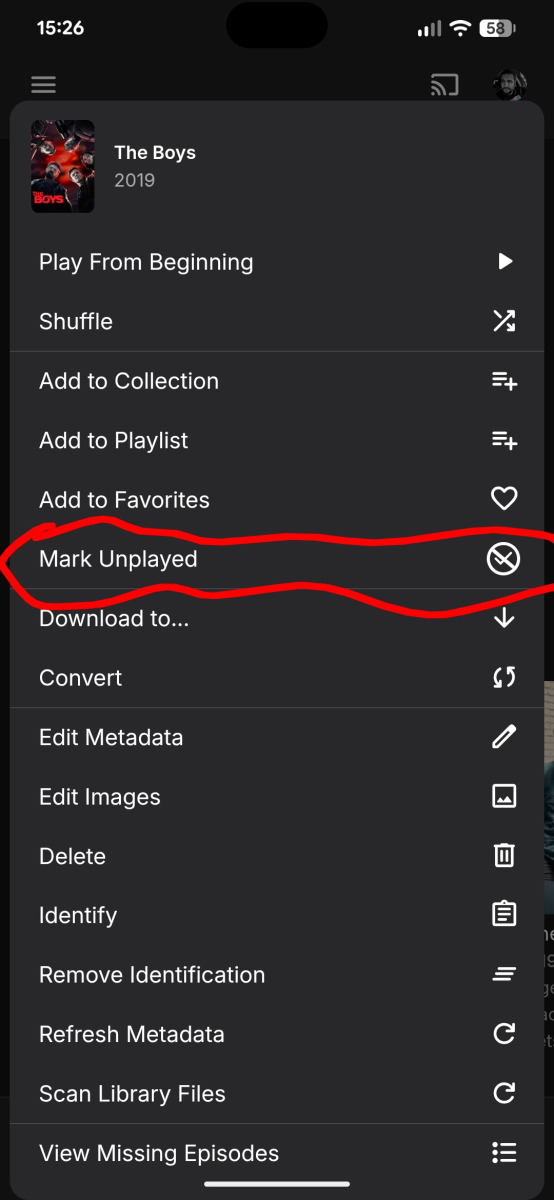
Sure.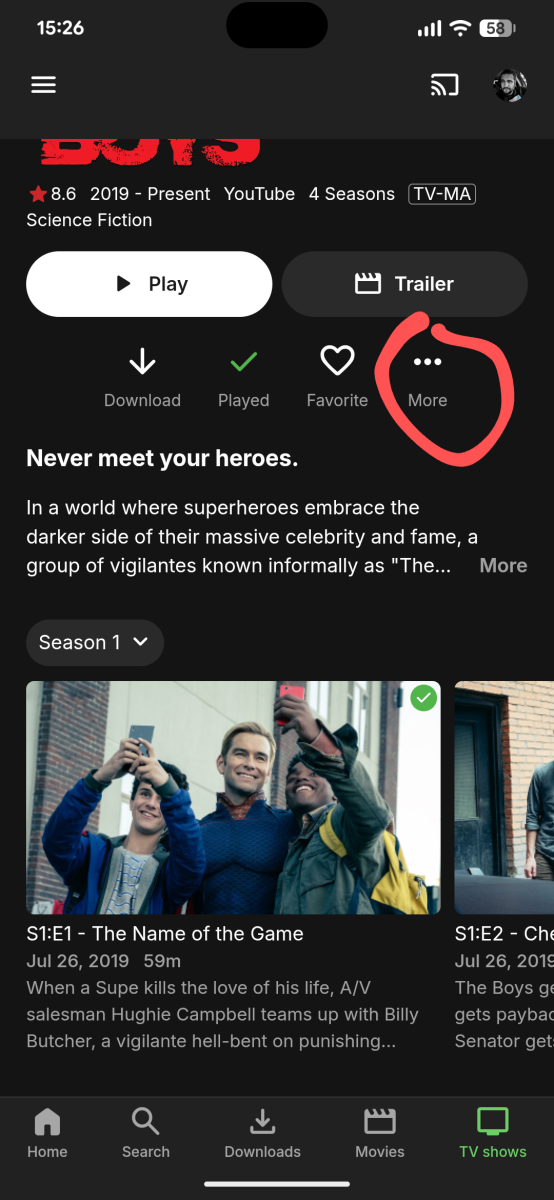
-
How to toggle individual season as watched or unwatchable?
GrimReaper replied to Robybw's topic in Android
Where are you clicking it? Care to share a screenshot? -

Plugin: Home Screen Companion (formerly AutoTag)
szymonSamsung replied to soderlund91's topic in Plugins
I tried to tinker with it a little everything works without any issues for now, might there also be a possibility to sync library order ? -
I can seem to find a way to only toggle one season as watched or unwatchable. When I select a season, then toggle the "watched" button, all season get toggled watched. Same if I click "unwatched". Am I missing something???
-
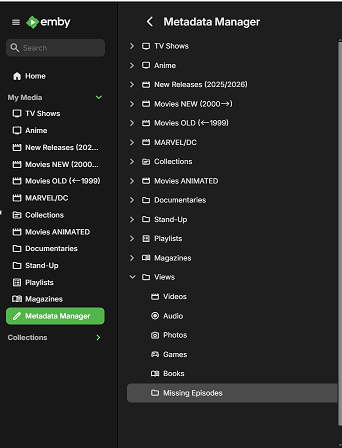
Metadata manager>Views>Missing Episodes
-
Hi, (DAMN - wrong forum and no idea how to move or delete it. SORRY!!!) I have sorted out many genres in my collection. I did this with a tagging tool for every single song. So all my songs are perfectly tagged now. I refreshed the metadata in Emby, but there are still far too many genres. So I inspected some of the genres, I expected to disappear. These genres are associated with albums, not with single songs. I don't know the origin of thes "album genres", and of course I can not edit the tags of an album externally. Is ther a way to get rid of all "album genres"? Thank you, Pete
-
First, I want to say how happy I am with Emby. I have a large video library with lots of TV shows and movies, and Emby does a great job of providing access to it. Most of my family and friends that use it are newbs, and they find the interface easy to understand and use. And the lifetime premiere license was very reasonable. So thank you. I know the Missing Episodes feature was changed a while ago. It now requires I go into each show to look for missing episodes. As previously noted, I have a large TV library and this is problematic as there are just too many shows to review. The upcoming episodes view is helpful, but it would be more helpful to tweak that view and just show the missing episodes (in a different tab, or a switch on the existing tab). It seems simple enough, because you already know which episodes are coming up, and you also know which episodes are in the library. The upcoming tab is slow anyway, and checking whether that episode is in the library should not add any significant time to the view.
- Today
-

SRT subtitles not displaying, other unknown subtitles are displaying
ebr replied to davesurfer's topic in Roku
But you say "your" subtitle was the only one? Are you positive they contain what you think they do? -
Movies don't resume, they start from beginning
ebr replied to Nabukodonosor's topic in Android TV / Fire TV
From the log it doesn't look like the resume button was pressed. System.out: Play called with pos: 0 and sub index: -1 Exactly how did you play it? -

Remote access to Emby Server as admin via VPN issues
jerkrl replied to jerkrl's topic in General/Windows
Thanks, I will try that (once I'm back home again)! -

embyforkodi (next-gen) 11.X.X support
quickmic replied to quickmic's topic in Emby For Kodi Next Gen
Indeed, looks a bit odd. Did you try a repair sync? -
 NCC1701A changed their profile photo
 -

Remote access to Emby Server as admin via VPN issues
Neminem replied to jerkrl's topic in General/Windows
You might need to add you VPN Ip subnet to your LAN networks. Just be careful not to make mistakes, you can get in an situation where you lock your self out of the server, even on local lan. I do it like this.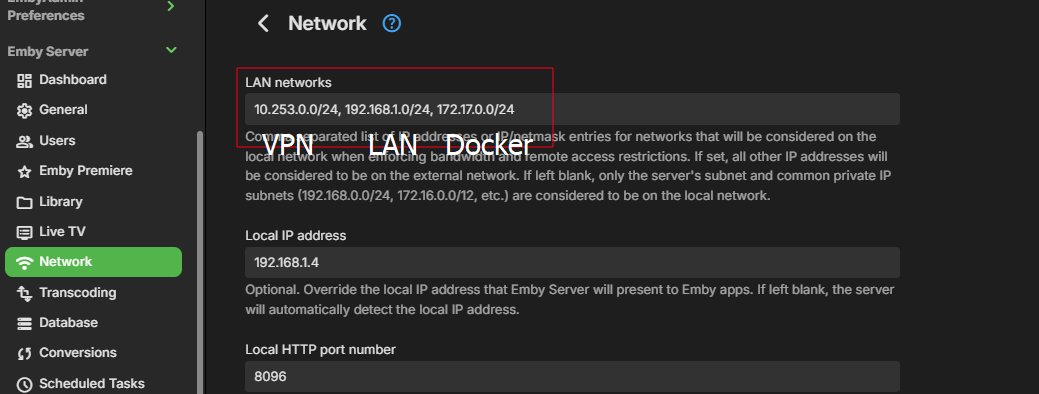
-

Remote access to Emby Server as admin via VPN issues
Abobader replied to jerkrl's topic in General/Windows
Hello jerkrl, ** This is an auto reply ** Please wait for someone from staff support or our members to reply to you. It's recommended to provide more info, as it explain in this thread: Thank you. Emby Team -
Hi there! I have y Emby Server running, local on my network and via internet as well. It all works perfectly well. For security reasons, in Emby Server, on my admin accoount, I turned off: "Allow remote connections to this Emby Server". So need remote access to the admin part of my Emby server. I did this, assuming/thinking that with a VPN connection to my internal/local network I would be able to access my server as an admin via it's local address (so: http://198.1.xx.xxx) . Yet, I get this message: "Sign In Error You've not been granted remote access to this server. Please ask your server administrator to grant you the appropriate access." I do understand this message should I try to connect without my VPN, but I do not expect this message with VPN and usingthe server's local ip address (http://198.1.xx.xxx). As a regular user of the Emby web app, I can have access via VPN and the server's internal ip-address. Any way to solve this and get access via VPN and with Remote Access to the server side disabled?
-

Guide Channels Missing USA-OTA36801 Columbus, GA
martincom replied to martincom's topic in Emby Provided Guide Data
Thank you! The work-around you detailed in post #6 has resolved the issue for now. -
OK. thank you
-
We're all on Google Fi.
-

Plugin: Home Screen Companion (formerly AutoTag)
soderlund91 replied to soderlund91's topic in Plugins
Beta release - Version 3.1.0.0-beta Download .dll and release notes: https://github.com/soderlund91/HomeScreenCompanion/releases/tag/v3.1.0.0-beta This release contains big improvements of home screen section handling. Use at own risk, I have tested the basic functionality but need your help to fully test, hence a BETA release. Please report any bugs or issues at the GitHub-page or here in the forum. Note Make sure to back up your settings before updating, just in case. Both the plugin and Emby (user data) Note Included a .NET V6 release, this is for legacy use (mostly for MacOS). This version is NOT tested. New Section management: Added function to manage a users home screen sections. You can now reorder sections directly from the plugin itself Create home screen sections: Added ability to create a new home screen section directly when creating a tag or collection. Improvements Created a flag for tag and home screen section in the header of each entry. Removed the source counter to make room. Fixes Bug fix: Fixed an issue when menu was not visible in light theme HomeScreenCompanion.dll HomeScreenCompanion_NET6_MacOS.dll -
The settings for recording paths are in Server Settings for Live TV / Advanced tab The paths are actually library names and where a library has more than one folder path defined, then it would be selecting the library and the parent folder path. I am actually updating the support documentation to give more details on this
-
Where was this stated ?