
All Activity
- Past hour
-
 Alihalil joined the community
 -
 Amany mostafa joined the community
 -
 Mubarak0236 joined the community
 -
can you try it with most watched turned off?
-
 Embynetx573277 joined the community
 -
 Lolipop1234 joined the community
 -
Well this makes it hard to find the cause, if seerr is involved..... I don't even use seerr and i don't know what happens to the plugin during lib sync. I will try to look into it but not gonna promise this will be fixed .
-
 LA040 joined the community
 -
 Cristhell joined the community
 -
 Embynetx421977 joined the community
 -
It crashes before the transcoding can even start. The ffmpeg file gets created in the logs, however it just says "no items found" Edit: The file I sent was actually the wrong one, here's on with transcoding activity embyserver-63921916800.txt
-
 Flambyjsp. joined the community
 -
Not exactly. Seerr itself doesn't cause the high CPU usage. The important part is the interaction with EmbyNewOverlay: Seerr stopped + EmbyNewOverlay enabled → normal CPU Seerr running + library sync disabled + EmbyNewOverlay enabled → normal CPU Seerr running + library sync enabled + EmbyNewOverlay enabled → ~100% CPU So the library synchronization in Seerr appears to trigger the issue, but I suspect something in EmbyNewOverlay is being executed excessively when Seerr scans the library. If I disable EmbyNewOverlay while keeping Seerr's library sync enabled, CPU usage also stays normal. So I don't think Seerr itself is the problem; rather, Seerr's library synchronization seems to trigger a problem in the overlay plugin.
-
 Salma2003 joined the community
 -
Oh so it was seerr after all? glad you figured it out your self.
-
Hi, there is no transcoding activity happening in this log file. Are you saying it happens without using it?
-
The issue seems to be specifically triggered by the Seerr library synchronization. With EmbyNewOverlay enabled: Seerr stopped → CPU normal Seerr running, library sync disabled → CPU normal Seerr running, library sync enabled → EmbyServer CPU goes to ~100% So it looks like the large number of library/season/episode requests generated during Seerr's library synchronization triggers excessive processing in EmbyNewOverlay.
-
Well I suspected there is another issue causing your CPU to run at 100% because while testing it on my PC with no premiere date, I didn't have a CPU running at 100%. like @Neminemsaid can you dump the emby server log and your hardware info. And i have one question for you. Is the v 1.3.4.0 the first version you tried on? and maybe one thing to try..... Try switching off some master switches like most watched, studio logos and the like and test the results.
-

Include playlists and collections in "Next Up"
Tandhruil replied to crusher11's topic in Feature Requests
Would it be possible to create for each user a dedicated playlist (like spotify or deezer) when the user start listening random music for exemple, or a watching a collection. For each new connection, the playlist is load by default (continue playing). The playlist stay until the user decide to do a new action like watching a movie, listen an album, etc... This new action will erase the dedicated playlist and generate a new one. Don't hesitate to ask for details -
@eMoOakI guess @Amanade3 would need your hardware info. And server logs with debug logging turned on.
- Today
-
Hi, I’ve just tested version 1.3.5.0 after your fix. Unfortunately, the CPU usage issue is still present. With EmbyNewOverlay enabled, the EmbyServer process goes to around 100% CPU continuously. As soon as I disable the plugin, CPU usage immediately returns to normal. I also confirmed that Emby is actually loading version 1.3.5.0. So it looks like the DateTime.MinValue / DateTimeOffset issue was fixed, but there is another issue causing the high CPU usage. There are no obvious exceptions in the Emby log while this is happening, which makes it a bit harder to identify. I’ve had to disable the plugin again for now because of the CPU usage.
-
This is not a bug, rather a priority issue. When a movie matches more than one rule at once, the plugin picks whichever rule has the highest priority, in this particular order Tag rules Folder rules Most watched Release date ( by the movie's premiere date) New Season And finally Date Added (by when it was added to the library) so in your case both movies may be added on the same day but the second movie also happens to fall within your Release Date window (i.e. it was actually released/premiered recently) so the plugin preferred to show the "new movie" banner instead.
-
Yesterday out of nowhere my hardware acceleration stopped working. I was watching something on my server and suddenly it started lagging, which is why I turned down the bitrate of the series I was watching. After this, the entire system started crashing as soon as I use hardware acceleration for transcoding. I did check the logs for any information on why this is happening. There seems to be an error which I can't really make out what it means right before the log stops (Logs attached). At first I thought it was an error that occured because of my reverse proxy setup, however the same thing happens when I stream through the local network. I did once have a similar issue that I could resolve by changing the transcoding settings to only use QuickSync instead of VA API and QuickSync. The driver for my GPU seems to be installed and loaded, however the output to the Command lspci -k | grep -A 2 VGA outputs no kernel driver in use: 00:02.0 VGA compatible controller: Intel Corporation Iris Plus Graphics 650 (rev 06) DeviceName: Onboard - Video Subsystem: Intel Corporation Iris Plus Graphics 650 Also of note: Running any glx commands in the console gives me the following error: Error: unable to open display I'm kind of at a loss here and don't know what to do. If anyone can help me with this would be nice, I have absolutely no clue how to make this work, especially since I don't really understand much about transcoding or hardware drivers. If I can add any more information to help solve this let me know! Thanks in advance! embyserver-63921916800.txt
-
Sorry my bad, on web browser it seems it was fixed - cannot replicate now on beta channel. However on Android phone app it is still bugged: Version 4.10.0.23 beta Preview attached. WhatsApp Video 2026-08-10 at 18.06.24.mp4
-
@GrimReaperI actually wanted to do a Netflix style badge too (like you asked) but got sidetracked. Should be in the next release.
-
This patch should fix it. but if you're still seeing high CPU after updating, let me know and I'll dig into what else might be causing it.
-
New Release V 1.3.5.0 Fix high CPU usage caused by an exception in badge cache-key generation for items with no premiere date. EmbyNewOverlay.dll
-

[Plugin / Beta] Status Sync - Live - real-time watched-state sync between profiles (Server 4.8.x)
Luke replied to vdb86's topic in Plugins
Thanks for sharing. -
You can just copy the files in. All users will have access to them, so they will no longer be personal playlists.
-
[Plugin / Beta] Status Sync - Batch - one-time / scheduled watched-state backfill between profiles (Server 4.8
Luke replied to vdb86's topic in Plugins
Thanks for sharing. -
@Oomek HI there, can you please provide a specific example? How to Report a Problem Thanks !
-

Emby is the Unraid Spotlight app for July 2026
Jdiesel posted a topic in Non-Emby General Discussion
For whatever reason they are a bit behind on releasing last months choice but nonetheless Emby is being featured. Unraid is a popular OS for self hosting and the spotlight apps are somewhat prestigious.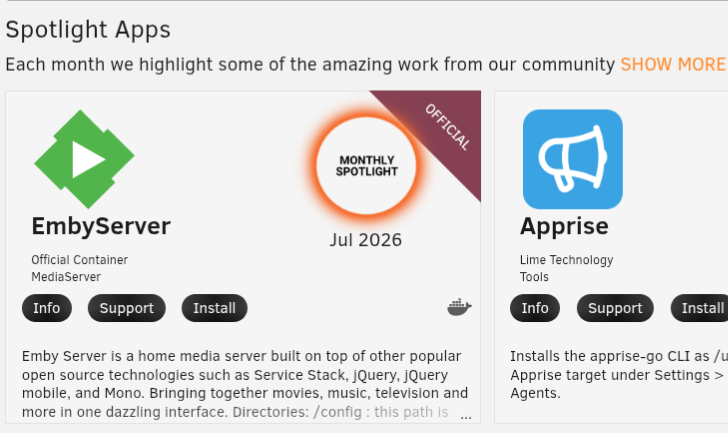
-
- 1
-

-
It was just something to be aware of. You're free to try and accomplish it but, this is such a niche need I think you are probably on your own. GL
-
This really needs to be fixed. Normal users cannot be expected to go into the Terminal @Luke
-
Thanks for the update. I tried patching 1.3.4.0 locally by replacing the DateTime.MinValue → DateTimeOffset conversion with DateTimeOffset.MinValue, but unfortunately it didn't resolve the 100% CPU issue. Disabling EmbyNewOverlay immediately brings CPU usage back to normal, so the plugin is definitely responsible for the issue on my server. I'll wait for the fixed release. Thanks again for looking into it.







