All Activity
- Past hour
-

OpenSubtitles not working, shows "There was an error processing the request" error yet "Success" in Emby log
SolidSnake289 replied to SolidSnake289's topic in General/Windows
Good afternoon, Just checking in on this issue - something to be tracked as a bug, so the subtitle search works properly from the Metadata Manager? Are there other logs/debugging details I can capture for further research? Thank you, Snake -
 SamiraPowshi joined the community
 -
 Naveen_Dubey joined the community
 -
 Tim_1 joined the community
 -
 abutahid joined the community
 -
 Zhanglong111 joined the community
 -
I'm having the same issue. Movie is there. Extras are showing up fine. Add a new version of the movie and both movies appear as versions of the same title as expected but the extras no longer appear as extras. instead, each video in the extras folder appears as separate movie title. Star Wars - A New Hope (1977) (PG) (#4) (h264) (720p).mp4 Star Wars - A New Hope (1977) (PG) (#4) (HD).mp4 Extras\Deleted Scene - Alternate Biggs And Luke Reunion.mp4 Extras\Deleted Scene - Aunt Beru's Blue Milk.mp4 Extras\Deleted Scene - Cantina Rough-Cut.mp4 Extras\Deleted Scene - The Search for R2d2.mp4 Extras\Deleted Scene - Tosche Station.mp4
-
 esther12 joined the community
 -
 Bruno_1005 joined the community
 -
 Aitortxitopito joined the community
 -
 Maingotm joined the community
 -
 -yick joined the community
 -

Emby Server not using hardware transcoding with Intel A310.
AV1Opus replied to NerfHerder's topic in Linux
I could still confirm this issue under 4.9.3.0 (production) and 4.10.0.4 (beta), unfortunately. The suspicion of a frontier LLM on the underlying cause is "ffdetect probes encoders via libmfx, and libmfx still doesn't enumerate Arc A310 encode". Meanwhile showing up properly in vainfo: # vainfo --display drm --device /dev/dri/renderD129 2>&1 | grep -i enc VAProfileH264Main : VAEntrypointEncSliceLP VAProfileH264High : VAEntrypointEncSliceLP VAProfileJPEGBaseline : VAEntrypointEncPicture VAProfileH264ConstrainedBaseline: VAEntrypointEncSliceLP VAProfileHEVCMain : VAEntrypointEncSliceLP VAProfileHEVCMain10 : VAEntrypointEncSliceLP VAProfileVP9Profile0 : VAEntrypointEncSliceLP VAProfileVP9Profile1 : VAEntrypointEncSliceLP VAProfileVP9Profile2 : VAEntrypointEncSliceLP VAProfileVP9Profile3 : VAEntrypointEncSliceLP VAProfileHEVCMain422_10 : VAEntrypointEncSliceLP VAProfileHEVCMain444 : VAEntrypointEncSliceLP VAProfileHEVCMain444_10 : VAEntrypointEncSliceLP VAProfileHEVCSccMain : VAEntrypointEncSliceLP VAProfileHEVCSccMain10 : VAEntrypointEncSliceLP VAProfileHEVCSccMain444 : VAEntrypointEncSliceLP VAProfileAV1Profile0 : VAEntrypointEncSliceLP VAProfileHEVCSccMain444_10 : VAEntrypointEncSliceLP Even with Anonymize log contents turned on, the hardware_detection still contains the MachineName and other personal info, I am happy to share the full version via DM. However, I attached the encoders array from the log, where all the action happens. Money quote: { "DeviceIndex": 1, "DeviceInfo": { "VendorName": "Intel Corporation", "DeviceName": "DG2 [Arc A310]", "VendorId": 32902, "DeviceId": 22182, "SubsytemVendorId": 5935, "SubsytemDeviceId": 16960, "DevPath": "/sys/bus/pci/devices/0000:07:00.0", "DrmCard": "/dev/dri/card1", "DrmRender": "/dev/dri/renderD129", "IsEnabled": 1, "IsBootVga": 1 }, "Error": { "Number": -17, "Message": "Error setting VAAPI device handle: MFX_ERR_DEVICE_FAILED" } } I hope we can get this resolved, not sure whether I will keep this card if I can't use it in here. Thanks encoders.json
-
The HTML rendering is built into their client. As far as Emby server knows, the web browser, it uses a user-agent and connects to the API endpoint. Same as every other app whether web based, or Roku based, or iOS based, or etc. They all use the API endpoints and http connections. They send the server a user-agent and an authorization. Combined that grants you access to your user and you log in. If you wish to disable users from being able to change things you can disable this on their user. You cannot disable their client from rendering HTML because that isn't how this works. You can only disallow them access to the API or restrict their access to certain API calls by changing their user settings. That is how it is meant to work.
- Today
-
But that doesn't make any difference to anything, as you've been told a dozen times already.
-

Skip Intro markers not being generated despite scheduled task completing
sa2000 replied to UsamaWaheed's topic in Linux
The timings I was referring relate to the earlier post and from the timestamp I see for you being at GMT-4, it was at 17:39 with the emby server log covering time to 17:37 and season 15 was removed at 17:27, added and rescanned at 17:30 and all markers were in place by 17:32:28 - so issue was resolved then What happened before that is unknown as we have no logs covering the times when each of the 8 episodes added to the library So be on the lookout for such issues and capture the logs soon. We keep logs for 3 days by default - these would be named embyserver.txt for the latest and embyserver-xxxxx.txt for earlier with logs cycled every 24 hours -
It would remove access to the HTML web interface, but its not manageable, as I have to do it AFTER each user has already connected once per browser device, and the user could simply use a different browser, it would be easier to have a setting to simply disable HTML web access per user or globally.
-
How should I know? You presumably contacted them to get your login initially. I should also point out that if they sold you a service they are violating the terms and conditions for the use of Emby's software, which is intended for private use. Paul
-
You are mentioning "search". The .embyignore feature described here Excluding Files & Folders enables to have files and folders excluding from libraries. It is not for search exclusion. There is a global search exclusion feature that operates at library level. So you can have a library excluded from search by enabling the option in the library preferences/settings, see So if want your folders to only be restricted and excluded when searching, I would suggest moving them to another path and create a separate library for them and enable the option to exclude from global search for the library To exclude folders from libraries, you can use .embyignore So create an .embyignore with contents being /name-of-excluded-folder1 /name-of-excluded-folder2 and place this .embyignore parent folder. This could be a root folder for the library, if the two folders are immediately below that If a folder to be excluded is at a lower directory level and you want to place your .embyignore in a library root folder, then the .embyignore would need to be like this /name-of-excluded-folder1 /a-folder/name-of-excluded-folder2 I will look into adding more examples in the support article
-
Thank you Paul. Do you know how I find that person. I use everyting3.1 regards deirdre
-
Are you using a server you installed yourself or someone else's? In the second case you need to contact the admin of the server concerned. Paul
-

Skip Intro markers not being generated despite scheduled task completing
TheFreeMan replied to UsamaWaheed's topic in Linux
AFTER I DID THIS ^ THIS IS WHAT HAPPENED: (for some reason, trying to partial quote a 2nd response is overwriting the text above, so...) After deleting & adding Season 15, I started played S15E07 and the `Skip Intro` button was there. This should be all the evidence you need. It DID work on reprocessing. There is nothing further to look into at this point. --- Unfortunately, I no longer have logs from the original import of any of these episodes, so I cannot post them to troubleshoot why it didn't generate the markers the first time through. I will continue to monitor shows as I import them to see if I find any that do not get a Skip Intro marker and will report back ASAP with the original import log. I really appreciate your dogged tenacity in wanting to dig further into this, but at this point, there is nothing further to dig into. It is now working as expected, but I'll keep my eyes open for any future failure and report back ASAP if I find one.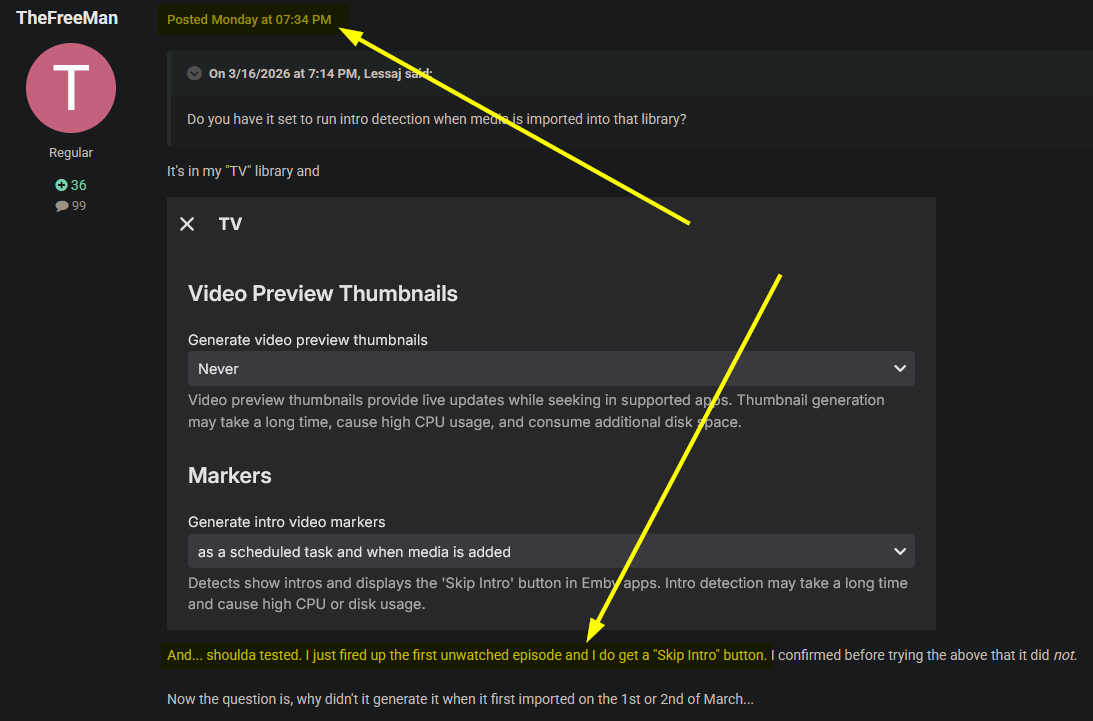
-
But you don't need to do that! It doesn't achieve anything!
-
If there were an option to deny access to web interface, that would be fine, however that doesn't seem to be the case, I can only restrict devices after they have already connected
-
I think its there, in case you have multi selected 10 items. Then you can skip that 1 and continue with the last 9.
- 1 reply
-
- 1
-

-
What's the difference between “Skip” and “Cancel”?

-

Add "Remove from Collection" to the three-dot menu on a collection in the "Included In" section
crusher11 replied to crusher11's topic in Feature Requests
Not if I have something on my watchlist because I want to re-watch it. -

Bug: Transcoding causes buffering plus transcoding when sending to LG TV.
yocker replied to yocker's topic in General/Windows
That was it, many thanks. -

Add "Remove from Collection" to the three-dot menu on a collection in the "Included In" section
ebr replied to crusher11's topic in Feature Requests
Set the section to only unwatched and this will take care of itself. However, this is still a valid request. -
Ability to have different GENRE artwork for libraries
ebr replied to unisoft's topic in Feature Requests
I think what you really want is different genres for different types - not just artwork. -
Bug: Transcoding causes buffering plus transcoding when sending to LG TV.
yocker replied to yocker's topic in General/Windows
Will try, thanks! -

Emby Theater Beta (Electron) on Raspberry Pi 5: Stuck at logo with infinite loading bar
hukt_own_fonikz replied to hukt_own_fonikz's topic in Linux & Raspberry Pi
Okay it was mad because mpv wasn't installed, I found that in the console output. Now I'm getting audio but not video, and that's because this old armbian image is trying to use xv for playback. So I'm updating to rpios lite now. Also of note, when I would force-close the app, on next launch it did not remember any of my login settings, it was like a fresh install. If I closed through the app, it booted up with my config. -
The guide from TVH is limited even when the source was the same as the one Emby used. Most people using TVH go the m3u tuner route instead of the plug-in. If the Emby guide has listings for your location you're better off using that one. There might be some useful info in this thread.
-
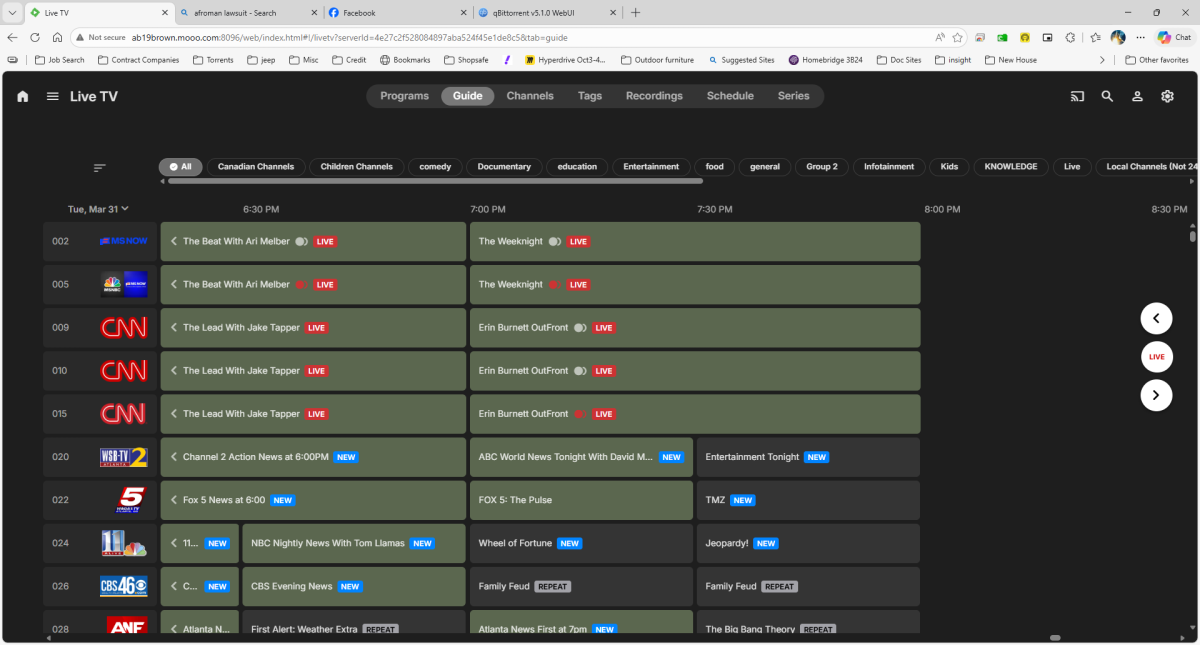
After coming up with a means for shutting down my firewall to allow the guide to proceed at least 1/day unobstructed (2AM ET, 10AM and 6PM refresh), the issue I'm now having is the log is showing requesting 2weeks out and successfully saving "programs" however, the display appears to be stopping on Mar 31st around 7PM ET and no further. It should go all the way through April 2nd. embyserver (10).txt
-
No unfortunately it does not.