
All Activity
- Past hour
-
HI, is this the web app?
-
 Seylaaa joined the community
 -
OK I think if you tested on a fresh install of the server now you'd see the behavior I'm describing.
-
My own Server in the same Network
-

Spotlight/Fokus item not centered when navigated via keyboard
Luke replied to SoliFlix's topic in General/Windows
HI, we'll take a look at it. Thanks. -
 Meli100 joined the community
 -
 Noel & Jenni Nielsen joined the community
 -
 JimeeSibajaaa22 joined the community
 -
 ZubairNadir joined the community
 -
 Jakeybals joined the community
 -
 ueli98866 joined the community
 -
 umica6282201 joined the community
 -
 Jessy566876 joined the community
 -
 Jamloreto joined the community
 -

NVIDIA Shield screensaver appears while paused, then playback resumes behind it
Lessaj replied to Dr. Technolust's topic in Android
Sounds like the app restarted. I'll try to test later tonight. - Today
-

Spotlight/Fokus item not centered when navigated via keyboard
SoliFlix posted a topic in General/Windows
When navigating the Home page's Spotlight/Fokus banner with the keyboard arrow keys, the focused item snaps to the left edge of the scroller instead of staying centered. Only affects the normal desktop web layout. In TV display mode, keyboard navigation centers the focused item correctly with no issue. This happens on a clean install with no plugins/customizations active. spotlight.mp4 -

NVIDIA Shield screensaver appears while paused, then playback resumes behind it
FrostByte replied to Dr. Technolust's topic in Android
Latest is always on GitHub https://github.com/MediaBrowser/Emby.Releases/tree/master/android -

NVIDIA Shield screensaver appears while paused, then playback resumes behind it
dbott replied to Dr. Technolust's topic in Android
Hi, I am sorry, but where do I find the beta's? I do not see a link to anything in the referenced thread other than to the Android download page. If that is the page for the current version assuming 3.5.58 is, it might be nice to list the version you are downloading. (And what if the version does not work as good, where do you find past versions?) Sorry, never needed to manually update, just rely on a Play Store for updates. -
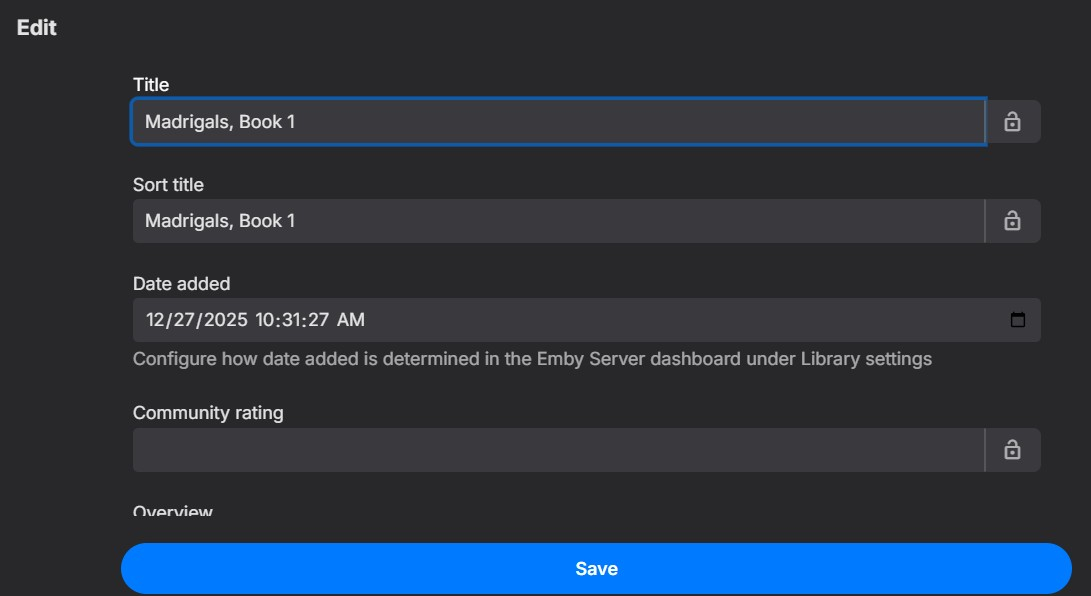
There wasn't - I was VERY careful to clean the slate before importing. ONLY mp3 music files and cover .jpgs. But then the created album.nfo shows incorrect date added info: <?xml version="1.0" encoding="utf-8" standalone="yes"?> <album> <review /> <outline /> <lockdata>false</lockdata> <lockedfields>Genres</lockedfields> <dateadded>2025-12-27 10:31:27</dateadded> <title>Madrigals, Book 1</title> <sorttitle>Madrigals, Book 1</sorttitle> <runtime>56</runtime> <genre>Classical</genre> <genre>Medieval</genre> <genre>Choral</genre> <artist>Delitiae Musicae, Marco Longhini</artist> <albumartist>Carlo Gesualdo</albumartist> </album>
-
The Guide page doesn't update until after a guide refresh.
-
NVIDIA Shield screensaver appears while paused, then playback resumes behind it
FrostByte replied to Dr. Technolust's topic in Android
My test with .58 Start movie wait several minutes Click pause Wait 5 mins and screensaver starts Wait another 5 min Don't hear any sound Click up arrow Then the Emby logo flashes and I'm back at the Home screen -

"Continue watching" between devices seems to "corrupt" content
Spymaster posted a topic in LG Smart TV
This is a weird one! I watched Emby via Tailscale on my Amazon firestick in a hotel room last night - perfectly fine playback - and exited two shows mid-way through. However, when I came to continue watching those shows tonight on my LG C5 TV app neither of them worked properly. One of them - a 4 hour horror documentary - stuttered, froze, and continually attempted to "recover from error" (according to stats for nerds) even when I attempted to restart it - and the other - an episode of Al Hail King Julien won't play at all. The MP4 files - I have to assume - are fine but somehow Emby has "corrupted" playback between one device and the other. I downloaded and re-uploaded the horror documentary to my NAS but the errors were repeated. I think I may have fixed it now by copying the MP4 and uploding the copy. It appears to work okay from the start. I'm using the very latest version of the Emby app for Synology which I downloaded tonight, and the LG TV app is also up to date. BOTH PROGRAMMES PLAYED FINE TONIGHT ON THE EMBY APP FOR ANDROID, HOWEVER. THE PROBLEM APPEARS UNIQUE TO THE LG TV APP Do you know what might be causing this problem? -
Is there an album.nfo in the folder when you move it back for import?
-
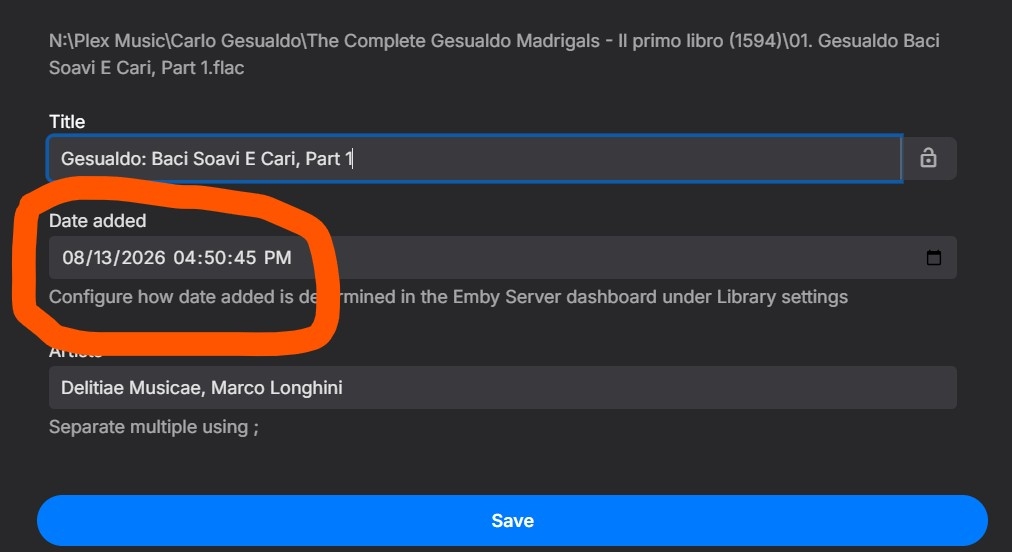
I only posted one screenshot, but every track shows the same, correct metadata/import data of Aug 2026, while album is Dec 2025 (above)
-

[Legacy App] Screensaver slideshow stops after displaying first image [ET 3.0.20/21]
scottpro replied to scottpro's topic in Windows & Xbox
Update 26.0.25 fixes the black bars. This issue is closed. -
What about for each of the songs because you don’t really know which one was imported first.
-
What is the device model number please?
-
It's correct for individual songs, wrong for album (see below), which is why I keep asking how Emby 'creates' albums.
-
What is the date added value for each of the songs?
-
@LukePlease read my detailed notes above. These have been my settings forever AND this applies to the newly imported albums. See screenshots and detailed explanations above. This mysterious problem I have reported in detail occurred for newly imported albums.
-
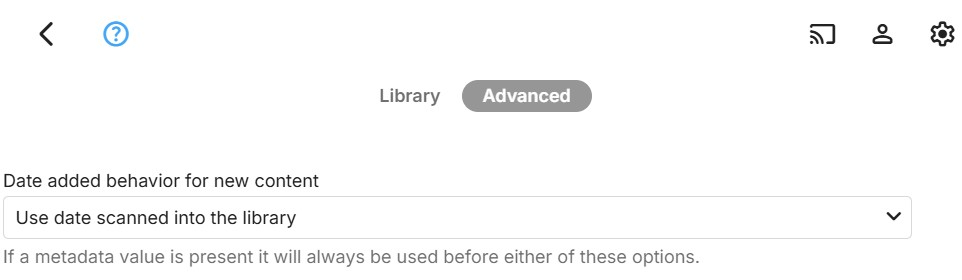
Remember that changing that does not impact previously imported content.
-
I know, I know. I'm probably 1 of 1 people whom this will affect. My projector is capable of 4K movies as well as 3D movies formatted as full side-by-side. In order for the 3D movies to display properly, I have to set some of the parameters in the mkv header "display height, display width, and stereo mode". When I set those, Emby correctly identifies that these are FSBS files. However, if I filter my movies by 4K, it shows the 3D movies as well since technically they are 3840x1080, even if they are only going to be displayed as 1920x1080. Would it be possible to have Emby either exclude 3D movies from 4K listings since there's no such thing as a 4K 3D bluray? Or, since technically, that's a thing that 'could' exist, look at the display height and width and if those are both <4K, then don't display them under 4K.
- Yesterday
-
I think (not sure) it was opened with EHS turned on and then when EHS turned off gave the above. Or maybe thats completely irrelevant.
-
No. because - having read all the documentation and discussions here - I have my libraries set like this (see below), and yet Emby import isn't respecting that, as detailed above. Why?
-
That’s odd.





