All Activity
- Past hour
-
 Azh287 joined the community
 -
@crusher11now that you can filter by tag could you somehow just add tag as one of your filters with an OR statement using your existing spotlight tag
-
 Dk_11 joined the community
 -
 Tonigc joined the community
 -
 Chenlong113250 joined the community
 -
 Cheong502 joined the community
 -
 zhangzimu16 joined the community
 -
 shashamctale joined the community
 -
 Alejandro50 joined the community
 -
Hi, longtime Emby user here (since the MediaBrowser days running it in Windows Media Center - circa 2010 I believe!) I have a playback issue that I'm struggling to solve/understand. The symptom is that seemingly randomly (usually it will happen a few times in quick succession, but then go hours/days before it happens again) I have several clients who report that playback pauses for 5-30 seconds, then resumes on it's own with no interaction from them. The main user affected is off-site and accessing from the AppleTV client so I had assumed this was a network issue on their side or something about the AppleTV app (not an Apple user myself). But then a couple months ago this same problem started happening to me locally from my Shield (using Emby Android, not the Android TV version) and it's been driving me (and my family) crazy. Finally I have some time to try to figure it out. A bit about my environment. Up until last week, I was running emby server on a Lenovo MicroPC which had worked fine for years but I thought maybe this was the issue. I have now moved it to my new server and the problem remains exactly as before so I guess that wasn't the problem. New machine details are below. Emby server is running on docker in a Debian VM on a proxmox host Proxmox host is a pretty powerful machine: AMD Epyc with 32 cores, 128GB ram, Quadro 1000 GPU passed through to docker VM for hardware acceleration (tested thoroughly and this works great) Transcoding is not the issue - files are being direct played (no transcode logs being generated to share) I do have a proxy (Traefik) that was in use for the below logs. But I've tried bypassing this locally before and the problem persisted. I have just now bypassed it again (logging in using local IP instead of through proxy address) and will report back with more logs once the problem happens again. Actual media files are on this same proxmox host but a different VM (TrueNAS with the HBA passed through to it - ZFS underlying filesystem with no drive errors or anything reported). The docker VM has a CIFS mount to the TrueNAS share and this is passed to Emby docker container using a volume. This is how I've had it setup for years without issues (prior to the relatively recent issue). I don't think it's relevant, but TrueNAS is fairly new as well - 2 months ago files were on a Synology NAS and the problem existed then so I don't think it's the media share that's the issue. It's now on completely different drives, with a different filesystem, on a different host. Completely different setup other than the CIFS share to access it and the problem is the same. Networking wise, I'm running Ubiquity gear. The connection between the docker VM and TrueNAS is virtual so it's incredibly fast (about 25Gbps in my testing). The connection from my proxmox host to my networking gear is 10GbE. The connection from network gear to Shield client is 1GbE. From another computer connected with 10GbE, I can read from my media share on TrueNAS at upwards of 800MB/s (~5-6Gbps). Logs from both server and android app are attached (I manually redacted my server address in the Android app - why doesn't the share button in the Android app work?). Have a look around the 22:27 mark. Here's what I see in the server log (note the "Response completed after client disconnected" line and then the "Playback progress (Unpause)" line. This is reported every time this happens and seems to be the only real error I can see in the logs related to this event making me think it's likely not a Emby server issue. 2026-02-28 22:27:03.241 Info VideoService-0HNJJB2U35J29:00000003: http/1.1 Response completed after client disconnected to host2. Time: 920922ms. GET http://emby_remote_ip/emby/videos/160697/original.mkv?DeviceId=99ee178fac43b052&MediaSourceId=mediasource_160697&PlaySessionId=336f46eff10f462cad79255c24ac365e&api_key=x_secret10_x. Headers: Content-Type=video/x-matroska, Date=Sun, 01 Mar 2026 05:11:42 GMT, Server=UPnP/1.0 DLNADOC/1.50, Accept-Ranges=bytes, Cache-Control=private, no-transform, Content-Range=bytes 9771-9963158044/9963158045, ETag="af4621eec7ab31973ddf144c3e7394df", Content-Length=9963148274, Cross-Origin-Resource-Policy=cross-origin, Private-Network-Access-Name=Media Server, Private-Network-Access-Id=31c02b8fef8147a1b2701b40eb6c826f 2026-02-28 22:27:03.414 Debug PlaystateService-0HNJJB2U35J3I:00000002: InitRemoteConnectionInfo - ipAddressFromHeaders: host9 2026-02-28 22:27:03.414 Debug PlaystateService-0HNJJB2U35J3I:00000002: InitRemoteConnectionInfo - rejecting ipAddressFromHeaders as on local network 2026-02-28 22:27:03.414 Info PlaystateService-0HNJJB2U35J3I:00000002: http/1.1 POST http://emby_remote_ip/emby/Sessions/Playing/Progress?X-Emby-Client=Emby for Android&X-Emby-Device-Name=SHIELD&X-Emby-Device-Id=99ee178fac43b052&X-Emby-Client-Version=3.5.28&X-Emby-Token=x_secret10_x&X-Emby-Language=en-us&reqformat=json. Source Ip: host2, UserAgent: Mozilla/5.0 (Linux; Android 11; SHIELD Android TV Build/RQ1A.210105.003; wv) AppleWebKit/537.36 (KHTML, like Gecko) Version/4.0 Chrome/145.0.7632.79 Mobile Safari/537.36 2026-02-28 22:27:03.415 Info SessionManager: Playback progress (Unpause) reported by app Emby for Android 3.5.28 on SHIELD playing Hijack - S1, Ep7 - Brace Brace Brace. Position: 946171 ms. PlaySessionId: 336f46eff10f462cad79255c24ac365e. IsPaused: False In the Android app log, I see the below. Note the STATE_BUFFERING and the internalError. Sat Feb 28 22:26:05.633 GMT-07:00 2026 EventLogger: loading [eventTime=866.69, mediaPos=902.21, window=0, period=0, true] Sat Feb 28 22:26:05.637 GMT-07:00 2026 EventLogger: loading [eventTime=866.70, mediaPos=902.21, window=0, period=0, false] Sat Feb 28 22:26:06.050 GMT-07:00 2026 EventLogger: loading [eventTime=867.11, mediaPos=902.62, window=0, period=0, true] Sat Feb 28 22:26:49.582 GMT-07:00 2026 EventLogger: rendererReady [eventTime=910.64, mediaPos=946.15, window=0, period=0, rendererIndex=0, video, false] Sat Feb 28 22:26:49.606 GMT-07:00 2026 EventLogger: droppedFrames [eventTime=910.67, mediaPos=946.15, window=0, period=0, 1] Sat Feb 28 22:26:49.607 GMT-07:00 2026 EventLogger: state [eventTime=910.67, mediaPos=946.15, window=0, period=0, BUFFERING] Sat Feb 28 22:26:49.607 GMT-07:00 2026 PlaybackManager state: STATE_BUFFERING Sat Feb 28 22:26:49.612 GMT-07:00 2026 EventLogger: isPlaying [eventTime=910.67, mediaPos=946.17, window=0, period=0, false] Sat Feb 28 22:26:59.921 GMT-07:00 2026 ExoPlayer onLoadError, wasCanceled false Sat Feb 28 22:26:59.924 GMT-07:00 2026 EventLogger: internalError [eventTime=920.98, mediaPos=946.17, window=0, period=0, loadError androidx.media3.datasource.HttpDataSource$HttpDataSourceException: java.net.SocketTimeoutException: timeout at androidx.media3.datasource.okhttp.OkHttpDataSource.read(OkHttpDataSource.java:352) at androidx.media3.datasource.DefaultDataSource.read(DefaultDataSource.java:281) at androidx.media3.datasource.StatsDataSource.read(StatsDataSource.java:103) at androidx.media3.extractor.DefaultExtractorInput.readFromUpstream(DefaultExtractorInput.java:298) at androidx.media3.extractor.DefaultExtractorInput.read(DefaultExtractorInput.java:70) at androidx.media3.exoplayer.source.SampleDataQueue.sampleData(SampleDataQueue.java:178) at androidx.media3.exoplayer.source.SampleQueue.sampleData(SampleQueue.java:602) at androidx.media3.extractor.TrackOutput$-CC.$default$sampleData(TrackOutput.java:168) at androidx.media3.exoplayer.source.SampleQueue.sampleData(Unknown Source:0) at androidx.media3.extractor.mkv.MatroskaExtractor.writeToOutput(MatroskaExtractor.java:2030) at androidx.media3.extractor.mkv.MatroskaExtractor.writeSampleData(MatroskaExtractor.java:1841) at androidx.media3.extractor.mkv.MatroskaExtractor.binaryElement(MatroskaExtractor.java:1517) at androidx.media3.extractor.mkv.MatroskaExtractor$InnerEbmlProcessor.binaryElement(MatroskaExtractor.java:2281) at androidx.media3.extractor.mkv.DefaultEbmlReader.read(DefaultEbmlReader.java:145) at androidx.media3.extractor.mkv.MatroskaExtractor.read(MatroskaExtractor.java:650) at androidx.media3.exoplayer.source.BundledExtractorsAdapter.read(BundledExtractorsAdapter.java:149) at androidx.media3.exoplayer.source.ProgressiveMediaPeriod$ExtractingLoadable.load(ProgressiveMediaPeriod.java:1146) at androidx.media3.exoplayer.upstream.Loader$LoadTask.run(Loader.java:453) at java.util.concurrent.ThreadPoolExecutor.runWorker(ThreadPoolExecutor.java:1167) at java.util.concurrent.ThreadPoolExecutor$Worker.run(ThreadPoolExecutor.java:641) at java.lang.Thread.run(Thread.java:923) Caused by: java.net.SocketTimeoutException: timeout at okhttp3.internal.http2.Http2Stream$StreamTimeout.newTimeoutException(Http2Stream.kt:675) at okhttp3.internal.http2.Http2Stream$StreamTimeout.exitAndThrowIfTimedOut(Http2Stream.kt:684) at okhttp3.internal.http2.Http2Stream$FramingSource.read(Http2Stream.kt:380) at okhttp3.internal.connection.Exchange$ResponseBodySource.read(Exchange.kt:281) at okio.RealBufferedSource$inputStream$1.read(RealBufferedSource.kt:161) at androidx.media3.datasource.okhttp.OkHttpDataSource.readInternal(OkHttpDataSource.java:520) at androidx.media3.datasource.okhttp.OkHttpDataSource.read(OkHttpDataSource.java:350) ... 20 more ] Sat Feb 28 22:26:59.925 GMT-07:00 2026 onLoadStarted windowIndex: 0 retryCount: 1 Sat Feb 28 22:26:59.948 GMT-07:00 2026 EventLogger: rendererReady [eventTime=921.01, mediaPos=946.17, window=0, period=0, rendererIndex=0, video, true] Sat Feb 28 22:27:02.783 GMT-07:00 2026 EventLogger: state [eventTime=923.84, mediaPos=946.17, window=0, period=0, READY] Sat Feb 28 22:27:02.783 GMT-07:00 2026 PlaybackManager state: STATE_PLAYING Sat Feb 28 22:27:02.784 GMT-07:00 2026 EventLogger: isPlaying [eventTime=923.84, mediaPos=946.17, window=0, period=0, true] Sat Feb 28 22:27:02.788 GMT-07:00 2026 IsPlaying true The Android app log makes me wonder if this is a networking issue, but I'd like confirmation of that before I spend too much time going down that route. Let me know if there's any testing you would recommend to help me try to figure this out. embyserver-63907920000.txt emby_android_1772334813184_redacted.txt
-
Still broken on web for 1.6.0.0 — and I've noticed that restrictions are not working on the Chromecast w Google TV Emby app as well. Another thing I've noticed is that, if I have my Emby app open on Android, I get the "You've been placed on temporary timeout" message on phone whenever I play on web app or CCWGTV — but the playback still continues on those devices.
-
Thanks, that was the solution.
-
Did you configure the path to where your backups are? It will scan what is available and the restore option will appear.
-
Correct. But I thought there might be a way to instruct Kodi to arrange movies/shows the way Emby does - by the "Sort title" field. Ah well. Thanks for the info.
- Today
-
Well that works. My initial thought was just to have two spotlight tags, one for manual and one for auto, but that's an even better solution. What about using the external ID, though? There are sometimes multiple films with the same title. I wouldn't get rid of the Title field, by any means, as it could prove useful itself—spotlighting all the prior adaptations of Wuthering Heights co coincide with the release of the new one, for example—but external ID would be a good additional field to have. What about negative matching? Would be neat to do, for example, “films that aren't in English.” Why is runtime a minimum, rather than functioning like the Year field? I've gone from having two AutoTags to about a dozen; really enjoying this update. Haven't updated to 2.3.2.0 yet, as I have a couple of active recordings.
-
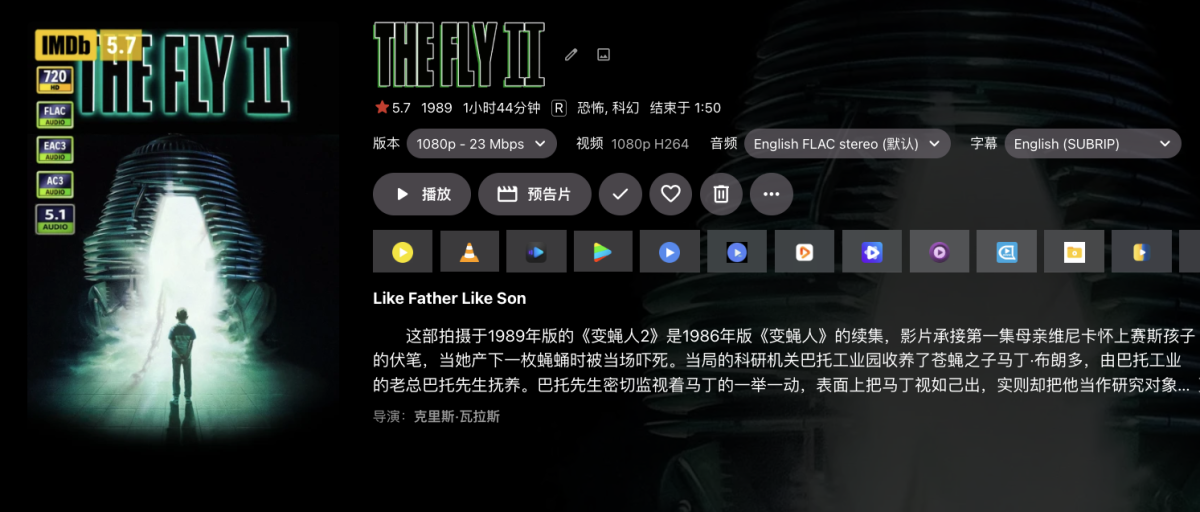
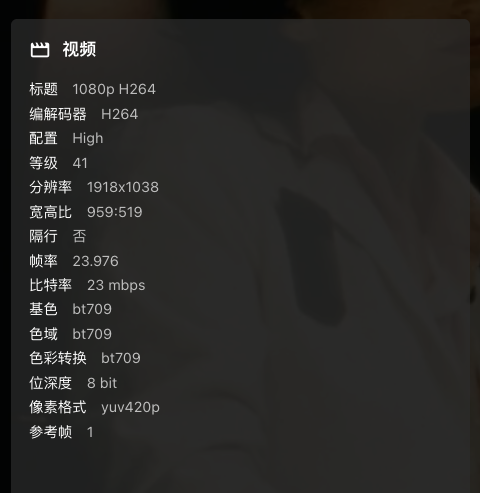
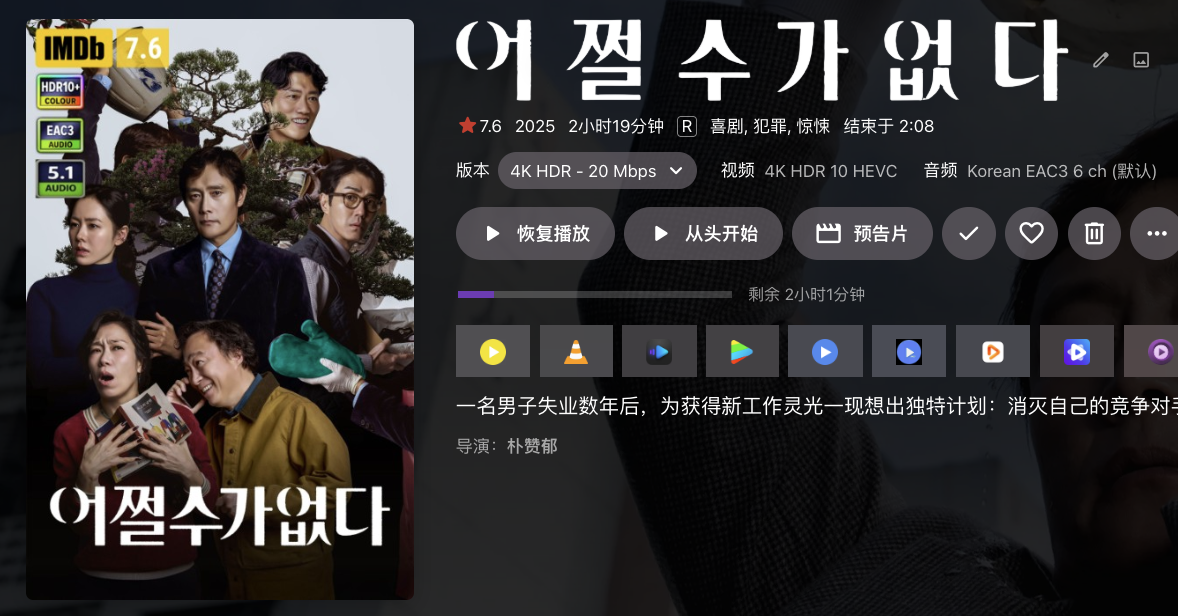
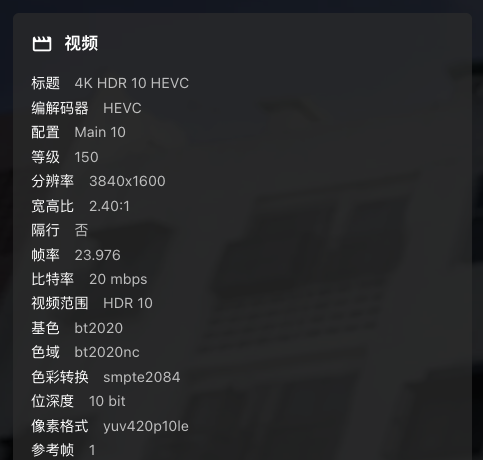
Hi,the resolution icon stiil have problem. It always show 720p at the resolution like 1920 *800/1440*1080/1918*1036. and also to some 4k movie, it don't show any icon if the width is less than 3840 or the heighth is less than 2160. Just like this
-
This requires making changes separately for each user, which is, to put it mildly, suboptimal when you have 10+ users. It is ridiculous that there is no way to edit settings for multiple users at the same time, no way for the admin to configure server defaults, and at the same time you silently change default behaviour in a minor release without even putting it in the changelog. You really need to either improve user settings management or at least ask the admin after the update if they want to apply this new default behaviour or not.
-
Today I was using the app and the first playing the shuffled library it stopped after the first few songs. Pressing "next" to play the next track and it didn't occur again. Just like in Chrome, the player in the app stopped near the end of the song without any message or notice. I'll see if I can reproduce it again.
-

Suggestions from emby server not loading in Android tv
buhochileno replied to buhochileno's topic in Android
where is the option to send the log from the device?, I honestly not sure I can do all the adb thinh to get it... -
As mentioned the file in question has both title and artist filled in within metadata but it looks like that data also isn't loaded by Emby.
-
Upgrade went okay with mine. Projectivy boot loader seems to still work.
-
Alex, "Mehr Davon" ist keine gute Ubersetzung. Es ist der genau wortliche Ubersetzung, aber auf English es hat ein andere Bedutung. Bessere ist "Ähnlich wie diese".
-
Hello scottpa, ** This is an auto reply ** Please wait for someone from staff support or our members to reply to you. It's recommended to provide more info, as it explain in this thread: Thank you. Emby Team
-
Hello, I had to do a clean reinstall of Emby (4.10.04) after a system (Terramaster) update. I have a Lifetime premier membership and had the backups running (4.10.03) prior to the system update. I now want to restore my config. I installed the backup and restore plugin and restarted Emby server. However when I go back to the Backup/Restore tab, there is no restore option that I can see. I am wondering if there is an issue with my Premier registration. If I open Emby from the TOS (Terramaster OS) desktop link, it opens on port 8185 "8185/emby/web/index.html#!/home" the Get Premiere button in the top right of the screen. In the Premier tab, I have my key entered but there is no status message about my membership. When clicking save, I get the confirmation message and the blue "processing" circle appears and doesn't go away until you move off that tab. However if I log on using the link given on the dashboard, port 8096 ":8096/web/index.html#!/home" logging in as the admin user, the Get Premier button is not displayed and in the Premier tab, I get a status message "You have a Lifetime Emby Premiere plan". If I go into Backup/Restore tab on this login, I still don't get a Restore option. I'm stumped as to what to do next to fix this, any ideas? tia.
-
Tks @CBers- I'm still using SE8 - I must be one of the last few users still using direct file access for Emby .. tbh, zero issues with the Shield - so no reason to upgrade.
-

embyforkodi (next-gen) 12.X.X support
quickmic replied to quickmic's topic in Emby For Kodi Next Gen
Sorting is a Kodi function and is not related to Emby server's (sort) settings. However, if you use custom plugin nodes, there is usually a pre-setting for sorting. But could be overwritten by your settings. You see, tricky to say what's the actual "problem" and frankly, I think Kodi does exactly what you configured. However if you found a specific issue and can track it down to custom nodes, I'm happy to fix it. -
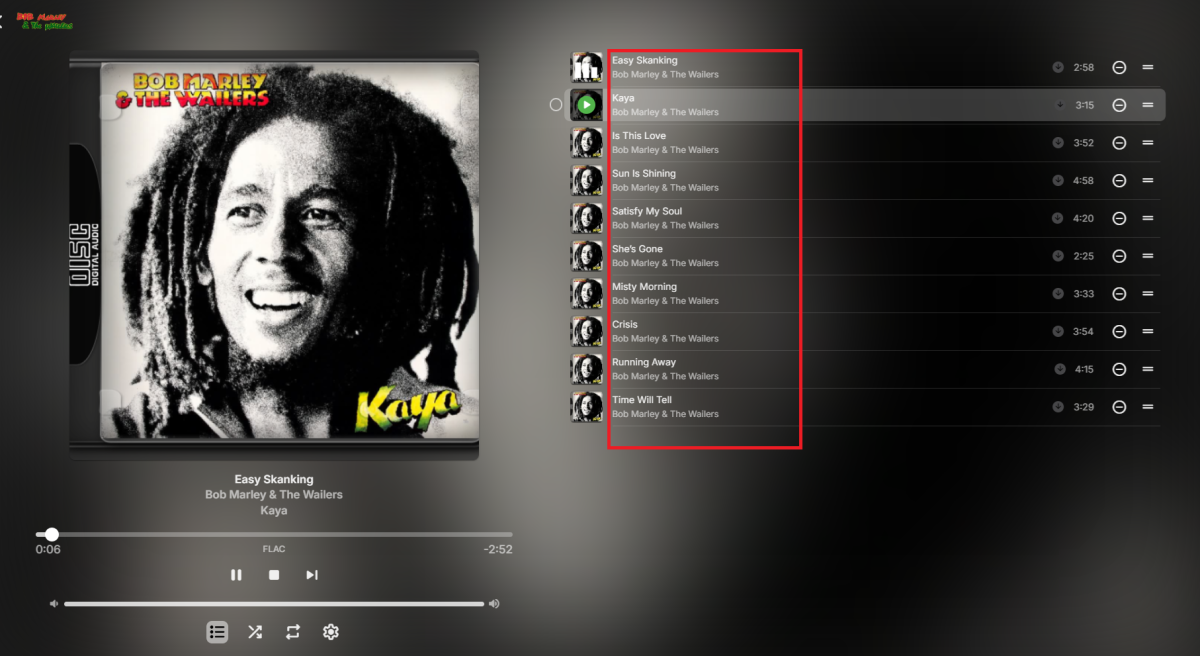
Windows app always crash when I try to click on different rows in the list view. logs attached. Tried on a different pc, same crash. EmbyClient-20260301T154547732.txt unhandled_12d04af3-aca1-40cf-b9c2-8270166ec253.txt
-
@soderlund91Have you thought any more about this? The scheduler doesn't update the Day field when the Month field is changed, so it's possible to set a schedule that ends on, for example, November 31. I don't think this is about the size of the library, I think it's about the number of matching items? I've set up a couple of tags, one which only matches a few things and syncs in a few seconds and one which matches a lot of things and took quite a while to sync.
-
Is there a difference between that version and this one? Does it need to be redownloaded?
-
New version up on yocksers/EmbyIcons Added: Individual corner icon sizing. Individual corner icon x/y positioning. Configurable icon spacing. Background bars for icons, posters will scale to fit. Changed: Chasing slightly optimized to improve performance. Fixed: Filename rule icons no longer duplicate for each file name hit.
-
The Direct Steam Live TV toggle now works, and the interlaced content is transcoding fine. Build 4.1.54 seems to have fixed this.
-
Why is the only version that is trash is the Apple TV version of Emby. Can we please make it just like the android version. IOS and Mac, even windows is a better experience than Apple TV. Let’s get a resolution going.