
All Activity
- Past hour
-
 haniiiitb joined the community
 -
 Norah Aljabri joined the community
 -
 Angel Narciso joined the community
 -

Remote access to Emby Server as admin via VPN issues
justinrh replied to jerkrl's topic in General/Windows
Is the "LAN Networks" populated by default with the server's LAN network? Mine is populated but I don't remember actually typing it in ... -
 Hello, I purchased an Emby Premiere monthly subscription today, but I did not receive the activation email. Here are my purchase details: Email used for purchase: 2009vib@gmail.com Date and time of purchase: Today at 19:49 Subscription type: Monthly Amount charged: $4.99 Last 4 digits of the Visa card: 4531 Card holder name: Mohamed Adel Country: Egypt The payment has already been deducted from my Visa card, but I did not receive the activation key email. Please help me resend the activation email or provide the activation key. Thank you.
 -
 ColinPostsHere changed their profile photo
 -
 shiran2008 joined the community
 -
 Kate78 joined the community
 -
 Maorsalomon joined the community
 -
 muaath_1 joined the community
 -
Offline Music Sync - Not Viable in 2026 despite statements back to 2022 that it's planned for the future
ColinPostsHere replied to ColinPostsHere's topic in Feature Requests
Are you suggesting that AI wrote that for me? Why and what goods comes from that? I took the time to provide actionable feedback to correct a major deficiency in the PAID version of Emby that Emby is implying customers will get after they pay, but we don't. -

Offline Music Sync - Not Viable in 2026 despite statements back to 2022 that it's planned for the future
Neminem replied to ColinPostsHere's topic in Feature Requests
AI can you please explain HITL? -
Limit users outside network to individual IP adress.
Neminem replied to MediaIntelNUC's topic in General/Windows
@visproductionhow would that work with Emby's apps -
Offline Music Sync - Not Viable in 2026 despite statements back to 2022 that it's planned for the future
ColinPostsHere posted a topic in Feature Requests
LOVE Emby for local on-LAN playback. Practically perfect for me. However, I bought Premiere specifically for offline music play, only to learn it doesn't really work yet. What is the state of this feature, "planned" per Emby responses to requests for this going back at least as far as 2022? Is this close and coming soon? Whether it is or isn't close, here's specifically what I request and suggest you add if any of these are not already included in your development. Ability to establish per device syncing by at least: artist, playlist, and genre where "sync" means that any changes or additions on the server will automatically download those some changes to the Android client when it next connects to the Emby server. If I add an album to the Rock genre, and I've told Emby client to Sync the Rock genre, it should get that new album at its next connection to the server. Changes to song metadata on the server should also update metadata on the device. This is basic concept of sync rather than download. Recognize changes on the server and update files on the client to match (one-way sync, Server -> Client, is fine). An option to sync everything in a Library (in my case, it's my Music library) to the current device. My current Android phone finally has enough room for all my music. In that case, for simplicity's sake, while I don't necessarily need EVERY song, I'd rather just have an option to get it all and keep the phone in sync with my full Library, rather than have to go through artists and albums and select which I want and which I don't. Offline ability to view the list of playlists, artists, genres, albums, songs, then open to drill down through the layers to individual songs. Currently, Emby only lets you sort downloaded music by album or song, which is not really helpful with hundreds of artists, many of whom have several albums. I never want to scroll through hundreds of albums to find an album. I want to see all the albums by a particular artist to select one to play or to navigate to a specific song. If I could only have 1 listing structure, it would be by artist -> album -> song. Occasionally, for things like Christmas music that may span multiple artists on a single album, sorting by genre or album do make more sense (but that's the minority of cases). Especially important for Android Auto so I can make selections easily on the console screen while driving (important safety measure): provide an easy, big-button way to jump to a particular letter. E.g., if I want to get to Yes or ZZ Top, don't make me scroll through pages and pages of artists starting with AC/DC and Aerosmith; just let me hit Y or Z to jump to the end of the alphabet. UI should be roughly the same whether online or offline. Don't make me learn a whole new and different UI because I'm outside my house and no longer connected to the server. Use the same UI, with the sole change being to show only the subset of songs that I have synced/downloaded for offline playback. (Kudos: the Emby UI is great when online, so be proud to keep it available for offline playback) I think those are all the base expectations any user would have for offline music play. I'm happy to add further details or help clarify any of these if you need. LOVE Emby for online use, but equally upset and disappointed that its offline play for music is not really usable, especially because you charged me money for it as a premium feature that doesn't really exist. Please share a general idea and rough timeframe for if and when these are coming. If it's not by sometime in the summer of 2026, you should probably remove the offline claim for Premiere and not accept customer money for this missing feature. Thanks, Colin -
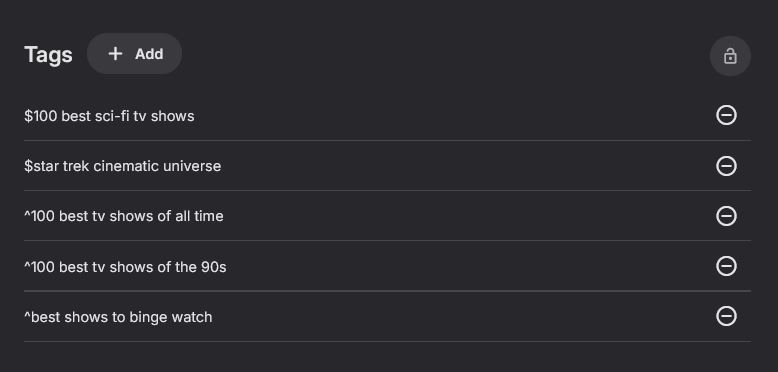
So much for that..... Some are still lower case. The strange thing is they are not mixed, either all correct or all lower. And Some of the same tag are right and some are wrong. I can find no pattern.
-
Is it possible to change the number of posters shown on the movies list screen to a lower number? Say 4 to make the posters and Text bigger?
-
I checked it by turning my wifi out of my phone and tried to login to the server.
-

Emby Not Adding New Genres to Music After Editing Metadate
Happy2Play replied to warpedrevolutio's topic in General/Windows
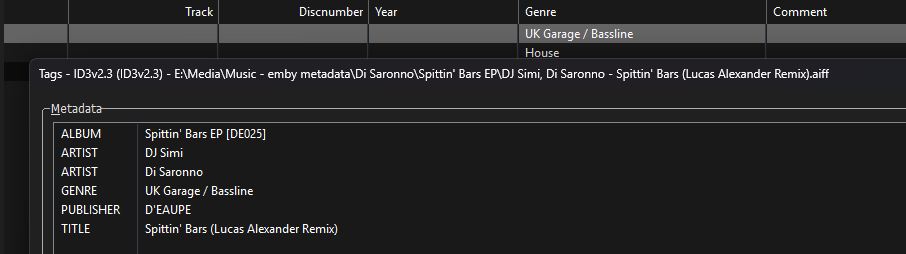
Yes what is your details screen setting? Sorry but coma delimiter is not supported. Semicolon or forward slash and I believe double back slash. @LukeKB probably needs to extend this rule to other fields. Music Naming | Emby Documentation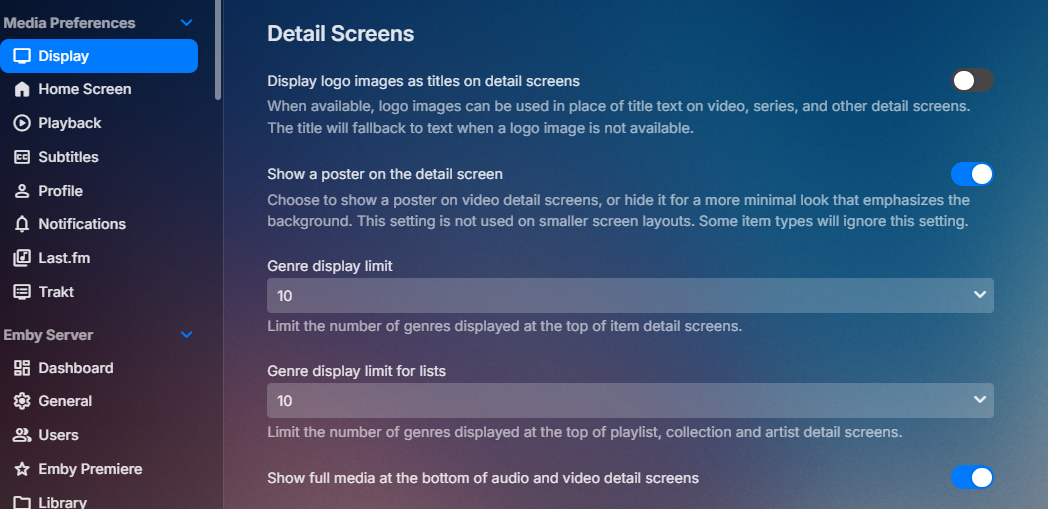
-
Yes. I have. I just doubled checked the emby settings and eero settings.
-
What doesn't work? Have you gone through all the various steps for setting up and enabling external access from the page linked above? - it's not automatic... Paul
-
Doesn't work.
- Today
-

Emby Not Adding New Genres to Music After Editing Metadate
visproduction replied to warpedrevolutio's topic in General/Windows
I believe there is a setting that allows a maximum number of genres to appear on the media page. By default that was set low to 3 or 4. This limit is a styling option and if it is set, then just the first few genres appear, but the remaining genres are still valid and being used for dbase selection of "More like these". If you click on the other genres links directly, you should find your content listed for each genre. This style option was surely made just to clean up the look of the page. At some point, someone complained that there was too many genres links cluttering up the page. Everyone has an opinion. Perhaps as a feature request, when this limit happens, there might be either a 'more...' link or something like that to show there are more genres. The admin, I believe, has the option to increase the number of genres on the media page. I would do an screen grab, but I am on the road and do not have server access. -
The absolute craziest thing happened. After this post I made an edit to the system.xml file and restarted the server. Now, the Tags as posted above are all back to the correct case. I give up.
-
After selecting that, does the option to "Automatically download new content" keep the contents of the Playlist permanently synced between the client on an Android phone and Emby server (downloading new albums when I rune Emby client locally on same LAN as server)? It doesn't appear to be. Do I need to do something to trigger it to re-sync? And if that's not what that's supposed to do, what does that option do? My goal is to be able to take the majority of my music library with me and continue to use Emby to play it. This is why I paid for Premiere, for its offline capability, which I assumed (wrongly) meant it would work about the same as when connected to the Emby server and provide a way to sync music to keep the offline library always up to date. Right now, this doesn't appear possible. Downloading from a Playlist in Emby to Android client, as far as I can tell, only downloads current songs (no long-term sync for future additions) despite the "Automatically download new content" option, and it doesn't actually download the Playlist itself nor the Artist or even the genre, so you can only find songs by Album or song title, neither of which is a very good sort option on a small scrolling touchscreen or while driving and accessing through Android Auto. E.g., I'm in the mood for Led Zeppelin, but the Coda album is nowhere near Physical Graffiti album, because the albums are sorted alphabetically by album title, not by artist. There doesn't seem to be any way to view albums by a particular artist when offline even though the MP3 files are downloaded and so the Emby client has access to all the metadata it needs to do this. And when viewing by songs, which include their track # at the start of their name (needed for my older, pre-Emby DLNA sorting so it would keep tracks in the proper order on albums) are sorted by track independent of album. That means first come almost a thousand track 1's, then just as many track 2's, etc. It's effectively unusable for offline music play unless your only goal is to bring a dozen or two songs with you. And even if you could sort by artist, there's no way to jump to the L's for Led Zeppelin or Z for ZZ Top, you have to scroll through hundreds of pages of cover art to get through them all, always starting with whoever comes first alphabetically. Unless it's just that I can figure it out, which is certainly possible, the current system seems unusable for offline playback in Emby across a library of thousands of synced (or even just one-time downloaded) songs. I should point out that I LOVE Emby for local, online playback. It's far, far better than my old DLNA approach and appreciate the native clients on both my LG C5 and Samsung Smart TV's (and native Samsung TV app support is why I picked Emby over Jellyfin), both TVs connected to AVRs. Perfect selection and wonderful UI. But I equally need the offline support for music to preserve all or at least most of that UI in my car and on the phone's screen when going for a walk or run.
-
App log emby_android_1772904205662.txt
-
Better implementation of Android Auto and Downloaded files
ColinPostsHere replied to nospotify's topic in Feature Requests
Did this ever materialize? In early 2026 with Emby Premiere, I see that I can download a playlist, but that only downloads the albums and songs. The Playlist itself is not available offline, nor is the critical (for me) sort by Artist. That is lost when offline on Android. Without playlists or artists, I effectively can't use Emby to play music when driving. Also, especially important when driving in Android Auto: a "jump to letter" option. So, for example, if I want to play ZZ Top, I can press Z to jump to those artists, rather than having to scroll through dozens or hundreds of pages to get there. When driving, that's both difficult and dangerous. I had really assumed that Premiere, promoted as supporting offline playback, would include this. I can see how it may not be needed for movies -- you take a few with you on a trip, you don't really need all the sorting and metadata features -- but for audio/music, it isn't really usable at all without playlists and artist grouping. It should work just like when it's online to the Emby server at my house. I can select Playlists, hit the one I want, and play those songs. It's also important that there be some mechanism to SYNC (not just a onetime download) music for offline play. I'm always adding new songs and albums to Emby, so need a way to efficiently sync them to the offline/downloaded files on my phone. -

Limit users outside network to individual IP adress.
MediaIntelNUC replied to MediaIntelNUC's topic in General/Windows
@visproduction Thanx for that! I got to admit that after reading up on ways to block IP:s, rerouting IP:s, reverse proxys and pages of coding, Your suggestion was by far the most creative and fun! Its a bit above my paygrade for the moment, but when i get the fundamentals locked down i think i might just take you up on that! Peace brother! N. -
I have a 4 tuner live TV box (vbox), and have simultneous stream limit set to 0, but I can only stream 1 channel. If I play say BBC one on one device, it plays fine, but then try and select ITV on another device I get playback error, internal server error. Incidentally, I can play the same channel on multiple devices fine. Help.
-
Whenever a network change happens on my phone, such as going from wifi to cellular or vice versa or turning a vpn on/off, I become disconnected to the server and it won't load anything until the app is restarted. However this issue does not occur when actually watching video, but backing out of the video after the network change still causes the issue. This is all demonstrated in the attached video. It also happens almost every time I open the app if it's been awhile, so i'm constantly restarting the app. At first I thought it occured when changing from remote to local connection but that is not the case. The example shown in the video is connected remotely before and after. Not sure if this is a setup issue with the server or a bug with the app. Device: Oneplus 13 on android 16 App version 3.5.28 Record_2026-03-07-08-45-42_44afb15bb7fddf0c82da86f25534e5f4.mp4 embyserver.txt
-
Thanks, I'll give it a try.
-

HW acceleration (decode + encode) with RK3568?
danergo replied to danergo's topic in Feature Requests
Hi Folks! How is the status with this currently? I came across with this problem again, and it would be extremely useful if I can use rk's hw acceleration with emby.








