All Activity
- Past hour
-
 iu4433 joined the community
 -
 Pordunk joined the community
 -
 Karolinalush2210 joined the community
 -
 Mely3 joined the community
 -
 Business4@gmail.com joined the community
 -
 Ron6044 joined the community
 -
 emilgomez joined the community
 -
 l695197 joined the community
 -
Sorry for the confusion. For the Windows and Xbox app, we have a hybrid package in the store which consists of two different apps. The Windows app is a WinUI3 and the Xbox a UWP app. In order to have the store give you the WinUI3 app on Windows and the UWP app on Xbox, the WinUI3 app needs to be slightly ahead in the version number. The store requires control over the 4th part (x.x.x.0), so we are left to increasing the 3rd part. Preparing for unexpected cases is always a good thing, that's why we're doing +2 (and not +1). In turn, the 3rd part of the Windows app is always +2 compared to the official release version.
-
Finally getting back to this. Logs didn't have any other information relating to the problem. I uninstalled via the universal installer and installed the .deb as suggested and the server is now running. Maybe it would be good to remove emby server from the universal installer? At any rate, thanks for the help.
- Today
-

The Emby Universal Installer does not work with Fedora 43
Luke replied to fritz.the.cat's topic in Linux & Raspberry Pi
Hi, how does it compare when installing the rpm from our website? https://emby.media/linux-server.html -
Hi there, we work very hard on Emby and we thank you for your support.
-
Suggestions from emby server not loading in Android tv
Luke replied to buhochileno's topic in Android
Can you please provide a new log example? Thanks. -
I am a user of a Toshiba 58QA4263DT UltraHD QLED Android TV, and the application does not support Dolby Vision
Luke replied to TSİNAN's topic in Android TV / Fire TV
Hi there, let's look at an example. Please attach the information requested in how to report a media playback issue. Thanks! -
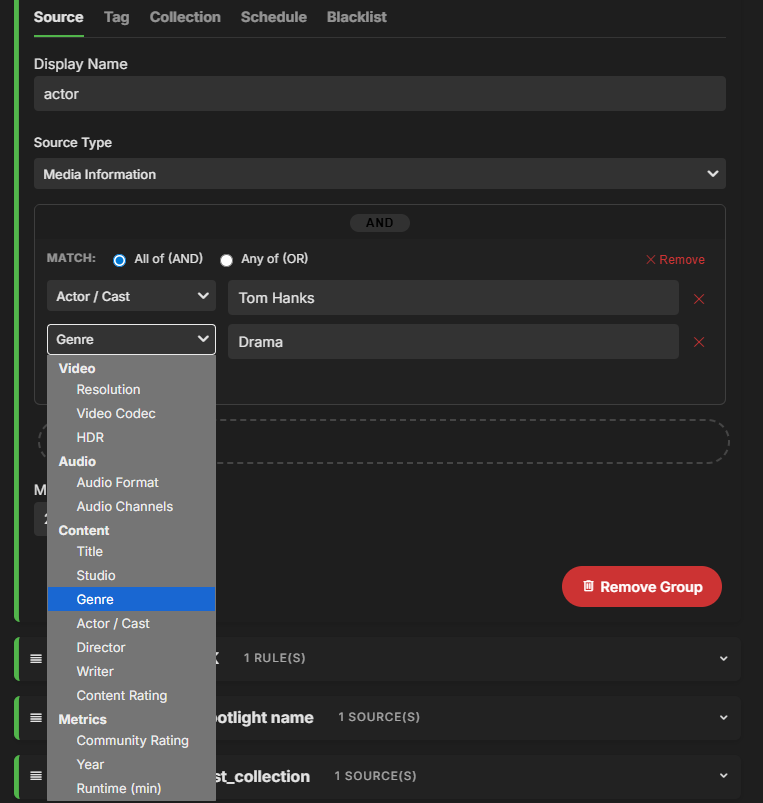
Here is a teaser I just need to get it working properly and some smaller UI fixes.
-

Suggestions from emby server not loading in Android tv
buhochileno replied to buhochileno's topic in Android
I just did that, clear cache full reboot of the onn device, same thing.... -
Your individual Emby users only need access to your application web page and/or app login. Not to anything else on the system running Emby. Check to see which OS user owns the Emby server logs. That is the user and group that needs access to the paths (folders) holding your media libraries and files. That same user:group also needs access to the transcoding temp path, recordings (if using LiveTV) and backup destination.
-
Color me intrigued. Trying not to get my hopes up for the moment, haha.
-
OLED65C9 I use the black theme for years and notice this but for several months but i did not posted it
-
Can also confirm this. The home page rows won't let me sort collections by random, so I used AutoTag to tag everything within my 1,001 Movies You Must See Before You Die collection, and set up a row using that tag instead of the collection, and now my homepage has a row for that collection in a random order.
-

I am a user of a Toshiba 58QA4263DT UltraHD QLED Android TV, and the application does not support Dolby Vision
TSİNAN replied to TSİNAN's topic in Android TV / Fire TV
I am a user of a Toshiba 58QA4263DT 58" Ultra HD QLED Android TV, and the application does not support Dolby Vision. Dolby Vision is important to me; could you please add it to the application? -
Thanks! I'm testing the next version at the moment, will put out a release tonight or tomorrow if it goes well. It will have a HUGE upgrade regarding local media info, with inspiration from the smart playlist plugin @crusher11 On release I would be happy to get your help testing, i'm just gonna do some basic function test, and you seem to have pretty specific use case
-
I hope that the Android app can configure the aspect ratio of the vide
buhochileno replied to yanzuxu's topic in Android
I doble check and is my copy that have some issues, it happen also with vlc where is hard to change the aspect ratio, sometimes takes other don't but I do miss the "zoom" option on the Emby for Android version... Thanks -
Hi! Im gonna take a stab in the dark here.. But is it possible that you have surpassed the amount of devices you can have Emby on? N.
-
Toshiba 58QA4263DT 58' Ultra HD QLED Android TV Kullanıcısıyım uygulama Dolby Vision desteklemiyor. Benim için önemli olan Dolby Vision özelliği, uygulamaya Dolby Vision özelliği ekler misiniz ?
-
Gotcha! Your plugin your rules brother..
-
I basically don't want the responsibility. If it was a smaller plugin i wouldn't have minded so much.
-
Suggestions from emby server not loading in Android tv
Luke replied to buhochileno's topic in Android
Hi, are you able to update to Emby Server 4.9.3? -
Having a heck of a time getting Emby running on a UGreen DXP2800. I installed Emby (the Linux edition) without using Docker. I have been able to create libraries under a main "Media" shared folder. Emby seems unable to get file permission to access any of these files. It makes no difference whether I have transcoding on or not. I get the "No compatible streams available" error code. For instance, when trying to play the 2 Guns.mkv file the log says "/volume2/Media/Movies/2 Guns/2Guns.mkv: Permission denied". All the users have read/write access to the Media folder and all subfolders and files from with ugos. All the existing users are in a group I created and the group has all the permissions to read/write as well. Still, no joy getting it to play or get any new metadata. I no longer know what else to do. The files and folders themselves when listed on Linux show the file owner to be one of my administrators and the group to be the one I created in ugos. They have 777 permissions. What am I missing here? Is there something special I must do when creating an Emby user from within Emby? Here is the part of the log that shows the problem. The whole file is attached. 15:22:24.998 ffmpeg version 5.1-emby_2023_06_25_p4 Copyright (c) 2000-2022 the FFmpeg developers and softworkz for Emby LLC 15:22:24.998 built with gcc 10.3.0 (crosstool-NG 1.25.0) 15:22:24.998 Execution Date: 2026-02-28 15:22:24 15:22:24.999 /volume2/Media/Movies/2 Guns/2Guns.mkv: Permission denied 15:22:25.000 EXIT ffmpeg-directstream-60a78a79-afe5-4f6e-9b9c-0c03b6ab6e20_1.txt
-
Suggestions from emby server not loading in Android tv
buhochileno replied to buhochileno's topic in Android
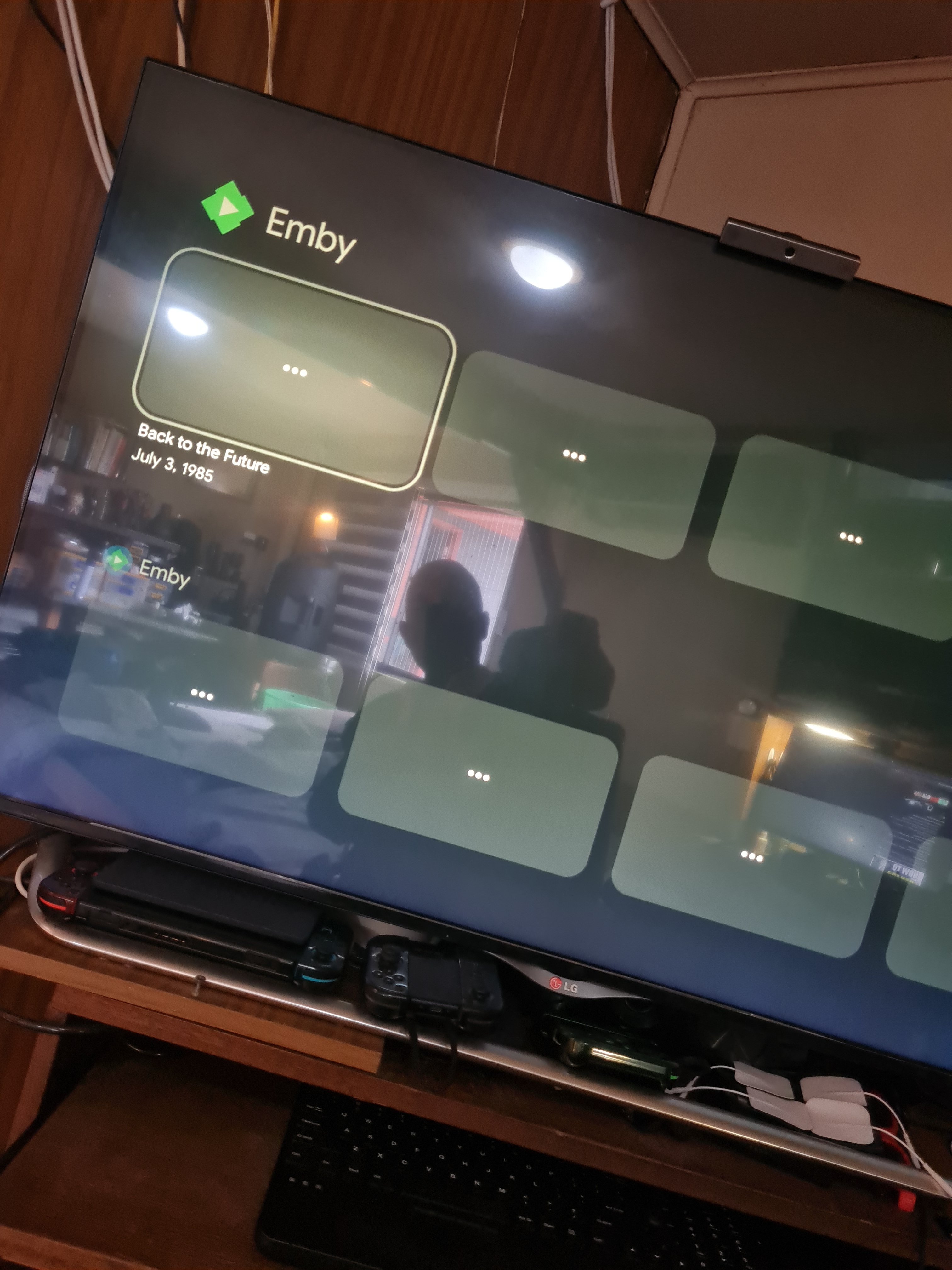
Hi, I’m having an issue with Android TV home screen recommendations coming from Emby. On multiple Android TV devices, the “suggestions/recommendations” row appears on the Android TV Home screen (cards have titles), and selecting a card opens Emby and plays the correct item — but the image/poster on the Android TV Home screen stays blank/doesn’t load. This happens with both: Emby for Android TV (2.1.23g, Registered) Emby for Android (generic beta) (3.5.28) What I’m seeing On Android TV Home screen: Emby rows appear, titles load, but the thumbnail/poster images do not (blank placeholders with 3 dots "..." like loading or missing). Clicking a card works (opens the right content and plays normally). In the attached photo you can see two Emby rows (because I have both apps installed). This also happens when only one of the apps is installed. Devices affected (same behavior) 2× MiBox S2 1× Onn 4K Pro Samsung TV (Tizen OS): Emby suggestions do populate, but the suggestions look like a mix of items + library shortcuts + login entries (not sure if expected). Server / network All devices connect to the same Emby Server on my local network: Emby Server version: 4.9.1.90 (Server OS Ubuntu 24 + install method: from official packages) Connection type: local LAN (no remote/reverse proxy involved) Steps to reproduce On an Android TV device, go to the Android TV Home screen. Navigate to the Emby “recommendations/suggestions” rows. Observe that titles appear, but images never load. Select any card → Emby opens and playback works, the row correspoding to Emby for Android TV dosn't get updated it remain with the first content from when it was install. What I tried Reinstalled both apps / tried with only one app installed Cleared cache/data, force stop, rebooted devices Logs / attachments Attached: Emby Server log from the timeframe when reproducing (full .txt, not excerpt). Attached: Photo showing the Android TV Home rows with missing images. I could not find a “Send Log” option in the Android TV app UI for this issue. I was able to capture a short log from the Android (generic) app on the Onn device (extracted from a screenshot): Logs emby_android_1772308137445.txt Sat Feb 28 16:48:57.551 GMT-03:00 2026 Updating apiclient serverinfo id: 8efd14da21614ecab5ced49d3eeb269a, Sat Feb 28 16:48:57.846 GMT-03:00 2026 MediaService.onCreate Sat Feb 28 16:48:57.924 GMT-03:00 2026 MediaService starting a new MediaSession Sat Feb 28 16:48:57.942 GMT-03:00 2026 MediaService setting up CarHelper and WearHelper Sat Feb 28 16:48:57.949 GMT-03:00 2026 MediaService calling updatePlaybackState Sat Feb 28 16:48:58.019 GMT-03:00 2026 PlaybackManager state: STATE_NONE Sat Feb 28 16:48:58.019 GMT-03:00 2026 MediaService creating MediaNotificationManager Sat Feb 28 16:48:58.020 GMT-03:00 2026 MediaService getting MediaRouter Sat Feb 28 16:48:58.028 GMT-03:00 2026 MediaService.registerCarConnectionReceiver Sat Feb 28 16:48:58.029 GMT-03:00 2026 MediaService.registerMediaNotificationReceiver Sat Feb 28 16:48:58.029 GMT-03:00 2026 MediaService.registerMediaNotificationReceiver If you need an Android TV / Fire TV app log specifically, please tell me the preferred method and I’ll reproduce and provide it. EST 3PM Server Version 4.9.1.90 Folders Program Data /var/lib/emby Cache /var/lib/emby/cache Metadata /var/lib/emby/metadata Logs /var/lib/emby/logs Transcoding Temporary Files /var/lib/emby/transcoding-temp Thanks! embyserver.txt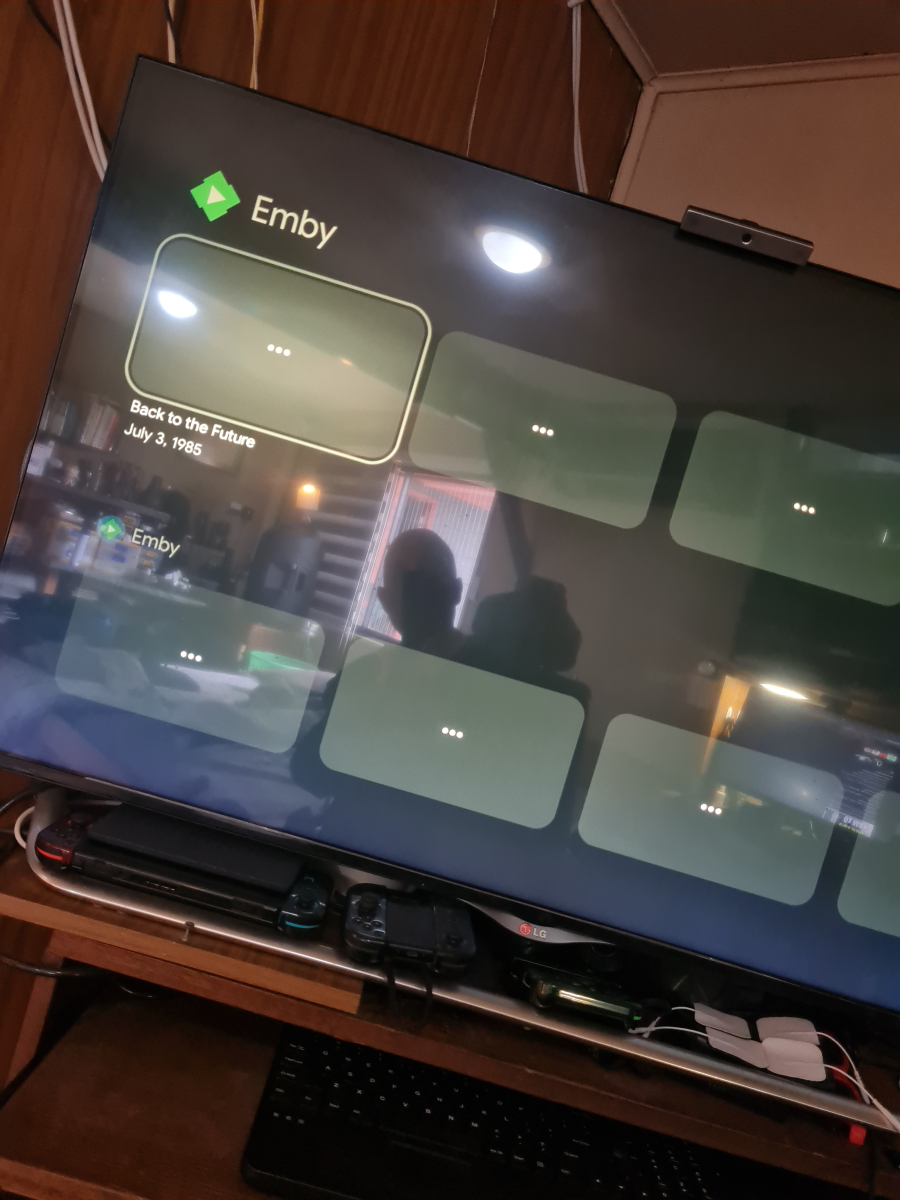
-
Tested auto tag using a local collection and it is working very well. Thank you.
-
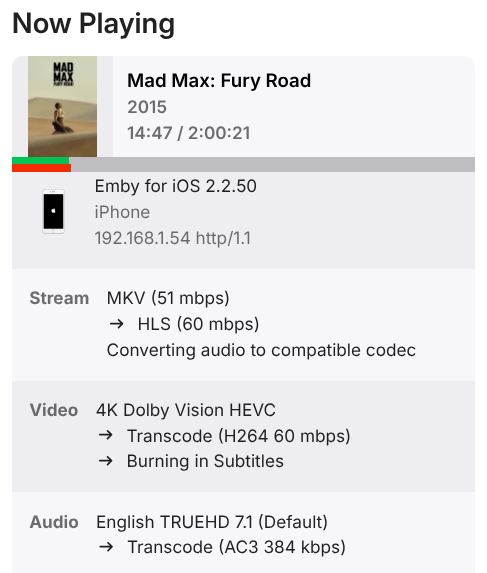
I’m currently running Emby on an AlmaLinux 9 VM in Proxmox, installed using the CentOS RPM. Problem: Hardware acceleration/transcoding is not actually being used. During transcodes, CPU usage hits 100% across all cores, there is no GPU utilization, and there is no “hardware” icon beside the transcoding stream (as shown in my screenshots). Emby does recognize the GPU, at least I'd think so with Emby displaying the GPU name under "Transcoding" in the settings menu. A Plex instance on the same physical server performs proper hardware acceleration (Plex is deployed bare metal, like Emby), so the GPU drivers should be installed and working correctly. Emby settings are configured as follows: Preferred Hardware Decoders are all set to VAAPI, and Preferred Hardware Encoders are set to QuickSync (the only available option). Software tone mapping is disabled. Hardware Accelerated Tone Mapping is enabled. Intel QuickSync tone mapping is disabled, and VAAPI tone mapping is set to VAAPI HW Tone Mapping. Hardware and versions: Emby version is 4.9.3.0, also tried with the latest "official" RPM, version 4.9.1.90-1 GPU is a SPARKLE Intel Arc A310 ECO. Permissions and setup: User/group and device permissions look like this: [kabs@plex01 ~]$ id emby uid=985(emby) gid=986(emby) groups=986(emby),39(video),998(render) [kabs@plex01 ~]$ ls -la /dev/dri total 0 drwxrwxrwx 3 root root 120 Feb 19 23:14 . drwxr-xr-x 21 root root 3360 Feb 19 23:14 .. drwxrwxrwx 2 root root 100 Feb 20 07:08 by-path crwxrwxrwx 1 root video 226, 0 Feb 19 23:13 card0 crwxrwxrwx 1 root video 226, 1 Feb 20 07:08 card1 crwxrwxrwx 1 root render 226, 128 Feb 19 23:14 renderD128 Systemd service configuration: [kabs@plex01 ~]$ systemctl cat emby-server /usr/lib/systemd/system/emby-server.service [Unit] Description=Emby Server is a personal media server with apps on just about every device After=network.target [Service] EnvironmentFile=/etc/emby-server.conf WorkingDirectory=/opt/emby-server ExecStart=/opt/emby-server/bin/emby-server RestartForceExitStatus=3 User=emby [Install] WantedBy=multi-user.target /etc/systemd/system/emby-server.service.d/override.conf [Service] User=emby Group=emby The GPU is passed through to the VM. Logs have been attached. Any help is appreciated. ffmpeg-transcode-dba49dd1-1f16-47b7-8361-526236cef54f_1.txt hardware_detection-63907892050.txt
-

Updating Emby - from app store to Emby website image
me@jackbenda.com replied to me@jackbenda.com's topic in TerraMaster NAS
Thank you, sir!