All Activity
- Past hour
-
 Ismaelo0 joined the community
 -
 ragthefirst joined the community
 -
In my library, I have two different versions of the original Star Wars trilogy. One is the original three films in their theatric version and the other are the three films with their latest updated cut with new scenes and SFX. Emby has put these films under the same heading with the versioning options. I'd prefer if they were listed separately. How do I separate them?
-
 Eliex joined the community
 -

AndroidTv update now black screen with av1/opus videos
suetlung replied to esaym153's topic in Android TV / Fire TV
I would like to just say I am having the same issue here. AV1 + OPUS + mkv resulting in black screen with audio, using internal EXO player. And using non "TV" version on my TV doesn't work, as I am not having premier licence on both my server and the TV -
 Ani2705 joined the community
 -
 bajaliving joined the community
 -
 noga123 joined the community
 -
 iiskoaz joined the community
 -
 Celticrussell joined the community
 -
 AOKAY joined the community
 -
@SamES
-

Embeat — a native, music-only player for Emby (gapless, DLNA, offline)
jasonmcroy replied to vdatanet's topic in Third Party Apps
This looks promising. However, I just installed on my iphone and I can connect on my wifi directly to my Emby server with my local IP address but I can't get it to connect if I use my tailscale IP. This same IP works fine on the Narjo app but I wanted to take yours for a spin to see if it could work out for me. Is there any particular reason it shouldn't connect? - Today
-

embyforkodi (next-gen) 12.X.X support
quickmic replied to quickmic's topic in Emby For Kodi Next Gen
Yes, they are synced if you selected them -> plugin menu -> "Manage libraries". -

Regarding the issue of 4.9.1.80 and the plugin Bluray Folder Support 1.0.3.0 recognizing BDMV original disc fi
LonelyCat replied to LonelyCat's topic in Synology
I have created a laster version of EMBYServer 4.9.5.0 and added media in ISO, BDMV, and MKV formats to the media library. Only MKV can recognize it, but BDMV still cannot recognize and play it. same NAS same bdmv on 4.8.10.0 can play on 4.9.5.0 ffmpeg-remux-1fd7f370-e736-4d2e-b146-7b1361318d55_1.txt ffmpeg-remux-8f8b0f27-7e97-435c-8863-fe0fa3111bee_1.txt ffmpeg-remux-253c61f0-79e4-420c-9bb9-9c6664e96c05_1.txt ffmpeg-remux-c3d88536-6e46-4a34-a57f-59bce150598b_1.txt embyserver (2).txt
-
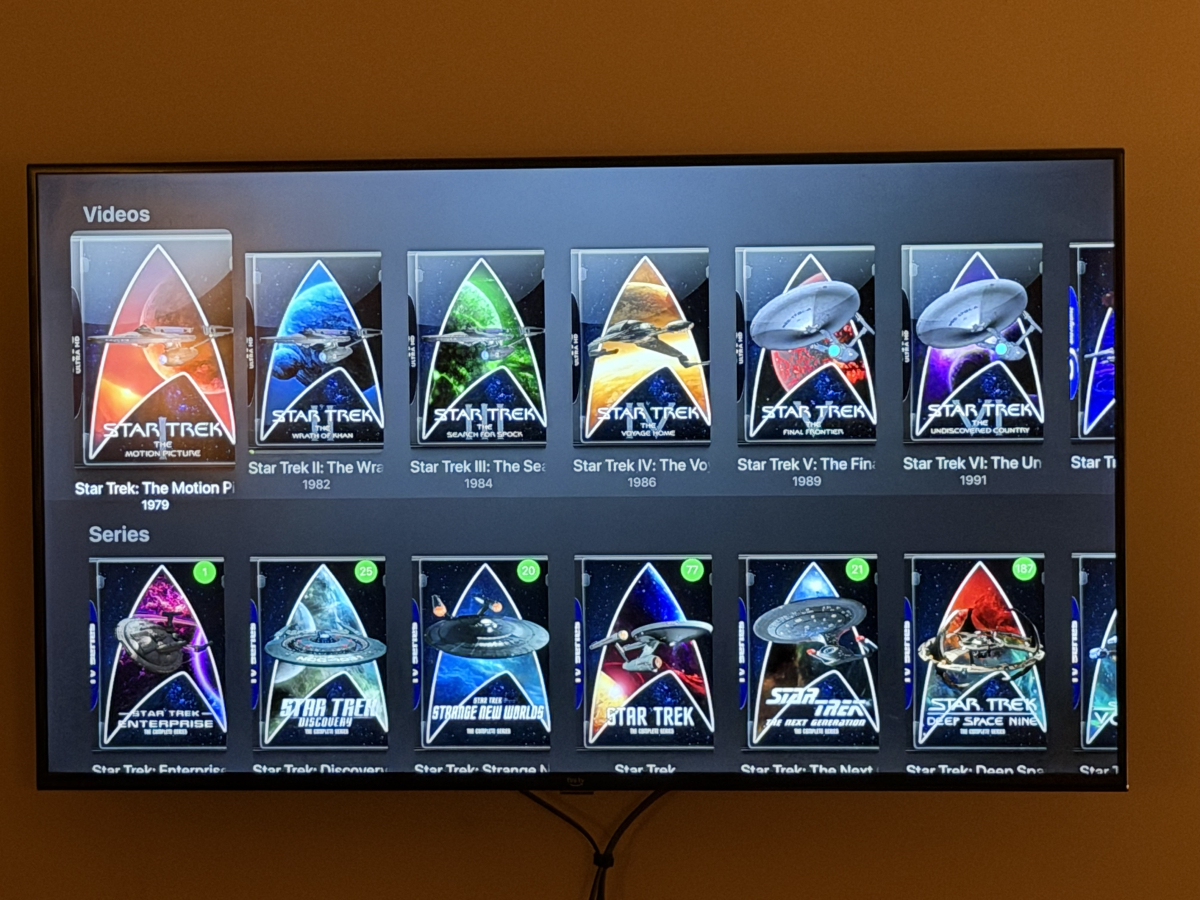
Yea, it won’t let me edit my post, so I’ll just have to comment again with the collection view on Apple TV. This is what I get on AppleTV As you can see, they get split by type then get usual sorting rather than just sorting properly. Ignore my question about collections sorted to top, that appears to be resolved on latest version
-

HW Tone Mapping Transcoding no longer works after updating to 4.9.1.80 (Synology 220+)
softworkz replied to rekit's topic in Synology
Well, did you enable tone mapping actually? -

Downloads stuck on "Ready to transfer" after movie quality conversion
Luke replied to Joaqim_Braga's topic in Android
Hi, try opening the app on the device and see if that gets it going. -
HW Tone Mapping Transcoding no longer works after updating to 4.9.1.80 (Synology 220+)
Luke replied to rekit's topic in Synology
Hi, there will be a new ffmpeg build on the server beta channel soon, so stay tuned for that. Thanks. -
Hi, can you add the atv screenshots? Thanks.
-
We used to have a param to have the server send back an estimated content length. I’ll have to check but that may have been ripped out as I think it was mainly ancient devices that needed it.
-
Hi, yes I agree this would make sense. Thanks.
-
LG webOS Emby App – Simplified and Traditional Chinese subtitles frequently fail to display or appear after se
Luke replied to Haibinsky's topic in LG Smart TV
Hi there, let's look at an example. Please attach the information requested in how to report a media playback issue. Thanks! -
Probably not needed, but here's my environment: Synology NAS running DSM 7.4.1 Emby server 4.10.0.22 nVidia Shield 2019 Pro and Shield experience 9.2.4, Projectivy loader AndroidTV app 2.1.51 happens with DTSHD, DTS, and TrueHD when I turn those codecs on it goes back to Direct both in SFN and OSD Shield --> HDMI --> Samsung Soundbar --> eARC --> Samsung TV
-
 am experiencing subtitle display issues on the latest version of the Emby app for LG webOS. The issue mainly affects Chinese subtitles, including both Simplified Chinese and Traditional Chinese subtitles. During playback, subtitles frequently fail to appear correctly. In some cases, subtitles are completely missing, while in other cases they only appear after the video has been playing for approximately 3–5 minutes. The problem occurs with different media files and subtitle tracks. English subtitles may also experience similar issues, but the problem is especially noticeable with Simplified Chinese and Traditional Chinese subtitles. The same video files and subtitle tracks work normally on other Emby clients, which suggests the issue may be related to the LG webOS Emby application, subtitle loading process, or subtitle rendering mechanism. Environment: Device: LG Smart TV Platform: LG webOS Emby App: Latest version available from LG Content Store Emby Server: Latest version Subtitle languages tested: Simplified Chinese, Traditional Chinese, English Steps to reproduce: Open a video with Chinese subtitle tracks in the Emby LG webOS app. Select Simplified Chinese or Traditional Chinese subtitles. Start playback. Observe subtitle behavior during playback. Expected behavior: Selected subtitles should load immediately and display correctly from the beginning of playback. Actual behavior: Simplified Chinese and Traditional Chinese subtitles often do not appear when playback starts. Sometimes subtitles only appear after 3–5 minutes of playback. In some cases, subtitles never appear. The issue happens repeatedly with different video files. Additional information: This issue seriously affects the viewing experience, especially for Chinese-speaking users. Since the same media files and subtitle tracks work correctly on other Emby clients, the problem appears to be specific to the LG webOS client. Please investigate the subtitle loading, character encoding support, and subtitle rendering process in the LG webOS Emby application, especially for Simplified Chinese and Traditional Chinese subtitles.
 -
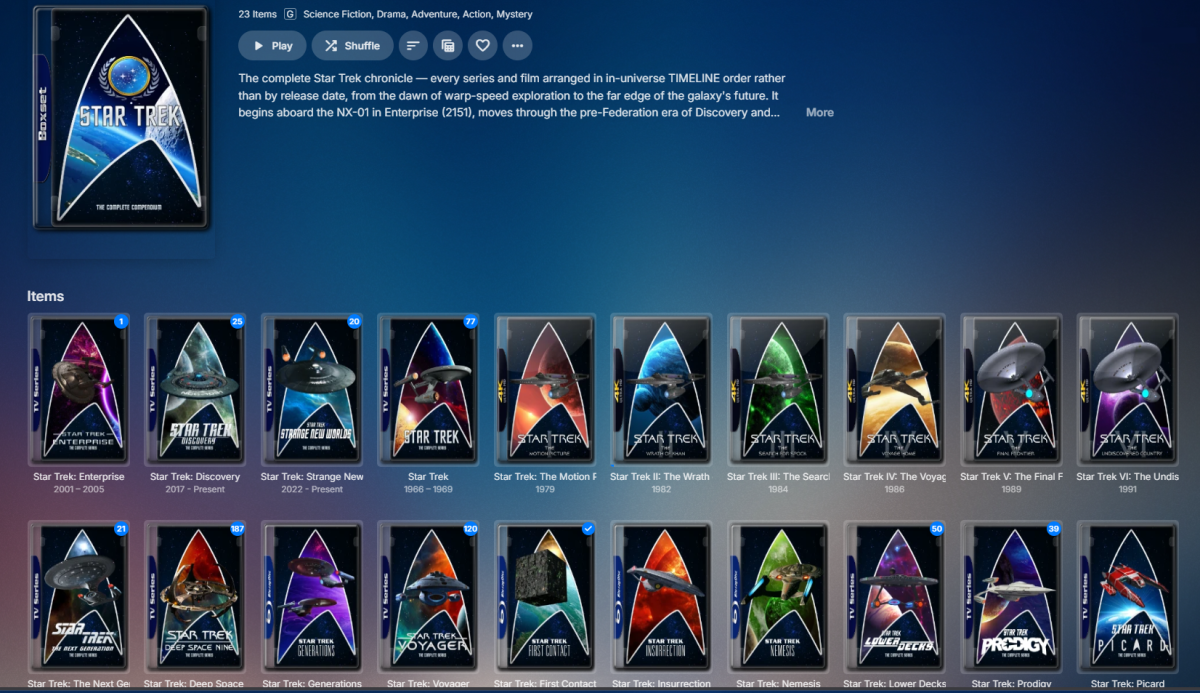
NOTE: Post in progress, posting web portion from computer, will edit with AppleTV photos on my phone momentarily and will remove this message. Here is the collection view via the web browser: That's what I am aiming for on all devices. On Apple TV it looks like this: <ATV Collection photo here> As far as collections in movies library, on Web they are just sorted by sort title and intermix in as expected. On AppleTV all collections are grouped at the top rather than where they should fall in the list of titles. <ATV Movies collections photo here>
-

Can’t see skip/back 10 sec. with carplay and on the start screen
Valako replied to Valako's topic in Apple iOS / macOS
Hi, thanks for the reply and understood. It would be great if you could add it to Carplay, in order to be able to use the car’s screen safely while driving (avoiding unlocking the phone), so I will patiently wait for it. - Yesterday
-
Hmm.. EmbyIcons doesn't change logos and fanart. Can i get you to temporarily uninstall EmbyIcons and see what happens? I have a suspicion that it's not EmbyIcons that is the cause of the problem.
-
You still have to import URLs to media files. It’s not going to scrape web pages.
-
Maybe Simkl?
-
It's not just posters. The issue also affects logos and fanart. The incorrect images aren't always the same, they seem to change over time. The original image files are all correct on disk, but Emby displays random artwork from other items.
-
The plugin does not cache any posters, it only caches the icons and aggregation data for TV series. Posters are handled by Emby it self, unless you have another plugin that changes the poster for you. Try what i wrote above and move an icon position. This will forcibly clear the cache and redraw everything.
-

Emby initial screen has no info only logo.
GlenManor replied to GlenManor's topic in General/Windows
OMG! That worked!!! Thank you! Thank you! (That solution sure wasn't obvious to me.) Let me say again what a fantastic product this is. -

Unable to play MP3 files / constant crashes during audio playback
twos50 replied to hallansen's topic in Android Server
embyserver-63921290350.txt