
All Activity
- Past hour
-
 Rakannnnn joined the community
 -
 DanielZambrano2 joined the community
 -
 jph78500 joined the community
 -

Existing transcoded video should be discarded when remote playback bitrate is changed
GrimReaper replied to gu5gus's topic in General/Windows
Yes, with specific example, not in general terms. how to report a media playback issue -
 Said.k joined the community
 -
 Aby Molina joined the community
 -
 Said.khalil joined the community
 -
 Hayaaaa marafiii joined the community
 -
 maximus5338 joined the community
 -
 Bubba08 joined the community
 -
 Hayaaam joined the community
 -

Existing transcoded video should be discarded when remote playback bitrate is changed
gu5gus posted a topic in General/Windows
Problem: When changing the remote (cellular) playback bitrate while in the middle of watching a video, the video that has already been transcoded at the previous bitrate continues to play, not respecting the new bitrate setting. The expected behavior is for the video transcoded at the previous bitrate be discarded and transcoding at the new bitrate to begin immediately. It should behave in this way when either of the different playback birate settings (home streaming quality, remote quality, remote (cellular) quality, and Chromecast quality) no longer match the transcoded stream's bitrate. Steps to reproduce: From an Emby client, begin to play a video - make sure that you are not using Direct Play. Let it play for several minutes at least to allow the transcoding to develop a significant cache of transcoded video. From this Emby client, go into settings and change playback bitrate for the type of stream that you are using (home, remote, remote (cellular), Chromecast). I see this when reducing the bitrate on remote (cellular) stream but I assume it works the same way for all of these streaming categories. Go back and resume playing that video. Observe that the bitrate has not changed. Instead it is continuing to use the video that had already been transcoded for this stream, which is at the previous bitrate. Please let me know if you would like logs. -
Hello! Yes the “Run Group” button initially builds the playlist with the correct tags in the correct order (as they appear from the source link). However, as that external source list updates day to day, the schedule tasks do not automatically update the playlist. They update the tags correctly but not the playlist itself. Only when I manually press the “Run Group” button does the playlist update with the additional content. Furthermore, manually running the “Run Group” a second time after content is added does not update the playlist order, it simply appends the new content to the end of the playlist. An edge case I have not tested yet is I am not sure what happens if you press the “Run Group” button when content is later removed from the sourced list. I do not know if it will remove the content from the already built playlist.
-

Best path for cleaning up duplicate People profiles / folders?
Neminem replied to Smitty018210's topic in General/Windows
I think things changed with 4.9 where "tmdb + id" was implemented. I also see a lot of file system duplicates. But not duplicates in emby. yet another thing not disclosed in a update post from the Emby team. Come to think of it, nothing was disclosed about the update from 4.8 to 4.9 Not even a blog. -
New patch release - Version 4.1.3.0 Download .dll and full release notes: https://github.com/soderlund91/HomeScreenCompanion/releases/tag/v4.1.3.0 Bugfix release IMPORTANT! Minimum required Emby server v4.10.0.12 Release notes Fixes: User selections: Fixed an issue where all users was not displayed in some user selections. Playlist: Playlists didn't update when doing a full sync, only when running a single group run.
-
Add a confirmation dialog to Remove From Collection option
gu5gus posted a topic in Feature Requests
Please add a confirmation dialog to Remove From Collection option. This option appears, when available, at the bottom of the options list but Refresh Metadata is normally there in all other cases. Someone working too quickly to refresh metadata can accidentally remove the items from the collection. - Today
-

Introducing Traxx, an Android music app built for Emby music libraries
GrimEvil replied to Hauzz's topic in Third Party Apps
Tried the new version, it still times out a lot, sent two lots of diag information. this was using a the connection on my local network. will give a try later with a remote setup and android auto and will report back. Also to use it remotely, I need to log out and back in to reset the connection as my external url does not work on my local network, so maybe you could have an option of a main and backup server with auto switching? -
Gotcha!
-
It is complex and requires to setup things outside emby. I use it on Synology where I can easily setup self-signed certificate to enable SSL. Would be great to have the same here, just to not have password floating in clear text...
-
Sorry, keyword should have been "service". https://emby.media/support/articles/Run-as-Windows-Service.html Paul
-
Hi, I don’t want to remove the library as it’s setup correctly, just the folder location changed. I added the new folder and removed the old one and that worked, but there is an edit icon for a reason I figure and it’s not allowing editing was what I was trying to report.
-
Hi there! You just need to remove it and then add the new one. N.
-
The online site to check for acceptable color contrast is: https://www.siegemedia.com/contrast-ratio#%230B0D10-on-%232B3643 You need to be > 3.0 contrast. The colors from the theme are used in this test page link and they are only rated at 1.58. All the other black on dark blue background texts on the page, also fail. This is not enough contrast and these style choices are technically design errors. It is a lot of work to get all texts to work on all backgrounds with theme design. The online Contrast ratio site is helpful. Getting all the admin texts to work is also quite tricky, because there are many div and class styles in the admin dashboard. I've attached the section I use in my State Street theme to adjust all the admin dashboard texts. This covers most color styles for text and backgrounds for the admin dashboard and can maybe be helpful in updating your style theme colors. Most all of the texts in my theme are using ivory. color:#FFFFF0; Pick whatever color you prefer that passes the online, contrast ratio test and replace #FFFFF0; Tweak whatever you need on the background colors. Try adding the newly edited css style excerpt into your css theme update somewhere at the bottom of the file. Hopefully, the excerpt will start working for most all the admin text areas. Admin Dashboard styles excerpt from State Street v 1.06d2 - reference.css
-

Unable to connect to configure Server
visproduction replied to Rew452's topic in Android TV / Fire TV
Suspect file permissions need to be set correctly in Asustor NAS. see: https://www.asustor.com/en/online/College_topic?topic=110 -
And just How can I do that, Thanks
-

Emby Theater for Windows (desktop/mouse): OSD auto-hide is far too long for pointer input
loop11 posted a topic in General/Windows
Hi, Long-time Emby Premiere Lifetime user here. I use Emby Theater for Windows on the desktop, with a mouse, as my main client. The OSD / playback controls auto-hide delay feels appropriate on TV and Android clients — with a remote and a 10-foot UI, keeping the controls visible longer makes sense. But on desktop with a mouse, the same long timeout doesn't fit the input model. With a pointer the user has precise, instant control and doesn't need the OSD lingering for several seconds. Right now the desktop client seems to inherit the TV-oriented timing, and it noticeably gets in the way during normal mouse usage. A few ways this could be addressed, in order of how clean they'd be: Shorter auto-hide specifically for pointer/mouse input on the desktop client (separate from the TV/remote timing). This seems like the most correct fix, since the issue is really about input context. A configurable timeout in player/display settings. Or, if neither is desired, support for custom CSS in Emby Theater for Windows (the way the web client allows) so power users can tune it themselves. Server-side custom CSS currently doesn't appear to reach the native Windows client at all. Related: the seek bar on the desktop player is also quite large and visually heavy — it obscures more of the picture than necessary. A thinner/less intrusive bar, or the ability to adjust it, would help for the same reason: the desktop/mouse experience deserves a tighter UI than the TV layout. Emby has been my setup for years and I'd really appreciate the desktop player being tuned for pointer input rather than inheriting TV timing. Thanks for considering. -
What do you have set for this option? It will default to 30. If you change this option to Yes does it start to work the same as iOS? The framerate of your media is 59.94 which is above the 30 the setting will start at as default.
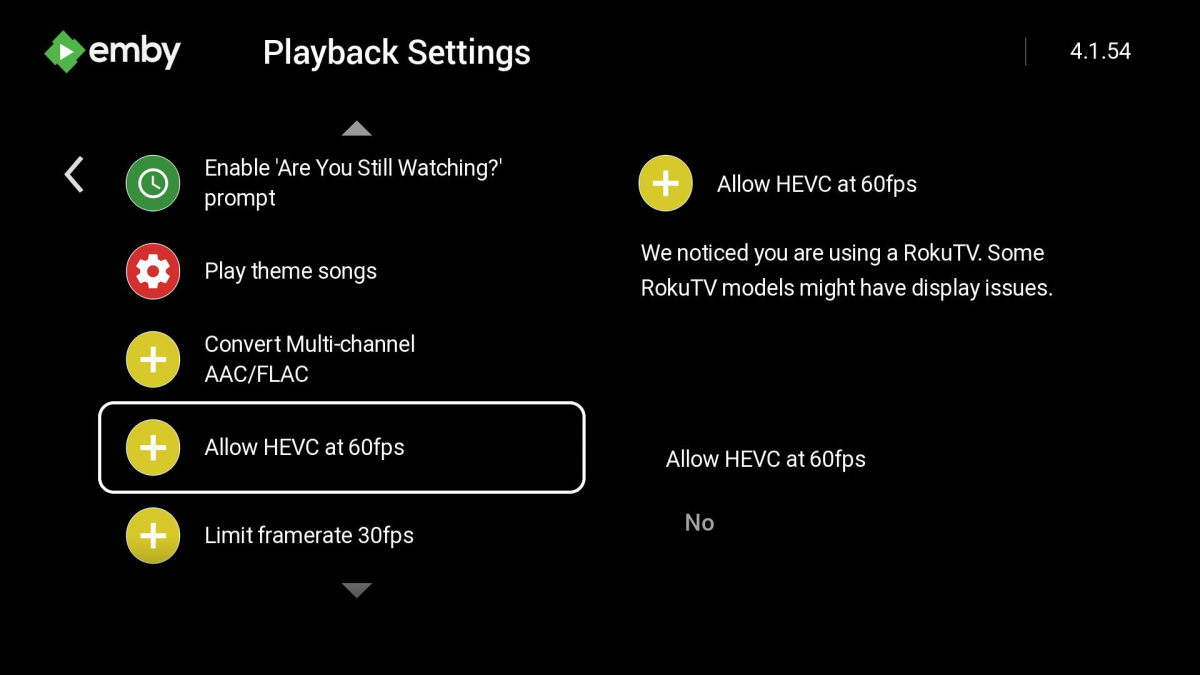
-
I am looking forward to it. My Synology crapped the bed, but I am still waiting on my new Ugreen. If I need to use Docker, I will. I need my Emby But that means I need to learn Docker also (dance). I am a fan of native whenever possible, with as few steps in the chain as possible.
-

External Player (Vimu) resume position issue on Android TV
gluk147 replied to franco72's topic in Android TV / Fire TV
Same problem. Tried the latest versions of Android and Android TV. Saving viewing position does not work with Vimu -
Run it as a server? Paul
-

Introducing Traxx, an Android music app built for Emby music libraries
howlermonkey replied to Hauzz's topic in Third Party Apps
Correct, in the android app there is a menu entry for Folder view, it's the last entry along the menu ribbon for music. See my screenshot below for folder view.thumb.png.11e9302aa19ef5689cac681f37226bb4.png)
-

Skip Intro markers not being generated despite scheduled task completing
atcronin replied to UsamaWaheed's topic in Linux
Something else I just noticed when setting the library Markers option to "as a scheduled task". 1. The task creates fingerprints for all 13 episodes in the season 2. then it detects there are 13 episodes with audio fingerprints available 3. then for each episode in the season it recreates the fingerprint (with the same ffmpeg parameters, and stores it in the same path) 4. finally it detects and adds the intro timestamps. Is this duplication intended? As the logs (with the library Markers options set to "as a scheduled task and when media is added") in the previous post show, the library scan creates the fingerprints, then during the detect episode intro task the intro timestamps are detected and added without recreating the fingerprints. Intro Task - Fingerprint Created Twice.txt -
On my Nvidia Shield ATV Pro I am getting when opening Emby this message "Unable to connect to configure server" this last for second or so and goes away. I Have up to now ignored this since movies and video's all seems to play. I need to explain that a couple months ago I changed from a Qnap NAS to a Asustor SSD NAS using the same IP as Qnap which is no longer on my network, For the most part everything seems to play Bluray's, DVD's & video's; But I add a new mp4 video and it is slow to start on Emby and then plays for few seconds and seems to buffer and plays a few seconds, repeating. Other mp4 video's play fine. The offending mp4 video plays fine on my PC so I don't think the files is bad. Is there some setting that need to be change after changing NAS's?? Thanks Rew
-

Best path for cleaning up duplicate People profiles / folders?
ginjaninja replied to Smitty018210's topic in General/Windows
I have 3 "Tom Hollands" for what is ultimately 2 people in the real world. Separate nfos share the same tvdbid and different tmdbid which isnt possible. So emby might not be right all the time or have received duff information form a provider... Observations The delete endpoint can not be use for persons (access denied). there is no person merge function in ui or api Each person ID is hard coded to a meta location (delete a metadata folder and refresh person in emby to log error saying folder). The person.nfos dont contain an emby id, the link is mystical. An bodgy empirical algorithm is needed to identify the person to folder link (unless the devs say its exposed somewhere) removing all content off a person seems to remove the person id from database but as a tombstone, under some unknown circumstance the object can be reinstated when you refresh shows with that person (string match?) on. Does emby clean these tombstones up. time>? reboot? With 3 emby persons Tom Holland (detail below) 3 folders "Emby-Server\programdata\metadata\people\Tom Holland\person.nfo" "Emby-Server\programdata\metadata\people\Tom Holland-tmdb-64796\person.nfo" "Emby-Server\programdata\metadata\people\Tom Holland-tmdb-1136406\person.nfo" Suggested Approach to test manually (not proven out) I will assume the tmdbids on user objects are unique for now (to be proven) (identify which folder the Emby ID is associated to, maybe use tmdb as primary key, will that uniquely identify them, did for me), assuming you will be left with 1 Emby object without a tmDB id and that would be associated to the \Tom Holland folder identify which person ids you will keep, possibly copy known good metadata to ids you will keep (method to be determined) identify which emby object and associated folder is the bad one (s) (by looking at content comparisons across tmdb/tvdb api). In my case "Emby-Server\programdata\metadata\people\Tom Holland-tmdb-64796\person.nfo" was perfect, all the ids matched the content The person associated to "Emby-Server\programdata\metadata\people\Tom Holland-tmdb-1136406\person.nfo" was the bad one remove tom holland from all content from the bad one This will delete the emby id and possibly folder, delete the metadata folder After tombston period has expired tbc Refresh the content associated to the bad one identified for 6 and hopefully it will be attached correctly to the now curated person objects. 2 and 3 are doing alot of heavy lifting, easier said than done. Maybe for persons with duplicate names, you need to retrive all tmdb and tvdb metadata for their media objects and use the content response to establish the link between TVDBID and TMDBID. maybe filmography, type, description comparison to weight confidence. Of course you could do all that perfectly or your own version of it, but it wont help you retain any manually curated metadata and people images en masse. but maybe the observations help some of your thinking. but maybe just having a utility which is double checking duplicate persons out of band from the refresh metadata cycle which optimises for speed i suspect, would be interesting. -
That solved my problem. Thanx for the support








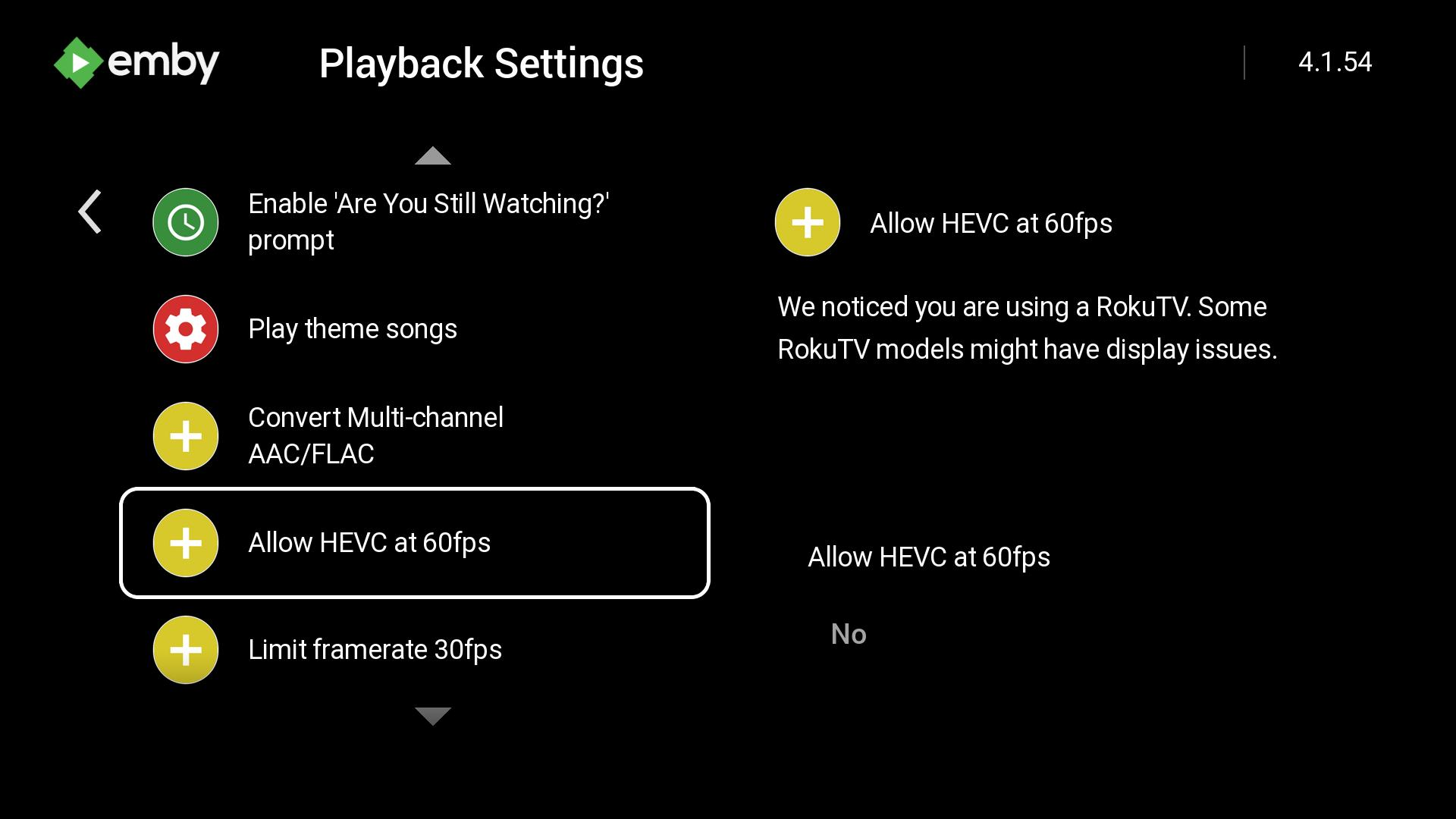


.png.2b73ccd84bbf244aa6ac76887ace1232.png)

