All Activity
- Past hour
-
 Tatiana Quinonez joined the community
 -
 Abdulrhmanngeda joined the community
 -
 Andreza souza joined the community
 -

Skip Intro markers not being generated despite scheduled task completing
sa2000 replied to UsamaWaheed's topic in Linux
Thanks @atcroninfor your investigations and all the details. I will follow this up -
 n0vll joined the community
 -
 Didi4500 joined the community
 -
 Dr.Rabbi joined the community
 -
 Najlaa.94 joined the community
 -
С момента старта топика прошло уже 9 лет, но поддержки отображения 360 фото и видео нет. Это печалит. ;( Есть ли запланированные работы в этом направлении?
-
 Yagofnaja joined the community
 -
 Ange625 joined the community
 -
Hi, Luke! Есть ли какие-то рекомендации по решению проблемы с отображением плагинов? Можешь дать ссылку на URL с которого загружаются плагины? Я проверю его доступность со своего NAS. Может мне отдельную ветку завести для моего вопроса? Хотя, вроде, по теме здесь правильное. ))
-
Ese error luce como si un tercero lo estuviera bloqueando. He visto ese mismo error en otros casos en los que un antivirus lo bloqueaba. Debe revisarse los programas instalados.
- Today
-

How can Emby detect end credits from embedded MKV chapters like it detects intro/episode markers?
crusher11 replied to AngelSing's topic in General/Windows
No, it doesn't. That's not how intro detection works. It scans through the audio of each episode, and looks for a short section that is identical on every episode. This gets marked as the intro. MKV chapter markers are irrelevant to the process; it will work regardless of what the chapter is named or even if there is no chapter marker at all. This plugin claims to do the same with end credits, though I've never used it: -
For anyone that wants to remove the pointless crew roles from the DB, here's the Python script. Simply stop the Emby service, copy the library.db file from the data folder to your desktop and then run the script. You will be prompted what and from where you want the crew roles removed. A backup of the library.db will be automatically made. By default the script will not commit the changes. You must modify the python script and change the commit value to True. Once you have committed the changes, copy the llibrary.db back to your server installation folder and replace the old version and then restart the Emby service. The script is supplied as is, and to be used wholly at your own risk. Always make your own copy of any files you intend to modify. The attached file is released to the public domain. Remove Emby Crew Roles.py
-

Collections : Adding description to the nfo file??
Luke replied to Roblin1971's topic in Developer API
Hi, if you're going to use the api then you would just update the overview field and the server will worry about saving it to the database and nfo file. Or if you want to edit the nfo directly, then yes that is the right node. Just make sure to use cdata. -
Is this a playlist of videos?
-
Hi, on what screen exactly?
-

How can Emby detect end credits from embedded MKV chapters like it detects intro/episode markers?
yocker replied to AngelSing's topic in General/Windows
I'm working on a feature to have EmbyCredit read the embedded timestamps and import them to Emby so they will work. That should do pretty much what you are asking for, if i understand your question correctly. I can't promise when it will be done as i'm taking a vacation from most computer stuff here in the summer but, the code is nearly there. -

External Player (Vimu) resume position issue on Android TV
franco72 replied to franco72's topic in Android TV / Fire TV
Yeah, I know that, of course. I have a standalone Ugoos AM6B+ box flashed with CoreELEC. What's more, I’m using the modern Arctic Fuse 3 skin, so it looks really sleek. But I still like the Emby interface better; it's just more user-friendly. And if the free Jellyfin managed to integrate Vimu, why hasn't Emby done it yet? Right now, a friend of mine is rebuilding the Emby client using AI, and he’s already got this integration partially working. If some random guy can pull this off, why can’t the Emby developers??? Especially since the app already has an "use external player" option in the settings—it just needs to be properly polished. -
Not that I know of. You can use Playback Reporting plugin for that purpose (note that plugin tracks only from the time of installation onwards).
-
No, show title in episode filenames is not mandatory, plain SxxEyy works (and is supported naming convention) just fine. https://emby.media/support/articles/TV-Naming.html#episode-naming-conventions
-
I've created a separate library (mixed content) in Emby for Kids Movies, but what's the best way to separate this library in Kodi?
-

TV episodes flagged as "watched" as soon as started.... no resume point if stopped early
OMGzilla replied to OMGzilla's topic in MacOS
Update to the above... so I had a dog, and his name was BINGO! I thought the episode I posted above had the audio transcoded to FLAC, but what I forgot was that the tool I used only does it for lossless tracks and ignores AC3. Doi! But what it DID do was rename the file slightly and THAT made a difference here! My TV shows are normally named like this: The Addams Family | S1 E1 - The Addams Family Goes to School The Addams Family | S1 E2 - Morticia and the Psychiatrist And so on. The tool I used to try transcoding the audio replaced that | character with I instead in the output file. This is what actually effected change. Not only am I now getting audio like I should be with the AC3 track, but it's not getting flagged immediately as watched as soon as I start playing. I should mention I normally do get the audio when using Infuse, but it was silent with Emby. I had been assuming this was an Emby player issue with some audio formats, which I thought was really odd that it couldn't decode AC3 of all things. But nope... just the file naming scheme threw a monkey wrench in all of this. I just did a little more testing. I thought I wasn't getting resume points yet, but I simply hadn't played to the 30% mark for that to kick in. Some tweaking of the settings should get me to where I need to be. Problem SOLVED! Thanks for sticking in there with me. -
Well it seems that this issue is back again. I just uploaded a new show to my server and it would not allow me to identify it so I checked a few other movies as well as TV shows and they are not able to identify or select photos for anything again. Do you know if the issue is back again?
-
Any chance of Emby on Panasonic TV's? models TH-43FX600Z and TH-55FX600Z!! Or am I dreaming?
-

How can Emby detect end credits from embedded MKV chapters like it detects intro/episode markers?
AngelSing posted a topic in General/Windows
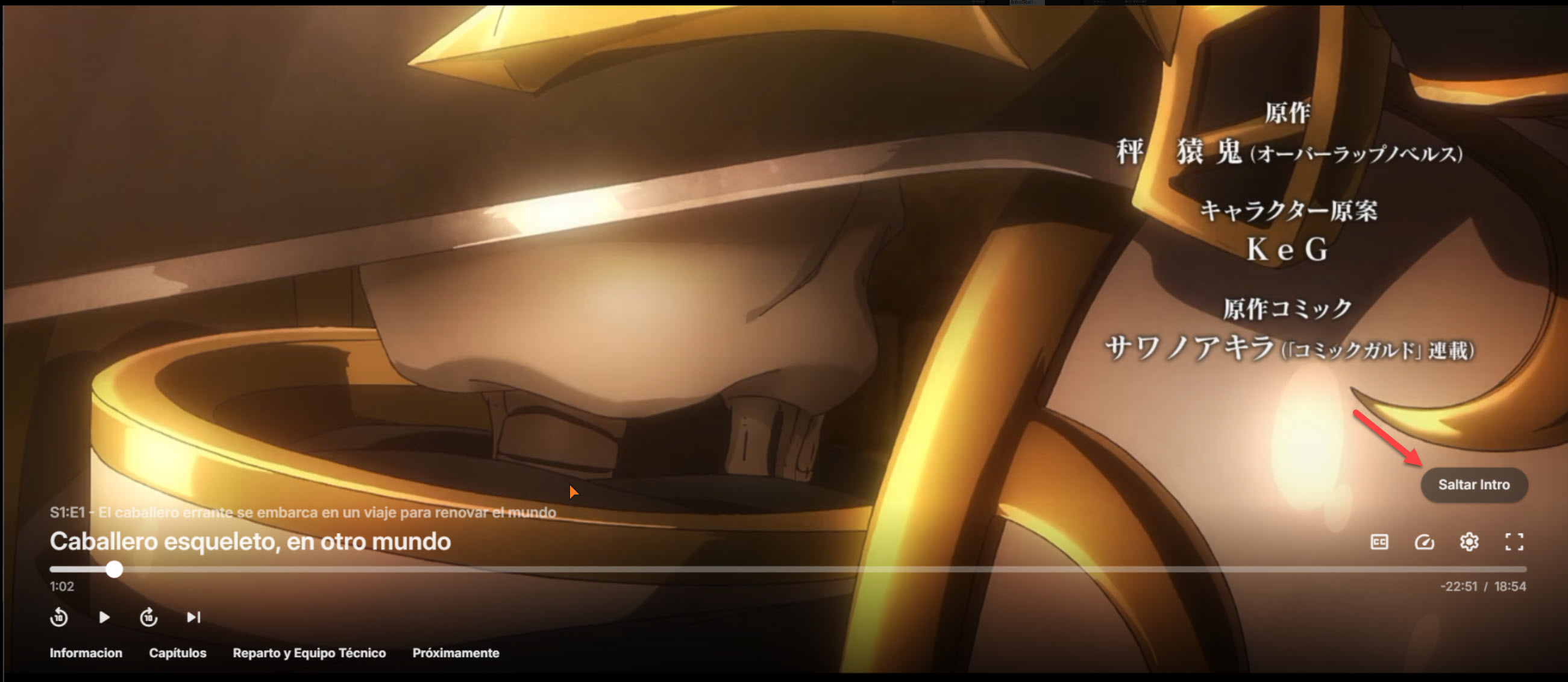
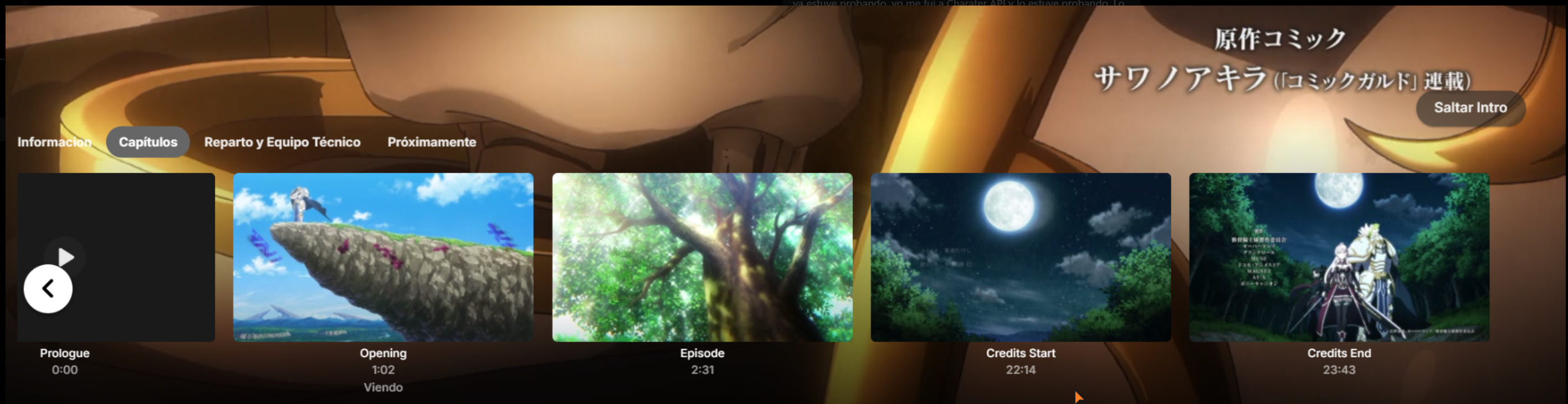
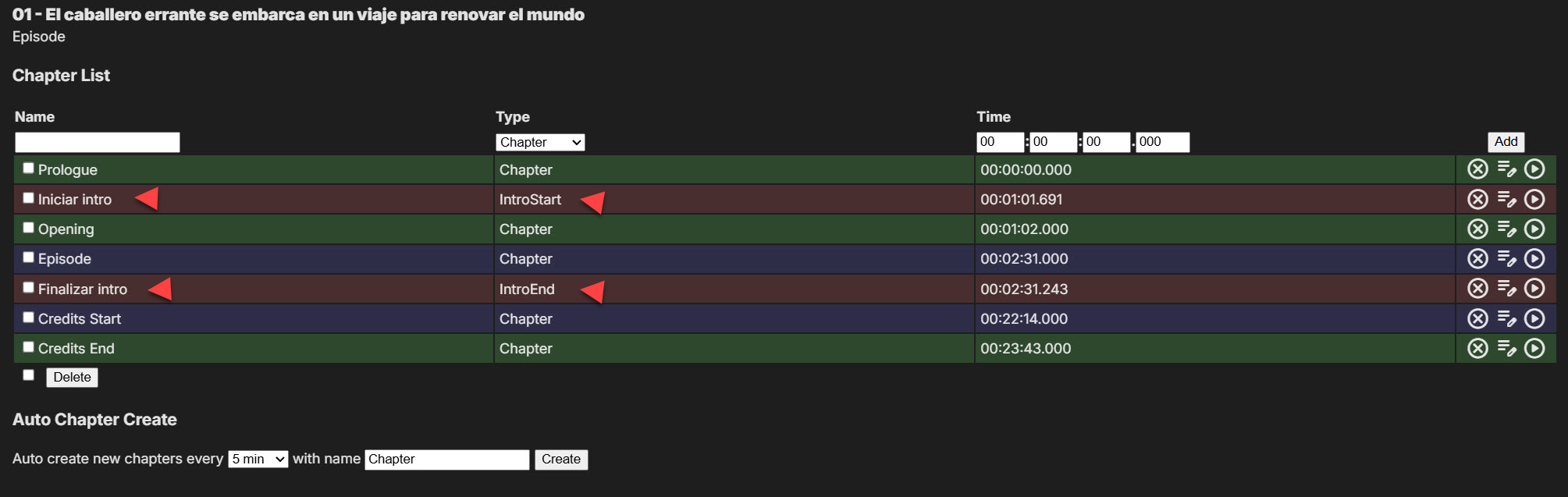
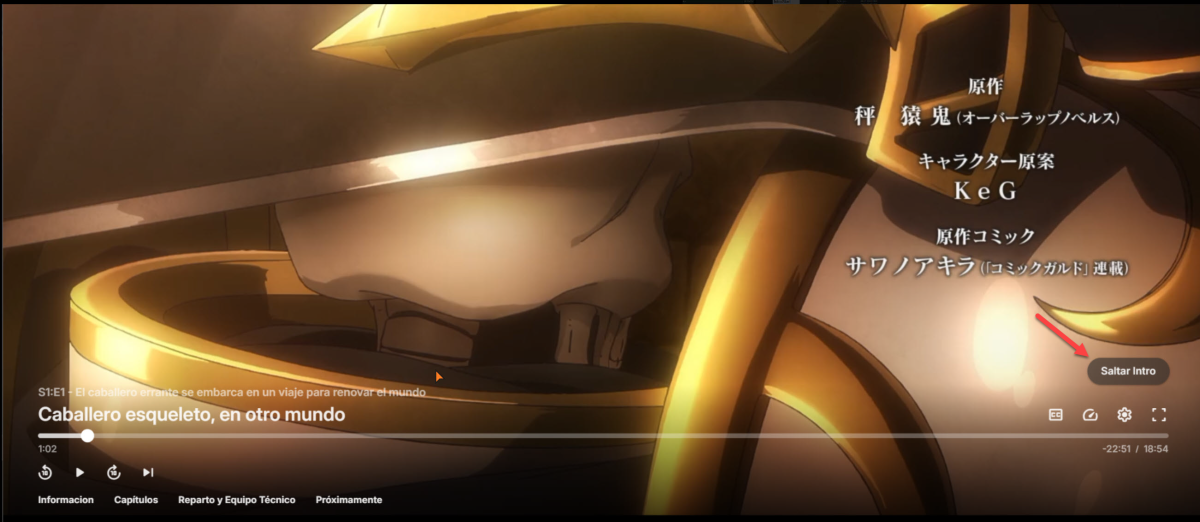
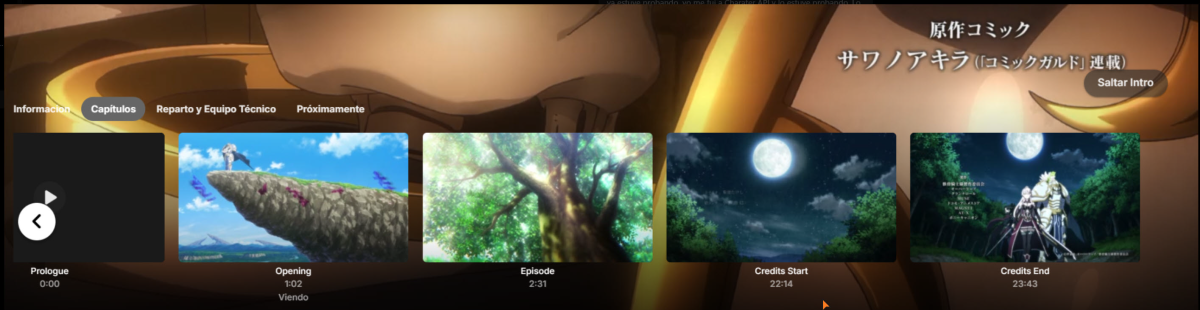
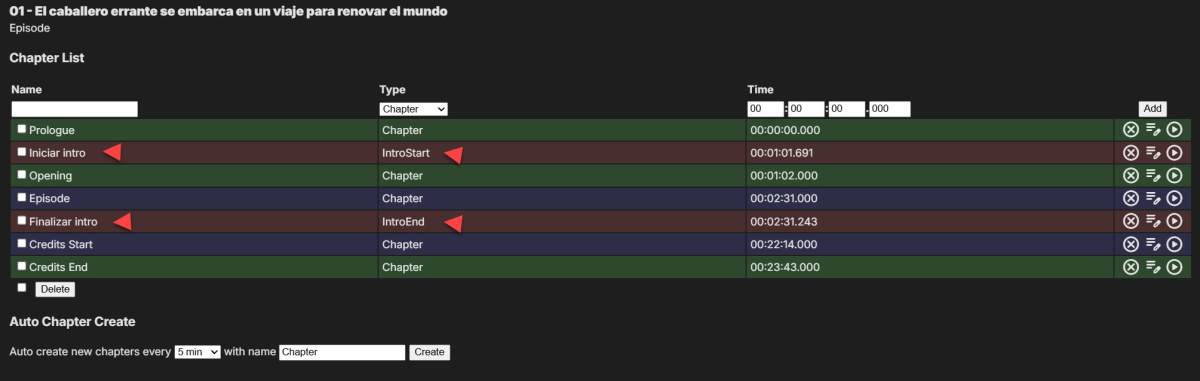
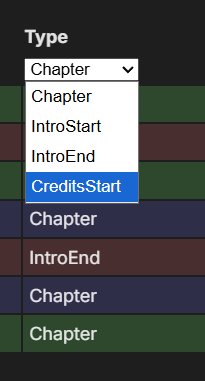
Hi, I’m trying to understand how Emby uses embedded MKV chapters to show the Skip Intro button and whether there is a similar way to trigger the end credits / next episode button from MKV chapter names. I have an anime episode with embedded MKV chapters created/visible in MKVToolNix. The original chapter structure is: Prologue 00:00:00 Opening 00:01:02 Episode 00:02:31 Credits Start 00:22:14 Credits End 00:23:43 When I import this episode into Emby and refresh metadata, Emby correctly shows the Skip Intro button at the Opening chapter time. When I click the button, it jumps to the Episode chapter time. In the Emby chapters tab, I can also see the normal MKV chapters: Prologue, Opening, Episode, Credits Start, and Credits End. When I check the same episode in the Chapter API plugin, I can see that Emby/Chapter API has created or detected special intro markers: Iniciar intro Type: IntroStart 00:01:01.691 Finalizar intro Type: IntroEnd 00:02:31.243 The normal MKV chapters still appear as type Chapter. This confirms that Emby is somehow able to use the embedded MKV chapter structure to create or detect the intro skip markers. What I cannot get working is the end credits button. I tried renaming the final chapters in the MKV in several ways: Credits Start CreditsStart Credits End End But Emby still keeps them as normal Chapter entries and does not create a CreditsStart / StartCredit marker. The end credits / next episode button does not appear at 00:22:14, which is where the credits actually start. In Chapter API, I can see that CreditsStart is a valid type in the dropdown. My question is: Is there a specific MKV chapter name, format, marker type, or metadata structure that Emby recognizes to automatically create a real CreditsStart / StartCredit marker from embedded MKV chapters? What I want is this: Embedded MKV chapter: Credits Start 00:22:14 to be recognized automatically by Emby as: CreditsStart / StartCredit marker at 00:22:14 without manually editing every episode one by one in Chapter API. I know Chapter API can add CreditsStart manually, but I have many episodes and I don’t want to manually edit each episode. I’m looking for a way to make Emby recognize the credits start from the MKV chapters during metadata refresh or chapter scan. Is this currently possible? If not, is there any server setting, naming convention, scheduled task, plugin, or supported workflow that can automatically convert embedded MKV chapters like Credits Start into real Emby CreditsStart markers? Thanks.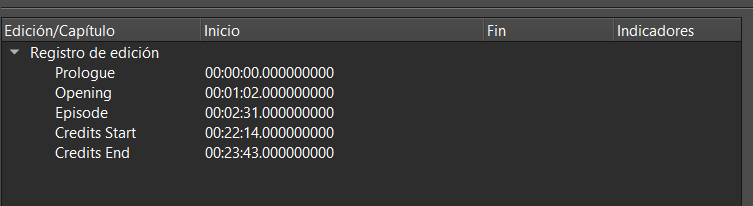
-

Windows app not recognising Emby Premiere
wookie_jmc replied to ProjectBlue's topic in Windows & Xbox
Turns out, there was enough of a change to the Emby app in the last update that TinyWall no longer detected it as the same app and was preventing net access. I had to re-enable access for Emby. -

Windows app not recognising Emby Premiere
ProjectBlue replied to ProjectBlue's topic in Windows & Xbox
You could try resetting your Windows Network settings as that's the only thing I can think of that I didn't try. You can do this with the following steps: Open the "Settings" app. Click on "Network and internet" Click on "Advanced network settings" Click "Network reset" then "reset now". -
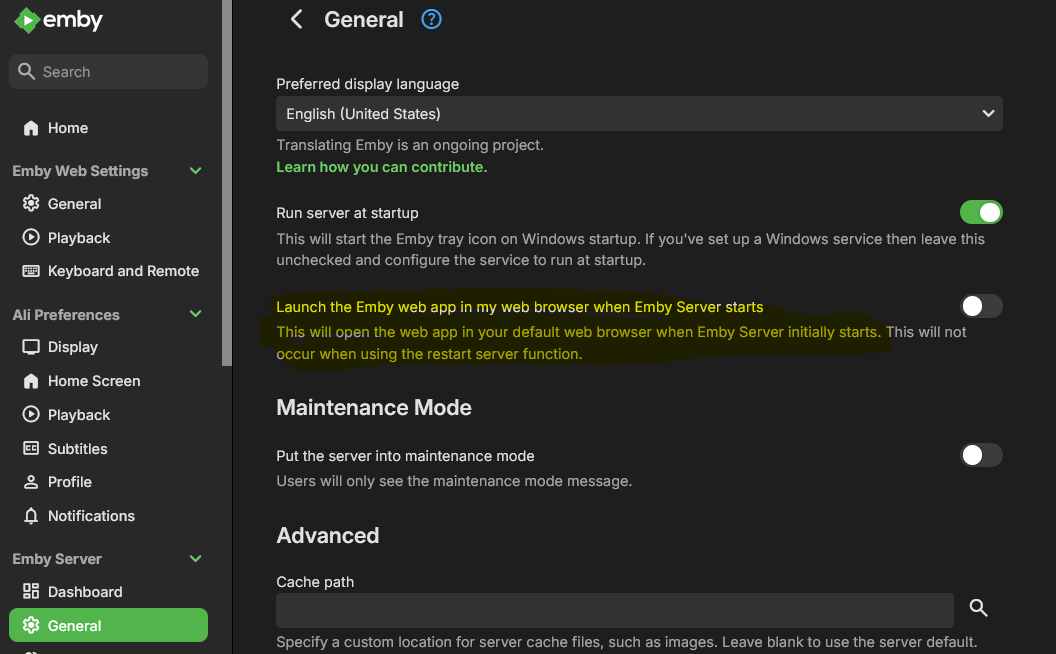
You don't even need a service, mine is just plain old EmberServer.exe in startup in windows. Maybe uncheck this button may help?
- Yesterday
-
I think OP is missing the name of the show in the episode file names, he just has for example S01E01 episode name If you follow the guide: https://emby.media/support/articles/TV-Naming.html Better call Saul for example, should look like this: Better Call Saul - 1x01 - Uno.mkv
-
Coming back 4 years later. Upgraded to a new 85" TV same Fetch box. Same DLNA issue remains and now can't preview trailers on Sony Bravua ( will raise a separate post on this). Did I miss anything in another thread on DLNA?
-
@NeminemI'll try that and report back. Do you have any idea why it needs to transcode in the first place, though? I thought Roku TV could do HLS 4K HEVC just fine.
-
Plugin: EmbyCredits, detect end credits and add auto skip.
yocker replied to yocker's topic in Plugins
Tesseract and PaddleOCR does note have an Unraid template so you need to manually add them in Unraid's docker section. @Neminem Made a great guide for PaddleOCR. Please note: It takes up A LOT of space, 25GB+ of docker space. unRaid PaddleOCR setup guide. · yocksers/EmbyCredits · Discussion #5 There is also a guide for installing them in the plugin it self, there you can see how to install Tesseract or PaddleOCR. Tesseract is a lot smaller but a little less accurate and slower but nothing major.