
All Activity
- Past hour
-
 iAfnan joined the community
 -

Hide Playlists from Included In & Group Albums by Release Type + Decade
user24 replied to user24's topic in General/Windows
Just grabbed the latest v0.6 - will give it a go soonish. I really want to try the Mapping next, and now there is Custom as well! Was playing around with the GUI a bit - I have a few tentative ideas, but it's hard to know where the line is crossed between useful info and visual clutter, without doing a full mock-up. Currently we have these Main Sections: Selection Mode Method Mapping (default hidden) Run Live Log (including end results/reports) I tired to descibe the Section Functions in only two distinctive words each, perhaps something like: Select Albums Import Mode Tag Method Tag Mapping (default hidden) Run Process Activity Log View Results (not sure about this being necessary?) I was also trying to imagine what the work-flow would be like, by swapping the Mode and Method order? I have been tending to jump past Mode straight into Method and forgetting to go back to it, before hitting Run. Only more use will tell what may be more intuitive (irrespective of the underlying logic). Mode could be even more useful with one extra function button - CLEAR. If you have time to add it, feel free to change the colors, to whatever you think will work. I did try traffic light colors, but yellow/orange didn't really work. I don't mean for them all to be on at once. They would still only color highlight on click/tap selection, the same as the red and green do now. CLEAR would not even have to read any embedded tags - it would just access the Emby field/tags, I assume??? Then, looking at the whole GUI, perhaps the single/multi selector could be aligned (on LHS) and matched with the dry-run selector. It might take a bit of juggling the info to make it match nicely. Sorry, I haven't done a mock-up of this. Only just though of it. It may save some vertical space or it look worse??? Now, back to that Mappiing testing...
-

Free Emby app, free Emby server, remote connection, no limitations — how is this possible?
StefanoMore replied to StefanoMore's topic in Android
This has been consistent across multiple servers over the years, not just this one. Is it possible that the playback restriction for Android mobile has been silently lifted, similar to what was officially announced for Android TV? Also, a couple of additional questions: - Is there a reliable way to verify whether I or the server have an active Premiere license? - Could it be that I'm somehow in a free trial period without knowing it? If so, how long does the trial last and how would I know when it expires? -
 FurestierM joined the community
 -
 木子木子 joined the community
 -
 loco123456 joined the community
 -
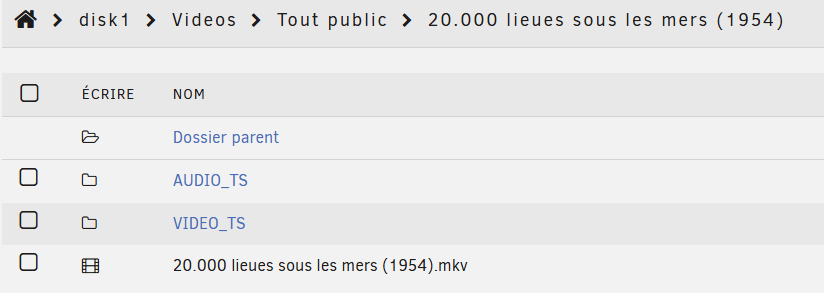
Hi, an example of directory. The VIDEO_TS contains VOB files. I Want to replace all my 'DVD' directories with mkv files, so I tried creating the mkv files in the same directory. But in Emby, the mkv file does not appear.
-
 Shawn vidot joined the community
 -
 DenDee84 joined the community
 -
Another thought: I should have pointed out that this refresh utilizes a link to an XML file that my provider supplies. As I said, manual refresh appears to work fine.
-
 Monkeylabs joined the community
 -

Emby app on Samsung TV crashes when opening Guide via VirtualTV plugin
s1mwest replied to s1mwest's topic in Samsung Smart TV
Apologies for not supplying any logs and appearing to abandon this question. Just noting here that this turned out to be caused by an overkill of multiple DNS blocklists used in my internal network. I'm not certain which entry caused the symptoms, but now I only use Steven Blacks blocklist and the TV Guide functionality works as intended, as do other Samsung features now (iPhone screen mirroring wouldn't work either), whilst avoiding the majority of chatty/unwanted Samsung telemetry. Once again, thanks for an awesome product and keeping up the awesome work! -
 Shatteredhand joined the community
 -
 Grizzly81 joined the community
 -
Should this be moved to Live TV discussion? Apologies for misplacing, if so.
-
 Tahanii joined the community
 -
There are so many websocket errors in your log that I unfortunately cannot see the login sequence but it does appear you are logged in and the app is working fine. Are you able to re-enter it now?
-

Emby Premier Key will not register (Version 4.10.0.8 beta)
ebr replied to Bobbybare's topic in General/Windows
This likely indicates a problem in the browser. Your server is validating fine. Look in the browser console for errors. -
Free Emby app, free Emby server, remote connection, no limitations — how is this possible?
ebr replied to StefanoMore's topic in Android
Exactly what server are you connecting to? You can PM to me. - Today
-

My random thoughts on emby and the forum
yocker replied to Apotropaic's topic in Non-Emby General Discussion
And i was an idiot and forgot that i had quoted you. @GrimReaperto the rescue! -
There is an app in the Play Store called BT Remote. It is free has no ads, atleast so far, and works MUCH better than any oter Bluetooth remote for Android I have tried. I cannot 100% recomend it as its interface is quite primitive and it does not work on many of my devices giving an error that say that a service is not installed. In fact it only works, for me, on my Motorolla phone but does not work on my LG phone or my Fire Tablet or an older moto. phone. It does not appear to have any real drawbacks so it can be tested without any real problem. If you search for "Bluetooth remote" in the play store it is about the third or fourth hit returned. BTW: The logo for this app is dark in color so that makes it easier to find in the play store. It is easy to use but its interace is not customizable but, I think it will be updated soon. "I could be wrong, but I don't think so." It's a jungle out there.
-

SRT subtitles not displaying, other unknown subtitles are displaying
Starlionblue replied to davesurfer's topic in Roku
+1 Even better if the functionality was embedded in Emby somehow, as an add-on or not. -
I run emby server on a Synology disc station. Lately (Last couple of weeks) a scheduled job I have set (Refresh Guide Data) starts, but doesnt really refresh. It makes no progress. I have the job scheduled to refresh every 12 hours. If I stop the job and then start it manually, it then runs normally This is what I see in the log (Repeated) 2026-04-03 11:42:45.863 Error ChannelManager: Error getting channel content *** Error Report *** Version: 4.9.3.0 Command line: /volume1/@appstore/EmbyServer/system/EmbyServer.dll -programdata /var/packages/EmbyServer/var -ffdetect /var/packages/EmbyServer/target/bin/ffdetect -ffmpeg /var/packages/EmbyServer/target/bin/ffmpeg -ffprobe /var/packages/EmbyServer/target/bin/ffprobe -nolocalportconfig -ignore_vaapi_enabled_flag -pidfile /var/packages/EmbyServer/var/EmbyServer.pid -defaultdirectory /volume1/Public -updatepackage emby-server-synology72_{version}_x86_64.spk -noautorunwebapp Operating system: Linux version 4.4.302+ (root@build6) (gcc version 12.2.0 (GCC) ) #86009 SMP Wed Nov 26 18:29:22 CST 2025 OS/Process: x64/x64 Framework: .NET 8.0.22 Runtime: volume1/@appstore/EmbyServer/system/System.Private.CoreLib.dll Processor count: 4 Data path: /var/packages/EmbyServer/var Application path: /volume1/@appstore/EmbyServer/system System.OperationCanceledException: System.OperationCanceledException: The operation was canceled. at System.Threading.CancellationToken.ThrowOperationCanceledException() at Emby.Server.Implementations.HttpClientManager.CoreHttpClientManager.SendAsyncInternal(HttpRequestOptions options, String httpMethod) at Emby.Server.Implementations.HttpClientManager.CoreHttpClientManager.SendAsync(HttpRequestOptions options, String httpMethod) at MediaBrowser.Plugins.TuneIn.TuneInChannel.SendRequest(HttpRequestOptions options, String method) at MediaBrowser.Plugins.TuneIn.TuneInChannel.GetMenu(String title, InternalChannelItemQuery query, CancellationToken cancellationToken) at MediaBrowser.Plugins.TuneIn.TuneInChannel.GetChannelItems(InternalChannelItemQuery query, CancellationToken cancellationToken) at Emby.Server.Implementations.Channels.ChannelManager.GetChannelItems(IChannel channel, String externalFolderId, Nullable`1 sortField, Boolean sortDescending, CancellationToken cancellationToken) at Emby.Server.Implementations.Channels.ChannelManager.GetChannelItemsInternal(Channel channel, IChannel channelProvider, InternalItemsQuery query, CancellationToken cancellationToken) at Emby.Server.Implementations.Channels.ChannelManager.GetAllItems(Channel channel, IChannel channelProvider, Int64 parentId, Int32 currentRefreshLevel, Int32 maxRefreshLevel, String restrictTopLevelFolderId, CancellationToken cancellationToken) at Emby.Server.Implementations.Channels.ChannelManager.GetAllItems(Channel channel, IChannel channelProvider, Int64 parentId, Int32 currentRefreshLevel, Int32 maxRefreshLevel, String restrictTopLevelFolderId, CancellationToken cancellationToken) Source: System.Private.CoreLib TargetSite: Void ThrowOperationCanceledException() When I run the channel refresh manually I see this: 2026-04-03 11:50:49.508 Info ScheduledTaskService-0HNKGA202RGLK:00000016: http/1.1 POST http://192.168.1.167:8096/emby/ScheduledTasks/Running/9492d30c70f7f1bec3757c9d0a4feb45?X-Emby-Client=Emby Web&X-Emby-Device-Name=Chrome Windows&X-Emby-Device-Id=c35eb54e-f696-4d8b-9192-05fd7656d3a2&X-Emby-Client-Version=4.9.3.0&X-Emby-Token=x_secret5_x&X-Emby-Language=en-us. Source Ip: host7, UserAgent: Mozilla/5.0 (Windows NT 10.0; Win64; x64) AppleWebKit/537.36 (KHTML, like Gecko) Chrome/146.0.0.0 Safari/537.36 2026-04-03 11:50:49.508 Info TaskManager: Executing Refresh Guide This is not present when the scheduled job runs. Let me know if you want me to drop the full log as an attachement, is this perhaps a known issue? Thanks in advance Gary G
-
Here is the Kodi wiki on the location and ways to get their log files https://kodi.wiki/view/Log_file
-
Are the play counts grabbing multiple sequential media requests, so it counts a play for every 7 second media download?
-

SRT subtitles not displaying, other unknown subtitles are displaying
visproduction replied to davesurfer's topic in Roku
PW, please show us your script. -
@radeon I think I found the issue. The logs show youtube spitting out "Error caused by Youtube.(Sign in to confirm your age))" issue. Seems like youtube is gatekeeping. Anyway to use youtube credentials or import cookies to prevent that?
-
AVI summary of possible fixes - This is a recent article showing many different apps and methods to help fix AVI files that may be causing an issue. Scroll down to find VLC and ffmpeg and many other options. It's possible, of course, that some update from Emby made, changed the ability to playback AVI files, but many times individual files have issues that are not obvious. One way to check if Emby is causing an issue is to find a properly created test AVI file and see if it plays correctly. https://4ddig.tenorshare.com/video-tips/repair-avi-file.html
-
Ill run one tonight. Enjoy the vacation!
-
Ran fine for me pal. I'm away for the long bank holiday weekend so can't do a lot right now but it downloaded a good chunk of new ones when I ran it up. You do need tmdb metadata. Send me over the debug log for a run on a PM and I'll have a look when I can! Cheers
-
Thanks @radeon. Doesnt seem to be working. I swapped out the DLL. The registration code was still in EMBY settings so seems to be good there. Manually ran the scheduled task and let it run overnight. this morning, I checked a few newly added movies from a few weeks ago lacking trailers (not obscure so trailers should have been found) and none was downloaded.
-
The smartlist and home screen display functions work great, but the plugin requires beta versions of the server. I found out that the Emby addon for Kodi doesn't work well with the latter, even 12.X versions of the addon: as the addon collects metadata from the freezer, it stops scanning after a certain point. I'm currently using Kodi with Emby because the former has very good smartlist features, etc. The problem is that it eats up storage in the Android TV. Using a flash drive helps but Kodi still runs slowly, e.g., it processes things for around 30 seconds after I view and delete a video. Several have been requesting for a smartlist feature for Emby for around a decade. Meanwhile, I found out that they have a plugin for that in Jellyfin, but the Android apps for the latter have limited features. For example, when you browse a playlist, you can only see the titles of the movies, and probably the duration. They don't show more details, like community ratings, the synopsis, etc., unlike in Kodi.
-
Hi everyone, having a very strange issue with Emby on one of my Apple TVs. Everything was working up until a few days ago. Now, any video I play has no audio. After a bunch of troubleshooting, I was able to get audio to work only if I changed the playback settings to use the ATV native player. Setting it to auto or MPV gives no audio. This is happening regardless of the codecs; every video has the same issue. It is also only happening on one Apple TV. I have three, and everything works fine on the other two. I have tried restarting the server, restarting the Apple TV itself, and uninstalling and reinstalling the Emby app. I've also tried to force transcoding (the videos usually direct play) and the issue persists. Any help on this would be greatly appreciated.
-
Indeed my friend. I’ve been trying several options and same occurred in the series at a random moment Really hope to be able to get a solution that will finally work asap. Can’t wait. In the meantime, thanks for your help as usual. Best regards!
-
That was indeed the part of the issue. Turns out my server installation corrupted and wouldn't let me access those user permissions. I had to uninstall and reinstall the server and import my configs back but I then got access to those permissions and the problem is solved. Thank you so much for the help.






_1.thumb.jpg.d4e6a650cb4552bc437a9e6156024102.jpg)




