All Activity
- Past hour
-
 JordanHyde joined the community
 -
Hi Luke, I do have a workaround and can script around this, so I am not blocked. That is not really the point. The point is that something changed, the manual scan advice does not solve it, and the current behavior for people is not consistent with the behavior for movies. What used to work for me was straightforward: I could manage local people images directly in the metadata folder, refresh metadata, and Emby would pick up the change. That no longer works. What I am seeing now is this: If I manually place a folder.jpg into a person’s metadata folder, using the exact naming and location Emby itself uses, Emby does not reliably honor it. If I add the image through the web interface, Emby writes folder.jpg into that same folder and it displays correctly. If I then replace that same folder.jpg on disk with a different valid image, Emby does not handle the replacement properly. The image either does not update or goes blank. In my testing, scan/refresh behavior does not resolve this and may remove manually managed files instead. So yes, I have a workaround. I can convert the image to base64 and use the API to load it, and that works because Emby then creates the folder.jpg file itself. But that just raises a bigger question: why is there now a mandatory API Kabuki dance specifically for actor art? Requiring admin authentication for a metadata-changing API call is one thing. Requiring base64 conversion and an API-only path for person images, while movie posters and video NFO files still follow a logical local file-first workflow, is another. From the user side, that is an obvious inconsistency. One of the main reasons many of us use Emby is to curate private or local-heavy libraries that do not exist on TMDb or IMDb. I have scripts that build titles, actors, and metadata into NFO files for hundreds of non-mainstream entries. For movies, local metadata still works in a direct and sensible way. For people, it now appears that local filesystem management is no longer treated as authoritative in the same way. That is the actual issue here. Not whether I can hack around it, but that the workflow for people has changed while the workflow for movies apparently has not. And that leads to the documentation problem: if the intended workflow for people is now “base64 the image, authenticate as admin, POST it through the API, and let Emby create folder.jpg itself,” then that is a major workflow change and it is not clearly documented as such. Related to that, is person.nfo even still a meaningful part of the supported workflow for people metadata? There are enough signs now that people NFO/image handling is no longer behaving like the older local workflow, but I do not see that stated clearly anywhere. So my questions are simple: Was this workflow change for people intentional? If so, why is people artwork now handled differently from movie artwork? And is person.nfo still actually supported as a reliable local metadata mechanism for people, or not?
-
 GuniGuGu joined the community
 -
 nquig joined the community
 -
 Josebl84 joined the community
 -
 DayDreams joined the community
 -
 brz1 joined the community
 -
 mertibee joined the community
 -
 祈愿江南 joined the community
 -
 祈愿 joined the community
 - Today
-
@LukeAny ETA on when this future will come?
-
Unfortunately no news... everything is at a standstill in Emby development... and I'm sorry that the promises are not fulfilled Hispa
-

SerieTv genres with empty folders/genres
Hispanico957 replied to Hispanico957's topic in General/Windows
I'm sorry, but it's been over two months and there's been no solution to this bug. I don't mean to sound argumentative, but I don't understand why the Emby staff hasn't fixed it... Thank Hispa -
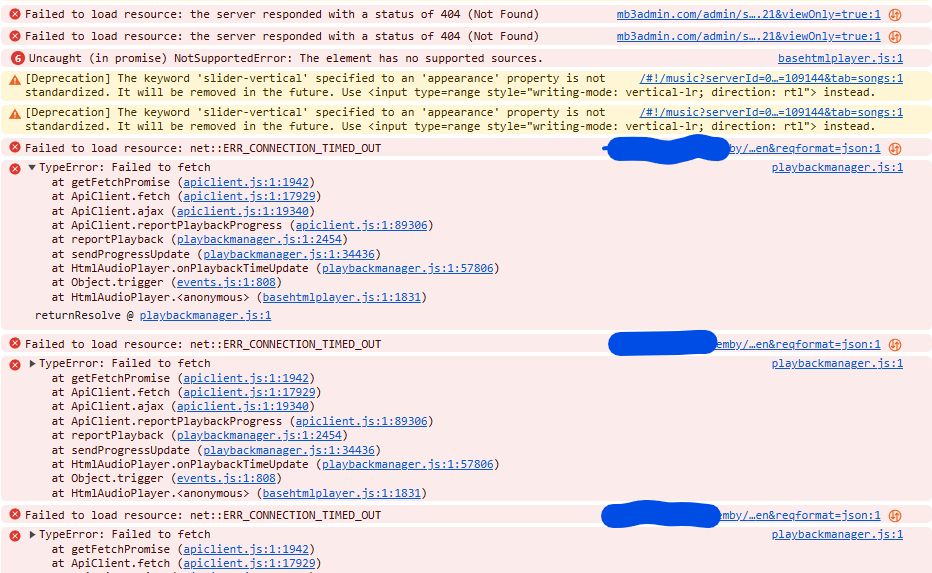
After some time (even as an active tab) the following occurs:
-
@AhmedNSane Unrelated .... I notice you have DB Cache set to 2Gb. Starting with Emby Server version 4.9, we have multiple db connections and the cache wiould apply to each, I would recommend reducing significantly. We currently have up to 5 db connections for the library.db which is what this cache setting applies to. The default is 128 Mb
-
The embyserver log you provided which covered the time from 03:09:30 am shows 1.0.42.0 installed. 2026-03-26 03:09:30.389 Info App: File C:\Users\Ahmed\AppData\Roaming\Emby-Server\programdata\plugins\Emby.M3UTuner.dll has version 1.0.42.0 2026-03-26 03:09:30.389 Info App: File C:\Users\Ahmed\AppData\Roaming\Emby-Server\system\plugins\Emby.M3UTuner.dll has version 1.0.42.0 Your screenshot showing 1.0.38 was for earlier period and you have not uploaded the log for that. I have actually removed the log as it was unsantized and included tokens Lets try and compare the requests that are being made. So enable debug logging on emby server - dashbaord / settings / Logs / Settings - and tick enable debug logging Restart the emby server to get fresh logs. Then try the same source with IPTV and noting down the time and then close that and try with m3utuner and livetv and Note down the time of the test and then send me the embyserver.txt log file by private message as I do want to see the actual raw unsanitized log for this Thanks
-

Moved media Library to new location. Some media's metadata points to old Paths and won't play.
sa2000 replied to beefsnack's topic in General/Windows
I thinl I will need more than that, Library name, movie filename/folder paths on both drives, library scan which would show that one drive is unavailable, and then opening the movie details and screenshot to show that no multiple versions available and - an embyserver log file up to this time -
I want a widget that, when I click "continue watching," shows me movies, series, etc... The one that comes with Embuary only shows what I've already started; it doesn't show what I need to watch next.
-
sideload with adb to replace the existing installed version
-
Also the Android apk on my phone is slow on searchers only web app is fast?
-
Web app is fine and responsive as expected, just the apps on amazon fire stick that are slow on search (both the newer version app and the classic app)
-
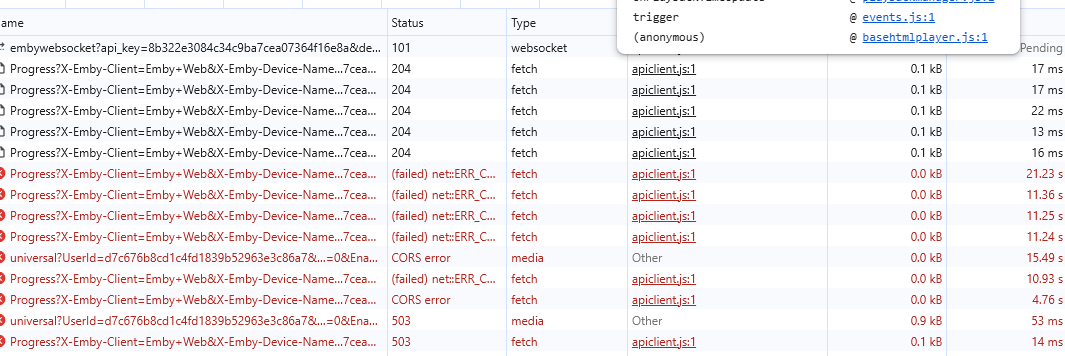
@Lukegot some more info, this time the player stops while the browser is active and stop only after a couple of minutes. I've exported Chrome's connections and tried to sanitize it best I couldapp.emby.media.har In this case it's almost like the server became unreachable, but the server's side seems to be working fine. Perhaps there are some timeouts going on and Emby has difficulty "retrying" the connection because it looks like there's no mechanism to retry. Perhaps that's also a nice addition?
-

Emby app crashes when using “Next Episode” prompt
FrostByte replied to UsamaWaheed's topic in Android
The latest version should always be on GitHub to sideload https://emby.media/emby-for-android.html -

Emby app crashes when using “Next Episode” prompt
UsamaWaheed replied to UsamaWaheed's topic in Android
Hey @sa2000how do I go abt downloading this? I Signed up for beta on play store but still haven't gotten the update yet. -
Taking a look through that log file, I notice a couple things: Emby server is seeing all client connections as '172.18.0.1' which is the gateway address of your docker network. This will prevent Emby from being able to differentiate between local and remote, so you cannot disable remote connections. (at least not within emby) Is this a windows host machine or linux? I've heard windows docker handles networking differently, but I'm not familiar with it so I can't give much more info there. The requests sent trying to log into your server all use your public address as the hostname, which tells me this is very likely an external connection and not being routed via another container. These are also username+password based attempts, nothing API key related. Finally, you appear to be using plain http for external connections. This is not recommended as your username+password/auth-tokens are sent unencrypted over networks you don't control (the internet). This can be a source of someone gaining unauthorized access. I don't think this was the cause in this scenario though; because if that information had been captured and used here, the assailant wouldn't be stuck at the login page. While I don't know where they got your username(s) to try out; this appears to me as someone just randomly trying out passwords until they can't anymore. Given they know your username(s) and that's not your name here on the forums; I'd be inclined to think this person knows you and is just messing with you. I could be wrong. If you correct your networking issue so that Emby can capture IP addresses, you may get a better picture of who/where.
-
-

Suggestion for Emby Android TV App - Customizable Media Player
Ansell replied to shimakaze's topic in Android TV / Fire TV
十分需要 ! -
也许我们在未来可以有弹幕功能?! 这是一个需求量巨大的功能 可以使用第三方弹幕api!
-
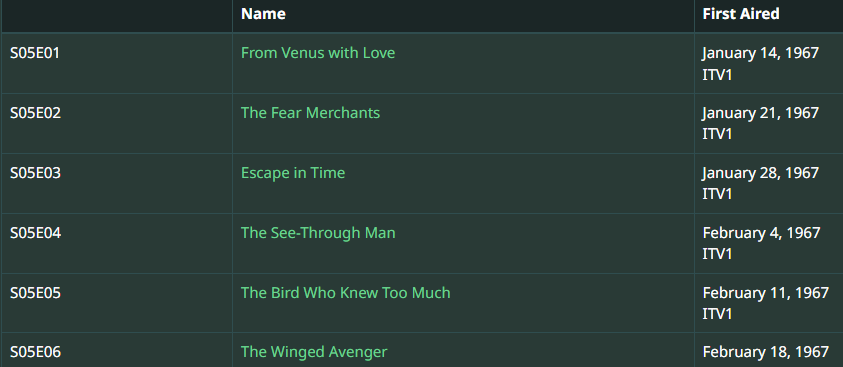
TVDB The Avengers - Unknown - Season 5 - TheTVDB.com TMDB The Avengers: Season 5 (1967) — The Movie Database (TMDB) Not that IMDB is ever directly used but looks the same as other providers. I will guess as it translates slightly different on google but your S05E02 is "Escape in Time" so you do not have Aired Order. DVD order from TVDB Emby currently does not offer alternate orders from TMDB. So the issue becomes is all your content in DVD order? If so then you would Edit metadata on the Series and change the Display Order from Aired to DVD and Refresh metadata on the series ensuring you Replace images also.
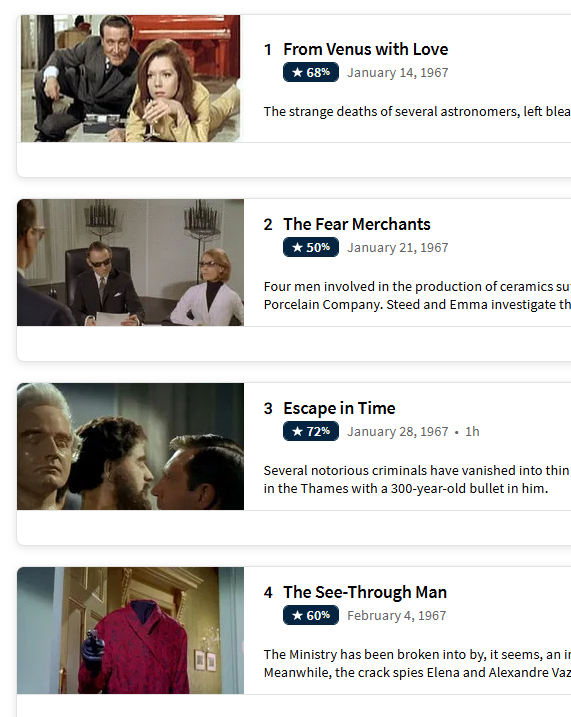
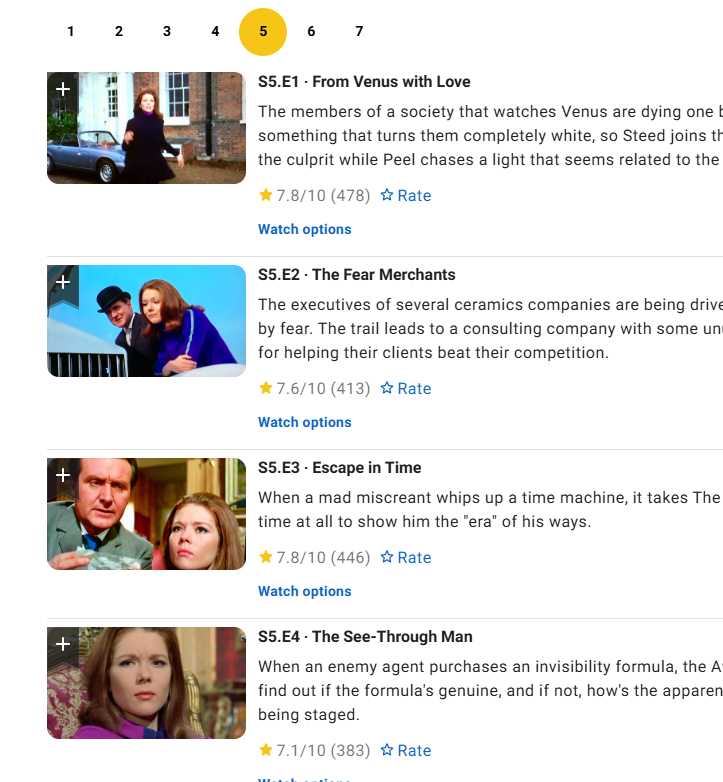
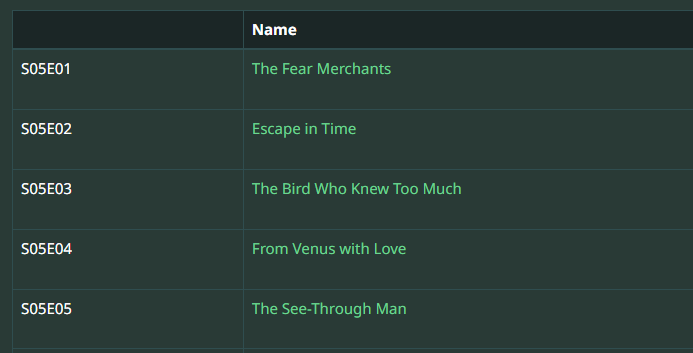


-

"Parental ratings on by default" mode & generally making it an option
Nzzer0 replied to Nzzer0's topic in Feature Requests
Thanks. Yes the TV ratings are shown by default in some views but they dont show up in some eg I think maybe collections? Collections are weird because you cant sort and filter them or have parental ratings show, at least in the web browser, and maybe TV as well as far as I remembver. Its confusing since the platforms are very different and also change over time. But you are right that the TV app shows parental ratings by default now, which is great ... Wish it did in the browser but yeah it seems to have improved i think? (I know you can change it in the TV app but setting that each time using a remote is not gonna happen). -
can i make all lists default to parental rating and community rating visible?
Nzzer0 replied to Nzzer0's topic in General/Windows
hope so thanks -
Same as the other topic, ffprobe does not like VTT in MKV. Unsupported codec with id 0 for input stream 2 https://emby.media/community/topic/130082-emby-cant-see-subtitles-inside-the-mkv-file/#findComment-1367381 VTT has to be extracted from MKV in order for the sub to be seen.
-
我的I/o不是瓶颈 最大的问题是cpu几乎沾满了 根本无法正常使用 我看的bif被弃用了应该使用更新的技术 emby是否考虑使用呢?
-

Moved media Library to new location. Some media's metadata points to old Paths and won't play.
beefsnack replied to beefsnack's topic in General/Windows
I'll get that NFO for you..