All Activity
- Past hour
-
 address joined the community
 -
 llttbnkgsv joined the community
 -
 lltt joined the community
 -
 xianyu11 joined the community
 -
 elquequieras@tutanota.com joined the community
 -
 QuanquanZ joined the community
 -
 1617280235 joined the community
 -
 blakehinton1997 joined the community
 -
 basjr joined the community
 -
 cisbdkcn joined the community
 -

Migrating from TerraMaster NAS to Ubuntu Server (i5-12500) - best approach for preserving watched status with
me@jackbenda.com posted a topic in Linux
Hi all, I posted a while back about migrating my Emby server and got some helpful advice on hardware. Since then I've done a lot more research and planning, and I'm now about a week away from doing the actual migration. Wanted to sense-check my approach and ask a few questions before I crack on Current Setup Emby Server 4.8.8.0 running natively on a TerraMaster NAS (Realtek RTD1296, 1GB RAM, a fairly low-powered unit). Media files are stored locally on the NAS. I have 5 users, all linked via Emby Connect (each with their own email and password). Active Emby Premiere subscription. New Setup Dell OptiPlex 3000 SFF with an Intel i5-12500 (UHD 770 for Quick Sync). Running Ubuntu Server 24.04 LTS with Emby installed natively (not Docker) for direct iGPU access via VAAPI. I know some people suggested lighter hardware when I posted before, but the OptiPlex is also running a homelab alongside Emby (Docker stack with qBittorrent, Sonarr, Radarr, Prowlarr, monitoring tools, and a few other self-hosted bits etc.) and I'll regularly have multiple Emby users streaming at once, so the extra headroom is deliberate. The media files will stay on the TerraMaster NAS, which becomes a dedicated file server. The new server accesses them via an SMB mount. This means the library paths change: from something like /Volume1/public/Films (TerraMaster internal paths) to /mnt/nas/Films (SMB mount on the Ubuntu box). Migration Approach The path change is the tricky bit. Ideally I'd just use Emby's built-in Backup and Restore, but I couldn't find clear guidance on making it work for a cross-platform move where the source paths are NAS-local and the destination is an SMB mount on a separate Linux server. I know Path Substitution exists, but wasn't confident it would handle this cleanly. If anyone has done this successfully, I'd love to hear how, because I'm very happy to go that route if there's a straightforward way to get the paths right. Failing that, my current plan is to use Trakt as a bridge to preserve watched status for all 5 users: 1. Install the Trakt plugin on the current TerraMaster Emby server 2. Create a separate Trakt.tv account for each of my 5 Emby users (a faff but I guess I only have to do it once) 3. Link each Emby user to their own Trakt account and sync watched history up to Trakt 4. Verify on trakt.tv that watched data looks correct for each user 5. Set up the new server with a fresh Emby install, add libraries pointing to the NAS mount paths, recreate the 5 user accounts 6. Install the Trakt plugin on the new server, link each user to their respective Trakt account 7. Sync watched history down from Trakt to the new Emby 8. Verify everything I've also enabled "Save artwork to media folders" and "Save metadata to NFO files" on the current server, so metadata gets written into the media folders on the NAS and should be picked up automatically by the new server during its library scan. Questions 1. Is there a better way to handle this? Would Backup and Restore with Path Substitution actually work for this kind of move (TerraMaster local paths to SMB mounts on Ubuntu), or is the Trakt approach more reliable? 2. Does Trakt preserve granular playback positions (e.g. 34 minutes into S02E05), or does it only sync binary watched/unwatched status? If resume positions are lost, that might push me towards trying Backup and Restore instead. 3. During the transition I may briefly have both servers running. All 5 users sign in via Emby Connect. If I create accounts on the new server and link the same Emby Connect emails, will the users' apps just show both servers and let them choose? Any risk of conflicts? 4. Once the old server is stopped, will the users' Emby apps automatically discover the new server, or will they need to manually re-add it? Trying to minimise disruption for less technical family members. Thanks in advance. Happy to provide more detail if it helps. - Today
-
You can set up Emby as a DLNA server.
-
Hello...eero is an app based router, but I went through the process and turned my wifi off on the phone and I was able to access the emby server. The next time I leave the house, I will try to connect to it as well. Now, my next question is, if I create a user profile for a person externally, how would I go about them accessing their login?
-
I've noticed those issues, I'm out of the country now but will have a fix out next week
-
I absolutely love this theme! Thanks for all the effort. I do have two odd things I cannot manage myself, I think: In some desciptions, like woth Actors: the 'rounded' style cuts of the text fater several characters. (See: rounded issue.jpg) The other thing is that when in 'Movies' (in my setup, that is my Movies catalog), it gives me options in the top of the screen that I seem not to be able to change. When I turn this CSS of, several optyions aren't visible. (See: Options issue.jpg) For me, options I do not need to see are: 'Shows'; 'Photo's'; 'Album Artists'; 'Artists'; 'Album'; ''Tags'. In the CSS file, I do not find them. I don't really know how this happens and how this can be changed?


-

MediaInfo For Emby Plugin(HDR, Vision, Atmos, DTS:X)
rbjtech replied to Cheesegeezer's topic in Plugins
Tks - I guess the main issue of not being able to turn it off is fixed, but I'll take another look on the logic. I can see the issue (thanks for the example) as you are using multiple layers of folders, so it's using the Parent folder as the name not the folder itself. -
Hi, I think you may have possibly misunderstood the requirement??? You should ideally be able to keep ARTIST as the embedded metadata individual artist(s) for the specific relevant tracks. You then need to ensure you have an additional embedded metadata field called ALBUMARTIST that pertains to the whole album as opposed to the individual songs. Once you have the separate ARTIST tags plus the overall ALBUMARTIST tag of (e.g.) "Various Artists" then Emby will combine the songs into the required Album. The official Emby documentation about this is here: https://emby.media/support/articles/Music-Naming.html From you screenshot it doesn't look like you have any ALBUMARTIST or ALBUM ARTIST tags? You can also check this with the metadata editor within Emby, but it is best to make any modifications required with you embedded metadata with a tagging program and then rescan into Emby. Cheers!
-

Add own MKV trailer to movies and make it intro
MediaIntelNUC replied to MediaIntelNUC's topic in General/Windows
@GrimReaper Will do, thanx! -
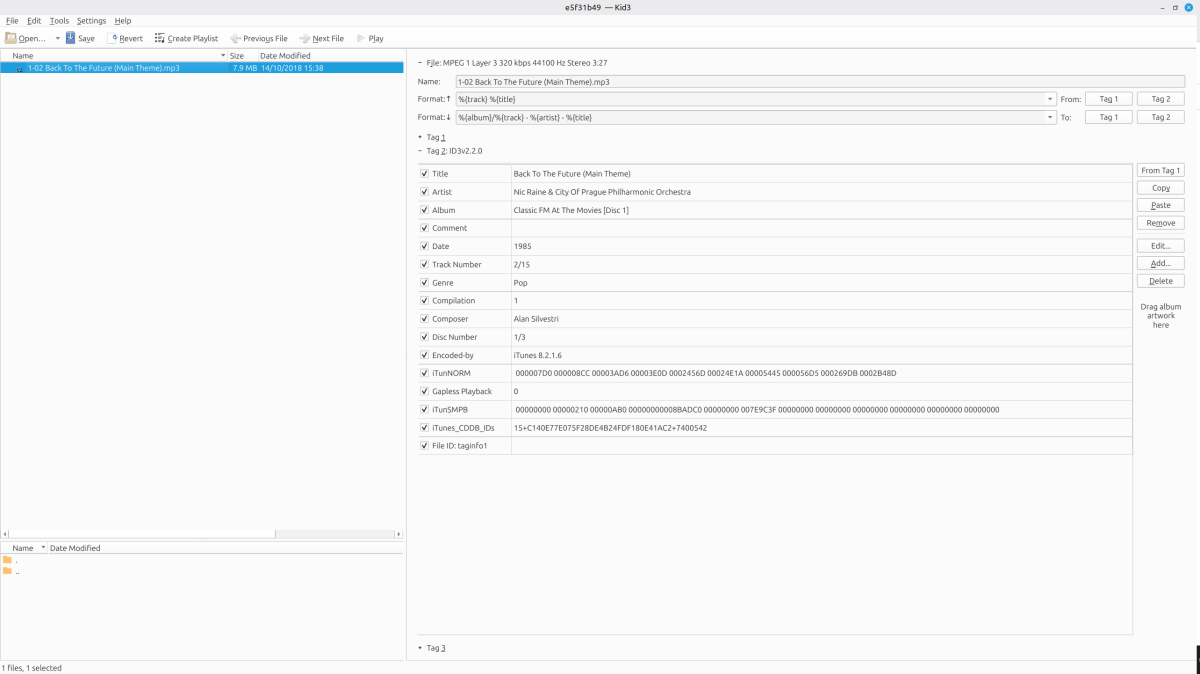
See screen shot Neminem suggestion of change artist to various artists works, but obviously looses the track artist Ripped off CD's with old PC years ago with iTunes 8.2 as will see
-

Add own MKV trailer to movies and make it intro
GrimReaper replied to MediaIntelNUC's topic in General/Windows
Check out Cinema Intros plugin. -

Remote access to Emby Server as admin via VPN issues
jerkrl replied to jerkrl's topic in General/Windows
I still have to try/do that. Because of this comment: "Be careful not to accidentally lock yourself out of your server, even on the local network. That's what the combination of Lan Networks + disabling remote access can cause if not configured correctly" I am carffull of experimenting without giving it good thought :-) One thing I did fugure out that aprt from the server to be maintained/accessed from out of my LAN, you also have to set external access per user. I hadn't seen that yet. I'm still learning a lot, being a new user for only two weeks. My main focus now is to install Emby as a Docker container instead of as a Synology package. I feel it is easier to tweak smaller thing and access the folders and files. Also, somewhere in the future I will move all my containers from my NAS to a dedicated serer/homelab. I will report here if this setting for remote access via VPN is working (without locking myself out...) -
Hi! I have a 3 min Mkv clip that i would like to add to my movies as a trailer, i havent used the trailer function before and searched the forum but couldnt find a clear answer. Is it possible to add a "generic" trailer for each movie? And if so, how would one go about in doing so? Is it possible to activate some "intro" function so that my family users have the possibility to skip it if they want to? Thanx! N.
-
And with ForceSystemDecoder and the bottom five checkboxes (the one for disabling force transcoding and four video output options) ticked, everything H.265 play flawlessly. Shouldn't come too much as a surprise because the Xbox One S can play 4K Blu-ray natively, so there is no reason why it shouldn't be able to play similar bitstreams from an app. Still, my questions remains, how do I make proper bug reports regarding UI glitches, for example?
-
One addition: on Firefox, after the black screen, I scroll with the mouse, but the page is not adjusted to where I started from. So: 1.) scroll down to 50%, then select a media to play 2.) after finish, Emby returns to grid, but it's empty 3.) I scroll a bit with the mouse, and the grid is not around 50%, but absolutely random. So I can't play the next file, unless I scroll again and search for it.
-

Misleading transcode information in clients and dashboard
danergo replied to danergo's topic in Linux
Thank you! This seems a bit misleading on more client platforms (LG TV, Android, Linux). Is "Stats for nerds" content coming from Emby Server, or it's a judgement of the client devices? -
Chrome seems doing it just fine (Version 146.0.7680.80 (Official Build) (64-bit)).
-
 13425173633 changed their profile photo
 -
I finally found the force transcoding checkbox and unchecked it for testing purposes, now it somewhat reliable plays or sometimes visually glitches out which is of no fault of yours but the hardware decoder. But that is not entirely dependent on bitrate.
-
Super boulot. Merci pour le partage. Je suis intéressé pour voir même si mes besoins sont très simples.
- 1 reply
-
- 1
-

-
pues le doy a poner y se pone a cargar y nada , no la termina de cojer la portada , no se por que sera , pero se tira cargando todo el rato, si puideras coroborarlo estaria bien
-

Running Emby Server on 2 x different Macs in my home but to the same NAS...Metadata import ???
JohnyMc replied to JohnyMc's topic in MacOS
No I don't have info files next to the videos... I use the Emby Server 'identify' and 'edit images' function in the drop downs to get the correct IMDB link and add images if they don't automatically update from the 'identify' function.. Guessing all is saved in the Emby App/folder ??? If so I'd like to access that folder and copy/paste it into the other Emby Server app I have on another computer so I can have both versions matched without having to manually do it all again. -
This might seem obvious to others, and I swore it was an issue 'inside Emby' to a degree, due to my own naivety, but just in case someone stumbles upon this thread like I did, this is what worked for me: 1) Check user permissions on the Emby Server for your libraries - this wasn't my issue as I have given myself access to all libraries, but still a good first check 2) Make sure your user on your machine hosting Emby has the correct permissions. In my case, I set up a new app, unrelated to Emby, to pull my content into a new media folder I had just created and even though I had added the new path into my Docker Compose file for Emby and restart the server, I was unable to play the content. After SSH'ing into my device and providing my user with the correct read/write permissions, I was able to play the content without any issues. That may not be what's happening here at all, I'm not the most savvy person, but figured those are 2 points worth ruling out, with an emphasis on making sure new volumes/folders have the correct permissions for your user on your machine.
-

embyforkodi (next-gen) 12.X.X support
Diedrich replied to quickmic's topic in Emby For Kodi Next Gen
All I installed was the 12.4.15 zip on the first post. Is there an additional repository to add? Edit: Thanks for the clue. I added the Emby repository http://kodi.emby.media Then I installed the Emby repository repository.beta.emby.kodi-1.0.11.zip and then installed the Kodi Emby Beta Addons>Video Addons>Emby for Kodi Next Gen (Video) and then the add-on showed up in the video add-ons list. Thank you, sir. -

Remote access to Emby Server as admin via VPN issues
Luke replied to jerkrl's topic in General/Windows
@jerkrl has this helped? -

Emby Theater v3.0.20 (Server v4.9.3.0) Homescreen Horiz. navigation broken
scottpro replied to d00zah's topic in Windows & Xbox
Because it's a website issue. ET Legacy uses files hosted on "tv.emby.media" which is where the bug resides. The Emby Team needs to update files on the site to fix this issue. I run a custom local proxy which allows me to revert back to old versions and even run offline.