
All Activity
- Past hour
-
 toystoryfan292 joined the community
 -
 pokis joined the community
 -

No Trailers on Samsung TV app - taking ages for release still on 2.2.5
Robnaeyaert replied to Robnaeyaert's topic in Samsung Smart TV
Hi again @Lukeso does this typically take Samsung a month of Sundays to update an app? It has literally been an age and yet zero sign of the app showing up in the app store in NZ. Surely there are other folk with 2022 TV's that dont want to sideload the app every month to be able to view simple trailers? Any clue as to why it's taking Samsung so long please? -
 xTHExBRADx joined the community
 -
 Kayla91 joined the community
 -
 hexicos joined the community
 -
 startal joined the community
 -
 mgainer007 joined the community
 -

SRT subtitles not displaying, other unknown subtitles are displaying
davesurfer replied to davesurfer's topic in Roku
Yes, they show up on the Emby web app, also when I play them with VLC or the old media player classic. -
 BATMAN121 joined the community
 -
I installed emby server using the universal installer in a clean install of ubuntu 24.04 and the service doesn't start. It says: emby-server[14486]: /opt/emby-server/bin/emby-server: 22: exec: /opt/emby-server/system/EmbyServer: Permission denied Running ls -l on the file I get: -rwxr-xr-x 1 root root 78872 Aug 21 2017 /opt/emby-server/system/EmbyServer I tried both the beta and stable options with the same results. What should I do?
-

embyforkodi (next-gen) 12.X.X support
quickmic replied to quickmic's topic in Emby For Kodi Next Gen
Iso files should work in addon mode, yes. When you removed it, you need to trigger a repair sync in the plugin. "/Downloads/data/media/movies/movie name(year)/file.iso" I assume the the path your Emby server accesses the file, and is not available on Kodi. You need to modify the path substitution on Emby server for that library and point it to the locaction Kodi can access it too. If you use a smb share, you need too map in in Kodi's filebrowser too. Native file access is not that easy to set-up. - Today
-
Bump?
-
Yes I agree, this was just a fix I found. I've mentioned this to the developers and they said they should be able to update the app to fix this. It was from this thread:
-
Followed up with a couple users and some do, some don't where the subtitles just don't show up at all.
-

After installing a new GPU, direct play is broken on Web App.
GrimReaper replied to KayDox64's topic in Web App
Which is notoriously weak (they've just added HEVC support recently, like a millenia after competition did) for media consumption compared to some other browsers . Try MS Edge or Thorium. -
Hmmm... strange. I thought viewing through the web page would be easier and thought I should do that before I attempted to view on the TV but surprise! It works on my ONN/TV. I can view there but not on my computer. Of course I will be watching on the TV but I'd still be curious what went wrong and it would be nice to fix this.
-
UPDATE: once I installed the MusicBrainz plugin, the artwork and metadata started populating. So, I’m assuming that "TheAudioDb" and "FanArt.TV" are dependent on it. Question: 1. Do I still need to keep the paid monthly subscription for “TheAudioDb” or not? 2. Should I enable FanArt.TV within Emby for Music library and should it be primary or secondary?
-

After installing a new GPU, direct play is broken on Web App.
KayDox64 replied to KayDox64's topic in Web App
im using Fire Fox EDIT: to see if you were right i tested it on brave and it worked just fine -
They been taking a look at it. A long 5+ month look at it.
-
Hello jtgdemby, ** This is an auto reply ** Please wait for someone from staff support or our members to reply to you. It's recommended to provide more info, as it explain in this thread: Thank you. Emby Team
-
Fresh install of Emby on Arch Linux extra/emby-server 4.9.3.0-1 Library set up without complaints. I can view the library with posters and do everything except play. Anything I play gets the error: "Playback Error No compatible streams are currently available. Please try again later or contact your system administrator for details." I do see errors in the log regarding ffmpeg. I have no need or desire to have anything transcoded by Emby, however the ffmpeg executable is present with execute permissions. I have it disabled in the settings (I think) so I would just like to know what setting I need to change so I don't have this error. I see the startup script does reference ffmpeg: exec dotnet /usr/lib/emby-server/EmbyServer.dll \ -programdata $PROGRAM_DATA \ -ffdetect $FFDETECT \ -ffmpeg $FFMPEG \ -ffprobe $FFPROBE \ -restartexitcode 3 If I modify that and remove the 3 -ff* lines, Emby does not work. All my movies have already been transcoded with ffmpeg as HEVC in an mkv container which is stated as supported, with Opus audio. Everything plays fine in mpv. Everything plays fine in a browser. Everything plays fine in VLC in my ONN(Chromecast), although I am not yet trying to use the ONN and just trying to play through the web interface for now. embyserver.txt
-
After installing a new GPU, direct play is broken on Web App.
GrimReaper replied to KayDox64's topic in Web App
To me that sounds more like browser (GPU drivers) problem than Emby problem. Which browser you're using for playback? -
After installing a new GPU, direct play is broken on Web App.
KayDox64 replied to KayDox64's topic in Web App
Lets look at Star trek Strange new worlds, that show is full direct play, and is having issues, a show like the original star trek worked fine, because it could trans-code. -
+1 Just wanted to say that I am also interested in this feature.
-
The same habbit. I really want a SDR icon, when there are no DV/HDR10/HDR format in the video files. By the way, are you planning to working on reorder the filename rules by priority? Even can display on the different position of the poster? I want the source icons like bluray/WEB-DL/REMUX can be separated with edition icons like CC/MoC/DC/TC.
-
I also ran into this same issue today when attempting to remove a genre from my server for movies (my tv shows library is unaffected). No movie contains the genre. Opening the genre shows "No items found." and attempting to play from that genre displays "Playback Error - No playable items were found. Are you trying to play an empty folder?". I have had the Genre Cleaner plugin installed and it did show that genre listed under my "movies" so I deleted it, which now it no longer shows up in the Genre Cleaner but still shows in my library movies>genres tab. I also tried to run a scheduled task for "Scan Metadata Folder" as well as "Scan media library". Server Version 4.9.3.0
-
Not sure what's up here, but I'm using an Onn 4k box. As I got a new Onn 4k plus and I've heard that the android tv version will eventually be supplanted by the android app version, I installed the android (non-tv) version and it's 3.5.28. I notice on the remote, when I'm in the guide, if I use the channel up/down buttons (not the circular D-pad), then the guide moves in the opposite direction. Clicking the channel up makes the guide go down and channel down goes up in the guide. Having used the android tv version, I thought this was weird since there, channel up moves the guide up one page and channel down goes down one page.
- Yesterday
-
 silent_assassin changed their profile photo
 -
Should iso files suppose to work in addon mode? With native direct access (path substitution) I had the movie showing up in the first library scan but when trying to play it it says the file isn't there anymore if I want to remove it. Said yes, now whenever a new sync is done it doesn't show up anymore. It seems it's pointing the iso file to /Downloads/data/media/movies/movie name(year)/file.iso But this file doesn't exist. Edit: And I guess I'm out of luck here because my smb share has one ip and my emby server has a different ip. Meaning direct access with path substitution will not work. Also I don't get it if I'm in addon mode why there's a place holder iso for the movie.
-
This is what I use now. It trims out commercials then converts to the new format. I've found accuracy and effectiveness can vary a lot between shows. I didn't know transcoding first would be better than just detecting commercials in the original TS file! That would require running it thru MCEBuddy 2X, though ...
-

Android app on TV frozen after relaunching from previously paused movie/show
rdhardi replied to GoldSpacer's topic in Android
Don't know what version of the Universal Android app (Emby for Android) you're running, but there are probably many behaviors you won't see in Emby for Android TV...because it was designed to run on TVs. The Universal app seems to work well on mobile devices, but not so well on TVs...imho, it's not so "Universal". It's been several months since I last tried the Universal Android app on my Shield TV Pro (2019) , but I DO recall the behavior you describe (among many other issues). For me, the "workaround" was to continue using the Android TV app until they sunset it. Not sure if your issue is a documented known issue, but you can check here to see: https://emby.media/community/topic/89802-emby-for-android-match-androidtv-app/ -
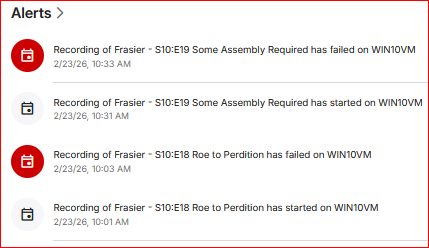
Any specific reason that can be discerned for the failed recordings for Frasier episodes today? embyserver.txt
-
Let me provide some additional information that might be helpful in solving this problem. My music is stored like this: \Music \Artist \Singles \Song_Title Plugins (for Music): - TheAudioDb - FanArt.TV - MusicBrainz (I just reinstalled it because I saw a post where "TheAudioDb" and "FanArt.TV" are dependent on it. Albums - 45% populated out of 581 items Album Artists - 5% populated with images out of 485 items Artists - 0% populated out of 623 items Genres - 0% populated (not sure if they're supposed to be populated or not All I can think of for now. Let me know if you have any questions.












.thumb.png.1ddf135ad99a72646a26d671a28ffe35.png)


