All Activity
- Past hour
-
 Naomy05 joined the community
 -
MoochiiOkk3 ahaha.mp3 Ego trip.mp3 Blessings .mp3 20260128-170459.mp3 S Pleasantburg Dr 2.m4a 20260126-121320.mp3 S Pleasantburg Dr.m4a 20260124-201248.mp3 20260130-000718.wav 2026-02-08 05.12.36.m4a Saturn.m4a 20260124-195655.mp3 Zaturn 1.m4a My Space _162016956.mp3 Greenville Inn & Suites 6.m4a alling .mp3 Saturnaster-Open.mp3 20260126-122120.mp3 no Sleep (1).mp3 Petro .mp3 flow .mp3 Wednesday, 4h06m PM.m4a 20260126-124328.mp3 2026-02-19 04.24.52.flac My New Song 3_SNAPSHOT_2026-02-18 00.12.40.sng
-

Emby takes forever to restart on server reboot.
ab123ga replied to ab123ga's topic in General/Windows
@NeminemOver the weekend I will check on the bios side as I do not want to try to do that during the week since all is good. I have multiple epg providers b/c I have a mix of channels that cover many areas. Yes that can take quite a while for a guide update but please explain what you mean by "fight about time slots" as it relates to the application starting up the first time? Not sure what you mean by this. Thank!!! -
 cthacker joined the community
 -
 dosica joined the community
 -
 Naomi2005 joined the community
 -
 tariksabry joined the community
 -
 Veiko joined the community
 -
Would love to see this as well. In my mind this should be two-fold. Global setting per library, and the ability for users to overwrite their own personal preference per library in the same way as they choose their default landing page per library.
-

'Upcoming TV' option in Emby taking forever to display any information...
Gaz posted a topic in General/Windows
Hi guys, hoping some of you techies or someone on the dev team can please help and let me know if the problem I'm having is normal behaviour or something my end needs to be fixed! I've always had a shortcut in my Windows taskbar that when clicked on takes me directly to the 'Upcoming' TV section on my Emby server so I can check daily which new TV shows from my library I need to check for new episodes etc. The problem is this link takes 15+ minutes to display any upcoming TV show information that I'm pretty sure used to display quite quickly! If after a few minutes of waiting in frustration I refresh the web page I can see a red warning message flash on and off the screen in the background which makes me think there is something definitely wrong? I've attached some screenshots below (with the server ID and Parent ID removed) if someone could please take a look to see if there are any formatting errors contained in the link to see if it's pointing to the correct place Emby expects in order to get the 'Upcoming TV' information? Also what is the easiest way currently to find out what your 'ServerID' and 'ParentID' details are that's needed to get the above 'Upcoming TV' link to work correctly? Grateful for any helpful advice please guys and huge thanks in advance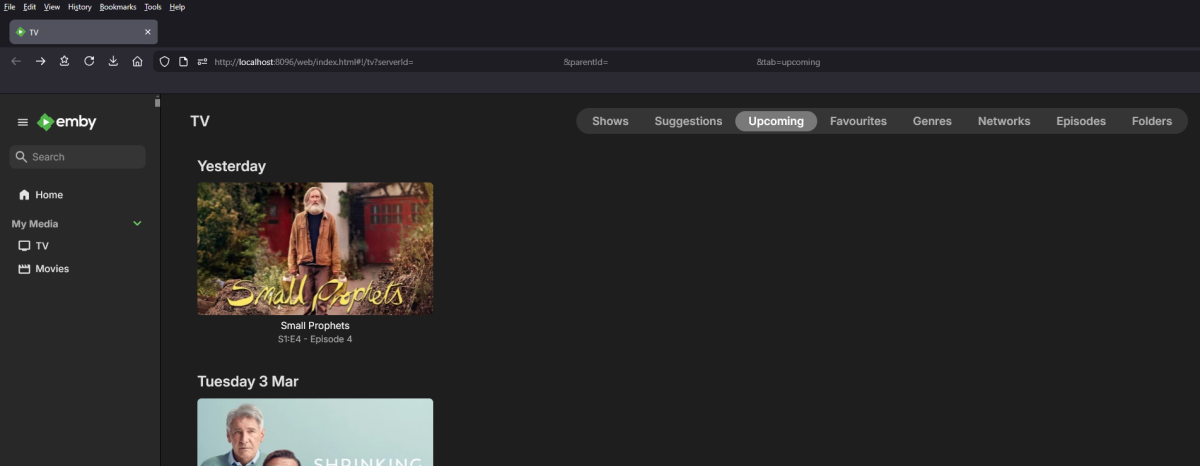

-

Feature request: Allow a strm file to contain a HTTP address
Luke replied to tOLJY's topic in General/Windows
Well YouTube is different. It shouldn’t be trying to probe it in the first place. That URL points to a web page, not to an actual video file. -

Emby Theater v3.0.20 (Server v4.9.3.0) Homescreen Horiz. navigation broken
d00zah replied to d00zah's topic in Windows & Xbox
Thanks for looking, Luke. No change, even after a reboot. Observation: Once a left/right arrow is clicked (selects row), left/right kbd arrow keys still work to navigate. -
Hi there, let's look at an example. Please attach the information requested in how to report a media playback issue. Thanks!
-
FLAC files with same Album and AlbumArtist tags appear as a duplicate album if the Artist tags differ.
Luke replied to Standroid's topic in General/Windows
@user24 might be up for looking at them. -
My series arnt playing ?
-
Works great, thanks @GrimReaper
-
Hi there, let's look at an example. Please attach the information requested in how to report a media playback issue. Thanks!
-
Thanks for following up.
-
I would try removing the playlists library from Emby library setup. Then after the scan finishes, then use the web app to create a new playlist to recreate it.
-
Hi. Please contact whomever gave you access to their server. It wasn't us. Thanks.
-
Hi, there's already an open request for this or something functionally equivalent. Please join in and contribute to the existing discussion at:
- Today
-
Hi there, let's look at an example. Please attach the information requested in how to report a media playback issue. Thanks!
-
Emby Theater v3.0.20 (Server v4.9.3.0) Homescreen Horiz. navigation broken
Luke replied to d00zah's topic in Windows & Xbox
Hi, please try restarting the app and see if that helps. -

No Trailers on Samsung TV app - taking ages for release still on 2.2.5
Robnaeyaert replied to Robnaeyaert's topic in Samsung Smart TV
thanks for that context @FrostByteand all that makes sense. However, those of us with *slightly* older TV (mine is a 2022 Art Frame which doesn't feel "that old" to my bank account) feel trapped as (a) we get treated like second class citizens by Samsung and (b) Samsung impose a 1 month timebomb any app that is sideloaded so we just can't win here. I get that's not an "EMBY" fault but someone's gotta fight the fight. I use the trailer feature a lot for my media collection and have been without this feature for what feels like a year now. -
Emby Theater v3.0.20 (Server v4.9.3.0) Homescreen Horiz. navigation broken
d00zah replied to d00zah's topic in Windows & Xbox
I'm aware, but my environment has been static since the v4.9.3.0 release & yet, Theater behavior has changed, so they are messing w/ things somewhere. To address your question re: the new Windows app... my IPTV tends to terminate quickly, albeit randomly on the new Windows app only. Since IPTV sources are considered a semi-tabu subject & Theater has always been stable & time precious(-ish ;^), I'd chosen to stick w/ what worked for me. That has changed. -

Emby Theater v3.0.20 (Server v4.9.3.0) Homescreen Horiz. navigation broken
Mahinepua replied to d00zah's topic in Windows & Xbox
Theater is no longer getting updates to support new server features or changes I'm afraid. At some point the Emby team will probably advise not to upgrade past a certain server version like the old WMC. Have you tried the new app? The latest beta which wont be far away from being released has been tidied up, only thing it doesnt yet include is external player support. -

Parental Control Tags don't reflect on Music Albums
justanotheruser replied to AustinStromness's topic in General/Windows
I have the exact same problem, but with audio books (it seems that they are working similarly to music albums). I have given parental ratings to all audio books I have and configured my child's account with a proper rating. It's working fine for TV Shows and Movies but for audio books the Audio Books (aka Albums) tab is always empty. I've found that un-selecting this option (from the screenshot below) fixes the Audio Books tab, but it displays all audio books no matter the parental rating. It looks like music/audiobooks libraries don't "see" parental ratings and tags properly. As I already said, it's working perfectly for TV Shows and Movies Emby Server 4.9.3.0, all clients (Android, iPad OS, Web)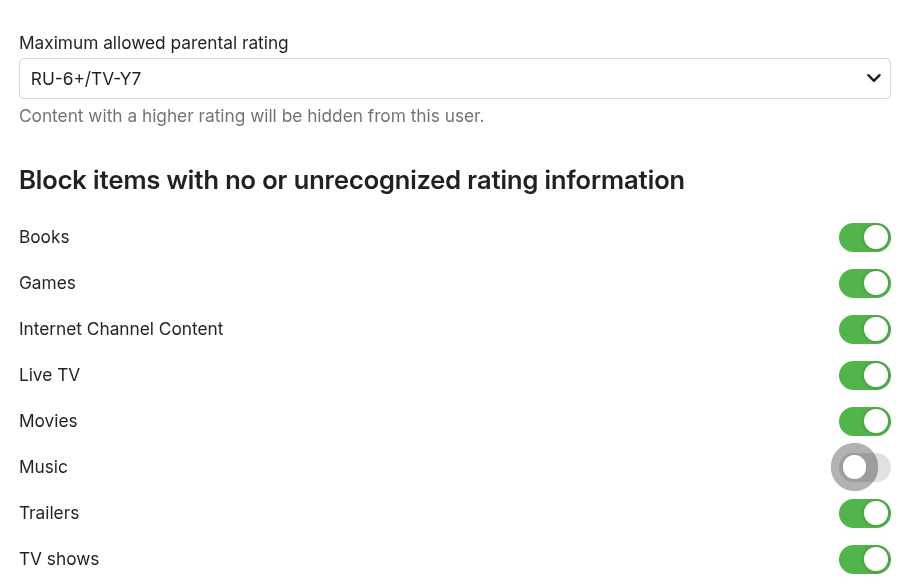
-

Emby takes forever to restart on server reboot.
Neminem replied to ab123ga's topic in General/Windows
Do you have a bad Bios batterie in your system? 2026-03-01 14:13:25.205 Info SystemEvents: SystemEvents_TimeChanged Then a little later this 2026-03-01 14:17:07.893 Info SystemEvents: SystemEvents_TimeChanged To me this might mean system time is off at boot, or you have multipel EPG providers monitoring the same shows and fighting about time slots. -
So I'm pretty sure I've made a similar FR a long while back that Luke had said they'd add to the development list. (Iirc, human readable name field to accompany RSS feed URL to make it easier to manage it.) But on further thought today, it would make much more sense to enable management from the main UI inside the library. For example if an admin user is in the podcast library, they can right click/long touch/3 dots to open the options menu on a particular podcast. In that menu they should be able to "Delete" a podcast to have the appropriate RSS URL removed from the list. Or "Edit Metadata" window should have a field with the RSS URL so that you can update it if necessary. I listen to a lot of podcasts, and often if someone suggests a new one or I hear about one that sounds potentially interesting, I will give it a try. But I've found my podcast list getting crowded with ones I don't listen to. It would be a massive chore to go find which generic megaphone.fm/buzzsprout/libsyn URL belongs to which podcast.