All Activity
- Past hour
-
I could mention for everyone that even though this is a stable release, there will probably be some bugs found. It’s stable in the sense that it will not break anything and all functionality is working as expected (except some bugs). I have tested all filters for the smart playlist, but when we start to combine them in weird ways and on other systems I expect some smaller issues. Thanks for all help and all bug reports!
-
 long157 joined the community
 -
 jximenis joined the community
 -
The rules should be correct. When I’m running with the exact same filter I get positive results.. Is it the Tag or Home Screen section that ends up empty? Do you see anything in the log (enable extended log)? Thanks!
-
.thumb.jpg.d1639af2d080f59454a5d8102bcb977e.jpg)
Cotignac MKV Toolkit — A Family of Automation Scripts for Synology NAS + Emby
Cotignac posted a topic in Synology
Hi again, Following my previous post about iso_convert.sh, I wanted to share that this script is actually part of a larger collection I've put together for automating my media pipeline on Synology NAS. I've named the collection Cotignac MKV Toolkit. The toolkit currently consists of five scripts, all running in Docker containers via Portainer, following the same queue-based folder structure and email notification pattern: iso_convert.sh — Converts Blu-ray ISO files to MKV using MakeMKV and MKVToolNix. As described in my previous post, it selects the correct title automatically based on duration and file size. mkv_merge.sh — Processes MKV files and handles subtitle track merging and selection. It follows a priority-based logic to ensure the preferred subtitle track ends up embedded in the final file, falling back through several options if the first choice isn't available. tv_merge.sh — A companion to mkv_merge.sh, specifically designed for TV series. It handles the same subtitle merging workflow but is built around the folder structure and naming conventions that Emby expects for episodic content. subscan.sh — Scans an MKV library for files that contain a subtitle track in a specific language. When a match is found, the file is renamed to reflect this, making it easy to identify which files already have the desired subtitles embedded and which still need processing. mkv_autosync.sh — Automatically resynchronizes subtitle tracks that have drifted out of sync with the audio. This is particularly useful for files where commercial breaks or other edits have caused variable timing drift that a simple offset correction won't fix. It uses segment-based analysis to correct the sync across the entire file. All five scripts share the same design philosophy: drop files into a queue folder, let the script run overnight, and find the results waiting in a done folder — with an email telling you what happened. I'm happy to share any of the scripts if there's interest. Please note that as with iso_convert, all scripts are shared as-is and used entirely at your own risk. I strongly recommend always working with copies of your files rather than originals. -
 lemon6769 joined the community
 -
 Lagrc joined the community
 -
 fnein joined the community
 -
 Pow3rkill3r joined the community
 -
 GANESHA joined the community
 -
 bj_luix joined the community
 -
Great update, one million thanks! Plugin is now complete (at least for me)
-
Automated Blu-ray ISO to MKV Conversion on Synology NAS using Docker + MakeMKV
Cotignac posted a topic in Synology
Hi everyone, I wanted to share a setup I've built for automatically converting Blu-ray ISO files to MKV on my Synology NAS. It might be useful for others running Emby on NAS hardware. What it does The script iso_convert.sh converts Blu-ray ISO files to MKV using MakeMKV and MKVToolNix, running inside a Docker container on Synology DSM 7. It uses a simple queue-based folder structure — you drop a movie folder with an ISO file into a queue directory, start the container in Portainer, and it handles the rest. The script automatically selects the correct title from the ISO based on duration and file size, converts it to MKV, and places the result in a done folder ready for Emby to pick up. If something goes wrong, the file ends up in a failed folder with a log, and an email notification is sent either way. The folder workflow /volume1/iso/queue/ — drop your movie folder + ISO here /volume1/iso/done/ — converted MKV lands here /volume1/iso/failed/ — failed conversions with log /volume1/iso/manual/ — for anything needing manual attention Tech stack Synology NAS with DSM 7 Docker + Portainer for container management MakeMKV 1.18.3 (compiled from source inside the container) MKVToolNix for post-processing msmtp for email notifications The container runs once per job and exits (restart: no), keeping resource usage minimal A few notes The Docker image is built locally on the NAS since it compiles MakeMKV from source — the build takes about 10–15 minutes but only needs to be done once (or when MakeMKV updates). The MakeMKV beta key is passed as an environment variable in Portainer, so updating the monthly key is just a quick edit without touching the image. This fits nicely into a broader media pipeline alongside Radarr, Sonarr, and qBittorrent — ISOs get converted to MKV and land directly where Emby can import them. Disclaimer If anyone wants to use this script, please be aware that you do so entirely at your own risk. I take no responsibility for any errors, data loss, or unintended consequences that the script may cause. That said, I strongly recommend always copying your ISO file into the /queue directory rather than moving it — that way your original file is safe if anything goes wrong during conversion. Happy to answer questions if anyone wants to set something similar up. -
 carnes0 joined the community
 - Today
-
But testing adding a genre to a multi-versioned nfo held that change after a library scan. Split the items apart and the version I modified showed the edited/added genre. Manually regrouped the items and it when back to previously not showing the added genre in UI but nfo still keep the information as Emby only shows metadata for one item when merged. I guess a complete example of what is being done would be needed for testing.
-

Emby 2.0.3 Apple TV 4K – Emby app crashes during playback (Direct Play) with no server errors
Jonathan1683 replied to Eliran's topic in Apple TV
I am having an issue where shows i am watching stop playing and just exit to the tv show main page as if i stopped playing it. I look in the log and it still shows im currently watching. This has been happening every day for the past week. Happens every couple of hours. -

No music streaming over mobile but works on external Wi-Fi
GlassEye replied to GlassEye's topic in Android
Well this is very odd; after I had gone and collected all the screencaps I needed to log an issue, I then put the logging mode into DEBUG and restarted the server (it had been restarted multple times during troubleshooting), then the issue auto-magically went away. I then reset it back to normal logging, restarted, and verified that things are working normally again. There was 4TB of freespace on the volumn that the host and logs are present so it wasn't a diskspace issue. I'm not sure why but it is working again. -
But if they are merged then you will never see different metadata. Will do some of my own testing as from a metadata standpoint metadata will always be the same for multi- versions and I would suspect version nfo would have to be locked if you want different. Sound correct? @Luke
-
Yes. That's why I have to edit the NFO file directly. I don't want different metadata for each version. One version has different genres to the other two and I'm trying to fix that.
-
Are they grouped together? Did you split them apart to allow different metadata for each version?
-
When I open the NFO file, it's returned to what it was before I edited it.
-
HI, can you please ask this question in the general section of the community? https://emby.media/community/index.php?/forum/53-generalwindows/ This will allow others to participate and see the responses. Thanks !
-
Hi there, please attach the Emby server log from when the problem occurred: How to Report a Problem Thanks!
-

Live TV with HD Homerun recorders - Closed Caption / Subtitle tutorial?
Luke replied to mohoelx's topic in Live TV
Hi there, what do you mean exactly by "can't seem to get it figured out" ? -
Hi, what makes you think it "edits it back" ?
-
Hi there, let's look at an example. Please attach the information requested in how to report a media playback issue. Thanks!
-
Hi, yes I would try removing these plugins and then see how things compare.
-

embyforkodi (next-gen) 12.X.X support
quickmic replied to quickmic's topic in Emby For Kodi Next Gen
I checked and I found no issues. I guess, you assume the Emby settings are used for Kodi, but no. You must setup the default subtitle language in Kodi. After change, in Kodi you must restart Kodi. -
Hi, do all of the users on your server have strong passwords?
-
HI there, can you please provide a specific example? How to Report a Problem Thanks !
-
Hi, how does it compare with Chrome?
-
No music streaming over mobile but works on external Wi-Fi
Luke replied to GlassEye's topic in Android
@GlassEye Hi there, let's look at an example. Please attach the information requested in how to report a media playback issue. Thanks! -
I know this is a very old topic but I am now encountering this issue on my iphone. Nothing has changed but music no longer plays audio, it says it is playing the equilizer icons are showing it playing but no actual audio for MUSIC only. Live TV, TV Shows, and Movies all play via phone network with their audio just fine. As soon as I connect back to my wifi, then music audio again works. Has anyone found a method to mitigate this issue?
-
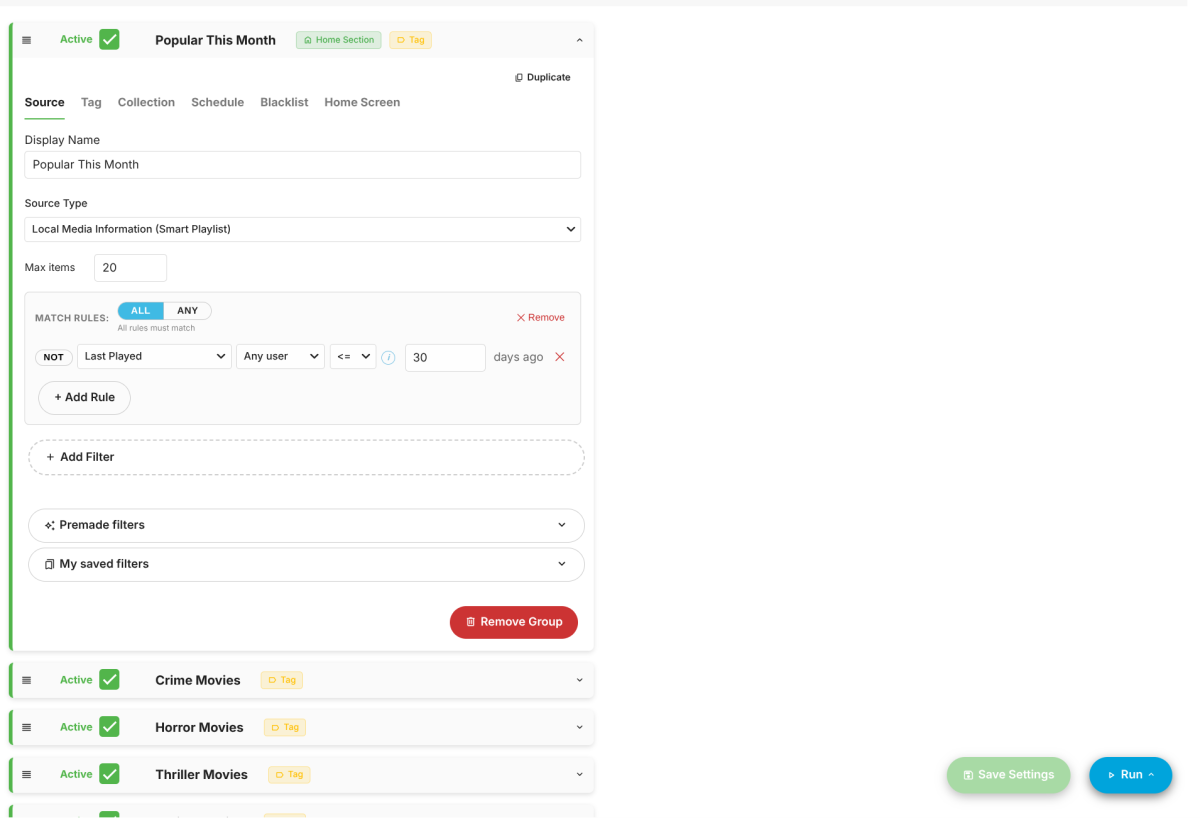
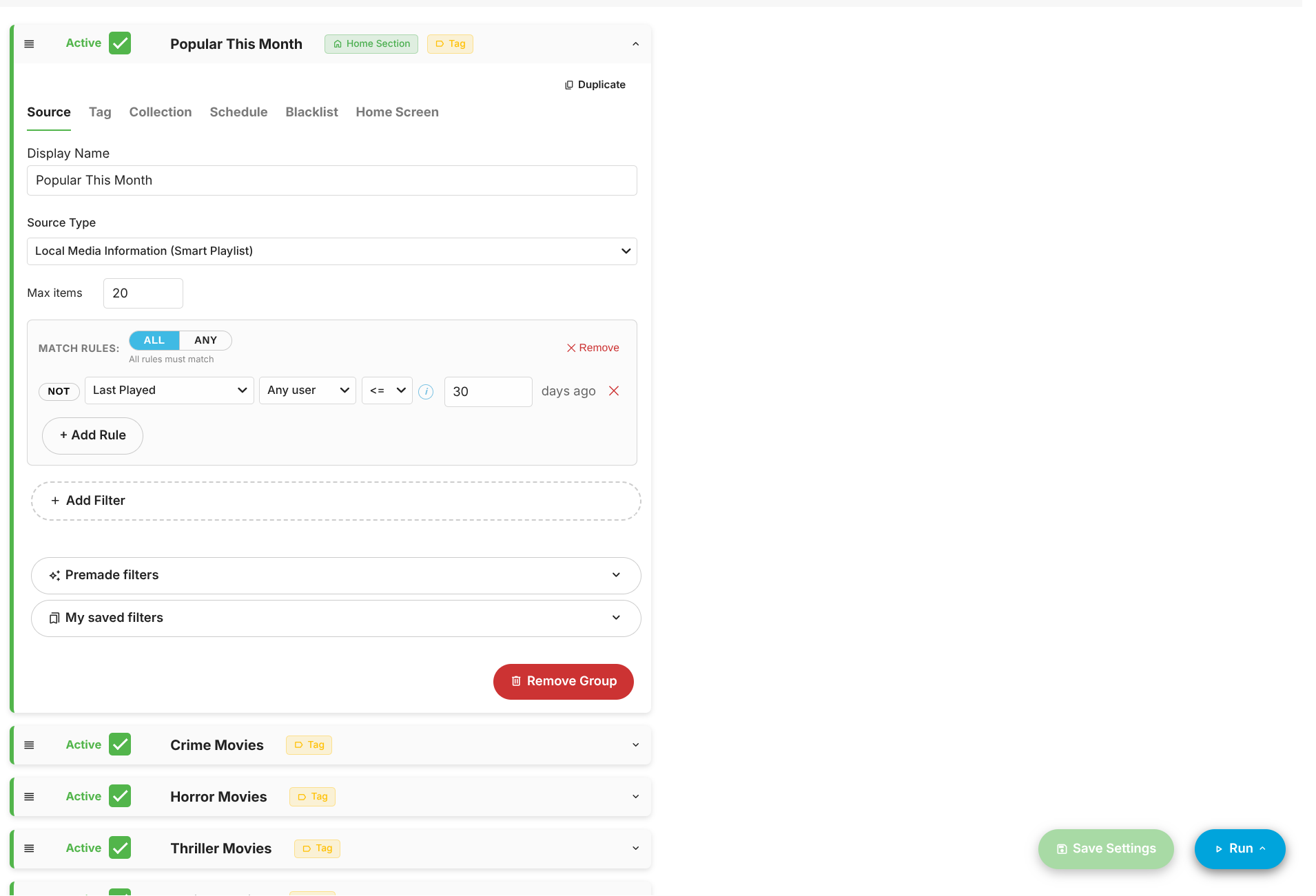
Unless I am misinterpreting the rules, I can't get the last played rule to work. What I'm trying to achieve is only show items watched by any user in the last 30 days.