All Activity
- Past hour
-
 AdonaiG joined the community
 -
 uufeng joined the community
 -
 Michellewes joined the community
 -
 Blackchild19 joined the community
 -
 MiguelAres12 joined the community
 -
 Alejomiron joined the community
 -
 rahafalo joined the community
 -
 Gavariel joined the community
 -
 Gurkaram joined the community
 -
Hi, yes, there's still stutter in the videos, though not as extreme as in the original post.
-
So is that the image that was used to create the thumbnail under "Image Capture" or was it generated elsewhere from within the mkv ?
-

Emby Connect, what kind of black magic is this?
toooo replied to MediaIntelNUC's topic in General/Windows
Hmm, my server is saying it is unreachable. I will start a separate thread to troubleshoot if it continues. -

【I need to add a custom option for transcoding frame rate】
Luke replied to Kaouning's topic in Feature Requests
HI, yes I think some in-app control could help with this. -
HI, if you go to the songs tab in your music library, you could filter by genre there and then see individual songs for that genre.
-
Yes embedded images are supported.
-
Emby Connect, what kind of black magic is this?
Luke replied to MediaIntelNUC's topic in General/Windows
No, it will auto-detect your remote ip if left blank. -
Emby Connect, what kind of black magic is this?
toooo replied to MediaIntelNUC's topic in General/Windows
So the manually entered 'external domain' in the network settings is where this comes from? Meaning no automation? And the server needs either a fixed IP or domain? I was looking at switching to the new letsencrypt short term SSL certs that are a public IP instead of domain name. I would have to automate updating the emby 'external domain' for that to work? - Today
-
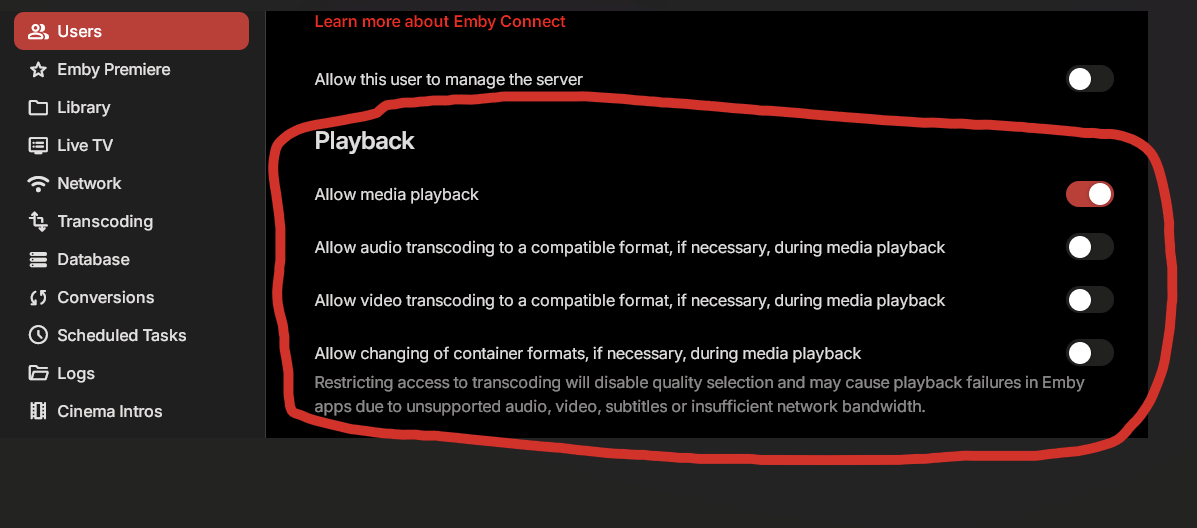
For some reason you have to disable all transcoding for the user that is using the Apple TV for proper Dolby Vision playback (this can cause issues with other devices this user uses so I would recommend making a separate user just for the Apple TV). The Emby Server for some reason wants to convert the stream server side when the Emby App is capable of doing it on the Apple TV itself which causes the issue with Dolby Vision. By changing these settings it also allows for direct streaming of other things such as PGS subtitles which puts less load on the server and makes the Apple TV a smoother experience. Hopefully they change this in the future but for now this is the only way to get proper playback for the Apple TV with the Emby App. Let me know if you need more information or help.
-
This. And if your domain doesn't have a PTR record for reverse lookups then your IP is all they know and can't complete the TLS handshake to get any more info. Just don't run non-TLS services on the same IP. Most domains wouldn't need a PTR unless running an email server and if someone is then they should know enough to protect their services.
-
Grim, that's the ticket, enabled and refreshed a couple and they now have thumbnails for the episodes - thanks. Since that's last in the order I'm assuming that it'll go to the other sources, tvbd etc. first and generate one as a last resort. Luke, attached is a mediainfo on that file, at the bottom it has a thumbnail of that episode as an attachment in the MKV. What/when/if anything are those attachments used in Emby? With a file explorer (windows) add on they show up in a folder view instead of generic icons. mediainfo.txt
-
Bei welchem Anbieter bist du? Tippe mal Telekom oder Vodafone? Je nach Anbieter wird die IPv4 mehr oder weniger häufig getauscht. Wenn du nun DynDNS nutzt, ist es wichtig dass du dich über die bei NoIP vergebene DynDNS-Adresse von ausserhalb mit deinem Server verbindest (also z.B. NCAA1701AsServer.ddns.net:8096), damit du auch nach IP-Wechsel weiterhin Zugriff auf den Server hast. Unabhängig davon kann ich dir nur dringend davon abraten, deinen Server über Port 8096/8086 public zu exposen (ist 8086 aus deinem ersten Post korrekt?). Falls du z.B. ne Fritzbox nutzt, richte lieber Wireguard VPN ein.
-
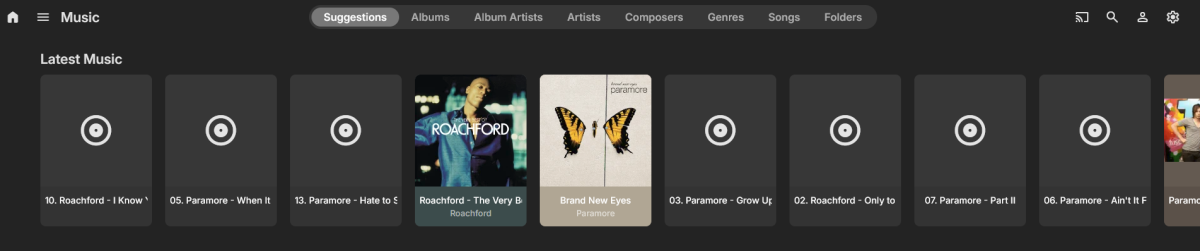
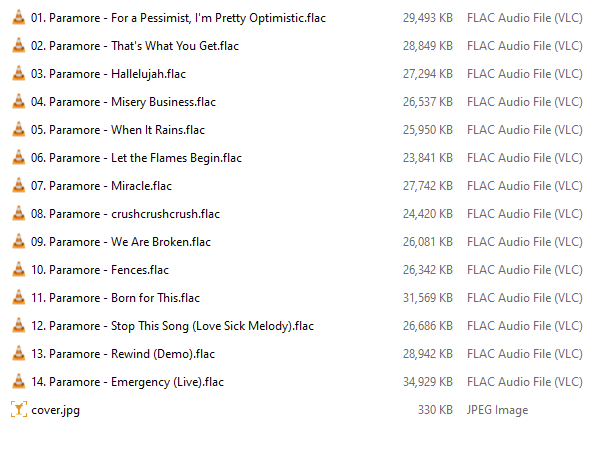
 Version: 4.9.3.0 Server: Windows (Win 11 Pro) Hi folks, I’m running into a strange issue with my Emby music library that I haven’t seen before. Up until now, adding albums (FLAC format) has been completely straightforward. I just copy the files to my NAS, run a library rescan, and the albums appear in Emby without any problems. Yesterday I added three new albums, but I noticed that some tracks are missing from all three albums inside Emby. In addition, the metadata appears to be incorrect or mixed up for some of the tracks. Things I have tried Removed the three albums from the NAS and ran a library rescan to clear them from Emby Verified that all the FLAC files are intact and playable (they are fine) Re-added the files individually to the NAS and rescanned the library (same issue) Tried manually adding the MusicBrainz ID for each album (no change) Has anyone encountered something similar or have any suggestions on what might be causing this? It's only happening with Music albums, everything else working as expected. In case its relevant, I nest music as FLAC > Artist > Album Name - Year > files Thanks in advance for any help. Sample - Tracks Missing Corresponding Directory on NAS Metadata Problems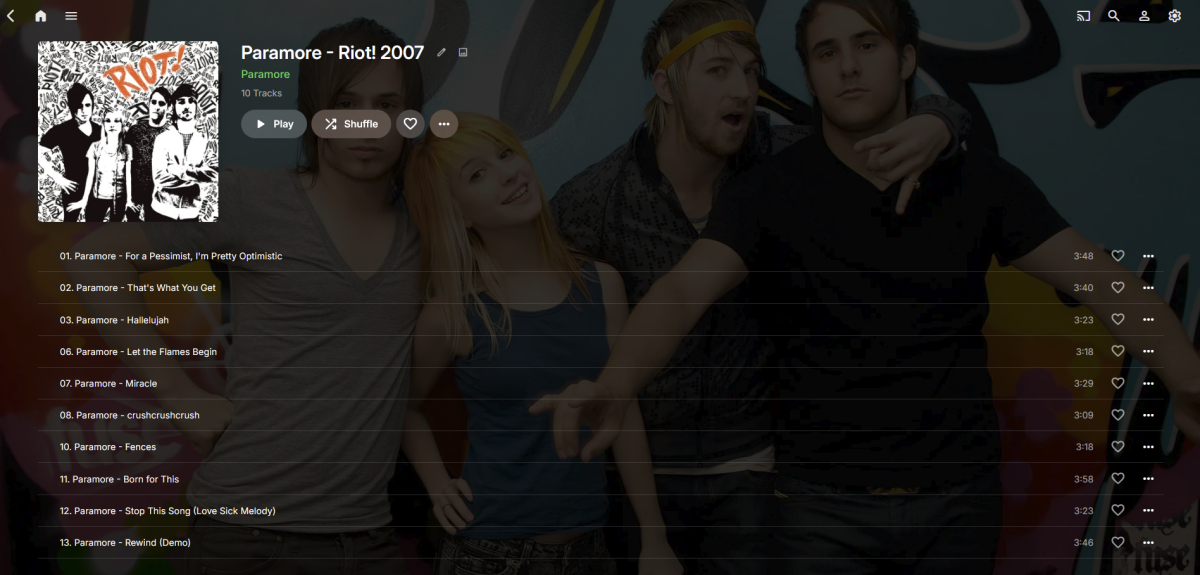
-
Server name indication. Simple: The reverse proxy just reacts when the specified hostname, e.g. emby.yourdomain.com is called by the client. Many simple bots, vulnerability scanners and automated scripts try to connect directly to your public IP address.
-

Recording playback switches ratio when fast forwarding
visproduction replied to Jmackay82's topic in Android TV / Fire TV
Jm, What is the actual pixel aspect ratio of the original media? Sometimes with .mkv content, you might have a squeezed or stretched copy that has added metadata tag to resize the media for playback. When the player accepts this resize tag, the end playback looks fine, but any fast forward would miss getting this resize control and look incorrect, just like you described. VLC [Ctrl J] , ffprobe can both find the file info to show if this is happening. Aspect Ratio errors and forced resize settings i quite common with content from DVD's or from about 10% of online media. -
【I need to add a custom option for transcoding frame rate】
visproduction replied to Kaouning's topic in Feature Requests
Kao, Another method, often used online, is to have an alternate, lower res copies, available to play for users who run into bandwidth or server/network traffic limits. When lower res media are made in advance and saved to the same directory, they can show up as a selection drop down in the media page: 4K 60fps, 4K 30fps, 1080P, 720P... -

No hardware acceleration on new Emby Windows 2.234.2.0
flic replied to flic's topic in Windows & Xbox
Thanks so much Lessaj it was set to HQ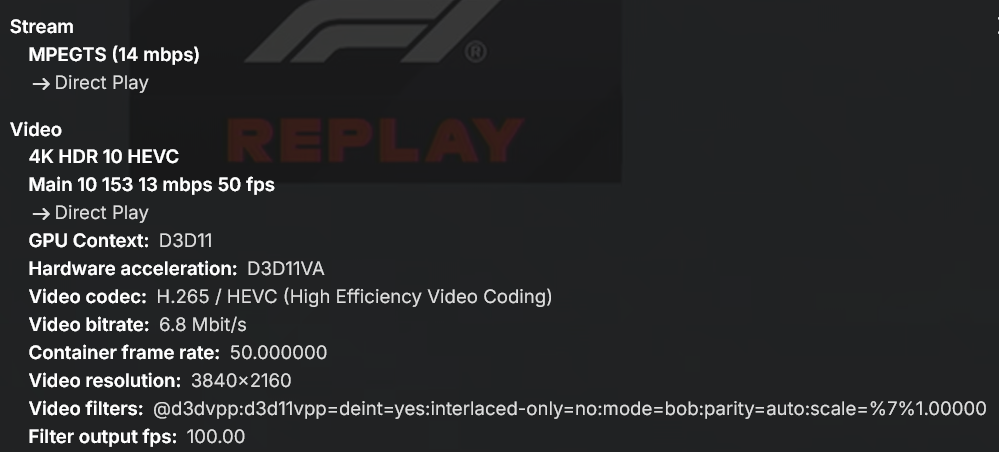
-

No hardware acceleration on new Emby Windows 2.234.2.0
Lessaj replied to flic's topic in Windows & Xbox
Go to Video Player and try changing the quality preset to Energy Efficient. -

I think my server was hacked
crusher11 replied to edvinmorales@hotmail.com's topic in General/Windows
What's SNI? -
I agree that for immediacy and non-technical users something is better than nothing. But we also have to be careful and not give those same users a false sense of security. Don't want them to think that changing their port range is a one-and-done fix and now they're secure...all good! As @rbjtech and many of us have posted before there are basic security hygiene steps the non-technical admins can apply on their servers. This is because out of the box Emby has horrible defaults and very little if any guidance and warnings in the application itself. The devs could do a much better job of initializing Emby with better defaults and opt-in settings in the name of security. And if someone decides to change their external port they should pick a value that services like Shodan don't scan, which is difficult. Shodan says they scan for 250+ ports which is vague and the API has a much longer list. For example: https://api.shodan.io/shodan/ports
-

Emby Theater v3.0.20 (Server v4.9.3.0) Homescreen Horiz. navigation broken
Symen_4ab replied to d00zah's topic in Windows & Xbox
A friend reported the exact same issue on my server today. Client Emby Theater 3.0.20, server 4.9.3.0 She's using the keyboard arrows for now. -
Few fixes and adjustment, etc... Also removed the pop-up hover effect over media cards (it started to annoy me.). Enjoy.. Emby Navy and Gold v2.4.css
-

I think my server was hacked
Apotropaic replied to edvinmorales@hotmail.com's topic in General/Windows
Appreciate your response but it’s probably a larger conversation for a wider audience. Sometimes you just have to make responses for quick wins for less technical Emby people out there. I wouldn’t normally advise obfuscation By using port 443 to hide in the background noise, all you’re really hiding from is traffic analysis monitoring from ISPs and other suspicious characters…lol You’re not going to hide from a port scan, a web server is a web server and if someone is looking for one they will gladly spend their curiosity looking at an Emby server, which in most cases will show the usernames… As for scanning, yes an automated scan makes a lot of things trivial but as I said, someone casually or even intentionally looking for Emby severs is not running a full scan. Anyone who blanket scans hundreds of thousands of home users is going to get noticed by their ISP and maybe even big brother. Especially using aggressive tools, otherwise it will take a long time and your Emby server is not likely to be a target. We can all give up if nation states want our Emby libraries!! I see hits against 80,443,8096,8920 from time to time. I’ve never seen anyone find my port - not that I’m setting a challenge But I do agree, a properly configured reverse proxy is the best solution but you’ve got to have actions that anyone can do regardless of their technical capability. Maybe they increase their learning and want to move to the next stage. Edit: this has reminded me of a suspicious event months ago, going to check my logs to see if I still have it. There may be more to this whole thing. -
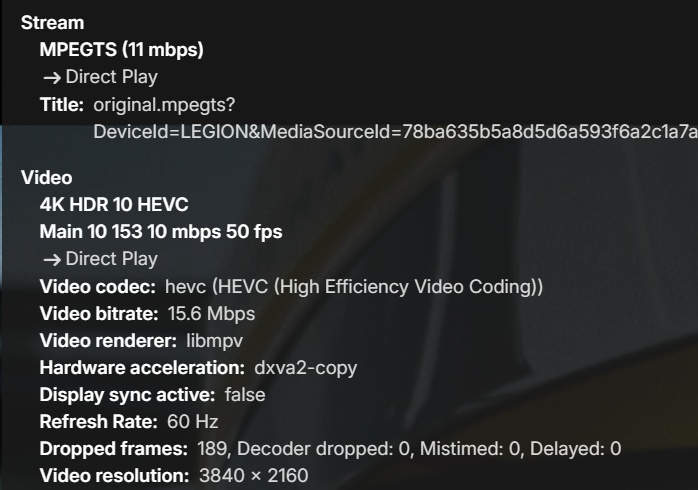
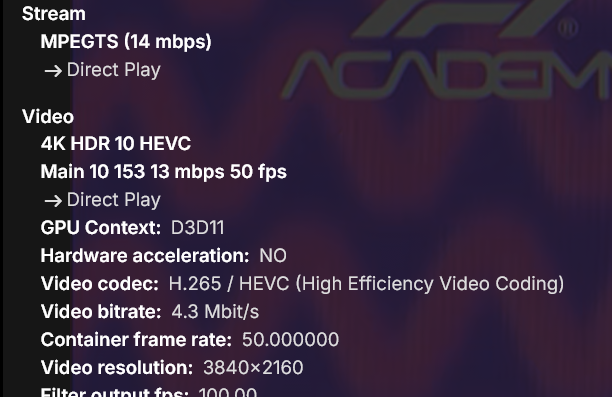
Here's my setup: Emby server 4.9.3.0 in a docker container on UnRaid. No GPU on it and no transcoding set, as desired Emby Theater 3.0.20 on Windows 11 home playing a 4K Live TV stream from server above Emby Windows 2.234.2.0 on Windows 11 Pro streaming the same 4K Live TV channel from server above Here's the Stats for Nerds from Emby Theater. As you can see Hardware acceleration is dxva2-copy. Stream is playing fine and client CPU usage is low Here's the Stats for Nerds from Emby Windows. Notice the Hardware acceleration is set to NO. Stream is playing fine except client CPU usage is through the roof So, how to set proper hardware acceleration on Emby Windows 2.234.2.0?
-
I recently started having issues with Live TV. That's our main use for Emby. We connect it to HD Homerun so we can watch antenna channels on multiple devices. Also recently noticed some of our recordings fail mid-stream. We travel sometimes and like to watch our local channels/shows wherever we are. Since we may go for a few weeks at a time, I created a start up task to re-start Emby daily. We may have an issue accessing/watching on one day, but it usually clears on the next. I read some past topics on Tuner not found error and tried to resolve this myself, but have been unsuccessful so far. Things that I have tried: 1) made sure Emby was up-to-date, 2) Tried re-starting EMBY & the server, 3) Verified Firewall still allows Emby services, 4) Un-installed my Anti Virus software, 5) Removed our picture library from displaying (not needed for us), 6) Re-downloaded HD Home Run app to make sure it is current. I did enable detailed logging and tried again, unsuccessfully. I can forward the logs, if needed. I've seen errors in the log like: Error LiveTV: Error deserializing C:\Users\xxxxx\AppData\Roaming\Emby-Server\programdata\data\livetv\timers.json Error HdHomerunHost: Error reading file: C:\Users\xxxxx\AppData\Roaming\Emby-Server\programdata\data\livetv\tuner_........._channels I am not sure what to try next. Any help is appreciated. Thanks.