All Activity
- Past hour
-

Live TV - M3U Tuner - Channel Name = EPG-ID + Channel Number?
Apotropaic replied to meowmix's topic in Live TV
No worries, it's annoying when things don't work out how you plan! I thought that was your editor but wanted to check. As for the M3U items, for some reason your editor is transposing the EPG-ID into the channel name, I imagine there must be some option or setting within your editor as I don't understand why anyone would want that by default. Here is mine for comparison.. #EXTINF:-1 tvg-id="101" tvg-name="BBC 1 4K" tvg-logo="http://192.168.x.x:9191/api/channels/logos/431614/cache/" tvg-chno="101" group-title="General",BBC 1 4K I've tried a number of different editors and I've given up on them, they all have some sort of limitation for what I want. If you have the skills and machine resources to run docker images, then I would recommend 'Dispatcharr'. It's free, will be hosted locally, and will let you customise and automate your M3U setup. Dispatcharr is meant to be used a proxy for emby but you don't have to run it that way but there some benefits. The Dispatcharr model is you have to manually create Channels out of the streams you have. So a one time activity is to create a BBC One channel and add a stream to it. The best bit is you can add multiple BBC One streams to the same channel and they will operate as a automatic backup (only if you use Dispatcharr as a proxy). This way you can name the channels exactly how you want, set icons for them, and even link an EPG to the channels. You then point emby to your dispatcharr instance for the M3U and EPG. But you can be flexible and use the Emby EPG if you wanted or mix and match. -
 chateaubrion joined the community
 -
 nadav_penker joined the community
 -
 76528861528 joined the community
 -
 Hanoah joined the community
 -
 Mashasha joined the community
 -
 jrramon1334 joined the community
 -
 hermanogaliano26 joined the community
 -
 leo92532 joined the community
 - Today
-

Emby server won't detect new items in TV shows library
pwhodges replied to xifnitsuj's topic in General/Windows
Are you sure it hasn't been detected, but as an alternate version of something else? Paul -

Moved media Library to new location. Some media's metadata points to old Paths and won't play.
beefsnack replied to beefsnack's topic in General/Windows
As I explained before, I haven't removed the A drive just yet because I'm still working on replacing the data I've lost from the specific HD crash, I'm being lazy I guess but I could write it down and be done with it, which I"m considering ATM, because this is causing to much trouble, I think this is the main reason why this is happening, everything is still showing in the A drive and not redirecting to the new folder when I replace the data and No I have not used the drive letter (A) yet it's not being used ATM this is probably why I'm having the issue, I'm just looking for an easy way out or a short cut before I use a new HD and label it A: when I do finally do finish up replacing all my missing data, If you can follow my madness. -

A lot of videos are stopping only 10 seconds into playback
yocker replied to dimitrik's topic in LG Smart TV
Same problem for some of my friends. When transcoding some files it stop after 8 seconds, shows a spinning circle and never continues. I've found no commend thing between the videos. -
Okay yes from the perspective of "upgrade" with a different file name - yes that would be considered a new addition, otherwise straight replacing the file with the same name would just trigger a metadata refresh.
-
Yes, but "upgrade" in my mind is moviename.720p.AAC.ext to moviename.1080p.AC3.ext or whatever. But if the filename remains the same (and if written, existing NFO has/retains same (previous) name as well), all data is preserved including Date Added.
-

Subtitles Not Displaying on Chromecast After Starting Next Episode/Movie
gebruiker replied to gebruiker's topic in General/Windows
Happened again just now. I was watching a movie, stopped it (around 18:38), started playing a tv episode, it started but picture froze and audio kept playing. Did the stop casting and reconnecting to the chromecast thing and i could watch the tv show just fine. This time it was a Thomson 270 plus. So to recap: I've had this with native Emby install on Ubuntu 24.04, and with the docker version (also on Ubunto OS). With a Chromecast Ultra 4k, Ziggo stb, Odido stb, and a Thomson 270 plus. Some remote, some on local lan. embyserver(1).txt ffmpeg-remux-ded78e79-da08-4a98-a31c-ff230c5c2f95_1.txt ffmpeg-remux-5172af3e-64bd-4e04-a562-2ccb401b231b_1.txt -
Also to OP, aside from the plugin changing those dates also check your date added behaviour to ensure it's appropriate.

-
Maybe this is specific to the *arr apps in how they process content (I don't use them so I don't know) but I don't agree with this statement. I replace files all the time and Emby sees that I replaced the file either via RTM or scan library files and updates the metadata accordingly without changing Date Added. As long as it's the same name.
-
Also should I be using Emby for Fire TV or just Emby app?
-

Can not delete downloaded media when server is not available
visproduction replied to brian5678's topic in Apple iOS / macOS
Apple iOS likes to decide for you what permissions are allowed. They know better. This has always been the complaint from people who prefer other OS's. Change the permissions and then delete all you want. If you don't like all the regulations, stop using iOS. https://support.splashid.com/portal/en/kb/articles/permissions-for-files-and-folders-local-network-and-location-access-on-both-iphones-ios-ipados-and-macs-macos -

Emby server won't detect new items in TV shows library
Coloboy replied to xifnitsuj's topic in General/Windows
I'm having the exact same issue. Up until about a week ago, whenever I copied a new movie or a fresh episode of a series into the library folder, Emby would pick it up automatically without any problems. Now, I added a brand-new episode, but Emby is completely ignoring it. I've already: Manually triggered a library scan multiple times Performed a "Scan Library Files" on that specific folder Restarted the Emby server Restarted the entire machine … and still nothing. It just won't detect the new file. Has there been a recent Emby update that might have broken something? Anyone else seeing this behavior lately? Thanks! -

Emby server won't detect new items in TV shows library
EmbyInvitado replied to xifnitsuj's topic in General/Windows
I'm having the exact same issue. Up until about a week ago, whenever I copied a new movie or a fresh episode of a series into the library folder, Emby would pick it up automatically without any problems. Now, I added a brand-new episode, but Emby is completely ignoring it. I've already: Manually triggered a library scan multiple times Performed a "Scan Library Files" on that specific folder Restarted the Emby server Restarted the entire machine … and still nothing. It just won't detect the new file. Has there been a recent Emby update that might have broken something? Anyone else seeing this behavior lately? Thanks! -
Collections are just a grouping. Like tags, or genres, or studios/networks, or playlists, etc. You will only the see the primary items in the group. You must enter one of those items to see its details view which will then show the extras, features, deleted scenes, etc which are related to that primary item. A collection itself doesn't understand the concept of extras.
-
Thanks for the kind words! Truly, that made me happy to read You are spot on with the AI, it is very useful but I absolutely don’t want to make it intrusive or give away sensitive information. You are correct regarding music and music videos. Nothing I use myself so I haven’t really thought about it. When this plugin has reach a mature state (which it almost is now) that might be a thing to add support for as well.
-
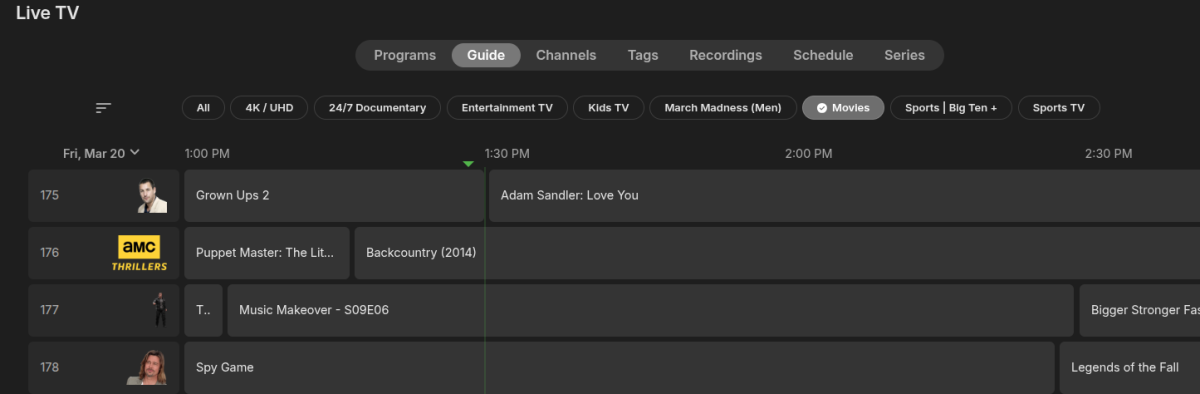
Is there a way to get the categories to display on the Firestick app, similar to how they do on the web app? I'v tried the beta, Emby app, and Emby for Fire TV apps. when I click sort it lets me select categories, presumably to display, but the actual categories do not display and I just have a guide of ALL channels
-
You can't have extras in a collection, they must be assigned to a specific movie.
-
https://emby.media/support/articles/Quick-Start.html Paul
-
Subtitles Not Displaying on Chromecast After Starting Next Episode/Movie
gebruiker replied to gebruiker's topic in General/Windows
Sorry @Luke I was away for business and haven't had a lot of time to watch anything. One of the people on my server reported this week that they played a tv show episode, stopped it a few minutes before the end, started the next episode and then the subs stopped showing. Stopping playback didn't stop the payback. the video kept playing. Disconnecting from the chomecast and force quiting the emby app and reconnecting fixed it again. It was around 00:23 (cet) I hope this helps. embyserver-63909475201.txt ffmpeg-remux-d9da75e8-74c5-4e88-b151-a986a194ee32_1.txt ffmpeg-remux-c684374c-0b6e-4a34-8221-2c272a07f9f9_1.txt -

A lot of videos are stopping only 10 seconds into playback
daiv_ replied to dimitrik's topic in LG Smart TV
I have this issue on my C5, but only with specific formats (1080p + DTS audio). I can play 4k DoVi / HDR + DTS-HD / Atmos etc. just fine. I've found that if i select playback correction within the player, this forces transcoding, which allows for playback, tho quality is lower due to the transcode. As stated by others, it is not a bandwidth issue and it is specific to the LG app. I have been switching over my Chromecast w/ GoogleTV, as it direct plays the file just fine in the instances the LG app will just freeze after ~5-10 seconds of playback. I had a similar issue on my old LG C2, but weirdly enough, I know I played the same video files without an issue on my C4 last year, but now they won't play on my C5 without playback correction, just like my old C2 did. Not sure if WebOS update broke, then fixed and then broke something or if it's some compatibility quirk of the C4. -
This should help: https://emby.media/support/articles/Movie-Naming.html?q=extras#movie-extras
-
Just switched to the Music Assistant beta branch just to try this out, and it's working great for me. Was worried it wouldn't work, as my Emby and HA/MA instances are not on the same network, but was able to point it via an IP and it all works flawlessly. Very happy with this, was plugging my laptop into my home AV set up every time I wanted to stream music from Emby, but now it's all cast-able from MA.
-

Launch directly to DOWNLOADS or SELECT SERVER when not local?
js28194 replied to roaku's topic in Android
Putting the phone into Airplane mode will almost instantly dump you directly to "Select Server" / "Downloads" icon screen. -
Ok .. thank you so much. Sorry to have bothered you all. regards Deirdre