All Activity
- Past hour
-
 Harrissss1 joined the community
 -
 Sadeemtq joined the community
 -
 Llmbs1031 joined the community
 -
 sertori.c joined the community
 -
 Jackitbelly joined the community
 -
 fresitasconcrem joined the community
 -
 yfc123 joined the community
 -
 okeh11 joined the community
 -
 Ranelly joined the community
 -
 dawnfire94@gmail.com joined the community
 -
السلام عليكم احتاج اشتراك امبي بس مو عارفة كيف
-
I also don't know what steps to follow. I want to do it this way and wonder if it will work: Back up all data using Emby's Backup & Restore on the old server. Install Emby (Docker) on the new server and set up the admin account. Copy all media files (videos, TV shows, music, e-books, etc.) to the new server. Restore the data using Backup & Restore in the new Emby (Docker) instance. Reconfigure the media library directories accordingly.
-
Hopefully it should not be bad, try the logic in the section 1 update notes, keep your section 1 and just add in the new stuff.
-
Apologies. At some point I allocated my emby server with only one vCPU. I'm not sure how this happened. I've provisioned the server with eight vCPUs and searching is no longer a problem.
-

Emby Theme: Retro Navy & Gold (W/ Seasonal Themes)
MediaEmby1968 replied to Aleas's topic in Web App CSS
I will be attentive... because also now I have to go over all those changes I made again. I'll have to write them down separately to have them on hand. Thanks,... downloaded and will try it tomorrow -
So do I disable and reenable or will the fix automatically occur? Let me know and either way, thank you
-
yes,I use this。but: First, I changed the media storage directory on the new server. Also, I have a lot of custom actors, movie covers, and other metadata in Emby on the old server. I wonder if I can migrate them over?
-
That's it working mate, thanks a lot much appreciated.
-
Alexa has been updated the fix should be available in the next few hours
- Today
-

Emby silently fails to index shows when season.nfo or tvshow.nfo has truncated XML
visproduction replied to nopenope12345's topic in Linux
In my experience, often any text before the last dash can be discarded in some situations. This text editing is used to create the pull down list of video resolutions on each media page, when you have multiple resolutions with the same filename and only a difference with the last - 1080P or - 720P. This is feature to remove excess text and allow the pull down menu to look good show the different resolutions. Unfortunately, I have noticed that this same text editing function has adjusted sometimes the title of the content in the on screen player that appears when you start media playback. I think this text editing function is used in other times where titles appear in lists. I mentioned this several times in various forum posts and no one seems to even try to test it. I guess if you don't want to change titles of anything because it's too much work, then not even testing it, is the choice. But, then you can't see if it's the actual problem. -
Here we go, an idea that sounded simple caused a lot of headaches along the way, but we eventually got there. Updates: More color variable options, a few variables to fine tune colors in specific areas. (See Section 1 updates for more details) Table grid header colors moved from h1-color to h5-color Video titles, music now playing in the OSD us now using h3-color instead of h1-color Changed custom CSS box to use 500 lines instead of 1000 Fixed icon hover shadows in the sidebar and dialogs popups. Fixed table view play buttons. Fixed the (3 dots ...) in table views to have a hover color. Removed the media bade effect from dialog popups Fixed the halo effect that happened with watched/favorite indicators in media cards. Fixed audio full screen image hover bugs Updated seasons to not use background images if they are set. (There's already enough animation going on, and it looked awful) (Some seasonal fixes still need to be done.) Updated seasons to reflect various changes. More image backdrop animation options (See section 1 updates for more details) Fixed various areas in the music suggestions page Submit/Action buttons will no longer be in all uppercase. Any many more fixes. Section 1 Changes: If you customized your CSS, you could keep your section 1 and just update section 2 on down. but here are the important things that were added or changed so you can modify accordingly. A lot of areas were re-organized; colors options were placed more closely together. And some moved into more appropriate areas. (No real change needs to happen here if you wish to keep your section 1) New header icon color variables (This affects the main pages, not the headers inside the OSD): --header-icon-color: var(--my-gold); /* Header icon color */ --header-icon-hover-color: var(--my-gold-light); /* Header icon color in a hover state */ New sidebar icon color variables: --sidebar-icon-color: var(--my-gold); /* Sidebar icon colors */ --sidebar-icon-hover-color: var(--my-gold-light); /* Sidebar icon colors in a hover state */ New OSD icon color variables: --osd-icon-color: var(--pure-white); /* Icon colors for the OSD display */ --osd-icon-hover-color: var(--my-gold-light); /* OSD Icon colors in a hover state */ (Pay attention to the OSD one @MediaEmby1968, if you loved those orange buttons in the OSD, you would want to change that, as white will be the default.) New Dialog icon color variables: --dialog-icon-color: var(--my-gold); /* Dialog popup icon color */ --dialog-icon-hover-color: var(--my-gold-light); /* Dialog popup icon color in a hovered state */ Various comments were updated but I did not really keep track of those. This comment is to note though as more options were created --backdrop-anim-toggle: imgZoomFadeIn; /* Options are: 'imgZoomFadeIn', 'imgPanRight', 'imgCinematicDrift', 'imgFadeOnly' to ENABLE the backdrop animation, or 'none' to DISABLE it */ Some of these default colors may change in time, I'm still experimenting with them to see what I actually prefer. I Think that's It, hope I did not miss anything on my notes here. Emby Navy and Gold v5.0.css Enjoy!
-
Movies and TV shows with commas (,) in the title are not recognized by the metadata scraper.

-
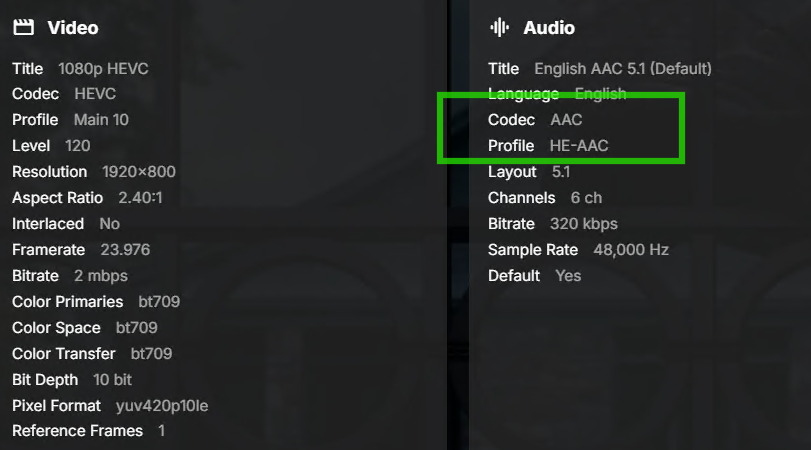
In the past few weeks I have gotten this error trying to play a few TV episode. They play fine on the web client but I get the "Playback error no compatible streams" in the Emby MS Store app. The first couple of times it happened I thought it might be a bad file so I replaced it with a new file and it worked fine. But this time I wanted to see if there was anything different that may be causing it. I will attach the relevant portion of the log file, but the only thing I notice right away is that the audio in this particular file has a profile listed as "Codec AAC - Profile HE-AAC" where most other ones just say "Codec AAC" and don't show any profile. I am wondering if it's just a matter of not having the appropriate codecs installed, so I thought I'd ask before randomly installing codec packs. 2026-04-14 094802.198 Debug TvShows.txt
-
I did some additional testing and found this issue happens on both the Android app completely direct playing or through browser, and happens whether using hardware transcoding or not. The playback stops at exactly 10 minutes every time.
-
Are you aware there is a forum subject for CSS styling for Web client only? https://emby.media/community/forum/144-web-app-css/ There are many themes and tweaks discussed. Changing Android / Apple iOS and TV apps are completely different and not affected with these style changes.
-
Interw, Maybe try testing with quality demo downloads of different resolutions to pinpoint the playback problem. Fast forward / rewind, I would guess that some media has metadata timelines set for perhaps blu-ray playback and remuxing the media to correct the metadata for streaming might fix that. It seems that any media not yet remuxed fails with fast forward. I just always remux and don't run into that problem. It might have something to do with h.265 and that codec needs more time because of higher compression for timeline shifts, compared to the older h.264. I have not tested this completely and I am mostly using Web. It could still be an Apple / Android / Emby combination issue. This is just a guess.
-

Playlists in file system not appearing in Emby (4.9.3.0, Windows 10)
BaNanaBlocks replied to BaNanaBlocks's topic in General/Windows
Are there any other things that I need to check to figure out why I can't see my playlists? Or should I just rebuild them? I'm at your command, as always! -

Subtitle Encoding Issue After Emby Premiere Activation
Andoo replied to Andoo's topic in General/Windows
In my opinion, for users who pay for Emby Premiere every month, things should be simple. When something breaks right after activating Premiere, they shouldn’t have to read a long guide on how to manually create logs, worry about whether those logs contain sensitive information, and then post them publicly on a forum. It’s an app you install and run. It should be simple, fast, and user-friendly. There should be a single button inside the app to send a problem report directly and receive proper support. Can you really not live without that forum? -
if you use windows i have blocked their ip in inbound firewall rule you could do the same so all your environments is blocked from them
-
First result In case of the movies: "2012 - we were warned" and "65" with Adam Driver "2012" - TMDB ID 14161-2012, TheTVDB ID 678, IMDB ID tt1190080 "65" - TMDB ID 700391-65, TheTVDB ID 290290, IMDB ID tt12261776 I tried each plattform and the movies are listed. Then i tried the ID's with the identify-function. Only IMDb gave me to "2012" a short result. Identify also doesn't work in combination with Titel, Year a.s.o. Wrong or none results. I think, this isn't for what i payed. And that's just the first bug i report.
-
That'd do me
-
Guess you media supplier is doing fails advertisements, Emby uses the tags in media.
-
I'm aware of that. It's just that when i get MKV file (and claimed with estonian language subrtitles), it still won't work without further processing.
-
Try fixing the metadata with MKVtoolnix with that you can edit the tags.
-
Yes. Emby probably gets this info from 'Language' field. For example Language : Ukrainian Unfortunately, .MKV is already compiled incorrectly in this regard witk Ekk (which in fact was, in current case, Estonian).