All Activity
- Past hour
-
New log?
-
Hi there, please attach the Emby server log from when the problem occurred: How to Report a Problem Thanks!
-

No compatible streams are currently available after update the TV app
Luke replied to Termindiego25's topic in LG Smart TV
Hi, yes are you able to test direct access with the reverse proxy disabled? -
Hi there, what exactly happens?
-
 herneyacosta joined the community
 -
Auto Organize "Unable to find movie in library matching name"
Luke replied to lorac's topic in Plugins
@lorac HI there, can you please provide a specific example? How to Report a Problem Thanks ! -
It is updated, not sure what it still sticks.. Might be browser or server cache? For me its updated, but i have uninstalled, reinstalled and so on a few times while testing.
-
 Elyasaf2005 joined the community
 -
Feature request: Allow a strm file to contain a HTTP address
Luke replied to tOLJY's topic in General/Windows
What do you mean by "no it won't" ? What do you mean by it does nothing? -
@soderlund91the plugin image should probably be updated.
-
 Abdulazizalk joined the community
 -
It is still not working after deleting both of the ACdb.dll files.
-
 joaomps joined the community
 -

FLAC files with same Album and AlbumArtist tags appear as a duplicate album if the Artist tags differ.
Standroid replied to Standroid's topic in General/Windows
Thank you - lots to digest - lots to consider - amazing stuff! But, I stopped cold when I saw that my three files were digested into your emby library as a single album! So, acting on that here's what I have done... 1. I moved the first few hundred files out of my Orchestral folder into a folder I named "sandbox". The "sandbox" folder is named in the .embyignore file. Then I started a Scan Library Files of the Orchestral folder. In short order those removed albums were gone from the Music>Albums table. Then I moved the files back into the Orchestral folder and started another Scan Library Files of the Orchestral folder. In time, all of the previously duplicated Album names were reduced to one line per album! Now, to scale up this solution... 2. I added all four large folders that comprise my library to the .embyignore file and started a Scan Library Files! Sure enough, after much churning emby showed all my music gone - sweet. Then I commented-out those lines in the .embyignore file and started another Scan Library Files. That was eight hours ago - I normally only scan the library overnight. The scan just finished and everything looks sweet! I have more checking to do, but I'm optimistic that we have a solution. My tentative diagnosis is that emby has a long memory for deleted metadata that used to belong to files in the library and emby remembers too much. Painful lesson. Thanks again for all the help. I may have more questions for you as I consider more of your comments. -
 joegaga joined the community
 -
Try deleting the ACdb plugin and then start the server. C:\Users\jason\AppData\Roaming\Emby-Server\programdata\plugins\ACdb.dll
-
 qn1 joined the community
 -
 hugotang joined the community
 -
Good to hear that it's working now!
-

Emby Theater v3.0.20 (Server v4.9.3.0) Homescreen Horiz. navigation broken
scottpro replied to d00zah's topic in Windows & Xbox
More info for devs. This issue started happening with version 4.9.3.20 . Version 4.9.2.19 works correctly . -

No Trailers on Samsung TV app - taking ages for release still on 2.2.5
Robnaeyaert replied to Robnaeyaert's topic in Samsung Smart TV
Hello @FrostBytecan you please help me more on this? I'm not familiar with "Shield" as I've been a dedicated EMBY user for over a decade or two. I use EMBY on my local PC to serve up locally stored media (movies, TV, photos etc) to my TV's across my home (via Chromecast or direct) and also to stream said content to a select number of friends with accounts on my Emby server. So given all that, how would "Shield" help me please as I'm not familiar with it, or if it does all the same things as I just described? I do have an ATMOS Soundbar and a 4K TV so I'm always looking to EEK out all the features of local media to match my gear. I'm generally pretty happy with EMBY and all it does (except for the latest Movie Trailer issue that I've been asking to be fixed with 2.2.8 in the app store for New Zealand for months on end) so I'm pretty reluctant to move away from EMBY unless there is a really good reason. Thanks for any advice. -
Good news mate that one seems to be working I have a busy morning with work but I will run some more tests as soon as I catch up and report back.
-
Nothing really. Well, to be true, I don't know how to do it. It's something I have been thinking about aswell. It will happen sooner or later I hope
-
Excited to try out v3.0. I'm sure it has been asked before but what's preventing this plugin from being added to the Emby catalog?
- Today
-
Please also note that the backup/restore plugin doesn't actually backup and restore everything You would think it would include everything but it doesn't Last time I had to use it I found lots of settings were missing: https://emby.media/community/topic/143261-backuprestore-plugin-not-backing-up-user-settings/
-
embyserver.txt
-
Major release - Version 3.0.0.0. Download .dll here and full changelog: https://github.com/soderlund91/HomeScreenCompanion/releases/tag/v3.0.0.0 This release contains major updates, improvements and bug fixes. New name - Home Screen Companion Read why below. Warning No longer support for Emby server version 4.9.x.x. Requires 4.10+ How to update from AutoTag (Optional/Recommended) Download a backup from the plugins settings menu Download HomeScreenCompanion.dll and put it in your /plugins folder. Remove AutoTag.dll from /plugins folder Restart Emby (Optional) If everything has migrated well you can remove AutoTag.xml.old from /plugins/configurations folder _____________________________________ New Home Screen manager: Added a new function that copies the home screen sections from a selected user to others. You no longer need to manually edit the home screen for multiple users. For example, if you create a tag or collection that you want to show on the home screen, you now only need to set it up for one user and then automatically copy it to all selected users in one go. Unlike Emby’s built-in copy function, this only copies the home screen sections. Improvements Local media information: Added ability to match with "NOT" logic. For example, you can filter movies that do not speak English. Local media information: Added an info popup with help to understand the symbols for equal, greater etc. Schedule override: Added ability to override a tag/collection based on schedule. Example: if you use the tag "spotlight", but for Halloween you want that to override during October and also use the tag "spotlight". Then the ordinary spotlight tag will become inactive, and only the Halloween one will get the tag spotlight. (If multiple overrides are used at the same time and for the same tag, they will be combined) Emby's scheduled tasks: Moved the tasks from "Library" into a separate Home Screen Companion title Fixes: Collection images: Uploaded images are now deleted when unused. Bug fix: Fixed a bug where you could select a non-existing date in the recurring schedule, for example Feb 31. _____________________________________________________ Why change the name? What started as a simple script to add tags from an external list has grown into much more. The plugin is now also used to create collections, and a "smart playlist" feature has been implemented using local media information. The idea behind this plugin was originally to create tags to use in conjunction with Emby’s new Home Screen Sections. I mainly build this plugin for my own needs. My goal is to have a plugin that helps manage and automate the home screen as much as possible. Now that I’m adding the ability to actually manage the home screen directly, I feel that the original name no longer describes the plugin accurately. It's still the same plugin, just with more and more functionality being added. However, it is evolving into a companion for managing the home screen — hence the name. HomeScreenCompanion.dll
-
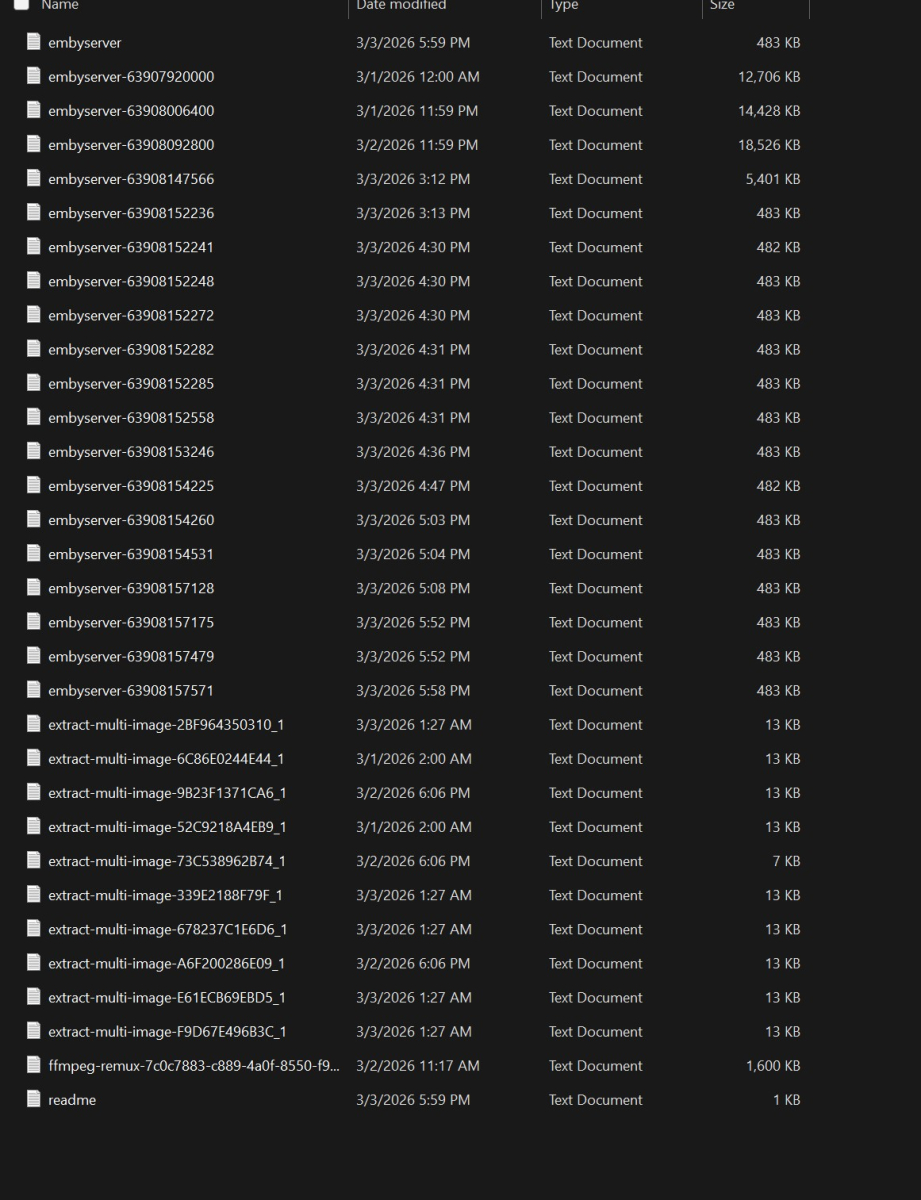
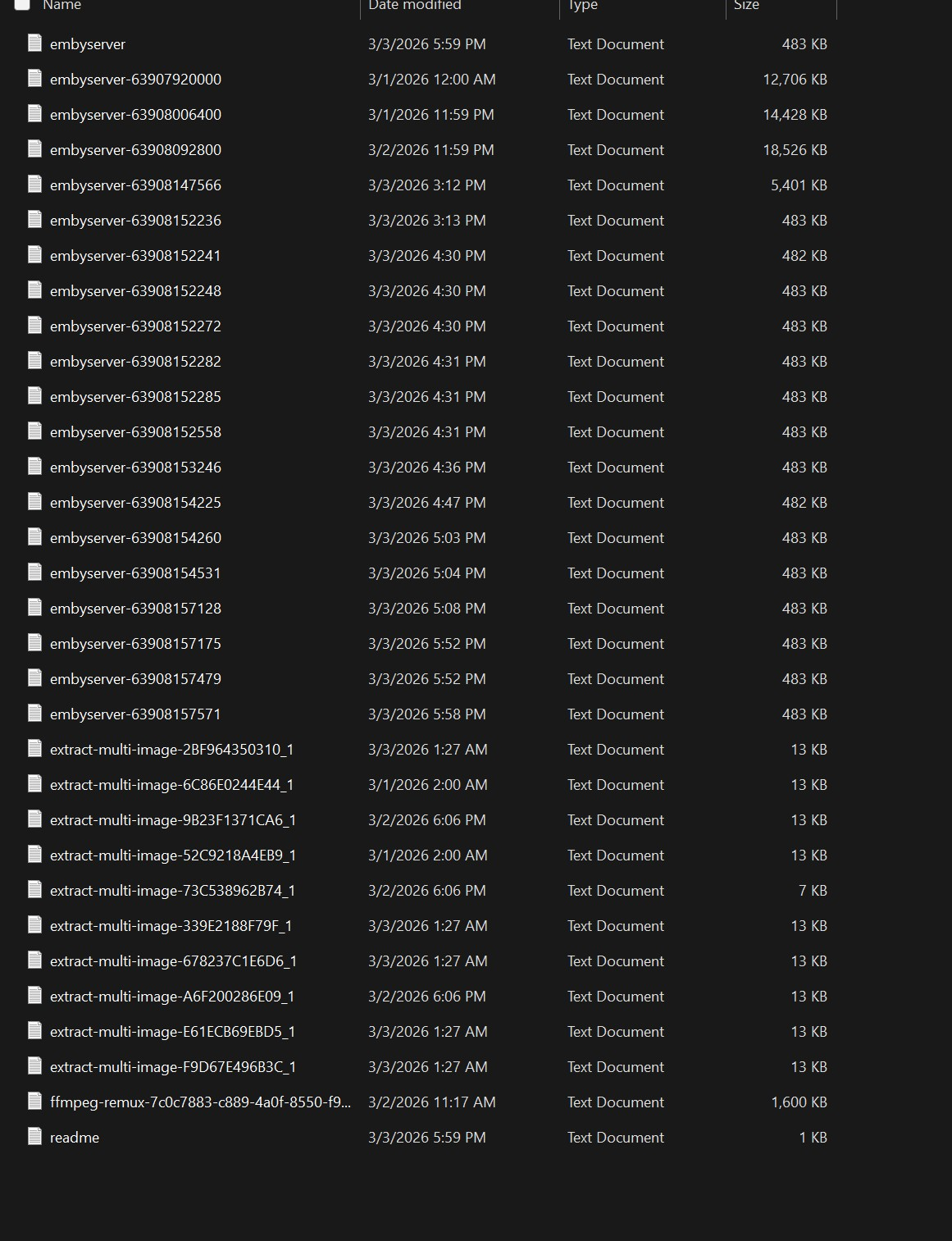
Hi yes, it's the very top file. You do not display file extensions so in your case it's just called "embyserver"
-
I sent the screen shot of the files within the log folder because I don't know which one to attach. I appreciate the help, but sarcasm is not needed. As you can see on the screenshot I've attached there is not a specific file labeled "EmbyServer.txt".
-
Do you know how to attach the file? Specifically the EmbyServer.txt file? I am assuming you do since you know how to use a puter to take a screen shot. It's the big "Drag Files here to attach" right below where you are posting. I'm not sure why you haven't so far. See the screen shot below.

-
Emby Theater v3.0.20 (Server v4.9.3.0) Homescreen Horiz. navigation broken
scottpro replied to d00zah's topic in Windows & Xbox
Yes, I know how to replace the mpv-1.dll in the protected WindowsApp folder but it's a PITA. In fact, I had a long chat session with Softworkz about this a while back. Also, Emby disables the loading of conf, script and plugins when it initializes the mpv-1.dll. I have a modified local build of mpv-1.dll which enables me to override the loading options if I'm forced to use the WindowsApp version in the future. Currently I'm using the modified mpv-1.dll which fixes the Dolby Atmos audio issue. This is getting a little off topic, but informative. -
Inside the log folder...