
All Activity
- Past hour
-
 QCS123 joined the community
 -
 dezfranz joined the community
 -
 Emmanuel 8965 joined the community
 -
 PaniPoke joined the community
 -
 April4444 joined the community
 -
 Noloo57 joined the community
 -
 敬一 joined the community
 -
 NasserAlo joined the community
 -
 bungtoof joined the community
 -
 Nsidbh joined the community
 -
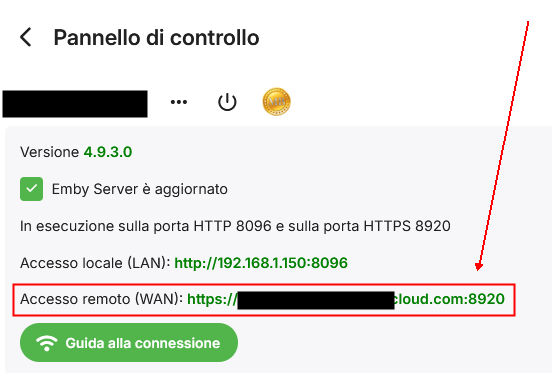
Buongiorno, sono Giampaolo licenza premiere lifetime da circa un paio di anni, poco tempo fa, avevo problemi di visualizzazione movie da remoto lato client sia con Apple TV sia con firestick , i filmati continuavano a bloccarsi durante la riproduzione. Ho il server su un qnap, non ho mai modificato nessuna impostazione perchè ha sempre funzionato quindi ho provato varie soluzioni, dal riavvio dell'una e dell'altra, al riavvio dei router ecc. senza risolvere. Ho quindi provato a disinstallare e installare nuovamente le relative app senza che cambi nulla e quindi ho riportato a reset di fabbrica i dispositivi. Ho quindi aggiornato anche il server all'ultima versione (prima avevo una versione beta) A questo punto ricreando il lato client non riesce più a trovare il server da remoto, nonostante non abbia toccato nessuna impostazione e abbia ancora tutte le porte TCP e UDP nattate. Chiedo di entrare con il pin code che viene correttamente accettato lato server, ma poi non mi fa entrare chiedendo di selezionare un server; metto l'indirizzo manualmente e mi dice che il server potrebbe non essere in funzione. Ho provato anche a sovrascrivere l'attuale firmware e a questo punto non so più che pesci pigliare, visto che lo ribadisco, non ho mai modificato le impostazioni. L'ultima spiaggia è disistallare il server sul qnap e poi inizializzare da zero il tutto. Allego uno screenshot del mio pannello che evidenzia l'esatta correttezza dell'esecuzione del server. Grazie a chi mi saprà rispondere.
-

Recording playback switches ratio when fast forwarding
Jmackay82 replied to Jmackay82's topic in Android TV / Fire TV
Luke i have reported this time and time again, I have previously sent logs and photos, not sure what else I can send. Please look at the history, 3 months ago you said "we will look at this" and still not fixed - Today
-

Screen does not turn off on end-screen when automatic playback of next Episode is disabled
SaschaLois replied to SaschaLois's topic in Android
Alright thank you very much! I believe this should generally be classified as Bug and possibly be accounted for in automated tests (if possible of course) since this was not a thing for like the first year or more of me using Emby, then all of a sudden became a thing after an update, then disappeared again, and now is happening again. I believe it should be consistent and I think most users would expect the display of their Device to turn off at some point after playback stops entirely, especially on a mobile device where it'll drain the battery if it doesn't happen. You most likely did take some sort of action, the only reason why I'm trying to force this topic is because I really really love Emby and I'm basically using it on a daily basis and I have my battery drained constantly because of this little issue. So sorry for applying additional pressure or whatever, I just really like the product -

Emby 2.0.3 Apple TV 4K – Emby app crashes during playback (Direct Play) with no server errors
CraigCarson replied to Eliran's topic in Apple TV
Also having this same issue, any word on a fix yet? -

Trakt get PIN failure - Error 502 Bad Gateway -Cloudflare
rlp122 replied to rlp122's topic in Plugins
Still doesn't work. No VPN, nothing unusual with my setup. Emby ports are open on my router and external access works. Trakt used to work, but it is throwing the cloudflare error every time I try to get a new PIN. This is on Synology NAS x64, latest stable release of Emby. Trakt support says; "My hunch is that the plug in is trying to refresh a token without giving the proper refresh token to the server." -
Bump
-
It's called Image Capture in your server version. Enable it and refresh metadata on an episode (or multiples).
-

Emby Connect, what kind of black magic is this?
MediaIntelNUC replied to MediaIntelNUC's topic in General/Windows
@Luke The "salute" emoji-thingy was my way of saying thank you for clearing that up -

Emby Theater v3.0.20 (Server v4.9.3.0) Homescreen Horiz. navigation broken
scottpro replied to d00zah's topic in Windows & Xbox
I can confirm that clicking the mouse on the horizontal scroll arrows does work when connected to the target PC using a RDP session. When clicking on the scroll arrows locally on the target PC does not work. The arrow does grow in size when the mouse is hovering the arrow but does not respond to mouse clicks. Windows 10 PC (RDP) -> Windows 11 PC (running ET 3.0.20), arrows work with mouse clicks Local Windows 10 or 11 PC (running ET 3.0.20), arrows do not respond to mouse clicks (no scroll) Using latest 4.9.3.21 -
Hi, can you give it another try? Are you using a vpn?
-
OK let's look at a specific example of that next episode: How to Report a Problem Thanks.
-
What do you mean by cover png attachment?
-

Emby server won't detect new items in TV shows library
RanmaCanada replied to xifnitsuj's topic in General/Windows
When this happens for me, I just reboot the machine. -
here's my settings, don't see a "screen grabber" choice but thanks for jumping in I still don't understand how having a cover png attachment on my mkv's plays in, is it ever even used for anything?

-

Emby Theater v3.0.20 (Server v4.9.3.0) Homescreen Horiz. navigation broken
step55 replied to d00zah's topic in Windows & Xbox
I downloaded this: https://github.com/MediaBrowser/emby-theater-windows/releases/download/3.0.20/emby-theater-x64.zip Then unzipped to a new folder and ran Emby.Theater.exe -

playback is often paused, crashes, freezes but for a specific user (its the wife-BIG problem :))
Luke replied to Zeltak's topic in MacOS
Hi, what exactly was played, at what time, and with what device/app? -
Thanks for the feedback !
-
Hi, this is good, right?
-
Emby Theater v3.0.20 (Server v4.9.3.0) Homescreen Horiz. navigation broken
Luke replied to d00zah's topic in Windows & Xbox
How exactly did you do a fresh install? -
What are your library enabled image fetchers and in what order? Neither TVDB nor TMDB have images for episodes after S03E06, so no thumbs could be downloaded, wild guess would be you have Screen Grabber disabled?
-
Attached is logs. From reading other posts I see it could be described as the server is unresponsive to users some time after authenticating. embyserver.txt
-
Hi Luke, Reviving this thread - I have issues accessing my server remotely sometimes, when accessed from a TV app or phone app it sometimes refuses to connect, and will just happen to start working 5 or so minutes later, but not always the case. It is running on a windows 10 PC, connecting via emby connect only. I have the pc set to always on and never sleep, I use Parsec to remote into the computer and each time it is up and running just fine & will end up working on the remote app access after a few minutes being on the Parsec connection. Is this an issue with Windows? Would it be easier to transition to linux? Also, side note, I found a bug where while the TV app could not connect it defaulted to the server select screen, I accidentally "removed this server" and was unable to re-add the server with emby connect or direct connect. I was forced to remove the user from my server and re-add them and their email address, it then worked as expected. I see this as a bug and want to report it! Also also, if I were to upload a log file, which one would that be? the embyserver.txt? Thank you, Jared
-
@jeffstifiedThere's a new Dev version 2.1.7.5 in the plugin catalog that you have to install manually. With that version, enable debug logging in the plugin settings, create or edit a VirtualTV channel, select or change the Emby Library User in the channel settings and send me the log after that.
-

playback is often paused, crashes, freezes but for a specific user (its the wife-BIG problem :))
Zeltak replied to Zeltak's topic in MacOS
thx @alex77777 will try that during the weekend and report back! -
@hdsuisseThere's a new Dev version 2.1.7.5 in the plugin catalog that should fix your problems. I've also added a new playback mode "Native (Live)". Maybe that is a better alternative to "Continuous Playback"?! Please test that version after manual install from the plugin catalog and report your findings.








