All Activity
- Past hour
-
 yorks joined the community
 -

version 4.9.1.80 - Add option to group notifications???
Teredactle replied to Teredactle's topic in General/Windows
I have 3 main reasons why I'm looking to moving off Emby, and exploring Jellyfin. This is reason number 3. The lack of fixing this is just hugely annoying. I find the initial design of these notifications (for the home movies photo libraries) poor. Why send a single notification for each single piece of media added, if it's a home video photo library it causes mass emails. Surely people are using the media server to also host family photo video and share them remotely? Am I just the only one that would like to notify family of new media? Just curious -
 mobopij joined the community
 -
 jodax3 joined the community
 -
 Calidoscopio joined the community
 -
 fokato joined the community
 -
 Amitbhsapir joined the community
 -
 Halfassingit joined the community
 -
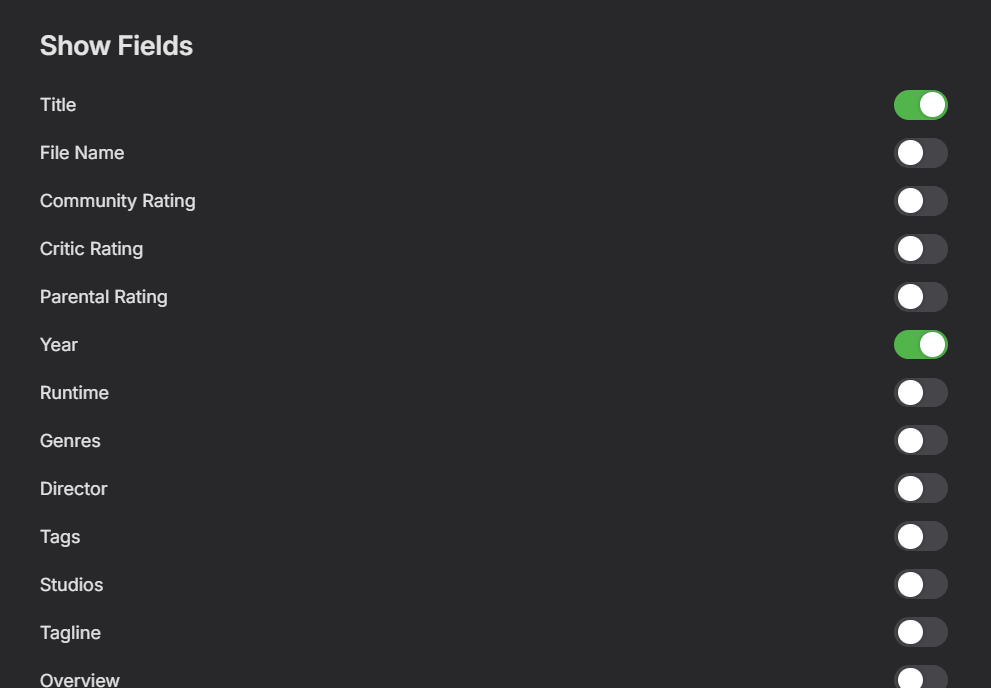
Why is this the default, and why can I not change this globally? I have 3 main reasons why I'm looking to moving off Emby, and exploring Jellyfin. This is the second reason. I'd like to hear from developers why such a basic function is not provided, I don't want this to be the default, why is this the default. I need to go manually through folders and subfolders to change so that the display has File Name and Runtime instead, hundreds of times. What was the thought behind locking this and giving the user no option here to globally change this. Very painful. Again, getting cookie cutter responses on fixing this functionality seems to a be a brush off; it's why initially moved away from Plex - focusing on anything else but fixing basic functionality.
-
@chrisrobbins1970Have you made any progress?
-
 TobyH joined the community
 -
I have 3 main reasons why I'm looking to moving off Emby, and exploring Jellyfin. This is one of them. I'd like to hear from developers why such a basic search function is not given more priority. I find this a basic function, and getting cookie cutter responses on fixing basic functionality seems to a be a brush off; it's why initially move away from Plex - focusing on anything else but fixing basic functionality.
-
@hdsuisseHave you tested the new playback mode?
-

Subtitle translation using local LLM or API calls - Very accurate language - cheap.
GrimReaper replied to dexus's topic in Tools and Utilities
I would love something like that (and I never cease hoping that one day would be feasible) as it would finally get wifey off my back - unfortunately, my native language is of such complexity that simple word-for-word translation or even Ai reading context can't provide acceptable outcome based on text-input only (words, nouns, verbs - everything changes in respect who's speaking, female or male + not 2 but 3 genders), voice sample is mandatory. If you know any method to automate that, I - and the better part of regional community - would likely be eternally grateful. For reference, I've just asked Gemini few common languages gradation by difficuly.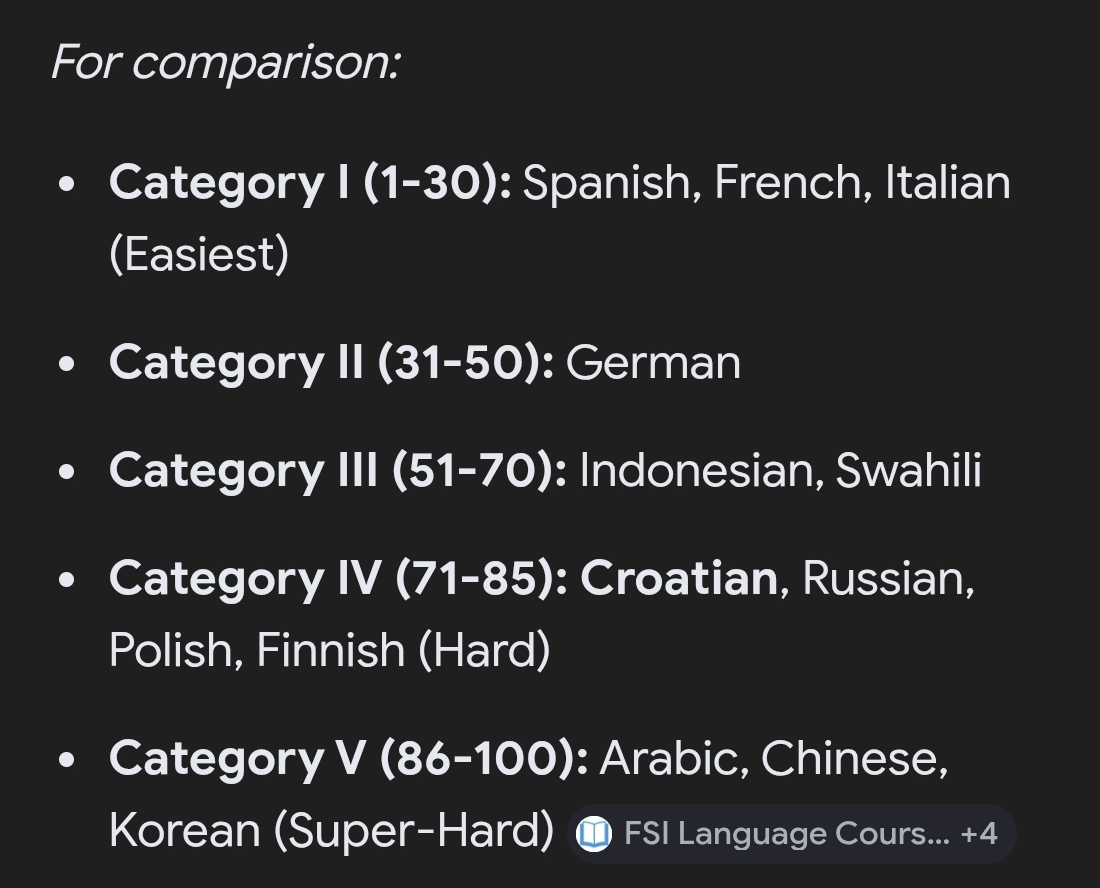
-
 As many of us, I am not a native english speaker, nor are many of my friends and family that use my Emby instance. Thus, I am constantly asked for subtitles for various tv-shows and movies. Now I have a VIP account on Opensubtitles.com and that is well and good, but often the subs are missing or sync is wrong. I have used AI tools both as a hobby and professionally for several years already, but until these last months, getting reliable AND cheap translations of whole movies and episodes has been a challenge.. that is .. until now. I have made a project that uses whatever llm you would like, either local, if you have some hefty hardware, or via API calls to commercial LLM's like chatgpt, claude, deepseek etc. This project has A LOT of redundancies built in, and uses batch translation to keep context, and ensure the llm understand the actual plot and handles slang and such in a good way. It is super easy to use, just edit the config files to reflect what are your target language, point the script to a folder with either a tv-series, a movie, or even a whole library, and it will go forth and find ALL embedded subtitles in mkv's extract one (there is a priority list you can use) translate it, and mux it into the mkv. For other file formats, eg. .mp4, .avi etc, it uses external files, and will translate those, and putting them back with the right language tag and filename. There is A LOT more to this, but if I can come with a simple suggestion: Use Deepseek API. It is really good for translation, and it is so cheap to use, I still can't wrap my head around it. If you need something like this, take a look at my repo, where all you need to know is, including one line installers. The project is of course fully open source, MIT license, so you can do with it what you want, and also it includes script wrappers for both powershell for use on windows, and bash scripts for use on Linux. (debian / ubuntu). One more thing, just to get it out of the way.. I take no responsibility for anything that happens by using the script. I have done all in my power to make it idiot-proof (mostly for myself :-)) but you never know what some people are capable of.. so use on your own risk.. Here is the repo: https://github.com/dexusno/Translate_Subs Best regards, dexus - Norway.
- 1 reply
-
- 1
-

-
After creating a new user profile in Kodi how do I invoke the E4K setup wizard to be able to select the proper Emby user?
-
- Today
-
Hi. I put emby on my friend's ipad and it works great with a wireguard connection using a local address direct to my network. Only problem is sometimes after a period of inactivity the wireguard connection gets out of kilter and needs to be reset. If my friend attempts to log in to emby while the WG connection is out of sorts, emby falls back to the remote SSL connection, for which my friend is not authorized. If she toggles WG off and on, then tries to log in again, emby keeps defaulting to the remote address, and she can't get in. Only by closing emby completely or restarting the ipad can she get back in when this happens. Anyway it's a bit of an inconvenience and I'm wondering if anything can be done. I'm thinking a client-side option to force local / remote would fix it, but if there's a simpler solution, that would be great too.
-

Webhook Notifications - Test works, but real notifications are never sent
Multitude9588 replied to Multitude9588's topic in Plugins
Hi Luke, Here are two specific examples. Example 1 Expected notification: User authenticated Time: 2026-03-31 16:38:21 What happened: user martin successfully authenticated on Martins-NAS Relevant log lines: 2026-03-31 16:38:21.873 Info UserManager: Authentication request for martin has succeeded. 2026-03-31 16:38:21.874 Debug Notifications: Sending notification to Emby Server User Notifications N8N: martin Has Authenticated on Martins-NAS Problem: I expected an outgoing webhook call here, but I do not see any matching HttpClient: POST ... line for this event, and nothing arrived at the webhook endpoint. Example 2 Expected notification: New Media Report Notification Time: 2026-03-31 16:38:59 What happened: Emby detected a newly added item and logged: 2026-03-31 16:38:59.966 Info NewMediaReportNotification - TaskNotifictionReport: Added Item Notification Message : ItemCount : 1 2026-03-31 16:38:59.967 Debug Notifications: Sending notification to Emby Server User Notifications N8N: New Media Report Notification Problem: again, I expected an outgoing webhook call, but I do not see any matching HttpClient: POST ... line for this real event, and nothing arrived at the webhook endpoint. For comparison, the test notification does work and I do see: 2026-03-31 16:38:09.849 Info HttpClient: POST http://10.20.1.24:5678/webhook/... 2026-03-31 16:38:09.988 Info HttpClient: Http response 200 ... Greetings Martin -

embyforkodi (next-gen) 12.X.X support
quickmic replied to quickmic's topic in Emby For Kodi Next Gen
Max resolution indeed needs a complete wipe of the cached artwork. Kodi caches the artwork directly (on demand) and is not related to the plugin (beside the compression options). I hope you didn't trigger the artwork cache manually. This forces the download immediately (not on demand). If you are familiar with Linux, you can install a sdcard/usb stick and link Kodis artwork folder to that drive. Only the artwork folder, keep everything else on the nvme internal drive. Don't use Kodi's pathsustition via advancedsettings.xml. Use linux softlinks (ln -s ...) -
embyforkodi (next-gen) 12.X.X support
quickmic replied to quickmic's topic in Emby For Kodi Next Gen
I use also Emby server beta version and there is no issue on my setup. I need a kodi.log for review including the freeze. -
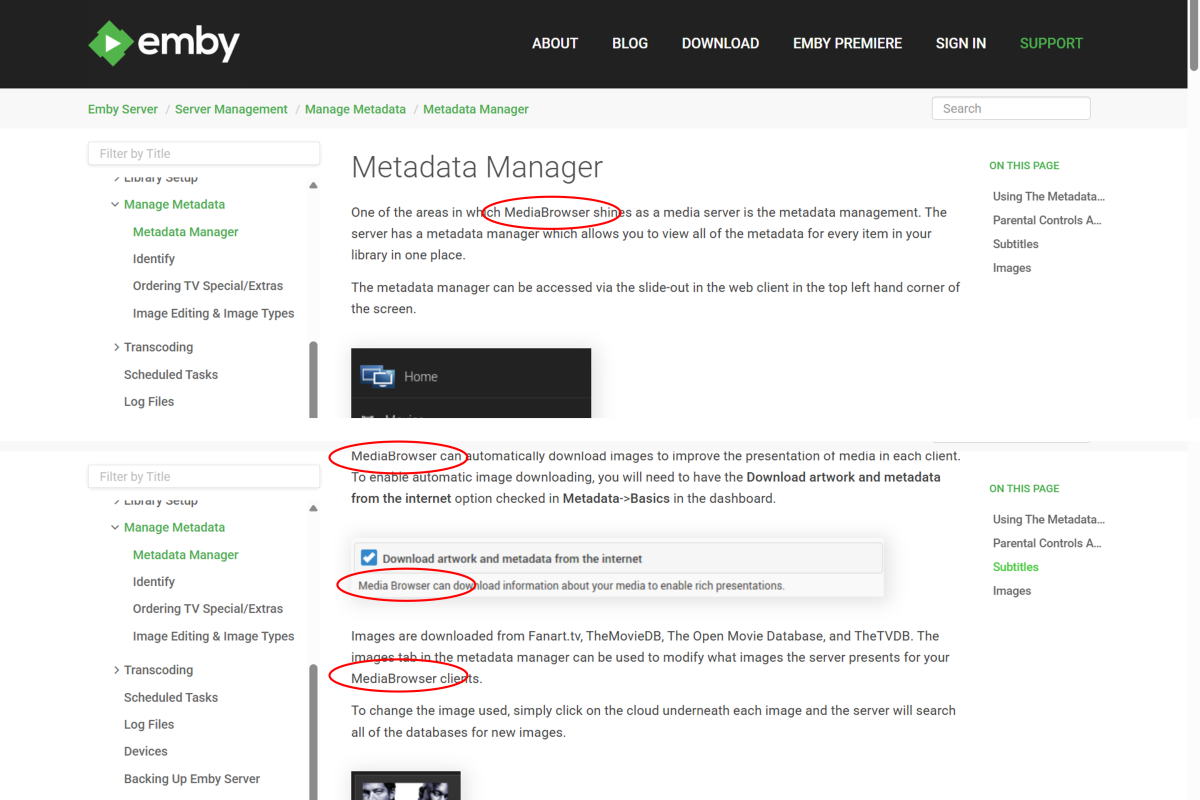
Hi, I just came across some old MediaBrowser references here: https://emby.media/support/articles/Metadata-manager.html Perhaps the page needs updating or maybe the navigation is just incorrectly linking to an old page? I think the images are all from a much older GUI as well.
-

Problemas al configurar emby en My cloud ex2 pro
sa2000 replied to Oscar Daniel Tafur Vidarte 's topic in Western Digital
@Oscar Daniel Tafur Vidarte Hi I am having difficulty understanding the issue I understand that the Emby Server is installed on the WD MyCloud Ex2 Ultra NAS which has an IP Address of 192.168.1.52 But you mentioned you installed it on windows ? I am confused here. Are we referring to an issue with the server running on the NAS or on Windows ? or on both ? Suggest we stick for now to just the Emby Server running on the NAS All the libraries screenshots you attached are for the Server Settings / Library screen. What do the libraries look like when you click on the Home button (showing as "Inicio" on your screenshots) - do all the libraries show up under "My Media" ? Is there an issue? You also included a screenshot of an error message indication that "\\192.168.1.52 could not be found" Where did you enter the `\\192,168.1.52" as a path in the libraries folder settings ? Could I have a screenshot showing where you entered this before you get the error I see you are using folder paths for movies libraries like "/shares/Directores" - why did you not do the same for the "Accion" library? I see you have a folder path as "\\192.168.1.52\Acción" - why? why are you not specifying WD MyCloud share path? If you download an embyserver log -and attach it and answer my questions above, that will help me understand the issue better For the server log, see How to report a problem -

embyforkodi (next-gen) 12.X.X support
supermood replied to quickmic's topic in Emby For Kodi Next Gen
hi @quickmic, I'm having 28gig of data in kodi, userdata, icons - which exceeds the space of my ugoos am6b+. Am I doing something wrong or does it have to be so much? (lib is about 1800 movies and 200 shows) I already checked the box for max resolution quality in your addon but that had no effect. maybe I have to delete all cache before, so it saves it again with less quality? is there something you would recommend? many thanks! -
I just got the app working on my TitanOS TV. The way to get there was too complicated and honestly just weird. I have my emby server exposed via nginx proxy manager. So I have a domain and an ssl certificate. Still the emby app on titanOS would not connect. The reason: I have setup a local DNS record so that requests in my local network don't go out through the internet but get routed directly to nginx. So the public DNS record is emby.mydomain.com -> MY_PUBLIC_IP in my local network the DNS resolves emby.mydomain.com -> 192.168... (local address of nginx proxy manager) With that setup the titanos app just wouldn't connect. Once I removed the local DNS record, it worked. So it seems that TitanOS is resolving the domain locally and then sending that resolved IP to a server which then connects to it?!? Hopefully this helps someone else.
-
I am experimenting with this box because it would simplify my life. I have been using a Windows 7 and now 10 PC for years with no emby problems on the same Unraid server. I want to convert to something with less maintenance issues as once or twice a year I wind up resetting the WIndows Kodi PC. For my needs, to best accomplish this I have been trying to get ZDMC v21 working with that fork's internal player which is the Zidooplayer. The Zidoo forums has half of the people saying it works and half saying it doesn't. What I can gather is that the Zidoo player doesn't like streaming files only local by design (don't ask me why.) Copilot tells me that this is very workable but I can't quite follow Copilots directions to completion. Here's where I am step by step: 1) I have websocket active and http: inactive. Path substitution on, direct paths. 2) Copilot advises to add a new path substitution. ls command gives me root@Unraid:/mnt/user/Movies which I think should translate to smb://Unraid/Movies/ I know on a PC I see UNRAID on my network and double click on it and see Movies Where I get lost is where Copilot tells me to add this path on the Advanced part of Emby. There's no place to do this. The only place I could find is under library, clicking on Movies, edit, I have added smb://Unraid/Movies/ to the Optional Share Folder field. I have restarted the server. 3) Copilot tells me to test by going to Kodi Videos files, and when I browse under either emby-for-kodi-next-gen-addon-video OR emby-for-kodi-next-gen-addon-video-path-substitution I get Remote Share / Path not found or invalid. Copilot says this error means I don't have it set correctly. (Gee, thanks.) So the internal (to ZDMC) Zidooplayer does not work. To me, the attached log is showing the correct SMB file and pathing. I may have a different issue, but Copilot is insiting I don't have pathing right. Any thoughts? kodi.log
-
And that didn't take long, found 1 bug right as I posted that Updates: Fixed the admin dashboard. Small variable updates Emby Navy and Gold v4.50.css
-
Hi Luke: The live TV refresh was just running, but making no progress. I checked the log and there were no entries in the log other than Tune In Plugin entries around 12:02. It's strange because I have Live TV scheduled for an every twelve hour refresh, and whatever was running, seemed to be running as a tv channel refresh, green progress bar. Ive uninstalled the "Tune In Plugin", I dont really use it anyway, and I did an Emby restart, and Im doing a manual channel refresh now. Ill give it another day or perhaps later 12 hours from now, lets see what happens Attached is log, perhaps you can see something im missing. Thanks again. GG embyserver-63910901099.txt
-

Emby Theater v3.0.20 (Server v4.9.3.0) Homescreen Horiz. navigation broken
Ralph's Emby replied to d00zah's topic in Windows & Xbox
@scottproRegarding issue/bug was a ET (legacy) problem, it was inaccurate because Emby Server Beta also was affected by the same issue, the one is reflected on Emby Theater but at least that part is resolved, last night I used Theater and the side scrolling is working but as stated before the option to apply the preferences "Hide Played Media" on Theater isn't working and yes I did check on my Preferences and are selected as before. @Luke Maybe check on this... isn't hiding the played media only on Theater, the new Windows App works as it should (I have both). Hope this helps -
Hide Playlists from Included In & Group Albums by Release Type + Decade
GrimReaper replied to user24's topic in General/Windows
GUI was getting overwhelmed with all the stuff crammed in, needed some breathing room. v0.9 - GUI reworked emby_album_tag_importer.py -
Emby Theme: Retro Navy & Gold (W/ Seasonal Themes)
GrimReaper replied to Aleas's topic in Web App CSS
Done. Done. Done. -
That would be awesome! I do know the ACdb has an option to add tags to collections? I'm not sure if it actually does that in Emby as well, but it seems like tags for collections still exist in some type of way? Either way, for the customization I'm going for, a feature like this would massively simplify my collections!
-
The way I understand it is that I can have up to 5 devices in the free version in to which I can access my emby server library. When try to access on another device I get a pop-up that says this feature is only available with a premiere subscription. What am I missing here?