All Activity
- Past hour
-
 alfonsocampobornacelli+900@gmail.com joined the community
 -
 Paulafer joined the community
 -
 Toms_Vault joined the community
 -
 TRUG joined the community
 -
 jhon2001 joined the community
 -
 niche2 joined the community
 -
 teostukan joined the community
 -
 lk3171 joined the community
 -
-
 AtharvaX joined the community
 -
 3AUH1D joined the community
 -

Why is Jellyfin so much more popular than Emby?
scb99 replied to Nabukodonosor's topic in Non-Emby General Discussion
He has now posted some more on Github -

Deutscher Alexa Skill meldet „Keine Berechtigung“, obwohl Kontoverknüpfung erfolgreich ist
Obelinchen replied to Obelinchen's topic in Amazon Alexa
Das Problem mit der Nichterreichbarkeit des Skills hat sich erledigt. Es lag daran, dass mein PC vorübergehend nicht mit der Internetverbindung verbunden war, über die der Emby-Server erreichbar ist. Der Server ist jetzt wieder normal erreichbar. Der ursprüngliche Fehler besteht aber weiterhin: „Keine Berechtigung. Bitte den Alexa-Skill neu verknüpfen.“ Das Zertifikatsproblem erklärt daher offenbar nur die zwischenzeitliche Nichterreichbarkeit, nicht den weiterhin bestehenden Berechtigungsfehler. English The issue with the skill being unreachable has been resolved. My PC was temporarily not connected to the internet connection used by the Emby server. The server is now reachable again. However, the original issue still remains: “No permission. Please relink the Alexa skill.” So the certificate error appears to explain only the temporary connectivity problem, not the ongoing permission error. -
Deutscher Alexa Skill meldet „Keine Berechtigung“, obwohl Kontoverknüpfung erfolgreich ist
Obelinchen replied to Obelinchen's topic in Amazon Alexa
Danke. Handelt es sich dabei um Logs aus dem Backend des Alexa-Skills? Ich vermute, dass der Fehler aus den Cloud-Logs des Skills stammt. Mein Emby-Server ist extern per HTTPS erreichbar, und Browser zeigen das Zertifikat als gültig an. Könnte der Skill noch eine alte Serveradresse oder ein zwischengespeichertes Zertifikat verwenden? Thank you. Are these logs from the Alexa skill backend? I assume the error is coming from the skill’s cloud logs. My Emby server is reachable externally via HTTPS and browsers show the certificate as valid. Could the skill still be using an old server address or cached certificate? - Today
-
At this time, you cannot. You can just use the other app, however.
-
Ich habe mir schon gedacht, dass diese Meldung einen Zweck hat. Ich würde ihn aber gerne deaktivieren, und möchte wissen wie das geht, und wenn ja wo?
-
It might have something to do with this. Trakt Product Update – June & Mid-July 2026 - Trakt / Product Updates - Trakt Forums And this Broken Sign In - Trakt / Questions & Help - Trakt Forums
-

Advice please - getting the maximum from my EMBY Setup / Samsung HW-Q990C (Atmos and TrueHD)
ebr replied to Robnaeyaert's topic in Hardware
Hi. Based on your original request, just get a Shield Pro and be done with it. Your AI pointed out an HTPC as "full flexibility". Well, that comes with full headache's as well. The Shield is plug-and-play, will play all your sound formats and support all other streaming apps without you having to constantly fiddle and configure it. -

Deutscher Alexa Skill meldet „Keine Berechtigung“, obwohl Kontoverknüpfung erfolgreich ist
hatharry replied to Obelinchen's topic in Amazon Alexa
The logs say: FetchError: request failed, reason: certificate has expired -
Hi. It is not a "problem". It is a feature/behavior of that app. Most people use that field for some sort of temporary message like "The server will be down for maintenance tonight" so the app gives you a way to remove it from your screen after you have read it.
-
I've been a Emby (with Trakt plugin) user for years, and I'm having the same experience for the last few days. Noticed watched status hadn’t been syncing from Emby to Trakt for a few days, and on the odd occasion this happens in the past, I simply get a new PIN via 'Get PIN' in Emby server settings. But this time when I click on 'Get PIN' I get routed to this URL, which produces a blank page: https://trakt.tv/oauth/authorize?response_type=code&client_id=c4eb7ab4ec2ad77255a739f62102bed03a2f56514ab9d20a3001b87f6d465358&redirect_uri=urn:ietf:wg:oauth:2.0:oob Where typically, I’d see this screen: https://us1.discourse-cdn.com/flex002/uploads/trakt/original/3X/8/b/8bb57bdacae07cd72a1438fda54d8b93a531d1cb.jpeg embyserver.txt
-
Premiere license key being rejected for all Premiere features
ebr replied to filecore's topic in General/Windows
Hi. Please send an email to billingsupport@emby.media using the email you have subscribed with and they can help you. Thanks! -
Hi, there's already an open request for this or something functionally equivalent. Please join in and contribute to the existing discussion at:
-

Premiere license key being rejected for all Premiere features
filecore posted a topic in General/Windows
Quick backstory: I was driving on Sunday 12.7. and listening to my playlists in the car, via Emby on Android Auto. Then I was away for a few days, and the next time I opened Emby, my playlists were missing. I did some investigating and it seems that personal playlists are a licensed feature, and my license validation seems to be consistently rejected. Not failing, actually denied by the auth server at mb3admin.com along with the other Premiere features. Is there some known issue that's been occurring over the last week, or some other known cause? 2026-07-20 16:27:26.228 Info App: Emby Server Version: 4.9.5.0 (running in Docker in Linux, from the official Docker image) 2026-07-20 16:34:35.425 Info HttpClient: POST https://mb3admin.com/admin/service/registration/validate 2026-07-20 16:34:35.828 Info HttpClient: Http response 200 from https://mb3admin.com/admin/service/registration/validate after 402ms. 2026-07-20 16:34:35.831 Info SecurityManager: Not registered for Playlists 2026-07-20 16:35:04.347 Info HttpClient: POST https://mb3admin.com/admin/service/registration/validate 2026-07-20 16:35:04.724 Info HttpClient: Http response 200 from https://mb3admin.com/admin/service/registration/validate after 376ms. 2026-07-20 16:35:04.724 Info SecurityManager: Not registered for Playlists 2026-07-20 16:35:04.749 Info HttpClient: POST https://mb3admin.com/admin/service/registration/validate 2026-07-20 16:35:04.874 Info HttpClient: Http response 200 from https://mb3admin.com/admin/service/registration/validate after 125ms. 2026-07-20 16:35:04.875 Info SecurityManager: Not registered for LiveTv 2026-07-20 16:35:05.036 Info HttpClient: POST https://mb3admin.com/admin/service/registration/validate 2026-07-20 16:35:05.161 Info HttpClient: Http response 200 from https://mb3admin.com/admin/service/registration/validate after 125ms. 2026-07-20 16:35:05.161 Info SecurityManager: Not registered for BackdropsPlugin 2026-07-20 16:35:05.176 Info HttpClient: POST https://mb3admin.com/admin/service/registration/validate 2026-07-20 16:35:05.301 Info HttpClient: Http response 200 from https://mb3admin.com/admin/service/registration/validate after 125ms. 2026-07-20 16:35:05.303 Info SecurityManager: Not registered for SubtitleSearch Based on the logs, the server reaches mb3admin.com successfully (HTTP 200 each time), so this is not a connectivity or firewall issue. The validation server is actively responding "not registered" for every Premiere feature simultaneously: Playlists, LiveTv, LiveTvRecording, BackdropsPlugin, SubtitleSearch. This started around July 13 and has persisted through multiple key re-entries and server restarts (both from within the web UI and by restarting the Docker container). Server is 4.9.5.0, lifetime licence. -
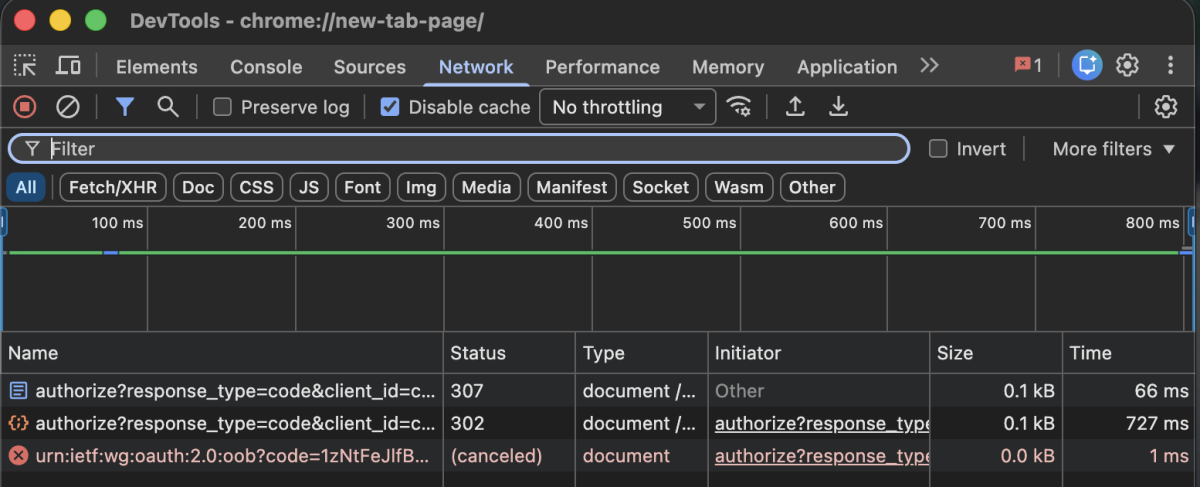
Emby Server 4.9.5.0 Trakt Plugin 3.8.5.0 I've never setup or used this plugin before but I installed it several days ago. Go to my user profile (Emby web) > app settings > user preferences > Trakt. I see the option for Get Pin. Clicking that link opens a new browser tab at: https://trakt.tv/oauth/authorize?response_type=code&client_id=...&redirect_uri=urn:ietf:wg:oauth:2.0:oob (... is some random id that I have redacted) That page responds with nothing. Looking through the network traffic, I see: All of the above is with me having previously been signed in with Trakt in this browser. If I clear data for trakt.tv, that URL hits me with a Trakt login prompt but as soon as enter my credentials, the page just spins in Chrome. Safari gives the message "Safari cannot open the page because the address is invalid." This is with the latest google Chrome and Safari on macOS. Ad blockers disabled. I could provide server logs but that seems pointless, all of this is happening in a browser from the link Emby provided. I've tried every day for the last 5 days with no improvement.
-

Emby Windows 2.317.2.0 playback controls hidden behind video
softworkz replied to TDriver's topic in Windows & Xbox
I'm grad you were able to resolved it. Thanks a lot for the feedback. -
Leider ist es immer noch nicht behoben nun ist Fussball vorbei da wäre es gut gewesen wenn es gegangen wäre. Unfortunately, it still hasn't been fixed. Now that soccer season is over, it would have been nice if it had worked.
-
3) is already implemented.
-
Will there be any advantages in waiting for the native package? Will it be updated as frequently as the Docker version? Because that's a downside of running Jelly native on ugreen: I'm versions behind the one people running in Docker.
-

[Beta] ROMote – play your retro game collection in the browser (NES → PlayStation)
GrimEvil replied to digitalirony's topic in Plugins
So on the android App on my phone/TV I click the link but the the popup says something went wrong and closes the app. on the browser works fine, not sure of the issue other than it is blocked for me on anything other than the browser. -
Current issues: live tv tunes to station, but does not display anything only a spinning circle, this is on android and the windows application The /Moonfin/Web interface never loads in the brower Movies when I click play, i have an intro video play before the movie, this shows no controls and then takes a couple of seconds longer than emby to start playing media There are other UI issues for me, but I am playing with the settings and if need will report on this separately
-
Duplicate:
-
Hi! I have been exploring Emby as a way to share family photos and videos with my grownup kids. It seems like a perfect solution, but we have been unable to get external access working. Here are some details about our setup: - we have a router from Optimum, our internet service provider. - we have a netgear orbi RBR750 and two satellites for home WiFi network due to size of our home - we tried to follow instructions to put the Optimum router on bridge mode so we can have the correct Universal plug and play (UPnP) set up, as instructed. This was unsuccessful and we actually lost all internet access until we reverted everything. Emby is set up on a Mac Studio 2022 with Apple M1 Max and Sequoia 15.7.3, accessing an external hard drive for the folders and data. I have not purchased Emby Premier yet because I wanted to test functionality first. Is that part of the issue? Thanks!
-
I have a couple of requests, all related to the "original title." 1) Include an option within each library to choose whether to display the "title" or the "original title." 2) It would be good if the movie page displayed the "title" with the "original title" underneath (in a smaller font) -or vice versa, depending on the library setting chosen. 3) Ensure the search function also searches within the "original title." 4) Make "original title" an option in "show fields."
-
Hi! I have been exploring Emby as a way to share family photos and videos with my grownup kids. It seems like a perfect solution, but we have been unable to get external access working. Here are some details about our setup: - we have a router from Optimum, our internet service provider. - we have a netgear orbi RBR750 and two satellites for home WiFi network due to size of our home - we tried to follow instructions to put the Optimum router on bridge mode so we can have the correct Universal plug and play (UPnP) set up, as instructed. This was unsuccessful and we actually lost all internet access until we reverted everything. Emby is set up on a Mac Studio 2022 with Apple M1 Max and Sequoia 15.7.3, accessing an external hard drive for the folders and data. Thanks!