All Activity
- Past hour
-
 Desou joined the community
 -
 hjj19691105 joined the community
 -
 Noonnyii joined the community
 -
 Ashvamedh 3598 joined the community
 -
 zxcv1 joined the community
 -
 zxydsb joined the community
 -
 Sirfechin joined the community
 -
 libuyan joined the community
 -
 sizm joined the community
 -
 Saleh026 joined the community
 -
Think of DTS as either 5.1 or 7.1. The Roku can play DTS. The Roku cannot play lossless streams. It must always use the DTS "core". Even if you have DTS-HD MA in 6 channel, rather than 8, the Roku isn't playing the lossless stream. It is playing the lossy "core" from the DTS stream. DTS should pass-through. The player just goes hmm.. whatever.. here is the stream. Untouched. Passes it down the wire. Just puts it out on the pass-through audio stream. After that.. it is up to your equipment to decode that or remove the DTS "core" from the stream and play it. This is why you must both enable pass-through then rather than use "Auto" use "Custom" and choose which codecs to allow. Usually DD5.1 and DTS turned on. Then restart the Roku. After that the Roku now understands you want DTS to pass-through. It is doing this because you hear silence with 8 channel DTS. That must mean the pass-through is working, or it means Roku isn't passing through the DTS to the receiver. But it does mean the Roku is doing it since this shows as Direct Play. @ebrDo you have a TV that supports DTS which can connect to a Roku? I do not or I would do this myself to test. Simply disable audio transcoding for a test user. Then play that file with that test user that has DTS-HD MA in 8 channels. Can you hear the lossy DTS "core" playing from the DTS-HD MA track? or do you also hear silence? If you also hear silence this is most certainly a recent Roku firmware bug.
-
Thanks for your reply. You are perceptive. I did migrate from Plex. This problem came out of nowhere, even before I attempted to update to 4.9.5 - advice - leave that update alone, wait for the next one. However, when I migrated to Emby, I manually recreated 50 Playlists within Emby, consisting of 50-60 songs manually. What a pain. Emby handles the media files just fine, it seems to have a problem with user created data. I'll attempt your instructions above(thanks for taking the time). Presently, I have installed a music streaming software on my iphone that accommodates my playlists and allows me to take them with me. Easy and it preserves my playlists. Emby now is just a holding container for music, and a video player for everything else. This is a "two state" solution, but it works
-
I dont know wether you fixed something else @hatharry but i ve been doing a lot of reading about alexa certificate chain support. I had switched over to letsencrypt (away from zero ssl) without luck but i forgot to set RSA 2028 explicitly and i think my renewal app (certifytheweb) chose elliptical by default...Anyways after arguing with AI for the whole day on various things i ticked letsencrypt on rsa 2048 and i now have audio. please dont burst my bubble and say it was something you did i am feeling very smug. Once i am sure of solution i will write it up. Edit Change player is working too
- Today
-
Suspect this is a known issue with .NET unable to find data paths that have previous dbase install links to files were cached and are no longer valid and /or not all .jpg files were saved from a dbase update or the location of these .jpg files change and old links fail. Example quote suggesting a .NET fix: https://stackoverflow.com/questions/7673290/visual-studio-retrieving-an-incorrect-path-to-a-project-from-somewhere Also see these search results: https://duckduckgo.com/?q=.net+data+path+errors+old+file+cache&ia=web Suspect that playlist issues result from migration from Plex. It seems almost obvious that this a long list of links, converted from one dbase to another, would easily fail. Even just testing this issue is complex, at best. Different versions of each dbase can cause different issues. Every playlist from all previous software versions would, ideally, need to be tested for conversion issues to new file locations with the latest Emby server software. Has this been done? Trying to get the old playlist versions to work is most likely a waste of time. In a tech support team for any business, fixing old lists would not be approved. Probably, the expected solution would be to just remake the playlists.
-
Gives me the warning screen about "unsecure" connection, I press "continue", and it connects.
-

Failed 4.9.5 update and disappearing Playlists
brucesnelgrove replied to brucesnelgrove's topic in TerraMaster NAS
I have rebooted twice. Still lists 4.9.3 as current rev. and also telling me 4.9.5 is available Before I updated I noticed 2 folders before my playlists disappeared. One said "Playlists" and the other "userplaylists". I noticed "userplaylists"was empty and "PLaylists" was occupied with the playlists I created. After my attempted upgrade and losing 50 playlists, I went back in and copied the ".m3u" files to "userplaylists" and my playlists returned, and they play. I am still running into problems with iOS not connecting. As a result, I have purchased dedicated music streaming software for my phone that allows me to stream and take my playlists with me. It appears the 4.9.5 leaves the media files alone, but destroys or damages "user created" data. -
Every time I see an update and go to the forum to check if there are any problems, I lose the desire to update. I'll keep my version 4.9.1.90, even though it doesn't scan all the films and TV series I have on my 50TB NAS.
-
Hi, I'm trying to use the following public IPTV playlist with Emby: https://raw.githubusercontent.com/jnk22/kodinerds-iptv/master/iptv/clean/clean_tv.m3u The playlist imports successfully, but only a small number of channels are playable. Some channels work normally, but most channels won't start at all in Emby. There is no playback; they simply fail to begin streaming. The same playlist works perfectly in VLC. All channels I've tested start and play without any issues there. Is this playlist expected to work in Emby, or are there known compatibility issues with some of the streams contained in it? Thanks
-
Thanks @hatharry, I can now issue a "change player" command and the "currently in use"? device is listed but no other devices, like before if i say "no" to the first one (i have 3 echos). I still get "Media Type Audio is unsupported on Amazon Echo" on echo but on Phone i get an additional error "Sorry your mobile device lost its connection". I am not dropping any pings on wifi to google.co.uk so i dont believe i have a connection problem (at layer 3).
-

Recording plays on iOS and on HTTP but not on Emby Roku
HappyGilmour replied to HappyGilmour's topic in Live TV
Ok so I don't have the same content to test against (it was too big and I needed space.) BUT I did test against known channels that produced this error in the past and I had no issues at all. Thank you so much (all of you) for your hard work. It is greatly appreciated! -
Thanks for your quick reply. And no worries at all, there's absolutely no urgency. It's really just a nice-to-have feature that I thought could improve the consistency of the overlays on libraries where posters don't all follow the same aspect ratio. Enjoy your summer break and don't feel any pressure to work on it. If it eventually makes its way into the plugin someday, that would be great, but it's certainly not a priority. Thanks again for taking the time to look into it!
-
Emby has always had R+W permissions to every folder and file on the drive. I went back in and confirmed settings and confirmed the box for all sub-folders and files was checked. Other than that I don't know what else to do.
-
Moved to the Emby Server (Linux) forum
-
The plugin takes the posters aspect ratio and uses a % of that to scale the icons and placement. I can certainly add an option to use 2:3 scaling, pretty easily even, i'm just not sure if it will negatively affect the posters. I will look into it but can't promise when it will be done, kinda on my summer break now and been trying (and failing) to limit the amount of work i have to do.
-
The DTS Core is usually embedded within the lossless DTS HD-MA track, so it cannot be "deleted" without re-encoding the audio. Most Blu-rays have a seperate DTS only track, that's what you can deselect within MakeMKV.
-
Yes, I use m3ueditor hosted in the same machine. Connection speed is not the issue.
-
Please try again, there was a bug with changing devices.
-
ive Just had the same issue think I’ve found a quick fix download the infuse app on iOS and run your Emby through that works perfectly through the rayneo air pro 4
-
There is no playback in your log. Looks like maybe you restarted the app before sending the log. This would be a very plausible explanation of what is happening.
-
Correct. Which means that, since we already have OS integration, we will be taking advantage of this anyway. To me, this appears to be a clever way of them getting more contributions to their site.
-
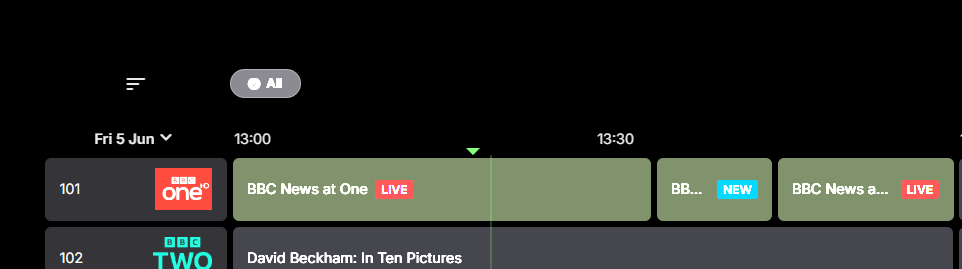
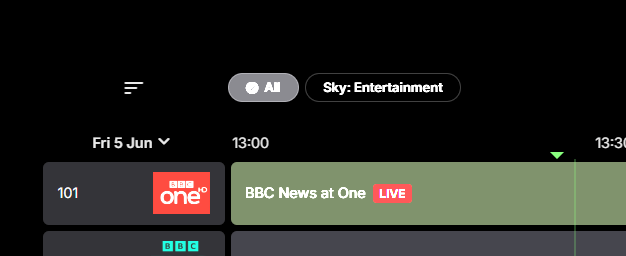
Hi, I have an issue with my Live TV setup. I use a HD Homerun/m3u8, Example below of the layout of a channel from a standard m3u. #EXTM3U x-tvg-url="http://*.*.*.*:****/epg" url-tvg="http://*.*.*.*:****/output/epg" #EXTINF:-1 tvg-id="101" tvg-name="BBC One HD" tvg-logo="http://*.*.*.*:****/api/channels/logos/3870/cache/" tvg-chno="101" group-title="Sky: Entertainment",BBC One HD http://*.*.*.*:****/proxy/ts/stream/5253535 This works fine but I do not see the Tag/Group in the Emby guide, all it shows just shows "All" I would expect emby to use group-title="Sky: Entertainment" or any of the other one's I set for Group-title. Currently I have to use the bulk plugin to fix this issue manually, as per below Is there any reason why this does not work as expected and auto import the tag/group from the m3u/HD homerun?
-
Hi @yocker, I have a question regarding how overlays are applied to posters. From what I understand, EmbyIcons adds the icons directly onto the original poster image. However, many posters are not exactly in a 2:3 ratio, and Emby then stretches or resizes them to fit its poster layout. As a result, the icons themselves can appear slightly distorted. Would it be possible to change this behavior, or add an optional setting, so that overlays are applied to a normalized 2:3 poster image instead of the original source image? In other words: Current workflow: Original poster EmbyIcons adds overlays Emby displays/stretchs to 2:3 Overlays may become distorted Desired workflow: Original poster Poster normalized to 2:3 EmbyIcons adds overlays Displayed with correctly proportioned overlays The goal would be to ensure that icons always keep the correct aspect ratio and positioning, regardless of the source poster dimensions. Is this something that could be implemented, or is there a technical limitation in the way Emby provides poster images to plugins? Thanks for your time and for all your work on the plugin.
-
plex with alexa had a play feature called Random Album Radio which would play a random album, and when that was done, play another random album, and so on.
-
For a list of what is available with Emby Premiere, please see Emby Premiere Feature Matrix There have been a number of Forum topics relating to Hardware Acceleration on Emby Server. Have a look at the discussions in these topics HW Acceleration on raspberry pi Raspberry Pi 4 hw encdoing works There may be more
-
Thanks, They aren’t working again at the moment. I am guessing it has to be something to do with Youtube.