All Activity
- Past hour
-
 wangxx joined the community
 -
 Kexer joined the community
 -
 linmingxie joined the community
 -
 a.com joined the community
 -

embyforkodi (next-gen) 12.X.X support
quickmic replied to quickmic's topic in Emby For Kodi Next Gen
New PUBLIC TESTING version available 12.4.13: Delta changelog 12.4.12 -> 12.4.13 fix database open -
 Dario0011 joined the community
 -
Collections can currently only be sorted by Album, Artist, Community Rating, Date Added, File Name, Runtime, Title, Release Date, and Year. When sorting a library, there are additional options for Bitrate, Container, Critic Rating, Date Played, Director, Framerate, IMDB Rating, Parental Rating, Plays, Random, Resolution, Runtime, Size, and Video Codec. Why aren't these available for collections as well? I understand that a lot of them make little sense as a default collection order (though Album and Artist make no sense when sorting a collection of movies, either), but they should all be available when viewing a collection and in the Home Screen Editor. There's also no way to filter collections, it would seem. I'd really like to filter my “1,001 Movies You Must See Before You Die” collection to only show unplayed movies, and then sort by random to find something to watch, but currently I can't do that.
-

Emby 2.0.3 Apple TV 4K – Emby app crashes during playback (Direct Play) with no server errors
Eliran posted a topic in MacOS
Hi, I’m having repeated crashes with the Emby app on Apple TV 4K. The app closes instantly during playback, but the server shows no errors and continues running normally. My setup: Apple TV 4K Model : A2843 tvOS version: 26.3 Emby for tvOS version: 2.0.3 Emby Server version: 4.9.3.0 Network: Wired Playback mode: Direct Play Video file: MKV with external SRT subtitle (but crash happens even without subtitles) What happens: Playback starts normally After a few minutes, the Emby app closes itself No error message No buffering No server-side warnings Server logs show only “client disconnected” The same file plays perfectly on Plex on the same Apple TV What I already tried: Disabled Match Frame Rate on Apple TV Reinstalled Emby app Restarted Apple TV Tried multiple files Tried with and without subtitles No transcoding involved (Direct Play only) Additional notes: Plex plays the exact same file without any issues This looks like a tvOS client crash (possibly mpv/libmpv related) ebr asked me to post here so the issue can be tracked properly. If needed, I can provide logs, timestamps, or test additional builds. Thanks. -

Emby has been a consistent source of Headaches on my NVIDIA Shield Pro 2019. Stuttering / freezing / audio
popy replied to Mkilbride's topic in Android
For me it seems the issue is gone after changing the setting descibed in my post above to "Auto". I have watched ~9 epsiodes without an issue. @Mkilbridecan check this setting on your end? @LukeIt seems that if any part of the stream is reencoded (in my case audio and maybe because of that use other transport method) the issue appears. P.S.: i am using AndroidTV emby app with wired 2,5 GBE connection. All other real time services over this connection doesn't have any issue at all. Also iperf works full speed with zero errors. -
 ninhoka joined the community
 -
 19112580795 joined the community
 -
 LTide joined the community
 -
Ok. Was a long shot. Thanks for replying!
-
With the death of CableCARD in the U.S., there's probably less demand for LiveTV in Emby. I generally don't use it any longer since I lost my promotion through Spectrum and my wife and I could no longer switch back and forth as "new" customers due to a new customer not being able to get a CableCARD plus the complications of having relatively cheap cell service tied to our Spectrum internet account. To top it off, SpectrumTV in their infinite wisdom doesn't have a GoogleTV App. Even then, when it was called AndroidTV the rep said we have an Android App and when informed there's a difference and there's no app in the Google Play Store she just repeated herself insisting they had an app for Android. Needless to say we switched to YTTV and haven't looked back. As far as channels goes, it'll read my library but cannot play back HDR 10 or Atmos and I they cannot transcode as smoothly as @softworkzthrottled transcoding solution can or even at all, last I tried anyhow. TVE doesn't have NBC due to NBC's walled garden of DRM. I do subscribe to it for occasional TVE recording with Comskip built in which is actually something Emby could do but Server side. TL/DR I use the Emby Universal Android App on all 8 of my Google TV's with 7 of them using just the built in Software which is something I said I would never do years ago but it's so good now on mid to high end Google TV's why not? There's so many sources of LiveTV now it just doesn't need to be a priority for Emby.
-
Hey, are there any news about this topic?
- Today
-
Thanks for your answer! When will this version be released? For now i forced transcoding for every codec and it seems to be working...
-
For me I found a temp solution. I went into the roku emby settings and changed the video playback quality from auto to 1080p @ 50Mbs. So far I haven't experienced the issue.
-
I just tried again (requested a new Trakt PIN) and "Emby" still doesn't show up in Trakt's list of authorized applications (https://trakt.tv/oauth/authorized_applications). The Trakt PIN screen just sits at "Return to the app and enter this PIN to connect your account" screen. Until Emby shows up as an authorized app, pretty sure there's zero chance of any syncing.
-
A little bit of update: my emby just reconnected to trakt, updated the seen shows. And no, I have not done anything to it, just changed the pin and did a library sync. Not sure what happened here.
-
I have been getting this problem since last year. My QNAP NAS is hardwired to my router. 100s of videos that played back without issue for years now jump back by up to two seconds-ish. The subtitles (SRT format) also go out of sync, but are corrected by stopping and restarting the video. The timing of the jump is random and usually is not reproducible at the same spot. It can occur several times in a 25-minute show or not at all. Have you found what the issue is yet Luke? Thanks for your help
-
Hi. Looks like a remote connection and the bitrate setting that was either chosen in the app or determined by the app connection is extremely low (1Mb). Clarification here - transcoding is NOT a Premiere only feature. The server provides transcoding. It is only hardware accelerated transcoding that is a Premiere feature.
-

Emby on ROKU has suddenly started almost constant buffering
ebr replied to TechowlTim's topic in General/Windows
Thanks for reporting back. Let us know how it goes. -
hmm there goes that theory.. Yeah I've rebooted everything few times last few weeks. Still keeps buffering (at least) once every hour for about 60 seconds.
-
The only reason I am still here is because Emby is the best of ok bunch. I still search for something better channels DVR is the closest and it is getting better just they don’t have a win client. feel sorry for softworkz for all his hard work that has been just been thrown down the toilet hopefully he has been rewarded if not not sure why he would support the open source jellyfin project or create his own commercial or open source project
-

Any file with this filename will not be added to the library
GrimReaper replied to gu5gus's topic in Linux
Move TMDb on top (or disable TVDB altogether), rename your movie folder to "Ex Machina (2015) [tmdbid=264660]", run Scan media library task. In each item details there's a "Split Versions Apart" button lower down, split items, re-Identify incorrectly identified ones. -

Unwanted fanart.jpg files being saved to Movie folders
tanStaafl replied to tanStaafl's topic in General/Windows
The is me beating a dead horse.. Updated a couple of movies in my collection and AFTER the movie was updated and 3 backdrop images downloaded, I got this: I'm showin this because oddly enough, the -thumb.jpg's are actually images that were missing, HOWEVER, it doesn't put in the missing -thumb.jpg's for Movies, only TV Series..?? All Image Fetchers are set the same be it Movie or TV Series. Curiouser and Couriouser..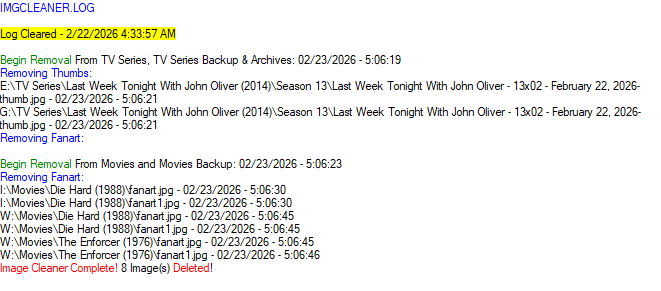
-
log ? merci d'avance embyserver-63907401600.txt
-
LOL never thought about it, but here are some examples that might be fitting? Continuing: Ended:






-
For good reasons. There can be just one captain on a boat, and when you want to achieve proper results, you can't let two entities control a single configuration (unless a player doesn't do much on its own, like the old ET. Please note that you are talking about integrated players. The external player features is something different (just see the menu in ET legacy).
-
turning on firewall today. everything seems to be working fine so far. will update hopefully in a week and alls fine.
-
Please talk to me as if I'm stupid. How can I fix this problem?
-
embyserver...txt line 642+ Line 663+ Quick guess... No license or registration not working and DirectPlay limit exceeded, so transcoding is required for .mkv media? But if license is not working, then transcoding is not available.
-
TVDB sometimes offers different versions as different "orders" - some of these can be selected by Emby in the series metadata. Paul