All Activity
- Past hour
-
 irzuc joined the community
 -
 Lepasaur joined the community
 -
 Linacab joined the community
 -
 Eleaor_Fishman joined the community
 -
 Dodjdlrnrb joined the community
 -
 Rony20 joined the community
 -
 JDQUARTER joined the community
 -
 Romiki joined the community
 -
 Vickyhp joined the community
 -
Tat, Consider you may have a collection of media that has not perhaps been conformed to all one standard and limited to specific codecs and bandwidth that are compatible and works for your hardware and for all your users. Yes, of course, Emby's advantage is that it can take care of that for you. But there can be limits. Maybe some of your media has timeline errors that only show up if you run a error probe check. Or some of your media might have a combination of high bit rate, high frames per second, high end audio and graphic subtitles all at once. This combination can be handled by Emby... but some server capacity and bandwidth for some remote users with different players and networks might NOT work 100%. OK, I understand you do not want have to test, remux or renecode your content, so it's all within some limit to make sure everyone can view it. But if you did do that, your issues might go away. Emby is suppose to be able to handle that. All online commercial streaming sites already do this automatic remux and limits all of their content, before any media even appears on their site. You are asking Emby to handle all the options that is not even done by any competitive service. Plex doesn't offer that. I believe Plex uses their servers. Online Netflix, Hulu, or Prime doesn't do that, their content is all remuxed and tested. I think that getting to the bottom what you're experiencing is that you are pushing the limits, beyond what can be expected to be handled automatically for every case on every media combination. If you want less errors, for the most part, you should use media that has bandwidth limits, specific audio codec and limited subtitle types so your media is more consistent. Using media that has many differnet issues, that might even have some uncaught file or timeline errors is always going to cause your streaming to run into problems.
-

Add ability to *move* media from one library to another
tedfroop21 replied to mastrmind11's topic in Feature Requests
Yup. I read the guides and organized my media first, like the helpful guides in the help section suggested. -
Exactly how is you folder naming, season and episode naming? Here is how I do it, and that only fails on edge cases, like "#1 HAPPY FAMILY USA" Folder : Ash vs Evil Dead (2015) [TvdbId=296295] Season : Season 01 etc. Episode : Ash vs Evil Dead - S01E01 - El Jefe [Bluray-1080p].mkv
-
HT, I avoid using so many dashes and I think I never have your issue. Dashes are used inside EMBY to break apart name from subtitles to make subtitles drop down lists not repeat the title. Emby is already using dashes to change titles around. I believe dashes can throw off comparing your title against the imdb or other online list of episodes that don't have dashes. I think that is where your title confuses the online search code that can't handle the dashes. I use names like this: The Magicians S02E13 We Have Brought You Little Cakes (2015) - 1080P Online database matching can run into all sorts of issues if you don't use the exact format recommended. Think about this. How can a new online search code be tested against 10,000 possible name variations that people come up with? It can't. It works if you have the exact title they ask for. Hope that helps.
-
Go to the line in the NFO. ( the pencil icon next to the movie name) Look at the right end of the Genres line, click the little lock icon to lock that field from being changed.
-

Add ability to *move* media from one library to another
Neminem replied to mastrmind11's topic in Feature Requests
So you want Emby to add control over your file system? One bad configured account could destroy you media collection and more. - Today
-

Reliable way to identify a single playback session via API?
Cr8iveLosr posted a topic in Developer API
Similar to Tautulli, I'm building analytics using the Emby API and I'm running into an issue with playback tracking. During normal playback the client sends repeated updates like: /Sessions/Playing/Progress /Sessions/Playing/Stopped /Users/{UserId}/PlayedItems/{Id} Because progress updates are sent frequently (and during pause/seek), a single viewing session generates many events. If you track these directly it looks like multiple plays for the same item. What I'm trying to determine is: What is the correct/official way to identify a single playback session using the API? For example: Is there a recommended session lifecycle to follow? Is there an API endpoint that exposes completed playback sessions? Or is the only reliable method reading the PlaybackActivity table in library.db? If there isn't currently an API solution, is there a recommended approach for analytics tools that need accurate play/session history without direct database access? -

Add support of embedded fonts into external ASS subtitles
guilty57 replied to guilty57's topic in General/Windows
I've tested the ass subtitles. Mkvs in my synology nas doesn't have fonts attached but the .ass subtitles have. I see that .ass subtitles with attached fonts are being succesfully rendered by Emby for android version on SHIELD TV. We're willing to see this feature in Emby Android TV App. -

Add ability to *move* media from one library to another
danieleemby replied to mastrmind11's topic in Feature Requests
you have 19235 movies and you decide to phisically separate the erotic ones to the regular ones, how would you do that if you cannot see the movie cover? Writing a list of thousands oF names and then use Windows Explorer?! The feature WOULD BE VERY USEFUL, IF YOU CANNOT IMPLEMENT IT IT'S FINE, JUST SAY IT. -
Add ability to *move* media from one library to another
danieleemby replied to mastrmind11's topic in Feature Requests
How Hard is it to understand a simple thing like: when you have 19235 movies and you decide to separate the erotic ones to the regular ones PHISICALLY and Windows Explorer just shows their folder names and not thei cover??!! Is that really hard to understand that, and to understand THE REASON TO THE FEATURE REQUEST?! -
Great plugin! A must have with the new spotlight stuff... Thanks for the hard work..
-
FYI, I found a second episode that was misidentified - this episode is named "The Magicians (2015) - S02E13 - We Have Brought You Little Cakes" - it was identified as S03E13. I was able to fix it by manually editing the nfo, like I did with Luke Cage. FYI I have 948 TV shows in my library and 19,203 episodes, and these are the only 2 episodes that were misidentified. I wish I could understand why they were misidentified by Emby so I could prevent this from happening again. This episode, like the misidentified episode in Luke Cage, is named like all the other episodes in the show, and none of the other episodes have this problem. For the past 5 years, they're all named as "Show Title (year) - SxxExx - Episode Title". Older shows have episodes named only as "SxxExx", but I've been slowly renaming them to this new format. Both Luke Cage and The Magicians are named using this newer format.
-
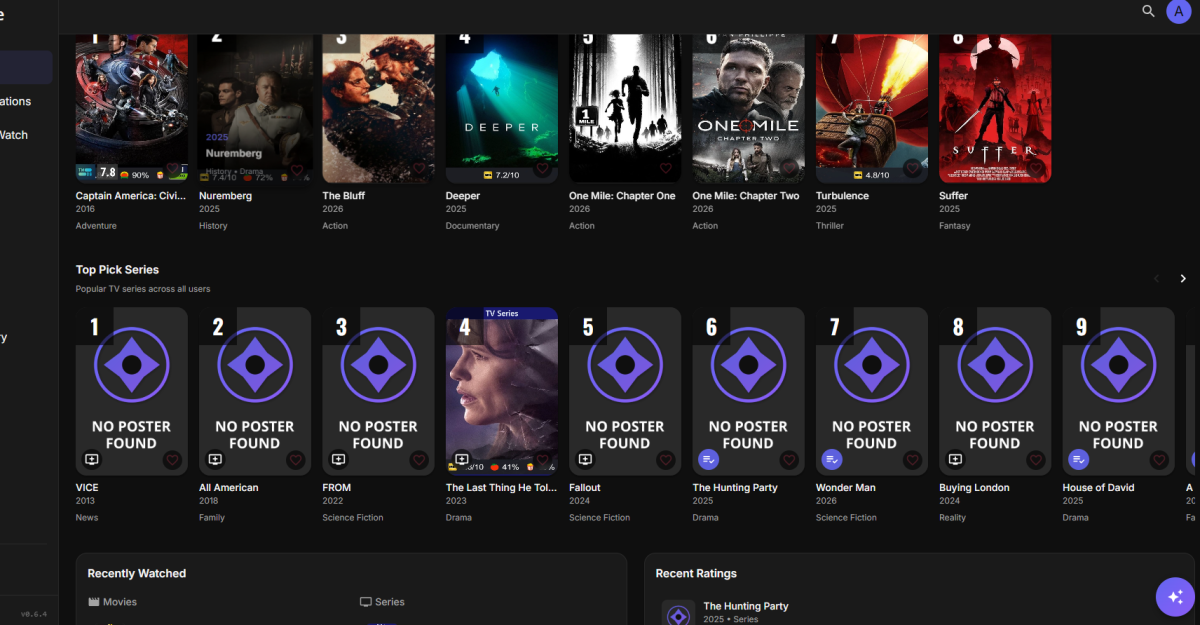
How do I permanently fix that (Missing posters)
-
Bump.
-
Thank you - GenreCleaner did the job. It couldn't clean all unwanted genres (don't know why). But there were so less at the end, I could do it manually.
-
Hi! I’m running Emby Server on Synology (DSM7.3.2 , package, x86_64). I’m trying to fix a long-standing issue: library scans hang and sometimes artwork doesn’t load / UI feels stalled. Environment Device: Synology NAS (DSM 7.3.2-86009 update 1), volume is Btrfs (/volume1) Emby Server: 4.9.3.0, (also tested 10.0.4 and 10.0.5version, issue persists) ProgramData: /var/packages/EmbyServer/var → symlink to /volume1/@appdata/EmbyServer Libraries: TV: /volume1/video/Serials Movies: /volume1/video/Movies Symptoms “Scan media library” hangs Logs stop showing “next step” as if the previous step was successful but the next one did not start: In logs Emby completes some scan steps, then no further “start next step” entries appear for a long time, while server still shows “Scan media library” running. What I already checked / tried File system is fast; find /volume1/video/Serials -type f completes quickly. Permissions: ProgramData cache/metadata folders are owned by emby:emby; emby user can write to them (su emby -c touch ... OK). Removed local NFO files temporarily and disabled NFO metadata reader to avoid broken/empty NFO overriding online metadata. Disabled UPnP mapping in Emby (auto port mapping) to prevent external influence. Questions Any recommended diagnostics to identify where the scan is blocked (e.g. enabling debug for TaskManager / library scanner)? embyserver.txt logs around scan start and the hang point Thanks! embyserver.txt
-
I'm not sure because everytime I see a stutter it seems Emby is trying to interact with something. But I can't be sure. Can't upload any full logs anywhere, because they get absolutely massive, so here's a part where a stutter happened at 15:46. kodi.log
-
Bonjour à tous, Depuis quelques jours (peut-être 10 jours), mon serveur EMBY est super lent. Après quelques recherches, j'ai remarqué qu'il utilisait en permanence plus de 10 go de RAM sur mon NAS Synology (RAM totale de 16 go). Je redémarre le serveur et après quelques heures, je suis de nouveau à plus de 10 go de RAM. J'ai donc un synology DS220+, 16 go de RAM. Serveur EMBY version 4.10.0.5. Je ne passe pas par container manager mais directement par synology. Par principe, j'ai relancé hier mon routeur, mon NAS et encore une fois emby mais ça ne change rien. Je n'ai pas spécialement de message d'erreur à publier, mais que ce soit à distance ou en local, ça met beaucoup de temps à afficher l'accueil ou les différentes bibliothèques. Je n'ai pas de tâches spéciales en arrière plan. Je n'ai pas changé de paramètres ces derniers temps. Voilà, avez-vous des idées`? J'ai l'impression que ça a commencé avec la version 4.10.0.4. Merci d'avance. vb (actuellement, j'ai 18mo utilisation pour ffmpeg et 10.6 go de emby server selon le gestionnaire des tâches de mon syno) Je n beta
-

Apple TV Remove From Playlist button not working
alexdchandler replied to alexdchandler's topic in Apple TV
Thank you so much!! -

Emby Theater v3.0.20 (Server v4.9.3.0) Homescreen Horiz. navigation broken
d00zah replied to d00zah's topic in Windows & Xbox
Thanks for narrowing things down @scottproI've tried an uninstall/reinstall & see no behavioral improvement... any update, @Luke? -
I saw that when I was editing the metadata. I wasn't sure why it would be needed. Now I understand. Thanks again!
-
Should be resolved for next update
-

Is March still a viable option to launch Emby for UGOS?
softworkz replied to Davey's's topic in General/Windows
I have moved your post because it was completely off-topic. Please don't be afraid of creating new topics when you have a question- 1 reply
-
- 1
-

-
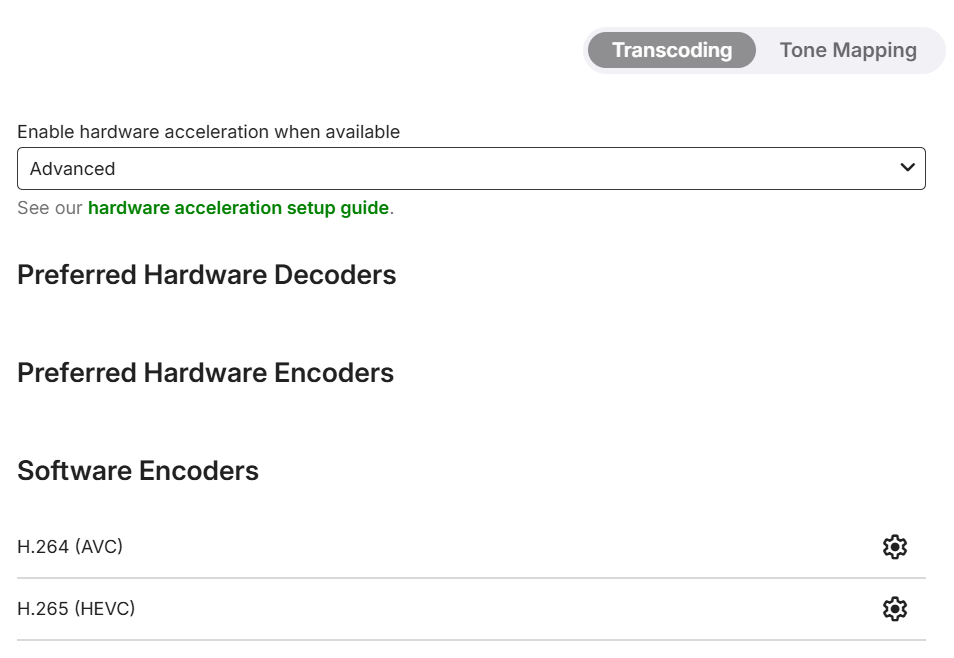
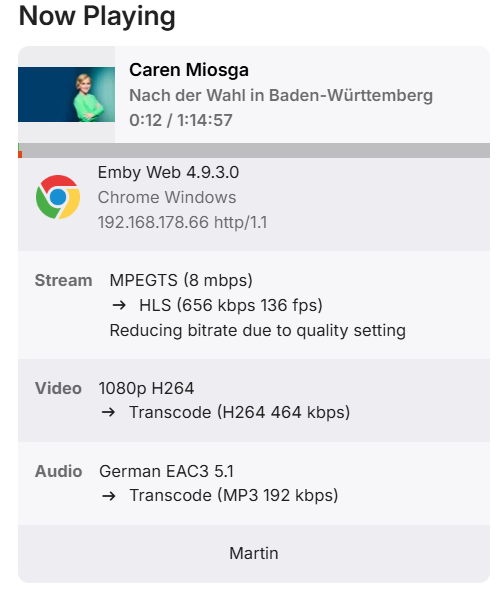
Emby Version 4.9.3.0 - Unraid 7.3.2 CPU is Intel® Xeon® CPU E3-1225 v6 @ 3.30GHz, which was working well with Plex before. I have Premiere lifetime if that is of interest: Recently I started converting some recorded TV episodes to a more "friendly" format, when I realised high CPU usage and very slow progress. Does it mean that HW transcoding is not working? It should state the encoders, shouldn't it? I forwarded /dev/dri in unraid ...and I can also see the device inside the Emby container: When I force transcode a playback, I don't seem to have any kind of HW transcoding indication either: What am I missing here? Edit: Just fired up my Plex container on the same system, and iGPU/QuickSync transcoding works fine there... Edit2: Same on Version 4.10.0.5 beta hardware_detection-63908664531.txt



-

Android player setting to disable brightness adjuster.
GroteGlon replied to gbutton's topic in Feature Requests
On my Samsung Galaxy s24 ultra the max brightness in the app is lower than what my phone is capable of. You can even see it go down in brightness in the first half second of playing where it adjusts to the highest setting allowed by the app. It's making it impossible to watch anything outside.