All Activity
- Past hour
-
 Jacobz99 joined the community
 -
 emb247@servitore.org joined the community
 -
 Tickittyboo joined the community
 -
 birkoff53 joined the community
 -
 ODX.19 joined the community
 -
Any update on this? I am not able to sideload on my GM so I don’t think I have a workaround either
-
 umari80751 joined the community
 -
 ferneycifuent joined the community
 -
 777279429ali joined the community
 -
 Silvano13 joined the community
 -
I have a powerful machine and disk, but more importantly, the language chosen in both of those checkboxes says nothing to the sort of what you just said, and both as written is unqualified and as you have written is unqualified. I suspect a top of the line intel i9 is better than "some systems" .... I'd argue, it is better than MOST systems. An RTX5080 is better than most GPUs..... a 500TB+ disk setup with all high end (albiet 7200RPM) disks, is better than avg.... unless someone is using SSD...... is still better than avg..... Again, all language that is unqualified, and again, ****** WITH THE CHECKBOX CHECKED, implies "it might crash ****** not....... that with the checkbox unchecked, it WILL CRASH. Respectuflly, does this explain why I am painting the f*****ed eitherway, and neither toggle is definitive?
-
 JimJon joined the community
 -

Moonfin, a new cross platform client
MediaEmby1968 replied to bingbong69_'s topic in Third Party Apps
This looks interesting, but what I'm not clear on is how to install it on both an Emby and a 2016 Samsung TV. I think it would be good to clarify this on the website. Can someone tell me how to install it on both an Emby and a 2016 smart TV? Do I need a Premiere account to install it? -

Stumped trying to get an API key to work with Powershell for Movies reporting
Lessaj replied to FatherSaint's topic in General/Windows
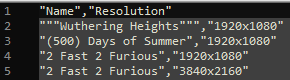
I ran the query against my instance with api_key and it accepted it. I ran the exact script with my own variable too and it worked, I just changed the api_key name I mentioned. You should be able to manually run a curl with the path looking like this: EDIT: Could be HTTP instead as well, I used "https://path.to.my.emby" for the variable, but "http://ip.address:port" should work too.
-
I don’t quite understand this point. Watching a movie won’t delete it from the library, or are you filtering the library by unwatched and it is still showing even though it has been watched? Can explain the steps to reproduce and how you have the library folder view/sorting/filtering configured?
-

Incorrect Artist Identification / Search Results
Rumzzz replied to Rumzzz's topic in General/Windows
It's true this may have been an issue from a previous server version (I've been using Emby for a while). I don't really have a way to test this on a fresh install but even when I manually delete the album containing the "incorrect" artist identification, after a rescan the issue persists. I agree that nailing down the original cause would be hard to do, mostly just throwing this out there. If anything, I am more so interested in how to get Emby to clean up / recognize any incorrect artist identifications -

Stuck at Ready to Transfer (Windows Emby App)
Luke replied to mrtechnologist's topic in Windows & Xbox
Hi, we are looking into this. Thanks. -
Correct. It is server-wide.
-
Going over your first issue again, it's hard to say what might have happened when this content was first imported into your database. Do you have a way of testing this with a fresh install, or with all new content where the tracks, album and artists have never been in your server database before? Otherwise we're kind of guessing about how it got that way, whether be through some defect in an older server version, various tinkering you might have done, etc.
- Today
-
Hi. And...
-
Edit: This is the 3rd post explaining how to do and revert the patches. The 2nd post (the one explaining the 2nd fix) got limited or something and is hidden until mods or someone approves it. Emby 4.10.x search-freeze workarounds — how to apply and revert each patch These are the workarounds referenced in my two bug reports (the "recent searches query freezes the server" thread and the "SearchTerm slowness / degenerate planner statistics" thread). They fixed, on our server (~191,000-item library): the whole server freezing for 1–2 minutes whenever someone opened search (100+ s → 16 ms), searches like lord taking a flat ~13 s (→ under 1 s), 1–2-letter searches from TV apps (which search per keystroke) taking 30–50 s and stalling everyone else (→ under 0.3 s). Read before starting At your own risk. These modify the live Emby database (an index and planner statistics) and system.xml. They are workarounds until the Emby team fixes this properly. Make the backups in Step 0 first. Applies to the 4.10.x beta schema (tables MediaItems, UserDatas, AncestorIds2). If those tables don't exist in your library.db, you're on 4.9.x or older — this guide does not apply. Paths below are for the Linux .deb install (/var/lib/emby). Docker: run the commands where the config volume is mounted. Windows: the same SQL applies via any SQLite tool against library.db in your programdata folder. Commands use python3 (preinstalled on most Linux servers) so you don't need the sqlite3 CLI. If you have the CLI, the SQL statements inside work there too. Run as root. "Cookie poke": SQLite only re-plans cached queries when the schema version changes. ANALYZE and statistics edits don't change it, so after Patches 2/4 the running server keeps its old (slow) query plans until you either restart Emby or "poke" the schema version by creating and dropping a dummy index. The poke is included in the commands below. Patch 1 (real DDL) needs no poke. Never edit system.xml while Emby is running — Emby rewrites it from memory on shutdown and your edit is silently lost. Always stop → edit → start. # Patch Fixes Downtime 0 Backups — none 1 Partial index on UserDatas Search page freezing the whole server none 2 Full ANALYZE Flat ~13 s searches (bad statistics) none 3 system.xml settings Flat ~13 s searches (bad statistics) ~1 min restart 4 Statistics override for AncestorIds2 Stops Emby re-creating the bad statistics; bigger DB pool none Step 0 — Backups (do this first) Consistent snapshot of the live database (safe while Emby runs, uses SQLite's VACUUM INTO mkdir -p /root/emby-backups python3 -c " import sqlite3, time con = sqlite3.connect('file:/var/lib/emby/data/library.db?mode=ro', uri=True, timeout=60) dest = '/root/emby-backups/library-backup-' + time.strftime('%Y%m%d') + '.db' con.execute(\"VACUUM INTO '\" + dest + \"'\") con.close(); print('backup written:', dest)" Copy of the config file: cp /var/lib/emby/config/system.xml /root/emby-backups/system.xml.bak-$(date +%Y%m%d) Snapshot of the current planner statistics (lets you revert Patch 2/4 exactly): python3 -c " import sqlite3, time con = sqlite3.connect('file:/var/lib/emby/data/library.db?mode=ro', uri=True) rows = con.execute('SELECT tbl, idx, stat FROM sqlite_stat1').fetchall() dest = '/root/emby-backups/sqlite_stat1-backup-' + time.strftime('%Y%m%d') + '.sql' with open(dest,'w') as f: f.write('DELETE FROM sqlite_stat1;\n') for t,i,s in rows: f.write(f'INSERT INTO sqlite_stat1(tbl,idx,stat) VALUES({t!r},{i!r},{s!r});\n') print('stats snapshot written:', dest)" Patch 1 — Partial index for the "recent searches" query Problem it fixes: opening the search page fires Items?...WasSearched=true&SortBy=DateLastSearched before you even type. There is no index on UserDatas.DateLastSearchedInt, and the planner can pick a plan that scans your whole library with expensive per-row visibility subqueries — 100+ seconds of CPU during which everything else on the server queues. This tiny partial index (it only covers the handful of rows where the column is set) makes the plan trivially correct in every case. Apply (safe while Emby runs, ~0.2 s, takes effect immediately): python3 -c " import sqlite3 con = sqlite3.connect('/var/lib/emby/data/library.db', timeout=60) con.execute('PRAGMA busy_timeout=60000') con.execute('CREATE INDEX IF NOT EXISTS idx_custom_UserDatas_LastSearched ON UserDatas(UserId, DateLastSearchedInt) WHERE DateLastSearchedInt IS NOT NULL') con.commit(); con.close(); print('index created')" Revert: python3 -c " import sqlite3 con = sqlite3.connect('/var/lib/emby/data/library.db', timeout=60) con.execute('PRAGMA busy_timeout=60000') con.execute('DROP INDEX IF EXISTS idx_custom_UserDatas_LastSearched') con.commit(); con.close(); print('index dropped')" Verify: open search in Emby Web, then check the request time in the server log — should be milliseconds: grep 'WasSearched=true' /var/lib/emby/logs/embyserver.txt | grep -oE 'Time: [0-9]+ms' | tail -5 Survives restarts, server updates, and VACUUM. Emby doesn't know about it; drop it once an official fix ships. Patch 2 — Full ANALYZE (fix the planner statistics) Problem it fixes: Emby's default DatabaseAnalysisLimit=5000 makes its maintenance run a sampled ANALYZE. On the heavily skewed AncestorIds2 table (folder hierarchy) the sample produces wildly wrong statistics ("1 row per folder" when big folders have tens of thousands), and the planner then picks catastrophic plans for search queries. A full, unlimited ANALYZE records correct statistics. Apply (safe while Emby runs, ~1–2 s, poke included): python3 -c " import sqlite3 con = sqlite3.connect('/var/lib/emby/data/library.db', timeout=60) con.execute('PRAGMA busy_timeout=60000') con.execute('ANALYZE'); con.commit() con.execute('CREATE INDEX IF NOT EXISTS idx_custom_statspoke ON ItemExtradataTypes(Name)'); con.commit() con.execute('DROP INDEX IF EXISTS idx_custom_statspoke'); con.commit() con.close(); print('ANALYZE done + plans refreshed')" Note: running plain ANALYZE also erases Patch 4 if you applied it — the combined recipe at the end reapplies both in one go. Revert (restore the statistics snapshot from Step 0 — only useful for debugging): python3 -c " import sqlite3, glob con = sqlite3.connect('/var/lib/emby/data/library.db', timeout=60) con.execute('PRAGMA busy_timeout=60000') snap = sorted(glob.glob('/root/emby-backups/sqlite_stat1-backup-*.sql'))[-1] con.executescript(open(snap).read()); con.commit() con.execute('CREATE INDEX IF NOT EXISTS idx_custom_statspoke ON ItemExtradataTypes(Name)'); con.commit() con.execute('DROP INDEX IF EXISTS idx_custom_statspoke'); con.commit() con.close(); print('restored', snap)" Patch 3 — system.xml settings Problems these fix: the first two stop Emby's own maintenance from re-creating the bad statistics (undoing Patches 2 and 4 at every shutdown); the pool increase keeps writes (playback progress reporting) flowing when heavy queries are running. Note: a bigger pool alone does NOT stop search convoys — Emby serializes list-type queries internally — which is why Patch 4 matters. In /var/lib/emby/config/system.xml change: <DatabaseAnalysisLimit>0</DatabaseAnalysisLimit> <!-- was 5000 --> <OptimizeDatabaseOnShutdown>false</OptimizeDatabaseOnShutdown> <!-- was true --> <MaxLibraryDatabaseConnections>10</MaxLibraryDatabaseConnections> <!-- was 5; ~your CPU core count is a reasonable value --> Apply (stop → edit → start; ~1 min downtime, streams drop and auto-resume): systemctl stop emby-server nano /var/lib/emby/config/system.xml systemctl start emby-server Revert: same procedure with the original values (see your Step 0 backup of the file; prefer editing values individually over copying the whole file back, in case you changed other settings via the dashboard since). Verify the pool size after start: grep 'SqliteItemRepository: Initializing PooledDatabaseConnectionManager' /var/lib/emby/logs/embyserver.txt | tail -1 Re-check these values after Emby package updates. Patch 4 — Statistics override for AncestorIds2 (the TV-search fix) Problem it fixes: even correct statistics only store the average rows-per-folder (a few), while the top-level library folders used in per-user visibility checks hold thousands to tens of thousands of items. SQLite (without STAT4, which Emby's build lacks) can't see the skew, so inside the per-row visibility subqueries it still drives from the folder side. Every search pays ~1–10 ms per matched item — 1–2-letter searches from TV apps (thousands of matches) take 30–50 s and stall other list queries. This override deliberately overstates the folder-side cost so the planner always probes from the item side instead. The first number in the stat is your table's row count, so it's computed dynamically: Apply (safe while Emby runs, instant, poke included): python3 -c " import sqlite3 con = sqlite3.connect('/var/lib/emby/data/library.db', timeout=60) con.execute('PRAGMA busy_timeout=60000') n = con.execute('SELECT COUNT(*) FROM AncestorIds2').fetchone()[0] con.execute('UPDATE sqlite_stat1 SET stat=? WHERE tbl=? AND idx=?', (f'{n} 3000 1','AncestorIds2','idxAncestorIds2_1')) con.commit() con.execute('CREATE INDEX IF NOT EXISTS idx_custom_statspoke ON ItemExtradataTypes(Name)'); con.commit() con.execute('DROP INDEX IF EXISTS idx_custom_statspoke'); con.commit() con.close(); print(f'override applied: {n} 3000 1')" (3000 approximates the real descendant count of large library folders; the exact value isn't critical — it just needs to be much larger than the item side's few rows.) Revert (a plain full ANALYZE restores honest measured statistics): python3 -c " import sqlite3 con = sqlite3.connect('/var/lib/emby/data/library.db', timeout=60) con.execute('PRAGMA busy_timeout=60000') con.execute('ANALYZE'); con.commit() con.execute('CREATE INDEX IF NOT EXISTS idx_custom_statspoke ON ItemExtradataTypes(Name)'); con.commit() con.execute('DROP INDEX IF EXISTS idx_custom_statspoke'); con.commit() con.close(); print('override removed')" Verify it's in place (second number should be 3000): python3 -c " import sqlite3 con = sqlite3.connect('file:/var/lib/emby/data/library.db?mode=ro', uri=True) print(con.execute(\"SELECT stat FROM sqlite_stat1 WHERE idx='idxAncestorIds2_1'\").fetchone())" If the second number is small (e.g. 1 or 4), the override was erased by something running ANALYZE — see the recovery recipe below. Symptom of loss: short/common-term searches suddenly take 30–50 s again. Results measured on our server after all patches: ST 52 s → 0.08 s, the (29k matches) 27 s → 0.25 s, lord 13 s → 0.008 s, recent-searches 100+ s → a few ms. No regressions in Continue Watching / Next Up / home screens. Recovery recipe: "searches got slow again after an update/restart" Refreshes statistics properly AND reapplies the Patch 4 override, then refreshes plans: python3 -c " import sqlite3 con = sqlite3.connect('/var/lib/emby/data/library.db', timeout=60) con.execute('PRAGMA busy_timeout=60000') con.execute('ANALYZE'); con.commit() n = con.execute('SELECT COUNT(*) FROM AncestorIds2').fetchone()[0] con.execute('UPDATE sqlite_stat1 SET stat=? WHERE tbl=? AND idx=?', (f'{n} 3000 1','AncestorIds2','idxAncestorIds2_1')) con.commit() con.execute('CREATE INDEX IF NOT EXISTS idx_custom_statspoke ON ItemExtradataTypes(Name)'); con.commit() con.execute('DROP INDEX IF EXISTS idx_custom_statspoke'); con.commit() con.close(); print('stats refreshed + override reapplied')" Removing all patches when Emby ships the official fix These are workarounds. When an Emby release notes say the search/statistics issues are fixed, remove the patches in the same maintenance window as that update, so the fixed version runs with a stock schema, stock statistics, and stock config. (For ordinary updates where no fix is mentioned: keep the patches, update normally, and afterwards run the recovery recipe above plus re-check the system.xml values.) 1. While the server is still running (old version), drop the custom index (Patch 1): python3 -c " import sqlite3 con = sqlite3.connect('/var/lib/emby/data/library.db', timeout=60) con.execute('PRAGMA busy_timeout=60000') con.execute('DROP INDEX IF EXISTS idx_custom_UserDatas_LastSearched') con.commit(); con.close(); print('custom index removed')" 2. Stop Emby: systemctl stop emby-server 3. Restore system.xml defaults (Patch 3): set DatabaseAnalysisLimit back to 5000 and OptimizeDatabaseOnShutdown back to true. (MaxLibraryDatabaseConnections is ordinary performance tuning, not part of the bug — keep your higher value or restore 5, your choice.) nano /var/lib/emby/config/system.xml 4. Remove the statistics override (Patches 2/4) by refreshing statistics on the stopped database — no poke needed since every connection will be new on start: python3 -c " import sqlite3 con = sqlite3.connect('/var/lib/emby/data/library.db', timeout=60) con.execute('ANALYZE'); con.commit(); con.close(); print('statistics reset to honest values')" With the defaults restored in step 3, Emby's own maintenance manages statistics again from here on — nothing custom remains in the database or config. 5. Install the update, then start: systemctl start emby-server Verify after the update that search is still fast on the fixed version; if it is not, the patches can be reapplied from the top of this guide at any time. (The Step 0 backups are unrelated to this procedure — they exist only as a safety net in case something goes wrong while patching.)
-

Stumped trying to get an API key to work with Powershell for Movies reporting
FatherSaint replied to FatherSaint's topic in General/Windows
This is ALL Co-Pilot, I don't know what I'm doing when it comes to scripts and programming. That's a good catch, I didn't see it but do now that you ask about it. I just tried that way and still got the error. Unless Tiny Media Manager doesn't give me a proper report, I'm not going to pursue this. Thank you for posting! -
Stumped trying to get an API key to work with Powershell for Movies reporting
Lessaj replied to FatherSaint's topic in General/Windows
Have you tried api_key instead of ApiKey in the URL?- 6 replies
-
- 1
-

-
- powershell
- script
- (and 1 more)
-
Got a bit tired of waiting so I let Claude try to do a fix for this and it did it. Search is close to instant on anything I try now. There were 2 issues it fixed. Each issue is explained in its own post one after another here then a guide how to apply it and how to revert it. in case if emby team ever fixes it in their update so you can re run their update afterwards. 4.10.x: "Recent searches" query (WasSearched/DateLastSearched) freezes entire server for 1–2 minutes on large libraries Versions affected (observed): 4.10.0.20, 4.10.0.23, 4.10.0.25 (Linux/Ubuntu 24.04, .NET 8.0.28, bundled SQLite 3.53.3). Did not occur on 4.9.x. Library size: ~191,000 MediaItems, ~555,000 UserDatas rows. Symptom Opening the search page in Emby Web fires GET /Users/{id}/Items?SortBy=DateLastSearched,SortName&SortOrder=Descending&Limit=20&Recursive=true&EnableTotalRecordCount=false&WasSearched=true (the "recent searches" panel — fired before the user types anything). On our server this single query runs 87–117 seconds of pure CPU inside sqlite3_step() (one thread pinned at 100%, zero disk I/O, verified with gdb + strace). While it runs, effectively the whole server convoys behind it: complex item queries and user-data writes queue (/Sessions/Playing/Progress POSTs took 89–99s; requests observed starved up to 15 minutes across consecutive episodes), then everything flushes in the same second the query completes. To all users the server appears completely hung. Typed search itself is NOT the culprit on our server: the FTS-based SearchTerm queries measure 27–850ms standalone (they only appeared slow because they queued behind the recent-searches query). This is likely the same class of issue reported in "Search Very Slow (3 minute response)" (topic 144128). Root cause (verified) The SQL (recovered verbatim from a process core dump taken mid-freeze; abbreviated): select ..., (Select ShareLevel from UserItemShares join AncestorIds2 on AncestorIds2.AncestorId=UserItemShares.ItemId where UserItemShares.UserId=1 and UserItemShares.ShareLevel not null and AncestorIds2.ItemId=A.Id order by Distance limit 1) as ShareLevel from mediaitems A left join UserDatas on A.UserDataKeyId=UserDatas.UserDataKeyId And UserDatas.UserId=1 where A.Type in (1,2,5,6,8,...,34) AND UserDatas.DateLastSearchedInt > 0 AND (ShareLevel > 0 OR A.Type in (...) OR A.IsPublic=1) AND A.ExtraType is null AND ( EXISTS (SELECT 1 FROM AncestorIds2 WHERE itemid=A.Id AND AncestorId in (...)) OR EXISTS (ListItems join ancestorids2 ...) OR EXISTS (itemPeople2 JOIN AncestorIds2 ...) OR EXISTS (ItemLinks2 join ancestorids2 ... Type in (...)) OR EXISTS (ItemLinks2 ItemLinks2TwoLevel WHERE EXISTS (...) ...) ) Group by A.PresentationUniqueKey ORDER BY MAX(UserDatas.DateLastSearchedInt) DESC NULLS LAST, A.SortName collate NATURALSORT DESC LIMIT 20 There is no index on UserDatas.DateLastSearchedInt, so the planner cannot see that DateLastSearchedInt > 0 is extremely selective (only ~10–100 rows in the whole table ever have it set). SQLite then picks this plan (EXPLAIN QUERY PLAN from a copy of the production DB): SEARCH A USING INDEX idx_MediaItems47cd2 (type=? AND ExtraType=?) -- ~176k rows CORRELATED SCALAR SUBQUERY 1 (ShareLevel) -- incl. USE TEMP B-TREE FOR ORDER BY, per row! CORRELATED SCALAR SUBQUERIES 2..7 (the visibility EXISTS chain, per row) SEARCH UserDatas USING INDEX UserDatasIndexUnique1 (UserDataKeyId=? AND userId=?) -- applied LAST i.e. it scans ~176k items and evaluates the ShareLevel subquery (with a per-row sort) plus up to five correlated visibility subqueries for every row, and only then joins UserDatas where DateLastSearchedInt > 0 throws away all but ~10 rows. Measured: >90 s. The mirror plan (drive from UserDatas first) takes ~2 s; which plan a pooled connection gets appears to depend on the sqlite_stat1 state at prepare time, which is why the freeze is intermittent and per-connection ("plan roulette" — we observed the identical request take 116,798 ms and, four minutes later, 2,351 ms). ANALYZE does NOT stabilize the good plan (after a fresh ANALYZE the planner chose SCAN A, still >60 s). Fix that works (verified on production) CREATE INDEX idx_UserDatas_LastSearched ON UserDatas(UserId, DateLastSearchedInt) WHERE DateLastSearchedInt IS NOT NULL; Build time 0.2 s (partial index over the handful of rows that have the column set). The planner then drives from this index in every stats state we tested. Result on the live server: the recent-searches request went from 116,798 ms → 16 ms, and the server-wide freezes stopped. Suggest shipping this index (or equivalent) in the 4.10 schema, and/or restructuring the query so the selective DateLastSearchedInt predicate drives the join rather than being applied after the per-row ShareLevel/visibility subqueries. Notes No SQLite errors of any kind in logs (no "database is locked", no corruption); PRAGMA quick_check ok. The DB stays fully readable by other processes during the freeze (external probe queries answered in 34–52 ms throughout) — the hang is entirely this query plus the connection-pool convoy behind it. Reproduction needs: a multi-user library in the 100k+ item range, at least one user with DateLastSearchedInt set (i.e. someone has used search before), and folder-restricted users (the ShareLevel/visibility subqueries). Secondary observation: Debug App: Sqlite: 284 - automatic index on ... warnings appear frequently for LastWatchedEpisodes(SeriesPresentationUniqueKey) and LinkedCounts(AId) (materialized subqueries in the NextUp/Resume queries) — worth a look for the same reason, but not the freeze trigger here.
-
Yes if you can pick new and live as options that's all I'm asking for. It would make setting up recordings much simpler when live is what's there. Thanks.
-
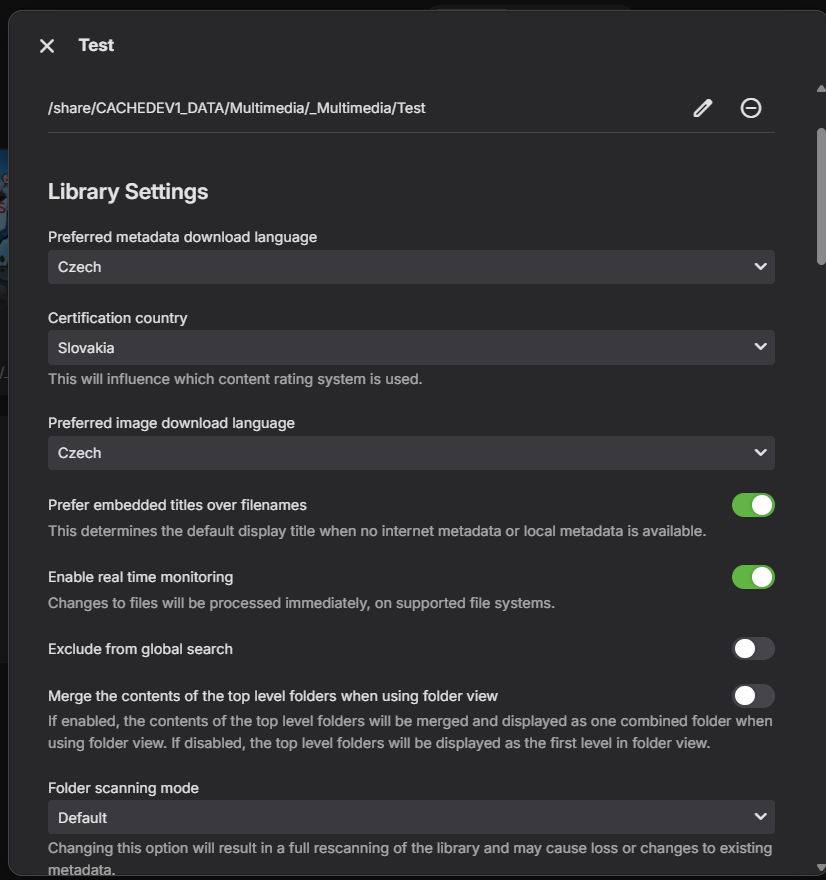
Hi Luke, Sure. the first pic - movies view with names in Czech the second pic - folders view - no collage pic for folder the third pic - movies with name of folder, no Czech names the fourth pic - library settings Thanks



-
Isn't it only things like pixel shift that can help with it?
-
So far this app is working great for me. I have tweaked a lot of the settings to just the way I like it. I am having one issue in the presentation of my poster and thumbs on the home screen. They look very blurry and low quality. In the Emby app they look really nice. I tried to look for any setting regarding this but can't find anything. Am I missing something somewhere or is this just how the app compresses these?
-
Upgraded 4.9.3 -> 4.9.5 (Artwork and data for movies disappearing on scheduled scans?)
Luke replied to mike3821's topic in Linux
What specific example from the log file are we focusing on here? -

Upgraded 4.9.3 -> 4.9.5 (Artwork and data for movies disappearing on scheduled scans?)
mike3821 replied to mike3821's topic in Linux
Need help to figure out why my media art is disappearing.... -

HLS transcoding for Apple's native player: fMP4 segments, and an HDR + SDR variant pair
vdatanet replied to vdatanet's topic in Developer API
@Geordie When you suggested the engine, I said the route wasn't for me but the pointer was worth it either way. It turned out to be worth more than that. I kept turning it over — the part of your suggestion that stuck wasn't the engine, it was the route itself: stop negotiating with the server's manifest and do the remux locally. So I built a narrow version of exactly that. The app now carries its own Matroska demuxer and fMP4 muxer — about two thousand lines of Swift, no FFmpeg, no decoders, nothing bundled. It reads the MKV straight from the server with HTTP range requests (opening a 19 GB file costs 16 requests and ~300 KB, thanks to Matroska's cues), splits it into fMP4 segments on the device, writes its own HLS master — VIDEO-RANGE, CODECS, one audio rendition per track, all derived from the file itself — and hands that to the native AVPlayer. It never touches the bytes: video and audio are copied, not transcoded. HDR10, and the HDR10+ metadata that a server-side transcode strips, survive untouched. Measured last night on an Apple TV 4K, with a 19 GB 4K feature — Dolby Vision profile 8 over an HDR10 base, ~25 Mbps average: the display switches into HDR, and it switches from a 4K SDR output mode with Match Dynamic Range on, before playback starts — the case that used to be hopeless. The server's only work is serving byte ranges: the day's server log shows zero ffmpeg launches and ~1,300 HTTP 206 responses against the static file endpoint, and the dashboard reports the session as Direct Play. Seeking, chapter jumps and resume all behave like local playback — the cues map straight to byte ranges, so nothing round-trips through a session. So the line I drew in my earlier post still stands, and now it has both halves: the native player, the system track picker, no bundled engine — and the local remux you were right to point at. The difference from the engine route is only where the pieces come from: AVPlayer keeps doing the decoding and the UI, and the app only rearranges containers, which is the boring part and the one I'm happy to own. For everyone else on the thread: this doesn't retire the original request. VIDEO-RANGE and CODECS in the manifest are still what would fix this for every client that doesn't carry its own demuxer — which is nearly all of them. My app just stopped needing to wait. Thanks again, @Geordie. The nudge did more work than the suggestion. -
It could be the mime type passed into the intent is not correct. We'll take a look at it. Thanks.
-
@jccbsl?
-

Misleading transcode information in clients and dashboard
danergo replied to danergo's topic in Linux
Success! Retested with Emby Server v4.9.5.0 and Emby for Android (on FireTV) v3.5.44. Now it seems every single place shows the correct transcoding information. Thank you @Luke! -
Stumped trying to get an API key to work with Powershell for Movies reporting
FatherSaint replied to FatherSaint's topic in General/Windows
PLAN B: Tiny Media Manager can apparently export the list that I need. I have it installed and running right now. Unfortunately, I had done what the page shows. It doesn't make sense to me, especially since I am the ONLY configured user and so presumably the Admin by default. Co-Pilot decided at some point that instead of using localhost the script should use the IP address instead. Maybe I'll just have to manually do this, which would be a stinker, but the Reports plugin might give me some good info.