All Activity
- Past hour
-
 kielyanderson joined the community
 -
 benjasuperpro joined the community
 -
 35357878 joined the community
 -
 EricHein joined the community
 -
 Nkb1411 joined the community
 -
 phant0m_jester joined the community
 -
 Chovla joined the community
 -
 JK666794C joined the community
 -
 Maryam1995 joined the community
 -
 Aphodite2001@hotmail.com joined the community
 -

Is it recommended to use the Android version over the Android TV version?
TMCsw replied to PapalPenguin's topic in Android TV / Fire TV
Just an added Note: Why not stick with what works? And test the new stuff? Note: EBR still seems to take pride in making the ATV app Great Some day the other version will be better, but after many years it’s still not! - Today
-
Is it recommended to use the Android version over the Android TV version?
TMCsw replied to PapalPenguin's topic in Android TV / Fire TV
Then switch back to ATV! -
There is a DTS "core" that should be discoverable inside the DTS-HD MA stream. That "core" stream within the DTS-HD MA is what the Roku should be passing through. You should not have to add both DTS-HD MA 7.1 and DTS 5.1 streams. Both streams contain the same "core" that Roku should be able to direct play. Having just DTS-HD MA 7.1 should passthrough as DTS 5.1 with direct play. https://en.wikipedia.org/wiki/DTS-HD_Master_Audio Now the fact you say, that you are doing this and still getting silence means either: 1) Your equipment cannot decode the core DTS stream. Which you said another DTS in 5.1 passed through just fine. So this cannot be the reason if that is true. 2) The Roku has a firmware bug where the DTS-HD MA stream is no longer being passed-through. Which is odd because the Roku reports 8 channel support for DTS. This is why above @ebrhas asked for you to send logs from that Roku device. Server logs will not show what is happening with Direct Play. We would need to see how the Roku decided to play this back and that is only discoverable within the logs the Roku app will keep when you turn on debug mode. Now that you've provided app logs we will find out... I can only suspect that Roku has a firmware bug. Seeing your logs would confirm it. Then we can add a setting or something to work-around that firmware bug if that is what this is. Thanks.
-

Is it recommended to use the Android version over the Android TV version?
Gilgamesh_48 replied to PapalPenguin's topic in Android TV / Fire TV
The standard Android app is vastly superior to the Android for TV app. Your stuttering problem is, most probably, not really related to the app but rather to something in your setup, There are plople here who can really help with that but they need much much more info like details of your setup and which devices are being used and which devices are connected wirelessly or wired and logs. If you report that and include examples then there is at least a good chance that your problem can be diagnosed. -

Is it recommended to use the Android version over the Android TV version?
PapalPenguin posted a topic in Android TV / Fire TV
I have noticed since switching to the android version, i am getting a large amount of stuttering when playing content. I have a Google TV 4k box. - Yesterday
-
I would change the last sentence to; I think new season Premieres should be called out in a separate OPTIONAL line. I do NOT want new shows to have any special features in my setup.
-
I do not see any advantage to that. However I, most probably, do not use Emby like others. I have no objection to allowing Emby to use that kind of sorting as long as I can use the current method as it is best for me. I still have concerns about options making things too complex but I think this might be simple enough and non-intrusive enough to make it worthwhile. Emby PLEASE do not remove the current method as it is almost perfect for my use case.
-
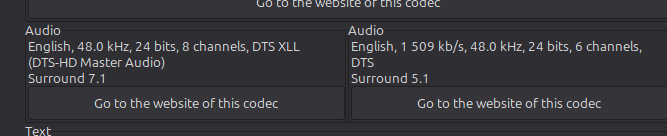
No I didn't rip these myself. A Roku can't pass through DTS-HD MA. With the 7.1 movie it pretended to play direct but no audio input was displayed at the AVR. with the 5.1 Emby realized it needed transcoding. This is clearly a problem with the Roku why would DTS-HD MA 5.1 be transcoded but DTS-HD MA 7.1 is a direct play. Makes no sense. The DTS core is not a separate audio track. It is natively embedded directly inside the DTS-HD Master Audio. So Roku is not extracting this one. What is your software version of the Roku Ultra? 1. Played the movie Zootopia 2 which had a DTS-HD MA 7.1 audio track and no sound could be heard. 2. I repeated the test at 7:40pm EST and sent the log. 3. Local user Hans I am so done with the Roku and there is not a single feature, program or event which the Shield doesn't have or is not superior to.
-
@PasitheaPerhaps support for GraphQL to allow for bulk mutations and queries might lighten the load?
-

Segment Reporting - Dashboard, bulk editing, and custom queries for your intro/credits markers
sydlexius replied to sydlexius's topic in Plugins
As far as I know since TheIntroDB sets the sort of media segments I'm reporting on, yes it only works from a reporting standpoint. I'm watching development of it, and if I can ever add some value to it I'll consider enhancing this. -
@One2Go- If you ripped these yourself, did you remove the DTS core when doing the rip? MakeMKV for example will allow you to strip the DTS core and get only the DTS-MA track. I made this error with a few early rips. That may explain the silence + lack of any errors. Check the info on one of these files, it should show a second DTS 5.1 audio track along with the DTS-MA. I just tested with my rip of Edge of Tomorrow and it properly passed the DTS core - Roku Ultra to a Denon AVR-1910 with a 5.1 setup. Roku preferred streaming format is Auto and Digital output format is Passthrough.
-
@johyphenelThis should fix it. Again sorry you became the target of my rant, it was absolutely not meant for you but just as a general explanation. WatchingEye.dll
-

Cloudflare + nginx + Emby (Windows)
AlmostTonyStark replied to JasonNalley's topic in General/Windows
In cloudflare I have Emby behind https headers as a security option. Ie I also have paperless ngx setup and AudioBookShelf all setup, the apps that connect to those support https headers for cloudflare authentication, ie the Paperless app, PaperParrot app, Plappa… but when attempting to log into Emby it does not give the option to pass the https headers. ie check out: https://github.com/immich-app/immich/discussions/1604 -
Other apps ive used allow new eps to show up as aired today, then it defaults back to last watched. That allows you to see new stuff if you dont keep an eye out on release dates ect
-
LiveTV isn't working good on my TV but working good on my PC (Plugin)
Gilgamesh_48 replied to XDavidT's topic in Android TV / Fire TV
I sometimes have the exact opposite problem in that some streams play fine on my TV (Shield TV) but do not play reliably on my PC. That is OK for me as I almost never actually watch anything on my PC as my PC only has a 25 inch screen while my TV is 55 inch. I can also report that my Roku Ultras play everything my Shield does as far as live TV goes. -

Segment Reporting - Dashboard, bulk editing, and custom queries for your intro/credits markers
sh0rty replied to sydlexius's topic in Plugins
Works also with TheIntroDB Plugin by @Pasithea -

Emby Remote Connections on CGNAT Internet Service
pwhodges replied to ginjaninja's topic in General/Windows
Is the WAN address on your router the same as you see when using a website that displays your IP? Is the WAN address in any of the private ranges, or does it start with "100." (part of which range is specifically allocated for cgNAT use)? Do you have IPv6 enabled - in which case maybe you are using IPv6 on the occasions when the connection works (cgNAT is only applicable to IPv4)? Paul -
Segment Reporting - Dashboard, bulk editing, and custom queries for your intro/credits markers
sydlexius replied to sydlexius's topic in Plugins
Another quick release...I wanted to clear out my issue backlog :-): https://github.com/sydlexius/Segment_Reporting/releases/tag/v1.5.0.1 just a couple of QoL additions (ex: mostly to make the UX less mouse-click centric). The user guide documents those shortcuts/chords. -
Also having issues, validated this on two seperate AppleTV's; - on a remote site, connected via VPN, - on the same network (cabled ofc.) with the following log; 2026-06-04 19:52:11.092 Info PlaystateService-0HNM1PJQHAGNK:0000003E: http/1.1 POST http://host3:8096/emby/Sessions/Playing/Stopped?X-Emby-Client=Emby for Apple TV&X-Emby-Device-Name=Apple TV&X-Emby-Device-Id=4A43C842-49BE-40B1-914D-E241045C71CA&X-Emby-Client-Version=2.0.6 (3)&X-Emby-Token=x_secret4_x&reqformat=json. Source Ip: host1, UserAgent: Emby/3 CFNetwork/3860.500.112 Darwin/25.4.0 2026-06-04 19:52:11.144 Info SessionManager: Playback stopped reported by app Emby for Apple TV 2.0.6 (3) on Apple TV playing {name_Anonymized}. Position: 3095920 ms. PlaySessionId: 184e82d5cda94f6faf5cf70848085b3c. IsPaused: False 2026-06-04 19:52:11.145 Info SessionManager: Removed playSession 184e82d5cda94f6faf5cf70848085b3c from session 31e5f1e7ef11f8e4532b379b48e8726d 2026-06-04 19:52:11.145 Info PlaystateService-0HNM1PJQHAGNK:0000003E: http/1.1 Response 204 to host1. Time: 53ms. POST http://host3:8096/emby/Sessions/Playing/Stopped?X-Emby-Client=Emby for Apple TV&X-Emby-Device-Name=Apple TV&X-Emby-Device-Id=4A43C842-49BE-40B1-914D-E241045C71CA&X-Emby-Client-Version=2.0.6 (3)&X-Emby-Token=x_secret4_x&reqformat=json. 2026-06-04 19:52:11.200 Info MediaInfoService-0HNM1PJQHAGO5:00000001: http/1.1 POST http://host3:8096/emby/Items/40704/PlaybackInfo?UserId=x_secret3_x&StartTimeTicks=0&IsPlayback=true&AutoOpenLiveStream=true&MaxStreamingBitrate=200000000&X-Emby-Client=Emby for Apple TV&X-Emby-Device-Name=Apple TV&X-Emby-Device-Id=4A43C842-49BE-40B1-914D-E241045C71CA&X-Emby-Client-Version=2.0.6 (3)&X-Emby-Token=x_secret4_x&reqformat=json. Source Ip: host1, UserAgent: Emby/3 CFNetwork/3860.500.112 Darwin/25.4.0 2026-06-04 19:52:11.200 Info MediaInfoService-0HNM1PJQHAGO5:00000001: GetPostedPlaybackInfo request. IsPlayback: true, isInLocalNetwork: True 2026-06-04 19:52:11.202 Info MediaSourceManager: Last played episode of series is {name_ Anonymized}. The selected subtitle stream was 2 dut 2026-06-04 19:52:11.203 Info MediaSourceManager: Subtitle stream selected based on last played episode: 2 dut 2026-06-04 19:52:11.203 Info MediaInfoService-0HNM1PJQHAGO5:00000001: User policy for {userID_Anonymized}. EnablePlaybackRemuxing: True EnableVideoPlaybackTranscoding: True EnableAudioPlaybackTranscoding: True 2026-06-04 19:52:11.204 Info SessionManager: Adding playSession 184cf6eb3f8141c5bae5edd4fa2d8a99 to session 31e5f1e7ef11f8e4532b379b48e8726d 2026-06-04 19:52:11.204 Info MediaInfoService-0HNM1PJQHAGO5:00000001: http/1.1 Response 200 to host1. Time: 5ms. POST http://host3:8096/emby/Items/40704/PlaybackInfo?UserId=x_secret3_x&StartTimeTicks=0&IsPlayback=true&AutoOpenLiveStream=true&MaxStreamingBitrate=200000000&X-Emby-Client=Emby for Apple TV&X-Emby-Device-Name=Apple TV&X-Emby-Device-Id=4A43C842-49BE-40B1-914D-E241045C71CA&X-Emby-Client-Version=2.0.6 (3)&X-Emby-Token=x_secret4_x&reqformat=json. 2026-06-04 19:52:11.310 Info VideoService-0HNM1PJQHAGO7:00000001: http/1.1 GET http://host3:8096/emby/videos/40704/original.mkv?DeviceId=4A43C842-49BE-40B1-914D-E241045C71CA&MediaSourceId=mediasource_40704&PlaySessionId=184cf6eb3f8141c5bae5edd4fa2d8a99&api_key=x_secret4_x. Source Ip: host1, Accept=*/*, Connection=close, Host=host3:8096, User-Agent=libmpv, Range=bytes=0-, Icy-MetaData=1 2026-06-04 19:52:11.322 Info VideoService-0HNM1PJQHAGO8:00000001: http/1.1 GET http://host3:8096/emby/videos/40704/original.mkv?DeviceId=4A43C842-49BE-40B1-914D-E241045C71CA&MediaSourceId=mediasource_40704&PlaySessionId=184cf6eb3f8141c5bae5edd4fa2d8a99&api_key=x_secret4_x. Source Ip: host1, Accept=*/*, Connection=close, Host=host3:8096, User-Agent=libmpv, Range=bytes=2250515820-, Icy-MetaData=1 2026-06-04 19:52:11.388 Info VideoService-0HNM1PJQHAGO8:00000001: http/1.1 Response 206 to host1. Time: 65ms. GET http://host3:8096/emby/videos/40704/original.mkv?DeviceId=4A43C842-49BE-40B1-914D-E241045C71CA&MediaSourceId=mediasource_40704&PlaySessionId=184cf6eb3f8141c5bae5edd4fa2d8a99&api_key=x_secret4_x. Headers: Connection=close, Content-Type=video/x-matroska, Date=Thu, 04 Jun 2026 19:52:10 GMT, Server=UPnP/1.0 DLNADOC/1.50, Accept-Ranges=bytes, Cache-Control=private, no-transform, Content-Range=bytes 2250515820-2250576490/2250576491, ETag="0be919cbb044fd8253c8d78561d80062", Content-Length=60671, Cross-Origin-Resource-Policy=cross-origin, Private-Network-Access-Name=Media Server, Private-Network-Access-Id=7e05431ee9f7470ead49d5571e1e59c5 2026-06-04 19:52:11.390 Info VideoService-0HNM1PJQHAGO7:00000001: http/1.1 Response completed after client disconnected to host1. Time: 81ms. GET http://host3:8096/emby/videos/40704/original.mkv?DeviceId=4A43C842-49BE-40B1-914D-E241045C71CA&MediaSourceId=mediasource_40704&PlaySessionId=184cf6eb3f8141c5bae5edd4fa2d8a99&api_key=x_secret4_x. Headers: Connection=close, Content-Type=video/x-matroska, Date=Thu, 04 Jun 2026 19:52:10 GMT, Server=UPnP/1.0 DLNADOC/1.50, Accept-Ranges=bytes, Cache-Control=private, no-transform, Content-Range=bytes 0-2250576490/2250576491, ETag="0be919cbb044fd8253c8d78561d80062", Content-Length=2250576491, Cross-Origin-Resource-Policy=cross-origin, Private-Network-Access-Name=Media Server, Private-Network-Access-Id=7e05431ee9f7470ead49d5571e1e59c5 2026-06-04 19:52:11.393 Info VideoService-0HNM1PJQHAGO9:00000001: http/1.1 GET http://host3:8096/emby/videos/40704/original.mkv?DeviceId=4A43C842-49BE-40B1-914D-E241045C71CA&MediaSourceId=mediasource_40704&PlaySessionId=184cf6eb3f8141c5bae5edd4fa2d8a99&api_key=x_secret4_x. Source Ip: host1, Accept=*/*, Connection=close, Host=host3:8096, User-Agent=libmpv, Range=bytes=5726-, Icy-MetaData=1 2026-06-04 19:52:11.437 Info PlaystateService-0HNM1PJQHAGNK:00000040: http/1.1 POST http://host3:8096/emby/Sessions/Playing?X-Emby-Client=Emby for Apple TV&X-Emby-Device-Name=Apple TV&X-Emby-Device-Id=4A43C842-49BE-40B1-914D-E241045C71CA&X-Emby-Client-Version=2.0.6 (3)&X-Emby-Token=x_secret4_x&reqformat=json. Source Ip: host1, UserAgent: Emby/3 CFNetwork/3860.500.112 Darwin/25.4.0 2026-06-04 19:52:11.439 Info SessionManager: Playback start reported by app Emby for Apple TV 2.0.6 (3) on Apple TV playing {name_Anonymized}. Position: 0 ms. PlaySessionId: 184cf6eb3f8141c5bae5edd4fa2d8a99. IsPaused: False
-
Thanks for sharing.
-
HI, doesn't support what exactly?
-
Thanks for sharing.
-

Remember audio playback speed and make the button more accessible
Luke replied to milostv60's topic in Feature Requests
HI, not yet, sorry. -
How did you determine that they're closed?
-
Apparently my ports are closed. I don't know why that would be? The rules still appear in my router's settings, and I've touched nothing...