All Activity
- Past hour
-
 Issis g joined the community
 -
 Wjs.gamehub joined the community
 -
 ulferas joined the community
 -
 Sofi_movies joined the community
 -
 Maxkoo joined the community
 -
 1597332360 joined the community
 -
 Kaksok joined the community
 -
 mrwong joined the community
 -

Can no longer connect to server locally on other devices. Have not changed any settings to cause this.
Theo-Media replied to Theo-Media's topic in General/Windows
My ip's have not changed either, I don't think this is the issue. I appreciate the help either way. Anything else you could think of being the issue? I've also since deleted the port rules and reconfigured them, still no success, even tried an alternate ip. -

Startup Buffering Fix using ffmpeg wrapper for LiveTV streams
bruor posted a topic in General/Windows
@LukeTagging you here since creation of this header is something you could add to your custom builds of ffmpeg to add some resilience to stream startup. Bonus points if you would consider sending a bit more of a buffer to a client when they try to join a live stream. I've been annoyed by buffering at the start of LiveTV feeds. I use the force transcoding option in my playback settings for MPEGTS so that I can pause/skip backwards while watching live tv. When Emby uses ffmpeg to compose the segments and HLS manifest it doesn't contain an #EXT-X-START:TIME-OFFSET=0 header to tell the player to begin playback from the first segment in the file. Default behavior on the player side when this header is missing is to jump to the last segment in the list (verified in logs), which skips over all data in the tuner buffer and results in periodic pauses until the player falls back in time enough segments to be arriving ahead of the current playback position. For example, ffmpeg generates roughly 8 segments of startup content in my current setup, but without this header being present, the player will start playing from segment 8 instead of segment 1. Once the header is added, I can verify in the logs that the player always requests the first segment available in the m3u8 manifest. I'm using the emby-server docker container and I've hacked a workaround in place for this by overriding the emby startup script to call an ffmpeg wrapper. The wrapper redirects manifest output to a .m3u8.raw file, uses a loop to check it for updates and when a new version is found it creates the intended original target m3u8 file with the necessary header. CAVEAT: This works well for the first person that tunes into a live channel. However, due to internal logic within Emby, additional sessions that join an in-progress live stream aren't given enough buffer data for this to have a meaningful impact. These add-on streams only receive enough data from the internal tuner cache to create 1-2 segments at startup which causes the emby client/player to pause a bit at startup while it waits for additional segments to be created and published. Docker compose bind mounts: - ./ffmpeg-wrapper-override.sh:/bin/ffmpeg-wrapper-override.sh:ro - ./emby-server-run-override.sh:/etc/services.d/emby-server/run:ro ffmpeg-wrapper-override.sh: #!/bin/sh # Version 2.8.0 - HLS Segment Pinner (Universal) REAL_FFMPEG="/bin/ffmpeg" # Smart Patcher: Only updates when the manifest actually changes maintain_proxy_smart() { OFFICIAL_M3U=$1 SHADOW_M3U=$2 FFMPEG_PID=$3 LAST_MTIME=0 until [ -f "$SHADOW_M3U" ]; do kill -0 "$FFMPEG_PID" 2>/dev/null || exit sleep 0.1 done while kill -0 "$FFMPEG_PID" 2>/dev/null; do if [ -f "$SHADOW_M3U" ]; then CURRENT_MTIME=$(stat -c %Y "$SHADOW_M3U" 2>/dev/null) if [ "$CURRENT_MTIME" != "$LAST_MTIME" ]; then # Inject the 'Start at 0' tag and commit atomically sed '2i#EXT-X-START:TIME-OFFSET=0' "$SHADOW_M3U" > "${OFFICIAL_M3U}.tmp" mv "${OFFICIAL_M3U}.tmp" "$OFFICIAL_M3U" LAST_MTIME=$CURRENT_MTIME fi fi sleep 0.1 done } # TRIGGER: If Emby is generating an HLS manifest, we intercept. TRIGGER=0 for arg in "$@"; do if [ "$arg" = "-segment_list" ]; then TRIGGER=1 break fi done if [ "$TRIGGER" -eq 1 ]; then WRAPPER_PID=$$ # Rebuild arguments to redirect the official manifest to a shadow file for arg do shift if [ "$PREV_ARG" = "-segment_list" ]; then REAL_PATH="$arg" SHADOW_PATH="${arg}.raw" set -- "$@" "$SHADOW_PATH" else set -- "$@" "$arg" fi PREV_ARG="$arg" done if [ -n "$REAL_PATH" ]; then maintain_proxy_smart "$REAL_PATH" "$SHADOW_PATH" "$WRAPPER_PID" & fi exec "$REAL_FFMPEG" "$@" else # Fallback for library scans, probes, and non-HLS tasks exec "$REAL_FFMPEG" "$@" fi emby-server-run-override.sh: #!/usr/bin/with-contenv sh # Maintain original config ownership logic if [ "$(ls -nd /config | tr -s '[:space:]' | cut -d' ' -f3)" -ne "$UID" ] || [ "$(ls -nd /config | tr -s '[:space:]' | cut -d' ' -f4)" -ne "$GID" ]; then chown "$UID":"$GID" -R /config fi # Maintain GPU device discovery (Critical for Hardware Acceleration) for d in $(find /dev/dri -type c 2>/dev/null); do gid=$(stat -c %g "${d}") [ -z "${GIDLIST}" ] && GIDLIST=${gid} || GIDLIST="${GIDLIST},${gid}" done # Launch EmbyServer # We change ONLY the -ffmpeg flag to point to your new wrapper path if [ -n "$(uname -a | grep -q synology)" ] || [ "$IGNORE_VAAPI_ENABLED_FLAG" = "true" ]; then s6-applyuidgid -U /system/EmbyServer \ -programdata /config \ -ffdetect /bin/ffdetect \ -ffmpeg /bin/ffmpeg-wrapper-override.sh \ -ffprobe /bin/ffprobe \ -ignore_vaapi_enabled_flag \ -restartexitcode 3 else s6-applyuidgid -U /system/EmbyServer \ -programdata /config \ -ffdetect /bin/ffdetect \ -ffmpeg /bin/ffmpeg-wrapper-override.sh \ -ffprobe /bin/ffprobe \ -restartexitcode 3 fi UPDATES: Make sure you disable the bind mounts when doing updates so you can inspect the /etc/services.d/emby-server/run file for changes that you need to bring into your override. -

Emby for Android 3.5.28 will not play songs -- just skips over them all.
lomography replied to lomography's topic in Linux
OK, I guess I answered my own question, and this may be of note for other people encountering this behaviour: I play Emby wirelessly to a Bluetooth stereo amplifier. This issue only happens on Bluetooth and with this particular stereo. After much experimentation, I determined that the BT chip in the stereo is an older one, and probably not compatible with my newer T90 tablet. So if Emby has issues playing out to Bluetooth, it just skips over all the songs in a folder and stops. Emby just rocks. I'm very impressed. I bought the Emby Premiere and uninstalled all my JRiver software. No looking back! - Today
-
I'll look into it, thanks for reporting!
-

Unable to find correct library path with Nvidia Shield and USB drive
amck24 replied to VideoEnthusiast's topic in Android Server
@ozturkHow do you find out the path after /storage? -

Does Emby store the tvdb notes "Season Finale"/"Series Finale"?
Kyouma posted a topic in General/Windows
Maybe i missed something, but i couldnt find anything in the metadata editor.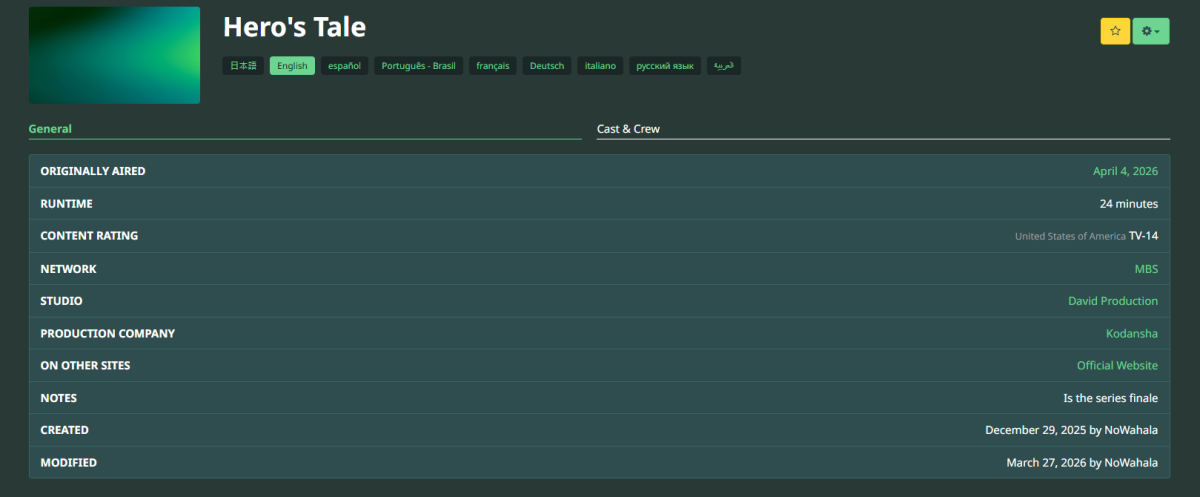

-

Can no longer connect to server locally on other devices. Have not changed any settings to cause this.
Jmackay82 replied to Theo-Media's topic in General/Windows
Hey, check the server IP. Most home routers have dynamic IPs, meaning the address changes every time you restart the router. There's usually a "preferred IP" option that makes sure the server always has the same address. -

Where is the tvshow.nfo file getting data from?
Deihmos replied to Deihmos's topic in Emby Provided Guide Data
i have all metadata lookup for recordings off. I still believe it would be great if emby got the backdrop from the guide instead of using the poster as the backdrop. -

[URGENT] Large Server (90TB) — Library Scans Stalling on Synology NAS
Nathanael replied to BaNanaBlocks's topic in General/Windows
Your symptoms look more like network bandwith then a problem with the server. My 60TB library does not have this issue, and i have an old low power 2011 xeon. -
does anyone have any other ideas what this could be? thanks
-
Can no longer connect to server locally on other devices. Have not changed any settings to cause this.
Theo-Media replied to Theo-Media's topic in General/Windows
No it has not. I've checked to make sure it is still set to private network. Still shows the same ip as well. -
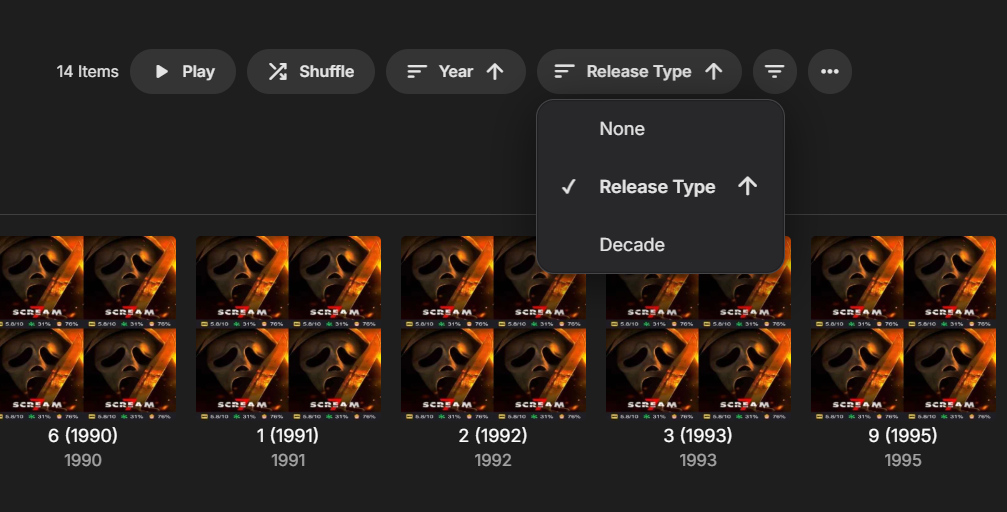
v2 Added Sections sorting: Release Type: Ascending/Descending alphabetically (no Tag/Other items always at the bottom/last) Decade: Ascending/Descending chronologically (no year/Unknown items always at the bottom/last) albums_groupby.js

-
Which is what makes it dangerous and opens us up to store policy scrutiny.
-

Plugin: EmbyCredits, detect end credits and add auto skip.
yocker replied to yocker's topic in Plugins
There is now a standalone of the Credit Edit function as per request. It can be found at: yocksers/TimeMarkEdit: Edit chapter time marks in Emby Thank you to @Neminemand @GrimReaperfor testing and suggestions for improvements. -
Plugin: EmbyCredits, detect end credits and add auto skip.
yocker replied to yocker's topic in Plugins
New version up (2.4.2) on yocksers/EmbyCredits Github. Changed: 1. Enhancements to the Credit Edit. -
2.234.2.0 not streaming remote media just keeps saying Playback error, there was an error processing the request. Please try again later. Live tv and recordings work fine just the strm files not playing. Works fine on web version and android app on my phone just not on theatre
-

Can no longer connect to server locally on other devices. Have not changed any settings to cause this.
Happy2Play replied to Theo-Media's topic in General/Windows
If no other local client can connect except for pc installed on usually means a firewall issue. Has your network type possible changed?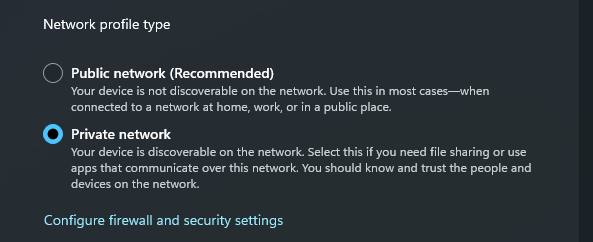
-
I found that disabling the new setting introduced in TVos 26.4 called "Continuous Audio Connection" resolves this issue.
-
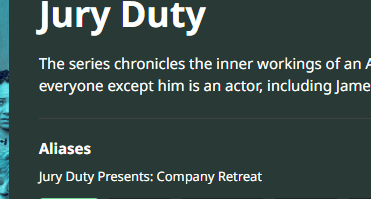
I cannot add Jury Duty Presents Company Retreat . Am I doing something wrong or is it missing on the database?
Happy2Play replied to GabrielPhoto's topic in General/Windows
But they are the same according to IMDB and TVDB (S01/S02). But a provider does list it differently/separately per TMDB you have an issue unless you are only using one provider as you will get mismatched info from multiple providers and will need to LOCK metadata and delete incorrect providerids. Or a matter of time before the provider delete or merges the Show. But they may not per the discussion board for this show. Jury Duty Presents: Company Retreat (TV Series 2026- ) - Seasons — The Movie Database (TMDB) Jury Duty (TV Series 2023-2023) - Seasons — The Movie Database (TMDB)
-
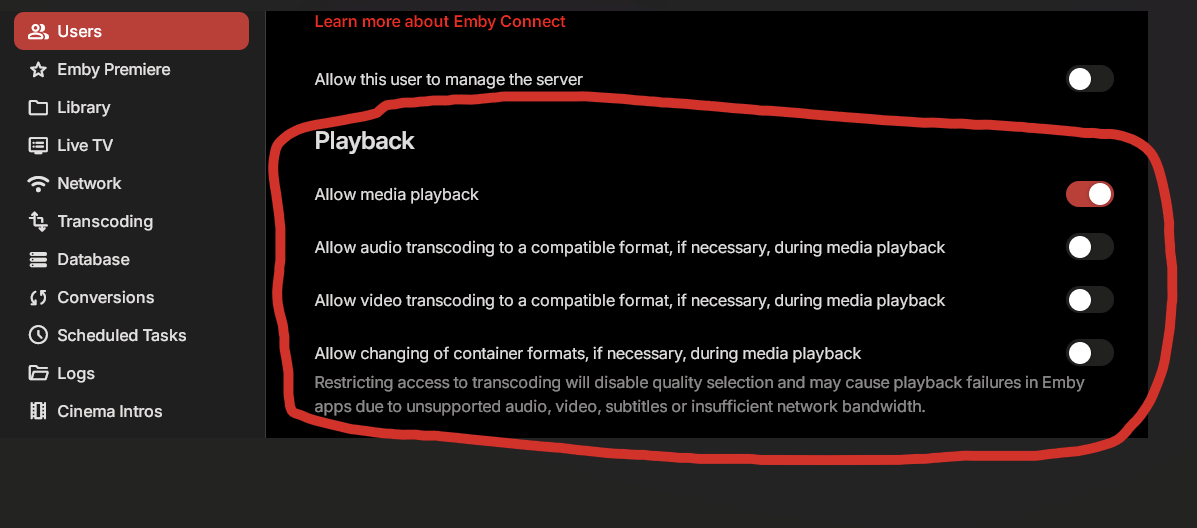
If you disable transcoding/container changing permissions for the user it will force the Apple TV to decode it client side rather than server side which will give proper Dolby Vision colors, TRUEHD to PCM conversion, and direct play of subtitles. This is not a perfect solution as this can cause playback issues on other devices that you use this profile on. What I do is have a separate profile for my Apple TVs with these permissions turned off.
-

Can no longer connect to server locally on other devices. Have not changed any settings to cause this.
Abobader replied to Theo-Media's topic in General/Windows
Hello Theo-Media, ** This is an auto reply ** Please wait for someone from staff support or our members to reply to you. It's recommended to provide more info, as it explain in this thread: Thank you. Emby Team -
Can no longer connect to server locally on other devices. Have not changed any settings to cause this.
Theo-Media posted a topic in General/Windows
Hello, a few months ago I started my server and have had no issues that a simple restart or troubleshooting couldn't fix. Just yesterday I was able to access it from my phone, today, it's saying the server cannot be reached but no issues connecting on the pc running it. I've followed the connectivity guide and haven't been able to find the issue yet. Hoping for some help from someone a bit more experienced than myself. Thank you much! Steps taken: checked for change in ip, nothing. no new vpn, no cgNAT, no change in ports or DNS, really just lost. -

I cannot add Jury Duty Presents Company Retreat . Am I doing something wrong or is it missing on the database?
pwhodges replied to GabrielPhoto's topic in General/Windows
Emby doesn't "expect" anything; it looks up the details you give in the name on the database you have selected as default - if those don't match there's nothing Emby can do about it. Paul -
Subtitles are usually included in any .mkv file or on puchased blu-ray, DVD discs. Software like MKVCleaver - Suggest you use v0801 instead of the latest version (v.0802 tends to set off virus check alarms) can be used to recover these files and save them as .srt or convert them, as needed. There are various sites online that have a forum type group collection of subtitles. I don't want to post any links to these sites. They are often heavily layered with ads. You should be cautious checking such sites. Sounds like you already know how to find individual subtitles per episode. The only tip would be to look inside the .mkv file, if you have those.
-
I tested Longman's scenario on my end with the latest update and it is tagging individual episodes as well. I don't know if that is what Longman is seeing.