All Activity
- Past hour
-
 考拉菌 joined the community
 -
 JAJOJ29 joined the community
 -
Version 4.10.0.8. I have checked both locations. Thank you
-
 Thaylor16 joined the community
 -
 Eitanbenari joined the community
 -
 gonzalolopezsanz joined the community
 -
 zhousancheng joined the community
 -
What server version as there is a bug in Beta. Potentially do to change in setting in two places now. Add played filter to home screen sections
-
 Karan4949 joined the community
 -
 varios7meses3 joined the community
 -
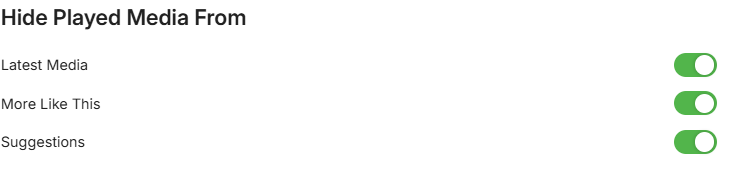
I have recently switched to the Android versions of Chrome and Fire TV Stick. Now, all played movies and shows will not clear the home page(i.e., latest movies, latest shows). I have gone to the server settings and the display subsection and clicked on all items in "Hide Play Media From." The play items are still there. I have exited, logged out/logged in, and reset the Fire TV Stick, and still nothing. I am looking at my next steps to fix this issue Thank you
-

SRT subtitles not displaying, other unknown subtitles are displaying
visproduction replied to davesurfer's topic in Roku
PW, NIce. I will try it. I did not know that this can go to the End of File even if :eof is not declared. That is a trick I had heard about. goto :eof - Today
-
Attached. Let me know if you need exact times or anything else. Thanks Luke. embyserver.txt
-
What is your provider order? Really depends on what the provider api returns for your exact setup as a query for "Cat's Eye" is pretty generic and will get multiple results when you have same named shows you really have to see how the provider lists them as it is usually best to add YEAR to show name as the simplest fix. Cat's Eye - Search - TheTVDB.com
-
I just solved it, but I'm not really sure how. I removed the new one from the server, locked the other series and put it back. The only thing that is still wrong, are the pictures from the old series from the first 12 episodes. They have now all the picture of the new series. By manually editing the metadata of every episode I manged to change that back. But there should be a better way.
-
Hi, I have a problem with the Emby server mixing two series into one. I have the old animé series Cat's Eye (73 episodes) and Cat's Eyes - Ein Supertrio (2 seasons with 12 episodes each). First the server mixed those two up, but I was able to sort it out. Now there is a new French TV series (2 seasons with 12 episodes each) based on the animé. This series is called Cat's Eyes and is as it should be in its own folder, but the server mixes it up with the original animé series Cat's Eye. The first 12 episodes (I don't have the second season by now) are now the real French TV series and not more the original ones and there is no new series called Cat's Eyes. I tested different approaches, but nothing worked. How can I force the Emby server to identify both series as different series? Yours Loeffel
-
I'm experiencing the same issue. I have an Android device that is working fine, as are my Google TVs. But my Wife's iPhone refuses to allow playback and only gives the premier as an option. The app was purchased years ago on her Apple account. So something changed recently, because it was working fine. Reinstalling the app does not fix the issue.
- Yesterday
-
Because your files are owned by unRaider (1000) and Emby runs as nobody (99), Emby only has the permissions of "Others", which is Write. It's likely you require Write AND Execute on a directory to create or delete files within it. You can try one of the below options: Change the Emby Docker UID/GID to match unRaider, i.e. change PUID to 1000 and PGID to 100 -- i would also check that UMASK is set to 002 If you prefer to keep Emby running as default nobody (99), you need to ensure the media folders allow users (GID 100) group to have full control and make sure Emby is part of that group. To reset all the existing files on the share, you can use the New Permissions tool within Unraid to reset the "multimedia" share with perms like 777 or 775. With this, you'll need to make sure your Zorin OS is allowing that group to write. How are you mounting the share in Zorin? Check that the /etc/fstab also using UMASK of 002. Try option 1 first as its the easiest and fastest to get you going.
-

Emby app on Samsung TV crashes when opening Guide via VirtualTV plugin
Luke replied to s1mwest's topic in Samsung Smart TV
Thanks for following up! -
Hi there, please attach the complete Emby server log. Thanks.
-
Nope, all your tags are supposed to show up. I had like 50 junk tags that all showed up.. This is a long shot - reboot server, clear browser cache and try again. If it’s not working try to crate a new tag and see if that one shows up. It could also be an issue that it only check movie, seres or episodes. I’m away for the weekend with limited ability to test this out myself: Could you add a new tag to a movie, a serie and an episode (do it manually and use different tags) and see what the plugin reports after that? The reason the plugin requires the beta server is because of the new Home Screen sections. The plugin calls new functions within Emby that’s only available in the beta. I’ll take a look at the blacklist function and see what’s wrong. Thanks for reporting! You are correct in your analysis. In the log you will see how many objects that got tagged. So if you have two versions of a movie (1080p and 4K) it will count as two in the log.
-

Free Emby app, free Emby server, remote connection, no limitations — how is this possible?
ebr replied to StefanoMore's topic in Android
Yes, that it also a possibility. -
How to solve the prompt "Too many errors.Giving up." on the TV
ebr replied to noistr's topic in Android TV / Fire TV
Hi. This is a generic message that playback of the item failed. It does not indicate any bug. Let's look at an example. Please attach the information requested in how to report a media playback issue. Thanks! -

SRT subtitles not displaying, other unknown subtitles are displaying
pwhodges replied to davesurfer's topic in Roku
Here you are. Only MKV files are processed, and they are modified in place without any rewriting. It assumes that the MKVToolNix program files are on the path. The base directory to be scanned can be provided as a command-line parameter or in response to a prompt, and subdirectories are also processed. All forced flags on any type of stream are removed. I run it automatically after re-encoding files with Handbrake (because Handbrake adds unwanted forced flags when you specify default), just on the program's target directory - Handbrake's preferences have a slot for specifying a command to be run automatically at the end. Paul unforce.cmd -

Windows 11 updated to 26220.8138 - Emby app wont open - Application Error / .NET Runtime
scottpro replied to Sulphy's topic in Windows & Xbox
You can try uninstalling that Windows update. To uninstall a Windows KB update, go to Settings > Windows Update > Update history. Scroll down to "Related settings" and select Uninstall updates. Select "KB5079491" (Windows 11 Insider Preview Build 26220.8138) and click "Uninstall". That should take you back to the previous Windows OS build. See if that helps. FYI, KB5079491 is for the Beta Channel 26220.8138 KB5079492 is the the Dev Channel 26300.8142 -

MacOS app goes back to the home screen but I can still hear the audio stream
kolik replied to TomHarrington's topic in Apple iOS / macOS
Hi everyone, I'm experiencing the exact same issue. The app keeps dropping to the home screen on my new MacBook and it's really annoying. I'm a bit disappointed that there isn't a fix for this yet. Let me know if you need me to upload my logs to help figure this out! -
I have a server running unRAID. The master user is unRaider, UID: 1000, GIP: 100. I installed EmbyServer (Official) via Docker: UID: 99, GID: 100. Movie data is on a multimedia share. When I copy a movie from my download PC (Zorin OS VM) to the multimedia share, it's saved with the user unRaider. This means Owner/Permissions: R/W, Group: R/W, and Others: W. Now for the problem: Emby can read the folder, but can't create the .nfo file or delete the movie. This only works if I either change the "Movie Owner/Permissions" or change the Emby Docker UID from 99 (nobody) to 1000 (unRaider). I hope you understand my problem and can help me. (Translated with Google Translate; my native language is German.)
-

How to solve the prompt "Too many errors.Giving up." on the TV
LSEMBY21 replied to noistr's topic in Android TV / Fire TV
Is this bug being looked into, or just ignored? I have several TV's - LG, Samsung, Toshiba, connected via TV App/Chromecast to NAS experiencing this problem. Also various iPads, Galaxy Tabs etc. with same problem. All works fine when connecting directly from PC/Laptop to NAS bypassing Emby. Surely after several years this should have been sorted out by now. What is the status? Thanks -
In trying to connect to my Emby Server with the iOS app while away from home, I'm using this URL as a "manual" connection: https://emby.mydomain.com, and then I manually enter port 443 in the app, and everything works just fine. (My Emby server is running on a Synology box and I have got the networking set up correctly for a secure connection to the server) But once I'm back at home, Emby default to the direct connection using the LAN IP address of the server, severing the secure connection and seemingly deleting that path to the server. Sooooo when I leave home, once again, I have to jump thru lots of hoops including entering all the manual server info again, to get to the point where I can connect. I'd like the connection from my phone to the server stay the same, so I don't have to enter server and id creds overtime I leave the house. Is there a way to make the manual connection "stick"?
-
Emby Theater v3.0.20 (Server v4.9.3.0) Homescreen Horiz. navigation broken
scottpro replied to d00zah's topic in Windows & Xbox
There is an option under "Preferences->Display" that hides played media from those sections. Also, the beta releases are for Emby server and not ET (legacy). This issue/bug was a ET (legacy) problem which is driven by online content updates, hence the version 4.9.3.28.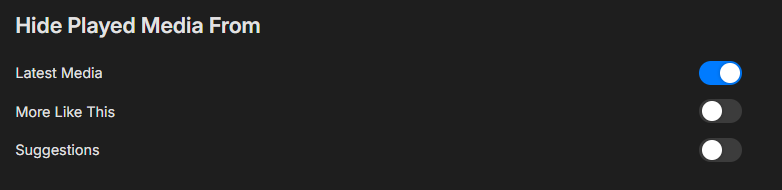
-
I’m confused, should “Show Login Screen” in Settings > Display > Startup Behavior bring up the user login/selection screen *every* time the app is launched, allowing a logged in user to be selected ? Maybe it is the TestFlight I’m using, but that login/selection screen doesn’t come up each launch. For me it only appears after the app has been force quit and is starting up fresh. I’ve tried resetting the setting, force quitting after, etc. Is this working for people?
-
Sorry yes TitanOS, not saying Emby is doing that
-

Hide Playlists from Included In & Group Albums by Release Type + Decade
GrimReaper replied to user24's topic in General/Windows
Tbh, I liked previous iteration/sections order more, but maybe my brain is just wired differently. There's too much going on now, too much up-down mouse movement, the flow simply doesn't feel right. Anyway, here: v0.7 emby_album_tag_importer.py