
All Activity
- Past hour
-
 yokee1470 joined the community
 -
 m20080309 joined the community
 -
 wudiweiwei joined the community
 -
 Turkialhrby joined the community
 -
 Doriabelmonte joined the community
 -
 Lukelu2026 joined the community
 -
 darren_01 joined the community
 -
 Xsming joined the community
 -

Suggestions from emby server not loading in Android tv
seanbuff replied to buhochileno's topic in Android
-

Search is returning too many results
Jonathan1683 replied to Jonathan1683's topic in General/Windows
Thanks for the quick responses, this does work on the PC. It doesn't seem to work on the IOS app, but I still dont like how this works by default. Is there a way to change this behavior? I rather it just search like it's using quotes by default. Teaching everyone to use quotes seems like a complicated task lol. I feel like this was not how it use to function. -
I can split it up to independant horizontal and vertical controls somewhat easy. Each corner separately will be harder, will see what i can do.
-
If you add the quotes around the search it should do that. "death proof"
-
death+proof or "death proof" (with quotation marks).
- Today
-
Hello, Was there a recent change to the search engine? It seems search by each word separately instead of together. Say I search for "death proof" it shows every movie that has death or proof. This obviously returns 15+ results instead of the 1 result I want. Is there a way to turn exact search back on instead of searching by all words in the search field? Thanks for your help!
-
You would just setup tasks to do that yourself outside of Emby. It would be the same as the optimize media option that is in Plex, but you would handle that manually or use automated tools like tdar, or better yet, just get an intel N100 or N150 machine, or a 12th gen or newer laptop to be your Emby server. They will perform far better, and use minimal power. My i5-1235u server uses 15-20 watts, and mostly sits idle at 8 watts, about the same as a high powered LED light bulb.
-

Clicking on the heading for a library at the home page opens "suggestions" and ignores user settings
GrimReaper replied to Nestar's topic in General/Windows
There are already two entry points to desired landing tab for any library (My Media and sidebar), I prefer header click as-is, linking to Suggestions, mostly for content discovery. -
I don't understand why it can't just be an option. It doesn't have to be the default. I don't even care if it's a hidden option and I have to edit a config file somewhere.
-

Clicking on the heading for a library at the home page opens "suggestions" and ignores user settings
Happy2Play replied to Nestar's topic in General/Windows
They are two separate option per home screen and the latest headers should not just go to the library as the library is usually never sorted that way. My Media options will always be different then Latest Rows options. -

Clicking on the heading for a library at the home page opens "suggestions" and ignores user settings
Nestar replied to Nestar's topic in General/Windows
The suggestions page doesn't make sense as a follow up for that purpose. The home page shows 16 items. Clicking the library takes you to suggestions which also shows those exact same 16 items. If that were the logic it should be going to the full list and enabling sort by added date filtering automatically. As of right now you have to go to suggestions, then click again on the heading to get to the actual list and then manually add those sort options. So it takes several clicks to get to what you originally wanted to do. Rather than following the user settings and doing it in 1 click. -
Clicking on the heading for a library at the home page opens "suggestions" and ignores user settings
Happy2Play replied to Nestar's topic in General/Windows
Well the Latest Rows have always been Suggestions as that is how the page is sorted ie Latest/Release date. And Library entries will be per your home screen landing page setting. -
Clicking on the heading for a library at the home page opens "suggestions" and ignores user settings
Nestar replied to Nestar's topic in General/Windows
It wouldn't be a new feature in this case, The option to set this already exists. It just doesn't affect those links because they have a hard-coded value tacked onto the end of them. &tab=suggestions Also just tested it out using the browser element inspector, and deleting that section out does fix it. -
Clicking on the heading for a library at the home page opens "suggestions" and ignores user settings
GrimReaper replied to Nestar's topic in General/Windows
It has always been like that, header click opening Suggestions page for both Movies and Tv Shows content-type libraries. You are welcome to open a Feature Request topic in respective forum section. Feature Requests - Emby Community -
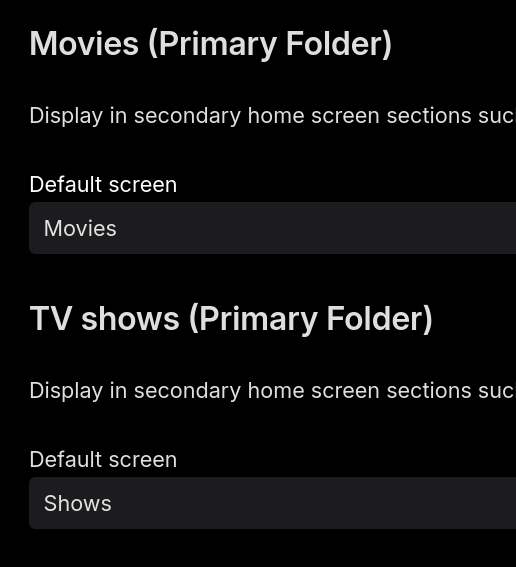
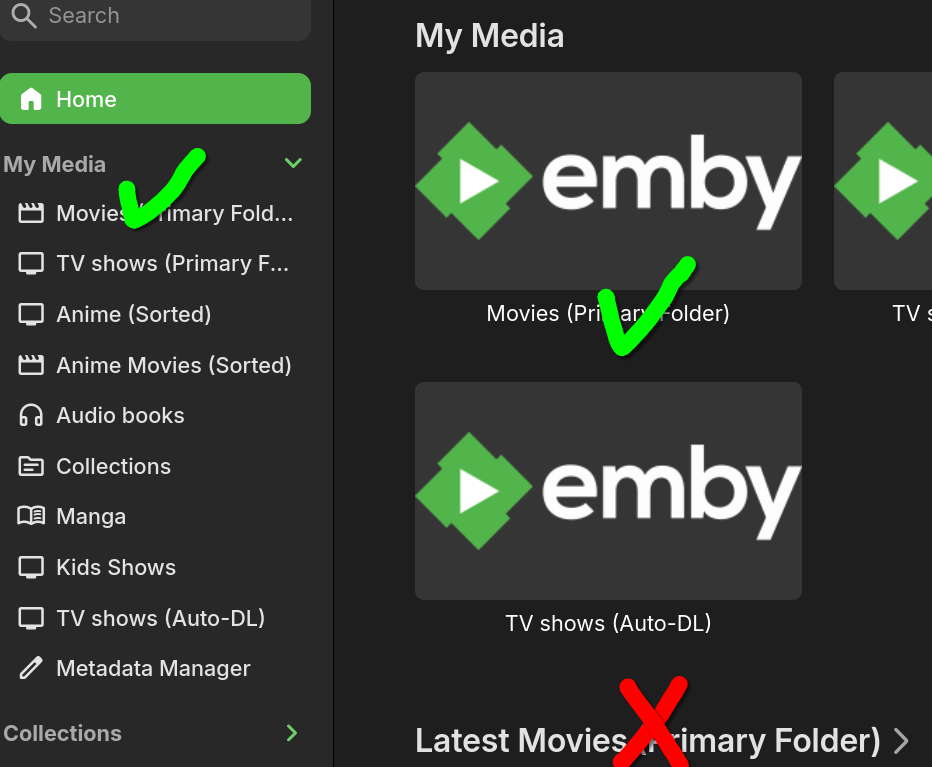
Home screen settings for the account in question are configured to have the default screen for every library as "Movies" or "Shows". However depending on where you click for each library some links will ignore this setting and always go to "suggestions". The my media lists at the top of the page and the side bar both work fine. But the heading above each individual library does not. This seems to be a server-side bug as it affects all the web client, android and the new linux beta. (I am technically running this on linux server, but based on what this is I expect it probably affects all versions of server)
-
Thanks for implementing that - unfortunately, not really useful (in my scenario) as icons move diagonally according Edge Padding value - IMHO they should move based on selected layout: for vertical layout, padding should be counted from upper/lower poster edge and vice-versa, for horizontal layout it should be counted from left/right poster edge. Or split that setting into vertical & horizontal padding value, if feasible. Thanks.
-

LDAP Authentication Issue: QNAP Active Directory - "Invalid username or password"
Luke replied to kayzer699's topic in QNAP
The error message in the log is saying Strong authentication required. Here is some info that I found: Please let us know if this helps. Thanks. -
Playback Error No compatible streams are currently available
Luke replied to DietzR's topic in Linux
Thanks for following up ! -
Those are all great additions. Well done.
-
They seem to be totally against that idea for what ever reason.
-
Started having problems watching my PVR and saved videos on Roku
Luke replied to AmericanMike's topic in Roku
Hi, what exactly happens? -

Started having problems watching my PVR and saved videos on Roku
AmericanMike posted a topic in Roku
This just started this week. Can't watch downloaded videos or PVR videos on Roku today. No issues watching them through Emby on Chrome Browser. ffmpeg-directstream-2fbf69fe-f180-4ce4-addb-d421fb1d7c99_1.txtembyserver.txtffmpeg-directstream-2fc556dc-9883-4e1f-96a6-6ff917615e0f_1.txt -
Adding tmdbid tags in file name where there are multiple versions of a movie
Luke replied to daleala's topic in General/Windows
Hi, what happy2play suggested is what I would recommend so that you can have grouping based purely on files. Currently that will produce a better looking result with the version selection drop down. -
@TariqK Hi there, let's look at an example. Please attach the information requested in how to report a media playback issue. Thanks!
-
OK please let us know what you find. Thanks.





