All Activity
- Past hour
-
 Daguru4sho joined the community
 -

embyforkodi (next-gen) 12.X.X support
supermood replied to quickmic's topic in Emby For Kodi Next Gen
thank you for your fast help! @quickmic! yes I accidentally download all in advance. didn't know that this is a mistake. now all perfect! many Thanks! and no, I have absolutely no clue about Linux happy Sunday! -
 Amthonyw98 joined the community
 -
 SimTay joined the community
 -
 isrealhabibur joined the community
 -
@Lukeis this still being worked on or is there a setting we can change that was added? Thanks
-
 Berken_2014 joined the community
 -
 Mariadg joined the community
 -
 imbingewatcher joined the community
 -
 Roberto4632415 joined the community
 -
I just had this happen to me, Emby for Android 3.5.28 on Nvidia Shield Pro. Screen saver went on, which caused playback to resume in the background (could hear the sound behind the screen saver). The thing is it's difficult to reproduce. Next time I tried it, it didn't happen.
-
Title: Home Videos library ignores “Date Added” from local NFO Hello Emby team, I would like to report an issue that appears to be related to how Emby handles local NFO metadata, especially the “Date Added” field, in a library of the type Home Videos / Home Videos & Photos. Environment Emby Server version: 4.9.3.0 Library type: Home Videos / Home Videos & Photos Operating system / storage: Linux-based NAS (Ugreen DXP8800Plus, Emby Docker Container), media paths mounted in Emby under /mnt/Emby/YT/... Example affected path: /mnt/Emby/YT/gamestar/videos What I am trying to achieve I maintain a large YouTube archive with several thousand videos. For each video, I create local NFO files myself and want Emby to use those files as the authoritative metadata source. The main fields I want Emby to read from the NFO are: Title Sort title Plot / overview Premiere date / year Date Added Current result Emby does appear to read at least part of the NFO correctly. For example, the following fields are correct: Title Plot / overview Premiere date / year However, “Date Added” is still wrong. Instead of using the value from the local NFO, Emby appears to keep the import or database timestamp. So the issue is not that the NFO is completely ignored. The issue is that Emby seems to apply only certain fields from the NFO, while “Date Added” is still not handled correctly. What I have already tested I created local NFO files for the videos myself. I used a PowerShell script that creates or updates a matching .nfo file for each media file. I verified that the generated local NFO files are correct. Before the Emby scan, the NFO files contain the expected values for title, plot, premiere date, year, and dateadded. I explicitly set the relevant date fields in the NFO. The generated NFO includes, among other things: <dateadded>YYYY-MM-DD HH:mm:ss</dateadded> <premiered>YYYY-MM-DD</premiered> <aired>YYYY-MM-DD</aired> <year>YYYY</year> I also set lock fields. The NFO contains: <lockdata>true</lockdata> <lockedfields>DateAdded|Overview|Title|SortName|PremiereDate|ProductionYear</lockedfields> I disabled NFO writing in Emby. In the library settings: Metadata reader: NFO enabled Metadata saver: NFO disabled I performed a normal library scan, not just a metadata refresh. I first let the NFO generation complete fully, and only then started a library scan. I also tested with real-time monitoring disabled. At first, I suspected that Emby might be reacting too early to file system changes. I therefore also tested with real-time monitoring disabled. This did not solve the issue. I first tested with a smaller subset. Specifically, I tested only a single channel folder, for example GameStar, before looking at the full library. The result was the same. I checked the Emby logs. The logs show that Emby scans the library and processes the path. However, there is no obvious error explaining why the “Date Added” field from the NFO is not being applied. Observed behavior in detail After my script has finished: the media file exists the local NFO exists the NFO contains the correct metadata Emby scans the library in Emby, title, plot, premiere date, and year are correct but “Date Added” still shows an incorrect value, apparently based on the import time rather than the NFO value This behavior is reproducible. Why I believe the issue is in Emby If the NFO were not being read at all, title and plot would also be wrong. However, those fields are correct. That means Emby is reading the NFO in general. The issue therefore seems to be specifically that “Date Added” is either: ignored for this library type, overwritten internally after import, or not applied from the NFO as expected in this scenario, even though other fields are processed correctly. Additional note This library contains many thousands of videos. As a workaround, I could completely remove the media from the library and re-import everything, or physically move the files away and copy them back. However, that creates unnecessary load and should not be required if local NFO metadata is properly supported. Question Could you please confirm whether the “Date Added” field from local NFO files is generally supported in a Home Videos / Home Videos & Photos library? If yes, is this a bug? If no, is there a recommended way to make Emby use a local NFO date as the effective “Date Added” value? Thank you.
- Today
-
 muiz changed their profile photo
 -

Is offline use with Xreal Beam Pro possible?
quickmic replied to bobaldis's topic in Emby For Kodi Next Gen
ok, thanks, I'll also doublecheck the download option. -

Is offline use with Xreal Beam Pro possible?
bobaldis replied to bobaldis's topic in Emby For Kodi Next Gen
Hi, Thanks for the response, but no I was downloading via the Emby client and pointing EFKNG at that location, I'll try as you suggest and let you know The you played the content and the progress was not reported to Emby server? Is that right? - Yes but not using the correct method it appears -
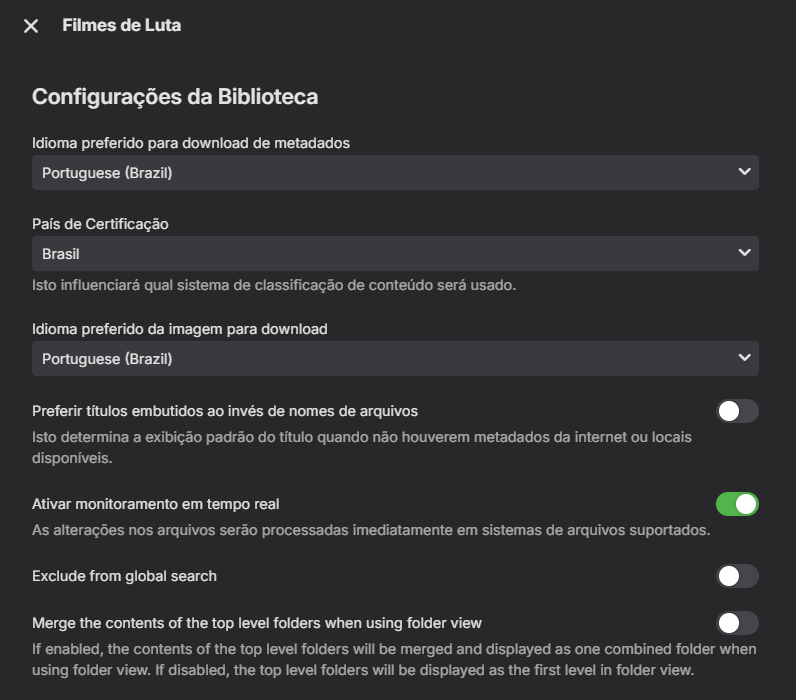
Existe uma previsão de quando esse mapeamento será feito no caso? gostaria de poder obter as imagens no meu idioma PT-BR para minhas galerias ficar no idioma correto Fanart.tv muito limitado. tenho uma assinatura vitalícia do Emby Premiere gostaria muito dessa melhoria, acredito que seja algo simples para se agregar.
-
Estou usando o padrão no meu idioma PT-BR porem ele não busca as imagens no TMDB no nosso idioma que é diferente do Português de Portugal agora recentemente vi que foi implantado a categoria para nosso idioma.
-

Two weeks of troubleshooting paid off – Docker solution for my Emby on UGREEN
Blueskies278 posted a topic in General/Windows
Wrong Date for US Shows Fixed US Show Metadata: Pulls directly from Trakt to bypass Emby’s "Upcoming" endpoint issues. "Upcoming" now displays the correct dates for US TV shows in the European timezone. Timezone Accuracy: Personally, I prefer Trakt because it syncs to whatever timezone you’re in. Self-Healing: Detects Emby cache resets and reapplies fixes within 30 seconds. Set & Forget: Runs automatically on my UGREEN DXP4800 Plus NAS; includes a 1:00 AM daily "safety net" sync and handles reboots without manual intervention. No TMDB Option for TV Shows TMDB Landscape Fixes: Scans my folders every 60 seconds and downloads missing landscape.jpg thumbnails from TMDB. Hopefully, TMDB support for TV shows will be implemented in the near future. Thumbnail Selection: It will download the most popular thumbnail with text. If you want to select a different one, you will have to manually download it from the TMDB website. Auto Next Episode Not Working (Android & Apple TV) The Workaround: Install Diagnostic Options and toggle "Disable HLS Subtitles." The Fix: Usually, this setting disables itself when Emby restarts. My Persistent Settings permanently locks the "Disable HLS Subtitles" toggle so it stays active even after a reboot. Summary: All of this took about two weeks to compile with Claude AI because I hit numerous walls, but it was well worth it! -
Sorry for delay in response. My qnap died on me and had to buy a new one. I have checked the changes and they have all been corrected Thanks
-
Let's not play diplomat it's tacky. Most want this and have wanted this. Fixing the search function should be relatively straightforward since the bulk of the code is already there.
-
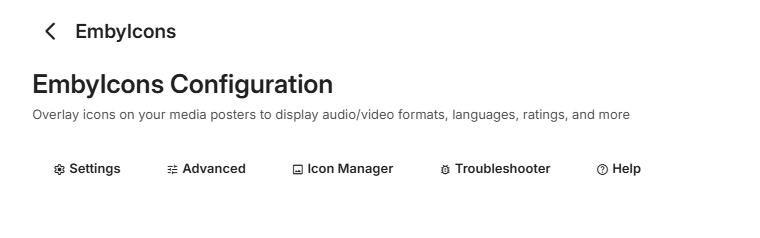
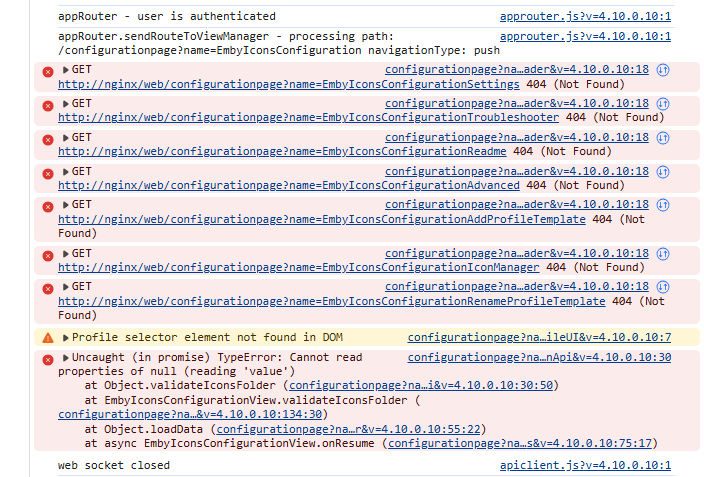
Hi @yocker Embarassingly, I can't seem to get your Plugin to work .. The Plugin is loading, I see it in the Plugin area, I see it load in the logs - but when I click on Settings - nothing at all happens. The config XML file is not being created - so I tried forcing a blank one but no joy. Other config XML's are being updated, so it's not a write/permission issue. I've tried cleaning browser cache, private & also an alternative browser. Filtered log below if this helps. I'm using the latest Emby beta - 4.10.0.10 Any help appreciated ! Thanks. Nothing shows from above - and nothing is actionable. Log below :- 2026-04-12 09:17:27.486 Info App: Loading EmbyIcons, Version=5.51.6.0, Culture=neutral, PublicKeyToken=null from C:\Emby-Server\programdata\plugins\EmbyIcons.dll 2026-04-12 09:17:27.764 Debug Plugin: EmbyIcons plugin initialized. 2026-04-12 09:17:27.862 Info EmbyIconsEnhancer: [EmbyIcons] Session started. 2026-04-12 09:17:27.862 Debug XmlSerializer: Deserializing file C:\Emby-Server\programdata\plugins\configurations\EmbyIcons.xml 2026-04-12 09:17:27.867 Info EmbyIconsEnhancer: [EmbyIcons] SkiaSharp is available and functional. 2026-04-12 09:17:27.867 Info EmbyIconsEnhancer: [EmbyIcons] SkiaSharp is available. Icon overlays will be applied. 2026-04-12 09:17:28.105 Debug Server: Defaulting route to authenticated: EmbyIcons.Services.ApiRoutesService.GetApiRoutesRequest 2026-04-12 09:17:28.105 Debug Server: Defaulting route to authenticated: EmbyIcons.Services.AspectRatioService.GetAspectRatio 2026-04-12 09:17:28.105 Debug Server: Defaulting route to authenticated: EmbyIcons.Services.CacheManagerService.RefreshCacheRequest 2026-04-12 09:17:28.105 Debug Server: Defaulting route to authenticated: EmbyIcons.Services.IconManagerService.GetIconManagerReport 2026-04-12 09:17:28.105 Debug Server: Defaulting route to authenticated: EmbyIcons.Services.ItemsByIconService.GetItemsByIcon 2026-04-12 09:17:28.106 Debug Server: Defaulting route to authenticated: EmbyIcons.Services.MemoryUsageService.MemoryUsageRequest 2026-04-12 09:17:28.106 Debug Server: Defaulting route to authenticated: EmbyIcons.Services.ExportProfilesService.ExportProfilesRequest 2026-04-12 09:17:28.106 Debug Server: Defaulting route to authenticated: EmbyIcons.Services.ImportProfilesService.ImportProfilesRequest 2026-04-12 09:17:28.106 Debug Server: Defaulting route to authenticated: EmbyIcons.Services.ValidateProfileImportService.ValidateProfileImportRequest 2026-04-12 09:17:28.106 Debug Server: Defaulting route to authenticated: EmbyIcons.Services.TemplateCacheStatsService.TemplateCacheStatsRequest 2026-04-12 09:17:28.106 Debug Server: Defaulting route to authenticated: EmbyIcons.Services.ClearTemplateCacheService.ClearTemplateCacheRequest 2026-04-12 09:17:28.106 Debug Server: Defaulting route to authenticated: EmbyIcons.Services.ProfileService.GetDefaultProfile 2026-04-12 09:17:28.106 Debug Server: Defaulting route to authenticated: EmbyIcons.Services.ScanProgressService.GetScanProgress 2026-04-12 09:17:28.107 Debug Server: Defaulting route to authenticated: EmbyIcons.Services.SeriesTroubleshooterService.GetSeriesTroubleshooterReport 2026-04-12 09:17:28.107 Debug Server: Defaulting route to authenticated: EmbyIcons.Services.ValidationService.ValidatePathRequest 2026-04-12 09:17:28.466 Debug Plugin: [EmbyIcons] Populating library path cache using Trie. ** edit ** yea - I think it's because it hasn't created the config xml for some reason - this is brand new install. Browser debug below :-
-
I have noticed a bug in the plugin with Emby 4.10.0.10 regarding playstate. It does no longer sync to Emby when set in the plugin, I'm working on a fix but I'm a bit busy so it might take some days before i get time to fix it. Thanks for your patience!
-
Should be possible, I'll look into it!
-
Is offline use with Xreal Beam Pro possible?
quickmic replied to bobaldis's topic in Emby For Kodi Next Gen
Ok, let's go step by step. The "Downloads section"... I assume you downloaded content via Kodi's context menu "EMBY: Download"? The you played the content and the progress was not reported to Emby server? Is that right? -
Hello Everyone, I wanted to write this topic because it's a series issue that I have been facing for a while now and I haven't discovered the cause of the issue yet. but I have found a way around it. First of all I want to mention why I have switched and subscribed to emby in the first place. I have always used Plex and it was bugging me all the time with their server issues and playback issues and almost every two weeks I had to reinstall the server because it just shuts down by itself. The movies I play on my TV and Soundbar are all 4K with TrueHD 7.1 surround sound. so you can imagine how huge these files were and the power they required to be played. Then I discovered emby. and man I was so happy that I found an app and server that play these movies super fast with no lag and no stutter and no server issues. at that time emby server was on 4.8.3.0. it played everything I throw at it. no server issues whatsoever. I subscribed immediately and transferred my whole library to emby. ditched plex completely. I stayed on version 4.8.3.0. for almost a year without updating my server and it was working amazingly. last year about the end of the year time I decided to update my server, since I saw a huge change log I said to myself it would be even better with these updates. little did I know that updating my server would be the end for emby for me. after that update to 4.9.3 and above and even the beta updates 4.10. My emby couldn't play any movies at 4K TrueHD 7.1. It crashes within the first 3 minutes of playing the movie. I couldn't figure out why or whats happening. I thought maybe the movies are corrupted and I redownload them. whenever I play a movie it just crashes and I have to relaunch the server. like it can't handle that format anymore. I tried to search here for a solution but nothing helped me. And I almost gave up on emby in search for something better or go back to plex because it didn't have that crash issue for me. As a final solution I wanted to try, I remembered why I switched to emby in the first place.. fast, no lag and no crashes at all, and that made me think of the version of emby server the moment I discovered it. I remembered that when I fell in love with emby it was on version 4.8.3.0. So as a final solution to try and fix the issue I said why not to try the old version of the server. And here is the surprise, No more lagging, no more crashing at all. it played my movies smoothly and with no worry that it would crash at any moment. So emby team, this is my message to you. Whatever you did after version 4.8.3.0. please revisit that and see whats changed. because this version never crashes for me. Finally, I hope this helps whoever is having these issues just like me. and sorry for the long essay I just wanted to express my feelings while explaining this issue.
-
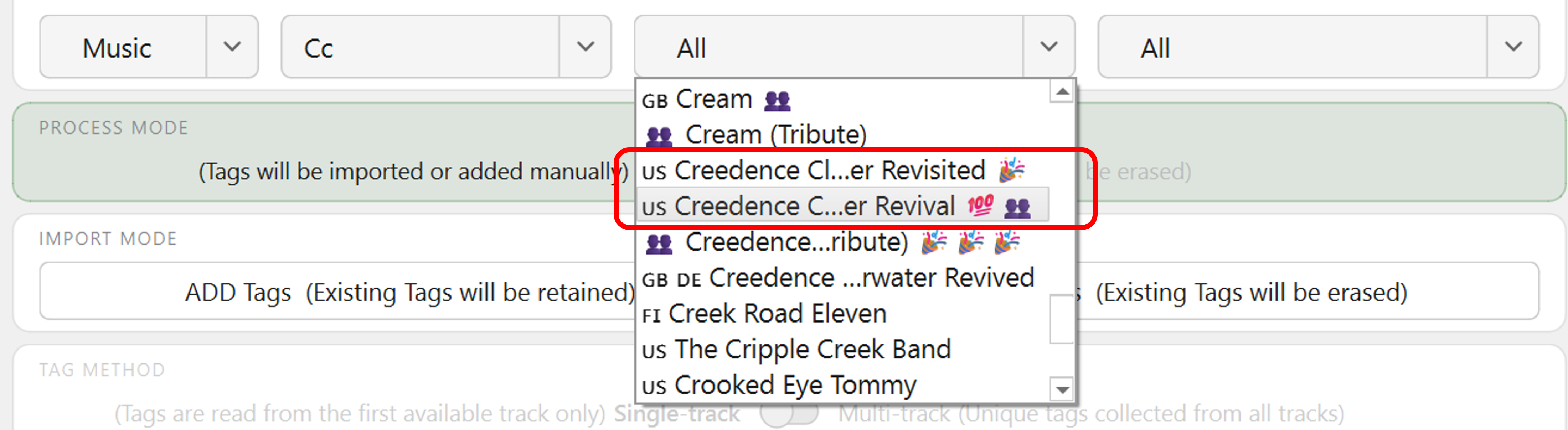
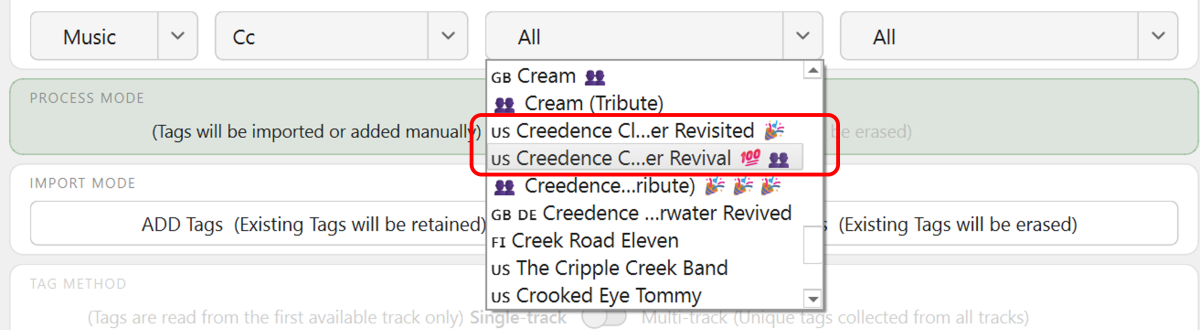
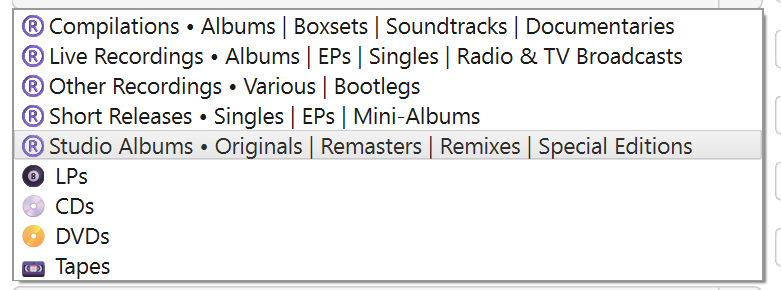
@GrimReaper Thanks for the v1.3 update! I've been using v1.2 every day for at least a couple of hours. Though, much of that time has been tagging in Mp3tag and then reviewing the end-results in Emby, plus revising. Here's some casual in-use observations... I've mainly been selecting specific Album Artists with 20+ Albums and doing: CLEAR ALL TAGS ADD+MAP RELEASETYPE ADD ROONALBUMTAG Then, if I have made an error, I select the specific Album and use any method (sometimes REPLACE) to correct the error. I think the new CLEAR options you have added for v1.3 will be very useful, once I have tagged a significant part of my library and then need to clear/change something specific without potentially messing up everything else. With initial testing, I had previously noticed that the SELECT ALBUMS drop-down menus keep the start and end of the names with "..." in the middle. This is actually very useful, because it didn't take me long to find an example where I need the end of the title to properly identify the specific Album Artist: This also makes it easy to quickly locate (e.g.) a "Top 100" Album Artist. Also, as a small test I tried updating from a folder-level - all "Zz" Albums at once. This worked with no problems. Once I finish the "Top 100" then I expect the folder-level bulk importing will be used more often. There are three minor suggestions I have for the SELECT ALBUMS section. Change "Album artist" heading to "Album Artist" to match with Mp3tag and Emby. Decrease the width of the Folder drop-down menu (perhaps same as Library) to allow for slightly wider Album Artist and Album menus. Increase the length of the drop down by 50%(?) to see more Album Artists and Albums. (If it is difficult, don't worry, it works fine as-is). I had also previously noticed the ACTIVITY LOG color coding: This is useful to show what is happening at a glance My interpretation has been: Red - no changes or an error Green - single change or ok Blue - multiple changes and ok The new color accents in v1.3 have "thrown me" a little bit. Just with the Green/Blue order. Wondering if they should be swapped to match the ACTIVITY LOG??? E.g. ADD = Blue and REPLACE = Green. Note, I haven't used this significantly as yet - this is just an initial first impression. I tend to think in color spectrum order - Blue is therefore "safer" than green. Though I guess most people don't think like that??? If what I have said is not logical for the whole GUI functions, then perhaps just keep it as it is? The v1.3 additional mapping drop downs look interesting. Currently my tags/mapping have consolidated to this: But that could all change tomorrow.... or next year...!!! Can't think of anything else at the moment - will continue with v1.3 now...

-
Already requested here as Thumbs currently only come from FanArt as TMDB language backdrops are not mapped.
-
Hi, what image language did you configure for the library?
-
Hi, it's not a bad idea. There's always the question of how important is it compared to other pieces of data that we're trying to show there, and then at what point does it all become too much.
- 1 reply
-
- 1
-

-

Users get access to directories they shouldn't
Luke replied to NicerDicer's topic in General/Windows
Hi, and its' only in one place right? -
Hi there, please attach the Emby server log from when the problem occurred: How to Report a Problem Thanks!
-
HI, it's not a username and password for the hard drive, it's for the network share. the path you entered is a network path. are you sure that is the right path to your drive?
-
Hi, thanks for following up.
-
please disregard, factory reset my NAS and it installed DSM 7.3 which was not available before