All Activity
- Past hour
-
 JerwinMaano joined the community
 -
 RobTaylot joined the community
 -
I’ve been tweaking my Emby home layout recently, and hiding library names definitely makes the interface feel cleaner and more minimal. It’s surprising how small text elements can change the overall look of a screen. If anyone likes customizing visuals beyond layout, I’ve found tools like https://thestylishname.com/ useful for generating clean Unicode text styles for labels or profile names. Little design touches can really elevate the whole media experience.
-
Hi there, let's look at an example. Please attach the information requested in how to report a media playback issue. Thanks!
-
 mjhon991 joined the community
 -
Yes This... I was just coming here to report that as well. I also had to run the installer twice to get everything successfully installed on its own on both my steamdeck & steam mini-pc. Not sure why that happened... If emby is only installable using terminal + disable the read-only system, it is going to make a lot of general users uncomfortable or just not do it all together. Don't get me wrong, the universal installer is great, but I think it would still be a turn-off for the average users. Especially after OS updates when they discover they have to run it again; it opens the door for a support ticket nightmare as well, with people thinking the emby app is broke (since average users don't understand why its happening)... I believe a flatpak version would resolve this with app discoverability in the repository, the discover/software GUI installer (no terminal required), and no need to disable the read-only file system. Would that be something considered in the future after a stable version is released? Otherwise, even for myself personally, Even though I know what I'm doing, I would just opt to use the browser version as I use SteamOS as my "smart-tv" media player nowadays. Thanks.
-

embyforkodi (next-gen) 12.X.X support
e123enitan replied to quickmic's topic in Emby For Kodi Next Gen
01_KODI.log pls see this log its has several errors, when I play/stop movie it freeze for several mins Thanks for your supports -
 Serpoo joined the community
 -
 criauto13 joined the community
 -
 NikolaDjuric joined the community
 -
 losztika joined the community
 -
Hi. Anyone uses Emby on Samsung phone with DEX + Xreal Glasses? I cannot control the video when a movies starts. Once it is on DEX mode and phone screen acts as a touchpad. if i touch the screen then no controls appearing Is there any known workaround or fix?
-
 Uriel112 joined the community
 -
 Mariesanchez24 joined the community
 -
 gissellm joined the community
 -
Thanks everyone for the feedback. I'm still trying to figure out all these settings. The end goal is to be able to get away from Infuse for my movies. Right now that is what I have to use to get the audio passthrough for non DD audio. I just want the best audio experience I can get and Dolby Digital is on the low end of that. I'll take LCPM over AC3. I always select what I believe to be the highest quality choice (IMHO) available and want it passed to my AppleTV. That way if the format is supported it will be used, otherwise it will be LPCM.
-
My family still loves WMC and won't let it go with their XBox 360 extenders. Emby doesn't present as a replacement for them unfortunately. Anyway, I had a HDHomeRun Prime with a cable card on my network and running to record shows in Emby and try and get the family to adopt it. That said, besides shows frequently failing to fully record and stopping after say 38 minutes or whatever the HDHomeRun prime started dropping off the network the other day. I eventually tracked it down to what I thought was the power supply but once I had a new one and it was up again, it seemed to see my cable card but not connect to Comcast. When I trying and look at the card settings it shows "Information is not available." People say that means the cablecard is dead. It showed the same on a second HDHomeRun I picked up to see what was going on as well so now have a spare useless one. Anyway, I digress. What are other people using to record shows on Emby? Thinking I'm missing something that this is actively being developed and cablecards seem to be dead. Most people say Comcast is going to refuse to replace and activate another card which means it's a dead option for me unless somehow it goes differently. What are others recording TV shows with?
- Today
-
Yeah, I went to delete the show I just watched and deleted 15 shows because of this. Keep in mind this "button" doesn't exist in the android app. Guess it doesn't really matter anymore but will post that in another topic.
-
Ah! Ok. Thanks!
-
Hi, not sure if this is possible but no harm asking. I have two emby instances running, one for internal use and one for external use. The internal one runs on my downloader machine and everytime i download a "linux iso" there is an auto trigger for library update using realtime monitor. The external one runs on another machine which access the drives over SMB. However it only updates on a schedule. I'd like to trigger this update from the first machine. Is this possible?
-

Movie Theme Songs Plugin Questions and Support Thread
adminExitium replied to radeon's topic in Plugins
Just realized that may be a bit pricey compared to MediaFire, so I have also had good experiences with Pixeldrain: https://pixeldrain.com/ -
Movie Theme Songs Plugin Questions and Support Thread
adminExitium replied to radeon's topic in Plugins
Cloudflare R2 should be only 30$ per month (https://developers.cloudflare.com/r2/pricing/) if you don't need to list the actual files and store just a JSON file containing the full list. Their downloads are free too and should be plenty fast for everyone. -
hardware_detection-63907289148.txtembyserver.txt The exact error message displayed is "Unable to tune to channel at this time." This occurs with both local OTA channels and FIOS channels. This was around 4:45-4:55 P.M. EST. User name is Dave.
-

Server transfer missing metadata, keep current .nfo info, sessions, etc..
buhochileno posted a topic in Linux
Hi everyone! I recently moved my Emby server to a new computer. The old server was running a really old version, so I preferred to start from scratch. I plugged in my USB drives and created the libraries again. After a loooooong scan, most of my TV shows showed up correctly, but I noticed that some didn’t. Those were locked because, when I originally added them, I edited the metadata for custom reasons and didn’t want it to be modified by a general library scan or refresh. For some of them, I was able to unlock the show, press “Refresh Metadata”, and select to look only for missing metadata, and it worked. “The Bullwinkle...” show is one of those cases. But with others, like the next two on the right (“Los Caballeros...” and Candy Candy), I try the same and nothing happens. No images, nothing. Both of them have their IMDb and TVDB IDs correct. This happens with several shows. One thing the old server had correct is what was already in the .nfo files for those shows in terms of seasons and episodes. I curated a bunch carefully to match what I have. Sometimes TMDB and TVDB do not match regarding the number of seasons and which episodes are in which season, especially for older shows. So I’m looking for a strategy that will preserve and respect the current .nfo files for the show, not recreate them, and just download the missing images. Even the episode descriptions and summaries are already in the episode .nfo files. Please suggest the best strategy for that. I don’t want to make a mess. It was really hard to curate the correct order of many old shows back when I had the old server. Thanks! Sorry if it is the wrong forum to ask..I wasn't sure in wich one this topic will be more appropiate...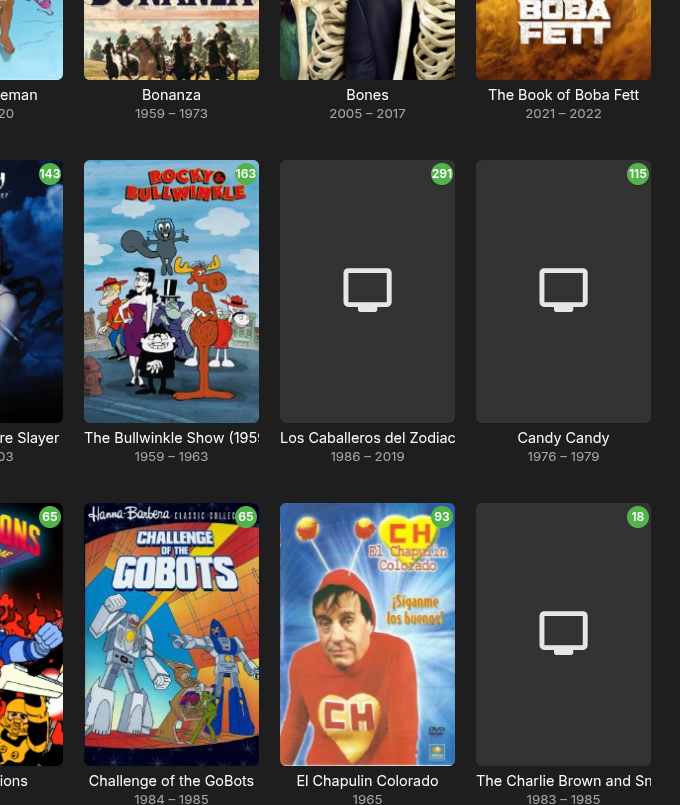
-
Hi, has this helped?
-
Hi, did you figure anything out?
-
Hi, you'll have to disable cinema intros in the Emby Samsung app for now, but this should be resolved once you have the 2.2.8 update. Thanks.
-
Hi there, let's look at an example. Please attach the information requested in how to report a media playback issue. Thanks!
-
to get all the none movies or shows you can do it like this: so you will find them as NR when filtering and you can edit them.

-
Hi, not yet but it’s possible for future updates. Thanks.
-

A lot of videos are stopping only 10 seconds into playback
burnchar replied to dimitrik's topic in LG Smart TV
Different problem. A router issue would not cause only videos of certain types to freeze, and not after exactly the same amount of time every time. -
I'm not entirely sure if this is the right sub-forum to post this so feel free to relocate it to the proper form, as necessary. I have the latest binhex-Emby docker installed on an unRAID server. The Emby app is installed on multiple nVidia Shields. I have four HDHomerun tuners - two HDHR Prime with cablecards on Verizon FIOS, one HDHR Connect Quatro, and one HDHR Connect 4K for OTA TV. I recently replaced my aging Linksys EA8500 wireless router with a TP-Link AXE5400 wireless router. All devices use hardwired connections via CAT6 ethernet on a home network. In addition to Emby, I also have the Channels app installed on the Shields with the Channels DVR recording engine on a separate Windows 10 HTPC. I also have two Windows 7 HTPCs with Windows Media Center installed using EPG123 and guide data from Schedules Direct.. Both of the Windows 7 HTPCs with WMC as well as the Channels apps on the Shields have no problems tuning to live TV. When I try tuning to a TV channel in the Emby guide on any of the Shields I get a message indicating that it is unable to tune to the channel at this time. I have reset each of the tuners as well as the Shields but still cannot access live TV via Emby. The HDHR tuners show up when I access the Emby server via the Web UI so I'm stumped as to why I can no longer tune to live TV. It worked perfectly fine before I replaced the router and I tried to maintain the same settings as the old router for a smooth transition. I have the router configured for DHCP to automatically assign an IP address to each device on the network with the exception of the unRAID server which has a static IP address. I set the range of DHCP address to range from 10 to 189 with the unRAID server static address set above that range.
-
If you take away transcoding permissions for the user that is using the Apple TV it will allow the Apple TV to convert the TrueHD stream to LCPM. Keep in mind this can cause issues if you use this user on other devices that are not capable of converting audio. For a more information on this check out this thread:
-

A lot of videos are stopping only 10 seconds into playback
alex77777 replied to dimitrik's topic in LG Smart TV
Seems it was just a network issue for me, I just restarted my router and the issue stopped. -
Restarting the router fixed the issue it seems. Thanks for the help

.thumb.png.1ddf135ad99a72646a26d671a28ffe35.png)