All Activity
- Past hour
-
 Marwa saghdani joined the community
 -
 laveg2 joined the community
 -
 Yousef13 joined the community
 -
 gamemaster3000 joined the community
 -
 Michelleandres joined the community
 -
 giravi joined the community
 -
 joran29 joined the community
 -
 pewin joined the community
 -
 z7s3f joined the community
 -
Nope, all your tags are supposed to show up. I had like 50 junk tags that all showed up.. This is a long shot - reboot server, clear browser cache and try again. If it’s not working try to crate a new tag and see if that one shows up. It could also be an issue that it only check movie, seres or episodes. I’m away for the weekend with limited ability to test this out myself: Could you add a new tag to a movie, a serie and an episode (do it manually and use different tags) and see what the plugin reports after that? The reason the plugin requires the beta server is because of the new Home Screen sections. The plugin calls new functions within Emby that’s only available in the beta. I’ll take a look at the blacklist function and see what’s wrong. Thanks for reporting! You are correct in your analysis. In the log you will see how many objects that got tagged. So if you have two versions of a movie (1080p and 4K) it will count as two in the log.
-
 xajec3 joined the community
 -

Free Emby app, free Emby server, remote connection, no limitations — how is this possible?
ebr replied to StefanoMore's topic in Android
Yes, that it also a possibility. -
How to solve the prompt "Too many errors.Giving up." on the TV
ebr replied to noistr's topic in Android TV / Fire TV
Hi. This is a generic message that playback of the item failed. It does not indicate any bug. Let's look at an example. Please attach the information requested in how to report a media playback issue. Thanks! -

SRT subtitles not displaying, other unknown subtitles are displaying
pwhodges replied to davesurfer's topic in Roku
Here you are. Only MKV files are processed, and they are modified in place without any rewriting. It assumes that the MKVToolNix program files are on the path. The base directory to be scanned can be provided as a command-line parameter or in response to a prompt, and subdirectories are also processed. All forced flags on any type of stream are removed. I run it automatically after re-encoding files with Handbrake (because Handbrake adds unwanted forced flags when you specify default), just on the program's target directory - Handbrake's preferences have a slot for specifying a command to be run automatically at the end. Paul unforce.cmd - Today
-

Windows 11 updated to 26220.8138 - Emby app wont open - Application Error / .NET Runtime
scottpro replied to Sulphy's topic in Windows & Xbox
You can try uninstalling that Windows update. To uninstall a Windows KB update, go to Settings > Windows Update > Update history. Scroll down to "Related settings" and select Uninstall updates. Select "KB5079491" (Windows 11 Insider Preview Build 26220.8138) and click "Uninstall". That should take you back to the previous Windows OS build. See if that helps. FYI, KB5079491 is for the Beta Channel 26220.8138 KB5079492 is the the Dev Channel 26300.8142 -

MacOS app goes back to the home screen but I can still hear the audio stream
kolik replied to TomHarrington's topic in Apple iOS / macOS
Hi everyone, I'm experiencing the exact same issue. The app keeps dropping to the home screen on my new MacBook and it's really annoying. I'm a bit disappointed that there isn't a fix for this yet. Let me know if you need me to upload my logs to help figure this out! -
I have a server running unRAID. The master user is unRaider, UID: 1000, GIP: 100. I installed EmbyServer (Official) via Docker: UID: 99, GID: 100. Movie data is on a multimedia share. When I copy a movie from my download PC (Zorin OS VM) to the multimedia share, it's saved with the user unRaider. This means Owner/Permissions: R/W, Group: R/W, and Others: W. Now for the problem: Emby can read the folder, but can't create the .nfo file or delete the movie. This only works if I either change the "Movie Owner/Permissions" or change the Emby Docker UID from 99 (nobody) to 1000 (unRaider). I hope you understand my problem and can help me. (Translated with Google Translate; my native language is German.)
-

How to solve the prompt "Too many errors.Giving up." on the TV
LSEMBY21 replied to noistr's topic in Android TV / Fire TV
Is this bug being looked into, or just ignored? I have several TV's - LG, Samsung, Toshiba, connected via TV App/Chromecast to NAS experiencing this problem. Also various iPads, Galaxy Tabs etc. with same problem. All works fine when connecting directly from PC/Laptop to NAS bypassing Emby. Surely after several years this should have been sorted out by now. What is the status? Thanks -
In trying to connect to my Emby Server with the iOS app while away from home, I'm using this URL as a "manual" connection: https://emby.mydomain.com, and then I manually enter port 443 in the app, and everything works just fine. (My Emby server is running on a Synology box and I have got the networking set up correctly for a secure connection to the server) But once I'm back at home, Emby default to the direct connection using the LAN IP address of the server, severing the secure connection and seemingly deleting that path to the server. Sooooo when I leave home, once again, I have to jump thru lots of hoops including entering all the manual server info again, to get to the point where I can connect. I'd like the connection from my phone to the server stay the same, so I don't have to enter server and id creds overtime I leave the house. Is there a way to make the manual connection "stick"?
-
Emby Theater v3.0.20 (Server v4.9.3.0) Homescreen Horiz. navigation broken
scottpro replied to d00zah's topic in Windows & Xbox
There is an option under "Preferences->Display" that hides played media from those sections. Also, the beta releases are for Emby server and not ET (legacy). This issue/bug was a ET (legacy) problem which is driven by online content updates, hence the version 4.9.3.28.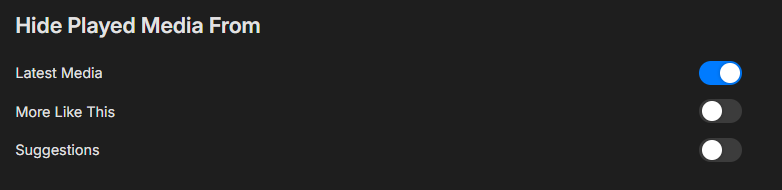
-
I’m confused, should “Show Login Screen” in Settings > Display > Startup Behavior bring up the user login/selection screen *every* time the app is launched, allowing a logged in user to be selected ? Maybe it is the TestFlight I’m using, but that login/selection screen doesn’t come up each launch. For me it only appears after the app has been force quit and is starting up fresh. I’ve tried resetting the setting, force quitting after, etc. Is this working for people?
-
Sorry yes TitanOS, not saying Emby is doing that
-

Hide Playlists from Included In & Group Albums by Release Type + Decade
GrimReaper replied to user24's topic in General/Windows
Tbh, I liked previous iteration/sections order more, but maybe my brain is just wired differently. There's too much going on now, too much up-down mouse movement, the flow simply doesn't feel right. Anyway, here: v0.7 emby_album_tag_importer.py -
Has this been forgotten and moved to the back of the line again?
-

Apple TV App cannot connect via DDNS on port 8096, while iOS app and browsers work
famarch posted a topic in Apple TV
Hello, I am seeing a reproducible issue with the Apple TV app and would like to clarify whether this is a known problem or a bug. My Emby server is reachable externally via DDNS on port 8096. What works: - access via Safari and other web browsers using the DDNS address - access via the iPhone/iOS Emby app using the same DDNS address What does not work: - access via the Apple TV Emby app using the same DDNS address So the basic pattern is: DDNS + port 8096 works in browser and iOS app, but not in the Apple TV app. My question is: Is there a known issue with the Apple TV app regarding external connections via DDNS and port 8096, especially compared to Safari and the iOS app? I would also like to know whether the Apple TV app handles DDNS, IPv4/IPv6, or external HTTP connections differently from the iOS app and browser access. Thanks. appleTV: A2169, tvos 26.4 emby app on tvOS latest version -
 zaraguel changed their profile photo
 -

Subtitles on new version (v1.0.49) show strange characters
hspantera replied to hspantera's topic in LG Smart TV
The only fix is external subs. -
Is there a way to prioritize local files so they are the default version?
-

Free Emby app, free Emby server, remote connection, no limitations — how is this possible?
StefanoMore replied to StefanoMore's topic in Android
I'm quite sure I haven't purchased anything — that would mean buying a license on 2/3 smartphones and a Fire TV Stick separately, which I would definitely remember. The more likely explanation is that all the servers I've connected to over the years had an active Premiere license on their end, which unlocked playback for all connected clients including me, without me even knowing it. If that's the case, it would also explain why the current server admin is confused — perhaps his server does have a license active and he's not aware of it, or it was activated at some point in the past. -
Subtitles on new version (v1.0.49) show strange characters
zaraguel replied to hspantera's topic in LG Smart TV
Is there any way to revert to the previous version? The problem has persisted for three months, making it impossible to watch a film in its original versioni with subtitles. -
Also ich bin von Plex zu Emby gewechselt, weil das Bearbeiten von Metadaten dort einfach viel entspannter ist und man auch eigene Daten verwenden kann. Was die Aussetzer angeht: Kann ich so nicht bestätigen. Bei mir läuft Emby auf einem recht potenten Unraid-Server, und ich nutze auch Apple TV – hatte bisher keine Probleme. Nur beim Scrollen gab’s leichte Ruckler, hab ich aber gemeldet und da wird schon dran gearbeitet Vielleicht liegt’s auch an der Hardware, auf der Emby läuft – was nutzt du?
-
@soderlundI just blacklisted four movies from a tag, saved and ran it, and got a message saying five items had changed status—it's not clear from the arrows what's adding and what's removing—but nothing seems to have actually changed on the server. The blacklisted items still show up in the home screen section and the tag is still attached to them. The mismatch in numbers I assume is because one of the movies is multi-version. No idea on the rest of it though.
-
Hide Playlists from Included In & Group Albums by Release Type + Decade
GrimReaper replied to user24's topic in General/Windows
Why would you ever need to clear any tags, it's done automatically on Replace mode? But I'll look into it. I'll also look into renaming section. -
Free Emby app, free Emby server, remote connection, no limitations — how is this possible?
ebr replied to StefanoMore's topic in Android
I think the most likely situation is that you purchased an unlock some time ago and just don't recall. The Android app would be limited to 1 minute of playback without this. -

Updated to v2.2.8 and can no longer connect
Nathanael replied to JBowen37's topic in Samsung Smart TV
I have a client that was able to connect, but could not play anything. They got a "connection error", but only when the media should start. This was when i was using let's encrypt. When i shifted to ZerroSSL they were able to connect and play. -
Same here