All Activity
- Past hour
-
Hi, Everytime that I open the app (doesn't matter on which device, Samsung tv, android app, Sony tv or my android cell) I've got this message (2-3sec). I can access and watch my media after. But I just want to ask why it started to appears, I didn't change anything in my devices. Maybe just to be sure why it's not like before. Windows server 4.10.1.0 Thank you.
-
 ShicongLin joined the community
 -
Regardless of permissions, what shows on your home screen is highly configurable now. User Preferences - Home Screen
-
 Askas30 joined the community
 -

Add "Remove from Collection" to the three-dot menu on a collection in the "Included In" section
crusher11 replied to crusher11's topic in Feature Requests
Because it's a list of things I want to watch in the near future, irrespective of whether I've previously watched them or not. If I watched a movie ten years ago and decide now that I'd like to go back to it soon, I can add it to my watchlist and have it appear. -
@LukeHere's another example from the logs this morning. I was watching the recording from the beginning while it was in progress. At the end of the scheduled recording the playback kicked me out of the playback. When I went back to it, it had nothing recorded past where I had watched. Logs attached. ffmpeg-transcode-43383a65-5a5b-441a-8ba8-bf587f414ca2_1.txt ffmpeg-transcode-0416bd2c-f789-4ce5-a974-f6ae4d649548_1.txt ffmpeg-transcode-1d9523a4-3909-42cf-b322-dc03fd666a66_1.txt ffmpeg-transcode-812465d3-12ec-449e-97b8-7e3f0d29a0b8_1.txt embyserver.txt
-
 HuBank joined the community
 -
 lwhite452 joined the community
 -
 yifei010805 joined the community
 -

Add "Remove from Collection" to the three-dot menu on a collection in the "Included In" section
ebr replied to crusher11's topic in Feature Requests
Why not just add a playstate filter to the home screen section? -

Movie Theme Videos Plugin Questions and Support Thread
Scott310 replied to radeon's topic in Plugins
Hey @radeonJust FYI, I don't know if you have made any changes yet but just thought I would let you know that I left the ytrailers plugin alone since my last post and only had the task trigger run once a day. I am still getting a hundred errors saying "Sign in to youtube to confirm you are not a bot". -
Feature Request: Native Plugin UI Support for Seerr & Music Requests + Albums, Singles & EPs Separation
ebr replied to Samus512's topic in Developer API
Hi. We cannot build direct integrations into content-acquisition systems. -
 sentenal joined the community
 -
 AineF joined the community
 -
 Ayaan1234@ joined the community
 -
 Jejekh joined the community
 -
 2tohar1 joined the community
 -
lol at this almost decade old request...
-
Thanks, my system has been using the legacy backdrop 1-2-3 and wanted to change to default, been fighting fanart popping up randomly for ages and this will fix that Appreciate the help and quick response.
-
That was PDQ
-

Android downloads fail with 404 because the Emby sync file is missing
OUARZA replied to OUARZA's topic in Android
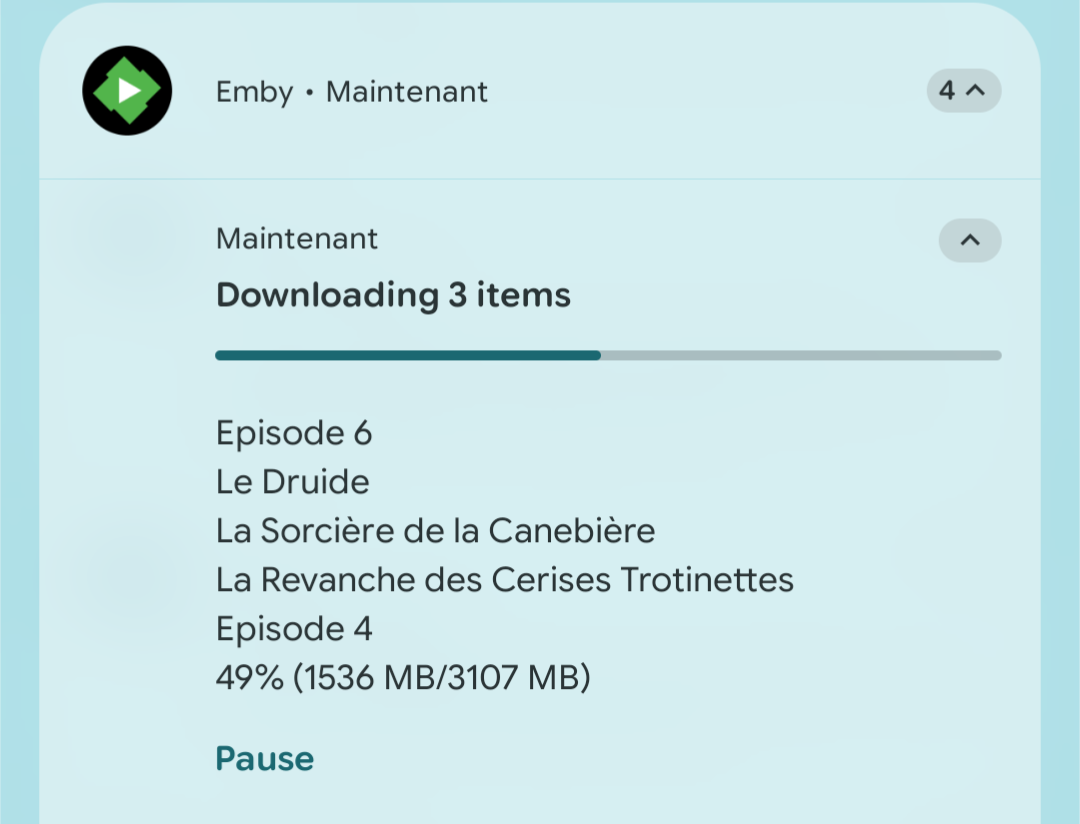
Hi @Luke, I wanted to follow up with a new test and a couple of screenshots. I found that the users group did not have write permission on the destination folders. I corrected the permissions, and transfers are now progressing. My Emby Server on the Synology DS720+ is now updated to 4.10.1.0; the Android app is still 3.5.55. There still seems to be an inconsistency in the download notifications. At 20:30, Emby reported “Download completed” for La Revanche des Cerises Trotinettes. At the same time, another Emby notification still showed “Downloading 3 items”, listing that title along with other items, while Episode 4 was at 49%. Could this indicate that the same item is being queued or processed more than once, or might the notification simply be stale? I’ve attached the screenshots. Please let me know if a fresh server log from this test would help. Thanks!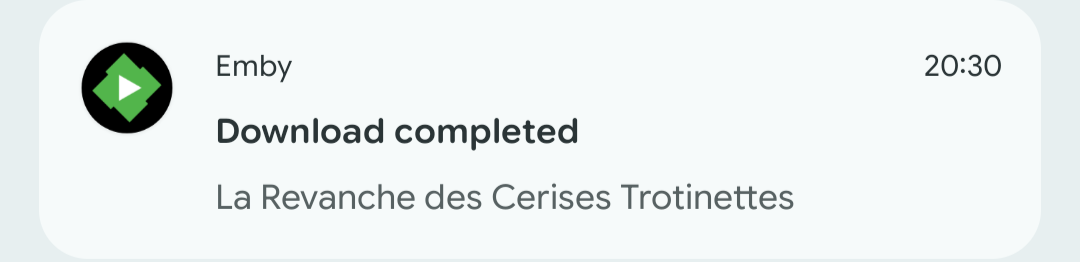
- Today
-

How to handle multiple actors with the same name?
pgriffith replied to GhostRider's topic in General/Windows
I just checked my install with Steve McQueen, this is what I see for both. First is from Bullitt, and the 2nd from 12 Years a Slave. This is with Emby doing 100% of the work. Nothing manual from me.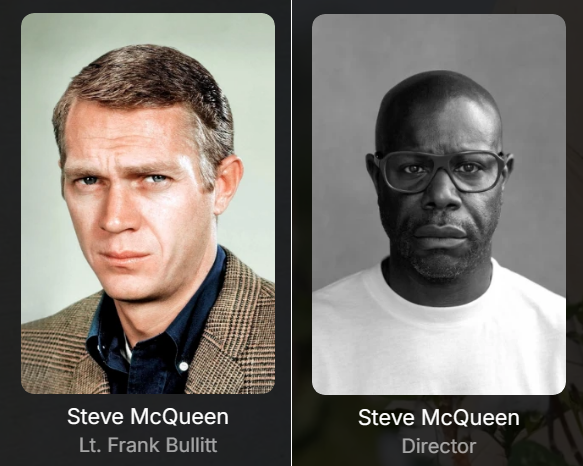
-
Using the latest version of Universal Android app and the stutter is unbearable still. Setup is: 1 docker running Jellyfin, 1 docker running Emby. Both pointing to same library. On Sony Bravia TV, Jellyfin renders ASS subtitle overlays fine with zero Stutter. Emby is unwatchable. Moonfin is also installed on the TV, and it also runs fine off the Emby server. So with everything being the same: Server, media, network etc. The only conclusion is that the Emby App has issues. From searches etc. this seems to have been an issue for years now. Every other App out there seems to have solved it, why are we still having issues?
-
Can you access it via localhost:8096 on the machine the server is running on? What are you running it on?
-
The solution to this on Server 2025 is to enable caching of SSL pages. On Server this is disabled, while on a desktop OS it is enabled. To enable it simply go to the following reg key and change it from a 1 to a 0. After that it will install just fine, no reboot required. [HKEY_CURRENT_USER\Software\Microsoft\Windows\CurrentVersion\Internet Settings] "DisableCachingOfSSLPages"=dword:00000000
-
Workaround found — Private Network Access (PNA) seems to be the root cause I had the same issue: web browser on the TV connects to Emby fine (http://192.168.x.x:8096), but the native app always said "server not found." Digging into this, it looks like TitanOS's Emby app is a web app with a public origin, and Chromium's Private Network Access (PNA) spec blocks requests from a public-origin context to a "private" IP address space (RFC1918: 10.0.0.0/8, 172.16.0.0/12, 192.168.0.0/16) unless a permission handshake succeeds — which apparently doesn't work correctly in this app. The fix: give your Emby server a second IP address that falls outside the RFC1918 ranges, so PNA classifies it as "public" instead of "private" (even though it's not actually reachable from the internet). I used an address from the CGNAT range 100.64.0.0/10 (RFC 6598), since it's never used for real internet routing: Added a secondary IP (e.g. 100.64.x.x/32) as an alias on the server's existing network interface, alongside its normal LAN IP. Added a static route on my router so that destination 100.64.x.x/32 is reachable via the server's normal LAN IP as next-hop. Entered that new 100.64.x.x address (with port 8096) in the Emby app on the TV instead of the normal 192.168.x.x address. That's it — the app connected immediately. No port forwarding, no public exposure, no DNS changes needed, entirely within the local network. This matches what others reported here (public IP worked, local DNS override broke it) — it all points to PNA's IP-space classification rather than any real internet routing being involved. Hope this helps someone else stuck on this!
-
Sorry I've been quite busy lately. I just tried again. Attached are the general log and all transcoding logs from the server. I also sent the logs from the Android TV app for the use 'Cédric' around 10:50 UTC. Ignore the playback of episode 1 I started first as there was some issue with the metadata for this episode which results in multiple versions of the file although there is only one file. After that I did some other tests. First with stopping playback around 10 minutes and resuming. This results in the file playing again from the stopped moment, but the subtitles showing are those from the start of the file. Then I tried to reproduce the subtitles not being enabled on starting the next episode. The first few times this worked as expected but this was with files I had already played in the weeks before so I guess Emby remembers which subtitle to use from the previous playback. Next I Started episode 93 and fast forwarded to the end to allow it to auto start episode 94 which hasn't been played before yet. Now there was no subtitle enabled when the episode starts. I tried to select it manually while playing but this didn't work. I think I've had some instances before where the sub started displaying about 2 or 3 minutes after selecting it during playback but I'm not sure. I"ve also attached the MediaInfo for episode 94. logs.zip Naruto.094.v4.480p.DVD.Dual-Audio.FLAC2.0.Hi10P.x264-JySzE.mkv.MediaInfo.txt
-
No, because I'm not using it as it doesn't work as well as the Android-TV app.
-

Show the path info when in a movie or series
GrimReaper replied to taunnnt0's topic in Feature Requests
Yes, and multiple paths could be listed. Though I don't imagine many users will have them scattered around in more than 1-2 folders. -
Show the path info when in a movie or series
crusher11 replied to taunnnt0's topic in Feature Requests
A series could be stored in multiple locations. -
Good morning, hope Yall have a good weekend

-
-
To be fair, I'm glad that a feature like this was implemented so quickly. Having the base integrated makes it a lot easier to to build on it instead of injecting the complete codebase. Perhaps some stuff like Spotlight height, Logo and Plot or tagline positioning + Trailer support will make it into Emby officially someday. We never know.
-
Select "Always show season folders" for "Preferred TV show display" under your user Display settings.
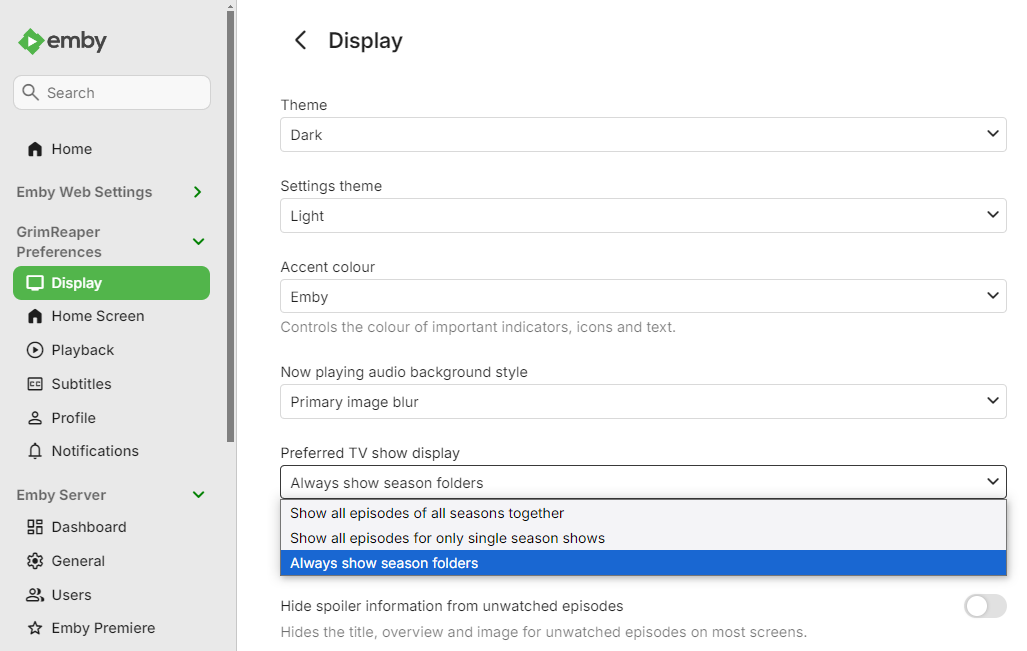
-
Show the path info when in a movie or series
GrimReaper replied to taunnnt0's topic in Feature Requests
TV shows never had it, as there's no tracks info. But true, maybe basics: path/size/Date Added should be displayed as well.