All Activity
- Past hour
-
 shakaraihan joined the community
 -
 faisal_extreme joined the community
 -
 Sascha18 joined the community
 -
 Satish Raj joined the community
 -
 Cubilith joined the community
 -
 emby147258369 joined the community
 -

Live TV (HLS/IPTV): Emby reads inflated bitrate from TS stream headers rather than HLS BANDWIDTH= value, incor
me@jackbenda.com posted a topic in Live TV
I first spoke about this bug on a thread in the Linux page and have just gotten around to raising this as a bug report on GitHub, though I'm not sure how actively that's monitored. Posting here as well in case it's a better route to the right people, like @Luke --- Environment Emby Server: 4.9.3.0 OS: Ubuntu Server 24.04 LTS Hardware: Intel i5-12500, Intel UHD 770 (VAAPI / QuickSync) IPTV source: ErsatzTV 26.3.0 (Docker), HLS Segmenter mode Client: Emby for Android 3.5.28 --- What's happening When playing a Live TV channel via an HLS/IPTV source, Emby detects a significantly inflated stream bitrate and triggers ContainerBitrateExceedsLimit, forcing unnecessary transcoding of a stream that should be eligible for direct play. ErsatzTV is configured to encode at 1200 kbps video + 128 kbps audio (~1.33 Mbps total). The HLS manifest advertises a correct BANDWIDTH= value consistent with this. However, Emby's Live TV pipeline detects the stream at 4,192,000 bps (~4.2 Mbps) - more than 3x the actual encode bitrate. From the transcoding logs, Emby is summing bitrate values read from the probed TS stream headers: Video stream: BitRate 4,000,000 Audio stream: BitRate 192,000 Container total: Bitrate 4,192,000 These values do not reflect the actual encode settings. Emby appears to be trusting stream-level header metadata from the probed TS segments rather than the BANDWIDTH= value advertised in the HLS manifest. --- Steps to reproduce 1. Add an HLS-based M3U source to Emby Live TV (e.g. ErsatzTV configured to encode at ~1.2 Mbps) 2. Set the client's streaming bitrate above the actual encode bitrate but below ~4.2 Mbps 3. Play a Live TV channel 4. Observe ContainerBitrateExceedsLimit in the transcoding log and transcoding being initiated despite the stream being within the client's stated limit --- Expected behaviour Emby uses the BANDWIDTH= value from the HLS manifest to determine the stream bitrate. A ~1.33 Mbps stream should direct-play when the client bitrate limit is set above that value. --- Actual behaviour Emby probes the TS segment headers and reads a bitrate of ~4.2 Mbps regardless of the actual encode bitrate or the BANDWIDTH= value in the HLS manifest. ContainerBitrateExceedsLimit is triggered even when the client limit far exceeds the true stream bitrate. --- Log evidence Two separate sessions confirm the same behaviour: Session 1 — client bitrate limit set to 3,808,000 bps: Detected container bitrate: 4,192,000 bps TranscodeReasons: ContainerBitrateExceedsLimit, DirectPlayError Session 2 — client limit raised to 4,000,000 bps (still just below the detected value): Detected container bitrate: 4,192,000 bps TranscodeReasons: ContainerBitrateExceedsLimit, DirectPlayError The second session is particularly telling — raising the client limit to exactly 4 Mbps still triggers transcoding because the detected container bitrate is 4,192,000, just above it. Full logs attached. --- Related ErsatzTV issue #2022 — HLS stream bitrates inflated during detection in Jellyfin/Emby Live TV pipelines --- Workaround Setting the client's maximum streaming bitrate to 20–30 Mbps masks the problem by raising the threshold above the inflated detected value. This is not a fix... it disables a meaningful safeguard and causes all Live TV to transcode regardless of source quality. --- Potential solution For Live TV HLS sources, Emby should use the BANDWIDTH= value from the HLS manifest as the authoritative bitrate for the ContainerBitrateExceedsLimit check, rather than probing the TS segment headers. The manifest value is what the HLS spec intends for this purpose (probing live segments for bitrate is unreliable, as segment headers may carry peak or nominal values that don't reflect the actual encode target.) It's also worth noting that the reason the probed values are so far off (4 Mbps vs ~1.33 Mbps actual) may involve incorrect bitrate metadata being written into the TS stream headers by ErsatzTV, but regardless of the source of that discrepancy, trusting the manifest BANDWIDTH= value would be the more correct and robust behaviour. ffmpeg-transcode-2c59b904-f3b8-417a-91db-6111478bb332_1 (1)(2).txt ffmpeg-transcode-3aa1a334-fdde-419f-a931-cb9380d36de0_1(1).txt -
 jaimealba joined the community
 -

Emby Theme: Retro Navy & Gold (W/ Seasonal Themes)
MediaEmby1968 replied to Aleas's topic in Web App CSS
Downloaded and testing. If there are any issues, I'll let you know. -
 Amitgk joined the community
 -
 ianw2012 joined the community
 -
 Mohamed16883 joined the community
 -
Conversions filling system disk: Any way to set a storage cap?
me@jackbenda.com posted a topic in Linux
I've been experimenting with Emby's built-in conversion feature and ran into a problem I suspect others have hit too: conversions writing to the system disk until it's completely full. The Conversions settings page only gives me two controls: A temporary file path and the full speed toggle. There's no native option to limit how much disk space conversions are allowed to use, or to cap the queue size. My setup: Emby running natively on Ubuntu Server 24.04, 231GB NVMe system disk. When I kicked off a batch of conversions, Emby happily wrote to /var/lib/emby/sync/ until the drive was full. No warnings, no throttling, just a dead server. A few questions for the community: 1. Is there a setting I've missed that limits conversion disk usage? I've only found the temporary file path and the speed toggle. 2. Is there a way to limit how many conversions run concurrently, to at least control the rate at which disk is consumed? 3. For those running conversions on a system disk — what's your approach? Redirect to a separate drive, or something else? If this genuinely isn't possible natively, I'll put in a feature request: A maximum disk usage cap for conversions seems like a fairly essential guardrail. Keen to hear how others are handling this before I go the OS-level workaround route (create a dedicated directory on the NVMe for conversions, then enforce a hard size limit using a fixed-size loopback mount. Emby hits the ceiling and stops. system disk is safe. I'd point the "Temporary file path" at that mount. The cap is whatever I set, say 50GB, and nothing else on the disk is at risk. I'm just worried that that could freeze Emby up entirely though.) -
Emby should be available for this device as of this morning.
- Today
-
Not just that. All the other systems you see doing this have a single, central repository of content that can be reached by everyone. We aren't like that. Every Emby server has its own content and there is no single source or even knowledge of that content. So the APIs involved in doing things like this have to be different.
-

No Compatible Stream error on a few episodes
visproduction replied to jellowe's topic in Windows & Xbox
Error happens 10 times - Example: line 33983 Error getting CultureInfo for English and ParseConfiguredCulture errors - 96 times Example: line 37182 Just guessing that HEVC copy has metadata errors. ffprobe also found issues. h.265 HEVC video codec is more demanding to open for playback because of it's compression. I think it's likely that the playback fails, due to some file errors. Testing playback with a 3rd party player is not a good test. It only prove the 3rd party player can handle playback. There can still be file errors. Look at playback stats or run ffprobe to see errors. Remuxing the video may fix this (typically 2 minutes for 2 hour media). Reencoding would also help to h.264 (larger file and typically takes 1 to 6 hours for quality transcoding depending on hardware.) If you want h.265 HEVC to work all the time, try remuxing and have fast enough hardware support for your largest resolution. Test with online demo files instead of random content to confirm if the problem is with the content. Specific playback errors for some particular media happens all the time and I think it's mostly media file errors or hardware limitations and browsers or TV apps are not as forgiving for playback. Someone who knows the errors better may have more exact info. These are guesses. -
Emby silently fails to index shows when season.nfo or tvshow.nfo has truncated XML
visproduction replied to nopenope12345's topic in Linux
There is a known issue with Mac OS keyboard created text / filenames that have incompatible characters with a Linux keyboard driver. Usually the characters that fail or ~ ^ ' ". I think also a "Hard space" created by a Mac keyboard can cause a title to fail with Linux. That looks just like a space. This sounds bizzare, but it shows up even with Windows and often file names typed by a Mac, break HTML page links. Perhaps the keyboard that created the title was Mac and the title has a strange character and Linux doesn't like it. To test, would be simply to rename the title of the file with a Linux keyboard and see if that helps. If the video starts playing, then I would think the filename must be fine. Maybe there is something about the Linux keyboard driver that needs updating. Here are some links talking about this. https://resulthunter.com/search?q=apple+keyboard+characters+cause+linux+error&engine=1&utm_source=extension&utm_medium=chrome&channel=8766289722 -
Hab vielen Dank! Und ja - die Bibliothek ist vom Typ "Gemischte Inhalte", die 2 Hauptordner enthält: "Musik" und "Filme", da es übergreifend z.B. Musikvideos, Tanz-/Musikfilme etc. gibt, erschien mir das praktikabel. Zudem habe ich schon lange vor emby begonnen, meine Bibliothek aufzubauen und eine Ordnerstruktur angelegt, die eine Syntax beinhaltet, wie folgt: ++ Filme einer Genregruppe, z.B. "Agatha Christie & Co - Filme" + (Krimi-Klassiker) - (Ebene 1) darunter + "Miss Marple - Filme", (Ebene 2) darunter Einzeltitel zu "Miss Marple" (Ebene 3) Einzeltitel zu "Agatha Christie" (Ebene 2) Die Ordner Einzeltitel lauten: {Originaltitel}. Beispiel: "Miss Marple - Mörder Ahoi" Die Filme in den Ordnern selbst tragen nur den Originaltitel: "Miss Marple - Mörder Ahoi.mp4" Jeder Ordner enthält zusätzlich eine "cover.jpg"-Datei Die + und ++ Anzeiger symbolisieren die Ordnerhierarchie --- Im Falle von "65" bzw. "2012" ist die Sache eher simpel - da gibt es nur einen "65 (SciFi)" als Container für den Film (Ebene 1). Insofern frage ich mich, wieso emby die Filme als Staffel kategorisiert. Bei bereits mehr als 700 angesammelten Filmen und einigen 100 Musikdateien, habe ich - man möge es mir nachsehen - null Bock, in diese Struktur mehr als nötig einzugreifen. Kostet so oder so schon unheimlich viel Zeit. TV-Serien udgl. habe so gut wie keine - im Moment vielleicht 2 oder 3.
-
Updates: Re-did the text-transforms. (It was sort of broken) (See section 1 updates) Fixed the header home button and admin help button not receiving the header-icon-colors Fixed certain table rows/cells not respecting the --table-row-hover-bg variable. Also updated the variable comment, if you prefer gold on hover instead of a blue Removed zebra striping when inside a TV Season, added episode image to popout shield Removed old test code Resolved issues with popout shadows (See section 1 updates) Removed year badge above the title in the video OSD. (It's already in the info panel) Fixed an issue where the dialog-icon-hover colors snuck its way into table grids. Fixed an issue where the header was not stretching to the right because of the scrollbar, or lack of. Various icons all around will now have some color in various states. Fixed a couple issues w/ seasonal content w/ all the changes. Fixed an issue with the header in a non-maximized window. And more... Section 1 Updates: If you customized your CSS, you could keep your section 1 and just update section 2 on down. but here are the important things that were added or changed so you can modify accordingly. Removed commented out flat button options in the variables. And removed references to pop-out for the active variables. Removed the section "TYPOGRAPHY BUTTON TOGGLES (PILLBARS)" Created new section "TYPOGRAPHY TEXT CASE TOGGLES" With these options. --text-transform-pillbar: uppercase; /* Pillbars - Set to 'uppercase' for all-caps, or 'none' for title-case */ --text-transform-primaryHeaders: uppercase; /* Section Titles (Header and Pages) - Set to 'uppercase' for all-caps, or 'none' for title-case */ --text-transform-dialogHeaders: none; /* Header text in dialogs - Set to 'uppercase' for all-caps, or 'none' for title-case */ Updated variable values and comments for --shadow-glow-standard, --popout-shadow Updated variable values and comments for --table-row-hover-bg Updated all the season section variables Renamed variable title "DANGER / CANCEL BUTTONS" to "DANGER / CANCEL / REMOVE ITEM BUTTONS I would say this version is very well polished, I haven't really seen any real issues "yet". So, I'm hopeful with this we are at a steady state. Emby Navy and Gold v5.3.css
-
I'm using Emby epg guide data all from the U/S. I have several. I re-did about 20 of them last night and those scheduled series fill in but many to do. However, sometime overnight the rest filled in. Maybe the fill in occurred during the next Guide refresh which occurred at 2AM ET. The point being for some reason after a reboot, the entire "Scheduled" was gone because the series list saw no programming. If that's to be expected during a reboot then maybe I need to do a guide refresh on emby start. I specifically don't do that b/c I've had issues /w guide refresh with my VPN on and I turn the VPN off at 2 am ET to ensure a clean refresh at least once per day. I have guide refreshes also at 10amET and 6PM ET but if they don't work b/c the VPN is on, I don't care since the 2 an ET one will run perfectly. So I'm back but again maybe the question is should a guide refresh occur on emby start to ensure the series information fills in. I've never seen it not be there on reboot but it just so happened that scheduled list was gone on reboot last night.
-
It works absolutely flawlessly, I tested it on my kometa , many thanks for this. Really really appreciate it.
-

Plugin: EmbyCredits, detect end credits and add auto skip.
yocker replied to yocker's topic in Plugins
I will consider it, just not sure i would like the responsibility. Also requires that it gets accepted. -
yes.
-

Users get access to directories they shouldn't
NicerDicer replied to NicerDicer's topic in General/Windows
Probably: Files yes, directories no. See my longer answer above. In its current state, this is a severe security issue. Users get access to entries they are explicitly not allowed to see. -
Do you mean the 4.10.0.10 beta?
-

Emby LXC Container OOM Crash during Direct Play / Remux
EmreWest replied to awkimball's topic in Linux
Thanks to @Lessajfor the hint on the path. My question now is, does this setting also apply to plugins using ffmpeg or ffdetect or does it exclusively only apply to real transcoding happening? If not, where would I maybe have to set up another path to use for plugins' cache/temporary files except for the plugin settings themselves? -
I don’t really use transcode, all streams are direct play because I don’t have too much ram
-
Good to know thank you. I also found another topic in here talking about the transcode path and it defaulting to the RAM if not set up as a path on the drive: I also created a mount for a local folder and use it as the transcode path in emby now.
-
Yep same discussion here.
-
It is too much, some changes was made in the DB and if you don’t have enough RAM this will be consumed with a couple of user’s when the app start
-
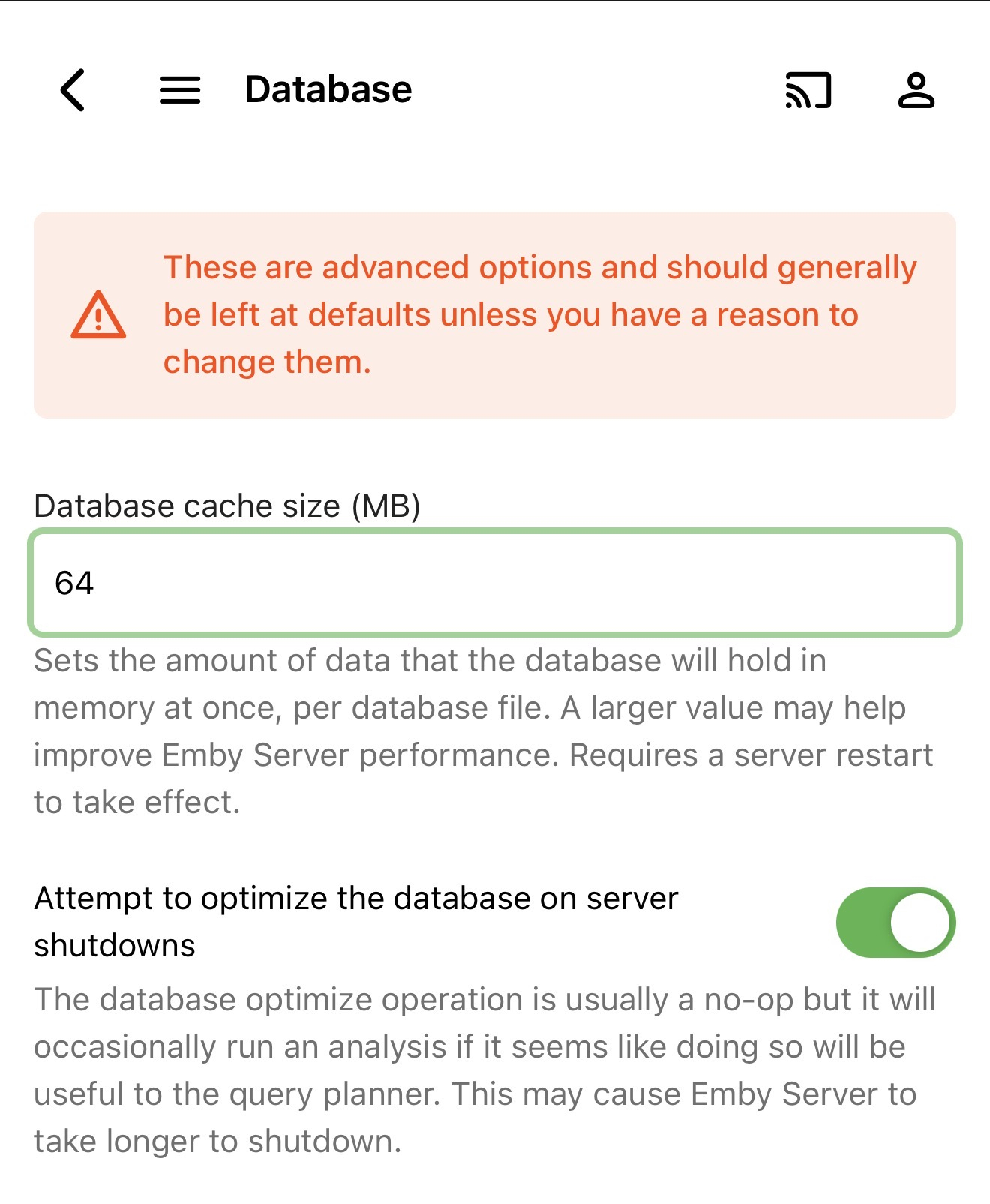
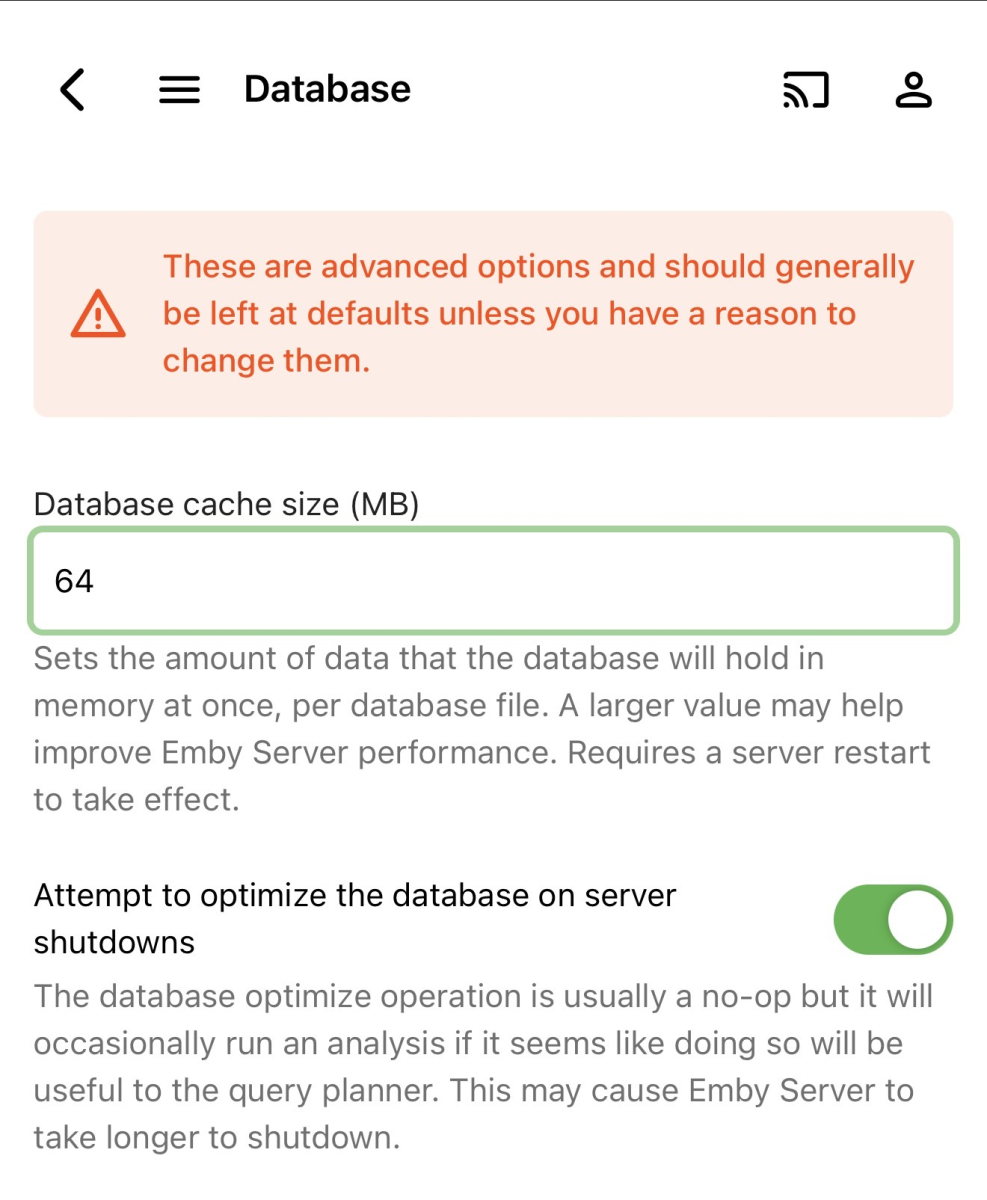
I even had 512 in there lol Thank you, changed it to 64, let's see how it goes.
-
Try to set 64MB instead of 128mb on the DB settings and do a server reboot, let me know if this helped you
-
Hi, I have a similar issue and posted in the Docker topic about it: I also had the problem on 4.9.3.0 and it still persists on the newest beta. I really want to avoid reinstalling everything since I have a pretty big library and already had to reset my database a few weeks ago due to a problem caused by a power outage. But even before that I had these problems of emby server crashing. Maybe there would be another fix? Would be nice to learn where to look for crash logs to see what causes the crashes.
-
Emby for android unified app, on Amazon its called only "Emby". Well i dont know whats happening but on google playstore .28 is the latest version i could install, while on Amazon is lottery.
-
I'm on Emby 4.9.3.0 & Trailers Plugin 1.4.0.0. I only have 3 trailers from 2026 and 2027.