All Activity
- Past hour
-
 camilootero joined the community
 -
 Mor444555 joined the community
 -
 Lorena95 joined the community
 -
 Chipibjg joined the community
 -
 Loryca95 joined the community
 -
 henryochoa joined the community
 -
 DEsau joined the community
 -
 yeisonballest joined the community
 -
 Benjamin123 joined the community
 -
 emby2wita joined the community
 -

embyforkodi (next-gen) 12.X.X support
Eisi2005 replied to quickmic's topic in Emby For Kodi Next Gen
There isn't a trailer library in my Emby libraries, but I could create one and have it point to the folder containing my trailers. Is that what you mean? And what settings would I need to configure in the Emby plugin settings under the “Cinema” section? -

TV Show Status — TMDB-powered Returning/Ended/Cancelled badges for series
GrimReaper replied to Blueskies278's topic in Plugins
Previously mentioned New Overlay plugin. -

TV Show Status — TMDB-powered Returning/Ended/Cancelled badges for series
Blueskies278 replied to Blueskies278's topic in Plugins
Yes, I will do that now where is the screenshot from? -

What's the current state of the MVP vs Native Player in the AppleTV Client
vdatanet replied to Lostboy66's topic in Apple TV
Achieving true Dolby Vision passthrough or playback on an Apple TV 4K using an mpv-based player stack is currently not possible, tvOS exclusively routes Dolby Vision and spatial/Atmos metadata through Apple’s native AVPlayer framework which brings us back to the same thing: support for HLS with fMP4 and remuxing, so the Apple TV could play HEVC HDR and DV natively without transcoding. It's as simple as that. -

Playback Progress Reporting Stops Immediately
quickmic replied to corey's topic in Emby For Kodi Next Gen
Did you install the Emby's Kodi beta repository, cause 12.X is there.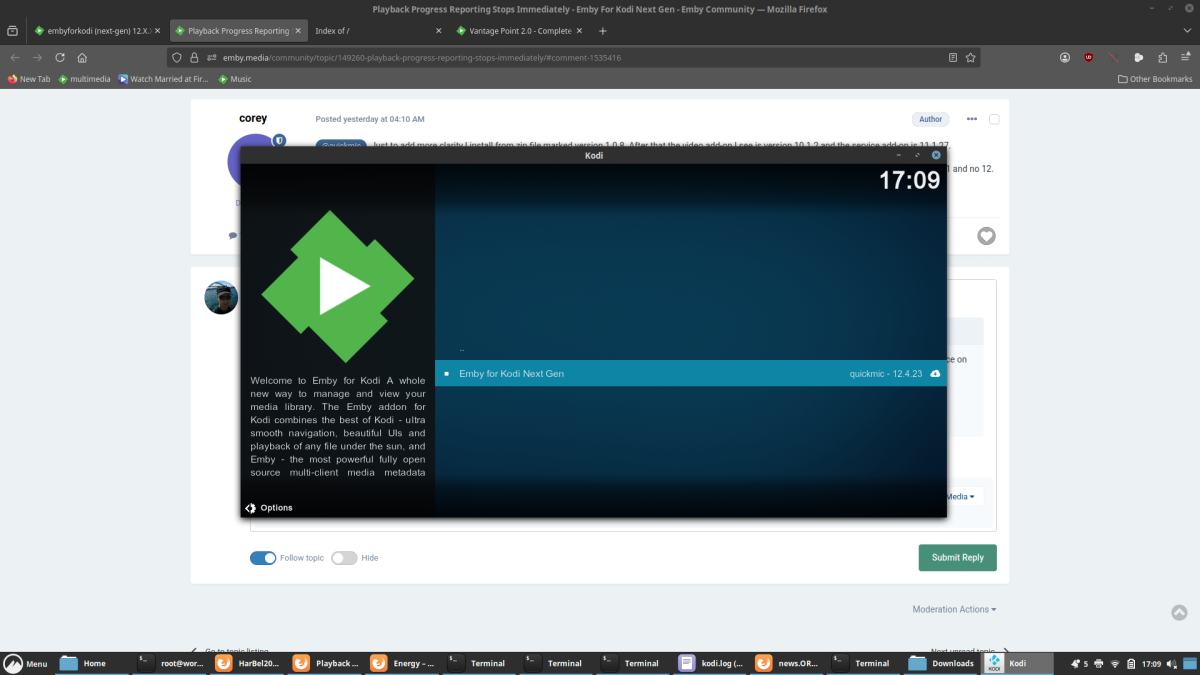
-
embyforkodi (next-gen) 12.X.X support
quickmic replied to quickmic's topic in Emby For Kodi Next Gen
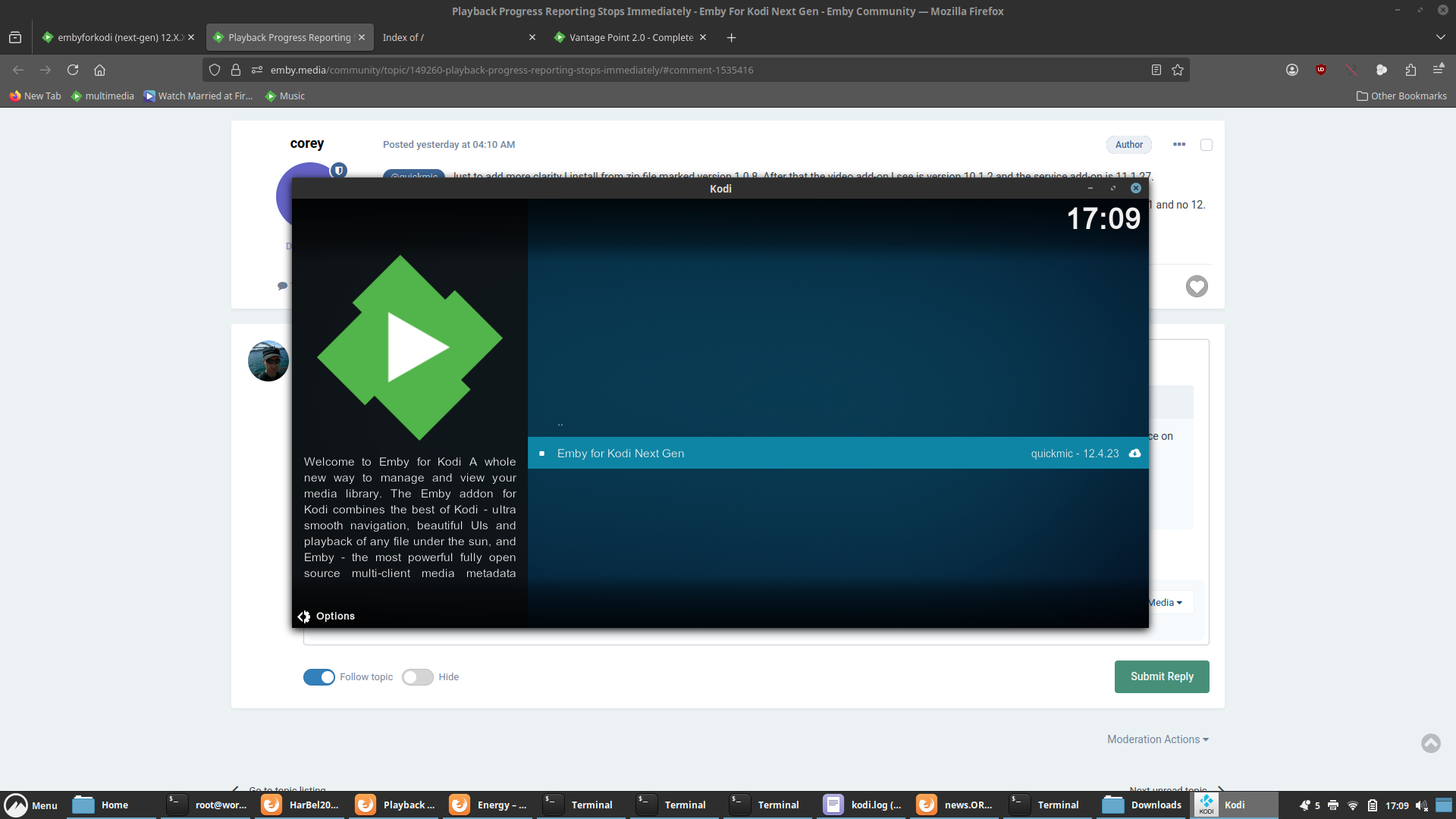
The manage libraries menu will show you a "Trailer" library that can be synced. After that, the remote trailer selection should look like in the screen shot. But I didn't test the Vantage point addon. Not sure if it works in Kodi, depends how it plays the trailers... -
TV Show Status — TMDB-powered Returning/Ended/Cancelled badges for series
GrimReaper replied to Blueskies278's topic in Plugins
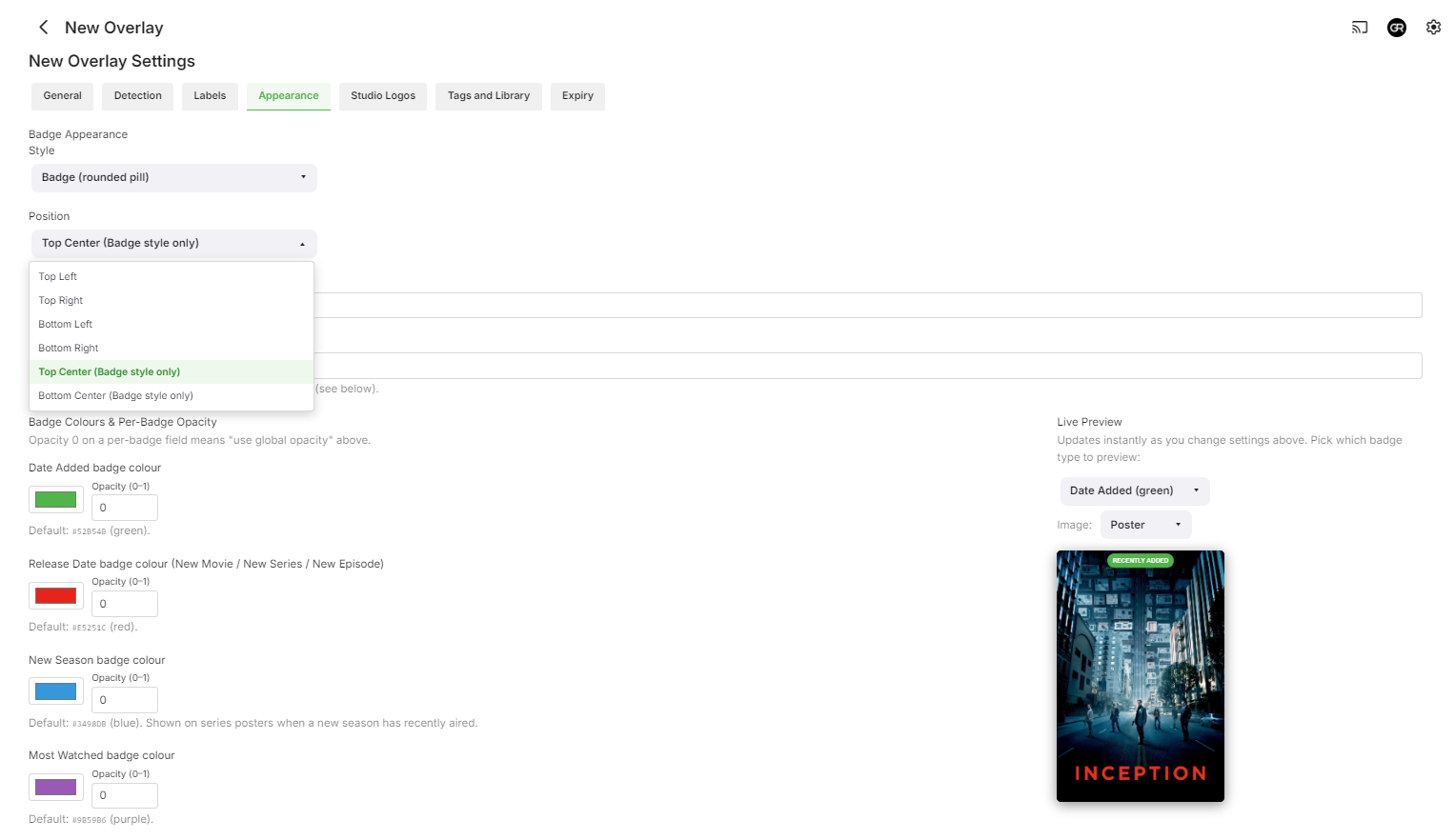
Don't know what was your intention for badge placement, but since you're still building: could you give us an option where to actually place it on the image? Thanks.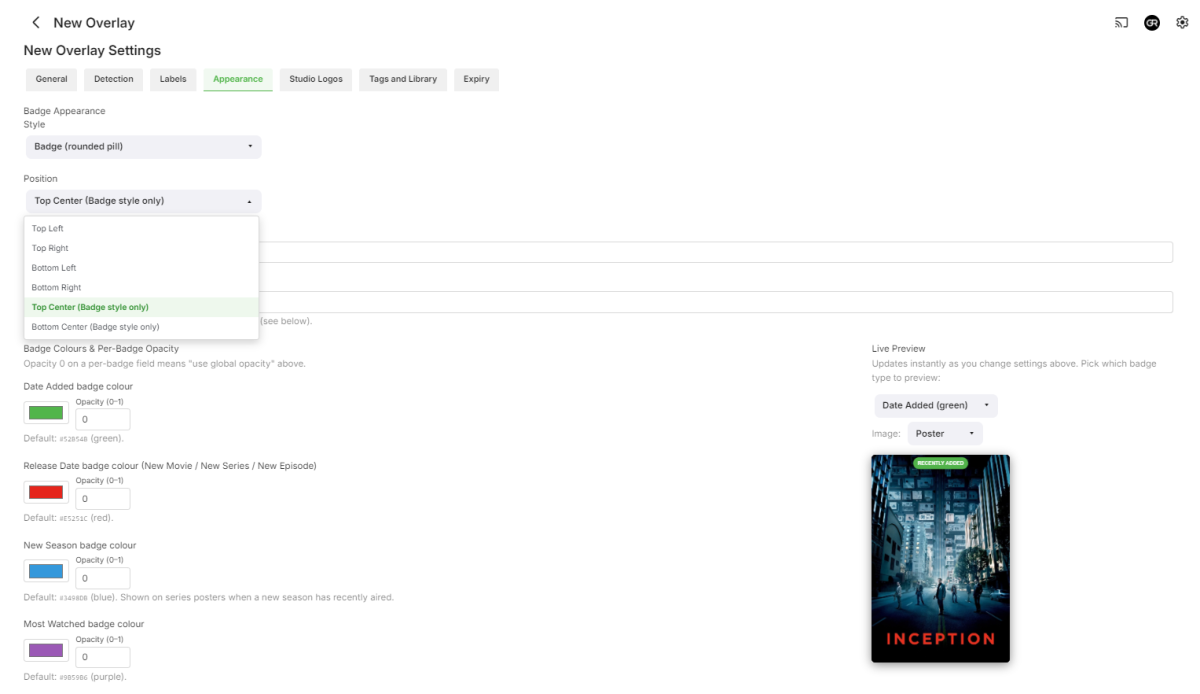
-
Playback Progress Reporting Stops Immediately
quickmic replied to corey's topic in Emby For Kodi Next Gen
You must install der service addon 12.X Video,audio and picture addons are just helper addon. -

Option to display missing movies within a collection
Luke replied to Dariusz's topic in Feature Requests
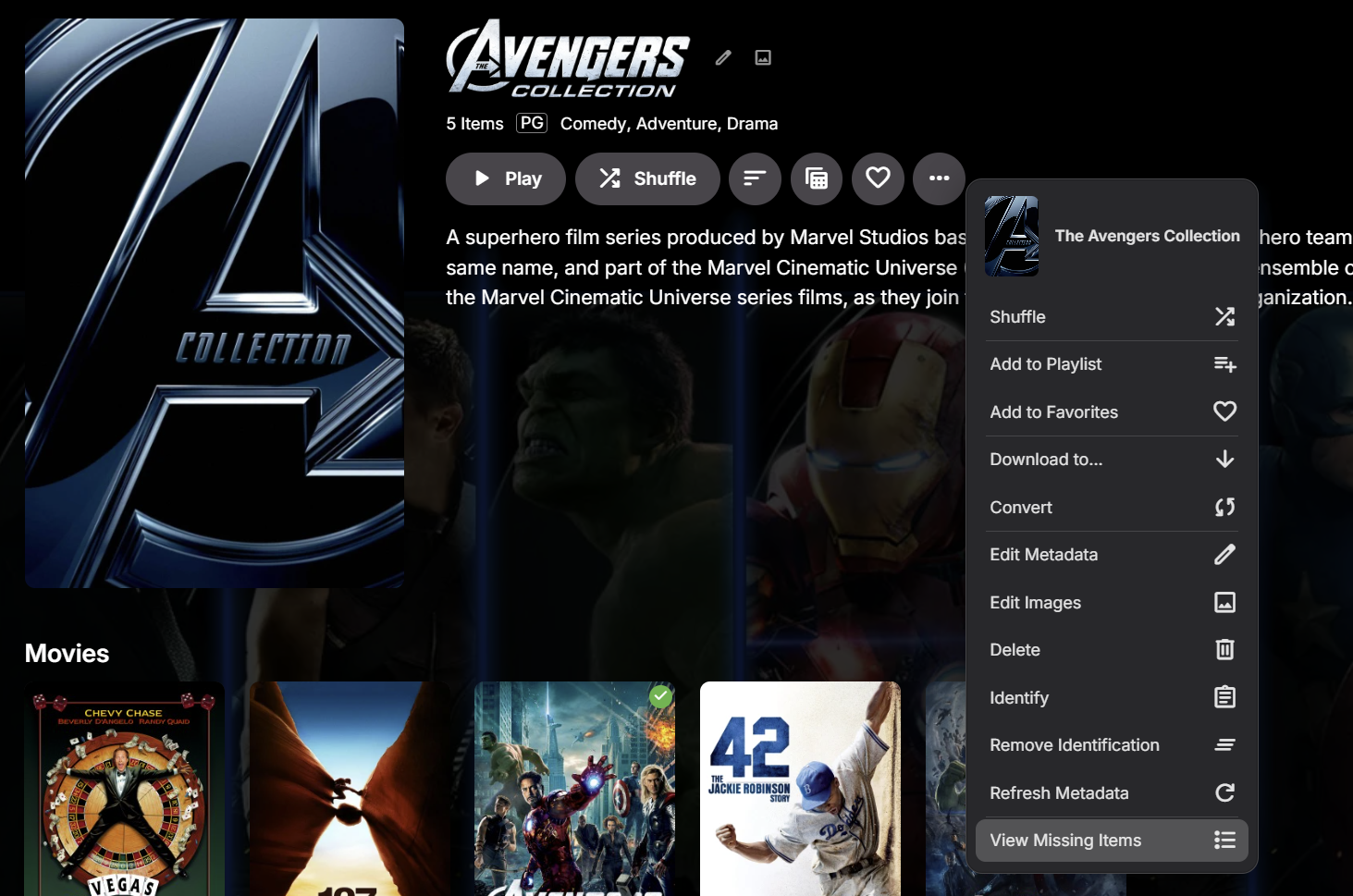
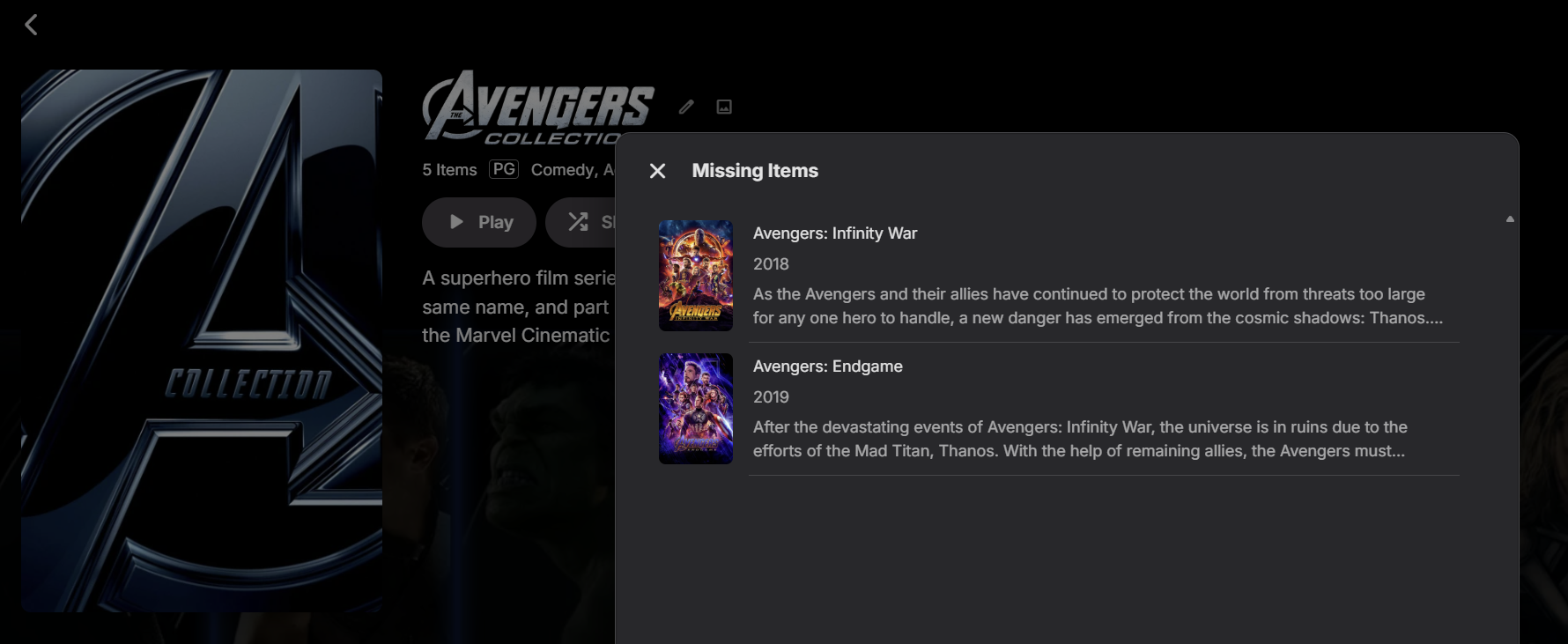
This has been added as a context menu option in the upcoming 4.10 server release: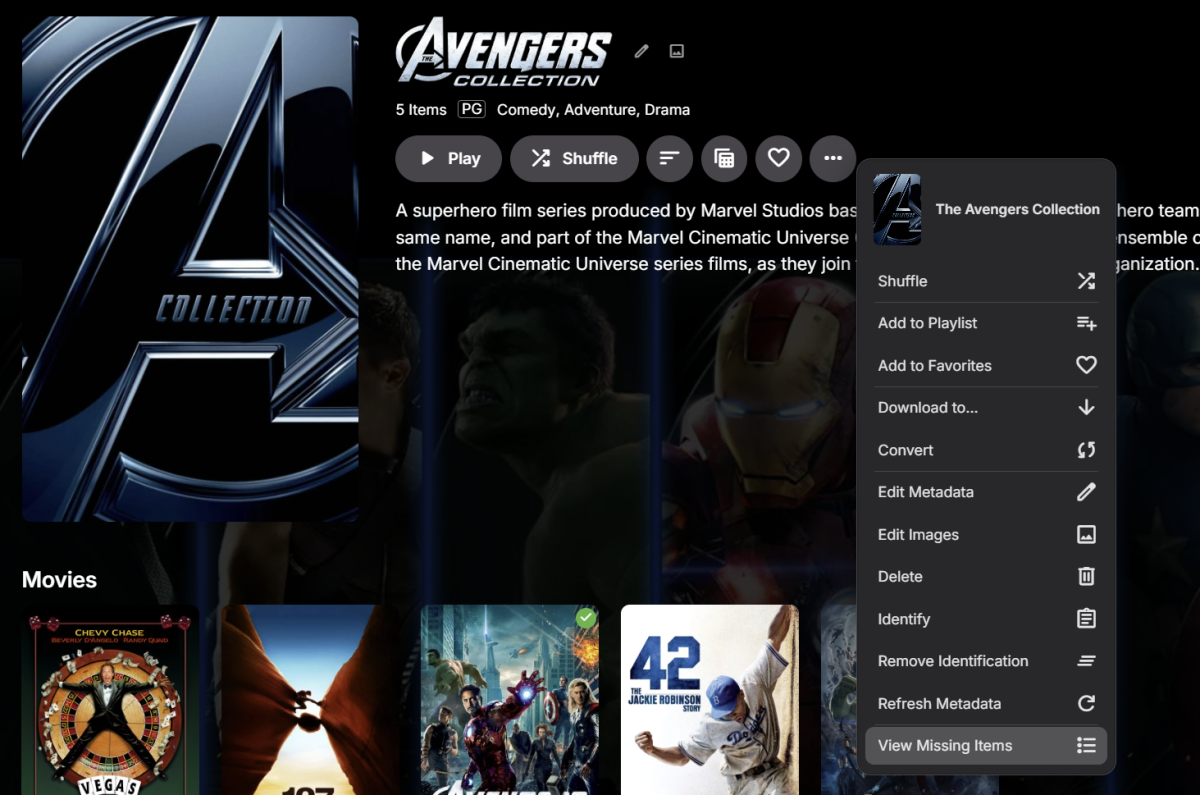
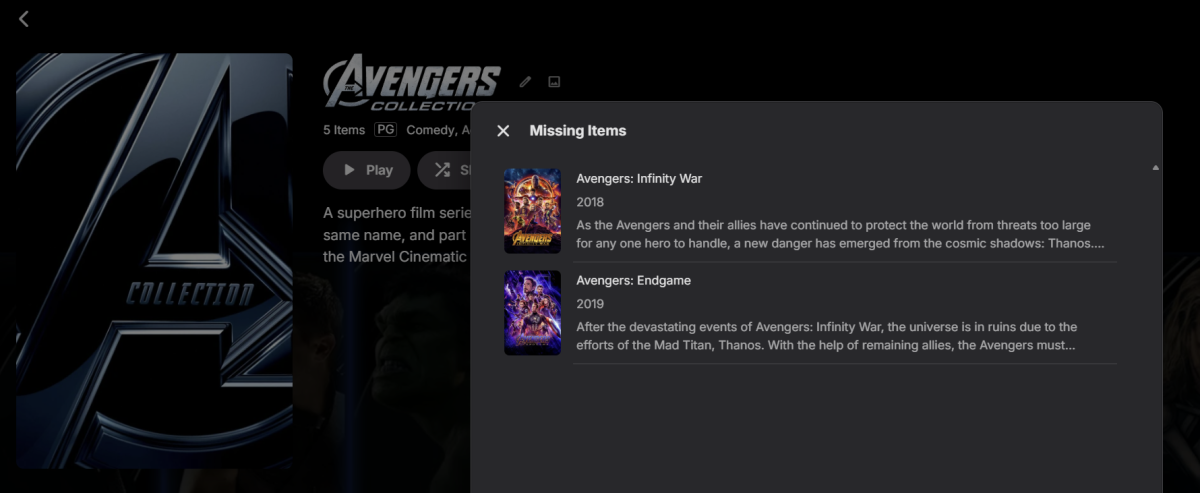
-
This has been added as a context menu option in the upcoming 4.10 server release:
-

What's the current state of the MVP vs Native Player in the AppleTV Client
alex77777 replied to Lostboy66's topic in Apple TV
@vdatanetDo you know why it is doing this? My understanding it MPV is capable of HDR but Emby's implementation of the player is not allowing it. -
TV Show Status — TMDB-powered Returning/Ended/Cancelled badges for series
Blueskies278 replied to Blueskies278's topic in Plugins
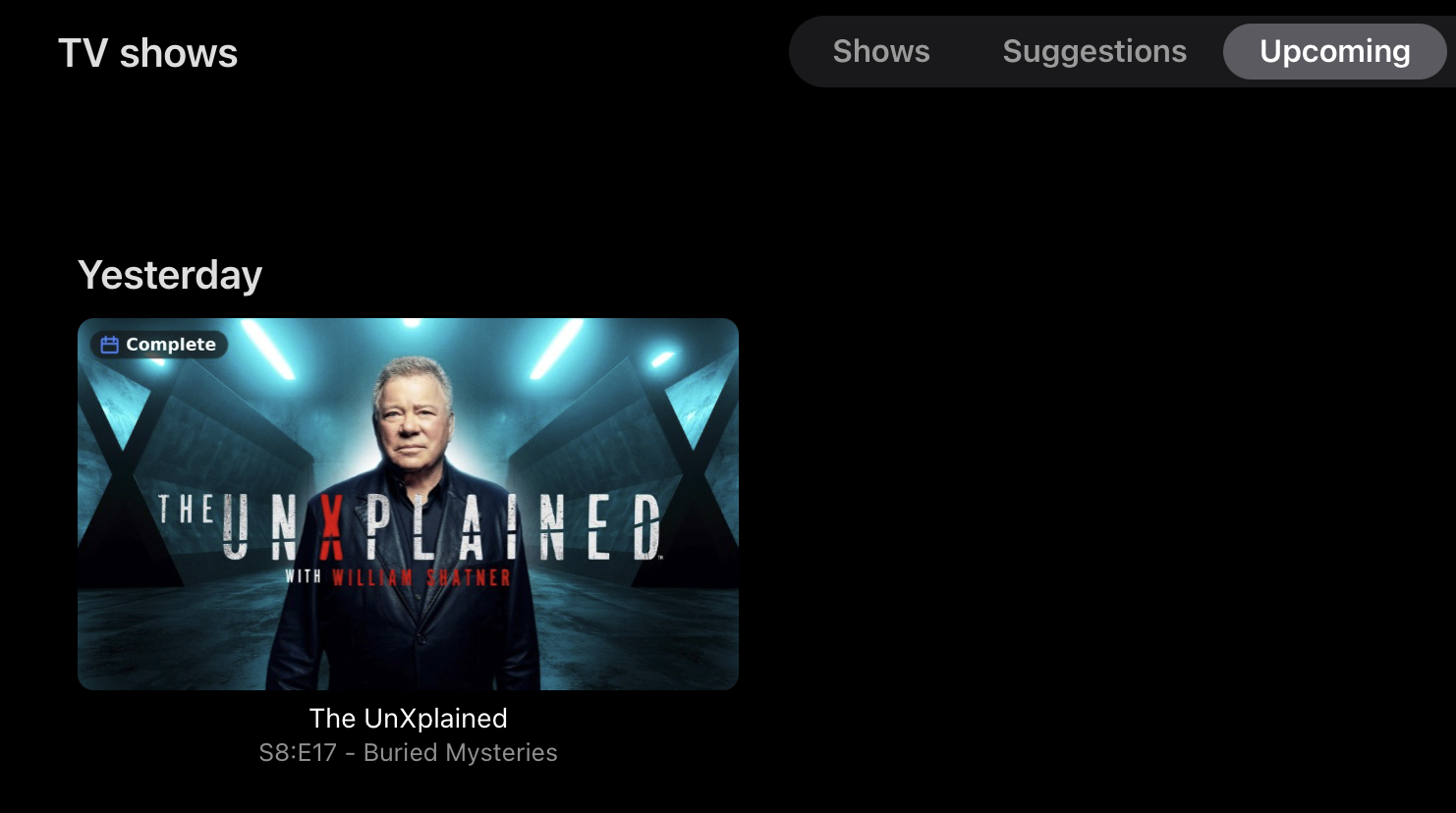
Update: New — "Complete" now flags the season finale in Upcoming The badge turns blue and reads Complete on the last episode of a season, so you can see at a glance that a show has finished airing and is ready to binge. Limitations, stated up front: Upcoming and your library's thumbnail view use the same image on the server, so whatever you set applies to both. There's no way to badge one and not the other. Choosing Complete only therefore affects your library too — thumbnails there show Complete and nothing else, so you lose the air dates in the library as well as in Upcoming. It's Complete rather than dates because the badge carries the series' next air date, so on any card that isn't the next episode it shows the wrong day — e.g. a "26 Aug" badge sitting under "Thursday 27 Aug". If you want full badges with dates and a clean Upcoming, use poster view for the library. Upcoming never requests a poster, so the two stop colliding. I tried giving unaired episodes their own artwork to break the link. Emby doesn't run image providers against them, so that route doesn't work. If you'd rather have the status on every client without any of this, "Prepend status to show description"writes into Emby's own metadata and shows everywhere, including the apps.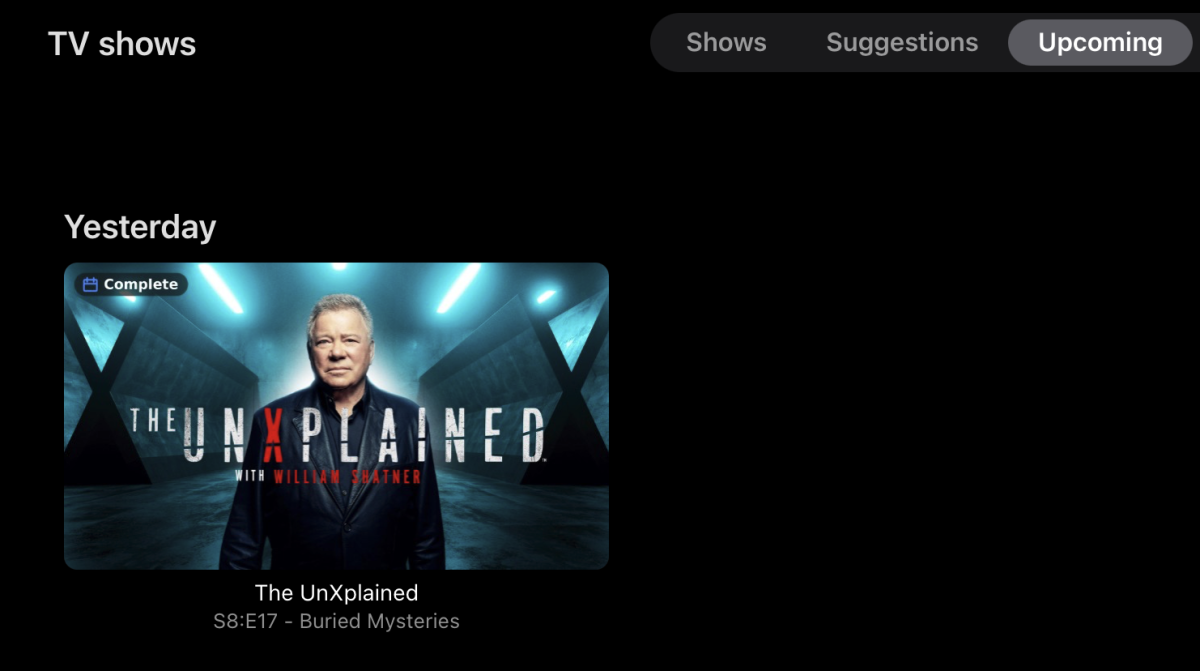
-

Moonfin, a new cross platform client
fabien_m2002 replied to bingbong69_'s topic in Third Party Apps
Hello i cannot play TV direct on android app mobile! Is there a special settings to play ts stream? - Today
-

Plugin: EmbyCredits, detect end credits and add auto skip.
yocker replied to yocker's topic in Plugins
@Baenwort did you see an improvement with the feature turned off? -
Regarding the hardware transcoding, can you please provide a specific example? How to Report a Problem Thanks !
-
Do you mean the "Welcome to Emby" splash with the spinner how the app starts every single time? Crash happens before home. Or.. Do you mean the green "Welcome to Emby" banner that appears from the bottom right corner of the screen the very first time you load the home view? Crash happens after home. What we wonder is.. does it make it to the homescreen and you start to see that or does it crash before it ever gets that far and crashes on the splash? Before home or after.
-
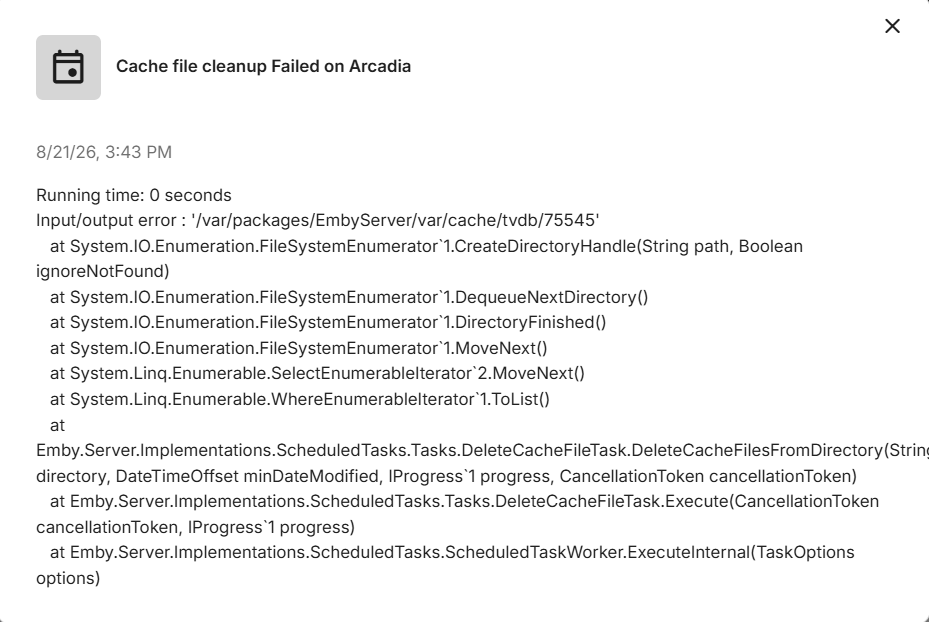
But that’s the scheduled task inside Emby. You said you were getting an error message trying to delete the folder. What was that? I’m asking you to delete the folder outside of Emby first and they try again.
-
this one
-
Naruto episodes not playing on Nvidia Shield
GrimReaper replied to Ceten's topic in Android TV / Fire TV
Which must be exactly what's happening, as it's an AVC Hi10p item - no device (neither CPU nor GPU) currently exist with dedicated hardware decoding/encoding paths (Shield included). Your assumption here was spot-on (though transcoding will still be done in software server-side):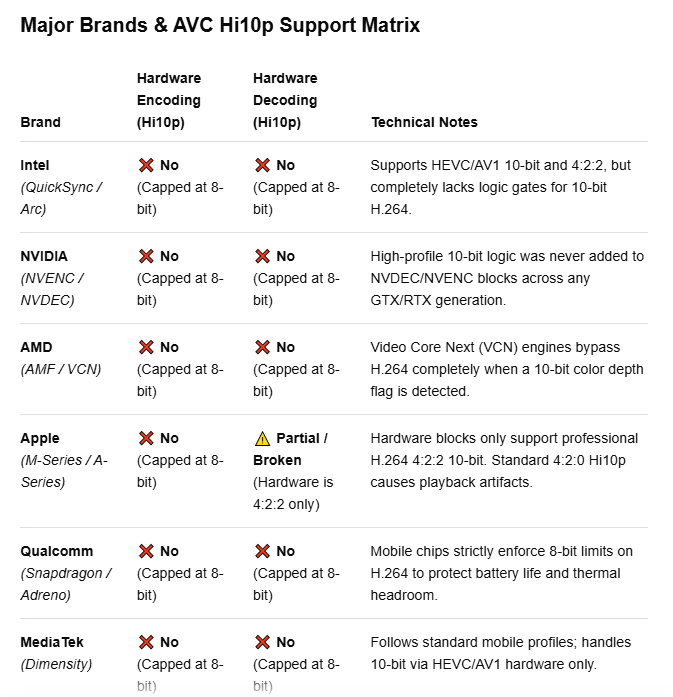
-
If your car is having trouble steering do you bring the whole car to your mechanic or do you pop off the steering wheel and just bring that? Anyway automatic collection images are created in 2:3 aspect ratio. It looks best when the source images are also 2:3. If they aren’t, then that’s when you probably just want to set your own image.
-
Yes, at this point this content was just moved over from the old site. It needs to be improved. Thx.
-
Depending on the exact hardware involved, possibly. Not necessarily as the other app may be decoding with software in app.
-

My home media server project got a little out of hand…
ebr replied to skidmarks's topic in Non-Emby General Discussion
Cool. Hopefully, it doesn't end up with "Sorry, Dave..."- 1 reply
-
- 1
-

-
On Universal Android app page, it is not obvious for new users that it can be installed/used on AndroidTV as well: no screenshots, no accompanying text, no indication whatsoever. Maybe that should be addressed somewhat, with the current intention of eventually unifying the apps.
-
Hi. Exactly what are you calling the "welcome screen"? Can you please explain exactly what you are doing and what is happening?