All Activity
- Past hour
-
 Ridhom saha joined the community
 -
 qq469007614 joined the community
 -
 galubru9 joined the community
 -
 huyang76 joined the community
 -
 Lucas_013l joined the community
 -
 Sonu0608 joined the community
 -
 Daulton228 joined the community
 -
 SERVER MEDIA joined the community
 -
 Zd4yannx joined the community
 -
 ak3242506 joined the community
 - Today
-

My random thoughts on emby and the forum
One2Go replied to Apotropaic's topic in Non-Emby General Discussion
Similar experience here as I also started when it was media browser. Purchased premier key also but I am taking a different angle on this. I do regularly every day a check on certain forums here that I have interest in and where I can contribute. The activity and traffic has definitely drastically declined BUT I think this is a good thing in my case. When posting has been reduced I take it as that the Emby project has reached a level of maturity and stability. I have 2 QNAP NASs running Emby servers one for friends that I update with content that they request and one for my home with the latest that my family likes. The boxes just keep running flawless. Update Emby servers with new versions, continue the watching routines I have been doing for years. I also have several streaming services mostly for sports events Netflix add free (Besides Drive to Survive they have the most compelling content), Paramount+ add free (Champions league & Serie A), ESPN+, Peacock (Premier league and Rugby). This further reduces my activity using Emby. However, I can't stand the commercials in the entertainment content on these streamers and you know where I go for the add free content and they end up on Emby. Bottom line my Emby setup just works and I am very happy with it. The home theater I have and the last server version for WMC is on an Intel NUC under Windows 7 that I haven't used in years but that version will never be updated as again it just works when powering it up with the 40TB of content on Unraid servers connected to it. -

Hide Playlists from Included In & Group Albums by Release Type + Decade
user24 replied to user24's topic in Web App CSS
Noted. I'll aim to send you the minimum amount of info for testing purposes! Generally, it's significantly faster to carry out bulk tag editing in Mp3tag (manual or auto) and then import into Emby, if possible. Emby will import most standard tags into the relevant fields (e.g. ARTIST). Emby will not import some standard tags into the relevant fields (e.g. ARTISTSORT). Emby is currently able to import unsupported tags into the Song/Track "Tags" field via ROONTRACKTAG. Emby is currently not able to import unsupported tags into the Album "Tags" field via ROONALBUMTAG. As far as this topic goes there are several potential usability scenarios: Best case: Emby is able to import RELEASETYPE tags into an Album "Release Type" field and then Group by Release Type, as a native function!!! Emby is able to import actual RELEASETYPE tags directly into the Album "Tags" field (faster tag editing in Mp3tag) and these tags can then be used for custom projects! Emby is able to import defacto Release Type tags into the Album "Tags" field, via ROONALBUMTAG (faster tag editing in Mp3tag) and these tags can then be used for custom projects? Worst Case: Emby is not able to import any Album-only tags (significantly slower non-bulk tag editing in Emby only) and custom projects become less fun and more like a huge chore - then the end-result may not be worth the overall time & effort for many people??? There are likely many other combinations of options - but any method of importing Album tags into Emby would be most useful. Cheers! -
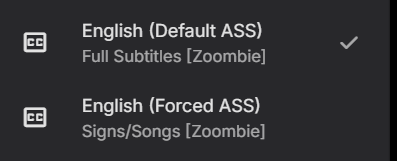
MPV player is an example. 75-90% of my downloads are like this (see attatchment/image) and on subtitle download websites, it is also like this. By "subtitle download websites" if you are referencing things as generic as OpenSubtitles, that isn't very useful since for anime content the only subs that are listed on there are poor quality official SRT subs, or the occasional plaintext SSA subs. You're looking at this situation from the narrow lens of normal media, where TS is almost non-existent. People who download Anime for their servers are not using OpenSubtitles. The anime community primarily uses Nyaa.si, Seadex (aka releases.moe), Animetosho, NekoBT, etc. For subtitles specifically reflecting a website like OpenSubtitles, I believe there is a way in Animetosho, I just haven't sunken the time into looking at it. Either way, the quality subs, more often than not, have a separated Dialogue and S/S file. Across all of those websites, it is standard to have a Dialogue subtitle file, and a Signs/Song subtitle file. Almost always, Dialogue is given the "Default" flag, while the S/S is given the "Forced" flag, for reasons already discussed. Occasionally, the subtitle file will be combined into one file "Full Subtitles" but it's only every once in a blue moon you find one of those, or if an encoder has a preference towards that format. EDIT: dont worry about it, the forced over default logic seems to be standard across media server platforms (not players, however, but I digress). Even though that is the case, that logic is very flawed and out-of-date in my opinion, but it's nothing Emby should be expected to address. It is true that Emby supports displaying multiple subtitle files at once though, will just have to put up with "Forced" being chosen over "Default", it's just a slight QoL annoyance after all, doesn't actually break anything.
-

App opens after install then fails to open
dadofhgnadn replied to dadofhgnadn's topic in Windows & Xbox
Luke, are you doing OK? -
MPVplayer, which is the standard player in the anime media server/encoder community, adheres to the behavior I described, and displays both subtitle files at the same time. That is an example. It also automatically selects the "Default" flag subtitle file, while the "Forced" flag subtitle file---even though it's not selected--is forcibly displayed. As for Emby, it's quite hilarious that you say it's never been true, because vanilla Emby as we speak is able to display more than one subtitle file simultaneously (when the forced flag is involved) Jellyfin and Plex follow suite in the same behavior.
-
Yes, wiim likes cover.jpg or folder.jpg. The question is, why does emby display a single cover.jpg file as a collage of 4 copies? That doesn't seem right.
-
Aleas, There are a lot of divs to get all the text inside admin dashboard to look better with some text color like Ivory #fffff0. Maybe there is higher div to change a lot of the texts, all at once. I ran into this problem, as well, in my theme. If you go into my theme code and look for text color changing to #fffff0 you can find many instances where I forced text to go Ivory white, because all of my background theme choices are darker. I've also added a lot of font size and other small style changes on these text styles. You can just remove those if you don't want those style changes. Hopefully, this list of dev classes will help you pinpoint the texts that need to be lighter. They should be all the same divs. h1 { border: #d1bb64 1px dashed; color: #FFFFF0; font-size: 30px !important; letter-spacing: 0.08em; line-height: 32px; padding: 8px 14px; text-shadow: 2px 2px 1px #244759; width:fit-content; word-spacing: 0.2em; } h2, h3 { border-radius: 0.5em; color:#FFFFF0; font-size: 16px !important; letter-spacing: 0.12em; overflow-wrap: break-word; padding: 4px 24px !important; text-shadow: 2px 1px 3px #333; width: fit-content; } .listItemBodyText { color: #FFFFF0; font-size:13px; } /* Startup background color 1 second before the custom colors start and force text to remain Ivory color */ .mainDrawerScrollSlider-autofont { background-color: #0d193b; color: #FFFFF0; padding: 0 4px; } /* Force text color Ivory, and font size to match the custom style theme */ .listItemBodyText { color: #FFFFF0; font-size:13px; } .listItemIcon { color: #FFFFF0; max-width:220px; } .syncJobListContent { color: #FFFFF0; font-size: 22px; } /* Text colors */ .txtCacheSize, .fldAnalysisLimit { color: #fffff0; } /***** Media Page Buttons *****/ /* Media Page Button: Play & resume light green - start, hover, active */ .btnResume.raised.detailButton.emby-button.detailButton-primary.detailButton-stacked, .btnPlay.btnMainPlay.raised.detailButton.emby-button.detailButton-primary.detailButton-stacked, .btnPlay.btnMainPlay.raised.detailButton.emby-button.detailButton-primary, .btnResume.raised.detailButton.emby-button.detailButton-primary { background-color:#1b9929; color: #FFFFF0; font-size:15px; margin-bottom: 12px; max-width:126px; opacity:0.6; text-shadow: 2px 2px 1px #244759; z-index:9; } .btnMoreCommands.fab.detailButton.detailButton-autotext.emby-button:active { background-color:#0066ff; color: #FFFFF0 !important; opacity:0.92; } /* Media Page - Pop-up: 3 dots control media title */ .actionsheetItemPreviewText:not(.secondaryText) { font-size: 20px; color: #FFFFF0; } /* Admin Pages: Webhooks page and Users / Edit / [link] Edit this user's profile, image and personal preferences. */ .readOnlyContent { color: #FFFFF0; margin-top:28px !important; text-shadow: 2px 2px 1px #244759; } /* Admin Pages: Conversions / Settings */ .view.flex.flex-direction-column.withTabs.page.page-withFullDrawer.page-withDockedDrawer.focuscontainer-x.view-server-sync-sync > div.tabContent.tabContent-positioned.flex.flex-grow.is-active.focuscontainer-x > div > div > form > div.inputContainer > div.flex.align-items-center > div > label { margin-top: 55px; color: #FFFFF0; } /* Admin Pages: Profile / Pin text */ form.profilePinForm.userProfileSettingsForm.auto-center.padded-top.fieldsets > fieldset > div.fieldset-fields > p { color: #fffff0; text-shadow: 1px 1px 2px #000; } /* Music Artist page: Edit and image icons, Actors as character name line, TV series details color */ .fieldDescription, .listItemBodyText-secondary, .secondaryText { color: #fffFF0 !important; padding: 0 4px; } /* TV Pages: Multi Select many pages and media posters - text labels dashboard - Camera, API Keys, DLNA and Media page */ .emby-checkbox-label { font-size: 18px; color: #FFFFF0; padding-top:3px;
-
Thank you for that, I missed the response above. For others looking, here's a link to the beta program. I was unaware of this. https://emby.media/join-the-emby-open-beta-programs.html
-
I have a emby license. I was playing with the bitrate on the app from troubleshooting but the rate I was playing with was way more than was needed. I think I was on like 4K 200 MBPS. I dont have problems on my Shield Device. I only have problems with the Fire Tv.
-
I am not sure but does this mean there is no license so transcoding has limitations? Line 127 Does this mean a transcoding limit is not high enough to handle the media size? LIne 146
-
WiiM has it's own requirements for names that has nothing to do with Emby. You could batch copy all the images to WiiM album.jpg. Command line xcopy and other file renaming software can do all your files by clicking enter once. When you find out how to do that, it's a pretty easy fix. Related: https://forum.wiimhome.com/threads/albumcover-but-what-name.8227/
-

Request to Customize the Default Trailer Link
thekingswolf replied to AngelSing's topic in Feature Requests
I will never not want this. been asking for this for a long time lol. I've been manually editing the .nfo file for years but even that is iffy. once i save the new file the only way to refresh on the emby side is the refresh metadata option, which is only replace all or search for missing, and both options ignore my changes to the trailer line. - Yesterday
-
This would certainly improve security for those that don't want to setup a domain. There's been quite a few threads lately revealing servers that are publicly exposed with only http...
-

My Fire TV won't connect to my Emby Server running on my old phone.
Liami10 replied to Liami10's topic in Android Server
I was unsure as well but it seems to work just fine, even with two streams running parallel -

My Fire TV won't connect to my Emby Server running on my old phone.
justinrh replied to Liami10's topic in Android Server
Server on an Android tablet - I never would have thought it! I wonder how well that sucker transcodes -
I attached the server file embyserver(1).txt
-

M3U tuner: 403 Forbidden despite User-Agent and Referrer
xxtonixx replied to sk222's topic in Live TV
I've installed it, but when I enter the URL in the dispatcharr, it doesn't retrieve the channels. I get the following error: "Failed to establish a new connection: [Errno 111] Connection refused" I've entered the settings in my mobile IPTV app, and it works fine, but of course, I want to use Emby, which is more convenient. -
Thanks, I will check it out edit: Actually, thank you very much. Looking through that thread I realized that I had the old Kodi naming convention for everything that I did have in place. I am in the process of changing to Emby's naming convention and adding all the images that typically go missing with a new rebuild directly to artist folders and that should completely solve my problem.
-

M3U tuner: 403 Forbidden despite User-Agent and Referrer
AhmedNSane replied to sk222's topic in Live TV
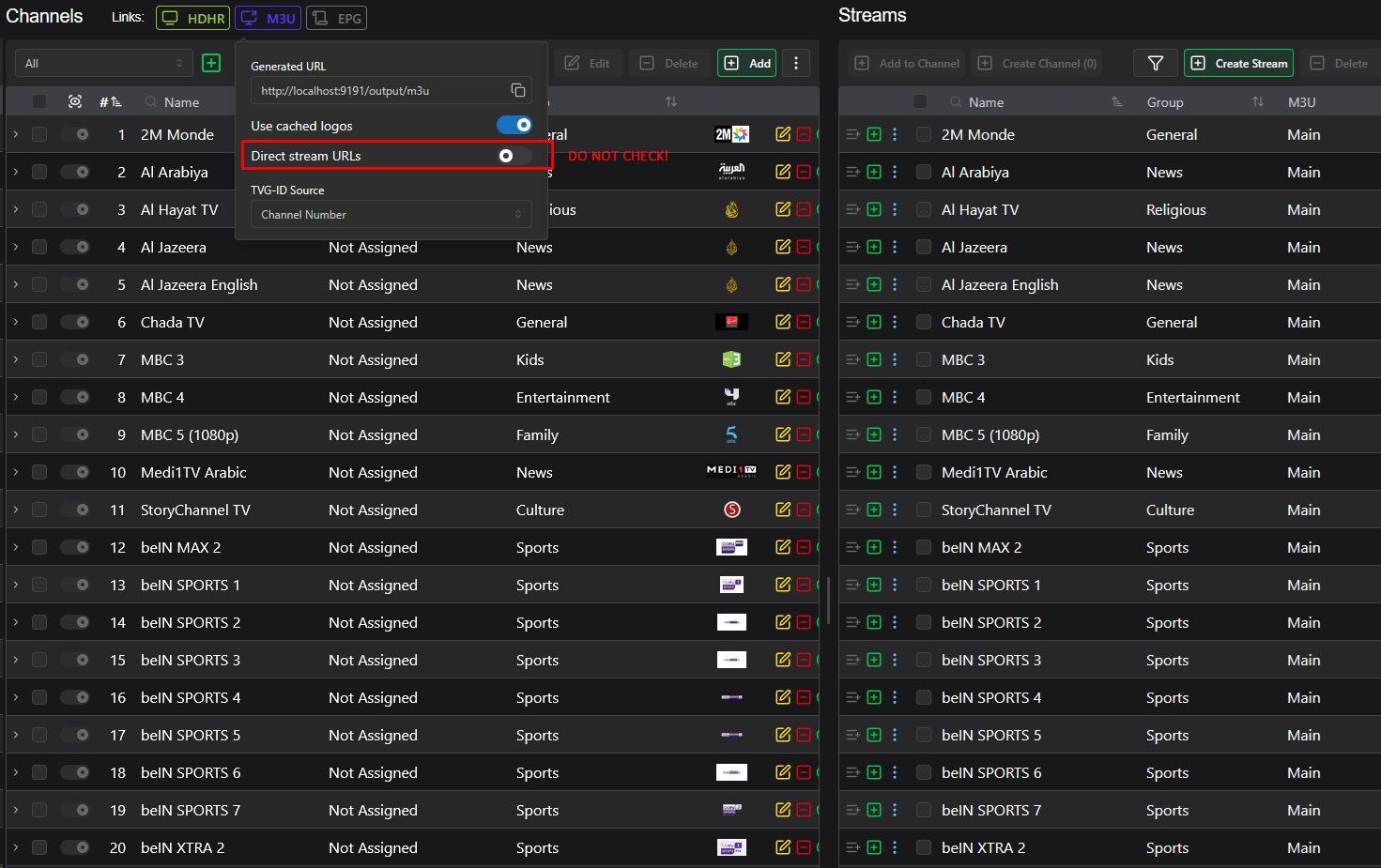
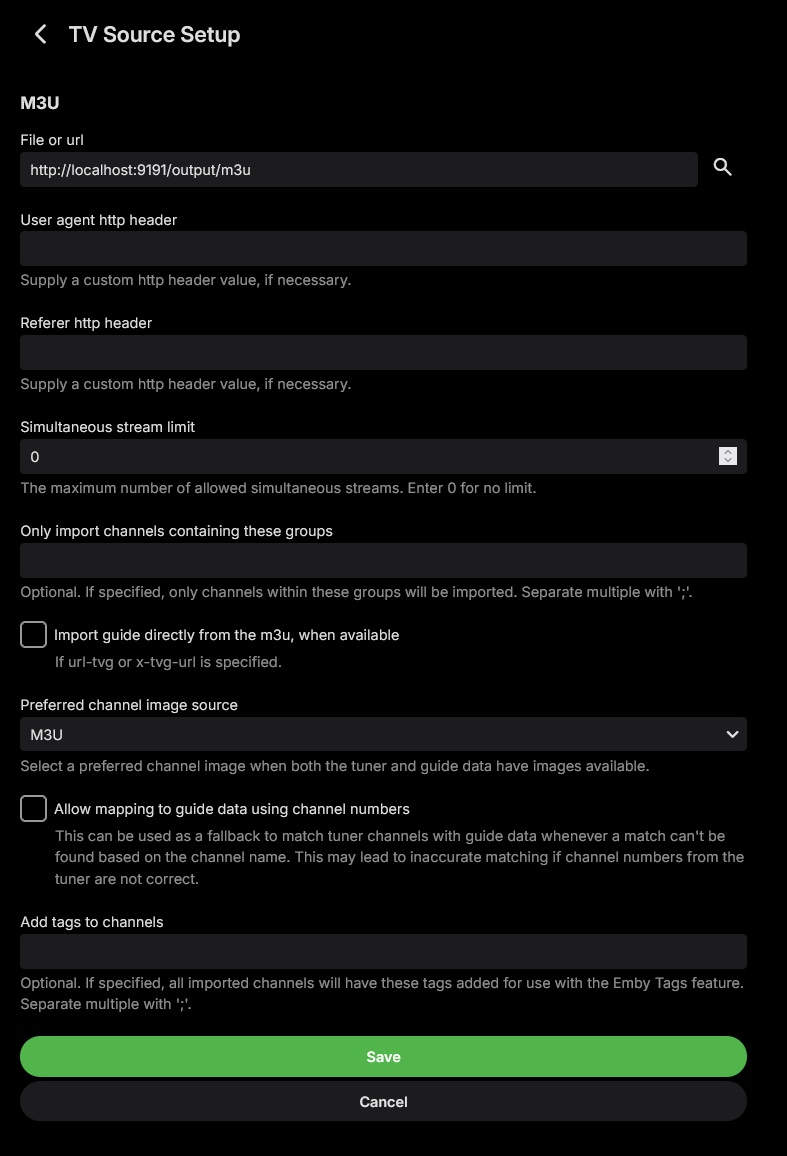
For those who are still having the Forbidden issue, I highly recommend you self-host Dispatcharr via Docker. It makes everything a breeze. Just make sure you don't check the Direct Stream box, and you don't even have to to fill out the user-agent and referrer fields during M3U Tuner setup. See the screenshots below: If anyone needs more details about how to achieve this, I'll be happy to help. Take care, y'all!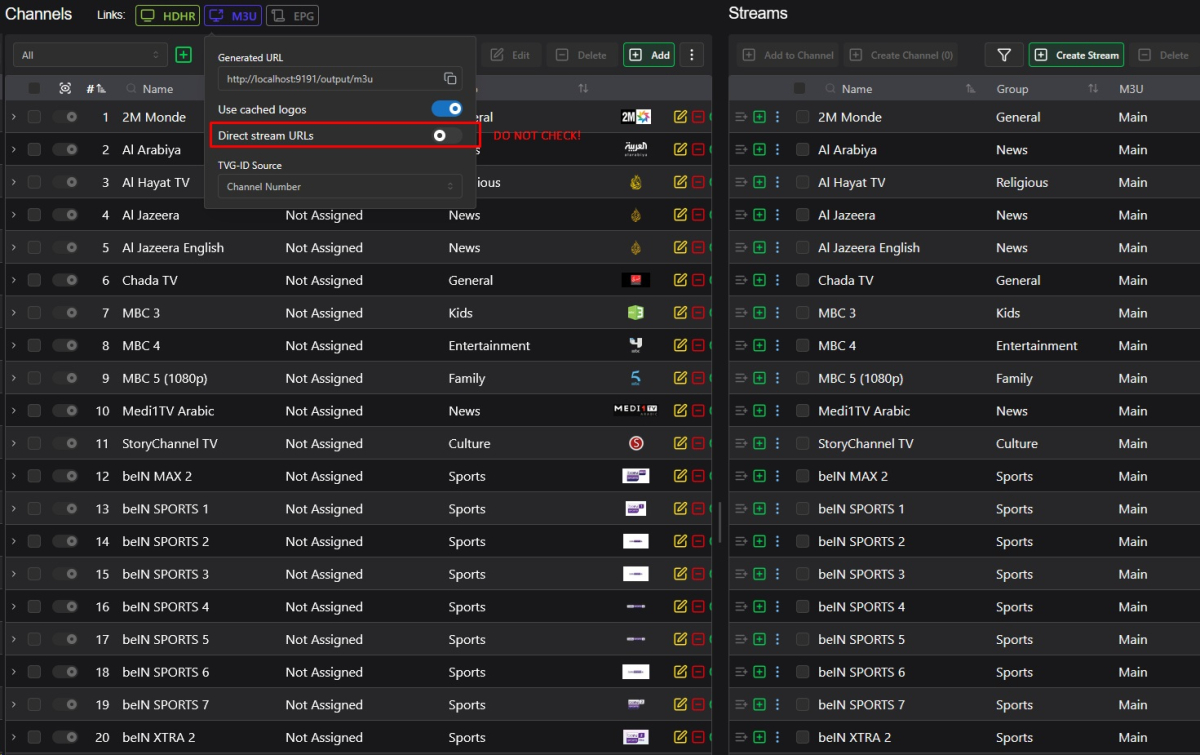
-
Yeah I can tell you IMDB is not gonna be an option for me to add to this plugin. MDBList is freaking awesome and support a lot of filtering and creation of list. Yes, it cost some money if you want the whole experience, but in regards what you get its well worth it in my opinion. I beleve you might be able to import your IMDB list aswell? There might be some other workarounds like Sonarr etc does it, to use a 3rd party that scrapes IMDB and then post it publicly. But that is a bit of a gray area.. For now, MDBList covers a lot of functionality and i will look into adding TMDB and other open sources. If you have any request pls let me know (I'm only using MDBList myself)
-

Does Emby store the tvdb notes "Season Finale"/"Series Finale"?
Kyouma replied to Kyouma's topic in General/Windows
Could i retrieve this information through the emby api or does it need to be added to the database first? -
Organizations that are concerned about these IP based certs can create policies to restrict to Domain Validation (DV) or higher. They wouldn't have to blacklist the CA, ISRG in this instance. Even DV certs don't add that much protection since anyone can get a subdomain with a DDNS service or even free Cloudflare. For Emby users I see this as an option for those who rely on Emby Connect, don't have a domain and would like to benefit from end-to-end TLS/HTTPS without having to learn or follow the usual path to HTTPS. As for the rest I do see how this could open the door for bad actors against whom the only safeguard currently in place is a bad cert error in a browser or auto HTTPS failing to connect. But with free domains or options like Cloudflare some are likely presenting "valid" endpoints already.
-
Hide Playlists from Included In & Group Albums by Release Type + Decade
user24 replied to user24's topic in Web App CSS
The tags may be similar, but they could have technical differences, so I can send a few of each - then you can try out whatever you want to. From the table below .mp3 uses ID3v2 and .flac uses Vorbis. https://picard-docs.musicbrainz.org/en/latest/appendices/tag_mapping.html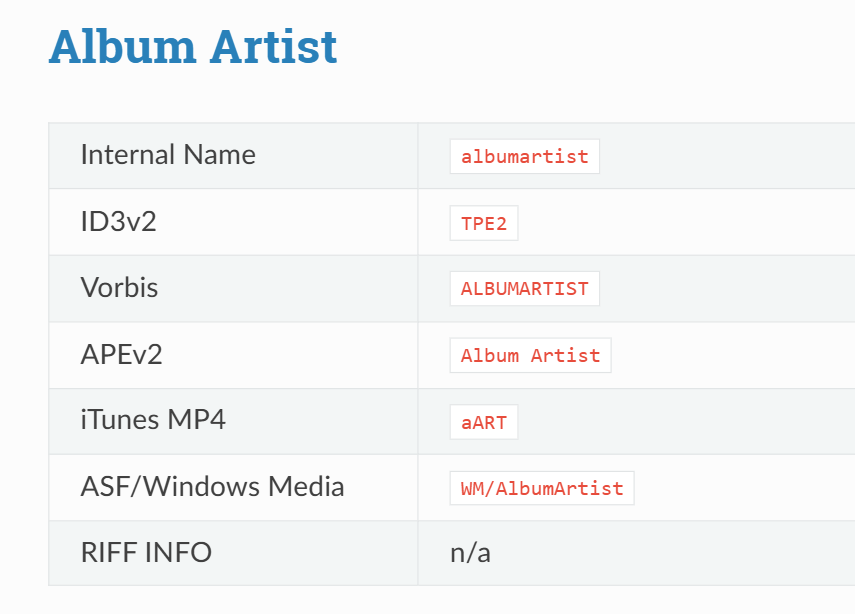
-

Hide Playlists from Included In & Group Albums by Release Type + Decade
GrimReaper replied to user24's topic in Web App CSS
FLAC will do as well, if it has same tags. No need to get into much specifics, I just need to see the layout/structure so I can reproduce. -
 The Sort Album (SortName) metadata tag is correctly respected when viewing the "Audiobooks" tab in the main library. However, this logic appears to be broken or ignored on the Author (Artist) page. Current Behavior: Main Library View: Books are sorted correctly according to the Sort Album tag. Author Page: Books are displayed in "Newest to Oldest" order (Release Date Descending). Author -> "Albums": The sorting here is also questionable. It currently appears to follow the Release Date (Ascending), which in my specific case matches the Sort Album order. However, it is unconfirmed whether this tab actually respects the Sort Album tag or simply defaults to "Date: Oldest first". The Core Issue: For audiobook series, "Newest to Oldest" sorting is counter-intuitive. If an author has multiple series released out of chronological order, the Author page becomes disorganized because it ignores the Sort Album / SortName field. Steps to reproduce: Main Library View. Verify the order is correct in the main Audiobooks library. Navigate to the Author’s page. Observe that books are sorted by date (newest first), ignoring the sort tag. Check the "Albums" under the Author — it needs verification whether it follows the Sort Album tag or just the date. Expected behavior: The SortName (Sort Album) tag should be the primary sorting key across all views (Main Library, Author page, and Albums tab) to ensure series continuity.